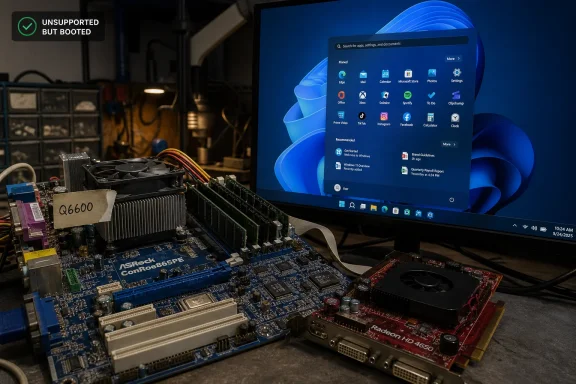
On June 27, 2026, VideoCardz reported that enthusiast O_MORES had Windows 11 running on an ASRock ConRoe865PE DDR1 motherboard with an Intel Core 2 Quad Q6600 and ATI Radeon HD 4650 AGP graphics, including working 3D acceleration and Crysis. The stunt is easy to file under retro-computing spectacle, but it says something sharper about Windows 11 than “old PC runs new OS.” Microsoft’s modern desktop is both more restrictive and more adaptable than its marketing implies. The real story is not that a 2003-era platform reached the Windows 11 desktop; it is that the weakest link was not the operating system kernel, but the abandoned driver stack around it.
The machine at the center of the story is not a normal “unsupported Windows 11” box. Unsupported installations on first-generation Ryzen systems or sixth-generation Intel laptops are now almost mundane; this one reaches much further back into the beige-and-blue era of AGP slots, DDR1 DIMMs, AC’97 audio, and BIOS firmware.
The motherboard reportedly used is ASRock’s ConRoe865PE, one of those odd transitional boards that made perfect sense in the upgrade economics of the mid-2000s. It paired Intel’s older 865PE chipset with LGA775 CPU support, letting users keep DDR memory and AGP graphics while moving beyond Pentium 4. In this build, that bridge becomes a time machine: a Core 2 Quad Q6600 supplies enough general-purpose compute to keep Windows 11 from feeling like a museum demo.
That Q6600 matters. A true 2003 Pentium 4 platform would be a far harsher test of Windows 11’s patience, especially once modern browsers enter the picture. The Q6600, launched years after the chipset’s heyday, brings four cores and a more efficient architecture to a board otherwise rooted in the Windows XP era.
The GPU is the more interesting part. The Radeon HD 4650 AGP was one of the strange late AGP holdouts, a chip family born when PCI Express had already won the market but enough upgrade demand remained to justify bridge-chip graphics cards. Getting Windows 11 to display a desktop on old hardware is one thing; getting an AGP Radeon to accelerate video and render games is where the project becomes a driver archaeology expedition.
But Windows has never been just one product. The consumer-facing requirements that blocked many Windows 10-era PCs from officially upgrading do not map cleanly onto every Windows 11 edition and deployment model. Windows 11 IoT Enterprise LTSC 2024, aimed at fixed-purpose systems, has looser hardware assumptions than the mainstream consumer channel, including optional TPM and Secure Boot in scenarios where OEMs and device makers need longer hardware lifecycles.
That distinction is often lost in the culture-war version of the Windows 11 requirements debate. Microsoft’s public message to consumers is that old PCs are not good enough. Its embedded and enterprise story is more pragmatic: old or specialized hardware may still be acceptable if the device class, support model, and risk profile justify it.
The DDR1 AGP build lands directly in that contradiction. It is not a practical recommendation for home users, and it certainly is not a supported mainstream upgrade path. Yet it demonstrates that Windows 11 itself is not fundamentally allergic to BIOS-era machines. The barriers are policy, support matrices, installer checks, firmware assumptions, and drivers — not a simple binary of “Windows 11 can” versus “Windows 11 cannot.”
That is why the Radeon HD 4650 angle matters. VideoCardz and Tom’s Hardware both describe the working graphics stack as the result of modified driver installation rather than native Windows 11 support. The enthusiast reportedly used old Windows 7-era 64-bit Radeon drivers, later comments point to Windows 10 AGP components and a custom INF, and the result is AGP 8X operation with H.264 hardware decoding active.
This is less “Windows 11 supports AGP” than “Windows 11 can still be persuaded to host enough old infrastructure for AGP to function.” That difference is important. Windows’ backward compatibility is deep, but it is not magic; it relies on driver models, signed binaries, kernel interfaces, and installer metadata that can break as the platform moves on.
The success here is therefore fragile in the way all retro-driver victories are fragile. A future cumulative update, security hardening change, or driver-signing enforcement tweak could turn a working installation into a weekend of recovery media and forum posts. For retro enthusiasts, that fragility is part of the fun. For production IT, it is exactly why unsupported platforms stay unsupported.
A desktop screenshot can hide software rendering, broken acceleration, fallback display adapters, and a system that technically boots but cannot do much beyond launch Notepad. A game workload proves the driver stack is doing real 3D work. It also shows that the AGP path is not merely enumerated in Device Manager for bragging rights.
That makes the build a better test case than most unsupported Windows 11 novelty installs. The interesting benchmark is not frames per second. It is whether Direct3D-era software, legacy graphics drivers, an obsolete interconnect, and a current Windows desktop can coexist without immediately collapsing.
The answer appears to be yes, with enough persistence. But that should not be mistaken for a general recipe. Crysis running on a carefully assembled retro system is a proof of possibility, not a proof of maintainability.
A Core 2 Quad with DDR1 is old, but it is not helpless. Pair it with a mechanical hard drive, however, and modern Windows becomes a study in waiting: background services, browser caches, update scans, antivirus activity, and telemetry writes all collide with seek latency. Put the same system on an SSD, and the subjective experience changes dramatically.
That does not mean the DDR1 platform becomes modern. Memory bandwidth, chipset limits, instruction-set support, and GPU capability still matter. But the SSD masks a major source of pain that many people associate with “old computers” rather than “old hard drives.”
This is one of the enduring lessons of retro-modern Windows experiments. The storage upgrade is rarely glamorous, yet it is often the difference between a stunt and a usable machine. The operating system may be new, the board may be ancient, but the SSD is doing the diplomatic work between them.
That tolerance is not accidental. Windows carries decades of compatibility expectations because the PC ecosystem demanded it. Industrial systems, medical devices, point-of-sale terminals, lab equipment, and embedded controllers have always stretched Microsoft’s support posture beyond the neat lifecycle charts presented to consumers.
The problem is that compatibility and support are not the same thing. A thing can boot, enumerate devices, decode video, and run games while still being a terrible candidate for normal use. Microsoft’s consumer Windows 11 requirements are partly about reducing that gray zone, even if the company has done a poor job explaining why some old PCs are blocked while other editions tolerate much stranger machines.
This is where enthusiasts perform a useful public service. They reveal the difference between engineering impossibility and vendor policy. That does not make the policy wrong, but it makes it debatable on honest terms.
A BIOS-only system without modern Secure Boot is outside the security assumptions Microsoft wants for consumer Windows 11. It cannot provide the same measured boot chain. It is unlikely to support the same virtualization-based security features cleanly. It may depend on unsigned or modified driver paths that would be unacceptable in a managed environment.
That matters. The more Windows depends on kernel isolation, credential protection, memory integrity, and driver hygiene, the more old platform assumptions become liabilities. A clever hobbyist can decide that the tradeoff is worth it. Microsoft cannot responsibly make that the default for hundreds of millions of users.
The fair criticism is not that Microsoft has security requirements. The fair criticism is that its messaging often collapses different concerns into a single “unsupported” bucket. Performance, firmware security, driver reliability, lifecycle economics, OEM validation, and user experience all get blended into one red X.
There is also the question of auditability. A system that depends on custom INF files and resurrected AGP support is hard to justify in a regulated environment. Even when the OS itself receives patches, the platform below it may be unfixable in ways that matter.
Still, IT pros should pay attention for another reason. The experiment illustrates how much latent life remains in old hardware when the workload is narrow and the operator understands the risk. That is precisely the logic behind some IoT and LTSC deployments, even if this particular gaming-capable retro rig is not what Microsoft had in mind.
The right lesson is not “ignore requirements.” It is “requirements encode support decisions, not just technical limits.” That distinction matters when organizations evaluate whether to replace hardware, isolate legacy systems, virtualize old workloads, or move them behind stricter network controls.
Boards like the ASRock ConRoe865PE are artifacts of that messy continuity. They existed because users wanted upgrade paths that did not require replacing everything at once. Two decades later, that same compromise makes the board a perfect vehicle for a Windows 11 stunt.
This is why retro PC projects resonate beyond nostalgia. They remind us that technology history is not a sequence of hard cuts. It is a pile of adapters, bridge chips, hacked drivers, strange motherboards, and economic decisions made by people trying to stretch one more year out of expensive parts.
Modern computing often pretends otherwise. Product cycles encourage the idea that platforms age out in neat intervals. Enthusiast projects expose the lie: hardware becomes obsolete unevenly, and software support ends for reasons that are technical, commercial, and managerial all at once.
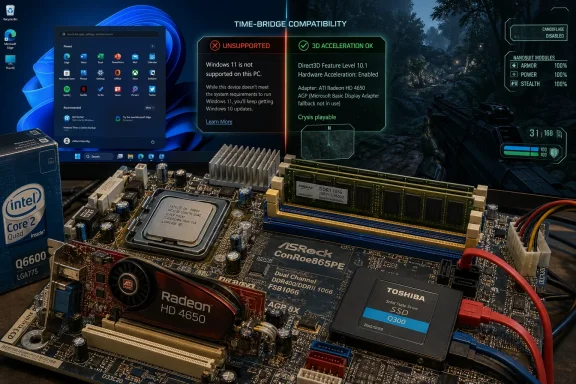 A Franken-PC Walks Through Microsoft’s Front Door
The machine at the center of the story is not a normal “unsupported Windows 11” box. Unsupported installations on first-generation Ryzen systems or sixth-generation Intel laptops are now almost mundane; this one reaches much further back into the beige-and-blue era of AGP slots, DDR1 DIMMs, AC’97 audio, and BIOS firmware.The motherboard reportedly used is ASRock’s ConRoe865PE, one of those odd transitional boards that made perfect sense in the upgrade economics of the mid-2000s. It paired Intel’s older 865PE chipset with LGA775 CPU support, letting users keep DDR memory and AGP graphics while moving beyond Pentium 4. In this build, that bridge becomes a time machine: a Core 2 Quad Q6600 supplies enough general-purpose compute to keep Windows 11 from feeling like a museum demo.
That Q6600 matters. A true 2003 Pentium 4 platform would be a far harsher test of Windows 11’s patience, especially once modern browsers enter the picture. The Q6600, launched years after the chipset’s heyday, brings four cores and a more efficient architecture to a board otherwise rooted in the Windows XP era.
The GPU is the more interesting part. The Radeon HD 4650 AGP was one of the strange late AGP holdouts, a chip family born when PCI Express had already won the market but enough upgrade demand remained to justify bridge-chip graphics cards. Getting Windows 11 to display a desktop on old hardware is one thing; getting an AGP Radeon to accelerate video and render games is where the project becomes a driver archaeology expedition.
Windows 11’s Hardware Wall Has Always Had Side Doors
Microsoft sold Windows 11 as a security reset. TPM 2.0, Secure Boot, UEFI, supported CPUs, and a harder line on platform age were all framed as the price of a safer Windows future. That framing was not entirely cynical: measured boot, virtualization-based security, and modern firmware expectations are genuinely easier to reason about on newer PCs.But Windows has never been just one product. The consumer-facing requirements that blocked many Windows 10-era PCs from officially upgrading do not map cleanly onto every Windows 11 edition and deployment model. Windows 11 IoT Enterprise LTSC 2024, aimed at fixed-purpose systems, has looser hardware assumptions than the mainstream consumer channel, including optional TPM and Secure Boot in scenarios where OEMs and device makers need longer hardware lifecycles.
That distinction is often lost in the culture-war version of the Windows 11 requirements debate. Microsoft’s public message to consumers is that old PCs are not good enough. Its embedded and enterprise story is more pragmatic: old or specialized hardware may still be acceptable if the device class, support model, and risk profile justify it.
The DDR1 AGP build lands directly in that contradiction. It is not a practical recommendation for home users, and it certainly is not a supported mainstream upgrade path. Yet it demonstrates that Windows 11 itself is not fundamentally allergic to BIOS-era machines. The barriers are policy, support matrices, installer checks, firmware assumptions, and drivers — not a simple binary of “Windows 11 can” versus “Windows 11 cannot.”
The AGP Slot Is the Real Main Character
AGP was not just a connector; it was an entire graphics memory model from another age. It arrived when local video memory was expensive, chipsets were northbridge-centric, and GPUs leaned on special pathways into system RAM. PCI Express replaced that world with a cleaner, more scalable serial interconnect, and operating systems eventually stopped caring about AGP as a living platform.That is why the Radeon HD 4650 angle matters. VideoCardz and Tom’s Hardware both describe the working graphics stack as the result of modified driver installation rather than native Windows 11 support. The enthusiast reportedly used old Windows 7-era 64-bit Radeon drivers, later comments point to Windows 10 AGP components and a custom INF, and the result is AGP 8X operation with H.264 hardware decoding active.
This is less “Windows 11 supports AGP” than “Windows 11 can still be persuaded to host enough old infrastructure for AGP to function.” That difference is important. Windows’ backward compatibility is deep, but it is not magic; it relies on driver models, signed binaries, kernel interfaces, and installer metadata that can break as the platform moves on.
The success here is therefore fragile in the way all retro-driver victories are fragile. A future cumulative update, security hardening change, or driver-signing enforcement tweak could turn a working installation into a weekend of recovery media and forum posts. For retro enthusiasts, that fragility is part of the fun. For production IT, it is exactly why unsupported platforms stay unsupported.
Crysis Is a Meme, but 3D Acceleration Is Evidence
“Can it run Crysis?” became a joke because Crysis once represented the cruel upper edge of PC gaming ambition. On this machine, the point is not that a Radeon HD 4650 AGP suddenly becomes a monster GPU. The point is that Crysis and Half-Life 2 running at all confirm something more concrete than a screenshot of the Windows desktop.A desktop screenshot can hide software rendering, broken acceleration, fallback display adapters, and a system that technically boots but cannot do much beyond launch Notepad. A game workload proves the driver stack is doing real 3D work. It also shows that the AGP path is not merely enumerated in Device Manager for bragging rights.
That makes the build a better test case than most unsupported Windows 11 novelty installs. The interesting benchmark is not frames per second. It is whether Direct3D-era software, legacy graphics drivers, an obsolete interconnect, and a current Windows desktop can coexist without immediately collapsing.
The answer appears to be yes, with enough persistence. But that should not be mistaken for a general recipe. Crysis running on a carefully assembled retro system is a proof of possibility, not a proof of maintainability.
The SSD Quietly Does the Modernizing Work
One detail in the report deserves more attention than it will get: the system boots from a Toshiba SSD. Old CPUs and memory standards make for better headlines, but storage is often what separates “surprisingly usable” from “historically accurate misery.”A Core 2 Quad with DDR1 is old, but it is not helpless. Pair it with a mechanical hard drive, however, and modern Windows becomes a study in waiting: background services, browser caches, update scans, antivirus activity, and telemetry writes all collide with seek latency. Put the same system on an SSD, and the subjective experience changes dramatically.
That does not mean the DDR1 platform becomes modern. Memory bandwidth, chipset limits, instruction-set support, and GPU capability still matter. But the SSD masks a major source of pain that many people associate with “old computers” rather than “old hard drives.”
This is one of the enduring lessons of retro-modern Windows experiments. The storage upgrade is rarely glamorous, yet it is often the difference between a stunt and a usable machine. The operating system may be new, the board may be ancient, but the SSD is doing the diplomatic work between them.
Microsoft’s Compatibility Story Is Stronger Than Its Upgrade Story
There is an uncomfortable compliment buried in this project: Windows remains extraordinarily tolerant software. Strip away the official upgrade gatekeeping, find drivers that still speak the right language, and the OS can run on hardware combinations that no product planner in Redmond would bless in 2026.That tolerance is not accidental. Windows carries decades of compatibility expectations because the PC ecosystem demanded it. Industrial systems, medical devices, point-of-sale terminals, lab equipment, and embedded controllers have always stretched Microsoft’s support posture beyond the neat lifecycle charts presented to consumers.
The problem is that compatibility and support are not the same thing. A thing can boot, enumerate devices, decode video, and run games while still being a terrible candidate for normal use. Microsoft’s consumer Windows 11 requirements are partly about reducing that gray zone, even if the company has done a poor job explaining why some old PCs are blocked while other editions tolerate much stranger machines.
This is where enthusiasts perform a useful public service. They reveal the difference between engineering impossibility and vendor policy. That does not make the policy wrong, but it makes it debatable on honest terms.
The Security Argument Survives the Stunt
It is tempting to treat this DDR1 build as a dunk on Windows 11’s requirements. If Windows 11 can run on AGP graphics and ACPI 1.1, why did Microsoft block millions of more recent PCs? The answer is that booting is not the same as meeting the threat model Microsoft chose for the mainstream OS.A BIOS-only system without modern Secure Boot is outside the security assumptions Microsoft wants for consumer Windows 11. It cannot provide the same measured boot chain. It is unlikely to support the same virtualization-based security features cleanly. It may depend on unsigned or modified driver paths that would be unacceptable in a managed environment.
That matters. The more Windows depends on kernel isolation, credential protection, memory integrity, and driver hygiene, the more old platform assumptions become liabilities. A clever hobbyist can decide that the tradeoff is worth it. Microsoft cannot responsibly make that the default for hundreds of millions of users.
The fair criticism is not that Microsoft has security requirements. The fair criticism is that its messaging often collapses different concerns into a single “unsupported” bucket. Performance, firmware security, driver reliability, lifecycle economics, OEM validation, and user experience all get blended into one red X.
For IT Pros, This Is a Lab Curiosity, Not a Lifecycle Strategy
No administrator should look at this project and start imaging Windows 11 onto warehouse relics. The practical risks are obvious. Drivers may be modified, undocumented, or pinned to ancient versions. Firmware behavior may be quirky. Update resilience is uncertain. Hardware failure rates rise with age, and replacement parts become their own supply chain.There is also the question of auditability. A system that depends on custom INF files and resurrected AGP support is hard to justify in a regulated environment. Even when the OS itself receives patches, the platform below it may be unfixable in ways that matter.
Still, IT pros should pay attention for another reason. The experiment illustrates how much latent life remains in old hardware when the workload is narrow and the operator understands the risk. That is precisely the logic behind some IoT and LTSC deployments, even if this particular gaming-capable retro rig is not what Microsoft had in mind.
The right lesson is not “ignore requirements.” It is “requirements encode support decisions, not just technical limits.” That distinction matters when organizations evaluate whether to replace hardware, isolate legacy systems, virtualize old workloads, or move them behind stricter network controls.
Retro Computing Keeps Exposing the PC’s Awkward Continuity
The PC is not a clean generational platform. It is a stack of compromises wearing a modern shell. BIOS gave way to UEFI, AGP gave way to PCI Express, DDR became DDR2 and then kept marching, but the ecosystem never moved all at once.Boards like the ASRock ConRoe865PE are artifacts of that messy continuity. They existed because users wanted upgrade paths that did not require replacing everything at once. Two decades later, that same compromise makes the board a perfect vehicle for a Windows 11 stunt.
This is why retro PC projects resonate beyond nostalgia. They remind us that technology history is not a sequence of hard cuts. It is a pile of adapters, bridge chips, hacked drivers, strange motherboards, and economic decisions made by people trying to stretch one more year out of expensive parts.
Modern computing often pretends otherwise. Product cycles encourage the idea that platforms age out in neat intervals. Enthusiast projects expose the lie: hardware becomes obsolete unevenly, and software support ends for reasons that are technical, commercial, and managerial all at once.
The DDR1 Windows 11 Box Tells Us Where the Line Really Is
The most concrete lesson from this build is that Windows 11’s practical floor is lower than its public requirements suggest, but its reliable floor is much higher than this experiment implies.- Windows 11 can still operate on surprisingly old PC foundations when edition choice, firmware assumptions, and installer barriers are handled carefully.
- The Radeon HD 4650 AGP result is significant because working 3D acceleration and H.264 decoding prove more than a basic desktop boot.
- The Core 2 Quad Q6600 is doing important work here, making the system far more viable than a true early-2000s Pentium 4-class machine.
- The SSD likely contributes heavily to the perception that the system is responsive, because storage latency punishes modern Windows more visibly than many old CPU limitations.
- The project does not invalidate Microsoft’s Windows 11 security posture, but it does show how much of that posture is policy and support strategy rather than raw kernel capability.
- For real deployments, this kind of setup belongs in a lab, a retro bench, or a YouTube video — not on a production network.
References
- Primary source: videocardz.com
Published: Sun, 28 Jun 2026 13:37:51 GMT
- Related coverage: tomshardware.com
RAM crisis provokes enthusiast to try Windows 11 on DDR1-era hardware — other key vintage components included the Core 2 Q6600 and ATI Radeon HD 4650 AGP | Tom's Hardware
'The best part,' says our hacky hero. 'It's completely stable.'www.tomshardware.com - Related coverage: windowslatest.com
Microsoft details Windows 11 24H2 LTSC requirements, TPM optional for IoT
Microsoft may have lowered the minimum system requirements for Windows 11 24H2 on IoT to support more specialized use cases. www.windowslatest.com
- Related coverage: overclockers.ru
Windows 11 IoT Enterprise LTSC 2024 теперь не требует TPM, Secure Boot или DirectX
Минимальные спецификации были понижены по сравнению с десктопной версий системы. | Overclockers.ru - крупнейший информационный сайт России посвященный компьютерам, мобильным устройствам, компьютерным играм, электромобилям и информационным технологиям.overclockers.ru - Related coverage: windowsarea.de
Microsoft reduziert Systemanforderungen für Windows 11 24H2 LTSC: TPM für IoT nun optional
Microsoft hat damit erstmals die Anforderungen für Windows 11 reduziert. Die Anforderungen sind im Grunde dieselben wie bei Windows 7.windowsarea.de - Related coverage: kluczesoft.pl
Windows 11 LTSC 2024 cena — licencja, dla kogo, gdzie kupić | KluczeSoft
Windows 11 LTSC 2024 cena: licencja Enterprise LTSC, IoT LTSC. Dla firm produkcyjnych i kiosków. Klucz z fakturą VAT, dostawa e-mail w 5 minut.kluczesoft.pl
- Related coverage: dell.com
- Related coverage: muycomputer.com
¿Qué nos cuentan los requisitos de Windows 11 IOT LTSC 2024?
Microsoft ha publicado, hace unos días, los requisitos técnicos de Windows 11 Enterprise IOT LTSC 2024, y lo que podemos colegir al revisarlos resulta de lo más interesante. Ahora bien, para quienes no estén familiarizados con la ristra de apellidos de esta versión de Windows, vamos con una... www.muycomputer.com
- Related coverage: ilsoftware.it
Windows 11 LTSC 2024, in quale edizione TPM e Secure Boot diventano opzionali
Windows 11 LTSC 2024: cos'è la versione del sistema operativo supportata per 10 anni. Addio a TPM e Secure Boot. www.ilsoftware.it
- Related coverage: hackaday.com
Using Windows 11 On An LGA 775 PC With AGP Videocard | Hackaday
Although the thought of installing a modern operating system like Windows 11 on something as archaic as a Core 2 Quad Q6600 Intel CPU may seem ridiculous, it being the flagship CPU of the time mean…hackaday.com
- Related coverage: latiendadelaslicencias.com
Windows 11 IoT Enterprise 2024 LTSC | Soporte hasta 2034
Optimiza tu negocio con Windows 11 Enterprise IOT 2024 LTSC. Licencias digitales válidas para España y LATAM.latiendadelaslicencias.com
- Related coverage: bleepingcomputer.com
Gigabyte ATI Radeon HD 4650 AGP 1GB not installing... - Internal Hardware
Gigabyte ATI Radeon HD 4650 AGP 1GB not installing... - posted in Internal Hardware: Just got my Radeon HD 4650 after waiting through the weekend, managed to take out my old PS and put in a new one, then put in my Radeon card. The computer will not recognize the card, Im not getting a new device...www.bleepingcomputer.com
- Related coverage: annabooks.com