

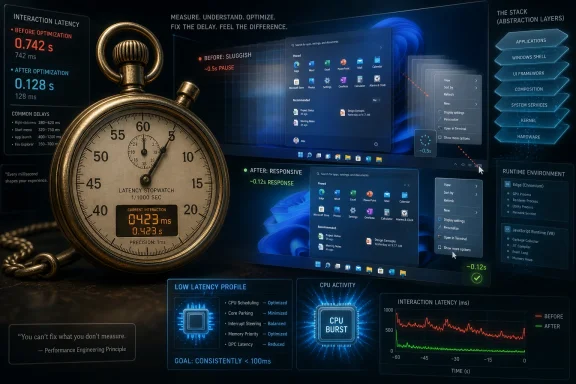
Steven Sinofsky, Microsoft’s former Windows chief, said in spring 2026 that early Microsoft engineers were once issued physical stopwatches to measure everyday software operations, from scrolling and booting to saving, compiling, printing, and exiting applications. The anecdote landed because it explains something Windows users feel but rarely see measured: modern PCs are wildly faster than their ancestors, yet modern software often feels less disciplined. Windows 11’s current performance push is not just a patch cycle; it is an implicit admission that the industry outsourced too much of the user experience to abstraction, memory abundance, and “good enough” responsiveness. The stopwatch is a relic, but the problem it represented has returned.
Sinofsky’s recollection sounds charming because it belongs to a world of beige PCs, boxed compilers, and engineers arguing over milliseconds with the seriousness of bridge inspectors. But the deeper point is less nostalgic. Microsoft did not hand out stopwatches because it loved ceremony; it did so because performance was a product requirement that could be seen, timed, argued over, and improved.
That culture emerged from scarcity. Early PC software lived inside hard limits that would be absurd by modern standards: tiny memory ceilings, slow disks, primitive graphics pipelines, and processors that could not hide inefficient code behind brute force. If a menu opened slowly, if a compiler felt sluggish, if a print dialog stalled, there was nowhere for the inefficiency to hide.
The stopwatch also made performance democratic. You did not need a distributed tracing platform, a telemetry lake, or a dashboard of percentile latency curves to notice that a command took too long. An engineer could click, time, repeat, and file a bug against the lived experience of using the product.
That matters because Windows was built as much from rituals as from code. The old Microsoft obsession with compatibility is famous; the old Microsoft obsession with speed deserves equal billing. The company’s best desktop software felt fast not because it was simple, but because the people building it treated delay as a defect.
Each layer can be defended in isolation. A richer framework helps developers ship faster. A web-based component makes cross-platform delivery easier. A cloud-connected panel can update without waiting for a full OS release. A sandbox improves safety. A telemetry path helps diagnose failures. A modern animation makes the interface feel polished.
The problem is that users do not experience layers in isolation. They experience the click. They experience the half-second pause before the Start menu appears, the flash of the wrong theme before File Explorer settles, the delay before a context menu finishes drawing, the memory footprint of an app that performs one modest task but brings an entire browser engine along for the ride.
This is why the stopwatch story cuts so sharply. It reminds us that performance is not an abstract benchmark category. It is the emotional contract between the machine and the person sitting in front of it.
For many products, that trade was rational. A messaging app, note-taking tool, music client, or admin console can reach Windows, macOS, and Linux faster if the desktop app is essentially a web app with local integration. The engineering savings are real, and in the cloud-software era they often matter more to the business than shaving 80MB from idle memory.
But Windows users have lived with the consequences. A lightweight utility can consume hundreds of megabytes because it is not merely a utility; it is a packaged runtime, rendering engine, JavaScript application, update system, and service wrapper. A desktop that once launched small native programs now hosts a constellation of mini-browsers, each behaving as though RAM were a public utility.
The old defense was that hardware would absorb the cost. For a while, it did. SSDs masked launch latency. More cores masked background churn. More RAM masked waste. High-refresh displays and GPU composition made interfaces appear smoother than their internal architecture deserved. Then Windows 11 arrived on millions of very capable PCs and still managed to make basic shell interactions feel heavier than users expected.
That is when the abstraction bill became political.
Users forgive slow operations when the work is obviously difficult. Rendering video, compiling code, unpacking archives, indexing large libraries, scanning for malware — these are tasks with visible weight. Users are much less forgiving when the delay appears before a right-click menu, a folder view, a system flyout, or the Start menu.
That kind of latency feels like disrespect. It suggests that the operating system is spending effort on itself before it spends effort on the user. Once that perception takes hold, every animation becomes suspect, every recommendation panel feels like clutter, and every web-powered component becomes evidence in a broader case against the platform.
This is why Windows 11 performance complaints have persisted even as Microsoft has improved the OS in real ways. The company can point to security, hardware enablement, accessibility, app modernization, and support lifecycle realities. Enthusiasts point back to the Start menu and ask why a modern desktop needs to think before showing a list of apps.
Both sides have a point. Windows is more complex than it was. But complexity does not excuse a slow first impression.
That story is often read as a lesson in perception. Users need signs of motion. A silent operation feels slower than one that communicates progress. The interface is part of the performance experience, not a decorative layer added after the hard work is done.
But there is a darker lesson for 2026. Modern software has sometimes taken the perception insight too far. Instead of using UI feedback to make real work legible, it uses animation, skeleton screens, spinners, staged loading, and optimistic rendering to paper over complexity that should have been reduced.
There is nothing wrong with perceived performance. In fact, it is essential. But perceived performance becomes cynical when it replaces actual performance. Users can tell the difference between a system that is doing hard work and telling them so, and a system that is theatrically busy because its architecture is bloated.
The best Windows software used to do both: it measured the actual delay and managed the perceived delay. Too much modern software treats the second as a substitute for the first.
That attitude is not unique to Microsoft. The whole industry has benefited from the assumption that next year’s laptop, console, phone, or workstation will have more headroom. Developers are not villains for using modern frameworks, and users are not wrong to expect that expensive machines should feel fast. The conflict begins when every layer assumes someone else will pay the performance bill.
Gaming makes the contrast especially vivid. Console developers have historically produced astonishing results inside fixed memory budgets because they must. A console generation imposes discipline. Desktop software, by contrast, runs across a sprawling hardware landscape where the top end can hide almost any sin and the low end gets blamed for struggling.
Windows sits in the middle of that landscape. It has to serve $300 laptops, workstation towers, handheld gaming PCs, enterprise fleets, and ARM-based ultraportables. When the shell itself feels heavy, the problem is not merely aesthetic. It affects battery life, fleet satisfaction, support tickets, and the credibility of Microsoft’s hardware partners.
The distinction matters. WinUI 3 and the Windows App SDK were supposed to provide a path forward for modern Windows development without abandoning the desktop’s strengths. Yet developers and users have often complained that the modern stack did not reliably outperform older Win32 interfaces in the places that mattered most: launch time, responsiveness, density, and predictability.
A platform cannot win developers with ideology alone. If the native path is harder, less mature, or slower than a web wrapper, developers will choose the wrapper. If the official modern UI framework produces apps that feel heavier than the ancient dialog boxes they replace, power users will keep asking why Windows abandoned what worked.
Microsoft’s 2026 performance messaging therefore has to do two things at once. It has to improve Windows itself, and it has to convince developers that building native Windows software is not an act of charity. The platform needs a performance story strong enough that “native” once again sounds like a competitive advantage rather than a nostalgic preference.
That is why reports of Microsoft moving important Start menu pieces away from heavier web-style components and toward more optimized native code are bigger than a refactor. The Start menu is where Windows 11’s design philosophy has been judged in public. If it feels slow, cluttered, or overly interested in recommendations, users conclude that the whole OS has misplaced priorities.
A fast Start menu will not fix every Windows 11 complaint. It will not settle debates over account requirements, advertising surfaces, Copilot placement, Settings migration, or update behavior. But it would address one of the most damaging daily irritants: the sense that Windows hesitates before doing the obvious thing.
That hesitation has been especially costly because earlier Windows releases trained users to expect instant interaction in basic shell surfaces. Windows 10 had its own problems, but many users still remember its core UI as snappier in ordinary tasks. Fair or not, that comparison has become a benchmark Microsoft has to beat on the same hardware, not merely explain away.
The backlash was predictable because the idea sounds like a confession. If Windows needs to goose the CPU just to open menus quickly, critics ask, does that not prove the software is too heavy? The answer is both no and yes.
No, because interactive computing has always relied on prioritizing the foreground user action. A short burst of power to complete a visible task can be more efficient than letting the system crawl at a lower frequency for longer. Responsiveness is not cheating; it is one of the central jobs of an operating system scheduler.
Yes, because scheduling tricks cannot be the whole answer. If the Start menu is slow because a stack of avoidable work happens before pixels appear, boosting the CPU masks the symptom. It may be a good mask, even a necessary one, but users are right to ask whether the underlying work should exist in the first place.
The best version of Low Latency Profile is therefore not a magic button. It is a complement to native rewrites, framework optimization, shell cleanup, and ruthless measurement. The stopwatch culture would not reject CPU bursting; it would time the burst, measure the before and after, then ask why the operation needed so much work at all.
A file manager has a brutally simple mandate: show files, move files, search files, and get out of the way. When dark mode flashes white, when a folder takes a beat too long to populate, when right-click behavior feels inconsistent, the user does not experience a sophisticated shell architecture. The user experiences friction.
That is why Microsoft’s smaller Explorer fixes matter more than their release-note size suggests. Instant theme rendering, smoother navigation, more reliable context menus, and fewer visual glitches restore confidence by removing moments where the interface betrays itself. A fast file manager makes the whole OS feel better because it is where users go when they are already trying to accomplish something else.
Explorer also illustrates the danger of modernization without hierarchy. Not every surface deserves the same design ambition. Some parts of Windows should be beautiful; others should be almost invisible. The file manager belongs closer to the second category.
Administrators also live with the consequences of architectural churn. Web-powered apps may simplify vendor delivery, but they can complicate control, caching, identity, update cadence, firewall behavior, memory planning, and troubleshooting. A native app that uses less memory and follows predictable Windows conventions is not just nicer; it is often easier to manage.
This is where Microsoft’s performance push intersects with its credibility in business computing. Windows remains the default enterprise desktop not because every admin loves it, but because it offers compatibility, manageability, security tooling, and a vast application ecosystem. If the user experience feels like a compromise despite that strength, rivals do not need to replace Windows everywhere to weaken its hold. They only need to make certain classes of work feel cleaner elsewhere.
The rise of macOS in developer-heavy organizations and the growing plausibility of Linux for some technical roles have changed the conversation. Windows still has enormous structural advantages, but it no longer gets unlimited patience from technically influential users. Performance has become part of platform legitimacy.
That creates a resource collision. If the future PC is supposed to run local AI workloads while preserving battery life and responsiveness, the platform cannot afford casual waste in the basics. A chat app that idles like a small operating system and a shell component that needs elaborate work to open a menu are no longer just irritants. They are competitors for the same headroom Microsoft wants to use for its next strategic layer.
This is the part of the story that should worry Microsoft most. Windows is not merely trying to feel better in 2026; it is trying to create room for the next decade of features. If the baseline desktop remains bloated, every AI addition will be judged as another burden, even when the feature itself is technically impressive.
Efficiency, in that sense, is not nostalgia. It is capacity planning.
But the lesson of the stopwatch is not that Windows should go back to 1993. It is that constraints produce taste. When every byte mattered, developers learned to ask whether work was necessary. When every second could be timed by hand, delay became embarrassing. When users bought boxed software and judged it directly against the previous version, perceived regression was dangerous.
Modern software has fewer natural constraints, so it needs artificial ones. Budgets for memory, launch time, interaction latency, background CPU, animation duration, and idle network behavior should be as real as feature deadlines. A team that would never ship a broken sign-in flow should be equally reluctant to ship a shell surface that feels slow on supported hardware.
Microsoft has the telemetry to measure this at planetary scale. What it has not always had is the willingness to make performance a veto power against product ambition. The 2026 push suggests that may be changing, but users will judge it by feel, not by roadmap language.
If app launches improve by 40 percent but the first thing a user sees is a recommendation they did not ask for, the OS still feels self-interested. If a context menu opens faster but hides common actions behind a redesigned hierarchy, the user still feels slowed down. If File Explorer becomes smoother but a background cloud integration interrupts the task, the improvement is diluted.
This is why Microsoft’s challenge is editorial as much as engineering. The company has to decide what Windows is trying to say in the first two seconds of use. Is it a calm, fast, local-first productivity environment that can also connect to the cloud? Or is it a surface for services, prompts, feeds, accounts, ads, assistants, and cross-platform web experiences that happen to include a desktop?
Windows users can tolerate a lot of complexity when the hierarchy is right. They become angry when the hierarchy feels inverted.
Near-term, Microsoft’s performance work appears to be moving in the right direction. Native components, WinUI optimization, File Explorer fixes, and scheduler-level responsiveness improvements all attack different parts of the same user complaint. The risk is that Microsoft treats them as isolated wins rather than evidence of a broader design reset.
A true reset would mean fewer excuses about hardware abundance. It would mean first-party apps setting the standard instead of demonstrating the compromise. It would mean the Start menu, File Explorer, Settings, Windows Search, widgets, notifications, and inbox apps all being judged against the same unforgiving principle: the user’s foreground action comes first.
That sounds obvious. The history of modern Windows proves it is not.
Source: Windows Latest Former Windows boss reveals why modern Windows 11 apps feel slower, says Microsoft once gave every engineer a stopwatch
 The Stopwatch Was a Management Philosophy, Not a Cute Anecdote
Sinofsky’s recollection sounds charming because it belongs to a world of beige PCs, boxed compilers, and engineers arguing over milliseconds with the seriousness of bridge inspectors. But the deeper point is less nostalgic. Microsoft did not hand out stopwatches because it loved ceremony; it did so because performance was a product requirement that could be seen, timed, argued over, and improved.That culture emerged from scarcity. Early PC software lived inside hard limits that would be absurd by modern standards: tiny memory ceilings, slow disks, primitive graphics pipelines, and processors that could not hide inefficient code behind brute force. If a menu opened slowly, if a compiler felt sluggish, if a print dialog stalled, there was nowhere for the inefficiency to hide.
The stopwatch also made performance democratic. You did not need a distributed tracing platform, a telemetry lake, or a dashboard of percentile latency curves to notice that a command took too long. An engineer could click, time, repeat, and file a bug against the lived experience of using the product.
That matters because Windows was built as much from rituals as from code. The old Microsoft obsession with compatibility is famous; the old Microsoft obsession with speed deserves equal billing. The company’s best desktop software felt fast not because it was simple, but because the people building it treated delay as a defect.
Modern Windows Is Paying Interest on Years of Abstraction
The uncomfortable truth is that much of today’s sluggishness is not caused by any single bad decision. It is compound interest. Windows 11 inherits decades of APIs, shell extensions, compatibility shims, security layers, cloud hooks, identity systems, accessibility frameworks, graphics stacks, update mechanisms, and UI technologies that all have legitimate reasons to exist.Each layer can be defended in isolation. A richer framework helps developers ship faster. A web-based component makes cross-platform delivery easier. A cloud-connected panel can update without waiting for a full OS release. A sandbox improves safety. A telemetry path helps diagnose failures. A modern animation makes the interface feel polished.
The problem is that users do not experience layers in isolation. They experience the click. They experience the half-second pause before the Start menu appears, the flash of the wrong theme before File Explorer settles, the delay before a context menu finishes drawing, the memory footprint of an app that performs one modest task but brings an entire browser engine along for the ride.
This is why the stopwatch story cuts so sharply. It reminds us that performance is not an abstract benchmark category. It is the emotional contract between the machine and the person sitting in front of it.
The Browser Became the New Runtime, and the Bill Came Due
The rise of Electron, WebView2, React Native, and Progressive Web Apps did not happen because developers suddenly stopped caring about users. It happened because the economics of software changed. The web became the default distribution platform, cross-platform teams became normal, and companies discovered that shipping one codebase everywhere was cheaper than building native applications for each operating system.For many products, that trade was rational. A messaging app, note-taking tool, music client, or admin console can reach Windows, macOS, and Linux faster if the desktop app is essentially a web app with local integration. The engineering savings are real, and in the cloud-software era they often matter more to the business than shaving 80MB from idle memory.
But Windows users have lived with the consequences. A lightweight utility can consume hundreds of megabytes because it is not merely a utility; it is a packaged runtime, rendering engine, JavaScript application, update system, and service wrapper. A desktop that once launched small native programs now hosts a constellation of mini-browsers, each behaving as though RAM were a public utility.
The old defense was that hardware would absorb the cost. For a while, it did. SSDs masked launch latency. More cores masked background churn. More RAM masked waste. High-refresh displays and GPU composition made interfaces appear smoother than their internal architecture deserved. Then Windows 11 arrived on millions of very capable PCs and still managed to make basic shell interactions feel heavier than users expected.
That is when the abstraction bill became political.
Windows 11 Made Performance a Trust Issue
Windows 11’s problem has never been that it is unusably slow for everyone. On high-end hardware, it can feel perfectly competent, and many of its delays are measured in fractions of a second. The problem is that those fractions occur in the wrong places.Users forgive slow operations when the work is obviously difficult. Rendering video, compiling code, unpacking archives, indexing large libraries, scanning for malware — these are tasks with visible weight. Users are much less forgiving when the delay appears before a right-click menu, a folder view, a system flyout, or the Start menu.
That kind of latency feels like disrespect. It suggests that the operating system is spending effort on itself before it spends effort on the user. Once that perception takes hold, every animation becomes suspect, every recommendation panel feels like clutter, and every web-powered component becomes evidence in a broader case against the platform.
This is why Windows 11 performance complaints have persisted even as Microsoft has improved the OS in real ways. The company can point to security, hardware enablement, accessibility, app modernization, and support lifecycle realities. Enthusiasts point back to the Start menu and ask why a modern desktop needs to think before showing a list of apps.
Both sides have a point. Windows is more complex than it was. But complexity does not excuse a slow first impression.
Sinofsky’s Compile Trick Explains More Than Microsoft Might Like
Sinofsky’s Visual C++ anecdote is almost too perfect for the modern Windows moment. His team reportedly found that the compiler was faster by stopwatch measurement, yet users perceived it as slower. The fix was not more raw speed but better feedback: a busy-looking line counter that made progress visible, even though it cost a few percentage points of actual performance.That story is often read as a lesson in perception. Users need signs of motion. A silent operation feels slower than one that communicates progress. The interface is part of the performance experience, not a decorative layer added after the hard work is done.
But there is a darker lesson for 2026. Modern software has sometimes taken the perception insight too far. Instead of using UI feedback to make real work legible, it uses animation, skeleton screens, spinners, staged loading, and optimistic rendering to paper over complexity that should have been reduced.
There is nothing wrong with perceived performance. In fact, it is essential. But perceived performance becomes cynical when it replaces actual performance. Users can tell the difference between a system that is doing hard work and telling them so, and a system that is theatrically busy because its architecture is bloated.
The best Windows software used to do both: it measured the actual delay and managed the perceived delay. Too much modern software treats the second as a substitute for the first.
The 32GB “No Worries” Moment Said the Quiet Part Out Loud
Microsoft’s brief messaging around 32GB of RAM as a comfortable target for gaming struck a nerve because it matched a suspicion many users already had. The average enthusiast is not shocked that demanding games like memory. The irritation came from the broader implication that software bloat is no longer a problem to solve, only a hardware requirement to normalize.That attitude is not unique to Microsoft. The whole industry has benefited from the assumption that next year’s laptop, console, phone, or workstation will have more headroom. Developers are not villains for using modern frameworks, and users are not wrong to expect that expensive machines should feel fast. The conflict begins when every layer assumes someone else will pay the performance bill.
Gaming makes the contrast especially vivid. Console developers have historically produced astonishing results inside fixed memory budgets because they must. A console generation imposes discipline. Desktop software, by contrast, runs across a sprawling hardware landscape where the top end can hide almost any sin and the low end gets blamed for struggling.
Windows sits in the middle of that landscape. It has to serve $300 laptops, workstation towers, handheld gaming PCs, enterprise fleets, and ARM-based ultraportables. When the shell itself feels heavy, the problem is not merely aesthetic. It affects battery life, fleet satisfaction, support tickets, and the credibility of Microsoft’s hardware partners.
Microsoft’s Native-App Revival Is an Admission Wrapped in a Roadmap
The renewed push around WinUI, Windows App SDK performance, and native-feeling Windows components is important because it marks a shift in tone. Microsoft is no longer merely saying that modern Windows apps are the future. It is trying to make that future feel less like punishment.The distinction matters. WinUI 3 and the Windows App SDK were supposed to provide a path forward for modern Windows development without abandoning the desktop’s strengths. Yet developers and users have often complained that the modern stack did not reliably outperform older Win32 interfaces in the places that mattered most: launch time, responsiveness, density, and predictability.
A platform cannot win developers with ideology alone. If the native path is harder, less mature, or slower than a web wrapper, developers will choose the wrapper. If the official modern UI framework produces apps that feel heavier than the ancient dialog boxes they replace, power users will keep asking why Windows abandoned what worked.
Microsoft’s 2026 performance messaging therefore has to do two things at once. It has to improve Windows itself, and it has to convince developers that building native Windows software is not an act of charity. The platform needs a performance story strong enough that “native” once again sounds like a competitive advantage rather than a nostalgic preference.
The Start Menu Became the Symbol Because It Is the Front Door
No single Windows component carries more symbolic weight than the Start menu. It is not just a launcher. It is the front door to the operating system, the muscle-memory anchor for decades of Windows use, and the place where Microsoft’s product ambitions collide with user impatience.That is why reports of Microsoft moving important Start menu pieces away from heavier web-style components and toward more optimized native code are bigger than a refactor. The Start menu is where Windows 11’s design philosophy has been judged in public. If it feels slow, cluttered, or overly interested in recommendations, users conclude that the whole OS has misplaced priorities.
A fast Start menu will not fix every Windows 11 complaint. It will not settle debates over account requirements, advertising surfaces, Copilot placement, Settings migration, or update behavior. But it would address one of the most damaging daily irritants: the sense that Windows hesitates before doing the obvious thing.
That hesitation has been especially costly because earlier Windows releases trained users to expect instant interaction in basic shell surfaces. Windows 10 had its own problems, but many users still remember its core UI as snappier in ordinary tasks. Fair or not, that comparison has become a benchmark Microsoft has to beat on the same hardware, not merely explain away.
Low Latency Profile Is Clever, but It Is Not a Substitute for Discipline
The reported Low Latency Profile effort is fascinating because it attacks performance at the level users actually notice. Briefly boosting CPU frequency when a user opens an app, triggers a flyout, or invokes a system UI element is not absurd. Modern operating systems already make aggressive scheduling and power-management decisions to balance responsiveness, battery life, thermals, and throughput.The backlash was predictable because the idea sounds like a confession. If Windows needs to goose the CPU just to open menus quickly, critics ask, does that not prove the software is too heavy? The answer is both no and yes.
No, because interactive computing has always relied on prioritizing the foreground user action. A short burst of power to complete a visible task can be more efficient than letting the system crawl at a lower frequency for longer. Responsiveness is not cheating; it is one of the central jobs of an operating system scheduler.
Yes, because scheduling tricks cannot be the whole answer. If the Start menu is slow because a stack of avoidable work happens before pixels appear, boosting the CPU masks the symptom. It may be a good mask, even a necessary one, but users are right to ask whether the underlying work should exist in the first place.
The best version of Low Latency Profile is therefore not a magic button. It is a complement to native rewrites, framework optimization, shell cleanup, and ruthless measurement. The stopwatch culture would not reject CPU bursting; it would time the burst, measure the before and after, then ask why the operation needed so much work at all.
File Explorer Shows Why Milliseconds Become Reputation
File Explorer is another case where small delays create outsized frustration. It is one of the most-used applications in Windows, yet it has spent years absorbing design changes, cloud integration, tab support, context menu transitions, gallery views, OneDrive affordances, and modernized surfaces. Some of those changes are useful. Some have also made Explorer feel less immediate than its role demands.A file manager has a brutally simple mandate: show files, move files, search files, and get out of the way. When dark mode flashes white, when a folder takes a beat too long to populate, when right-click behavior feels inconsistent, the user does not experience a sophisticated shell architecture. The user experiences friction.
That is why Microsoft’s smaller Explorer fixes matter more than their release-note size suggests. Instant theme rendering, smoother navigation, more reliable context menus, and fewer visual glitches restore confidence by removing moments where the interface betrays itself. A fast file manager makes the whole OS feel better because it is where users go when they are already trying to accomplish something else.
Explorer also illustrates the danger of modernization without hierarchy. Not every surface deserves the same design ambition. Some parts of Windows should be beautiful; others should be almost invisible. The file manager belongs closer to the second category.
Enterprise IT Has a Different Stopwatch
Home users notice sluggishness as annoyance. Enterprise IT notices it as cost. A delay that seems trivial on one machine becomes measurable when multiplied across thousands of endpoints, help-desk tickets, training sessions, update cycles, and employee workflows.Administrators also live with the consequences of architectural churn. Web-powered apps may simplify vendor delivery, but they can complicate control, caching, identity, update cadence, firewall behavior, memory planning, and troubleshooting. A native app that uses less memory and follows predictable Windows conventions is not just nicer; it is often easier to manage.
This is where Microsoft’s performance push intersects with its credibility in business computing. Windows remains the default enterprise desktop not because every admin loves it, but because it offers compatibility, manageability, security tooling, and a vast application ecosystem. If the user experience feels like a compromise despite that strength, rivals do not need to replace Windows everywhere to weaken its hold. They only need to make certain classes of work feel cleaner elsewhere.
The rise of macOS in developer-heavy organizations and the growing plausibility of Linux for some technical roles have changed the conversation. Windows still has enormous structural advantages, but it no longer gets unlimited patience from technically influential users. Performance has become part of platform legitimacy.
AI Makes Efficiency Urgent Again
The irony of the current moment is that artificial intelligence may be doing what years of user complaints could not: making efficiency fashionable again. Local AI features, background models, recall-like indexing, on-device inference, semantic search, and assistant experiences all want memory, compute, storage bandwidth, and battery. They arrive on machines already carrying browser-heavy apps and complex OS services.That creates a resource collision. If the future PC is supposed to run local AI workloads while preserving battery life and responsiveness, the platform cannot afford casual waste in the basics. A chat app that idles like a small operating system and a shell component that needs elaborate work to open a menu are no longer just irritants. They are competitors for the same headroom Microsoft wants to use for its next strategic layer.
This is the part of the story that should worry Microsoft most. Windows is not merely trying to feel better in 2026; it is trying to create room for the next decade of features. If the baseline desktop remains bloated, every AI addition will be judged as another burden, even when the feature itself is technically impressive.
Efficiency, in that sense, is not nostalgia. It is capacity planning.
The Old Microsoft Had Scarcity; the New Microsoft Needs Restraint
It would be easy to romanticize the stopwatch era too much. Old software was not magically better. It crashed, corrupted files, lacked accessibility, ignored security assumptions we now consider mandatory, and often achieved speed by doing far less. The modern PC is safer, more connected, more multilingual, more graphical, more manageable, and more capable than the machines that shaped early Microsoft engineering culture.But the lesson of the stopwatch is not that Windows should go back to 1993. It is that constraints produce taste. When every byte mattered, developers learned to ask whether work was necessary. When every second could be timed by hand, delay became embarrassing. When users bought boxed software and judged it directly against the previous version, perceived regression was dangerous.
Modern software has fewer natural constraints, so it needs artificial ones. Budgets for memory, launch time, interaction latency, background CPU, animation duration, and idle network behavior should be as real as feature deadlines. A team that would never ship a broken sign-in flow should be equally reluctant to ship a shell surface that feels slow on supported hardware.
Microsoft has the telemetry to measure this at planetary scale. What it has not always had is the willingness to make performance a veto power against product ambition. The 2026 push suggests that may be changing, but users will judge it by feel, not by roadmap language.
Windows Cannot Benchmark Its Way Out of a Vibe Problem
Benchmarks matter, but Windows 11’s performance problem is partly a vibe problem. That does not make it unserious. In consumer technology, vibe is the accumulated result of thousands of small interactions.If app launches improve by 40 percent but the first thing a user sees is a recommendation they did not ask for, the OS still feels self-interested. If a context menu opens faster but hides common actions behind a redesigned hierarchy, the user still feels slowed down. If File Explorer becomes smoother but a background cloud integration interrupts the task, the improvement is diluted.
This is why Microsoft’s challenge is editorial as much as engineering. The company has to decide what Windows is trying to say in the first two seconds of use. Is it a calm, fast, local-first productivity environment that can also connect to the cloud? Or is it a surface for services, prompts, feeds, accounts, ads, assistants, and cross-platform web experiences that happen to include a desktop?
Windows users can tolerate a lot of complexity when the hierarchy is right. They become angry when the hierarchy feels inverted.
The Stopwatch Returns as a Product Principle
The practical lesson from Sinofsky’s story is not that Microsoft should literally restock the supply room with stopwatches. It is that the company needs a visible, shared, non-negotiable performance culture that engineers, designers, managers, and executives all understand. The modern equivalent is not a plastic timer; it is a set of hard budgets and the authority to enforce them.Near-term, Microsoft’s performance work appears to be moving in the right direction. Native components, WinUI optimization, File Explorer fixes, and scheduler-level responsiveness improvements all attack different parts of the same user complaint. The risk is that Microsoft treats them as isolated wins rather than evidence of a broader design reset.
A true reset would mean fewer excuses about hardware abundance. It would mean first-party apps setting the standard instead of demonstrating the compromise. It would mean the Start menu, File Explorer, Settings, Windows Search, widgets, notifications, and inbox apps all being judged against the same unforgiving principle: the user’s foreground action comes first.
That sounds obvious. The history of modern Windows proves it is not.
The New Windows Performance Test Fits in One Click
Microsoft’s 2026 performance push will succeed only if ordinary users can feel it before they read about it. The company does not need to win a philosophical argument over Electron, React, WinUI, WebView2, or CPU boosting. It needs to make the next click feel instant enough that the argument loses oxygen.- Windows 11’s performance problem is less about raw benchmark speed than about visible latency in everyday shell interactions.
- Sinofsky’s stopwatch anecdote matters because it captures a culture where delay was treated as an engineering defect, not a user expectation.
- Web-wrapper economics made sense for developers, but Windows users have paid for that convenience in memory use, launch time, and interface weight.
- Microsoft’s reported native-code and WinUI-focused work is meaningful because it targets the parts of Windows that shape daily trust.
- Low Latency Profile may be a legitimate operating-system technique, but it must support deeper cleanup rather than excuse avoidable bloat.
- AI features will make efficiency more important, not less, because local intelligence competes for the same memory, compute, and battery budget as everything else.
Source: Windows Latest Former Windows boss reveals why modern Windows 11 apps feel slower, says Microsoft once gave every engineer a stopwatch
