

Paul Thurrott’s July 7, 2026 Thurrott.com posts surfaced two small Windows 11 Field Guide image attachments, “favorites” and “photo-view,” that point back to his Photos chapter and the app’s two defining jobs: viewing individual images and organizing selected media. The news is not that Microsoft changed Photos overnight. The news is that even a pair of guide screenshots now captures the larger Windows 11 bargain: Microsoft wants Photos to be simple enough to replace an old viewer, broad enough to span OneDrive and iCloud, and strategic enough to pull users deeper into its services. That is where a humble image viewer becomes a case study in modern Windows.
The Windows Photos app is supposed to be invisible infrastructure. You double-click a JPEG, it opens; you favorite a picture, it stays findable; you browse a folder, it behaves like the file system you already understand. But in Windows 11, Photos is no longer just the pane of glass between the user and an image. It is one of the places where Microsoft’s consumer strategy, cloud ambitions, legacy cleanup, and app-store-era Windows design all collide.
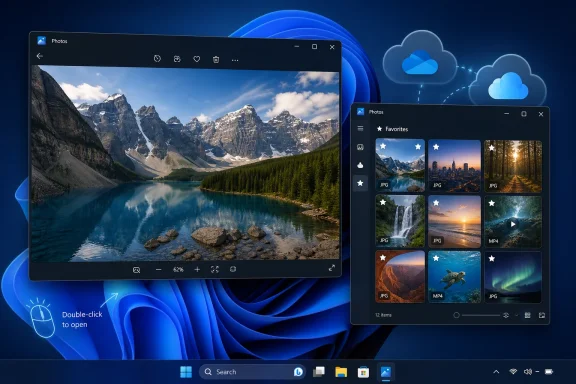
The most important thing about Photos is still the most boring one: Windows 11 uses it as the default viewer for common image formats. As Thurrott’s Windows 11 Field Guide explains, opening a supported image file launches Photos in its photo-viewer mode rather than the broader gallery experience. That split matters because Microsoft is trying to serve two very different behaviors with one app.
The first behavior is immediate and file-centric. A user has a PNG on the desktop, a JPEG in Downloads, or a screenshot in a project folder, and they want to inspect it quickly. In that moment, Photos is judged by latency, keyboard shortcuts, zoom behavior, reliability, and whether arrowing through a folder feels predictable.
The second behavior is library-centric. A user opens the Photos app deliberately and expects something closer to a memory manager: local pictures, OneDrive images, phone imports, iCloud photos, favorites, folders, and possibly cloud-backed albums. This is where Microsoft sees strategic surface area, because the app can become a dashboard for personal media rather than a simple viewer.
Those two jobs have always lived awkwardly together. Windows Photo Viewer was fast, limited, and beloved partly because it knew what it was. Windows 10’s Photos app tried to be a viewer, library, editor, and lightweight video tool. Windows 11’s Photos app is cleaner, but also more visibly connected to Microsoft’s cloud-era priorities.
But on Windows, favorites do a more specific job: they help Photos behave like a media app rather than a prettier File Explorer. Thurrott’s guide describes favorites as a way to collect selected photos and videos in one place, much like bookmarking pages in a browser. That comparison is apt because Microsoft is borrowing the mental model of the web and applying it to local and cloud media.
The limitation is just as revealing. Thurrott notes that Favorites works only with JPEG images and MP4 videos. That is not necessarily scandalous — every media app has format boundaries — but it undercuts the illusion that Photos is a universal library for everything visual. For Windows enthusiasts and IT pros who deal with RAW files, HEIC edge cases, design assets, screenshots, scans, and archived formats, the feature is useful but not definitive.
Favorites also expose the gap between consumer convenience and professional expectation. A casual user wants one click to surface vacation pictures. An administrator or creator wants predictable metadata, exportability, format coverage, and confidence that marked items will not become trapped inside an app-specific abstraction. Microsoft’s challenge is that Photos must satisfy the former without alienating the latter.
The iCloud integration was one of Microsoft’s smarter consumer moves in Windows 11. A large share of Windows users carry iPhones, and pretending otherwise only made Windows feel parochial. By letting iCloud Photos appear in the Windows Photos app, Microsoft acknowledged that the PC is often the secondary device in a user’s photo life.
OneDrive plays a different role. It is not merely a supported source; it is Microsoft’s preferred substrate for consumer continuity. The Photos app, OneDrive sync client, Microsoft account, and Microsoft 365 subscription funnel all point toward the same outcome: your personal data lives in Microsoft’s cloud, and Windows becomes the most convenient way to access it.
That strategy is coherent, but coherence is not the same as user trust. Windows users have become highly sensitive to perceived upsell surfaces, default nudges, and cloud-first assumptions. When Photos works well, OneDrive integration feels like convenience. When it misfires, it feels like yet another place where Windows is quietly steering the user away from local ownership.
That transition explains a lot of the resentment around Photos. Users do not evaluate apps against architectural purity; they evaluate them against muscle memory. If an older built-in app trimmed a video quickly and the newer default sends the user toward a different workflow, the user experiences that as a regression even if Microsoft can argue that Clipchamp is the more capable editor.
Clipchamp is more ambitious than the old Photos video tools. It can handle timeline editing, templates, captions, and more complex exports. But it is also a different product category with a different feel, and users who only want to trim a clip do not necessarily want to enter a full editor.
This is a recurring Windows 11 pattern. Microsoft removes or deemphasizes an old, plain utility, replaces it with a more modern and service-aware component, and then discovers that “more capable” is not always the same as “better for the task.” Photos is not the worst offender, but it is one of the clearest examples because the original user intent is so simple.
Thurrott’s “photo-view” attachment is a reminder of the app’s most important surface. The photo viewer window is where Microsoft either earns the default-app slot or drives users to IrfanView, XnView, ImageGlass, FastStone, Adobe tools, Affinity apps, or whatever lightweight viewer they have trusted for years. Defaults create exposure, but they do not create loyalty.
For casual users, Photos is probably good enough most of the time. It opens common formats, rotates images, deletes files, offers basic markup, exposes editing entry points, and integrates with the places where many people now store pictures. That is a reasonable mainstream baseline.
For power users, the problem is not simply missing features. It is the uncertainty that comes from Microsoft’s rolling app model. Store-delivered inbox apps can change outside the old Windows release rhythm, which means workflows can shift because an app update landed, not because the user chose a new tool. That is great for fixing bugs and adding features; it is maddening when the tool is part of a stable desktop workflow.
Photos benefits from being the default for common image formats, but that also raises the bar. A bundled app does not have to be the most powerful app on the system, but it does have to be respectful. It should not make users feel punished for preferring local folders, third-party tools, non-Microsoft cloud services, or older workflows.
This is especially important in managed environments. An IT department may not care whether home users favorite JPEGs, but it does care whether default handlers remain predictable, whether Store apps update on a schedule it controls, and whether consumer integrations create support noise. Photos is not a line-of-business platform, yet it still touches file associations, user training, privacy expectations, and helpdesk tickets.
The irony is that Microsoft knows how to build excellent small Windows utilities. Notepad’s modernization has been careful enough to preserve its identity while adding tabs, session restore, and AI-adjacent features for those who want them. Snipping Tool has become genuinely useful without losing the basic act of capturing a rectangle. Photos needs the same discipline: modernize the surroundings without compromising the instant-viewing core.
That is why iCloud integration is strategically necessary. If Windows cannot see the iPhone user’s photo library, Windows becomes less relevant to that user’s personal computing life. The PC remains powerful, but the memories live elsewhere.
Google is the harder comparison because Google Photos is a cloud-native product with a decade of user expectations behind it. Microsoft has OneDrive photos, but OneDrive still carries the mental model of file storage more than memory management. Photos on Windows tries to soften that distinction, yet it cannot fully escape OneDrive’s identity as a sync-and-storage service.
Microsoft’s opportunity is the reverse of Google’s. Google Photos is excellent in the cloud but not a native Windows citizen. Microsoft can make Photos the place where local folders, external drives, OneDrive, iCloud, and phone imports coexist with desktop conventions. The company’s risk is that it turns that advantage into a funnel rather than a neutral workspace.
That fear is why Photos receives more scrutiny than its feature list might justify. It sits at the intersection of personal data and daily muscle memory. People may tolerate experiments in Widgets or Copilot more easily than experiments in the app that opens family photos, work screenshots, receipts, diagrams, and evidence files.
Microsoft’s service strategy is not inherently hostile to users. OneDrive backup can save people from catastrophic data loss. iCloud integration can make a Windows PC more useful to iPhone owners. Clipchamp can offer creative tools the old Photos video editor never attempted.
But each of those benefits depends on consent and clarity. The user needs to know what is local, what is synced, what is imported, what is merely indexed, and what happens when a service is disconnected. In a media app, ambiguity is poison because the assets are personal and often irreplaceable.
That sounds modest, but it is harder than it looks. Microsoft’s consumer Windows organization is under constant pressure to make inbox apps part of broader ecosystems: Microsoft 365, OneDrive, Copilot, Clipchamp, Edge, Store distribution, and account-based personalization. A photo app that merely opens files beautifully may be beloved, but it does not obviously advance the services roadmap.
The counterargument is that trust itself is the roadmap. If users trust Photos, they may willingly connect OneDrive. If they trust Microsoft’s handling of local files, they may accept cloud memories or AI search later. If they feel manipulated, they will install a third-party viewer and never look back.
That is the lesson hidden in Thurrott’s tiny “favorites” and “photo-view” posts. The screenshots are mundane, but the product tension is not. Windows 11’s Photos app has to be both a default utility and a modern media hub, and the former must not be sacrificed to the latter.
The Windows Photos app is supposed to be invisible infrastructure. You double-click a JPEG, it opens; you favorite a picture, it stays findable; you browse a folder, it behaves like the file system you already understand. But in Windows 11, Photos is no longer just the pane of glass between the user and an image. It is one of the places where Microsoft’s consumer strategy, cloud ambitions, legacy cleanup, and app-store-era Windows design all collide.
 The Photo Viewer Became a Front Door
The most important thing about Photos is still the most boring one: Windows 11 uses it as the default viewer for common image formats. As Thurrott’s Windows 11 Field Guide explains, opening a supported image file launches Photos in its photo-viewer mode rather than the broader gallery experience. That split matters because Microsoft is trying to serve two very different behaviors with one app.The first behavior is immediate and file-centric. A user has a PNG on the desktop, a JPEG in Downloads, or a screenshot in a project folder, and they want to inspect it quickly. In that moment, Photos is judged by latency, keyboard shortcuts, zoom behavior, reliability, and whether arrowing through a folder feels predictable.
The second behavior is library-centric. A user opens the Photos app deliberately and expects something closer to a memory manager: local pictures, OneDrive images, phone imports, iCloud photos, favorites, folders, and possibly cloud-backed albums. This is where Microsoft sees strategic surface area, because the app can become a dashboard for personal media rather than a simple viewer.
Those two jobs have always lived awkwardly together. Windows Photo Viewer was fast, limited, and beloved partly because it knew what it was. Windows 10’s Photos app tried to be a viewer, library, editor, and lightweight video tool. Windows 11’s Photos app is cleaner, but also more visibly connected to Microsoft’s cloud-era priorities.
Favorites Are a Small Feature With a Big Job
The “favorites” attachment from Thurrott’s July 7 post points to one of Photos’ most deceptively important features. Marking a picture or video as a favorite is the kind of small affordance users expect in every modern media library, from Apple Photos to Google Photos. It turns a chaotic camera roll into something navigable.But on Windows, favorites do a more specific job: they help Photos behave like a media app rather than a prettier File Explorer. Thurrott’s guide describes favorites as a way to collect selected photos and videos in one place, much like bookmarking pages in a browser. That comparison is apt because Microsoft is borrowing the mental model of the web and applying it to local and cloud media.
The limitation is just as revealing. Thurrott notes that Favorites works only with JPEG images and MP4 videos. That is not necessarily scandalous — every media app has format boundaries — but it undercuts the illusion that Photos is a universal library for everything visual. For Windows enthusiasts and IT pros who deal with RAW files, HEIC edge cases, design assets, screenshots, scans, and archived formats, the feature is useful but not definitive.
Favorites also expose the gap between consumer convenience and professional expectation. A casual user wants one click to surface vacation pictures. An administrator or creator wants predictable metadata, exportability, format coverage, and confidence that marked items will not become trapped inside an app-specific abstraction. Microsoft’s challenge is that Photos must satisfy the former without alienating the latter.
Microsoft Rebuilt the Media Stack Around the Cloud
Microsoft’s official support pages describe the Photos app as a place to manage photos and videos from a PC, OneDrive, and iCloud, with iCloud integration requiring Apple’s iCloud for Windows app from the Microsoft Store. That is the modern Windows media proposition in a sentence: local first in appearance, cloud-aware by design, store-mediated in practice.The iCloud integration was one of Microsoft’s smarter consumer moves in Windows 11. A large share of Windows users carry iPhones, and pretending otherwise only made Windows feel parochial. By letting iCloud Photos appear in the Windows Photos app, Microsoft acknowledged that the PC is often the secondary device in a user’s photo life.
OneDrive plays a different role. It is not merely a supported source; it is Microsoft’s preferred substrate for consumer continuity. The Photos app, OneDrive sync client, Microsoft account, and Microsoft 365 subscription funnel all point toward the same outcome: your personal data lives in Microsoft’s cloud, and Windows becomes the most convenient way to access it.
That strategy is coherent, but coherence is not the same as user trust. Windows users have become highly sensitive to perceived upsell surfaces, default nudges, and cloud-first assumptions. When Photos works well, OneDrive integration feels like convenience. When it misfires, it feels like yet another place where Windows is quietly steering the user away from local ownership.
The Ghost of Photos Legacy Still Haunts Windows 11
The Windows 11 Photos app did not arrive in a vacuum. It replaced the older Windows 10 Photos experience, which itself had absorbed roles once filled by Windows Photo Gallery and Movie Maker. Microsoft’s official Clipchamp support material now positions Clipchamp as the built-in video editor for Windows 11, while the old Photos video editor survives in the separate Photos Legacy app.That transition explains a lot of the resentment around Photos. Users do not evaluate apps against architectural purity; they evaluate them against muscle memory. If an older built-in app trimmed a video quickly and the newer default sends the user toward a different workflow, the user experiences that as a regression even if Microsoft can argue that Clipchamp is the more capable editor.
Clipchamp is more ambitious than the old Photos video tools. It can handle timeline editing, templates, captions, and more complex exports. But it is also a different product category with a different feel, and users who only want to trim a clip do not necessarily want to enter a full editor.
This is a recurring Windows 11 pattern. Microsoft removes or deemphasizes an old, plain utility, replaces it with a more modern and service-aware component, and then discovers that “more capable” is not always the same as “better for the task.” Photos is not the worst offender, but it is one of the clearest examples because the original user intent is so simple.
The Best Windows Apps Disappear Into the Task
A photo viewer has one unforgiving benchmark: it must vanish. The user should think about the image, not the app. Every toolbar, account prompt, source selector, animation, and cloud integration is acceptable only if it stays out of the way until needed.Thurrott’s “photo-view” attachment is a reminder of the app’s most important surface. The photo viewer window is where Microsoft either earns the default-app slot or drives users to IrfanView, XnView, ImageGlass, FastStone, Adobe tools, Affinity apps, or whatever lightweight viewer they have trusted for years. Defaults create exposure, but they do not create loyalty.
For casual users, Photos is probably good enough most of the time. It opens common formats, rotates images, deletes files, offers basic markup, exposes editing entry points, and integrates with the places where many people now store pictures. That is a reasonable mainstream baseline.
For power users, the problem is not simply missing features. It is the uncertainty that comes from Microsoft’s rolling app model. Store-delivered inbox apps can change outside the old Windows release rhythm, which means workflows can shift because an app update landed, not because the user chose a new tool. That is great for fixing bugs and adding features; it is maddening when the tool is part of a stable desktop workflow.
The Default-App Fight Is Really About Trust
Microsoft’s default-app behavior in Windows 11 has been controversial far beyond Photos. Browsers, media players, PDF handlers, and image viewers all sit in the same philosophical space: who gets to decide what opens when a user double-clicks a file or link? Microsoft has made parts of this easier over time, but the Settings app still reflects a more granular, file-extension-driven world than many users want.Photos benefits from being the default for common image formats, but that also raises the bar. A bundled app does not have to be the most powerful app on the system, but it does have to be respectful. It should not make users feel punished for preferring local folders, third-party tools, non-Microsoft cloud services, or older workflows.
This is especially important in managed environments. An IT department may not care whether home users favorite JPEGs, but it does care whether default handlers remain predictable, whether Store apps update on a schedule it controls, and whether consumer integrations create support noise. Photos is not a line-of-business platform, yet it still touches file associations, user training, privacy expectations, and helpdesk tickets.
The irony is that Microsoft knows how to build excellent small Windows utilities. Notepad’s modernization has been careful enough to preserve its identity while adding tabs, session restore, and AI-adjacent features for those who want them. Snipping Tool has become genuinely useful without losing the basic act of capturing a rectangle. Photos needs the same discipline: modernize the surroundings without compromising the instant-viewing core.
Apple and Google Set the Expectations Microsoft Must Meet
The Windows Photos app does not compete only with other Windows apps. It competes with the user’s phone. Apple Photos and Google Photos have trained people to expect search, favorites, memories, face grouping, cloud sync, effortless sharing, and increasingly AI-assisted organization. Microsoft cannot pretend that a PC photo app is just a file viewer anymore.That is why iCloud integration is strategically necessary. If Windows cannot see the iPhone user’s photo library, Windows becomes less relevant to that user’s personal computing life. The PC remains powerful, but the memories live elsewhere.
Google is the harder comparison because Google Photos is a cloud-native product with a decade of user expectations behind it. Microsoft has OneDrive photos, but OneDrive still carries the mental model of file storage more than memory management. Photos on Windows tries to soften that distinction, yet it cannot fully escape OneDrive’s identity as a sync-and-storage service.
Microsoft’s opportunity is the reverse of Google’s. Google Photos is excellent in the cloud but not a native Windows citizen. Microsoft can make Photos the place where local folders, external drives, OneDrive, iCloud, and phone imports coexist with desktop conventions. The company’s risk is that it turns that advantage into a funnel rather than a neutral workspace.
Power Users Will Forgive Limits Before They Forgive Surprises
WindowsForum readers know the pattern: the built-in app is fine until it surprises you. A keyboard shortcut changes. A feature moves behind another app. A file association reverts. A cloud prompt appears where a local action used to be. The immediate problem may be small, but it confirms a broader fear that Windows is no longer fully on the user’s side.That fear is why Photos receives more scrutiny than its feature list might justify. It sits at the intersection of personal data and daily muscle memory. People may tolerate experiments in Widgets or Copilot more easily than experiments in the app that opens family photos, work screenshots, receipts, diagrams, and evidence files.
Microsoft’s service strategy is not inherently hostile to users. OneDrive backup can save people from catastrophic data loss. iCloud integration can make a Windows PC more useful to iPhone owners. Clipchamp can offer creative tools the old Photos video editor never attempted.
But each of those benefits depends on consent and clarity. The user needs to know what is local, what is synced, what is imported, what is merely indexed, and what happens when a service is disconnected. In a media app, ambiguity is poison because the assets are personal and often irreplaceable.
The Real Test Is Whether Photos Can Stay Boring
The best future for Photos is not a dramatic reinvention. It is boring competence. Microsoft should make the viewer fast, the library predictable, the source model legible, the defaults easy to change, and the service hooks optional enough that they feel like features rather than obligations.That sounds modest, but it is harder than it looks. Microsoft’s consumer Windows organization is under constant pressure to make inbox apps part of broader ecosystems: Microsoft 365, OneDrive, Copilot, Clipchamp, Edge, Store distribution, and account-based personalization. A photo app that merely opens files beautifully may be beloved, but it does not obviously advance the services roadmap.
The counterargument is that trust itself is the roadmap. If users trust Photos, they may willingly connect OneDrive. If they trust Microsoft’s handling of local files, they may accept cloud memories or AI search later. If they feel manipulated, they will install a third-party viewer and never look back.
That is the lesson hidden in Thurrott’s tiny “favorites” and “photo-view” posts. The screenshots are mundane, but the product tension is not. Windows 11’s Photos app has to be both a default utility and a modern media hub, and the former must not be sacrificed to the latter.
The Small Buttons Tell the Bigger Windows Story
The practical read for Windows users and administrators is straightforward: Photos is useful, but it should be treated as a changing Windows component rather than a timeless utility. Its strengths are real, especially for mainstream viewing and mixed local/cloud libraries, but its limits matter when predictability is the priority.- Photos remains the default Windows 11 experience for opening common image files, so its behavior affects nearly every consumer PC even when users never launch the full app directly.
- The Favorites view is helpful for casual organization, but its format limitations mean it should not be treated as a universal cataloging system.
- OneDrive and iCloud support make Photos more useful on modern mixed-device households, but they also make source clarity and privacy expectations more important.
- The split between Photos and Clipchamp explains why some users still prefer Photos Legacy for quick video workflows that once lived inside the older app.
- Power users and IT admins should verify file associations, Store update behavior, and default-app policies before assuming Photos will behave identically across machines.
- Microsoft’s best path is to make Photos a trustworthy viewer first and a service-connected media hub second.
References
- Primary source: thurrott.com
Published: 2026-07-07T23:10:09.303369
Loading…
www.thurrott.com - Official source: support.microsoft.com
Create films with a video editor | Microsoft Support
Learn how to use Clipchamp to create, edit, and share your own custom videos.support.microsoft.com - Official source: microsoft.com
Loading…
www.microsoft.com - Related coverage: windowslatest.com
Loading…
www.windowslatest.com - Related coverage: windowscentral.com
Loading…
www.windowscentral.com - Official source: answers.microsoft.com
Loading…
answers.microsoft.com
- Official source: learn.microsoft.com
Loading…
learn.microsoft.com - Official source: news.microsoft.com
Loading…
news.microsoft.com - Official source: techcommunity.microsoft.com
Loading…
techcommunity.microsoft.com - Related coverage: techradar.com
Will Microsoft never learn? Leaked OneDrive app sparks fears of more pointless bloat in Windows 11 | TechRadar
The new OneDrive app looks slick, sure, but there are questions about the purpose of this potential addition to the OSwww.techradar.com - Related coverage: tomsguide.com
Microsoft is reportedly developing a dedicated OneDrive app for Windows 11 — here's what it looks like | Tom's Guide
A native OneDrive app for Windows 11 has been discovered in Microsoft Servers with several new features.www.tomsguide.com - Related coverage: elluminetpress.com