

Microsoft’s Relight feature for the Windows 11 Photos app is an AI-powered editing tool, available on Copilot+ PCs, that lets users add and adjust virtual light sources in a photo to change direction, color, intensity, and mood without opening a professional editor. It sounds like a small creative flourish, but it is really a useful marker of where Microsoft now wants Windows to compete. The company is no longer treating Photos as a passive viewer or a basic crop-and-rotate utility; it is turning the inbox app into a showcase for local AI hardware. As detailed by Microsoft Support and surfaced in Paul Thurrott’s Windows 11 Field Guide coverage, Relight is less about one photo trick than about the new bargain Microsoft is making with PC buyers: buy the right class of machine, and Windows itself becomes more capable.
For years, the Windows Photos app occupied an awkward middle ground. It was too heavy for users who only wanted the old Windows Photo Viewer experience, too limited for people who used Lightroom or Affinity Photo, and too tied into Microsoft’s cloud-era priorities for those who just wanted a fast, local library browser. Relight does not magically fix that history, but it changes the app’s strategic role.
The feature lets users open an image, enter the Photos editor, and place virtual lights around a subject. Microsoft says users can control lighting direction, color, position, and intensity, and its own Windows messaging has described support for placing up to three virtual light sources. That is not the same thing as true studio relighting from a RAW workflow, but it is far beyond the old “enhance” button that guessed at contrast and saturation.
This is the sort of feature that looks simple only after the AI stack is already in place. The app has to understand the scene well enough to apply plausible illumination rather than merely painting a translucent glow over the image. The more it works, the more invisible the underlying computation becomes — which is precisely the point of Copilot+ PCs.
Microsoft has spent the past two years trying to make the neural processing unit, or NPU, feel like a consumer feature rather than a spec-sheet appendix. Relight is one of the cleaner examples because the value proposition is immediate. A user does not need to understand TOPS, model quantization, or Windows Studio Effects; they just see a badly lit portrait become more usable.
Copilot+ PCs were introduced as machines with dedicated AI silicon capable of running certain models locally. The original launch centered on Snapdragon X Series devices, with AMD and Intel systems joining the category later as their NPU-equipped platforms arrived. Relight belongs to that family of features that are meant to make the new hardware feel different from a conventional Windows 11 laptop.
That distinction matters because Windows has historically been broad rather than exclusive. The operating system’s cultural promise was that most features eventually flowed across a wide range of PCs, even if unevenly. Copilot+ changes that expectation by making some Windows experiences dependent on a specific hardware floor.
Microsoft would argue that this is not artificial segmentation but technical necessity. Local AI workloads need acceleration, and running them efficiently on the NPU avoids chewing through CPU cycles, battery life, or cloud compute. That argument is often fair, but it still creates a new kind of Windows divide: not between Home and Pro, or managed and unmanaged, but between AI-capable and AI-ineligible hardware.
For users who bought a premium laptop shortly before the Copilot+ cutoff, features like Relight may feel less like innovation and more like a reminder that their machine aged out of Microsoft’s preferred story faster than expected. For buyers choosing a new PC in 2026, however, this is exactly the kind of everyday feature that makes the Copilot+ branding easier to understand than abstract AI promises ever could.
Microsoft’s implementation appears designed for that mainstream user. Instead of presenting the full vocabulary of photographic lighting, it exposes a more approachable metaphor: place lights, move them, change their strength, and try presets. That is a sensible interface choice because it maps a technical operation onto something people already understand from the physical world.
The result is not likely to replace professional tools, and it should not be judged that way. A photographer working with RAW files, controlled color, and print intent will still want a proper editor. But Photos is not trying to beat Capture One; it is trying to keep ordinary users from leaving the default Windows experience for common fixes.
That is important because the default app still shapes user perception of the whole operating system. When the inbox photo app feels slow, confused, or underpowered, Windows feels worse. When it can perform a polished edit that once required a separate program, Windows feels more modern.
Relight’s appeal is especially obvious for portraits. Backlit faces, indoor shots with harsh ceiling lights, and phone photos taken in mixed lighting are common problems. If Photos can improve those images locally and quickly, the feature will earn more goodwill than many grander Copilot-branded demos.
This strategy is smarter than forcing every AI interaction through a chatbot. Most users do not wake up wanting to “use AI.” They want to fix a picture, find a setting, summarize a document, remove a background, or capture a cleaner screenshot. The AI succeeds when it disappears into the task.
But there is a risk in scattering these features across inbox apps. Microsoft’s Windows experience is already uneven, with old Control Panel surfaces, modern Settings pages, web-backed panels, Store-delivered apps, and Microsoft account prompts all coexisting in ways that can feel improvised. Adding AI features app by app may make Windows more capable, but it can also make it harder to explain.
Photos is a good test case because it has one of the clearest user missions. People understand what a photo app is for. If Microsoft cannot make AI feel coherent here, it will struggle in more abstract parts of the system.
The early signs are mixed but promising. Relight is concrete, local, and easy to demo. It does not require a conversation with Copilot, and it does not appear to demand that a personal photo be uploaded to a remote service for the core editing experience. That is the right direction for consumer trust.
Relight is a much safer ambassador. It operates on a user-selected image, performs a visible edit, and produces a result the user can accept or reject. There is no ambient monitoring, no hidden timeline of activity, and no need for Microsoft to argue that the user should trust an always-on system component.
That makes it strategically valuable. Microsoft needs AI features that feel helpful before they feel intrusive. Creative editing tools are ideal because the user initiates the action and expects transformation. Nobody is surprised when a photo editor alters a photo.
This is also where local processing matters as a message, not just an architecture. If the model runs on the device, Microsoft can tell a more privacy-friendly story than it can with cloud-only AI services. The company still has to be precise about which features are local, which use online services, and what data leaves the PC, but the NPU gives Windows a credible foundation for that distinction.
For IT professionals, that distinction is not academic. Consumer Windows features have a habit of drifting into business environments, and administrators need to know whether a tool processes corporate images locally, sends data to Microsoft services, or changes compliance boundaries. A photo relighting feature may sound harmless until the images are medical, legal, investigative, or proprietary.
That does not mean administrators should panic. It does mean they should inventory what Photos can do on their fleet, which devices qualify for Copilot+ features, and what app policies apply. Store-delivered app updates can move quickly, and the feature set of an inbox app in July 2026 may not be the same as the feature set an organization tested a year earlier.
The more Microsoft uses system apps as AI delivery vehicles, the more enterprises will need app-level controls that are as clear as OS-level controls. It is not enough to know that Windows 11 is patched. Admins need to know what the Photos app, Paint, Snipping Tool, Copilot app, and other components are allowed to do.
There is also a training issue. If employees are allowed to use AI-assisted image tools, they need guidance on provenance and disclosure. Relighting a marketing photo is one thing; altering evidentiary or inspection images is another. AI editing does not have to be malicious to create chain-of-custody problems.
This is where Microsoft’s consumer-friendly design can become a business headache. The easier a feature is to use, the easier it is to use casually. Enterprises will need policies that distinguish harmless enhancement from records alteration, especially in regulated environments.
If users do not trust Photos to display images faithfully, they may not care that it can relight them. If they see color shifts, HDR weirdness, or unexpected “enhancement” behavior, they will treat AI editing as another source of uncertainty. A photo app has to be predictable before it can be magical.
Microsoft’s challenge is therefore twofold. It has to make new AI tools compelling, and it has to keep the baseline viewer fast, transparent, and respectful of the file. The company has sometimes prioritized experiences that look good in a demo over the unglamorous reliability that power users notice every day.
The Windows community is especially sensitive to this because photo viewing is a muscle-memory task. People double-click an image expecting instant display, accurate color, and obvious controls. When an app interposes account prompts, library abstractions, or heavy editing surfaces, it can feel like Windows is getting in the way of a simple file operation.
Relight can win over some skeptics precisely because it is optional. The user chooses to edit and chooses to apply the effect. Microsoft should keep it that way. The fastest path to backlash would be making AI-driven image interpretation feel automatic, opaque, or hard to disable.
Relight hints at a different role. The PC may not be where most photos are taken, but it can become where more of them are repaired, reorganized, and repurposed. Microsoft is trying to make the Windows machine feel like an intelligent workbench for the media people already have.
That is a sensible move in a world where phone cameras are good but not omnipotent. Casual photos still suffer from bad lighting, cluttered backgrounds, awkward composition, and forgotten context. AI tools can address those problems in ways that traditional consumer editing never made approachable.
The question is whether Microsoft can make the PC feel like the natural place to do that work. Apple has strong continuity between iPhone, iCloud Photos, and Mac. Google has Google Photos and powerful cloud intelligence. Microsoft has Windows, OneDrive, Photos, and now Copilot+ hardware, but its consumer media story has often felt less cohesive.
Relight is one tile in that mosaic. It will not determine the success of Windows as a creative platform, but it shows Microsoft moving from storage and sync toward manipulation and assistance. That is the right battleground if the company wants Windows to be more than the place files go after the phone is full.
Relight belongs to that category. It is not a new computing paradigm. It is a better button in a place where people already click buttons. That may make it more important than features with more dramatic branding.
The same pattern explains why background blur, eye contact correction, and noise suppression became understandable AI features. They solved familiar problems inside familiar workflows. Nobody needed a keynote to understand why looking better on a video call was useful.
Microsoft should lean into that humility. Copilot+ PCs do not need every feature to feel like science fiction. They need enough daily conveniences that users notice when they move back to an older machine. Relight, if it performs well, is one of those conveniences.
There is still an adoption problem. A feature locked to new hardware cannot become ubiquitous overnight, especially in businesses with three-to-five-year refresh cycles and households that keep PCs even longer. Microsoft is building for the installed base it wants, not the installed base it has.
That shift has advantages. Microsoft can update Photos through the Store faster than it can ship a full Windows release. It can test features with Insiders, stage rollouts, and refine the experience independently of the OS build. For users, that means new capabilities can arrive without waiting for a once-a-year feature update.
It also makes Windows harder to pin down. Two users can both say they are on Windows 11 and have meaningfully different Photos experiences depending on app version, hardware class, region, account state, Insider enrollment, and rollout timing. That fragmentation is manageable, but it complicates support and documentation.
For WindowsForum readers, this is now part of the operating system reality. Troubleshooting Windows increasingly means checking the app package version, the Microsoft Store update state, the device’s AI hardware eligibility, and whether a feature is flighted. The OS version alone is not enough.
Relight, then, is not simply “in Windows 11” in the old sense. It is in the Windows 11 ecosystem for a subset of devices that meet Microsoft’s Copilot+ requirements and have the right Photos app bits. That nuance is exactly where user confusion tends to grow.
The practical reading is straightforward:
Microsoft has spent years trying to explain why Windows needs an AI era, and Relight offers one of the cleaner answers: because ordinary files can become easier to work with when the PC understands enough about them to help. The feature will not sell a Copilot+ PC by itself, and it will not silence every complaint about the Photos app. But it shows the right shape of progress — specific, local, user-initiated, and practical — and that is the version of AI Windows needs more of as the platform moves deeper into its hardware-gated future.
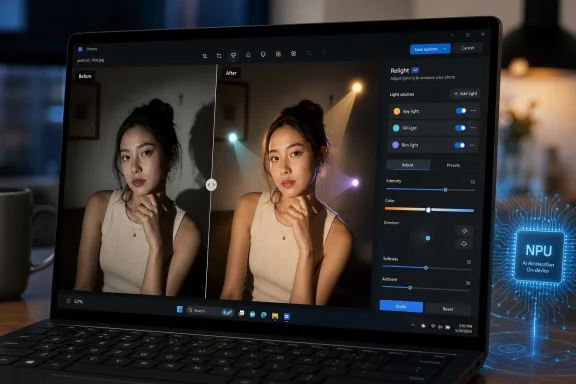 Microsoft Turns the Photo Viewer Into an AI Hardware Demo
For years, the Windows Photos app occupied an awkward middle ground. It was too heavy for users who only wanted the old Windows Photo Viewer experience, too limited for people who used Lightroom or Affinity Photo, and too tied into Microsoft’s cloud-era priorities for those who just wanted a fast, local library browser. Relight does not magically fix that history, but it changes the app’s strategic role.The feature lets users open an image, enter the Photos editor, and place virtual lights around a subject. Microsoft says users can control lighting direction, color, position, and intensity, and its own Windows messaging has described support for placing up to three virtual light sources. That is not the same thing as true studio relighting from a RAW workflow, but it is far beyond the old “enhance” button that guessed at contrast and saturation.
This is the sort of feature that looks simple only after the AI stack is already in place. The app has to understand the scene well enough to apply plausible illumination rather than merely painting a translucent glow over the image. The more it works, the more invisible the underlying computation becomes — which is precisely the point of Copilot+ PCs.
Microsoft has spent the past two years trying to make the neural processing unit, or NPU, feel like a consumer feature rather than a spec-sheet appendix. Relight is one of the cleaner examples because the value proposition is immediate. A user does not need to understand TOPS, model quantization, or Windows Studio Effects; they just see a badly lit portrait become more usable.
The Copilot+ Wall Is the Real Product Boundary
The catch is that Relight is exclusive to Copilot+ PCs. Microsoft’s support documentation says this plainly, and that single sentence is the most important part of the feature. The company is not merely updating Photos; it is using Photos to reinforce a new hardware tier inside the Windows ecosystem.Copilot+ PCs were introduced as machines with dedicated AI silicon capable of running certain models locally. The original launch centered on Snapdragon X Series devices, with AMD and Intel systems joining the category later as their NPU-equipped platforms arrived. Relight belongs to that family of features that are meant to make the new hardware feel different from a conventional Windows 11 laptop.
That distinction matters because Windows has historically been broad rather than exclusive. The operating system’s cultural promise was that most features eventually flowed across a wide range of PCs, even if unevenly. Copilot+ changes that expectation by making some Windows experiences dependent on a specific hardware floor.
Microsoft would argue that this is not artificial segmentation but technical necessity. Local AI workloads need acceleration, and running them efficiently on the NPU avoids chewing through CPU cycles, battery life, or cloud compute. That argument is often fair, but it still creates a new kind of Windows divide: not between Home and Pro, or managed and unmanaged, but between AI-capable and AI-ineligible hardware.
For users who bought a premium laptop shortly before the Copilot+ cutoff, features like Relight may feel less like innovation and more like a reminder that their machine aged out of Microsoft’s preferred story faster than expected. For buyers choosing a new PC in 2026, however, this is exactly the kind of everyday feature that makes the Copilot+ branding easier to understand than abstract AI promises ever could.
Relight Is Useful Because It Does Not Ask Users to Become Editors
The best consumer AI features reduce a task without pretending the user wants to learn a new discipline. Relight lands in that zone. Lighting is one of the hardest parts of photography to fix after the fact, and most casual users do not want to learn masks, curves, dodge-and-burn layers, or color grading just to rescue a family photo.Microsoft’s implementation appears designed for that mainstream user. Instead of presenting the full vocabulary of photographic lighting, it exposes a more approachable metaphor: place lights, move them, change their strength, and try presets. That is a sensible interface choice because it maps a technical operation onto something people already understand from the physical world.
The result is not likely to replace professional tools, and it should not be judged that way. A photographer working with RAW files, controlled color, and print intent will still want a proper editor. But Photos is not trying to beat Capture One; it is trying to keep ordinary users from leaving the default Windows experience for common fixes.
That is important because the default app still shapes user perception of the whole operating system. When the inbox photo app feels slow, confused, or underpowered, Windows feels worse. When it can perform a polished edit that once required a separate program, Windows feels more modern.
Relight’s appeal is especially obvious for portraits. Backlit faces, indoor shots with harsh ceiling lights, and phone photos taken in mixed lighting are common problems. If Photos can improve those images locally and quickly, the feature will earn more goodwill than many grander Copilot-branded demos.
The Inbox App Is Becoming the AI App Store
Relight also shows how Microsoft is distributing AI on Windows: not only through Copilot, but through familiar apps that gain one or two specialized abilities. Photos gets Relight, background editing, image generation, enhanced search, and object removal. Paint gets generative tools. Snipping Tool gains more intelligence. Settings experiments with natural-language help.This strategy is smarter than forcing every AI interaction through a chatbot. Most users do not wake up wanting to “use AI.” They want to fix a picture, find a setting, summarize a document, remove a background, or capture a cleaner screenshot. The AI succeeds when it disappears into the task.
But there is a risk in scattering these features across inbox apps. Microsoft’s Windows experience is already uneven, with old Control Panel surfaces, modern Settings pages, web-backed panels, Store-delivered apps, and Microsoft account prompts all coexisting in ways that can feel improvised. Adding AI features app by app may make Windows more capable, but it can also make it harder to explain.
Photos is a good test case because it has one of the clearest user missions. People understand what a photo app is for. If Microsoft cannot make AI feel coherent here, it will struggle in more abstract parts of the system.
The early signs are mixed but promising. Relight is concrete, local, and easy to demo. It does not require a conversation with Copilot, and it does not appear to demand that a personal photo be uploaded to a remote service for the core editing experience. That is the right direction for consumer trust.
Microsoft’s Local AI Pitch Finally Has a Normal-User Example
The Copilot+ PC launch was initially complicated by Recall, the controversial feature that captured snapshots of user activity for later search. Microsoft eventually reworked Recall’s rollout and security posture, but the episode made one thing clear: “AI built into Windows” can sound either magical or alarming depending on the example.Relight is a much safer ambassador. It operates on a user-selected image, performs a visible edit, and produces a result the user can accept or reject. There is no ambient monitoring, no hidden timeline of activity, and no need for Microsoft to argue that the user should trust an always-on system component.
That makes it strategically valuable. Microsoft needs AI features that feel helpful before they feel intrusive. Creative editing tools are ideal because the user initiates the action and expects transformation. Nobody is surprised when a photo editor alters a photo.
This is also where local processing matters as a message, not just an architecture. If the model runs on the device, Microsoft can tell a more privacy-friendly story than it can with cloud-only AI services. The company still has to be precise about which features are local, which use online services, and what data leaves the PC, but the NPU gives Windows a credible foundation for that distinction.
For IT professionals, that distinction is not academic. Consumer Windows features have a habit of drifting into business environments, and administrators need to know whether a tool processes corporate images locally, sends data to Microsoft services, or changes compliance boundaries. A photo relighting feature may sound harmless until the images are medical, legal, investigative, or proprietary.
The Feature Is Creative, but the Governance Questions Are Enterprise
In unmanaged consumer scenarios, Relight is mostly a convenience. In organizations, the same capability sits inside a larger governance problem. The modern Windows inbox app is no longer just a viewer; it is a small AI workstation that can modify, generate, search, and interpret images.That does not mean administrators should panic. It does mean they should inventory what Photos can do on their fleet, which devices qualify for Copilot+ features, and what app policies apply. Store-delivered app updates can move quickly, and the feature set of an inbox app in July 2026 may not be the same as the feature set an organization tested a year earlier.
The more Microsoft uses system apps as AI delivery vehicles, the more enterprises will need app-level controls that are as clear as OS-level controls. It is not enough to know that Windows 11 is patched. Admins need to know what the Photos app, Paint, Snipping Tool, Copilot app, and other components are allowed to do.
There is also a training issue. If employees are allowed to use AI-assisted image tools, they need guidance on provenance and disclosure. Relighting a marketing photo is one thing; altering evidentiary or inspection images is another. AI editing does not have to be malicious to create chain-of-custody problems.
This is where Microsoft’s consumer-friendly design can become a business headache. The easier a feature is to use, the easier it is to use casually. Enterprises will need policies that distinguish harmless enhancement from records alteration, especially in regulated environments.
The Old Photos Complaints Still Matter
Relight’s existence does not erase the long-running complaints about Microsoft Photos. Windows users have spent years grumbling about performance, file handling, RAW rendering, library behavior, OneDrive integration, and the loss of the simplicity associated with older viewers. Those complaints matter because a flashy AI feature sits on top of the same trust layer.If users do not trust Photos to display images faithfully, they may not care that it can relight them. If they see color shifts, HDR weirdness, or unexpected “enhancement” behavior, they will treat AI editing as another source of uncertainty. A photo app has to be predictable before it can be magical.
Microsoft’s challenge is therefore twofold. It has to make new AI tools compelling, and it has to keep the baseline viewer fast, transparent, and respectful of the file. The company has sometimes prioritized experiences that look good in a demo over the unglamorous reliability that power users notice every day.
The Windows community is especially sensitive to this because photo viewing is a muscle-memory task. People double-click an image expecting instant display, accurate color, and obvious controls. When an app interposes account prompts, library abstractions, or heavy editing surfaces, it can feel like Windows is getting in the way of a simple file operation.
Relight can win over some skeptics precisely because it is optional. The user chooses to edit and chooses to apply the effect. Microsoft should keep it that way. The fastest path to backlash would be making AI-driven image interpretation feel automatic, opaque, or hard to disable.
The Creative PC Is Back, but This Time It Is Ambient
There is a broader historical loop here. Windows once competed heavily on the idea that the PC was the place for creative work: scanners, digital cameras, printers, home video, DVD authoring, and desktop publishing all orbited the machine. Then the smartphone absorbed everyday photography, and the PC became more of an archive, backup target, or professional workstation.Relight hints at a different role. The PC may not be where most photos are taken, but it can become where more of them are repaired, reorganized, and repurposed. Microsoft is trying to make the Windows machine feel like an intelligent workbench for the media people already have.
That is a sensible move in a world where phone cameras are good but not omnipotent. Casual photos still suffer from bad lighting, cluttered backgrounds, awkward composition, and forgotten context. AI tools can address those problems in ways that traditional consumer editing never made approachable.
The question is whether Microsoft can make the PC feel like the natural place to do that work. Apple has strong continuity between iPhone, iCloud Photos, and Mac. Google has Google Photos and powerful cloud intelligence. Microsoft has Windows, OneDrive, Photos, and now Copilot+ hardware, but its consumer media story has often felt less cohesive.
Relight is one tile in that mosaic. It will not determine the success of Windows as a creative platform, but it shows Microsoft moving from storage and sync toward manipulation and assistance. That is the right battleground if the company wants Windows to be more than the place files go after the phone is full.
The NPU Needs Boring Wins More Than Spectacle
The tech industry tends to market AI with spectacle: generated images, chatbots, agents, and futuristic workflows. But the features that actually change user behavior are often boring wins. They save ten seconds, rescue one photo, remove one annoying object, or avoid one trip into a third-party app.Relight belongs to that category. It is not a new computing paradigm. It is a better button in a place where people already click buttons. That may make it more important than features with more dramatic branding.
The same pattern explains why background blur, eye contact correction, and noise suppression became understandable AI features. They solved familiar problems inside familiar workflows. Nobody needed a keynote to understand why looking better on a video call was useful.
Microsoft should lean into that humility. Copilot+ PCs do not need every feature to feel like science fiction. They need enough daily conveniences that users notice when they move back to an older machine. Relight, if it performs well, is one of those conveniences.
There is still an adoption problem. A feature locked to new hardware cannot become ubiquitous overnight, especially in businesses with three-to-five-year refresh cycles and households that keep PCs even longer. Microsoft is building for the installed base it wants, not the installed base it has.
Windows Differentiation Now Runs Through Apps, Not Just the Shell
For much of Windows history, major upgrades were visible in the shell: Start menu changes, taskbar changes, windowing changes, file management changes. Windows 11 still evolves that way, but the most interesting differentiation is increasingly arriving through apps and services. Photos is a prime example.That shift has advantages. Microsoft can update Photos through the Store faster than it can ship a full Windows release. It can test features with Insiders, stage rollouts, and refine the experience independently of the OS build. For users, that means new capabilities can arrive without waiting for a once-a-year feature update.
It also makes Windows harder to pin down. Two users can both say they are on Windows 11 and have meaningfully different Photos experiences depending on app version, hardware class, region, account state, Insider enrollment, and rollout timing. That fragmentation is manageable, but it complicates support and documentation.
For WindowsForum readers, this is now part of the operating system reality. Troubleshooting Windows increasingly means checking the app package version, the Microsoft Store update state, the device’s AI hardware eligibility, and whether a feature is flighted. The OS version alone is not enough.
Relight, then, is not simply “in Windows 11” in the old sense. It is in the Windows 11 ecosystem for a subset of devices that meet Microsoft’s Copilot+ requirements and have the right Photos app bits. That nuance is exactly where user confusion tends to grow.
A Small Lighting Tool Exposes Microsoft’s Bigger Bet
Relight is worth caring about because it compresses several Windows trends into one feature. It is local AI, hardware segmentation, Store-delivered app evolution, consumer creativity, and Microsoft’s ongoing attempt to make Copilot+ PCs feel meaningfully different. It is also a reminder that the future of Windows may arrive first as a button in an app many power users stopped thinking about years ago.The practical reading is straightforward:
- Relight is an AI editing feature in Microsoft Photos that changes photo lighting by adding and adjusting virtual light sources.
- Microsoft describes the feature as exclusive to Copilot+ PCs, making it part of the company’s new AI hardware tier rather than a universal Windows 11 capability.
- The feature is most useful for everyday photo fixes, especially portraits and images with poor or uneven lighting.
- Its value depends heavily on Photos remaining predictable, fast, and transparent as a basic image viewer.
- Enterprises should treat AI-enabled inbox apps as managed software surfaces, not harmless accessories.
- The feature’s success will be measured less by novelty than by whether users miss it when they return to an older PC.
Microsoft has spent years trying to explain why Windows needs an AI era, and Relight offers one of the cleaner answers: because ordinary files can become easier to work with when the PC understands enough about them to help. The feature will not sell a Copilot+ PC by itself, and it will not silence every complaint about the Photos app. But it shows the right shape of progress — specific, local, user-initiated, and practical — and that is the version of AI Windows needs more of as the platform moves deeper into its hardware-gated future.
References
- Primary source: thurrott.com
Published: 2026-07-07T23:10:09.300869
relight - Thurrott.com
 www.thurrott.com
- Official source: support.microsoft.com
- Official source: microsoft.com
Best photo and video apps in Windows | Microsoft Windows
Discover the photo editor app and video editor app lineup built into Windows 11. Learn how to choose the best app for each task.www.microsoft.com
- Official source: blogs.windows.com
Windows 11 is the home for AI on the PC, with even more experiences available today
AI is changing the way we use our PCs. According to a new consumer AI report commissioned by Microsoft, nearly 60% of people report using generative AI for work and business purposesblogs.windows.com - Related coverage: pureinfotech.com
What is Relight in Photos app, and how to use it on Windows 11? AI image tool explained. - Pureinfotech
This is Relight AI feature in the Photos app on Windows 11 to fix lighting, add presets, and enhance portraits on Copilot+ PCs. pureinfotech.com
- Related coverage: windowsreport.com
Microsoft Photos app update adds new Relight feature and smarter AI search on Windows 11
Microsoft Photos app update brings Relight lighting controls and AI-powered natural language photo search to Windows 11 Copilot+ PCs. windowsreport.com
- Related coverage: windowscentral.com
Windows 11's Photos app gains AI-powered categorization feature | Windows Central
Microsoft is testing a new feature in the Photos app on Windows 11 that lets the app automatically identify and categorize photos using AI, all handled locally on-device.www.windowscentral.com - Related coverage: tomsguide.com
Windows 11 gets new AI-powered features in latest update — here's 4 tools to try out now | Tom's Guide
Microsoft rolls out all-new AI features in its latest Windows 11 update, with Copilot+ PCs packing Snapdragon chips now being able to change settings with an AI agent, edit photos with Relight and more. Here are 4 tools to try out now.www.tomsguide.com - Related coverage: elluminetpress.com
- Official source: news.microsoft.com