
 The Browser Became an AI Runtime Before Users Got a Vote
The outrage over Chrome’s alleged 4GB model download is not really about four gigabytes. On a modern desktop with a 2TB SSD, four gigabytes is an annoyance; on a thin business laptop, a shared family PC, a virtual desktop, or a metered connection, it is a policy decision someone else made for you.
That distinction is why the word “silently” has carried so much weight in the backlash. Google’s explanation is not absurd: an on-device model can reduce cloud round-trips, lower latency, and keep some inference local. Gemini Nano inside Chrome is part of a broader push to make the browser capable of summarization, writing assistance, scam detection, developer APIs, and other AI features without sending every prompt to a remote server.
But the privacy defense only solves half the problem. A local model may be better than a cloud model for certain data flows, but it is still software delivered to a user’s machine, stored on a user’s disk, updated through a vendor-controlled channel, and potentially invoked by features the user did not explicitly ask to enable. Local does not automatically mean consensual.
That is the core failure here. Google can be right that Gemini Nano is not spyware and still be wrong about the expectations users have for a browser update. Chrome is no longer just a document renderer with extensions and sync; it is becoming a platform for embedded AI workloads. Platforms need defaults, but defaults at this scale become infrastructure decisions.
Microsoft’s Kill Switch Is Less Anti-Google Than It Looks
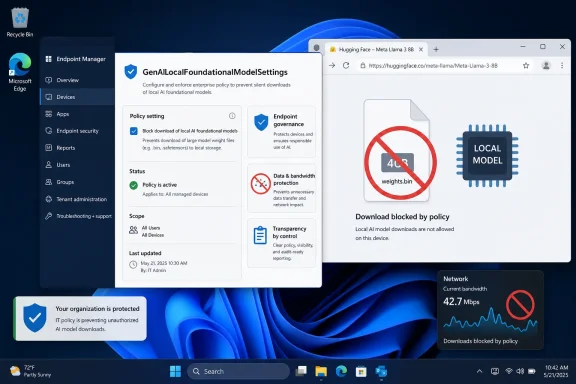
The satisfying framing is obvious: Windows 11 now has a kill switch for Chrome’s AI download. That makes for a clean Microsoft-versus-Google headline, and it is not entirely wrong. The same policy name can be applied under the Chrome policy path in the Windows registry, which means administrators can tell Chrome not to download or retain the local foundational model.
But the more interesting truth is that this is a Chromium-era control, not a one-off swipe from Redmond. Microsoft Edge uses Chromium too, and Edge has its own local AI ambitions. Microsoft’s documentation describes the policy as governing whether Edge downloads a foundational GenAI model and uses it for local inference, with support beginning in Edge 132 on Windows and macOS.
That makes the policy less like a weapon and more like a seat belt Microsoft had to install for itself. Edge and Chrome are both moving toward browsers that can fetch model assets, expose AI APIs, and run inference close to the user. Once that architecture exists, enterprise IT needs a knob that says no.
The Windows registry path gives administrators exactly that. Under Microsoft Edge, the policy lives below the Edge policy hive; under Chrome, it lives below Google’s Chrome policy hive. A value of 0 allows the local model behavior, while a value of 1 disallows it and can remove a previously downloaded model.
The practical effect is blunt in the best possible way. Instead of asking help desk staff to hunt down model directories, delete weights.bin, and hope the browser does not fetch it again, the organization can express intent through policy. That is what enterprise management is supposed to do: make the device’s behavior predictable.
The 4GB File Is a Symptom of a Larger Consent Problem
There is a reason this story caught fire so quickly. Users have been trained to accept that browsers update in the background because security demands it. Nobody wants a world where every minor Chromium patch requires a manual approval dialog and a prayer that users click the safe option.
But AI model delivery is not the same category as a security patch. A browser engine update closes vulnerabilities in software the user has already chosen to run. A multi-gigabyte model download adds a new local capability, consumes storage and bandwidth, and prepares the browser for a class of features that may have different privacy, compliance, and performance implications.
Google’s argument that the model powers security capabilities such as scam detection deserves to be taken seriously. The web is hostile, phishing is industrialized, and local analysis could be a useful layer of defense. If Chrome can detect malicious patterns without shipping more browsing context to the cloud, that is a real benefit.
Yet good intent does not erase deployment mechanics. If users discover a giant AI model only because their disk usage changed, trust has already been damaged. The right comparison is not malware; it is the long history of vendors expanding background components until users no longer understand what their machines are doing.
The more Google insists the file is benign, the more it should have been willing to make the download legible. A browser that can show a polished onboarding card for password managers, profiles, shopping tools, and AI writing features can also show a plain notice that a local model is being installed, how large it is, what it is for, and how to remove it permanently.
Local AI Is Not a Privacy Magic Trick
The industry has spent the last two years selling on-device AI as the wholesome alternative to cloud AI. The pitch is powerful because it is partly true. Running inference locally can keep sensitive text, page content, or signals on the machine, and it can make small tasks faster and cheaper.
But “on-device” is becoming a marketing phrase that compresses too many distinct questions. Where is the model stored? Who updates it? What telemetry is sent about its use? Which features call it? Does disabling a visible AI feature disable the model? Can administrators audit its presence? Does the browser fall back to the cloud if the local model is unavailable?
Those questions matter more than the slogan. A local model can be privacy-preserving in one workflow and operationally intrusive in another. It can be a security feature, a developer platform, a consumer assistant, and a background component all at once.
That ambiguity is what makes the Windows policy useful. It does not ask administrators to adjudicate every promise in every AI product blog post. It says that if local foundational models are not approved for the environment, the browser should not download or use them.
For home users, the story is messier. Windows 11 Pro users can set registry policy, but most consumers do not live in regedit or Group Policy Editor. A consumer-grade browser setting is still necessary, and Google reportedly began rolling out a way to disable and remove the model in Chrome settings earlier this year. The controversy exists because users and researchers argue that deletion did not always mean durable refusal.
Edge and Chrome Have Made the Admin Console the New AI Battleground
For sysadmins, the most important part of this episode is not whether weights.bin is exactly 4GB on every machine. It is that browser-managed AI assets are now part of fleet management. The browser is no longer just a patching concern, an extension concern, or a default-app concern; it is becoming an AI distribution channel.
That has immediate consequences. Organizations with metered branches, VDI pools, shared devices, or strict change windows cannot treat model downloads as incidental. Four gigabytes multiplied across hundreds or thousands of profiles is not a rounding error, especially if the asset appears per user profile rather than once per machine.
There is also the compliance angle. Many organizations are still writing policies for generative AI usage, and those policies often distinguish between approved and unapproved tools. If the browser quietly enables local AI APIs, developers and web apps may gain capabilities the organization has not reviewed.
The policy does not solve all of that, but it creates a control plane. Administrators can disable local foundational model downloads while they evaluate the feature set, monitor vendor documentation, and decide whether the benefits justify the footprint. That is healthier than discovering the deployment after the fact through storage alarms or user complaints.
It also exposes an uncomfortable reality for both Google and Microsoft. AI features are no longer just product differentiation; they are change management events. If a browser update brings a model runtime with it, IT departments will treat it like one.
Google’s Defense Is Plausible, Which Makes the Rollout More Frustrating
The weakest critique of Google is the claim that any local AI model is inherently sinister. That argument collapses too easily. A browser-side model can genuinely improve safety, enable offline-ish capabilities, and reduce exposure of user data to cloud services.
The stronger critique is that Google has once again leaned on scale and default behavior instead of explicit user agency. Chrome’s advantage is reach: when Google ships something in Chrome, it can reshape the web’s capabilities almost overnight. That power demands a higher bar for disclosure.
Google’s developer documentation around built-in AI has acknowledged that applications should inform users when model downloads are required. That guidance is sensible for web developers building on Chrome’s AI APIs. It is harder to reconcile with users reporting that the browser itself prepared the model in the background without an equally visible explanation.
This is where consumer and enterprise expectations diverge. Enterprises expect policy. Consumers expect settings. Both expect deletion to mean something. If a user removes a multi-gigabyte AI asset and the browser later restores it because the relevant feature remains eligible, the user experiences that as defiance, even if the browser is merely following its component update logic.
That perception matters. The AI market is already battling skepticism over training data, hallucinations, energy use, privacy, and creeping integration into every surface. A background 4GB download is practically engineered to confirm the suspicion that AI is being pushed faster than users can consent to it.
The Registry Fix Is Powerful Because It Is Boring
There is nothing glamorous about setting a DWORD value under a policy key. That is exactly the point. The most meaningful response to AI sprawl may not be another assistant, another toggle in a shiny settings page, or another trust-us blog post. It may be a boring administrative policy that can be deployed, audited, and reversed.
For Edge, administrators can configure GenAILocalFoundationalModelSettings under the Microsoft Edge policy path. For Chrome, the equivalent Google Chrome policy path can be used. Setting the value to 1 tells the browser not to download the local foundational model and to remove a model already present.
The policy’s support for dynamic refresh is especially important. If an administrator changes the setting, the browser can pick it up without forcing every user to restart. In real environments, that matters more than it sounds, because controls that require disruption are often delayed until the next maintenance window.
This is also why the feature’s availability through Group Policy, registry configuration, and enterprise management tools matters. A one-machine registry tweak is a workaround. A policy that can be pushed through established management channels is governance.
Still, users should not mistake the registry for a friendly consumer interface. Editing policy keys carries risk, and unmanaged home devices need simpler controls. The long-term answer cannot be “open regedit and hope you are in the right hive.” The long-term answer is that browsers should expose durable, understandable AI model controls in their own settings.
The Windows Angle Is Really About Who Owns the Endpoint
This episode lands differently on Windows because Windows remains the place where consumer habits and enterprise discipline collide. A Chrome behavior that feels like a convenience feature on a personal laptop can become a governance problem on a managed fleet. Windows 11 sits under both worlds.
Microsoft is not a neutral observer in the AI land grab. Copilot, Edge AI features, Windows Recall, on-device models, cloud-connected assistants, and developer-facing AI integrations all show that Microsoft wants intelligence woven deeply into the operating system and browser. The company is not objecting to local AI as a concept.
That is why the policy’s existence is significant. It suggests that even companies racing to embed AI understand the need for hard off-switches. The question is not whether AI belongs on the endpoint. The question is whether AI arrives as an accountable feature or as an ambient payload.
Windows administrators have spent decades managing this boundary. They control driver installation, browser extensions, update rings, security baselines, telemetry levels, and application allow lists. AI model distribution is simply the next category demanding the same treatment.
The difference is cultural. Traditional endpoint components were usually described in operational terms: patch, driver, runtime, agent, filter, extension. AI arrives wrapped in product language: assistant, smart feature, local intelligence, safety capability. The registry does not care about the branding. It asks what the software does.
Developers Gain a Platform, but IT Inherits the Blast Radius
Chrome’s built-in AI APIs are attractive for developers because they promise a browser-native way to use local models. If the model is already present, a web app can potentially deliver summarization, writing, translation, or task-specific intelligence without paying for every token in the cloud. For some applications, that is a real architectural shift.
But every platform abstraction hides a supply chain. If developers build for browser-provided AI, then the browser vendor decides model availability, hardware eligibility, update cadence, and policy behavior. A feature that works on a developer’s machine may be disabled in a managed enterprise or absent on unsupported hardware.
That is not a reason to reject browser AI APIs outright. It is a reason to design them as optional capabilities rather than invisible assumptions. Web apps should detect availability, explain downloads, provide fallbacks, and respect enterprise policy without punishing the user.
The same applies to browser vendors. If Google wants developers to treat Gemini Nano as a dependable local substrate, then model management must become boringly transparent. Developers need to know when the model exists, users need to know why it exists, and administrators need to be able to say no.
A browser-provided model could become as ordinary as a media codec or spellcheck dictionary. But codecs and dictionaries did not arrive under the cultural shadow of generative AI, nor did they typically weigh several gigabytes. The politics of deployment are different now.
The Real Cost Is Trust, Not Disk Space
It is tempting to reduce the whole affair to a storage complaint. Four gigabytes here, twelve gigabytes there, users being dramatic about modern software bloat. That reading misses why this story resonated.
The cost is trust in automatic updates. Modern browser security depends on users accepting that Chrome, Edge, Firefox, and others will update quickly and often. If users begin to associate background browser updates with unannounced AI payloads, vendors risk contaminating one of the web’s most important security norms.
That would be a bad outcome for everyone. The lesson should not be that users ought to freeze browser versions or disable component updates wholesale. The lesson should be that vendors must separate urgent security maintenance from discretionary AI capability deployment in ways users and administrators can understand.
There is also a class issue hidden in the technical argument. Multi-gigabyte downloads are easy to dismiss from the vantage point of unlimited broadband and large SSDs. They look different on constrained storage, mobile hotspots, rural connections, shared PCs, and regions where bandwidth remains expensive.
AI vendors often speak as though compute is ambient. Users experience compute as battery drain, fan noise, disk pressure, bandwidth caps, and unexplained background activity. The gap between those perspectives is where backlash grows.
The Chrome Backlash Gives Microsoft a Preview of Its Own Problem
Microsoft should not enjoy this moment too much. The company has faced its own AI trust issues, most notably when users and administrators pushed back against features perceived as too invasive, too automatic, or too difficult to disable. Windows users have long memories when it comes to telemetry, ads, account prompts, and feature rollouts that feel less optional than advertised.
The GenAILocalFoundationalModelSettings policy is therefore both a useful control and a warning. If Microsoft expects Windows and Edge users to accept more local AI, it will need the same kind of transparency it is now helping administrators impose on Chrome. The standard cannot be “controls for their AI, persuasion for ours.”
Edge already lives under greater suspicion than Chrome in some Windows communities because it is bundled with the operating system and persistently promoted. If Edge downloads local AI assets without clear consent, users will not grade Microsoft on a curve. They will see it as another example of Windows deciding what belongs on their PCs.
That makes the policy strategically smart. Microsoft can tell enterprises that it is not merely pushing AI into Edge; it is also providing the controls to govern it. In 2026, that may be the minimum credible posture for any platform vendor.
Google, for its part, still has the larger browser footprint and therefore the larger responsibility. Chrome’s dominance means small default choices become global infrastructure events. If a model download is justified, Google should be able to justify it before the download begins, not after researchers find it.
The Practical Lesson Hiding in the Registry Hive
For WindowsForum readers, the immediate takeaway is not panic. It is inventory. If you manage machines, you should know whether Chrome or Edge is downloading local AI models, whether your policies allow it, and whether your organization has decided that is acceptable.
Home users should also understand the difference between deleting a file and disabling the mechanism that fetched it. If the browser still believes a component is required, manual deletion may only create a temporary reprieve. Durable control usually means changing the relevant browser setting or policy.
The registry switch is not a moral verdict on Gemini Nano. It is a control point. Some users and organizations will want local AI enabled, especially if it supports anti-scam protections or useful offline features. Others will decide that storage, bandwidth, compliance, or consent concerns outweigh the benefits for now.
That is the correct shape of the debate. AI features should compete for permission based on value, not arrive as an inevitability hidden inside the update stream.
The AI Model on Your PC Is Now an Administrative Object
The important facts are concrete enough to act on, even while the broader AI strategy remains unsettled. Browser vendors are preparing local inference as a normal part of the web stack, and Windows administrators now have a policy lever to slow that down.
- Chrome users have reported a roughly 4GB weights.bin file associated with Gemini Nano appearing under browser-managed model directories.
- Google says the local model supports privacy-preserving AI and security features, including local scam detection and developer-facing capabilities.
- The GenAILocalFoundationalModelSettings policy can be used to disallow local foundational model downloads in Chromium-based browsers that honor it.
- On Windows, administrators can deploy the policy through registry settings, Group Policy, or enterprise management tooling rather than relying on manual file deletion.
- The same controversy applies beyond Chrome because Edge and other Chromium-based browsers are also moving toward local AI features.
- The safest operational posture is to disable the model by policy until an organization has reviewed storage, bandwidth, privacy, and compliance implications.
The browser wars used to be about speed, standards, extensions, and battery life; now they are about who gets to place an AI runtime on the endpoint and under what terms. Windows 11’s new kill switch does not end that argument, but it gives users and administrators something rare in the current AI rollout cycle: a real lever. The next phase will not be decided by whether local AI is good or bad in the abstract, but by whether vendors can make it visible, governable, and worth the space it occupies.
