

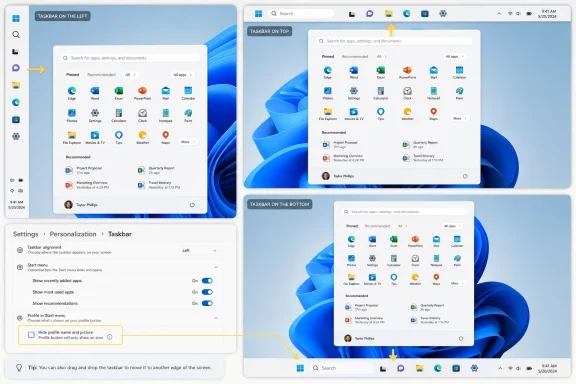
On May 15, 2026, Microsoft began rolling out Windows 11 preview changes that let Experimental-channel Insiders move the taskbar to the top, bottom, left, or right edge and customize Start menu sections, sizing, and profile visibility. That is the factual headline; the real story is more embarrassing and more important. Microsoft is not inventing a new Windows interface so much as negotiating its way back to old Windows virtues. After years of telling users that Windows 11’s cleaner design justified fewer choices, Redmond is rediscovering that the desktop’s power has always come from letting people make it ugly, efficient, personal, and theirs.
The Windows 11 taskbar has been a symbol of Microsoft’s modern desktop problem since launch. It looked calmer than Windows 10’s, lined up nicely for screenshots, and fit the rounded-corner visual language Microsoft wanted to sell. But it also broke habits that had survived multiple generations of Windows, including the ability to put the taskbar somewhere other than the bottom of the screen.
That omission was never a niche complaint in the way Microsoft sometimes implied. Developers with vertical monitors, administrators juggling remote sessions, ultrawide users who value vertical pixels, and anyone who had trained muscle memory around a top or side taskbar all lost a workflow overnight. Third-party utilities filled the gap because Windows itself had stopped doing what Windows users expected.
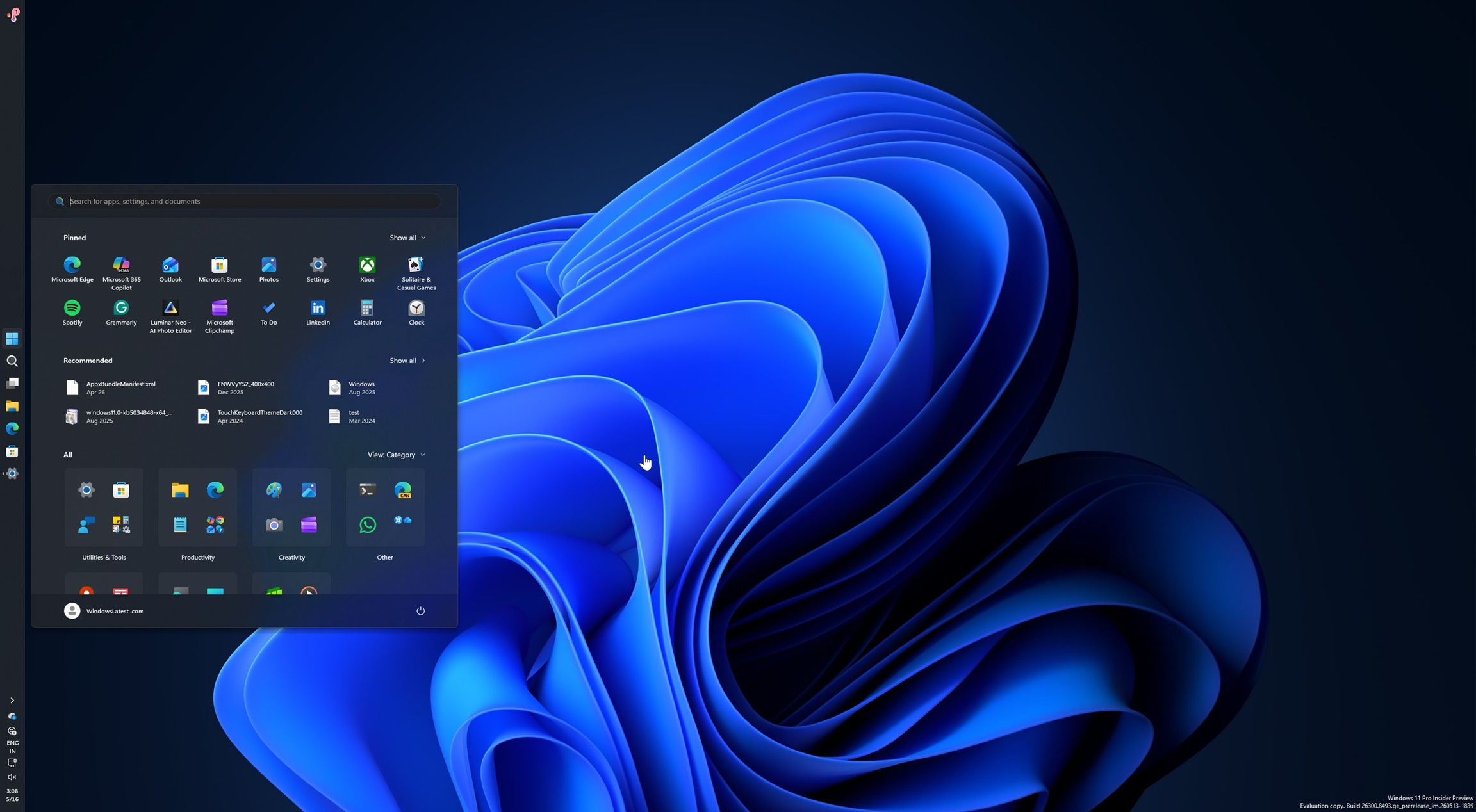
The new preview finally reverses that decision. In the Experimental channel, the taskbar can be placed on any screen edge, with alignment options that adapt to horizontal and vertical layouts. Flyouts such as Start and Search are also designed to appear from the taskbar’s new location rather than pretending the desktop still revolves around the bottom edge.
That detail matters because moving the taskbar is not just a cosmetic toggle. If Start still opened from the bottom while the taskbar sat on the left, the feature would feel bolted on rather than restored. Microsoft appears to understand that a movable taskbar has to behave like a first-class layout mode, not like a registry hack with a settings page.
That perception became especially damaging because the missing options were not obscure. Older versions of Windows let users move the taskbar, show labels, avoid combined buttons, and arrange the shell around their work. Windows 11 arrived with a prettier face and a thinner bag of tricks.
The company has spent years adding back pieces of that older competence. “Never combine” taskbar buttons returned. Labels returned. More Start menu controls trickled in. Now taskbar placement is coming back too, and the pattern is hard to miss: Windows 11 is slowly becoming acceptable by restoring things Windows already knew how to do.
There is a charitable interpretation. Microsoft rebuilt major shell components and needed time to reintroduce complex features without dragging old code forward. There is also a less charitable one: Microsoft shipped a desktop OS before its most important desktop surfaces were functionally mature. Both can be true.
Today, hiding Recommended can have effects beyond the Start menu, including interactions with recent files and jump lists. The new approach promises a cleaner separation. A user should be able to remove recent file suggestions from Start without making File Explorer less useful.
That is not just tidiness. It is a privacy issue. Plenty of Windows users share screens, present in meetings, stream, teach, troubleshoot, or work in shared environments where a supposedly helpful recommendation becomes an accidental disclosure. The option to hide your name and profile picture in Start belongs in the same category.
Microsoft’s best argument here is not that Start will become more customizable. It is that Start will become less presumptuous. The operating system should not assume that every recent document, account identity, or suggested item is safe to surface in the middle of a workflow.
On those systems, every pixel taken by the shell is a pixel not available to a browser, spreadsheet, terminal, remote desktop window, or line-of-business app. A smaller taskbar gives back space without requiring the user to scale the entire interface down. It is the kind of practical compromise Windows has historically been good at.
This is also where Microsoft’s design ambitions collide with its installed base. Windows cannot behave like a boutique operating system for a narrow class of premium devices. It has to serve people who bought whatever laptop procurement approved, whatever mini PC fits behind a monitor, or whatever machine survived the last budget cycle.
A smaller taskbar says Microsoft is at least listening to the utilitarian side of its audience again. The desktop is not a showroom. It is a workbench.
Microsoft has also signaled that more visual polish, performance optimization, and fixes are still needed. That should surprise nobody. A movable taskbar touches animations, flyouts, notification areas, touch behavior, multi-monitor layouts, accessibility, window management, and countless assumptions baked into apps and shell components.
The limitations matter too. Preview reporting indicates that some experiences, such as auto-hide and tablet-optimized behavior in alternate positions, are not yet fully supported. That does not make the work meaningless, but it does remind us that a feature users remember as simple may be complicated inside a redesigned shell.
For cautious users, the advice is obvious: do not move a production machine into an experimental Windows branch just because the taskbar can move. For IT departments, the better move is to watch how quickly Microsoft fixes edge cases and whether policy controls arrive alongside the consumer-facing settings.
But it also turns Windows enthusiasts into public witnesses for Microsoft’s product priorities. When a long-requested feature appears in Experimental, it is not just a test; it is a statement that the company has accepted the complaint as legitimate. The movable taskbar is now no longer a fringe wish. It is officially on Microsoft’s roadmap of repair.
That creates pressure. Once users see a familiar capability working in preview, patience narrows. If Microsoft takes too long, or ships a partial version that lacks polish, the story will quickly turn from “Microsoft listened” to “Microsoft still cannot finish the shell.”
This is the trap Microsoft built for itself by removing long-standing features. Restoring trust takes longer than restoring code. Users do not merely want the option back; they want evidence that Windows will not casually discard their workflows again.
The backlash to that strategy has been real. Windows users have complained about ads, recommendations, account nudges, cloud prompts, hardware requirements, and AI features that feel more strategically important to Microsoft than operationally useful to customers. Against that backdrop, a movable taskbar feels almost radical because it is so plainly user-driven.
There is no grand AI story in letting someone put the taskbar on the left. There is no subscription upsell in hiding a profile picture from Start. There is no cloud synergy in separating file recommendations from jump lists. These are boring features in the best possible sense: local, practical, visible, and tied to daily friction.
If Microsoft is serious about improving Windows quality in 2026, this is the right kind of work. Not because taskbar placement is the most important feature in computing, but because it proves the company can still care about the parts of Windows people touch hundreds of times a day.
But the taskbar and Start menu are not minor artifacts. They are the front door, the dashboard, and the muscle-memory engine of the Windows desktop. Changing them is not like moving a settings page. It changes how users begin tasks, switch contexts, recover from interruption, and orient themselves.
Windows 11 confused consistency with simplification. Centered icons and a cleaner Start menu created a tidier default, but Microsoft went further by removing the escape hatches that let users reject the default. That is where design discipline became design arrogance.
The new preview is therefore more than a feature update. It is a partial admission that familiarity is not automatically technical debt. Sometimes it is infrastructure.
That ecosystem will not disappear overnight. Third-party tools still offer deeper customization than Microsoft is likely to support, and some users will always want more control than the stock shell provides. But the return of core options narrows the reason ordinary users need to modify Windows just to feel at home.
This is good for security and manageability. Shell-modifying tools can be excellent, but they also introduce update risks, compatibility headaches, and support ambiguity. In enterprise environments, a native setting is almost always preferable to a workaround maintained outside Microsoft’s servicing model.
It is also good for Microsoft’s credibility. A company that owns the platform should not depend on hobbyists and small software vendors to restore basic desktop ergonomics. Third parties should extend Windows, not rescue it.
Microsoft will need to think beyond the Settings app. Group Policy, mobile device management controls, provisioning behavior, multi-user environments, and accessibility documentation all matter if these features are to be enterprise-ready. A customization option that cannot be governed is not fully mature in Windows’ most important market.
At the same time, enterprise IT should not dismiss the productivity angle. Persistent labels, vertical taskbars, and predictable Start behavior can help users who live in dense multitasking environments. The point of managed Windows should not be to freeze everyone into the least flexible configuration possible.
The best outcome is policy-backed choice. Let organizations set sane defaults, prevent chaos where necessary, and still allow departments or power users to opt into layouts that make their work faster. Windows has always been strongest when it gives IT control without treating users as decorative accessories.
That is why section-level toggles are important but not sufficient. Users need to believe that when they turn something off, it stays off. They need confidence that a “recommended” area is not a future advertising slot waiting for a policy change. They need local files, cloud documents, Store suggestions, and web results to be clearly separated rather than blended into a vague feed of Microsoft-curated relevance.
The option to hide name and profile photo is a small but telling concession. It acknowledges that Start is not always a private surface. In hybrid work, streaming, education, and support contexts, the screen is often shared, recorded, projected, or observed.
Microsoft’s challenge is to make Start useful without making it nosy. That is a harder design problem than adding a size selector, but it is the one that will determine whether users actually embrace the new controls.
The taskbar is becoming more adaptable. The Start menu is becoming less rigid. The shell is moving back toward user agency after an extended detour through polished constraint. These are positive developments, but they are not a full redemption arc.
File Explorer performance, Settings sprawl, account pressure, update reliability, search quality, default app friction, and the balance between local computing and cloud services all remain live issues. Windows 11’s reputation was not damaged by one missing taskbar option. It was damaged by a pattern of decisions that made the OS feel less like a tool and more like a strategy document.
That is why this update matters beyond the people who wanted a left-side taskbar. It suggests Microsoft may be relearning that Windows quality is not only measured in boot times, security baselines, or AI integration. It is measured in the absence of daily annoyance.
Windows 11 strained that bargain by narrowing the acceptable ways to use the desktop. It was never as locked down as a mobile OS, but it borrowed some of that sensibility: fewer knobs, cleaner defaults, more insistence that users accept the intended experience. The pushback was predictable because Windows users are not a monolith, and many of them actively dislike being treated as one.
Restoring taskbar placement is a symbolic reversal of that narrowing. It says the desktop can again bend around the user rather than the other way around. The Start menu controls say something similar, though more quietly: not every surface needs to show every Microsoft-approved section all the time.
This is the direction Windows should take. Not endless nostalgia, not a full retreat to Windows 10, and not a refusal to modernize. The goal should be a modern shell with old-school respect for user control.
 Microsoft’s Great Taskbar Retreat Is Finally Underway
The Windows 11 taskbar has been a symbol of Microsoft’s modern desktop problem since launch. It looked calmer than Windows 10’s, lined up nicely for screenshots, and fit the rounded-corner visual language Microsoft wanted to sell. But it also broke habits that had survived multiple generations of Windows, including the ability to put the taskbar somewhere other than the bottom of the screen.That omission was never a niche complaint in the way Microsoft sometimes implied. Developers with vertical monitors, administrators juggling remote sessions, ultrawide users who value vertical pixels, and anyone who had trained muscle memory around a top or side taskbar all lost a workflow overnight. Third-party utilities filled the gap because Windows itself had stopped doing what Windows users expected.
The new preview finally reverses that decision. In the Experimental channel, the taskbar can be placed on any screen edge, with alignment options that adapt to horizontal and vertical layouts. Flyouts such as Start and Search are also designed to appear from the taskbar’s new location rather than pretending the desktop still revolves around the bottom edge.
That detail matters because moving the taskbar is not just a cosmetic toggle. If Start still opened from the bottom while the taskbar sat on the left, the feature would feel bolted on rather than restored. Microsoft appears to understand that a movable taskbar has to behave like a first-class layout mode, not like a registry hack with a settings page.
The Missing Feature Was the Message
Windows 11’s launch-era taskbar was not merely unfinished; it expressed a product philosophy. Microsoft prioritized a controlled, centered, simplified desktop over the messy flexibility that had long defined Windows. The company may have believed it was modernizing the OS, but to many users it felt like Windows had been redesigned by people who did not use Windows all day.That perception became especially damaging because the missing options were not obscure. Older versions of Windows let users move the taskbar, show labels, avoid combined buttons, and arrange the shell around their work. Windows 11 arrived with a prettier face and a thinner bag of tricks.
The company has spent years adding back pieces of that older competence. “Never combine” taskbar buttons returned. Labels returned. More Start menu controls trickled in. Now taskbar placement is coming back too, and the pattern is hard to miss: Windows 11 is slowly becoming acceptable by restoring things Windows already knew how to do.
There is a charitable interpretation. Microsoft rebuilt major shell components and needed time to reintroduce complex features without dragging old code forward. There is also a less charitable one: Microsoft shipped a desktop OS before its most important desktop surfaces were functionally mature. Both can be true.
Start Menu Control Becomes a Privacy Feature, Not Just a Preference
The Start menu changes are less visually dramatic than a vertical taskbar, but they may matter more to everyday users. Microsoft says it is adding section-level toggles for Pinned, Recommended, and All, along with a separate control for file recommendations. That distinction addresses one of Windows 11’s most persistent irritations: changing Start often means changing behavior elsewhere.Today, hiding Recommended can have effects beyond the Start menu, including interactions with recent files and jump lists. The new approach promises a cleaner separation. A user should be able to remove recent file suggestions from Start without making File Explorer less useful.
That is not just tidiness. It is a privacy issue. Plenty of Windows users share screens, present in meetings, stream, teach, troubleshoot, or work in shared environments where a supposedly helpful recommendation becomes an accidental disclosure. The option to hide your name and profile picture in Start belongs in the same category.
Microsoft’s best argument here is not that Start will become more customizable. It is that Start will become less presumptuous. The operating system should not assume that every recent document, account identity, or suggested item is safe to surface in the middle of a workflow.
The Smaller Taskbar Is Really About Screen Economics
The new smaller taskbar option sounds modest, but it cuts into one of the biggest practical complaints about modern Windows design. Windows 11 often feels tuned for ideal hardware: high-resolution panels, roomy displays, modern aspect ratios, and users who do not mind spacious UI chrome. But Windows runs on everything from cheap school laptops to compact work machines to aging corporate fleets.On those systems, every pixel taken by the shell is a pixel not available to a browser, spreadsheet, terminal, remote desktop window, or line-of-business app. A smaller taskbar gives back space without requiring the user to scale the entire interface down. It is the kind of practical compromise Windows has historically been good at.
This is also where Microsoft’s design ambitions collide with its installed base. Windows cannot behave like a boutique operating system for a narrow class of premium devices. It has to serve people who bought whatever laptop procurement approved, whatever mini PC fits behind a monitor, or whatever machine survived the last budget cycle.
A smaller taskbar says Microsoft is at least listening to the utilitarian side of its audience again. The desktop is not a showroom. It is a workbench.
Experimental Means Hope, Not a Shipping Date
The catch is that these changes are not rolling out to everyone today. They are in the Windows Insider Experimental channel, which exists precisely so Microsoft can test features that may change, slip, or fail to ship in their current form. Anyone treating this as a stable-channel release is getting ahead of the facts.Microsoft has also signaled that more visual polish, performance optimization, and fixes are still needed. That should surprise nobody. A movable taskbar touches animations, flyouts, notification areas, touch behavior, multi-monitor layouts, accessibility, window management, and countless assumptions baked into apps and shell components.
The limitations matter too. Preview reporting indicates that some experiences, such as auto-hide and tablet-optimized behavior in alternate positions, are not yet fully supported. That does not make the work meaningless, but it does remind us that a feature users remember as simple may be complicated inside a redesigned shell.
For cautious users, the advice is obvious: do not move a production machine into an experimental Windows branch just because the taskbar can move. For IT departments, the better move is to watch how quickly Microsoft fixes edge cases and whether policy controls arrive alongside the consumer-facing settings.
The Insider Program Is Becoming Microsoft’s Public Repair Shop
The timing of this feature matters because Microsoft has recently been reshaping the Windows Insider Program around more explicit experimentation. The Experimental channel gives Microsoft a place to test visible, user-facing changes without implying they are nearly ready for broad deployment. That is healthier than smuggling half-finished behavior into channels where users expect more stability.But it also turns Windows enthusiasts into public witnesses for Microsoft’s product priorities. When a long-requested feature appears in Experimental, it is not just a test; it is a statement that the company has accepted the complaint as legitimate. The movable taskbar is now no longer a fringe wish. It is officially on Microsoft’s roadmap of repair.
That creates pressure. Once users see a familiar capability working in preview, patience narrows. If Microsoft takes too long, or ships a partial version that lacks polish, the story will quickly turn from “Microsoft listened” to “Microsoft still cannot finish the shell.”
This is the trap Microsoft built for itself by removing long-standing features. Restoring trust takes longer than restoring code. Users do not merely want the option back; they want evidence that Windows will not casually discard their workflows again.
The AI Detour May Have Helped Windows Remember Its Job
OC3D frames the change with a sharp suggestion: missing AI targets may have been good for Windows 11 users. That is speculative, but the broader point lands. Microsoft has spent the last several years pushing AI into almost every product narrative, and Windows has often looked like a platform being prepared for Copilot first and users second.The backlash to that strategy has been real. Windows users have complained about ads, recommendations, account nudges, cloud prompts, hardware requirements, and AI features that feel more strategically important to Microsoft than operationally useful to customers. Against that backdrop, a movable taskbar feels almost radical because it is so plainly user-driven.
There is no grand AI story in letting someone put the taskbar on the left. There is no subscription upsell in hiding a profile picture from Start. There is no cloud synergy in separating file recommendations from jump lists. These are boring features in the best possible sense: local, practical, visible, and tied to daily friction.
If Microsoft is serious about improving Windows quality in 2026, this is the right kind of work. Not because taskbar placement is the most important feature in computing, but because it proves the company can still care about the parts of Windows people touch hundreds of times a day.
Windows 11’s Original Sin Was Treating Familiarity as Technical Debt
Every major Windows redesign faces the same temptation: call the old ways clutter, call the new way clarity, and wait for users to adapt. Sometimes that works. Users do not need every legacy control forever, and Windows has accumulated plenty of cruft over the decades.But the taskbar and Start menu are not minor artifacts. They are the front door, the dashboard, and the muscle-memory engine of the Windows desktop. Changing them is not like moving a settings page. It changes how users begin tasks, switch contexts, recover from interruption, and orient themselves.
Windows 11 confused consistency with simplification. Centered icons and a cleaner Start menu created a tidier default, but Microsoft went further by removing the escape hatches that let users reject the default. That is where design discipline became design arrogance.
The new preview is therefore more than a feature update. It is a partial admission that familiarity is not automatically technical debt. Sometimes it is infrastructure.
Third-Party Tools Won Because Microsoft Left Money on the Table
The years-long market for Start menu and taskbar replacement tools is one of the clearest indictments of Windows 11’s early shell decisions. Utilities such as Start11, ExplorerPatcher, Windhawk mods, and other customization tools did not become popular because users were desperate to theme every pixel. They became popular because Microsoft removed practical configuration options.That ecosystem will not disappear overnight. Third-party tools still offer deeper customization than Microsoft is likely to support, and some users will always want more control than the stock shell provides. But the return of core options narrows the reason ordinary users need to modify Windows just to feel at home.
This is good for security and manageability. Shell-modifying tools can be excellent, but they also introduce update risks, compatibility headaches, and support ambiguity. In enterprise environments, a native setting is almost always preferable to a workaround maintained outside Microsoft’s servicing model.
It is also good for Microsoft’s credibility. A company that owns the platform should not depend on hobbyists and small software vendors to restore basic desktop ergonomics. Third parties should extend Windows, not rescue it.
Enterprise IT Will Care About Control More Than Nostalgia
For administrators, the emotional satisfaction of a movable taskbar is secondary. The real questions are whether these settings can be managed, whether defaults can be standardized, and whether changes create support complexity. A user who moves the taskbar to the left may be happier; a help desk that has to troubleshoot inconsistent layouts across a fleet may be less thrilled.Microsoft will need to think beyond the Settings app. Group Policy, mobile device management controls, provisioning behavior, multi-user environments, and accessibility documentation all matter if these features are to be enterprise-ready. A customization option that cannot be governed is not fully mature in Windows’ most important market.
At the same time, enterprise IT should not dismiss the productivity angle. Persistent labels, vertical taskbars, and predictable Start behavior can help users who live in dense multitasking environments. The point of managed Windows should not be to freeze everyone into the least flexible configuration possible.
The best outcome is policy-backed choice. Let organizations set sane defaults, prevent chaos where necessary, and still allow departments or power users to opt into layouts that make their work faster. Windows has always been strongest when it gives IT control without treating users as decorative accessories.
The Start Menu Still Has to Earn Back Trust
The Start menu is harder to fix than the taskbar because its problem is not just missing customization. It is suspicion. Many users see Recommended, suggested apps, cloud prompts, and account surfaces as places where Microsoft’s business interests leak into the operating system.That is why section-level toggles are important but not sufficient. Users need to believe that when they turn something off, it stays off. They need confidence that a “recommended” area is not a future advertising slot waiting for a policy change. They need local files, cloud documents, Store suggestions, and web results to be clearly separated rather than blended into a vague feed of Microsoft-curated relevance.
The option to hide name and profile photo is a small but telling concession. It acknowledges that Start is not always a private surface. In hybrid work, streaming, education, and support contexts, the screen is often shared, recorded, projected, or observed.
Microsoft’s challenge is to make Start useful without making it nosy. That is a harder design problem than adding a size selector, but it is the one that will determine whether users actually embrace the new controls.
The Repair Job Is Bigger Than One Preview Build
It would be easy to overpraise Microsoft for restoring features that arguably should never have disappeared. That would let the company grade itself on a curve it created. The more useful reading is that Windows 11 is entering a repair phase, and this preview build shows where the repairs are most visible.The taskbar is becoming more adaptable. The Start menu is becoming less rigid. The shell is moving back toward user agency after an extended detour through polished constraint. These are positive developments, but they are not a full redemption arc.
File Explorer performance, Settings sprawl, account pressure, update reliability, search quality, default app friction, and the balance between local computing and cloud services all remain live issues. Windows 11’s reputation was not damaged by one missing taskbar option. It was damaged by a pattern of decisions that made the OS feel less like a tool and more like a strategy document.
That is why this update matters beyond the people who wanted a left-side taskbar. It suggests Microsoft may be relearning that Windows quality is not only measured in boot times, security baselines, or AI integration. It is measured in the absence of daily annoyance.
The Old Windows Bargain Comes Back Into View
The historic bargain of Windows was simple: Microsoft provided the broad platform, and users made it fit their lives. That bargain tolerated inconsistency, odd configurations, and decades of compatibility compromises because the payoff was enormous. Windows could be a gaming rig, a hospital terminal, a developer workstation, a classroom laptop, a factory controller, or an accountant’s spreadsheet machine.Windows 11 strained that bargain by narrowing the acceptable ways to use the desktop. It was never as locked down as a mobile OS, but it borrowed some of that sensibility: fewer knobs, cleaner defaults, more insistence that users accept the intended experience. The pushback was predictable because Windows users are not a monolith, and many of them actively dislike being treated as one.
Restoring taskbar placement is a symbolic reversal of that narrowing. It says the desktop can again bend around the user rather than the other way around. The Start menu controls say something similar, though more quietly: not every surface needs to show every Microsoft-approved section all the time.
This is the direction Windows should take. Not endless nostalgia, not a full retreat to Windows 10, and not a refusal to modernize. The goal should be a modern shell with old-school respect for user control.
The Preview Delivers a Verdict Microsoft Should Not Ignore
The concrete meaning of this preview is narrow, but the strategic meaning is broad. Microsoft is testing a set of changes that directly address some of the loudest Windows 11 complaints, and the reaction is likely to be shaped by relief as much as excitement.- Windows 11 Experimental-channel Insiders are beginning to receive taskbar placement options for the top, bottom, left, and right edges of the screen.
- The taskbar changes include alignment behavior and flyouts that follow the taskbar’s new position rather than remaining anchored to the old bottom-edge model.
- Microsoft is adding Start menu controls for hiding or showing major sections, separating Start file recommendations from recent-file behavior elsewhere, and choosing Start menu size.
- The option to hide the user’s name and profile picture in Start is a practical privacy improvement for screen sharing, streaming, presenting, and support sessions.
- These features are still preview work, so users should expect missing polish, performance tuning, and possible behavior changes before any broad release.
- The larger lesson is that Microsoft gains more goodwill from restoring daily workflow control than from forcing another layer of strategic product messaging into Windows.
References
- Primary source: OC3D
Published: Mon, 18 May 2026 09:49:11 GMT

Microsoft finally fixes its Windows 11 Taskbar and Start Menu - OC3D
Microsoft has started rolling out much-needed customisation options for its Windows 11 Start Menu and Taskbar.overclock3d.net
- Related coverage: windowscentral.com

The movable taskbar is finally back in Windows 11 — and yes, you can try it right now
Windows 11 Build 26300.8493 introduces the ability to move the Taskbar and resize icons, reversing a major launch-day limitation. www.windowscentral.com
- Official source: blogs.windows.com

Improving Windows quality: Making Taskbar and Start more personal
In our commitment to Windows quality, we outlined our plans to deliver improvements in performance, reliability, and craft. We are also committed to blogs.windows.com
- Related coverage: windowslatest.com
Microsoft rolls out Windows 11's movable and smaller taskbar 5 years after killing it (hands on experience)
Microsoft is finally rolling out two of the most requested features in Windows 11: the ability to move the taskbar and make it smaller. www.windowslatest.com
- Related coverage: abit.ee
Windows 11 Will Finally Let You Move the Taskbar and Resize the Start Menu
Microsoft is testing taskbar repositioning and Start menu resizing in Windows 11, currently available in the Windows Insider Experimental channel.abit.ee
- Related coverage: moneycontrol.com
- Related coverage: engadget.com

Microsoft lets Insiders choose their Windows 11 Start menu size - Engadget
The company is also testing the ability to reposition the Windows 11 taskbar. www.engadget.com
- Related coverage: windowsforum.com

Windows 11 Preview: Move Taskbar to Any Side and Customize Start Menu
On May 15, 2026, Microsoft said Windows 11 Insiders in the Experimental channel would begin receiving taskbar and Start menu personalization changes, including the ability to place the taskbar on any screen edge and choose smaller taskbar buttons and Start menu layouts. The move is not just a... windowsforum.com
- Related coverage: windowsreport.com
- Related coverage: pureinfotech.com

You can’t move the Taskbar in Windows 11 anymore, unless you do this
To move Windows 11 Taskbar to the top, left, right, or bottom, you have to use WindHawk, ExplorerPatcher, or Start11. Native option is coming. pureinfotech.com
- Related coverage: windowsnews.ai
Windows 11 Experimental: Resizable Start Menu, Hide Sections, and Move Taskbar Anywhere
Windows Insiders in the Experimental channel can now test a resizable Start menu, hide Start sections, and move the taskbar to any screen edge—features long...windowsnews.ai
- Related coverage: timesofindia.indiatimes.com

Windows 11 finally lets you move the taskbar, and resize the Start menu - The Times of India
The Times of India brings the Latest & Top Breaking News on Politics and Current Affairs in India & around the World, Cricket, Sports, Business, Bollywood News and Entertainment, Science, Technology, Health & Fitness news & opinions from leading columnists. timesofindia.indiatimes.com
- Related coverage: pcworld.com

Windows 11 is finally fixing two of its most hated design choices
Since launch, Windows 11 users have asked for a Taskbar that can be moved around the screen, a better Start menu, improved Search, and more. Microsoft is setting out to address Windows' user complaints. www.pcworld.com
- Related coverage: techradar.com
- Related coverage: tomshardware.com
Microsoft simplifies Windows Insider program — fewer channels, and switching without wiping your device
The company will also make it easier to ensure you get all of the latest features.www.tomshardware.com
- Related coverage: tomsguide.com
