

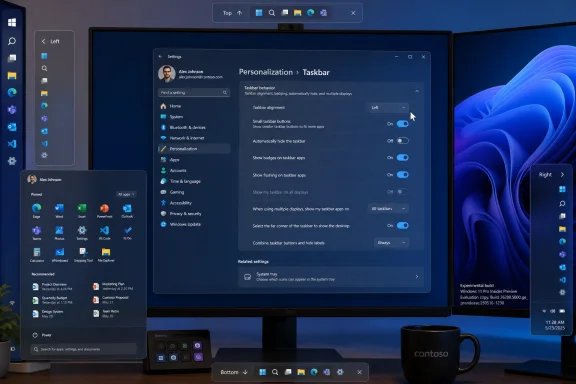
On May 15, 2026, Microsoft said Windows 11 Insiders in the Experimental channel would begin receiving taskbar and Start menu personalization changes, including the ability to place the taskbar on any screen edge and choose smaller taskbar buttons and Start menu layouts. The move is not just a nostalgia play for Windows 10 holdouts. It is Microsoft admitting, without quite saying so, that Windows 11’s original simplicity bargain went too far. Four and a half years after centering the Start button and pinning the taskbar to the bottom, Redmond is rediscovering that restraint and removal are not the same thing.
Windows 11 arrived with a theory of the desktop: make it calmer, more centered, more visually coherent, and less burdened by decades of inherited affordances. That theory produced a pretty operating system, at least in screenshots. It also produced a taskbar that felt oddly less capable than the one many users had relied on for years.
The missing pieces were not obscure registry knobs known only to shell tweakers. Moving the taskbar to the top or sides of the screen, shrinking its footprint, showing labels, and arranging work around a preferred edge were core habits for developers, sysadmins, ultrawide users, multi-monitor operators, and anyone who had spent years bending Windows to fit a workflow. Windows 11 did not merely change the defaults; it narrowed the available vocabulary.
Microsoft has spent the years since launch slowly giving some of that vocabulary back. The return of taskbar labels and “never combine” options already signaled a retreat from the original minimalism. The latest Insider work goes further because it restores something more spatial: the right to decide where the operating system’s main control strip lives.
That matters because the taskbar is not decorative chrome. It is the desktop’s cockpit panel. When Microsoft moves or removes its controls, it changes the physical rhythm of using a PC.
The settings live where most users would expect them: Settings, Personalization, Taskbar, Taskbar behaviors. Icon alignment changes with orientation. On a top or bottom taskbar, icons can be left-aligned or centered. On a vertical taskbar, they can be top-aligned or centered.
This is not a complete restoration of the old Windows 10 taskbar, and Microsoft is being careful about that. Auto-hide and the tablet-optimized taskbar are not yet supported in alternate positions. Touch gestures are still being worked on. Search boxes are not supported in alternate positions and will appear as icons for now.
Those omissions are not footnotes. They show that the modern Windows 11 shell is not simply Windows 10 with rounded corners. Microsoft rebuilt enough of the taskbar experience that restoring old behaviors requires new engineering, new animations, new layout logic, and fresh testing across touch, scaling, multiple monitors, accessibility settings, and language directions.
That is the charitable explanation. The less charitable one is that Microsoft shipped Windows 11 before its most important desktop surface had feature parity with what it replaced.
Developers are the obvious beneficiaries. A few extra lines of code visible at all times can reduce scrolling and context loss. Spreadsheet users get a little more row visibility. Laptop users on 13- and 14-inch screens gain breathing room where the panel is most constrained.
The side taskbar also changes how users manage many open windows. Microsoft specifically calls out vertical layouts paired with “never combine” and labels, where each app window can appear as a separate labeled button. That is a very un-Windows-11 sentence in the best possible way: dense, practical, and unapologetically productivity-minded.
This is where the update stops being about sentimentality. Windows 10-style controls are not valuable because they are old. They are valuable because they encode workflows that Windows 11 initially treated as expendable.
The return of compact density is another quiet concession. Windows 11’s original interface favored touch-friendly targets, padding, and visual calm. Those are legitimate goals, especially on hybrid devices. But Windows is still heavily used on clamshell laptops, desktops, virtual machines, lab benches, trading desks, and remote admin sessions where density is not clutter; it is efficiency.
The best Windows design has usually allowed both instincts to coexist. A default can be spacious and modern while still permitting a compact layout for users who know what they want. Windows 11’s launch-era taskbar too often confused default with destiny.
For IT departments, this kind of option also reduces friction in migrations. Users moving from Windows 10 to Windows 11 have had to accept a bundle of behavioral changes, some of which looked arbitrary from the outside. Giving people a smaller bar and familiar edge placement will not solve every adoption complaint, but it removes one of the most visible daily irritants.
That last feature may sound minor until you have watched someone share a screen during a customer call, training session, livestream, classroom demo, or support escalation. Windows surfaces identity everywhere. Being able to hide the name and profile image from Start is a small privacy improvement that acknowledges how often the desktop is now projected, recorded, streamed, and remoted.
The section toggles also address one of Windows 11’s stranger tensions. Microsoft wanted Start to be a clean launcher, a recent activity hub, and a recommendation surface. Those are different jobs. Some users want a minimal grid of pinned apps. Others want an app list. Others do want recent files and newly installed apps. The mistake was treating the compromise layout as if it were universally acceptable.
A Start menu that can be made smaller, stripped down, or expanded is not just a customization perk. It is an admission that Start serves different roles depending on the user. A developer’s launcher, a family PC’s app board, a managed enterprise desktop, and a presenter’s screen-sharing environment should not have to wear the same outfit.
“Recommended” has become a loaded word across software. It can mean useful suggestions, but it can also mean promotional placement, engagement bait, or a vendor’s priorities masquerading as assistance. “Recent” is less ambitious and more honest. It tells the user that this area is about activity, not prophecy.
More practically, Microsoft says it is separating Start menu recommendations from File Explorer recent items and jump lists. Today, disabling recommendations in Start can have broader effects elsewhere in Windows. That coupling never made much sense from a user’s perspective. A person may not want files appearing in Start but may still rely on File Explorer recents or app jump lists.
Decoupling those controls is the sort of plumbing work that rarely gets applause but improves trust. When a setting says it affects Start, it should affect Start. Windows has accumulated too many controls whose side effects only become clear after users break a workflow they did not know was connected.
The refinement of file suggestions also matters. Recent files can be useful when they are relevant and unnerving when they are not. The difference between convenience and creepiness is often context: the right document at the right moment feels helpful; the wrong document during a meeting feels like a liability.
This is especially important because Microsoft has been reshaping the Windows Insider Program itself, with Experimental, Canary, Dev, Beta, and release-oriented channels carrying different expectations. A feature appearing in a preview build is a strong signal of intent, but not a guarantee of timing, final behavior, or broad availability.
Microsoft’s own language leaves room for iteration. Some features are rolling out today, others over coming weeks, and several known gaps remain. Multi-monitor per-position behavior and drag-and-drop are described as areas under evaluation, not as completed commitments.
That caveat should not dull the significance of the move. The Windows shell changes slowly because it is one of the most heavily used pieces of software on earth. If Microsoft is publicly showing top, left, and right taskbars in official preview materials, the company has crossed an internal threshold. The movable taskbar is no longer just a community request; it is back on the product roadmap.
Users do not experience Windows quality only through crash rates and benchmark numbers. They experience it when a click lands where expected, when a setting does only what it says, when a multi-monitor setup remembers its arrangement, when a file suggestion does not expose something awkward, and when an upgrade does not erase a habit for no obvious reason.
The restoration of taskbar flexibility is therefore both a product change and a trust repair exercise. Microsoft is trying to show that Windows 11 can evolve without treating user complaints as resistance to progress. That is a healthier posture than insisting that every removed feature was a necessary modernization.
There is still a tension Microsoft cannot escape. Windows must serve touch devices and desktops, casual users and power users, Microsoft 365 subscribers and local-account traditionalists, Copilot-forward experiments and locked-down enterprise images. The Windows 11 launch design leaned toward coherence. This update leans back toward accommodation.
The trick is not to let accommodation become chaos. Windows 10’s sprawl had its own problems. But the answer to sprawl was never to remove the knobs people actually used while leaving less coherent complexity elsewhere.
Windows 10 remains a huge presence in business environments, and every Windows 11 improvement now lands against the backdrop of migration pressure. When a user’s first complaint after an upgrade is “where did my taskbar go?” or “why can’t I put it on the side anymore?” IT has to spend time explaining a design decision it did not make. Restored controls reduce that burden.
The Start menu privacy and layout changes also have enterprise implications. Screen sharing is routine. Recent-file surfaces can be sensitive. Presentation machines and shared devices benefit from cleaner launchers. A Start menu that can hide identity elements and independently manage recent activity is easier to justify in managed environments.
The open question is policy. Microsoft has not, in this preview announcement, made the administrative control story the centerpiece. For enterprises, the difference between a nice user setting and a deployable standard is whether it can be configured, documented, and enforced through management tooling. If these options mature into stable policies, they become operationally meaningful. If they remain mostly per-user preferences, they are still welcome but less strategic.
Those tools will not disappear. Many users prefer a full Windows 10-style Start menu, deeper theming, richer taskbar behavior, or control Microsoft is unlikely to bless. But the more Microsoft restores first-party options, the narrower the mainstream case for shell replacement becomes.
That is good for security and stability. Shell customization utilities can be excellent, but they operate in sensitive territory. They hook into workflows that Windows updates can break. Enterprises are understandably wary of adding unsupported interface layers simply to regain features users once had natively.
Microsoft does not need to out-customize the customization market. It needs to provide enough built-in flexibility that ordinary users and cautious IT shops are not forced into that market for basic ergonomics. Movable taskbars, smaller icons, and Start menu section toggles are exactly that kind of baseline.
At the same time, Microsoft should notice why those tools became popular. Users were not merely asking for a retro skin. They were asking for agency. Windows 11 will age better if Microsoft treats agency as part of the product rather than an exception granted after backlash.
The problem was not that Microsoft changed the default. Defaults change. The problem was that Microsoft removed long-standing alternatives and then asked users to treat the loss as modernization. That is a very different bargain.
The new approach is better: keep the modern default, but give power users and habit-bound users practical choices. A centered bottom taskbar can remain the out-of-box identity of Windows 11. A left-side taskbar can coexist with it. A compact taskbar can be an option rather than a regression. A minimal Start menu can sit one setting away from a fuller one.
That is the difference between design and dogma. Design chooses a point of view. Dogma forbids escape.
Windows has survived because it is adaptable. It runs on gaming rigs, office desktops, kiosks, classroom laptops, engineering workstations, and remote cloud PCs. The more Microsoft tries to make all of those contexts behave like one idealized Surface demo, the more friction it creates. The more it lets users tune the shell without breaking the platform, the more Windows feels like Windows.
A vertical taskbar without polished touch behavior may disappoint tablet users. A top taskbar with incomplete flyout edge cases may irritate precision users. A multi-monitor setup that cannot assign different taskbar positions per display may feel half-restored to workstation users. Microsoft is choosing to ship the core first and iterate, which is reasonable for Insiders but risky if rushed to stable builds.
There is also the question of consistency across the Windows ecosystem. Widgets, Copilot surfaces, notification panels, system tray elements, overflow menus, app thumbnails, and third-party app behaviors all have to understand that the taskbar may no longer be at the bottom. The old Windows shell had years of scar tissue around that flexibility. The new one has to earn it again.
That is why the Experimental channel placement is appropriate. These are not mere toggle additions. They are layout contracts that every adjacent shell surface must honor.
Windows has long suffered from split-brain configuration: some controls in Settings, others in Control Panel, some in Group Policy, some in registry keys, some exposed only through right-click context menus whose contents change from version to version. Windows 11 has improved this in places but has also hidden or flattened options in ways that frustrate experienced users.
The taskbar and Start changes are a chance to do better. A user should be able to understand the layout model from one place: where the taskbar sits, how icons align, whether buttons are compact, which Start sections appear, whether recent files show, and whether identity information is visible. If Microsoft makes those relationships clear, it reduces the sense that Windows is playing shell games with the user’s own desktop.
The decoupling of Start recommendations from File Explorer recents is especially encouraging here. It suggests Microsoft is not merely adding more switches; it is rethinking which switches should have been separate all along.
The movable taskbar is too visible to vanish without explanation, but its final timing remains uncertain. Microsoft will need to harden the feature across scaling modes, accessibility tools, language settings, multiple displays, virtual desktops, remote sessions, tablet postures, and enterprise management. The moment it reaches mainstream Windows 11, it will be judged not as a preview but as a promise kept or broken.
That is the correct standard. Users asked for the taskbar back because they rely on it. Restoring it poorly would be worse than waiting longer.
The Start menu changes face a different test. They must avoid becoming yet another layer of partially overlapping personalization. If “Pinned,” “All,” “Recent,” file recommendations, newly installed apps, account identity, and size settings all interact in confusing ways, the feature will feel like Microsoft added knobs without simplifying the machine. The goal should be fewer surprises, not merely more permutations.
That does not settle the migration question. Hardware requirements, application compatibility, enterprise validation, account policies, privacy concerns, update cadence, and user training still matter. But the shell is emotional terrain. A PC can meet every technical requirement and still feel wrong if the user’s daily navigation has been arbitrarily constrained.
The restored controls also arrive at a moment when Microsoft needs goodwill. Windows users have been asked to absorb AI integration, cloud nudges, account prompts, changing defaults, new servicing models, and security baselines that sometimes arrive with rough edges. Giving back straightforward local control over the desktop is a modest but symbolically powerful counterweight.
There is a lesson here that goes beyond the taskbar. Users are more open to change when they believe the vendor is not taking away leverage. Windows 11 can push forward while still preserving escape routes for people whose productivity depends on the old geometry.
Windows 11’s next phase will be judged less by whether it looks new and more by whether it feels negotiable. If Microsoft can deliver these taskbar and Start menu changes with polish, policy support, and respect for established workflows, the company will have done more than restore a few Windows 10-style switches. It will have rediscovered a durable truth about the PC: power users do not need every default to match their habits, but they do need the operating system to leave room for them.
 Microsoft’s Clean Break Finally Meets the Desktop’s Muscle Memory
Windows 11 arrived with a theory of the desktop: make it calmer, more centered, more visually coherent, and less burdened by decades of inherited affordances. That theory produced a pretty operating system, at least in screenshots. It also produced a taskbar that felt oddly less capable than the one many users had relied on for years.The missing pieces were not obscure registry knobs known only to shell tweakers. Moving the taskbar to the top or sides of the screen, shrinking its footprint, showing labels, and arranging work around a preferred edge were core habits for developers, sysadmins, ultrawide users, multi-monitor operators, and anyone who had spent years bending Windows to fit a workflow. Windows 11 did not merely change the defaults; it narrowed the available vocabulary.
Microsoft has spent the years since launch slowly giving some of that vocabulary back. The return of taskbar labels and “never combine” options already signaled a retreat from the original minimalism. The latest Insider work goes further because it restores something more spatial: the right to decide where the operating system’s main control strip lives.
That matters because the taskbar is not decorative chrome. It is the desktop’s cockpit panel. When Microsoft moves or removes its controls, it changes the physical rhythm of using a PC.
The Movable Taskbar Is Back, but This Is Not Windows 10 Reborn
The headline feature is straightforward: Windows 11 is gaining the ability to position the taskbar at the bottom, top, left, or right edge of the display. Microsoft says Start, Search, flyouts, tooltips, and animations will follow the taskbar’s location rather than behaving as if the bar still lived at the bottom. That detail is crucial, because an edge-positioned taskbar that spawns menus from the wrong place would feel like a hack rather than a supported feature.The settings live where most users would expect them: Settings, Personalization, Taskbar, Taskbar behaviors. Icon alignment changes with orientation. On a top or bottom taskbar, icons can be left-aligned or centered. On a vertical taskbar, they can be top-aligned or centered.
This is not a complete restoration of the old Windows 10 taskbar, and Microsoft is being careful about that. Auto-hide and the tablet-optimized taskbar are not yet supported in alternate positions. Touch gestures are still being worked on. Search boxes are not supported in alternate positions and will appear as icons for now.
Those omissions are not footnotes. They show that the modern Windows 11 shell is not simply Windows 10 with rounded corners. Microsoft rebuilt enough of the taskbar experience that restoring old behaviors requires new engineering, new animations, new layout logic, and fresh testing across touch, scaling, multiple monitors, accessibility settings, and language directions.
That is the charitable explanation. The less charitable one is that Microsoft shipped Windows 11 before its most important desktop surface had feature parity with what it replaced.
The Left and Right Edges Were Always About Work, Not Whim
Vertical taskbars have long been treated as a niche preference, but the niche has always been more rational than Microsoft’s early Windows 11 design allowed. Modern displays are wide. Documents, code editors, web pages, terminals, spreadsheets, and chat windows often benefit more from vertical space than horizontal space. A taskbar on the side trades an abundant dimension for a scarce one.Developers are the obvious beneficiaries. A few extra lines of code visible at all times can reduce scrolling and context loss. Spreadsheet users get a little more row visibility. Laptop users on 13- and 14-inch screens gain breathing room where the panel is most constrained.
The side taskbar also changes how users manage many open windows. Microsoft specifically calls out vertical layouts paired with “never combine” and labels, where each app window can appear as a separate labeled button. That is a very un-Windows-11 sentence in the best possible way: dense, practical, and unapologetically productivity-minded.
This is where the update stops being about sentimentality. Windows 10-style controls are not valuable because they are old. They are valuable because they encode workflows that Windows 11 initially treated as expendable.
Smaller Icons Are a Small Feature with an Outsized Message
Microsoft is also restoring a compact taskbar option, though the exact behavior has evolved during testing. In the new Experimental rollout, enabling smaller taskbar buttons is intended to produce smaller icons and a shorter taskbar, reclaiming more vertical room for apps. That is more meaningful than simply shrinking icons inside the same fixed-height strip.The return of compact density is another quiet concession. Windows 11’s original interface favored touch-friendly targets, padding, and visual calm. Those are legitimate goals, especially on hybrid devices. But Windows is still heavily used on clamshell laptops, desktops, virtual machines, lab benches, trading desks, and remote admin sessions where density is not clutter; it is efficiency.
The best Windows design has usually allowed both instincts to coexist. A default can be spacious and modern while still permitting a compact layout for users who know what they want. Windows 11’s launch-era taskbar too often confused default with destiny.
For IT departments, this kind of option also reduces friction in migrations. Users moving from Windows 10 to Windows 11 have had to accept a bundle of behavioral changes, some of which looked arbitrary from the outside. Giving people a smaller bar and familiar edge placement will not solve every adoption complaint, but it removes one of the most visible daily irritants.
The Start Menu Is Being Recast as a Surface Users Can Prune
The Start menu changes are just as important, even if they are less visually dramatic than moving the taskbar to the left edge. Microsoft is testing controls that let users choose smaller or larger Start menu formats, hide or show sections such as Pinned, Recommended, and All, and remove the user name and profile image from Start.That last feature may sound minor until you have watched someone share a screen during a customer call, training session, livestream, classroom demo, or support escalation. Windows surfaces identity everywhere. Being able to hide the name and profile image from Start is a small privacy improvement that acknowledges how often the desktop is now projected, recorded, streamed, and remoted.
The section toggles also address one of Windows 11’s stranger tensions. Microsoft wanted Start to be a clean launcher, a recent activity hub, and a recommendation surface. Those are different jobs. Some users want a minimal grid of pinned apps. Others want an app list. Others do want recent files and newly installed apps. The mistake was treating the compromise layout as if it were universally acceptable.
A Start menu that can be made smaller, stripped down, or expanded is not just a customization perk. It is an admission that Start serves different roles depending on the user. A developer’s launcher, a family PC’s app board, a managed enterprise desktop, and a presenter’s screen-sharing environment should not have to wear the same outfit.
“Recommended” Becoming “Recent” Is More Than a Rename
Microsoft is also changing the way Start recommendations work. The “Recommended” area is being renamed “Recent,” which is a clearer description of what many users actually see there: recently installed apps and recently used files. The rename is a subtle but important retreat from the language of algorithmic helpfulness.“Recommended” has become a loaded word across software. It can mean useful suggestions, but it can also mean promotional placement, engagement bait, or a vendor’s priorities masquerading as assistance. “Recent” is less ambitious and more honest. It tells the user that this area is about activity, not prophecy.
More practically, Microsoft says it is separating Start menu recommendations from File Explorer recent items and jump lists. Today, disabling recommendations in Start can have broader effects elsewhere in Windows. That coupling never made much sense from a user’s perspective. A person may not want files appearing in Start but may still rely on File Explorer recents or app jump lists.
Decoupling those controls is the sort of plumbing work that rarely gets applause but improves trust. When a setting says it affects Start, it should affect Start. Windows has accumulated too many controls whose side effects only become clear after users break a workflow they did not know was connected.
The refinement of file suggestions also matters. Recent files can be useful when they are relevant and unnerving when they are not. The difference between convenience and creepiness is often context: the right document at the right moment feels helpful; the wrong document during a meeting feels like a liability.
Insider First Means Hope, Not a Shipping Date
The changes are rolling out first to Windows Insiders in the Experimental channel, including the 26H1-era build stream Microsoft is using to test future platform work. That means ordinary Windows 11 users should not treat this as a feature that will necessarily arrive on their production PCs next week. Experimental channel work is, by design, unsettled.This is especially important because Microsoft has been reshaping the Windows Insider Program itself, with Experimental, Canary, Dev, Beta, and release-oriented channels carrying different expectations. A feature appearing in a preview build is a strong signal of intent, but not a guarantee of timing, final behavior, or broad availability.
Microsoft’s own language leaves room for iteration. Some features are rolling out today, others over coming weeks, and several known gaps remain. Multi-monitor per-position behavior and drag-and-drop are described as areas under evaluation, not as completed commitments.
That caveat should not dull the significance of the move. The Windows shell changes slowly because it is one of the most heavily used pieces of software on earth. If Microsoft is publicly showing top, left, and right taskbars in official preview materials, the company has crossed an internal threshold. The movable taskbar is no longer just a community request; it is back on the product roadmap.
The Real Story Is Microsoft’s New Posture Toward Feedback
This rollout fits into a broader 2026 messaging campaign around “Windows quality.” Microsoft has been talking more openly about performance, reliability, craft, and responsiveness to feedback. The taskbar and Start menu are ideal symbols for that campaign because they are where every abstraction collapses into muscle memory.Users do not experience Windows quality only through crash rates and benchmark numbers. They experience it when a click lands where expected, when a setting does only what it says, when a multi-monitor setup remembers its arrangement, when a file suggestion does not expose something awkward, and when an upgrade does not erase a habit for no obvious reason.
The restoration of taskbar flexibility is therefore both a product change and a trust repair exercise. Microsoft is trying to show that Windows 11 can evolve without treating user complaints as resistance to progress. That is a healthier posture than insisting that every removed feature was a necessary modernization.
There is still a tension Microsoft cannot escape. Windows must serve touch devices and desktops, casual users and power users, Microsoft 365 subscribers and local-account traditionalists, Copilot-forward experiments and locked-down enterprise images. The Windows 11 launch design leaned toward coherence. This update leans back toward accommodation.
The trick is not to let accommodation become chaos. Windows 10’s sprawl had its own problems. But the answer to sprawl was never to remove the knobs people actually used while leaving less coherent complexity elsewhere.
Enterprise IT Will Read This as a Migration Sweetener
For administrators, the taskbar’s return to flexibility is not just a matter of user happiness. It affects training, help desk load, standard operating procedures, and the psychological cost of migration. Users are more tolerant of change when familiar escape hatches exist.Windows 10 remains a huge presence in business environments, and every Windows 11 improvement now lands against the backdrop of migration pressure. When a user’s first complaint after an upgrade is “where did my taskbar go?” or “why can’t I put it on the side anymore?” IT has to spend time explaining a design decision it did not make. Restored controls reduce that burden.
The Start menu privacy and layout changes also have enterprise implications. Screen sharing is routine. Recent-file surfaces can be sensitive. Presentation machines and shared devices benefit from cleaner launchers. A Start menu that can hide identity elements and independently manage recent activity is easier to justify in managed environments.
The open question is policy. Microsoft has not, in this preview announcement, made the administrative control story the centerpiece. For enterprises, the difference between a nice user setting and a deployable standard is whether it can be configured, documented, and enforced through management tooling. If these options mature into stable policies, they become operationally meaningful. If they remain mostly per-user preferences, they are still welcome but less strategic.
The Third-Party Shell Market Just Got a Warning Shot
One underappreciated consequence of Windows 11’s early taskbar rigidity was the oxygen it gave to third-party customization tools. Apps that restore classic Start menus, taskbar behaviors, labels, density, and positioning became more attractive because Microsoft had left obvious demand unmet.Those tools will not disappear. Many users prefer a full Windows 10-style Start menu, deeper theming, richer taskbar behavior, or control Microsoft is unlikely to bless. But the more Microsoft restores first-party options, the narrower the mainstream case for shell replacement becomes.
That is good for security and stability. Shell customization utilities can be excellent, but they operate in sensitive territory. They hook into workflows that Windows updates can break. Enterprises are understandably wary of adding unsupported interface layers simply to regain features users once had natively.
Microsoft does not need to out-customize the customization market. It needs to provide enough built-in flexibility that ordinary users and cautious IT shops are not forced into that market for basic ergonomics. Movable taskbars, smaller icons, and Start menu section toggles are exactly that kind of baseline.
At the same time, Microsoft should notice why those tools became popular. Users were not merely asking for a retro skin. They were asking for agency. Windows 11 will age better if Microsoft treats agency as part of the product rather than an exception granted after backlash.
The Windows 11 Design Bet Is Being Renegotiated, Not Reversed
It would be easy to frame this update as Microsoft admitting Windows 11’s interface redesign was a mistake. That is too simple. Centered icons, rounded menus, simplified surfaces, and cleaner defaults did help Windows look less like a museum of every decision made since 1995. Many users adjusted quickly, and some prefer the newer arrangement.The problem was not that Microsoft changed the default. Defaults change. The problem was that Microsoft removed long-standing alternatives and then asked users to treat the loss as modernization. That is a very different bargain.
The new approach is better: keep the modern default, but give power users and habit-bound users practical choices. A centered bottom taskbar can remain the out-of-box identity of Windows 11. A left-side taskbar can coexist with it. A compact taskbar can be an option rather than a regression. A minimal Start menu can sit one setting away from a fuller one.
That is the difference between design and dogma. Design chooses a point of view. Dogma forbids escape.
Windows has survived because it is adaptable. It runs on gaming rigs, office desktops, kiosks, classroom laptops, engineering workstations, and remote cloud PCs. The more Microsoft tries to make all of those contexts behave like one idealized Surface demo, the more friction it creates. The more it lets users tune the shell without breaking the platform, the more Windows feels like Windows.
The Taskbar’s Return Carries a Few Hard Limits
The preview is promising, but users should keep expectations grounded. The alternate-position taskbar still has unfinished pieces, and those pieces matter most to the people likely to use the feature early. Auto-hide support, touch gestures, search box behavior, drag-and-drop, and multi-monitor nuance are not cosmetic details.A vertical taskbar without polished touch behavior may disappoint tablet users. A top taskbar with incomplete flyout edge cases may irritate precision users. A multi-monitor setup that cannot assign different taskbar positions per display may feel half-restored to workstation users. Microsoft is choosing to ship the core first and iterate, which is reasonable for Insiders but risky if rushed to stable builds.
There is also the question of consistency across the Windows ecosystem. Widgets, Copilot surfaces, notification panels, system tray elements, overflow menus, app thumbnails, and third-party app behaviors all have to understand that the taskbar may no longer be at the bottom. The old Windows shell had years of scar tissue around that flexibility. The new one has to earn it again.
That is why the Experimental channel placement is appropriate. These are not mere toggle additions. They are layout contracts that every adjacent shell surface must honor.
The Settings App Becomes the Battleground for Trust
One promising aspect of the update is that Microsoft is putting the controls in Settings rather than hiding them behind registry edits, feature flags, or obscure legacy dialogs. That sounds obvious, but it is central to the trust story. If a feature is officially supported, it should be discoverable.Windows has long suffered from split-brain configuration: some controls in Settings, others in Control Panel, some in Group Policy, some in registry keys, some exposed only through right-click context menus whose contents change from version to version. Windows 11 has improved this in places but has also hidden or flattened options in ways that frustrate experienced users.
The taskbar and Start changes are a chance to do better. A user should be able to understand the layout model from one place: where the taskbar sits, how icons align, whether buttons are compact, which Start sections appear, whether recent files show, and whether identity information is visible. If Microsoft makes those relationships clear, it reduces the sense that Windows is playing shell games with the user’s own desktop.
The decoupling of Start recommendations from File Explorer recents is especially encouraging here. It suggests Microsoft is not merely adding more switches; it is rethinking which switches should have been separate all along.
Microsoft Still Has to Prove It Can Finish the Job
Windows enthusiasts have learned to distinguish between a promising Insider build and a finished feature. Some preview features arrive quickly. Some change names. Some are delayed, limited to certain regions, or quietly revised. Some never arrive in the form users first saw.The movable taskbar is too visible to vanish without explanation, but its final timing remains uncertain. Microsoft will need to harden the feature across scaling modes, accessibility tools, language settings, multiple displays, virtual desktops, remote sessions, tablet postures, and enterprise management. The moment it reaches mainstream Windows 11, it will be judged not as a preview but as a promise kept or broken.
That is the correct standard. Users asked for the taskbar back because they rely on it. Restoring it poorly would be worse than waiting longer.
The Start menu changes face a different test. They must avoid becoming yet another layer of partially overlapping personalization. If “Pinned,” “All,” “Recent,” file recommendations, newly installed apps, account identity, and size settings all interact in confusing ways, the feature will feel like Microsoft added knobs without simplifying the machine. The goal should be fewer surprises, not merely more permutations.
The Windows 10 Holdouts Just Got One Less Reason to Hold Out
The practical significance of this update is not that Windows 11 is becoming Windows 10 again. It is that Microsoft is removing a category of needless objections. For users who rejected Windows 11 because the taskbar felt like a downgrade, the argument against upgrading is weaker than it was last week.That does not settle the migration question. Hardware requirements, application compatibility, enterprise validation, account policies, privacy concerns, update cadence, and user training still matter. But the shell is emotional terrain. A PC can meet every technical requirement and still feel wrong if the user’s daily navigation has been arbitrarily constrained.
The restored controls also arrive at a moment when Microsoft needs goodwill. Windows users have been asked to absorb AI integration, cloud nudges, account prompts, changing defaults, new servicing models, and security baselines that sometimes arrive with rough edges. Giving back straightforward local control over the desktop is a modest but symbolically powerful counterweight.
There is a lesson here that goes beyond the taskbar. Users are more open to change when they believe the vendor is not taking away leverage. Windows 11 can push forward while still preserving escape routes for people whose productivity depends on the old geometry.
The Restored Taskbar Is a Roadmap in Miniature
The most concrete read of Microsoft’s current plan is that the company wants to make Windows 11 feel less rigid without abandoning its visual identity. That is the right direction, provided the implementation survives the preview pipeline intact.- Windows 11 Insiders in the Experimental channel are the first audience for the restored taskbar positioning controls.
- The taskbar can be placed on the top, bottom, left, or right edge, with flyouts and alignment designed to follow that location.
- The compact taskbar option is meant to reduce both icon size and taskbar height, not merely squeeze the same bar visually.
- Start menu controls are expanding to include size choices, section-level visibility toggles, and the option to hide account identity.
- Microsoft is separating Start’s recent and recommendation behavior from File Explorer recent items and jump lists.
- Several important edge cases, including auto-hide in alternate positions, touch gestures, and some multi-monitor refinements, remain unfinished or under evaluation.
Windows 11’s next phase will be judged less by whether it looks new and more by whether it feels negotiable. If Microsoft can deliver these taskbar and Start menu changes with polish, policy support, and respect for established workflows, the company will have done more than restore a few Windows 10-style switches. It will have rediscovered a durable truth about the PC: power users do not need every default to match their habits, but they do need the operating system to leave room for them.
References
- Primary source: www.guru3d.com
Published: Mon, 18 May 2026 04:35:00 GMT

Microsoft Restores Windows 10-Style Taskbar Controls in Windows 11
Microsoft is preparing a wider set of personalization options for Windows 11, with changes focused on the taskbar and Start Menu. The update restores several capabilities that many users previously associated with Windows 10, including the option to move the taskbar away from its default bottom... www.guru3d.com
- Related coverage: windowscentral.com

The movable taskbar is finally back in Windows 11 — and yes, you can try it right now
Windows 11 Build 26300.8493 introduces the ability to move the Taskbar and resize icons, reversing a major launch-day limitation. www.windowscentral.com
- Related coverage: notebookcheck.net

Microsoft brings back Windows 10 taskbar customizations to Windows 11
Microsoft is finally giving Windows 11 users more control over the taskbar again, including full screen-edge placement and a smaller, more compact mode. The update also improves how menus and window labels behave depending on the taskbar position. www.notebookcheck.net
- Related coverage: pcworld.com

How to move Windows 11’s Start menu to the left corner
If you don't like the new, centered look of Windows 11's Start menu and Taskbar icons, here's how to move them back to their familiar left-hand corner. www.pcworld.com
- Related coverage: guidingtech.com
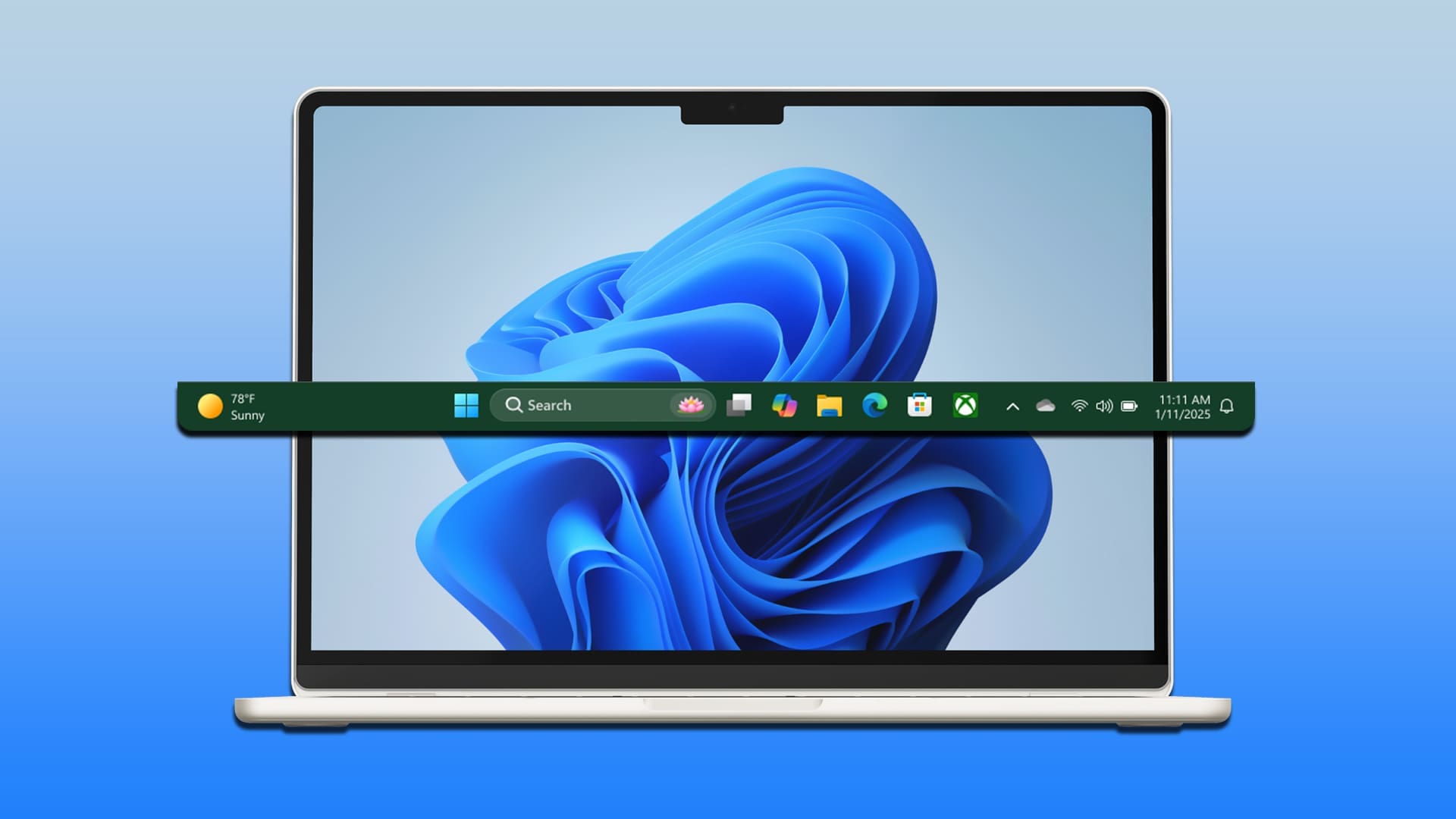
How to Move the Taskbar on Windows 11
Discover if it’s possible to move the taskbar in Windows 11, and how to move the taskbar on Windows 11 devices to suit your personal preferences.www.guidingtech.com
- Official source: support.microsoft.com
Customize the Taskbar in Windows - Microsoft Support
Learn how to use the taskbar features in Windows. Hide the taskbar, pin an app, change the location, and more with taskbar settings. support.microsoft.com
- Related coverage: howtogeek.com

Windows 11 Lets You Move the Taskbar to the Left or Right, But It's Broken
Does this mean we could have an official option soon? www.howtogeek.com
- Related coverage: engadget.com

Microsoft lets Insiders choose their Windows 11 Start menu size - Engadget
The company is also testing the ability to reposition the Windows 11 taskbar. www.engadget.com
- Official source: learn.microsoft.com

- Related coverage: techadvisor.com

How to customise the Windows 11 taskbar
Windows 11 removed some Windows 10 taskbar features, but you can add many of them back or customise it in other ways www.techadvisor.com
- Official source: intowindows.com

How To Make Windows 11 Taskbar Look Like Windows 10
Now that Microsoft has officially stopped supporting Windows 10, millions of users who were hesitant to upgrade to Windows 11 have finally begun doing so. www.intowindows.com
- Related coverage: moneycontrol.com
- Related coverage: techradar.com
- Related coverage: tomsguide.com
- Related coverage: pcgamer.com
- Official source: blogs.windows.com

Improving Windows quality: Making Taskbar and Start more personal
In our commitment to Windows quality, we outlined our plans to deliver improvements in performance, reliability, and craft. We are also committed to blogs.windows.com
- Related coverage: elevenforum.com

Microsoft making Taskbar and Start more personal in Windows 11
Windows Blogs: In our commitment to Windows quality, we outlined our plans to deliver improvements in performance, reliability, and craft. We are also committed to being transparent about the work behind those efforts, including what we are shipping, why we prioritized those features, and where... www.elevenforum.com
