

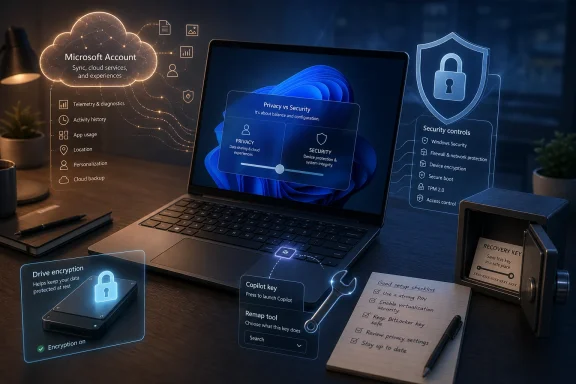
Paul Thurrott’s May 2026 “Switcher” essay argues that Windows 11 can be made more private and less Microsoft-centric, but that abandoning a Microsoft account without replacing the security it enables can make a PC less safe in practice. That is the tension Windows power users keep tripping over: privacy and security overlap, but they are not the same thing. Treating them as interchangeable turns a legitimate objection to Microsoft’s overreach into advice that can leave ordinary users worse protected than before.
The Microsoft account fight has become a proxy war for every frustration people have with Windows 11. It stands in for telemetry, OneDrive nudges, Edge persistence, Copilot promotion, Microsoft 365 upsells, Start menu advertising, and the uneasy feeling that the operating system has become less like a neutral computing environment and more like a client for Microsoft’s cloud business.
That anger is earned. Windows 11 often behaves as though the user is merely borrowing a device that exists to advance Microsoft’s services strategy. The Copilot key is a perfect small example: a physical keyboard change that presumes Microsoft’s assistant deserves permanent hardware-level real estate, then gives users only constrained ways to repurpose it.
But the account itself is not the whole story. A Microsoft account can be a privacy liability, a convenience layer, an identity provider, a recovery mechanism, and a security dependency all at once. That complexity is exactly why “use a local account” is not a complete answer.
The older Windows model felt simpler because it was simpler. You created a local user, maybe added a password, and the machine was yours. The modern model assumes that identity, encryption, recovery, app licensing, device tracking, browser sync, and cloud backup are intertwined. You can dislike that bargain and still need to understand what breaks when you opt out.
Those are not semantic quibbles. A system can be more private and less secure. A system can be more secure and less private. A system can be both, but only if the user does the work that the default platform otherwise tries to automate.
That is Thurrott’s central objection, and it is the right one. A local Windows account does reduce one class of Microsoft dependency, but it also removes some default safety rails that mainstream users may not know they were relying on. The risk is not that experts will choose local accounts; the risk is that experts will prescribe local accounts to everyone else without prescribing the replacement controls.
This is where Linux habits can mislead Windows users. Linux’s local-account model feels liberating to people who know what they are doing, especially those who value minimal vendor mediation. But Linux users who care about security also tend to understand disk encryption, package trust, sudo boundaries, recovery media, backup discipline, and the consequences of losing a passphrase. That culture does not transfer automatically to a Best Buy laptop running Windows 11 Home.
Both things can be true. The Microsoft account lets Windows connect the device to BitLocker recovery, Microsoft Store licensing, OneDrive, Find My Device, Windows Backup, sync settings, passkeys, and other account-bound services. It also gives Microsoft another way to associate device usage with a persistent identity.
That is why the debate gets so heated. Microsoft is not merely asking users to sign into a web service. It is using the operating system’s first-run experience to define what “normal” ownership looks like. Increasingly, normal ownership means cloud identity first, local machine second.
For power users, that feels like a hostile inversion. For Microsoft, it is the logical consequence of treating Windows as one endpoint in a broader account-based security and services architecture. The problem is that Microsoft rarely admits the trade-off in plain language. It sells the convenience and security while minimizing the privacy cost.
That is not a small detail. A stolen unencrypted laptop is not just missing hardware; it is a data breach waiting for a screwdriver, a bootable USB stick, or a second computer. Your browser profile, documents, cached tokens, tax files, photos, SSH keys, and work data may all become someone else’s weekend project.
A local account can be used securely, but only if the user deliberately enables encryption and stores the recovery material somewhere safe. That means not just clicking a privacy-friendly setup path and calling it done. It means verifying the encryption state, understanding where the recovery key lives, and accepting that if the key is lost, the data may be gone.
This is where the privacy-first slogan fails ordinary users. Avoiding Microsoft’s cloud copy of a recovery key may be a rational choice for someone with a password manager, a printed emergency sheet, an offline backup, and the discipline to test recovery. It is not necessarily rational for a user who has never opened Disk Management and thinks “backup” means “I emailed it to myself once.”
A TPM is a hardware-backed security component used to protect cryptographic keys and support features such as measured boot, device encryption, Windows Hello, and credential protection. It can help ensure that secrets are released only when the system is in an expected state. It does not magically make Windows private, and it does not make Microsoft benevolent, but it is not accurately described as a surveillance implant.
The TPM requirement for Windows 11 was controversial because it cut off many otherwise functional PCs. Microsoft argued that the hardware baseline was necessary for a more secure ecosystem. Critics argued, fairly, that it accelerated hardware churn and gave Microsoft a convenient support boundary.
But a flawed platform requirement is not the same as a fake security feature. TPM-backed protections do raise the bar against real attacks, especially when paired with Secure Boot, virtualization-based security, and disk encryption. Dismissing that because Microsoft also abuses user trust elsewhere is analytically lazy.
It is also incomplete. Windows is not merely collecting crash dumps in a vacuum. It is part of a company that sells advertising, runs cloud services, promotes subscriptions, and increasingly treats the desktop as a recommendation surface. Users have learned that “recommended” often means “profitable for Microsoft.”
That history makes even defensible security decisions look suspicious. If Microsoft says a Microsoft account improves recovery, users remember the OneDrive setup dark patterns. If Microsoft says Copilot belongs on the keyboard, users remember Edge ignoring their browser preferences. If Microsoft says telemetry improves Windows, users ask why the off switch is not truly off.
Trust is cumulative, and Microsoft has spent too much of Windows 11 spending it down. That does not make every privacy-maximalist recommendation correct. It does explain why so many users are ready to believe the worst.
This is not just about AI. It is about who gets to decide what a PC is for. A key that cannot simply be disabled through normal settings tells users that Microsoft’s intent outranks their preference.
PowerToys Keyboard Manager can work around the problem. Third-party tools can work around many others. Enthusiasts can debloat, redirect, remap, uninstall, disable, script, block, and neuter. The existence of those tools is a testament to the Windows ecosystem’s resilience, but also an indictment of the defaults.
A healthy consumer operating system should not require a cottage industry of de-enshittification utilities. The fact that Windows can be made excellent after sufficient surgery is not the same as Windows being respectful out of the box.
But debloating is not risk-free. Removing components can affect updates, app dependencies, enterprise management, security baselines, recovery options, and future feature upgrades. A stripped-down Windows image may be exactly what an expert wants in a lab, VM, kiosk, or single-purpose machine. It may be a support nightmare on a family member’s daily driver.
The same is true of local accounts. There is nothing inherently reckless about them. Many administrators, developers, repair technicians, and privacy-conscious users have good reasons to prefer them. The recklessness starts when the account choice is treated as a magic privacy shield instead of one decision in a broader configuration.
The right question is not “Microsoft account or local account?” The right question is: what threat model are you designing for, and what are you willing to maintain after setup day?
That is not a moral failing. It is the normal condition of consumer computing. A secure platform has to protect users who are busy, distracted, underinformed, and inconsistent.
From that perspective, Microsoft’s account-first model has a defensible purpose. If signing in with a Microsoft account increases the odds that the device is encrypted, recoverable, and integrated with modern authentication, then it can be the safer default for many people. The catch is that Microsoft has polluted that safety argument by bundling it with marketing, upsells, and data collection.
This is the tragedy of Windows 11: Microsoft often has a good security reason somewhere inside a bad user experience. The company then acts surprised when users reject the whole package.
That does not mean enterprises love Microsoft’s consumer account pressure. It means they understand why unmanaged local identity is a risk at scale. A laptop that is private from Microsoft but invisible to IT is not a win for a regulated business.
The enterprise version of this debate is more mature because it is framed around controls rather than vibes. If a company uses Microsoft Entra ID, Intune, BitLocker recovery escrow, Defender, and compliance policies, it is making a centralized-management trade-off. There are privacy implications for employees, but there is also operational accountability.
Consumers deserve the same clarity. They should not be pushed into Microsoft accounts by omission, nor lured into local accounts by slogans. They should be told what each path does, what it exposes, and what it requires.
Microsoft could do this. It chooses not to, because frictionless account capture is more valuable than informed consent. The company’s current setup flow is designed less like a neutral configuration wizard and more like a funnel.
That funnel creates backlash. Users who might otherwise accept a Microsoft account resent being coerced. Users who choose a local account through workarounds feel clever but may bypass useful setup steps. Everyone becomes more ideological because the interface refuses to be candid.
The irony is that transparency would probably help Microsoft. Many users would still choose the Microsoft account if the trade-off were explained honestly. Others would choose local accounts and accept the responsibility. What breeds distrust is not merely the cloud requirement; it is the sense that Windows is hiding the ball.
That feeling has value. Computers should feel like tools, not billboards. Reducing unwanted integrations can reduce attack surface, cognitive load, and data exposure. A less noisy Windows install is often a better Windows install.
But privacy theater is possible, too. A local account on an unencrypted laptop is not a hardened system. A debloated install with neglected updates is not safer than a stock install. A machine with telemetry reduced but browser sync leaking everything to another vendor has not escaped the surveillance economy; it has merely changed landlords.
The goal should be operational privacy, not aesthetic purity. That means fewer unnecessary data flows, yes, but also strong authentication, encryption, backups, patched software, limited privilege, and recoverable credentials.
There are legitimate reasons to use a local account. A testing machine may not need cloud identity. A privacy-sensitive workstation may deliberately avoid account binding. A repair bench may need local admin access. A user may simply reject the idea that Microsoft should mediate access to hardware they bought.
Windows should support those choices cleanly. Not grudgingly, not through hidden commands, not through setup tricks that disappear in the next Insider build. Clean local-account support is part of what makes a general-purpose operating system general-purpose.
The problem is not the desire for local accounts. The problem is pretending the desire ends the security conversation. Ownership includes responsibility, and responsibility includes boring things like encryption status and recovery planning.
A cloud-backed recovery key can save a family’s photos. Windows Hello can reduce password reuse. Account-based device recovery can help after hardware failure. Store app identity can simplify reinstalls. These are real benefits, even if they arrive wrapped in Microsoft’s usual self-serving packaging.
Security professionals understand that the best control is often the one users do not have to remember to perform. Automatic encryption beats a blog post telling people to encrypt. Recovery escrow beats a sticky note that was thrown away during a move. Managed identity beats five local admin accounts named “Owner.”
That is why absolutist privacy advice can become anti-user. It may optimize for the fears of the most technical audience while underestimating the failure modes of everyone else.
Neither path absolves you. A Microsoft account is not a security force field. A local account is not a privacy force field. Windows 11 is secure only to the extent that its protections are enabled, maintained, and understood.
For enthusiasts, the best posture is humility. The configuration that works for you may be bad advice for your parents, your neighbor, or a small-business owner who just wants QuickBooks, email, and a working printer. The more technical the workaround, the more carefully it should be recommended.
That is not condescension. It is threat modeling with empathy.
Source: Thurrott.com Switcher 2026: Privacy, Security, and What Really Matters
 Windows 11’s Real Problem Is Not That It Has an Online Account
The Microsoft account fight has become a proxy war for every frustration people have with Windows 11. It stands in for telemetry, OneDrive nudges, Edge persistence, Copilot promotion, Microsoft 365 upsells, Start menu advertising, and the uneasy feeling that the operating system has become less like a neutral computing environment and more like a client for Microsoft’s cloud business.That anger is earned. Windows 11 often behaves as though the user is merely borrowing a device that exists to advance Microsoft’s services strategy. The Copilot key is a perfect small example: a physical keyboard change that presumes Microsoft’s assistant deserves permanent hardware-level real estate, then gives users only constrained ways to repurpose it.
But the account itself is not the whole story. A Microsoft account can be a privacy liability, a convenience layer, an identity provider, a recovery mechanism, and a security dependency all at once. That complexity is exactly why “use a local account” is not a complete answer.
The older Windows model felt simpler because it was simpler. You created a local user, maybe added a password, and the machine was yours. The modern model assumes that identity, encryption, recovery, app licensing, device tracking, browser sync, and cloud backup are intertwined. You can dislike that bargain and still need to understand what breaks when you opt out.
Privacy Advice Becomes Dangerous When It Borrows Security Language
The phrase “the only safe way to use Windows 11” sounds powerful because it collapses a complicated choice into a single instruction. In privacy circles, “safe” often means safe from vendor tracking, data aggregation, cloud identity, and compelled access. In security circles, “safe” more often means resilient against theft, malware, credential compromise, data loss, and unauthorized local access.Those are not semantic quibbles. A system can be more private and less secure. A system can be more secure and less private. A system can be both, but only if the user does the work that the default platform otherwise tries to automate.
That is Thurrott’s central objection, and it is the right one. A local Windows account does reduce one class of Microsoft dependency, but it also removes some default safety rails that mainstream users may not know they were relying on. The risk is not that experts will choose local accounts; the risk is that experts will prescribe local accounts to everyone else without prescribing the replacement controls.
This is where Linux habits can mislead Windows users. Linux’s local-account model feels liberating to people who know what they are doing, especially those who value minimal vendor mediation. But Linux users who care about security also tend to understand disk encryption, package trust, sudo boundaries, recovery media, backup discipline, and the consequences of losing a passphrase. That culture does not transfer automatically to a Best Buy laptop running Windows 11 Home.
The Microsoft Account Is a Privacy Trade-Off, Not a Security Scam
Microsoft has spent years making the Microsoft account harder to avoid during Windows setup, especially on consumer editions. The company’s explanation is usually framed around completing setup correctly, enabling services, and delivering the intended Windows experience. The less charitable but often more convincing interpretation is that Microsoft wants identity binding because identity binding makes the rest of its ecosystem stickier.Both things can be true. The Microsoft account lets Windows connect the device to BitLocker recovery, Microsoft Store licensing, OneDrive, Find My Device, Windows Backup, sync settings, passkeys, and other account-bound services. It also gives Microsoft another way to associate device usage with a persistent identity.
That is why the debate gets so heated. Microsoft is not merely asking users to sign into a web service. It is using the operating system’s first-run experience to define what “normal” ownership looks like. Increasingly, normal ownership means cloud identity first, local machine second.
For power users, that feels like a hostile inversion. For Microsoft, it is the logical consequence of treating Windows as one endpoint in a broader account-based security and services architecture. The problem is that Microsoft rarely admits the trade-off in plain language. It sells the convenience and security while minimizing the privacy cost.
Disk Encryption Is Where the Argument Gets Real
The most practical reason this debate matters is drive encryption. On many modern Windows 11 systems, device encryption or BitLocker-style protection is tied into the account and recovery-key flow. When everything works as Microsoft intends, the user signs in, the system drive is encrypted, and a recovery key can be retrieved later through the associated account.That is not a small detail. A stolen unencrypted laptop is not just missing hardware; it is a data breach waiting for a screwdriver, a bootable USB stick, or a second computer. Your browser profile, documents, cached tokens, tax files, photos, SSH keys, and work data may all become someone else’s weekend project.
A local account can be used securely, but only if the user deliberately enables encryption and stores the recovery material somewhere safe. That means not just clicking a privacy-friendly setup path and calling it done. It means verifying the encryption state, understanding where the recovery key lives, and accepting that if the key is lost, the data may be gone.
This is where the privacy-first slogan fails ordinary users. Avoiding Microsoft’s cloud copy of a recovery key may be a rational choice for someone with a password manager, a printed emergency sheet, an offline backup, and the discipline to test recovery. It is not necessarily rational for a user who has never opened Disk Management and thinks “backup” means “I emailed it to myself once.”
The TPM Is Not Microsoft’s Spy Chip
The Trusted Platform Module has become an unfortunate magnet for conspiracy-adjacent Windows commentary. Some critics talk about it as if it exists primarily to lock users into Microsoft’s control. That framing misses what TPMs actually do in the Windows security model.A TPM is a hardware-backed security component used to protect cryptographic keys and support features such as measured boot, device encryption, Windows Hello, and credential protection. It can help ensure that secrets are released only when the system is in an expected state. It does not magically make Windows private, and it does not make Microsoft benevolent, but it is not accurately described as a surveillance implant.
The TPM requirement for Windows 11 was controversial because it cut off many otherwise functional PCs. Microsoft argued that the hardware baseline was necessary for a more secure ecosystem. Critics argued, fairly, that it accelerated hardware churn and gave Microsoft a convenient support boundary.
But a flawed platform requirement is not the same as a fake security feature. TPM-backed protections do raise the bar against real attacks, especially when paired with Secure Boot, virtualization-based security, and disk encryption. Dismissing that because Microsoft also abuses user trust elsewhere is analytically lazy.
Telemetry Is the Original Sin That Poisons the Rest
The account debate would be less toxic if Windows 11 were more restrained everywhere else. Instead, Microsoft continues to insist on required diagnostic data, recommends optional diagnostic data, and uses Windows surfaces to promote Microsoft products and services. The company’s position is that diagnostic collection helps keep Windows reliable, secure, and up to date. That is plausible.It is also incomplete. Windows is not merely collecting crash dumps in a vacuum. It is part of a company that sells advertising, runs cloud services, promotes subscriptions, and increasingly treats the desktop as a recommendation surface. Users have learned that “recommended” often means “profitable for Microsoft.”
That history makes even defensible security decisions look suspicious. If Microsoft says a Microsoft account improves recovery, users remember the OneDrive setup dark patterns. If Microsoft says Copilot belongs on the keyboard, users remember Edge ignoring their browser preferences. If Microsoft says telemetry improves Windows, users ask why the off switch is not truly off.
Trust is cumulative, and Microsoft has spent too much of Windows 11 spending it down. That does not make every privacy-maximalist recommendation correct. It does explain why so many users are ready to believe the worst.
The Copilot Key Is the Whole Windows 11 Argument in Plastic
The Copilot key is not the most consequential Windows 11 controversy, but it may be the most revealing. It takes a keyboard layout, something users reasonably expect to be stable and personal, and turns it into a branded invocation point for Microsoft’s current strategic obsession. Then, when the user does not want it, Windows offers customization that still largely assumes the key should do something Microsoft approves.This is not just about AI. It is about who gets to decide what a PC is for. A key that cannot simply be disabled through normal settings tells users that Microsoft’s intent outranks their preference.
PowerToys Keyboard Manager can work around the problem. Third-party tools can work around many others. Enthusiasts can debloat, redirect, remap, uninstall, disable, script, block, and neuter. The existence of those tools is a testament to the Windows ecosystem’s resilience, but also an indictment of the defaults.
A healthy consumer operating system should not require a cottage industry of de-enshittification utilities. The fact that Windows can be made excellent after sufficient surgery is not the same as Windows being respectful out of the box.
Debloating Is a Scalpel, Not a Religion
Tools such as Tiny11 Builder, Win11Debloat, Rufus, PowerToys, and MSEdgeRedirect exist because Windows 11 gives technical users both too much unwanted behavior and enough flexibility to fight back. That is the paradox of modern Windows. It is irritatingly prescriptive at the surface and still surprisingly malleable underneath.But debloating is not risk-free. Removing components can affect updates, app dependencies, enterprise management, security baselines, recovery options, and future feature upgrades. A stripped-down Windows image may be exactly what an expert wants in a lab, VM, kiosk, or single-purpose machine. It may be a support nightmare on a family member’s daily driver.
The same is true of local accounts. There is nothing inherently reckless about them. Many administrators, developers, repair technicians, and privacy-conscious users have good reasons to prefer them. The recklessness starts when the account choice is treated as a magic privacy shield instead of one decision in a broader configuration.
The right question is not “Microsoft account or local account?” The right question is: what threat model are you designing for, and what are you willing to maintain after setup day?
Mainstream Users Need Defaults That Survive Real Life
Most people do not live in their operating system settings. They do not verify encryption state after setup. They do not maintain offline recovery keys. They do not keep full image backups. They do not understand the difference between a Windows password, a Microsoft account password, a PIN, a BitLocker recovery key, and a browser-saved credential.That is not a moral failing. It is the normal condition of consumer computing. A secure platform has to protect users who are busy, distracted, underinformed, and inconsistent.
From that perspective, Microsoft’s account-first model has a defensible purpose. If signing in with a Microsoft account increases the odds that the device is encrypted, recoverable, and integrated with modern authentication, then it can be the safer default for many people. The catch is that Microsoft has polluted that safety argument by bundling it with marketing, upsells, and data collection.
This is the tragedy of Windows 11: Microsoft often has a good security reason somewhere inside a bad user experience. The company then acts surprised when users reject the whole package.
Enterprise IT Already Knows This Is About Control
Business administrators are less sentimental about local accounts because they have lived the consequences of unmanaged machines. In a fleet environment, identity is policy. Devices need encryption escrow, compliance reporting, conditional access, remote wipe, update management, credential rotation, and audit trails.That does not mean enterprises love Microsoft’s consumer account pressure. It means they understand why unmanaged local identity is a risk at scale. A laptop that is private from Microsoft but invisible to IT is not a win for a regulated business.
The enterprise version of this debate is more mature because it is framed around controls rather than vibes. If a company uses Microsoft Entra ID, Intune, BitLocker recovery escrow, Defender, and compliance policies, it is making a centralized-management trade-off. There are privacy implications for employees, but there is also operational accountability.
Consumers deserve the same clarity. They should not be pushed into Microsoft accounts by omission, nor lured into local accounts by slogans. They should be told what each path does, what it exposes, and what it requires.
The Better Windows Setup Would Admit the Bargain
A more honest Windows setup would offer three clear paths. One would be a Microsoft account for users who want integrated recovery, sync, store access, and default cloud-backed security. Another would be a local account with explicit prompts to enable encryption and save recovery material. A third would be a work or school account for managed devices.Microsoft could do this. It chooses not to, because frictionless account capture is more valuable than informed consent. The company’s current setup flow is designed less like a neutral configuration wizard and more like a funnel.
That funnel creates backlash. Users who might otherwise accept a Microsoft account resent being coerced. Users who choose a local account through workarounds feel clever but may bypass useful setup steps. Everyone becomes more ideological because the interface refuses to be candid.
The irony is that transparency would probably help Microsoft. Many users would still choose the Microsoft account if the trade-off were explained honestly. Others would choose local accounts and accept the responsibility. What breeds distrust is not merely the cloud requirement; it is the sense that Windows is hiding the ball.
Privacy Without Maintenance Is Just Aesthetic Minimalism
There is a genre of privacy advice that focuses heavily on removing visible annoyances. No OneDrive. No Edge. No Microsoft account. No Copilot. No telemetry toggles left untouched. The resulting desktop feels cleaner, calmer, and more like the PC era many enthusiasts remember.That feeling has value. Computers should feel like tools, not billboards. Reducing unwanted integrations can reduce attack surface, cognitive load, and data exposure. A less noisy Windows install is often a better Windows install.
But privacy theater is possible, too. A local account on an unencrypted laptop is not a hardened system. A debloated install with neglected updates is not safer than a stock install. A machine with telemetry reduced but browser sync leaking everything to another vendor has not escaped the surveillance economy; it has merely changed landlords.
The goal should be operational privacy, not aesthetic purity. That means fewer unnecessary data flows, yes, but also strong authentication, encryption, backups, patched software, limited privilege, and recoverable credentials.
The Local Account Crowd Is Right About Ownership
It would be a mistake to dismiss local-account advocates as cranks. They are defending a principle that matters: a personal computer should remain usable without mandatory submission to a vendor identity system. That principle is not obsolete just because cloud services are convenient.There are legitimate reasons to use a local account. A testing machine may not need cloud identity. A privacy-sensitive workstation may deliberately avoid account binding. A repair bench may need local admin access. A user may simply reject the idea that Microsoft should mediate access to hardware they bought.
Windows should support those choices cleanly. Not grudgingly, not through hidden commands, not through setup tricks that disappear in the next Insider build. Clean local-account support is part of what makes a general-purpose operating system general-purpose.
The problem is not the desire for local accounts. The problem is pretending the desire ends the security conversation. Ownership includes responsibility, and responsibility includes boring things like encryption status and recovery planning.
The Microsoft Account Crowd Is Right About Human Failure
The strongest argument for Microsoft’s default is not that Microsoft deserves more data. It is that users lose passwords, forget backups, misplace laptops, ignore warnings, and click bad links. Security design has to assume imperfection.A cloud-backed recovery key can save a family’s photos. Windows Hello can reduce password reuse. Account-based device recovery can help after hardware failure. Store app identity can simplify reinstalls. These are real benefits, even if they arrive wrapped in Microsoft’s usual self-serving packaging.
Security professionals understand that the best control is often the one users do not have to remember to perform. Automatic encryption beats a blog post telling people to encrypt. Recovery escrow beats a sticky note that was thrown away during a move. Managed identity beats five local admin accounts named “Owner.”
That is why absolutist privacy advice can become anti-user. It may optimize for the fears of the most technical audience while underestimating the failure modes of everyone else.
The Safer Windows 11 Is The One You Actually Finish Configuring
The practical answer is less dramatic than either camp wants. If you use a Microsoft account, reduce the data sharing you can reduce, uninstall what you do not use, disable unnecessary sync, review privacy settings, and push back against Microsoft’s defaults. If you use a local account, enable drive encryption, save the recovery key securely, use a strong password or Windows Hello where appropriate, maintain backups, and keep the system patched.Neither path absolves you. A Microsoft account is not a security force field. A local account is not a privacy force field. Windows 11 is secure only to the extent that its protections are enabled, maintained, and understood.
For enthusiasts, the best posture is humility. The configuration that works for you may be bad advice for your parents, your neighbor, or a small-business owner who just wants QuickBooks, email, and a working printer. The more technical the workaround, the more carefully it should be recommended.
That is not condescension. It is threat modeling with empathy.
The Windows 11 Escape Plan Has To Include A Seatbelt
A privacy-first Windows 11 setup can make sense, but only when it is built as a complete system rather than a protest gesture. The point is not to replace Microsoft’s defaults with vibes. The point is to replace them with deliberate choices.- A local account can reduce Microsoft account dependency, but it should be paired with verified full-disk encryption.
- A recovery key that is not stored with Microsoft still needs to be stored somewhere the user can actually retrieve years later.
- Removing Microsoft apps may improve the experience, but aggressive debloating should be tested before it is trusted on a primary machine.
- Disabling or reducing telemetry can limit data exposure, but it does not replace browser privacy, account hygiene, or network-level protections.
- Remapping the Copilot key is a reasonable act of user control, but it is a symptom of a larger Windows design problem.
- The safest Windows setup is not the most ideological one; it is the one whose privacy and security consequences the user can sustain.
Source: Thurrott.com Switcher 2026: Privacy, Security, and What Really Matters
