

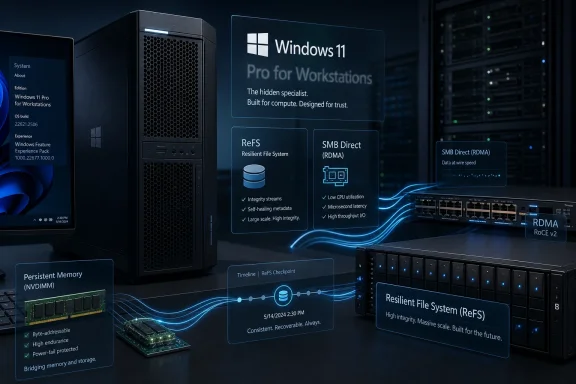
Windows 11 Pro for Workstations is Microsoft’s workstation-tier client operating system for high-end PCs, positioned above Windows 11 Pro and below Windows Server, with support for larger memory, more CPU sockets, ReFS storage features, SMB Direct networking, and persistent-memory workloads. It is not new, but TechPowerUp’s recent “Windows 11 Pro Max” framing usefully exposes how invisible this SKU remains to the audience most likely to obsess over Windows editions. Microsoft built a specialist client Windows for machines that behave less like gaming rigs and more like small servers. The strange part is not that it exists; the strange part is how little Microsoft wants ordinary power users to think about it.
For most PC buyers, the Windows 11 decision tree is brutally simple: Home if the machine came from a retail shelf, Pro if BitLocker, Remote Desktop, Hyper-V, domain join, or business management matter. That mental model leaves no room for a third client tier, even though Windows 11 Pro for Workstations has been part of the family since the Windows 11 launch era and descends from Windows 10 Pro for Workstations, introduced in 2017.
The edition was never designed to be a gamer flex. It was aimed at machines running large datasets, multiple processors, fault-tolerant storage pools, high-speed network storage, and workloads where the line between “desktop” and “server” is already blurry. Think CAD, simulation, media production, scientific compute, software build farms, local AI experiments, and storage-heavy engineering workstations.
That makes the “Pro Max” comparison both funny and slightly misleading. Apple’s “Max” branding sells visible prestige to consumers; Microsoft’s workstation SKU sells invisible plumbing to OEMs and businesses. It is less a luxury trim than a set of OS switches that stop client Windows from getting in the way of workstation-class hardware.
The confusion is Microsoft’s own doing. The company markets Windows 11 Pro aggressively to small businesses and enthusiasts, while Pro for Workstations tends to appear in spec sheets for Dell Precision, HP Z, Lenovo ThinkStation, and similar machines. If you build your own high-end PC, Microsoft rarely nudges you toward it, even when your hardware ambitions sound more workstation than consumer.
Microsoft’s own positioning emphasizes four classes of difference: expanded hardware support, resilient storage through ReFS, faster file sharing through SMB Direct, and support for persistent memory. Those are not cosmetic features. They are decisions about what kinds of computers client Windows is allowed to become.
The most obvious example is scale. Windows 11 Pro supports up to two physical CPU sockets and 2 TB of RAM, while Windows 11 Pro for Workstations supports up to four CPU sockets and 6 TB of RAM, according to Microsoft’s published Windows memory limits and business edition materials. For almost everyone, those numbers are absurd. For the small group that needs them, they are the difference between using client Windows and leaving for Windows Server or Linux.
That “almost everyone” matters. A modern single-socket workstation CPU can already offer dozens of cores, high PCIe lane counts, and more compute than many older dual-socket systems. The four-socket headline is more symbolic than practical for enthusiasts. The 6 TB memory ceiling, however, is a real marker of who this edition is for: people whose datasets make ordinary desktops look like thin clients.
Microsoft introduced ReFS in the Windows Server world, and its client availability has long been uneven. Standard Windows client editions can often read ReFS volumes, and Windows 11 has reintroduced ReFS in specific contexts such as Dev Drive, but the broad ability to create and use ReFS as a workstation storage tool has historically been reserved for editions such as Enterprise and Pro for Workstations. That segmentation is exactly why this SKU matters.
For a home gamer, ReFS may be trivia. For someone running a local backup repository, a media scratch array, a large source tree, or a storage pool where silent corruption is a bigger fear than benchmark bragging rights, it becomes more interesting. ReFS was built for integrity streams, metadata resilience, and cooperation with Storage Spaces rather than for preserving every legacy assumption attached to NTFS.
There are trade-offs. NTFS remains the default because it is deeply compatible, bootable, familiar to every Windows tool, and optimized across decades of software expectations. ReFS is a specialist file system, and specialists always disappoint users who expect them to behave like generalists. The point of Pro for Workstations is not that ReFS should replace NTFS everywhere; it is that Microsoft gives workstation buyers the option without forcing them into Windows Server.
Microsoft’s SMB Direct documentation places the feature squarely in the Windows Server storage universe, but Windows 10 Pro for Workstations and later are listed as supported clients. That is significant. It means a Windows workstation can participate in high-speed file workflows that look much closer to datacenter practice than to home NAS browsing.
This is where TechPowerUp’s comparison to Linux home AI clusters becomes provocative. RDMA is one of the technologies that makes Linux attractive in multi-node compute setups, including experimental AI inferencing clusters, because it lets systems move data with less CPU involvement. Windows 11 Pro for Workstations does not magically make Windows the obvious choice for that world, but it does show that Microsoft knows the gap exists.
The catch is hardware and ecosystem reality. SMB Direct needs RDMA-capable NICs, compatible switches or cabling, and a network design that justifies the effort. This is not a checkbox that helps your Wi-Fi file copy. It is a feature for environments where storage, compute, and network throughput are designed together.
That sounds ideal for workstation use cases. Simulation software can checkpoint more frequently. Database engines can log transactions with less latency. Large build systems can use persistent scratch space. Render and compute workflows can avoid repeatedly rebuilding temporary state after every reboot.
But persistent memory never became a mass-market enthusiast feature. Intel Optane’s long retreat removed much of the oxygen from the conversation, and NVDIMM-class hardware remains a niche inside a niche. The result is that Pro for Workstations carries support for a technology that still matters in some installed bases and specialized machines but does not define the everyday buying decision.
This is a recurring pattern with the edition. Its features are real, but many are only real for people who already know why they need them. Microsoft is not selling a dream to hobbyists here. It is preserving compatibility with workstation and near-server hardware that ordinary Windows Pro was never meant to fully exploit.
Tom’s Hardware and Windows Central both reported on the short-lived registry workaround, with enthusiasts claiming meaningful improvements in storage responsiveness and I/O performance when using the native NVMe path. Reports varied: some users described dramatic random I/O gains, while Windows Central characterized observed improvements more conservatively in the 10 to 15 percent range for certain scenarios. The important point is not the exact benchmark delta; it is that Microsoft appears to be holding a storage modernization path behind edition, stability, or support boundaries.
That makes the workstation SKU feel oddly incomplete. If any client Windows edition should receive the most architecture-aware NVMe stack first, it should be the one marketed for demanding workloads. Yet the feature’s strongest public association has been Windows Server 2025, not Windows 11 Pro for Workstations.
There may be good engineering reasons for that. Storage drivers are not app skins. A native NVMe driver that changes I/O behavior, power handling, queueing, or compatibility assumptions can break machines in ways Microsoft cannot casually shrug off. Server deployments are controlled, certified, and administered by professionals; consumer Windows machines are a zoo of firmware, SSD controllers, vendor utilities, and sleep-state bugs.
Still, the optics are telling. Microsoft sells a high-end workstation client, but the most visible recent storage-performance curiosity arrived as a hack, not as a clean workstation feature. That reinforces the sense that Pro for Workstations is a support matrix SKU more than a coherent enthusiast platform.
A workstation image from a major OEM is less likely to greet a buyer like a bargain-bin consumer laptop. You should expect fewer sponsored app shortcuts and fewer entertainment-first assumptions. That does not mean the operating system is free of Microsoft’s broader Windows 11 habits, but the OEM channel and business positioning change the out-of-box experience.
This is attractive, but it should not be oversold. “Less bloat” is not the same as a different Windows philosophy. Pro for Workstations still lives inside Microsoft’s modern Windows servicing model, Microsoft account pressures, telemetry debates, Edge promotion, and shifting UI priorities. The SKU reduces some consumer cruft; it does not resurrect the austere workstation operating systems of the 1990s.
The better way to understand the cleanliness advantage is institutional. A Dell Precision or Lenovo ThinkStation buyer expects a machine for work, not a subsidized content portal. Microsoft and OEMs know that audience has less tolerance for gimmicks. The cleaner image follows the sales channel as much as the edition.
That distribution model sends a clear message. Microsoft is not trying to create a mainstream “ultimate” Windows for self-builders. It is trying to support certified workstation hardware sold into professional environments where the vendor, Microsoft, and the customer all understand the use case.
This is rational from Microsoft’s perspective. If a user buys Pro for Workstations just to “have the best Windows,” then discovers that ReFS is not a boot-volume miracle, SMB Direct needs RDMA hardware, persistent memory is rare, and four-socket support is irrelevant, the support burden becomes absurd. The SKU is powerful because it is narrow.
But the model also leaves money and goodwill on the table. PC enthusiasts routinely spend workstation money on CPUs, GPUs, SSDs, and memory, then run an OS edition that may not expose every relevant capability. Some of those users would happily pay for a clean, direct, well-documented upgrade path if Microsoft made the value proposition honest and accessible.
Pro for Workstations therefore functions as a pressure valve. It allows Microsoft to say yes to high-end workstation hardware without turning every powerful desktop into a server SKU. You can get larger memory support, ReFS creation capability, SMB Direct client functionality, and persistent-memory support without inheriting the full Server world.
That halfway position is useful, but it can also feel arbitrary. Why should one storage improvement live in Server first while another appears in Workstations? Why should advanced file-system creation be edition-gated when data integrity would help many technically literate users? Why should Microsoft make workstation Windows difficult to buy directly while simultaneously complaining that Windows power users wander toward Linux for serious compute projects?
The answer is segmentation. Microsoft’s Windows business has always separated capability, supportability, and monetization into editions. Sometimes that segmentation protects users from features they cannot support. Sometimes it protects Microsoft’s pricing architecture. Often, it does both at once.
Linux is not simpler. RDMA, ZFS or btrfs choices, GPU drivers, container stacks, and distributed filesystems can become their own private weather systems of pain. But Linux usually fails in a way that feels open-ended: if you have the skill, patience, and hardware, you can often make the machine do what you want.
Windows often fails differently. The feature may exist, but not in your edition. The driver may work, but not in a supported configuration. The registry hack may unlock it, but only until the next cumulative update. For some users, that is more aggravating than complexity.
This is why Pro for Workstations is simultaneously impressive and unsatisfying. It proves Microsoft has built serious workstation capabilities into client Windows. It also proves those capabilities are gated, under-marketed, and sometimes detached from the enthusiast energy that could make them culturally relevant.
The calculus changes when the hardware gets strange. Multi-socket systems, memory above 2 TB, RDMA networking, ReFS storage pools, persistent-memory modules, or workstation OEM support packages all make the edition less exotic and more obvious. At that point, Windows 11 Pro becomes the edition with missing assumptions.
There is also a gray zone. A small studio using Windows workstations against fast SMB storage may care about SMB Direct. A developer with enormous source trees may experiment with ReFS-based Dev Drive workflows but still wonder whether the broader Workstations SKU buys anything else. A homelab user building a backup server on client Windows may find ReFS worth the ticket but dislike the licensing ambiguity.
That gray zone is where Microsoft’s messaging is weakest. The company explains the features, but not the decision. A serious buyer needs a crisp answer to a simple question: “At what point does Windows 11 Pro stop being the right Windows?” Microsoft has never made that answer as clear as it should be.
Windows 11 Home assumes a consumer PC. Windows 11 Pro assumes a managed or semi-professional PC. Windows 11 Pro for Workstations assumes workstation-class hardware and workflows that punish ordinary storage, memory, and networking limits. Windows Server assumes a machine providing services to other machines as its primary identity.
Once you see the ladder that way, Pro for Workstations becomes less mysterious. It is not Windows 11 Ultra. It is Windows 11 for computers that are still personal workstations but have started borrowing server traits. The name is clunky, but the boundary is coherent.
The problem is that Microsoft’s product culture keeps obscuring coherent boundaries with inconsistent feature gates. If Pro for Workstations is the serious client SKU, it should be the first-class home for serious client storage and networking advances. If Microsoft wants enthusiasts to stop treating every SKU boundary as hostile, it needs to explain why a boundary exists.
 Microsoft Built a Workstation Windows, Then Hid It in Plain Sight
For most PC buyers, the Windows 11 decision tree is brutally simple: Home if the machine came from a retail shelf, Pro if BitLocker, Remote Desktop, Hyper-V, domain join, or business management matter. That mental model leaves no room for a third client tier, even though Windows 11 Pro for Workstations has been part of the family since the Windows 11 launch era and descends from Windows 10 Pro for Workstations, introduced in 2017.The edition was never designed to be a gamer flex. It was aimed at machines running large datasets, multiple processors, fault-tolerant storage pools, high-speed network storage, and workloads where the line between “desktop” and “server” is already blurry. Think CAD, simulation, media production, scientific compute, software build farms, local AI experiments, and storage-heavy engineering workstations.
That makes the “Pro Max” comparison both funny and slightly misleading. Apple’s “Max” branding sells visible prestige to consumers; Microsoft’s workstation SKU sells invisible plumbing to OEMs and businesses. It is less a luxury trim than a set of OS switches that stop client Windows from getting in the way of workstation-class hardware.
The confusion is Microsoft’s own doing. The company markets Windows 11 Pro aggressively to small businesses and enthusiasts, while Pro for Workstations tends to appear in spec sheets for Dell Precision, HP Z, Lenovo ThinkStation, and similar machines. If you build your own high-end PC, Microsoft rarely nudges you toward it, even when your hardware ambitions sound more workstation than consumer.
The Real Upgrade Is Not Speed, but Permission
The first misunderstanding to kill is that Windows 11 Pro for Workstations is not a magic performance mode. Installing it on a mainstream desktop will not transform a Ryzen 7 gaming box into a render farm. The edition matters when Windows 11 Pro’s limits or missing subsystems become the bottleneck.Microsoft’s own positioning emphasizes four classes of difference: expanded hardware support, resilient storage through ReFS, faster file sharing through SMB Direct, and support for persistent memory. Those are not cosmetic features. They are decisions about what kinds of computers client Windows is allowed to become.
The most obvious example is scale. Windows 11 Pro supports up to two physical CPU sockets and 2 TB of RAM, while Windows 11 Pro for Workstations supports up to four CPU sockets and 6 TB of RAM, according to Microsoft’s published Windows memory limits and business edition materials. For almost everyone, those numbers are absurd. For the small group that needs them, they are the difference between using client Windows and leaving for Windows Server or Linux.
That “almost everyone” matters. A modern single-socket workstation CPU can already offer dozens of cores, high PCIe lane counts, and more compute than many older dual-socket systems. The four-socket headline is more symbolic than practical for enthusiasts. The 6 TB memory ceiling, however, is a real marker of who this edition is for: people whose datasets make ordinary desktops look like thin clients.
ReFS Is the Feature That Sounds Boring Until Your Data Matters
The most consequential storage distinction is ReFS, Microsoft’s Resilient File System. ReFS is not simply “new NTFS,” and it is not a drop-in boot-volume replacement for ordinary Windows users. Its appeal is narrower and more serious: data integrity, resilience, and behavior tailored to large volumes and fault-tolerant storage configurations.Microsoft introduced ReFS in the Windows Server world, and its client availability has long been uneven. Standard Windows client editions can often read ReFS volumes, and Windows 11 has reintroduced ReFS in specific contexts such as Dev Drive, but the broad ability to create and use ReFS as a workstation storage tool has historically been reserved for editions such as Enterprise and Pro for Workstations. That segmentation is exactly why this SKU matters.
For a home gamer, ReFS may be trivia. For someone running a local backup repository, a media scratch array, a large source tree, or a storage pool where silent corruption is a bigger fear than benchmark bragging rights, it becomes more interesting. ReFS was built for integrity streams, metadata resilience, and cooperation with Storage Spaces rather than for preserving every legacy assumption attached to NTFS.
There are trade-offs. NTFS remains the default because it is deeply compatible, bootable, familiar to every Windows tool, and optimized across decades of software expectations. ReFS is a specialist file system, and specialists always disappoint users who expect them to behave like generalists. The point of Pro for Workstations is not that ReFS should replace NTFS everywhere; it is that Microsoft gives workstation buyers the option without forcing them into Windows Server.
SMB Direct Is Where Client Windows Starts Acting Like Infrastructure
SMB Direct is the other feature that sounds like enterprise alphabet soup until you understand what it changes. It uses RDMA-capable network adapters to move SMB traffic with lower latency, higher throughput, and reduced CPU overhead compared with ordinary TCP/IP networking. In practice, it is about making network storage feel less like a network tax.Microsoft’s SMB Direct documentation places the feature squarely in the Windows Server storage universe, but Windows 10 Pro for Workstations and later are listed as supported clients. That is significant. It means a Windows workstation can participate in high-speed file workflows that look much closer to datacenter practice than to home NAS browsing.
This is where TechPowerUp’s comparison to Linux home AI clusters becomes provocative. RDMA is one of the technologies that makes Linux attractive in multi-node compute setups, including experimental AI inferencing clusters, because it lets systems move data with less CPU involvement. Windows 11 Pro for Workstations does not magically make Windows the obvious choice for that world, but it does show that Microsoft knows the gap exists.
The catch is hardware and ecosystem reality. SMB Direct needs RDMA-capable NICs, compatible switches or cabling, and a network design that justifies the effort. This is not a checkbox that helps your Wi-Fi file copy. It is a feature for environments where storage, compute, and network throughput are designed together.
Persistent Memory Was the Future That Arrived Unevenly
The persistent-memory story is more complicated, because the hardware market has moved in fits and starts. Windows 11 Pro for Workstations’ support for NVDIMM-N and persistent memory made sense in a world where memory-speed storage could accelerate databases, checkpoints, compile caches, and other latency-sensitive workloads. The promise was simple: storage that behaves more like memory and survives power loss.That sounds ideal for workstation use cases. Simulation software can checkpoint more frequently. Database engines can log transactions with less latency. Large build systems can use persistent scratch space. Render and compute workflows can avoid repeatedly rebuilding temporary state after every reboot.
But persistent memory never became a mass-market enthusiast feature. Intel Optane’s long retreat removed much of the oxygen from the conversation, and NVDIMM-class hardware remains a niche inside a niche. The result is that Pro for Workstations carries support for a technology that still matters in some installed bases and specialized machines but does not define the everyday buying decision.
This is a recurring pattern with the edition. Its features are real, but many are only real for people who already know why they need them. Microsoft is not selling a dream to hobbyists here. It is preserving compatibility with workstation and near-server hardware that ordinary Windows Pro was never meant to fully exploit.
The NVMe Driver Episode Shows the Limits of the “Pro Max” Metaphor
The most intriguing recent wrinkle is not what Pro for Workstations includes, but what it apparently does not. TechPowerUp notes that Windows 11 Pro for Workstations lacks the newer native NVMe SSD driver associated with Windows Server, the same driver family that enthusiasts briefly managed to expose on consumer Windows 11 before Microsoft blocked the registry trick in March 2026.Tom’s Hardware and Windows Central both reported on the short-lived registry workaround, with enthusiasts claiming meaningful improvements in storage responsiveness and I/O performance when using the native NVMe path. Reports varied: some users described dramatic random I/O gains, while Windows Central characterized observed improvements more conservatively in the 10 to 15 percent range for certain scenarios. The important point is not the exact benchmark delta; it is that Microsoft appears to be holding a storage modernization path behind edition, stability, or support boundaries.
That makes the workstation SKU feel oddly incomplete. If any client Windows edition should receive the most architecture-aware NVMe stack first, it should be the one marketed for demanding workloads. Yet the feature’s strongest public association has been Windows Server 2025, not Windows 11 Pro for Workstations.
There may be good engineering reasons for that. Storage drivers are not app skins. A native NVMe driver that changes I/O behavior, power handling, queueing, or compatibility assumptions can break machines in ways Microsoft cannot casually shrug off. Server deployments are controlled, certified, and administered by professionals; consumer Windows machines are a zoo of firmware, SSD controllers, vendor utilities, and sleep-state bugs.
Still, the optics are telling. Microsoft sells a high-end workstation client, but the most visible recent storage-performance curiosity arrived as a hack, not as a clean workstation feature. That reinforces the sense that Pro for Workstations is a support matrix SKU more than a coherent enthusiast platform.
Less Consumer Bloat Is Nice, but It Is Not the Product
TechPowerUp also highlights a softer distinction: Windows 11 Pro for Workstations tends to arrive with less consumer-facing clutter. That matters emotionally because many power users judge Windows editions not only by kernel features but by how much of the Start menu feels like an ad inventory experiment.A workstation image from a major OEM is less likely to greet a buyer like a bargain-bin consumer laptop. You should expect fewer sponsored app shortcuts and fewer entertainment-first assumptions. That does not mean the operating system is free of Microsoft’s broader Windows 11 habits, but the OEM channel and business positioning change the out-of-box experience.
This is attractive, but it should not be oversold. “Less bloat” is not the same as a different Windows philosophy. Pro for Workstations still lives inside Microsoft’s modern Windows servicing model, Microsoft account pressures, telemetry debates, Edge promotion, and shifting UI priorities. The SKU reduces some consumer cruft; it does not resurrect the austere workstation operating systems of the 1990s.
The better way to understand the cleanliness advantage is institutional. A Dell Precision or Lenovo ThinkStation buyer expects a machine for work, not a subsidized content portal. Microsoft and OEMs know that audience has less tolerance for gimmicks. The cleaner image follows the sales channel as much as the edition.
The Licensing Model Tells You Who Microsoft Thinks Deserves It
The most frustrating part for enthusiasts is availability. Windows 11 Pro for Workstations is not promoted like a normal retail upgrade for end users. It is primarily encountered through OEM workstation configurations and business procurement channels, including devices from major vendors such as Dell, HP, Lenovo, and HPE-linked workstation ecosystems.That distribution model sends a clear message. Microsoft is not trying to create a mainstream “ultimate” Windows for self-builders. It is trying to support certified workstation hardware sold into professional environments where the vendor, Microsoft, and the customer all understand the use case.
This is rational from Microsoft’s perspective. If a user buys Pro for Workstations just to “have the best Windows,” then discovers that ReFS is not a boot-volume miracle, SMB Direct needs RDMA hardware, persistent memory is rare, and four-socket support is irrelevant, the support burden becomes absurd. The SKU is powerful because it is narrow.
But the model also leaves money and goodwill on the table. PC enthusiasts routinely spend workstation money on CPUs, GPUs, SSDs, and memory, then run an OS edition that may not expose every relevant capability. Some of those users would happily pay for a clean, direct, well-documented upgrade path if Microsoft made the value proposition honest and accessible.
Windows Server Is Still the Line Microsoft Does Not Want Crossed
The existence of Pro for Workstations also clarifies what Microsoft wants to keep separate. Windows Server is not merely Windows with bigger numbers. It carries server roles, licensing assumptions, management patterns, storage features, and support expectations that Microsoft does not want folded casually into client Windows.Pro for Workstations therefore functions as a pressure valve. It allows Microsoft to say yes to high-end workstation hardware without turning every powerful desktop into a server SKU. You can get larger memory support, ReFS creation capability, SMB Direct client functionality, and persistent-memory support without inheriting the full Server world.
That halfway position is useful, but it can also feel arbitrary. Why should one storage improvement live in Server first while another appears in Workstations? Why should advanced file-system creation be edition-gated when data integrity would help many technically literate users? Why should Microsoft make workstation Windows difficult to buy directly while simultaneously complaining that Windows power users wander toward Linux for serious compute projects?
The answer is segmentation. Microsoft’s Windows business has always separated capability, supportability, and monetization into editions. Sometimes that segmentation protects users from features they cannot support. Sometimes it protects Microsoft’s pricing architecture. Often, it does both at once.
Linux Gains Ground Where Windows Makes Experts Ask Permission
The Linux comparison is unavoidable because the workstation audience overlaps with the group most willing to switch operating systems. Developers, AI hobbyists, storage tinkerers, and homelab builders are exactly the people who notice when Windows hides advanced capabilities behind licensing fog. They may tolerate complexity, but they dislike artificial scarcity.Linux is not simpler. RDMA, ZFS or btrfs choices, GPU drivers, container stacks, and distributed filesystems can become their own private weather systems of pain. But Linux usually fails in a way that feels open-ended: if you have the skill, patience, and hardware, you can often make the machine do what you want.
Windows often fails differently. The feature may exist, but not in your edition. The driver may work, but not in a supported configuration. The registry hack may unlock it, but only until the next cumulative update. For some users, that is more aggravating than complexity.
This is why Pro for Workstations is simultaneously impressive and unsatisfying. It proves Microsoft has built serious workstation capabilities into client Windows. It also proves those capabilities are gated, under-marketed, and sometimes detached from the enthusiast energy that could make them culturally relevant.
The Edition Makes Sense Only When the Hardware Is Already Weird
For a typical high-end gaming PC, Windows 11 Pro remains the practical ceiling. A single-socket CPU, 64 GB to 192 GB of RAM, one or two fast NVMe drives, and a 10 GbE NIC do not automatically justify Pro for Workstations. Most users will never touch the features that define the edition.The calculus changes when the hardware gets strange. Multi-socket systems, memory above 2 TB, RDMA networking, ReFS storage pools, persistent-memory modules, or workstation OEM support packages all make the edition less exotic and more obvious. At that point, Windows 11 Pro becomes the edition with missing assumptions.
There is also a gray zone. A small studio using Windows workstations against fast SMB storage may care about SMB Direct. A developer with enormous source trees may experiment with ReFS-based Dev Drive workflows but still wonder whether the broader Workstations SKU buys anything else. A homelab user building a backup server on client Windows may find ReFS worth the ticket but dislike the licensing ambiguity.
That gray zone is where Microsoft’s messaging is weakest. The company explains the features, but not the decision. A serious buyer needs a crisp answer to a simple question: “At what point does Windows 11 Pro stop being the right Windows?” Microsoft has never made that answer as clear as it should be.
The “Best Windows” Is Not the Best Windows for Everyone
The enthusiast instinct is to rank editions vertically: Home, Pro, Pro for Workstations, Enterprise, Server. That ranking is emotionally satisfying and technically incomplete. The best edition is not always the one with the highest ceiling; it is the one whose assumptions match the machine.Windows 11 Home assumes a consumer PC. Windows 11 Pro assumes a managed or semi-professional PC. Windows 11 Pro for Workstations assumes workstation-class hardware and workflows that punish ordinary storage, memory, and networking limits. Windows Server assumes a machine providing services to other machines as its primary identity.
Once you see the ladder that way, Pro for Workstations becomes less mysterious. It is not Windows 11 Ultra. It is Windows 11 for computers that are still personal workstations but have started borrowing server traits. The name is clunky, but the boundary is coherent.
The problem is that Microsoft’s product culture keeps obscuring coherent boundaries with inconsistent feature gates. If Pro for Workstations is the serious client SKU, it should be the first-class home for serious client storage and networking advances. If Microsoft wants enthusiasts to stop treating every SKU boundary as hostile, it needs to explain why a boundary exists.
The Workstation SKU Is a Map of Windows’ Unfinished Power-User Strategy
The practical lesson is not that everyone should hunt for Windows 11 Pro for Workstations. The lesson is that Microsoft’s client Windows lineup contains a serious, under-discussed workstation path, and its existence exposes how poorly the company speaks to the users who live between consumer PCs and servers.- Windows 11 Pro for Workstations is best understood as a specialist client OS for workstation-class hardware, not as a general-purpose upgrade for faster gaming or everyday desktop use.
- Its clearest technical advantages are support for up to four CPU sockets, up to 6 TB of RAM, ReFS creation and storage workflows, SMB Direct with RDMA, and persistent-memory scenarios.
- ReFS and SMB Direct are meaningful only when the surrounding storage and network design can exploit them, which makes the edition far more relevant to studios, labs, engineers, and administrators than to casual enthusiasts.
- The recent native NVMe driver episode shows that Microsoft still treats some high-end storage improvements as controlled platform changes rather than consumer-facing power-user features.
- The OEM- and business-heavy availability model protects Microsoft from confused buyers, but it also keeps technically capable self-builders at arm’s length.
- For most users, Windows 11 Pro remains the sensible endpoint; Pro for Workstations becomes compelling only when Windows 11 Pro’s hardware limits or missing workstation features are real blockers.
References
- Primary source: TechPowerUp
Published: 2026-07-05T08:20:12.120879
Loading…
www.techpowerup.com - Official source: microsoft.com
Loading…
www.microsoft.com - Official source: learn.microsoft.com
Loading…
learn.microsoft.com - Related coverage: tomshardware.com
Microsoft blocks registry trick that unlocked performance-boosting native NVMe driver on Windows 11 — workarounds still exist to enable support, however | Tom's Hardware
A ViVeTool workaround still works for now.www.tomshardware.com - Official source: answers.microsoft.com
Loading…
answers.microsoft.com - Official source: techcommunity.microsoft.com
Loading…
techcommunity.microsoft.com
- Related coverage: windowslatest.com
Loading…
www.windowslatest.com - Related coverage: techyorker.com
Loading…
techyorker.com - Related coverage: winbuzzer.com
Loading…
winbuzzer.com - Related coverage: umatechnology.org
Loading…
umatechnology.org - Related coverage: tnd.vn
Loading…
www.tnd.vn - Related coverage: windowscentral.com
Microsoft shuts down another Windows 11 registry hack — native NVMe SSD support has changed but Insiders still have options | Windows Central
Microsoft changes the nvmedisk.sys registry ID tweak.www.windowscentral.com - Official source: cdn-dynmedia-1.microsoft.com