

Microsoft is rolling out a quieter but genuinely useful update to Windows 11’s recovery and security tooling that promises to shave hours off routine troubleshooting: the Quick Machine Recovery (QMR) flow has been streamlined to run a single, more decisive scan during boot-time recoveries, and Smart App Control (SAC) can now be toggled on or off from Windows Security without forcing a clean reinstall. These changes are shipping to Windows Insiders in the Dev and Beta channels as part of Insider Preview Build 26220.7070 (packaged as KB5070300) and are aimed squarely at reducing downtime for both home users and IT administrators while removing friction for app compatibility testing.
Quick Machine Recovery (QMR) is Microsoft’s cloud-assisted extension to the traditional Windows Recovery Environment (WinRE) that can search Windows Update for targeted remediations, download and apply fixes, and reboot a device — all without physical access to the affected PC. QMR was introduced as part of Microsoft’s broader Windows Resiliency Initiative to reduce mass disruption from faulty updates or drivers and to shorten mean time to repair (MTTR) across large fleets. The feature is implemented as a best-effort, cloud-first recovery path that falls back to local Startup Repair if a matching remediation is not available.
Smart App Control (SAC) is a proactive protection layer that blocks untrusted or suspicious binaries using a mix of local evaluation and cloud reputation. Historically, SAC has required being enabled during a clean Windows install to ensure a trust baseline; toggling it off and back on previously often meant reinstalling the OS. The new build exposes an SAC toggle in Windows Security so administrators and users can flip the control without reimaging machines.
These changes are rolling out behind Microsoft's usual controlled feature rollout (CFR) gates, which means individual devices — even in the same Insider channel — may see different experiences depending on server-side entitlement and device configuration.
QMR’s single-scan default and SAC’s new toggle are pragmatic, operationally focused improvements — not headline-grabbing features — but they materially improve the day-to-day resilience and manageability of Windows 11 endpoints. For help desks and IT operations teams, the changes mean fewer ambiguous recovery sessions, simpler compatibility testing, and the ability to adopt cloud-assisted recovery workflows with appropriate governance. The features are in preview for Insiders now; organizations should pilot and validate them against their compliance, network, and imaging constraints before a broad enablement.
Source: Petri IT Knowledgebase Windows 11's Updated QMR Tool to Streamline Troubleshooting
 Background / Overview
Quick Machine Recovery (QMR) is Microsoft’s cloud-assisted extension to the traditional Windows Recovery Environment (WinRE) that can search Windows Update for targeted remediations, download and apply fixes, and reboot a device — all without physical access to the affected PC. QMR was introduced as part of Microsoft’s broader Windows Resiliency Initiative to reduce mass disruption from faulty updates or drivers and to shorten mean time to repair (MTTR) across large fleets. The feature is implemented as a best-effort, cloud-first recovery path that falls back to local Startup Repair if a matching remediation is not available.Smart App Control (SAC) is a proactive protection layer that blocks untrusted or suspicious binaries using a mix of local evaluation and cloud reputation. Historically, SAC has required being enabled during a clean Windows install to ensure a trust baseline; toggling it off and back on previously often meant reinstalling the OS. The new build exposes an SAC toggle in Windows Security so administrators and users can flip the control without reimaging machines.
These changes are rolling out behind Microsoft's usual controlled feature rollout (CFR) gates, which means individual devices — even in the same Insider channel — may see different experiences depending on server-side entitlement and device configuration.
What changed: QMR’s single-scan behavior explained
The old behavior: repetitive, noisy scans
Previously, when QMR and the setting “Automatically check for solutions” were both enabled, the recovery flow could execute repeated diagnostic scans while searching for a remediation, which sometimes gave the impression of an endless loop and delayed user action. This could be especially frustrating for non-technical users and increased support volume for help desks attempting to triage “stuck” recovery screens.The new default: one decisive scan then guidance
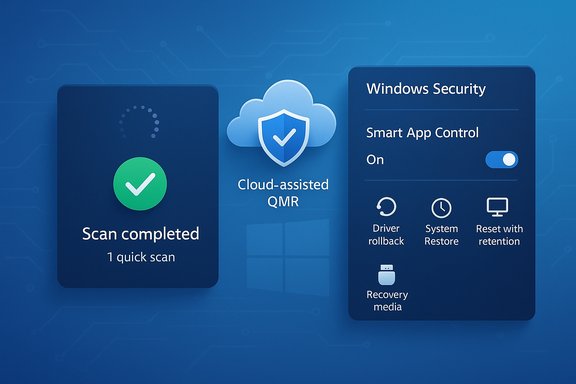
With Build 26220.7070 Microsoft changed that default: when Quick machine recovery and Automatically check for solutions are both enabled, QMR now runs a one-time diagnostic scan by default. If that scan locates an automated remediation, the remediation is offered and can be applied. If not, the flow immediately surfaces the most relevant recovery options (driver rollback, System Restore, reset with file retention, or directions to external recovery media) so users and IT can act instead of waiting for repeated background checks. This produces a faster, less noisy recovery experience that reduces ambiguous “still checking” states.Why this matters for IT admins and help desks
- Faster triage: support staff get a clearer endpoint state sooner, reducing time spent guiding users through repetitive screens.
- Lower help-desk volume: consumer devices won’t sit in looped scans that create unnecessary tickets.
- Predictable recovery outcomes: administrators can plan fallback steps (imaging, local repair) sooner when cloud remediation isn’t available.
How QMR actually works (technical lifecycle)
QMR operates with a short, repeatable recovery lifecycle while WinRE is active. Administrators and architects should understand each stage to validate their environment:- Detection — device fails to boot repeatedly and enters the recovery flow.
- Boot to WinRE — the system boots into the Windows Recovery Environment where QMR logic runs.
- Network connection — WinRE attempts to establish network connectivity (Ethernet or supported Wi‑Fi). Administrators can pre-provision Wi‑Fi credentials for WinRE via management tooling.
- Remediation search — the device queries Windows Update for targeted remediation packages or scripts that match the failure signature.
- Apply & reboot — if a remediation is found, it is downloaded and applied; the device reboots to test success and the flow exits if boot is restored.
- Retry or fallback — if no remediation is available or an applied remediation fails, QMR falls back to local repair tools (Startup Repair, System Restore, reset) according to configured retry intervals.
reagentc.exe (for example, reagentc.exe /getrecoverysettings) and validate Wi‑Fi credential provisioning and CloudRemediation/AutoRemediation states. For testing, reagentc.exe /SetRecoveryTestmode followed by reagentc.exe /BootToRe can reproduce the auto-remediation flow without crashing production devices.Smart App Control: the toggle that removes reimage friction
The change in practice
Smart App Control now appears in Windows Security under App & Browser Control → Smart App Control settings, and eligible users can enable or disable SAC without performing a clean install. This removes a major operational friction that previously forced reimaging simply to change SAC state.Operational benefits
- Faster compatibility testing for line-of-business apps and driver installers.
- Easier response to false positives—security teams can temporarily relax enforcement to remediate blocking issues without rebuilding devices.
Security trade-offs
This convenience introduces an operational risk: toggling SAC is functionally like changing a security posture. Organizations should treat SAC state changes as security-relevant events, log them centrally, and control the toggle via Group Policy / MDM where possible. Relying on ad-hoc toggling without governance risks exposing endpoints to unvetted binaries.Enterprise impact, manageability, and best-practice deployment
Defaults vary by SKU
Microsoft’s approach is deliberately differentiated by edition: Windows 11 Home devices are typically configured for lower friction (cloud remediation enabled by default), while Pro/Enterprise/Education SKUs keep cloud remediation and auto-remediation disabled by default to give IT organizations explicit control. This split reduces accidental policy drift in managed environments.Management surfaces and controls
- Intune / MDM and the RemoteRemediation CSP can configure QMR behavior across fleets.
reagentc.exeprovides on-device inspection and test modes for validation.- KB/servicing packages (for example, KB5070300, Build 26220.7070) deliver the enablement and fixes to Insider channels; features are then staged server-side via CFR.
Recommended rollout plan (pilot → staged → baseline)
- Pilot and validate — use a small representative group; enable cloud remediation only in test groups and exercise
reagentctest mode. - Staged production rollout — progressively expand to low-risk devices, monitor Update History and internal telemetry for any applied remediations.
- Organization baseline — restrict auto remediation on critical systems, rely on validated remediation packaging and established imaging/rollback procedures.
Security, privacy, and governance — what to watch
Telemetry and diagnostic uploads
QMR’s cloud-assisted remediation requires some diagnostic exchange with Microsoft to identify the correct remediation package. Multiple technical briefings and community tests indicate diagnostic metadata may be uploaded during the remediation-identification stage; however, Microsoft’s public documentation emphasizes the search/apply mechanics more than the exact telemetry contract. Administrators in regulated environments should treat diagnostic uploads as likely and evaluate the feature under internal privacy and compliance frameworks before enabling auto remediation broadly.Network and credential complexities
WinRE must be able to reach the Internet to retrieve remediations. Typical pitfalls include captive portals, complex 802.1X networks, and unsupported Wi‑Fi encryption — all of which can block WinRE connectivity. To mitigate this:- Pre-provision Wi‑Fi credentials (Intune or local provisioning) for WinRE use.
- Favor wired Ethernet for recovery stations and validate that recovery partitions have up-to-date network stacks delivered via servicing.
Auditing and rollback
Because remediations are applied automatically in some configurations, IT must maintain clear logging and rollback procedures:- Monitor Update History to trace remediations applied during WinRE.
- Keep tested, offline recovery media and image-based restore options available in case a remediation causes regressions.
Known limitations and realistic expectations
- QMR is designed for boot-centric failures where Microsoft can publish a remediation that matches the failure signature; it is not a cure-all for hardware faults, deep data corruption, or unique device-specific issues. Treat QMR as a force multiplier that addresses widespread or repeatable faults at scale rather than a substitute for backup and DR planning.
- Network environments with captive portals or advanced authentication may block WinRE unless credentials are provisioned; additional configuration effort is often required.
- Feature visibility will vary because of controlled feature rollout; not all Insiders will see the SAC toggle or QMR tweaks immediately even after installing the build.
Practical troubleshooting and admin commands
- Inspect QMR state and recovery settings: run
reagentc.exe /getrecoverysettingsto view CloudRemediation and AutoRemediation states and any preconfigured Wi‑Fi credentials. - Enter test mode to simulate remediation flows safely:
reagentc.exe /SetRecoveryTestmodethenreagentc.exe /BootToReto exercise the WinRE remediation lifecycle without inducing crashes on production systems. - Verify applied remediations and history: check Settings → Windows Update → Update history after remediation operations.
- Control QMR at scale: use Intune/MDM or the RemoteRemediation CSP to enable or restrict cloud remediation and auto-remediation behavior for device groups.
Notable strengths — what makes these updates worthwhile
- Reduced downtime and clearer triage — the single-scan QMR flow stops ambiguous waiting states and gets users to actionable recovery choices faster.
- Lower operational friction — SAC’s togglability removes a major barrier for testing and compatibility validation without rebuilding images.
- Managed risk model — Microsoft ships QMR with per-SKU defaults and multiple management surfaces, allowing IT to choose the appropriate trade-off between resilience and governance.
Risks and unresolved questions — be cautious
- Telemetry specifics remain opaque — while community reporting and documentation indicate QMR may upload diagnostic metadata to identify remediations, explicit telemetry contracts suitable for compliance reviews are not always included in consumer-facing docs. Organizations requiring explicit telemetry guarantees should seek direct vendor confirmation or test in a controlled pilot.
- Feature gating creates variance — because many changes are server-gated, fleets will experience uneven behavior during phased rollouts; IT must be prepared to handle mixed experiences across an estate.
- Operational risk if toggles are unmanaged — the ability to toggle SAC increases convenience but also raises the possibility of uncoordinated security posture changes unless toggles are centrally managed and logged.
Claims to treat cautiously (flagged as unverifiable without direct confirmation)
Some coverage and community posts have linked the urgency for QMR to a high-profile July 2024 outage attributed to a third-party security update that left a large number of devices unbootable. Reports vary widely on the scale and impact of that event — figures like “8.5 million devices” and cascading business impacts (for example, major airline disruptions) have been circulated in the press and community write-ups, but those exact numbers and financial impacts are complex to verify and depend on multiple independent investigations. These items should be treated as reported context rather than precise, audit-ready facts until confirmed by primary sources or vendor statements. Administrators should plan for similar failure modes regardless of the precise historical scale because the architectural lesson — that mass-impacting updates can cause severe distributed outages — remains valid.Bottom line and recommendations for IT teams
- Pilot first: enable QMR cloud remediation only for a small, representative pilot group and use
reagentctest mode to validate behavior end-to-end. - Treat SAC as policy: centralize control over the SAC toggle through Group Policy or Intune and log any changes to maintain security posture visibility.
- Pre-provision network credentials: ensure WinRE can reach the Internet in your most common recovery sites by pre-provisioning Wi‑Fi credentials or using wired recovery paths.
- Keep offline recovery ready: even with cloud remediation, maintain tested offline recovery media and validated image-based restore processes for disconnected or high-compliance environments.
- Monitor Update History and telemetry: track remediations applied by QMR and validate remediation packages before broad rollout to reduce the chance of regressions.
QMR’s single-scan default and SAC’s new toggle are pragmatic, operationally focused improvements — not headline-grabbing features — but they materially improve the day-to-day resilience and manageability of Windows 11 endpoints. For help desks and IT operations teams, the changes mean fewer ambiguous recovery sessions, simpler compatibility testing, and the ability to adopt cloud-assisted recovery workflows with appropriate governance. The features are in preview for Insiders now; organizations should pilot and validate them against their compliance, network, and imaging constraints before a broad enablement.
Source: Petri IT Knowledgebase Windows 11's Updated QMR Tool to Streamline Troubleshooting
