

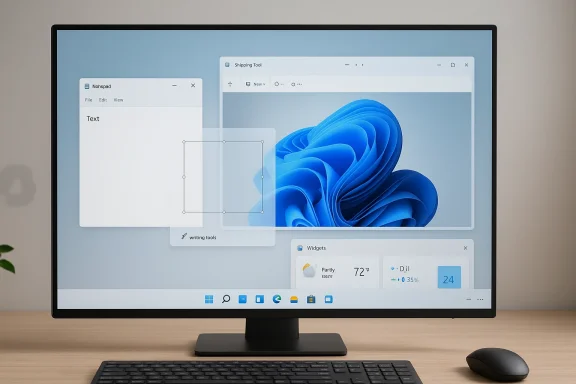
Microsoft is quietly reversing one of Windows 11’s most visible design choices: the habit of putting Copilot buttons, badges, and prompts into places where users were trying to do something simple and fast. In the latest Insider-facing changes, Microsoft is reducing unnecessary Copilot entry points in apps like Notepad, Snipping Tool, Photos, and Widgets, while also restoring a little more of the desktop control long-time Windows users have been asking for. That is not the same as abandoning AI in Windows, but it does signal a more restrained approach after months of criticism that the operating system had become too eager to advertise Copilot everywhere. The shift matters because it touches the core tension shaping Windows 11 in 2026: whether Microsoft wants the platform to feel like a calm work environment or a constant stage for its AI ambitions. oft’s Copilot strategy has been one of the most visible and controversial elements of the Windows 11 era. Since the company announced Copilot as a cross-platform AI companion in 2023, it has steadily pushed the assistant into more parts of the desktop experience, from the taskbar to inbox apps and system touchpoints. That made sense as a branding move, because Microsoft wanted Windows to feel like the front door to the AI era. But it also created a familiar kind of Windows backlash: users did not object to AI in principle, they objected to it being surfaced in places where it felt intrusive, repetitive, or simply out of place.
The latest changes suggest Microsoft has heard that complaint more clearly than before. The company is not removing Copilot from Windows, but it is shrinking the number of obvious entry points and toning down the visual emphasis inside everyday tools. That distinction is important. For a desktop operating system, the difference between “available when needed” and “always in your face” is the difference between a useful feature and a source of friction. The most telling signal is that Microsoft is now framing the work around intentionality rather than ubiquity,ission that “Copilot everywhere” was not winning universal goodwill.
There is also a broader context behind the rollback. Windows 11 has spent years being criticized for reduced customization, awkward shell decisions, and a general sense that the product was becoming more opinionated just as users wanted more control. The taskbar restrictions became a symbol of that frustration. So did intrusive update behavior and the feeling that even basic apps were turning into showcases for cloud services and AI branding. Microsoft is now trying to answer that criticism with a combination of UI restraint, better update handling, and more practical shell improvements.
This is not happening in a vacuum. Windows 10 support ended on October 14, 2025, which means Microsoft can no longer count on users staying put in order to avoid its design direction. The company has to make Windows 11 feel not just modern, but tolerable and efficient. That makes the Copilot pullback more than a cosmetic change; it is part of Microsoft’s effort to rebuild trust with users who have been feeling nudged, prompted, and marketed at for too long.
When Microsoft introduced Copilot, the company framed it as a sweeping transformation of how people would interact with Windows, Edge, Microsoft 365, and the broader Microsoft ecosystem. The idea was to make AI ambient: always nearby, always ready, and woven into the everyday operating system rather than relegated to a separate app. That strategy was ambitious, and in a product presentation it sounded elegant. In practice, though, it meant that the assistant began showing up in places where users had not asked for help, and sometimes in places where help was not what they wanted at all.
The user backlash was predictable, and in some ways old-fashioned. Windows veterans have always cared about control, efficiency, and the ability to customize the shell. They tolerate change when it feels useful, but they resist change that feels like clutter or coercion. Copilot buttons in Notepad or Snipping Tool were a particularly sensitive example because those are supposed to be quick, lightweight tools. When a utility becomes a platform for a chatbot prompt, it stops feeling like a utility and starts feeling like a sales surface. That is a bad trade in a desktop environment where speed and predictability matter more than novelty.
Microsoft’s own messaging has begun to reflect that reality. In recent Insider communications and related support material, the company has emphasized being more intentional about where Copilot appears, and it has paired those changes with other usability improvements. That includes update behavior that is less disruptive, shell changes that restore some flexibility, and performance work in parts of the OS that users touch constantly. This is a notable rhetorical shift. Microsoft is no longer just saying Windows will be smarter; it is also saying it should stop fighting the user quite so much.
That matters because the Copilot story is bigger than one assistant button. It has become shorthand for a larger debate about what Windows 11 is supposed to be. Is it a polished desktop that quietly gets out of the way, or is it a curated AI platform that constantly advertises the company’s strategic priorities? Microsoft is trying to preserve the second identity while making the first one more believable. The latest changes suggest the company has realized that ubiquity is not the same as utility.
Snipping Tool appears to be the other major symbolic change. The tool is built for fast capture and rapid exit, so an embedded AI button can feel like a detour in the middle of a task. Microsoft’s decision to reduce or remove that visible Copilot layer suggests it now understands that a screenshot tool should behave like a tool, not a marketing brochure. That is a small interface adjustment with outsized emotional weight for power users.
The bigger lesson is that Windows users do not necessarily reject AI entry points; they reject AI entry points in the wrong context. A feature can be technically impressive and still feel like clutter if it interrupts a simple task. That is why the company’s current course correction feels less like a retreat and more like a product discipline exercise. It is learning where not to place a button.
This timing also explains why Microsoft’s correction is broader than a single feature. The company is trying to pair the Copilot pullback with more user-visible flexibility elsewhere, including changes that make Windows Update less intrusive and the taskbar more customizable. That combination matters because it tells users the company is not just hiding AI a little better; it is trying to change the tone of the product.
There is a difference between a platform feature and a platform posture. Copilot became both, and that is part of the problem. The feature itself can be useful, but the posture—constant visibility, constant nudging, constant branding—made many users feel they were being managed rather than helped. Microsoft is now trying to undo that impression before it hardens further.
This is also why the Notepad changes carry such symbolic weight. Notepad is one of the clearest examples of a no-frills Windows app. The more Microsoft layered AI branding into it, the more it seemed to violate the app’s identity. By shifting toward a generic “Writing tools” framing, Microsoft is acknowledging that the app’s value lies in speed and simplicity first.
Microsoft is also trying to avoid another problem: feature fatigue. If every app in Windows 11 carries a Copilot badge, the feature stops feeling special and starts feeling like a recurring interruption. Removing some buttons can paradoxically make the remaining AI moments more meaningful. That is a smart lesson for a company trying to keep AI useful without making it oppressive.
There is also a governance angle. Many organizations are still cautious about generative AI because they want tighter control over where data goes and how users interact with cloud-backed features. A less aggressive Copilot presence reduces the chance that AI feels forced on endpoints before IT has had a chance to define policy. That does not eliminate the governance challenge, but it makes the default experience more acceptable.
Still, there is a risk that Microsoft does not go far enough for either audience. Consumers may want more dramatic decluttering, while enterprise admins may want policy-based removal rather than just a lighter UI. The company’s challenge is to make the changes feel decisive without turning them into another half-measure.
The new direction suggests Microsoft is trying to make Copilot more situational and less ideological. That is a healthier strategy for a desktop platform, where users value efficiency over narrative. It also keeps Microsoft from turning every inbox app into a mini billboard for its AI business. A less visible Copilot may actually be a more sustainable Copilot.
This does not mean Microsoft is abandoning AI as a competitive differentiator. On the contrary, the company still wants Windows to be synonymous with intelligent assistance. But it is learning that the desktop is not the same as a mobile app or a web service. The best AI on a PC may be the AI that appears only when it is genuinely needed.
It is also worth noting that the Copilot pullback is happening alongside other user-facing changes that make Windows 11 feel less rigid. Taskbar flexibility, better update handling, and broader shell improvements all reinforce the same message: Microsoft wants Windows 11 to feel less like a locked-down promotional canvas and more like a customizable desktop. That broader package is what gives the Copilot changes credibility.
The most interesting question is whether this turns into a broader philosophy or stays a narrow cleanup. If Microsoft is genuinely rethinking Copilot placement, then more shell surfaces may follow, along with additional work on updates, notifications, and default behaviors that have annoyed users for years. If not, this will be remembered as a tactical retreat rather than a meaningful pivot.
What to watch next:
Source: The Verge Microsoft starts removing Copilot buttons from Windows 11 apps
Source: GameGPU https://en.gamegpu.com/news/igry/microsoft-ubiraet-copilot-iz-interfejsa-windows-11/
The latest changes suggest Microsoft has heard that complaint more clearly than before. The company is not removing Copilot from Windows, but it is shrinking the number of obvious entry points and toning down the visual emphasis inside everyday tools. That distinction is important. For a desktop operating system, the difference between “available when needed” and “always in your face” is the difference between a useful feature and a source of friction. The most telling signal is that Microsoft is now framing the work around intentionality rather than ubiquity,ission that “Copilot everywhere” was not winning universal goodwill.
There is also a broader context behind the rollback. Windows 11 has spent years being criticized for reduced customization, awkward shell decisions, and a general sense that the product was becoming more opinionated just as users wanted more control. The taskbar restrictions became a symbol of that frustration. So did intrusive update behavior and the feeling that even basic apps were turning into showcases for cloud services and AI branding. Microsoft is now trying to answer that criticism with a combination of UI restraint, better update handling, and more practical shell improvements.
This is not happening in a vacuum. Windows 10 support ended on October 14, 2025, which means Microsoft can no longer count on users staying put in order to avoid its design direction. The company has to make Windows 11 feel not just modern, but tolerable and efficient. That makes the Copilot pullback more than a cosmetic change; it is part of Microsoft’s effort to rebuild trust with users who have been feeling nudged, prompted, and marketed at for too long.
 Background
When Microsoft introduced Copilot, the company framed it as a sweeping transformation of how people would interact with Windows, Edge, Microsoft 365, and the broader Microsoft ecosystem. The idea was to make AI ambient: always nearby, always ready, and woven into the everyday operating system rather than relegated to a separate app. That strategy was ambitious, and in a product presentation it sounded elegant. In practice, though, it meant that the assistant began showing up in places where users had not asked for help, and sometimes in places where help was not what they wanted at all.The user backlash was predictable, and in some ways old-fashioned. Windows veterans have always cared about control, efficiency, and the ability to customize the shell. They tolerate change when it feels useful, but they resist change that feels like clutter or coercion. Copilot buttons in Notepad or Snipping Tool were a particularly sensitive example because those are supposed to be quick, lightweight tools. When a utility becomes a platform for a chatbot prompt, it stops feeling like a utility and starts feeling like a sales surface. That is a bad trade in a desktop environment where speed and predictability matter more than novelty.
Microsoft’s own messaging has begun to reflect that reality. In recent Insider communications and related support material, the company has emphasized being more intentional about where Copilot appears, and it has paired those changes with other usability improvements. That includes update behavior that is less disruptive, shell changes that restore some flexibility, and performance work in parts of the OS that users touch constantly. This is a notable rhetorical shift. Microsoft is no longer just saying Windows will be smarter; it is also saying it should stop fighting the user quite so much.
That matters because the Copilot story is bigger than one assistant button. It has become shorthand for a larger debate about what Windows 11 is supposed to be. Is it a polished desktop that quietly gets out of the way, or is it a curated AI platform that constantly advertises the company’s strategic priorities? Microsoft is trying to preserve the second identity while making the first one more believable. The latest changes suggest the company has realized that ubiquity is not the same as utility.
What Microsoft Is Removing
The headline feature of this change is not a dramatic disappearance of Copilot from Windows 11. Instead, Microsoft is trimming away the most obvious and repetitive Copilot entry points inside inbox apps. In plain terms, that means fewer moments where the user opens a basic tool and gets greeted by a Copilot badge, button, or invitation that does not feel essential to the job at hand. The apps most often mentioned in this round are Notepad, Snipping Tool, Photos, and Widgets.The most visible change
The clearest example is Notepad, which has already been moving toward a more subdued AI treatment. Instead of a colorful Copilot badge, Microsoft is shifting toward a more neutral “Writing tools” style presentation in Insider builds, with a pen icon replacing the more aggressive branding. That may sound cosmetic, but in UI terms it matters a lot. Branding influences expectation, and expectation influences whether a feature feels helpful or pushy.Snipping Tool appears to be the other major symbolic change. The tool is built for fast capture and rapid exit, so an embedded AI button can feel like a detour in the middle of a task. Microsoft’s decision to reduce or remove that visible Copilot layer suggests it now understands that a screenshot tool should behave like a tool, not a marketing brochure. That is a small interface adjustment with outsized emotional weight for power users.
Why these apps were the wrong place
Notepad, Snipping Tool, and Widgets all share one important trait: they are supposed to be low-friction. Users reach for them because they want to do something quickly, not because they are trying to explore an ecosystem of features. Putting Copilot in these surfaces was always going to create a mismatch between intent and presentation. Microsoft seems to have accepted that some places in Windows should stay quiet, even if the company still wants AI to be discoverable elsewhere.The bigger lesson is that Windows users do not necessarily reject AI entry points; they reject AI entry points in the wrong context. A feature can be technically impressive and still feel like clutter if it interrupts a simple task. That is why the company’s current course correction feels less like a retreat and more like a product discipline exercise. It is learning where not to place a button.
- Notepad is being visually de-emphasized.
- Snipping Tool is losing unnecessary AI clutter.
- Photos is being treated more like a utility than a Copilot billboard.
- Widgets are being pushed toward a calmer, less promotional role.
- The common theme is less interruption, more context.
Why Microsoft Is Doing This Now
Timing matters here. Microsoft is making these changes in a Windows ecosystem that is still adjusting to life after Windows 10 support ended in October 2025. That transition gives Microsoft more leverage over the platform’s future direction, but it also raises the stakes. If Windows 11 is now the default path forward, it has to feel more respectful of user preference, not less.The post-Windows 10 reality
For years, Microsoft could rely on inertia. Users who disliked a new Windows design could remain on Windows 10 for a while, and enterprises could delay moves until the support clock forced action. That escape hatch is gone. As a result, every new Windows 11 design choice is under sharper scrutiny, especially anything that feels like an imposed business objective rather than a user benefit. Copilot buttons have landed in that category for many users.This timing also explains why Microsoft’s correction is broader than a single feature. The company is trying to pair the Copilot pullback with more user-visible flexibility elsewhere, including changes that make Windows Update less intrusive and the taskbar more customizable. That combination matters because it tells users the company is not just hiding AI a little better; it is trying to change the tone of the product.
The credibility problem
Microsoft’s credibility problem is not that it shipped AI too early. It is that it shipped AI too often, in too many places, and with too little restraint. Once that pattern takes hold, every new button looks like another attempt to force the company’s strategy onto the user. That is why a smaller Copilot footprint matters beyond aesthetics. It is a signal that Microsoft is trying to reduce the impression that Windows 11 exists to promote Microsoft’s AI roadmap above all else.There is a difference between a platform feature and a platform posture. Copilot became both, and that is part of the problem. The feature itself can be useful, but the posture—constant visibility, constant nudging, constant branding—made many users feel they were being managed rather than helped. Microsoft is now trying to undo that impression before it hardens further.
- The Windows 10 support deadline changed Microsoft’s leverage.
- The company needs Windows 11 to feel less coercive.
- Too many Copilot surfaces created a credibility issue.
- Restraint is now a product strategy, not just a design preference.
- The goal is to make AI feel optional again.
The UI and UX Implications
This story is really about user experience, not just AI policy. In operating system design, visual clutter is not an abstract concept; it changes how fast a user can complete a task and how much mental effort they spend deciding what to click. When Microsoft strips away redundant Copilot surfaces, it is not merely simplifying a toolbar. It is changing the rhythm of the desktop.Less noise, more clarity
A cleaner UI has a direct emotional effect. Users often cannot articulate why a desktop feels “busy,” but they know it when they see it. Fewer AI buttons in everyday apps make Windows feel less like a product demo and more like a workspace. That distinction is especially important for users who spend all day inside the OS and want fewer reasons to look away from their actual task.This is also why the Notepad changes carry such symbolic weight. Notepad is one of the clearest examples of a no-frills Windows app. The more Microsoft layered AI branding into it, the more it seemed to violate the app’s identity. By shifting toward a generic “Writing tools” framing, Microsoft is acknowledging that the app’s value lies in speed and simplicity first.
Why context matters
Context is the entire issue. A Copilot prompt can be appropriate in a complex workflow, in a creative app, or in a place where the user explicitly wants assistance. It is much less appropriate in a utility whose core job is to get out of the way. That is why this update feels like a mature correction: it treats UI placement as a matter of relevance, not just availability.Microsoft is also trying to avoid another problem: feature fatigue. If every app in Windows 11 carries a Copilot badge, the feature stops feeling special and starts feeling like a recurring interruption. Removing some buttons can paradoxically make the remaining AI moments more meaningful. That is a smart lesson for a company trying to keep AI useful without making it oppressive.
- Fewer prompts reduce mental friction.
- Cleaner utility apps reinforce trust.
- Context-sensitive AI feels more helpful than omnipresent AI.
- Visual restraint can improve the perceived speed of the OS.
- Selective placement may make Copilot stronger, not weaker.
Enterprise vs. Consumer Impact
The consumer reaction to this change is easy to predict: many Windows enthusiasts will see it as long-overdue common sense. They have been asking Microsoft to stop littering the desktop with assistant prompts, and this rollback directly answers that complaint. For consumers, the immediate payoff is a quieter interface and a stronger sense that Windows 11 is once again trying to serve the user instead of selling a platform narrative.Why enterprises care even more
Enterprise IT teams, however, may care even more than consumers because they judge software by manageability, predictability, and support burden. Every extra AI button creates another policy question, another user-training issue, and another potential source of confusion. If Copilot is less visible in inbox apps, administrators may find Windows 11 easier to standardize and easier to explain to employees.There is also a governance angle. Many organizations are still cautious about generative AI because they want tighter control over where data goes and how users interact with cloud-backed features. A less aggressive Copilot presence reduces the chance that AI feels forced on endpoints before IT has had a chance to define policy. That does not eliminate the governance challenge, but it makes the default experience more acceptable.
Different audiences, different thresholds
Consumers may tolerate a little AI branding if the benefits are obvious. Enterprises want the opposite: they prefer AI to be available on demand, not constantly advertised. Microsoft’s current direction seems designed to satisfy both camps by keeping Copilot in the ecosystem while reducing its visibility in places where it does not clearly earn its keep. That is a useful compromise, even if it will not satisfy the most skeptical users.Still, there is a risk that Microsoft does not go far enough for either audience. Consumers may want more dramatic decluttering, while enterprise admins may want policy-based removal rather than just a lighter UI. The company’s challenge is to make the changes feel decisive without turning them into another half-measure.
- Consumers get a calmer desktop experience.
- Enterprises get easier standardization and training.
- IT admins gain a little more room to define policy.
- Users who dislike AI still see some brand reduction.
- Users who want AI still have access where it makes sense.
Competitive and Strategic Implications
Microsoft’s Copilot pullback should be read as a competitive adjustment as much as a UX decision. Apple has generally been more conservative about pushing systemwide AI into the desktop shell, while Google has been aggressive with AI across its services but not under the same operating-system-wide constraints Microsoft faces. Windows has a harder problem: it must remain a flexible general-purpose desktop while also serving as Microsoft’s flagship AI showcase.Copilot as a brand problem
One of Microsoft’s strategic mistakes may have been treating Copilot branding as synonymous with product progress. In reality, the brand became a source of friction when it appeared too often and in the wrong places. That matters because brand saturation can backfire in software. When users stop noticing the value and only notice the presence, the feature starts to resemble clutter.The new direction suggests Microsoft is trying to make Copilot more situational and less ideological. That is a healthier strategy for a desktop platform, where users value efficiency over narrative. It also keeps Microsoft from turning every inbox app into a mini billboard for its AI business. A less visible Copilot may actually be a more sustainable Copilot.
Pressure from the market
The timing also hints at market pressure. Users have not embraced “AI everywhere” with the enthusiasm Microsoft may have hoped for, at least not on the desktop. Meanwhile, criticism of Windows 11 has continued to center on the same themes: too much clutter, too little control, and too many product decisions that feel optimized for Microsoft’s goals rather than the user’s. Pulling back some Copilot entry points is therefore as much a defensive move as a design one.This does not mean Microsoft is abandoning AI as a competitive differentiator. On the contrary, the company still wants Windows to be synonymous with intelligent assistance. But it is learning that the desktop is not the same as a mobile app or a web service. The best AI on a PC may be the AI that appears only when it is genuinely needed.
- Microsoft is adjusting to competitive expectations around restraint.
- Over-branding Copilot risked turning it into a liability.
- The desktop demands a different AI strategy than cloud services.
- Apple’s conservatism and Google’s service-layer approach create different benchmarks.
- Selective AI may prove more durable than omnipresent AI.
What Changes for Windows 11 Users
For everyday Windows 11 users, the practical effect should be a cleaner and less cluttered experience in the apps they touch most often. That is not a revolutionary change, but it is the kind of change people notice quickly because it affects repeated behaviors. Opening Notepad, grabbing a screenshot, checking widgets, or browsing photos should feel a little less interrupted.Small changes, repeated daily
The reason this matters is that small interface annoyances compound. A single Copilot badge is easy to ignore. A pattern of badges across multiple apps becomes a psychological burden. Microsoft is finally treating that burden as a real product issue rather than a side effect of progress.It is also worth noting that the Copilot pullback is happening alongside other user-facing changes that make Windows 11 feel less rigid. Taskbar flexibility, better update handling, and broader shell improvements all reinforce the same message: Microsoft wants Windows 11 to feel less like a locked-down promotional canvas and more like a customizable desktop. That broader package is what gives the Copilot changes credibility.
The first-order takeaway
The first-order takeaway is simple: Microsoft is not removing AI from Windows, but it is making AI less noisy. That is likely the right move. In consumer software, restraint is often underrated because it is less flashy than a new feature announcement. In a desktop OS, though, restraint can be a premium feature in its own right.- The desktop should feel calmer.
- Common apps should feel faster to use.
- Users should encounter fewer unnecessary prompts.
- The OS should feel less like a demo reel.
- Better control can improve satisfaction even without new headline features.
Strengths and Opportunities
Microsoft’s decision to pull back some Copilot surfaces has several clear advantages. Most importantly, it addresses a grievance that has been building for more than a year: the sense that Windows 11 was becoming busier and more promotional just as users wanted it to feel more stable and controllable. That gives Microsoft a chance to improve sentiment without having to re-architect the entire platform.- Reduces visual clutter in high-frequency apps.
- Makes Windows 11 feel more respectful of user intent.
- Improves the odds that AI appears only where it is actually useful.
- Helps restore goodwill among power users and IT admins.
- Aligns the product more closely with a quiet-workflow model.
- Makes future Copilot features more meaningful by reducing overload.
- Supports Microsoft’s broader “more intentionaks and Concerns
- The changes could be too limited to satisfy skeptics.
- Microsoft may keep AI noisy in other parts of Windows.
- Users could interpret the rollback as an admission of previous overreach.
- Enterprises may still want stronger policy controls.
- Some people may confuse update flexibility with permission to ignore security maintenance.
- Mixed messaging could leave Copilot’s future unclear.
- Slow rollout may frustrate users who want the changes immediately.
Looking Ahead
The next few weeks will be the real test, because Microsoft is rolling these changes through Windows Insider builds first before widening availability later in the year. That gives the company time to see whether users view the new balance as thoughtful or incomplete. It also creates a useful signal for how much appetite remains for broader simplification across Windows 11.The most interesting question is whether this turns into a broader philosophy or stays a narrow cleanup. If Microsoft is genuinely rethinking Copilot placement, then more shell surfaces may follow, along with additional work on updates, notifications, and default behaviors that have annoyed users for years. If not, this will be remembered as a tactical retreat rather than a meaningful pivot.
What to watch next:
- Whether Copilot entry points disappear from more inbox apps.
- Whether Notepad’s “Writing tools” branding becomes the new normal.
- Whether Snipping Tool stays free of a visible Copilot badge.
- Whether Windows 11 gains more customization in other shell areas.
- Whether Microsoft keeps emphasizing intentional AI placement in future builds.
- Whether enterprises get clearer policy controls for AI surfaces.
- Whether the company extends the same restraint to Widgets, Photos, and setup flows.
Source: The Verge Microsoft starts removing Copilot buttons from Windows 11 apps
Source: GameGPU https://en.gamegpu.com/news/igry/microsoft-ubiraet-copilot-iz-interfejsa-windows-11/
