

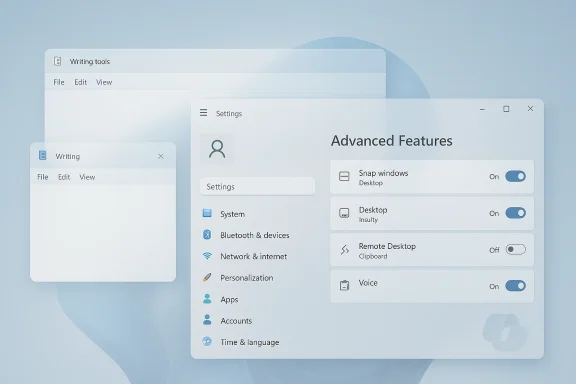
Microsoft is quietly changing course on one of the most visible elements of its Windows 11 AI push: the Copilot brand is starting to disappear from core inbox apps, even as the underlying features remain. In Insider builds, Notepad’s prominent Copilot button has been replaced by a more neutral Writing tools entry, Settings has renamed AI Features to Advanced Features, and the Snipping Tool appears to be losing Copilot treatment altogether. The shift is small in UI terms, but it is highly symbolic for a company that spent much of the last two years trying to make Copilot the identity layer for Windows.
Microsoft’s Windows 11 strategy over the past several release cycles has been defined by a tension between AI branding and product usability. On one hand, the company wanted Copilot to become a familiar, systemwide companion, appearing everywhere from the taskbar to inbox apps. On the other hand, Windows users repeatedly signaled that they wanted cleaner interfaces, fewer interruptions, and a stronger focus on reliability rather than constant feature churn. That tension has now become visible in the smallest parts of the operating system.
The Copilot branding wave accelerated in 2024 and 2025, when Microsoft pushed AI functions into apps such as Notepad, Paint, and the broader Windows shell. In practical terms, that meant features like rewrite, summarize, and tone adjustment were increasingly presented as Copilot-powered experiences rather than ordinary editor tools. Microsoft also made Copilot a central narrative for Windows 11 itself, linking the assistant to the company’s broader AI platform strategy and to the new class of Copilot+ PCs.
But the reception was mixed. A lot of users welcomed AI help when it was discreet and optional. Many others saw the branding as intrusive, especially in simple tools like Notepad, where a bright Copilot badge felt out of place next to a minimalist editing surface. That reaction is important, because Windows is not just another app ecosystem; it is a desktop environment where every pixel of chrome competes with a user’s attention.
Microsoft’s own messaging began to change in March 2026, when Windows chief Pavan Davuluri wrote that the company would be “more intentional” about where Copilot integrates across Windows and would focus on experiences that are genuinely useful and well-crafted. That statement matters because it signals a course correction, not a retreat from AI. The company is not abandoning Copilot; it is trying to make the experience feel less noisy and more credible.
What makes this development especially interesting is that Microsoft is still deeply invested in AI across Windows. The Copilot brand remains central in other parts of the ecosystem, and recent Windows Insider builds still show AI-enabled features in many places. So the current shift is best understood as a branding and UX adjustment, not a strategic surrender. It is a refinement of presentation, not a rejection of the underlying technology.
The change also aligns with the app’s ongoing evolution. Notepad has already grown far beyond its old identity, adding formatting, spell check, tabs, tables, and markdown support. In that sense, the AI tooling now feels like part of a broader modernization path, but a less aggressive one.
This kind of renaming usually happens when a platform team realizes that the marketing term has become more visible than the user benefit. In practical terms, most users care less about whether a function is “AI” and more about whether it is useful, predictable, and easy to turn off. Microsoft appears to be acknowledging that reality.
The removal suggests Microsoft is differentiating between visible AI assistance and intrusive AI labeling. The utility can still offer smart assistance, but the company no longer seems eager to announce Copilot at every interaction point.
The irony is that some of Copilot’s actual capabilities are genuinely useful. Summaries, rewrites, and quick image or text tasks can save time when presented at the right moment. But the brand shock often overshadowed the function.
This is the kind of phrasing you use when you know the old approach has become too loud. It is also a sign that Microsoft is trying to rebuild user trust by making Windows feel less experimental and more disciplined.
It also reflects a more mature product stance. Early AI rollouts often lead with branding because the vendor wants users to notice the new capability. Later, once the capability exists, the best products often recede into the background and become just another tool.
The problem was presentation. A plain text editor with a bright Copilot badge can feel like a contradiction, especially for users who open Notepad specifically because they want to avoid complexity. The new Writing tools label is less dramatic and therefore more compatible with the app’s identity.
That is why the branding matters so much here. The feature itself is not controversial. The visual interruption is. By changing the label, Microsoft is trying to protect the user’s sense that Notepad is still a lean editor, not a billboard.
At the same time, enterprises will still care about governance, telemetry, and disablement controls. A less conspicuous UI does not automatically solve policy concerns, but it does lower the chance of user annoyance becoming an adoption blocker.
That problem is especially acute in productivity tools. The promise of Copilot is that it reduces friction, but a noisy icon can create the opposite effect by demanding attention before the user even asks for help.
It also aligns with how many users think about software. People do not always want a model name or a platform label; they want a practical category. “Advanced” feels optional and controllable, which is exactly what a lot of Windows users want from these tools.
The transition is not a failure. It is the sign of a product team realizing that adoption depends on restraint as much as ambition.
That distinction matters because many people will conflate the two. A less visible Copilot does not mean fewer AI functions, and a renamed Settings entry does not mean the company is de-prioritizing the technology.
This is a smart product principle because it lets the company preserve innovation while reducing the chance that users feel manipulated. If the experience helps without announcing itself constantly, it tends to age better.
The broader pattern is familiar in software history: platform vendors often begin by naming the engine, then eventually name the job the engine performs. That shift usually happens when the underlying feature is mature enough to stand on its own.
The danger, of course, is that Microsoft could lose that advantage if users start perceiving Copilot as clutter rather than help. The current rebrand is partly an effort to avoid that outcome.
That means Microsoft’s change is not just about aesthetics. It is about defending user habit formation against competitors that can offer simpler stories.
For consumer users, the reaction may be even more immediate. Casual users often care about whether something feels annoying or helpful. A quieter Copilot may simply feel more human and less corporate.
That does not mean progress stops. It means Microsoft wants users to feel that each change is earned, not just inserted for the sake of showing activity.
The fact that these changes were spotted in Insider builds first suggests Microsoft is using that channel as a pressure valve. It can test the new presentation, watch reactions, and decide whether to extend the pattern elsewhere.
So the rebranding is also a brand repair exercise for Windows itself. It is not just Copilot that needs to feel better; Windows needs to feel calmer.
Another thing to watch is how Microsoft handles user education. If the company makes AI features quieter, it may also need better in-product explanations so users know where to find them. That will be especially important in enterprise environments, where administrators want clarity and employees want simple guidance.
Source: Mezha Microsoft starts removing Copilot from Windows 11 apps
 Background
Microsoft’s Windows 11 strategy over the past several release cycles has been defined by a tension between AI branding and product usability. On one hand, the company wanted Copilot to become a familiar, systemwide companion, appearing everywhere from the taskbar to inbox apps. On the other hand, Windows users repeatedly signaled that they wanted cleaner interfaces, fewer interruptions, and a stronger focus on reliability rather than constant feature churn. That tension has now become visible in the smallest parts of the operating system.The Copilot branding wave accelerated in 2024 and 2025, when Microsoft pushed AI functions into apps such as Notepad, Paint, and the broader Windows shell. In practical terms, that meant features like rewrite, summarize, and tone adjustment were increasingly presented as Copilot-powered experiences rather than ordinary editor tools. Microsoft also made Copilot a central narrative for Windows 11 itself, linking the assistant to the company’s broader AI platform strategy and to the new class of Copilot+ PCs.
But the reception was mixed. A lot of users welcomed AI help when it was discreet and optional. Many others saw the branding as intrusive, especially in simple tools like Notepad, where a bright Copilot badge felt out of place next to a minimalist editing surface. That reaction is important, because Windows is not just another app ecosystem; it is a desktop environment where every pixel of chrome competes with a user’s attention.
Microsoft’s own messaging began to change in March 2026, when Windows chief Pavan Davuluri wrote that the company would be “more intentional” about where Copilot integrates across Windows and would focus on experiences that are genuinely useful and well-crafted. That statement matters because it signals a course correction, not a retreat from AI. The company is not abandoning Copilot; it is trying to make the experience feel less noisy and more credible.
What makes this development especially interesting is that Microsoft is still deeply invested in AI across Windows. The Copilot brand remains central in other parts of the ecosystem, and recent Windows Insider builds still show AI-enabled features in many places. So the current shift is best understood as a branding and UX adjustment, not a strategic surrender. It is a refinement of presentation, not a rejection of the underlying technology.
What Changed in Windows 11
The most obvious change is in Notepad, where the previously prominent Copilot logo in the upper-right corner has been replaced by a more subdued Writing tools label. Under the hood, the feature set appears to remain the same, including rewrite, summarize, and tone-adjustment functions. The difference is that the app now presents those capabilities as part of the editor’s workflow rather than as a branded AI showcase.Notepad’s Rebrand
That redesign is more than cosmetic. Notepad is one of the oldest and simplest Windows accessories, and users tend to expect it to be fast, quiet, and self-explanatory. By removing the Copilot badge, Microsoft reduces the sense that a basic text editor is trying to upsell a platform message every time a user opens a file.The change also aligns with the app’s ongoing evolution. Notepad has already grown far beyond its old identity, adding formatting, spell check, tabs, tables, and markdown support. In that sense, the AI tooling now feels like part of a broader modernization path, but a less aggressive one.
- Copilot branding has been removed from the visible button.
- AI writing actions still exist, but are framed as Writing tools.
- The change makes the interface feel less promotional.
- The feature remains optional and can be turned off.
Settings and Naming Cleanup
Windows 11’s Settings app is also changing its terminology. The line previously labeled AI Features is now being renamed Advanced Features, with the same single toggle that lets users disable the tools altogether. That is a subtle but meaningful move, because it reduces the cognitive load associated with “AI” labeling while still preserving control.This kind of renaming usually happens when a platform team realizes that the marketing term has become more visible than the user benefit. In practical terms, most users care less about whether a function is “AI” and more about whether it is useful, predictable, and easy to turn off. Microsoft appears to be acknowledging that reality.
Snipping Tool Integration
The Snipping Tool change is even more notable because the Copilot label there appears to have been removed without much ceremony. Earlier integration had attached Copilot branding to image markup workflows, but the app now seems to be moving toward a cleaner presentation. That matters because the Snipping Tool is a utility users reach for in a hurry, and speed matters more than branding in that context.The removal suggests Microsoft is differentiating between visible AI assistance and intrusive AI labeling. The utility can still offer smart assistance, but the company no longer seems eager to announce Copilot at every interaction point.
Why Microsoft Is Repositioning Copilot
Microsoft’s move is best understood as a response to user feedback, not as an isolated design tweak. Over the past year, the company has faced a steady stream of criticism that Windows 11 has sometimes felt over-designed, over-branded, and over-explained. The result has been a broader push to emphasize Windows quality, streamline UI treatment, and make AI feel more native.The Feedback Problem
Copilot has had a branding problem from the start. For many users, it became associated with button clutter, taskbar changes, and the feeling that Microsoft was trying to force a new interface habit before trust had been earned. That is a dangerous dynamic in desktop software, where people value muscle memory and predictability.The irony is that some of Copilot’s actual capabilities are genuinely useful. Summaries, rewrites, and quick image or text tasks can save time when presented at the right moment. But the brand shock often overshadowed the function.
- Users wanted features, not constant reminders of the AI layer.
- Simple apps like Notepad are especially sensitive to visual clutter.
- Branding fatigue can damage adoption even when features are valuable.
- Control and opt-out options matter as much as feature quality.
A Quality-First Reset
Microsoft’s March 2026 Windows Insider message made the company’s direction clearer. The post emphasized performance, reliability, and craft, and explicitly promised more intentional Copilot integration across Windows. That language is important because it moves the discussion away from “how many places can we put Copilot?” and toward “where does Copilot actually improve the experience?”This is the kind of phrasing you use when you know the old approach has become too loud. It is also a sign that Microsoft is trying to rebuild user trust by making Windows feel less experimental and more disciplined.
What This Means Strategically
From a strategy standpoint, Microsoft is likely trying to keep the AI capability while reducing the backlash. If the company can preserve the function but remove the visible noise, it may lower resistance without sacrificing the broader Copilot ecosystem. That is a smart move if the goal is long-term adoption rather than short-term attention.It also reflects a more mature product stance. Early AI rollouts often lead with branding because the vendor wants users to notice the new capability. Later, once the capability exists, the best products often recede into the background and become just another tool.
The Notepad Story Is Bigger Than It Looks
Notepad is not a marquee app, but it is one of the clearest symbols of how Microsoft’s Windows philosophy is changing. Historically, Notepad was stripped down almost to the point of austerity. Its transformation into a richer editor has been gradual, and every new feature has forced Microsoft to balance simplicity against capability.From Utility to Platform Showcase
Over the last few years, Notepad has gained enough features to stop being a pure throwaway accessory. Tabs, markdown support, and formatting support pushed it into a more serious lightweight editor category. Once that happened, Microsoft evidently decided Notepad could serve as a showcase for AI text actions as well.The problem was presentation. A plain text editor with a bright Copilot badge can feel like a contradiction, especially for users who open Notepad specifically because they want to avoid complexity. The new Writing tools label is less dramatic and therefore more compatible with the app’s identity.
UX Matters More in Legacy Apps
Legacy apps carry emotional expectations. Users have an idea of what Notepad should be, just as they have an idea of what Calculator or Paint should be. If Microsoft introduces a new function in those apps, it has to respect the mental model that users already have.That is why the branding matters so much here. The feature itself is not controversial. The visual interruption is. By changing the label, Microsoft is trying to protect the user’s sense that Notepad is still a lean editor, not a billboard.
The Enterprise Angle
For enterprise users, the change is likely welcome because it reduces surface-level distraction while keeping the functions available for productivity work. IT departments generally prefer software that is easier to explain and less likely to confuse users. If a writing assistant is useful but hidden enough not to become a support issue, that is a better balance.At the same time, enterprises will still care about governance, telemetry, and disablement controls. A less conspicuous UI does not automatically solve policy concerns, but it does lower the chance of user annoyance becoming an adoption blocker.
Copilot Branding Fatigue and User Trust
Microsoft is not the first vendor to discover that a strong platform brand can become a liability when it is stamped onto too many places. The more often users see the same label, the less special it feels, and the more likely they are to interpret it as marketing rather than assistance. That is where Copilot appears to have been heading in Windows 11.When Branding Overreaches
The original Copilot push gave Microsoft a unified story across Windows, Edge, Microsoft 365, and its broader AI ambitions. But Windows is not a phone app or a web portal; it is an operating system with decades of user behavior behind it. If branding starts to appear in places where the user just wants to save a file or crop a screenshot, it risks becoming noise.That problem is especially acute in productivity tools. The promise of Copilot is that it reduces friction, but a noisy icon can create the opposite effect by demanding attention before the user even asks for help.
- Strong branding can accelerate awareness.
- Overexposure can trigger resistance.
- Utility apps are less tolerant of visual marketing.
- Trust grows faster when tools feel invisible until needed.
Why “Advanced Features” Works Better
The phrase Advanced Features is less emotionally loaded than AI Features. It tells users that the controls are optional, specialized, and perhaps worth exploring later, without implying that the app is turning into an AI product. That can be a subtle but powerful improvement in perception.It also aligns with how many users think about software. People do not always want a model name or a platform label; they want a practical category. “Advanced” feels optional and controllable, which is exactly what a lot of Windows users want from these tools.
A Lesson Microsoft Has Learned Before
Microsoft has gone through similar cycles in the past, where a big platform idea needed to be softened by user reality. The company has often had to move from announcement mode to operational mode, where it stops showcasing the idea and starts integrating it quietly. That is what this looks like now.The transition is not a failure. It is the sign of a product team realizing that adoption depends on restraint as much as ambition.
What Happens to the Rest of the Windows AI Stack
The removal of Copilot branding from Notepad and Snipping Tool does not mean AI is leaving Windows 11. In fact, Microsoft continues to ship AI-centric experiences across the platform, from Copilot+ PC features to text and image actions in other apps. The real story is that Microsoft seems to be separating useful AI from visible AI branding.AI Is Still Everywhere
Windows Insider builds continue to show meaningful AI integration in the operating system and the app ecosystem. Microsoft still treats Copilot as a strategic pillar, and its Insider communication has not suggested any retreat from AI investment. So this is not a rollback in capability; it is a change in presentation.That distinction matters because many people will conflate the two. A less visible Copilot does not mean fewer AI functions, and a renamed Settings entry does not mean the company is de-prioritizing the technology.
Practical vs. Promotional AI
The strongest AI features are often the ones that disappear into the workflow. A rewrite tool that appears only when needed is more valuable than a permanent logo in the corner of the app. Microsoft seems to be moving toward that model.This is a smart product principle because it lets the company preserve innovation while reducing the chance that users feel manipulated. If the experience helps without announcing itself constantly, it tends to age better.
A Possible Broader Pattern
It would not be surprising if other Windows apps start receiving similar treatment. Microsoft may gradually replace Copilot labels with task-specific names that describe the user benefit rather than the AI engine behind it. That would be consistent with the company’s current messaging about being more intentional and focused.The broader pattern is familiar in software history: platform vendors often begin by naming the engine, then eventually name the job the engine performs. That shift usually happens when the underlying feature is mature enough to stand on its own.
Competitive Implications for Microsoft and Rivals
This change also has competitive implications, because Windows is the front door to a larger battle over assistant-style computing. Microsoft, Google, Apple, and a growing set of AI-first vendors are all trying to define where intelligent helpers belong in everyday workflows. Branding strategy matters in that fight, because adoption is shaped by both capability and comfort.Microsoft’s Advantage
Microsoft still has a major structural advantage: it controls the operating system and can embed useful tools directly into native apps. That gives it a distribution edge that competitors cannot easily match. If it presents those tools with less friction, it may actually improve their real-world adoption.The danger, of course, is that Microsoft could lose that advantage if users start perceiving Copilot as clutter rather than help. The current rebrand is partly an effort to avoid that outcome.
How Rivals Benefit
Rivals benefit whenever Microsoft overplays its hand. If users feel that Copilot is too visible or too self-promotional, they may turn to alternative tools that feel more focused or less invasive. This is especially true for writing, image editing, and general productivity tasks where users have many substitute options.That means Microsoft’s change is not just about aesthetics. It is about defending user habit formation against competitors that can offer simpler stories.
- Less branding can reduce user pushback.
- Task-based labels can improve perceived usefulness.
- Lower-friction tools can weaken rival appeal.
- Quiet integration may create stronger long-term retention.
The Enterprise Market
Enterprise buyers will likely appreciate the softer approach, especially in environments where standardization and supportability matter more than flash. IT leaders generally want features that improve productivity without creating confusion. If AI tools are labeled as advanced or optional rather than mandatory or omnipresent, they are easier to govern.For consumer users, the reaction may be even more immediate. Casual users often care about whether something feels annoying or helpful. A quieter Copilot may simply feel more human and less corporate.
Historical Context: Microsoft’s Windows 11 Course Corrections
Microsoft’s current move fits a longer pattern of responding to user backlash with refinement. Windows 11 has seen multiple examples of the company adjusting course after public pushback, whether on the taskbar, the Start menu, default apps, or the pace of Copilot-related changes. The operating system has become a live experiment in balancing ambition with usability.The March 2026 Messaging Shift
The March 2026 Insider blog post is the clearest evidence that Microsoft wants to reset expectations. It talked about Windows quality, performance, reliability, and craft, which are not the kinds of words a company uses when it wants to double down on flashy surface changes. It is the language of stabilization.That does not mean progress stops. It means Microsoft wants users to feel that each change is earned, not just inserted for the sake of showing activity.
The Role of Windows Insiders
Windows Insiders have become a crucial feedback loop for Microsoft’s product direction. If a Copilot badge in Notepad lands badly in preview builds, the company can replace it before it reaches the broad audience. That is exactly how Insider programs are supposed to work.The fact that these changes were spotted in Insider builds first suggests Microsoft is using that channel as a pressure valve. It can test the new presentation, watch reactions, and decide whether to extend the pattern elsewhere.
Why This Matters for the Windows Brand
Windows has always depended on trust. When users feel the platform is stable, useful, and respectful of their time, they tolerate change. When they feel it is noisy or inconsistent, they start resisting even good features. Microsoft appears to understand that the Copilot brand was beginning to strain that trust in some areas.So the rebranding is also a brand repair exercise for Windows itself. It is not just Copilot that needs to feel better; Windows needs to feel calmer.
Strengths and Opportunities
Microsoft’s quieter Copilot presentation creates room for better adoption, better perception, and fewer user objections. It also gives the company a chance to preserve its AI roadmap while repairing some of the friction that built up around Windows 11. If handled well, this could become a model for how to ship AI in desktop software without overwhelming the user.- Cleaner UX in apps like Notepad and Snipping Tool.
- Less branding fatigue among users who dislike Copilot overexposure.
- Better enterprise acceptance for optional productivity features.
- Stronger trust by emphasizing utility over promotion.
- Improved discoverability through task-based labels like Writing tools.
- More flexible messaging around what AI actually does.
- A path to quieter integration across the rest of Windows 11.
Risks and Concerns
The biggest risk is that Microsoft may be correcting too hard and confusing users about what changed. If Copilot branding disappears too broadly, some users could lose the link between features they liked and the platform identity that explained them. There is also a chance that the company’s messaging becomes fragmented if some apps keep Copilot branding while others hide it.- User confusion if branding changes without clear explanation.
- Inconsistent naming across Windows apps and settings.
- Reduced recognition of Microsoft’s AI ecosystem.
- Possible backlash from users who prefer explicit Copilot labeling.
- Fragmented experiences if rebranding rolls out unevenly.
- Support complexity if different builds show different labels.
- Risk of looking indecisive if Microsoft keeps changing course.
What to Watch Next
The key question now is whether this is the beginning of a broader Windows-wide cleanup or just a limited adjustment for a few apps. If Microsoft continues replacing Copilot branding with task-specific names, it will confirm that the company is shifting from platform promotion to product utility. If the branding returns in other places, then this may turn out to be a targeted response to one particularly loud wave of criticism.Another thing to watch is how Microsoft handles user education. If the company makes AI features quieter, it may also need better in-product explanations so users know where to find them. That will be especially important in enterprise environments, where administrators want clarity and employees want simple guidance.
Items to monitor
- Whether Paint, Photos, or other apps get similar rebranding.
- Whether Microsoft extends Advanced Features naming beyond Notepad.
- How the Windows Insider community reacts to the new presentation.
- Whether Copilot branding returns in future stable builds.
- Whether Microsoft publishes clearer guidance on AI tool controls.
- Whether enterprise policy tools gain more visibility and granularity.
- Whether this approach improves overall Windows 11 sentiment.
Source: Mezha Microsoft starts removing Copilot from Windows 11 apps
