

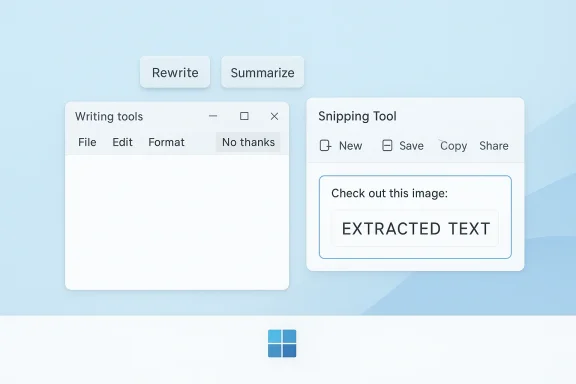
Microsoft is quietly rewriting the story of Copilot inside Windows 11, and the change says as much about user resistance as it does about AI strategy. The latest versions of Notepad and Snipping Tool are shedding Copilot branding and replacing it with more neutral labels such as Writing tools, while the company appears to be dialing back the push to force AI buttons into every corner of the operating system. That is a notable reversal for a product category Microsoft spent much of 2024 and early 2025 aggressively promoting as the future of Windows. It also suggests that the company has finally heard a message many users have been sending for months: less branding, more utility.
Microsoft’s recent Copilot pivot did not happen in a vacuum. Over the past year, the company has been steadily embedding AI into Windows 11’s inbox apps, expanding from a standalone Copilot experience into smaller features inside everyday utilities. Notepad gained AI-assisted rewrite and summarize capabilities, while Snipping Tool picked up OCR and text extraction features, and the broader Copilot app itself was updated repeatedly through the Windows Insider program. Microsoft’s own support pages now describe Notepad’s AI features as Rewrite, Summarize, and Write, and explicitly note that they are powered by GPT and available only in certain Insider channels or on supported subscriptions.
The company’s enthusiasm for integrating AI into common workflows was easy to understand. Microsoft has spent two years trying to establish Copilot as a cross-product layer rather than a single app, with the same name spanning Windows, Microsoft 365, and the web. In that model, Notepad is not just a text editor and Snipping Tool is not just a screen capture utility; they become on-ramps to a much larger AI ecosystem. That approach may make sense on a product roadmap, but it also risks alienating people who use these tools precisely because they are simple, lightweight, and predictable.
By March 2025, Microsoft had already made the Copilot connection explicit in Notepad and Snipping Tool updates for Windows Insiders. The March 13 rollout introduced Summarize and other Copilot-linked actions in Notepad, with Microsoft stating that Microsoft 365 Personal, Family, and Copilot Pro subscribers could use AI credits for those features. Then, on May 22, the company added Write in Notepad, again under the same Copilot umbrella, and positioned the new capability as a generative AI drafting aid.
The problem was never the existence of the features themselves. The problem was the visible, persistent branding and the sense that Microsoft was turning basic tools into advertisements for a broader AI agenda. In Windows communities and Microsoft’s own feedback channels, that pushback became increasingly hard to ignore. Users complained about Copilot being forced into workflows they never asked for, and a number of Microsoft Q&A threads captured the same underlying frustration: people wanted the old, simple utility back, not a brand banner layered over it.
The new naming shift is therefore more than cosmetic. When Microsoft swaps Copilot labels for terms like Writing tools, it is signaling a willingness to decouple functionality from the marketing wrapper. That distinction matters because it reframes the feature from “AI first” to “task first,” which is exactly how many Windows users expect inbox apps to behave. It is also a practical acknowledgement that AI adoption in Windows will not be won by branding alone. It has to be earned through usefulness, discretion, and trust.
The same broader pattern is visible in Snipping Tool. Microsoft has already been expanding the app beyond screen captures into text extraction and AI-assisted workflows, and its Insider releases show an emphasis on practical features such as OCR and markup improvements. When users complain about “Copilot everywhere,” Snipping Tool becomes a perfect example of the tension: a classic utility is now expected to carry the weight of Microsoft’s AI brand strategy.
What makes the change notable is that Microsoft is not removing the AI feature itself. Instead, it is de-emphasizing the branding around it. That is usually a sign that a company still believes in the capability, but not necessarily in the way it was introduced. In product terms, this is a retreat from visible evangelism toward quiet utility, which is often where users are most comfortable.
There is also a psychological component. A visible Copilot badge can make an otherwise helpful command feel like a mandatory promotion, especially when it appears in legacy tools that users have trusted for years. That can create brand fatigue fast. The more Microsoft tried to make Copilot omnipresent, the more some users seemed to interpret it as an intrusion rather than an enhancement.
A neutral term like Writing tools does not solve every concern, but it does lower the temperature. It suggests a specific purpose instead of a platform-wide agenda. That is a small interface decision with outsized strategic meaning.
Notepad is a particularly sensitive case because it is one of Windows’ most minimal and iconic tools. Users who open it are usually not looking for a feature-rich creative suite. They want speed, low overhead, and zero friction. Adding a permanent Copilot presence can feel like putting a showroom in a broom closet.
The same logic applies to Snipping Tool, which for years was valued because it did one job well. As Microsoft adds OCR, text extraction, and smarter workflows, the app becomes more capable, but also more complicated. That complexity can be worth it if the added features are discreet and intuitive. It becomes a problem when the interface begins to look like a billboard for Copilot.
In product ecosystems as large as Windows, feedback tends to arrive through multiple channels at once. Insider reactions, forum complaints, support threads, and community posts all shape perception even when a feature is technically sound. Once the narrative becomes “Microsoft keeps forcing Copilot on us,” interface tweaks become part of reputation management as much as product design.
The most important lesson is that AI assistance needs a lower profile than Microsoft originally assumed. Users may accept it, but they do not necessarily want it foregrounded. That is especially true in tools that are not supposed to feel intelligent at all.
That makes the branding retreat more interesting, not less. Microsoft is not canceling the AI strategy; it is refining the presentation layer. The company seems to be separating the infrastructure of AI from the visual insistence of AI, which is a much smarter long-term play if it wants users to adopt features voluntarily.
The challenge is that Microsoft has built a sprawling Copilot universe. Search results and support pages now reference Copilot in Windows, Microsoft 365 Copilot, Copilot Pro, Copilot credits, Copilot+ PCs, and app-specific Copilot integrations across multiple product families. That breadth creates brand confusion as much as brand recognition. When every feature has a Copilot label, the label starts to lose meaning.
That fragmentation matters because user expectations differ sharply across those contexts. A business customer using Microsoft 365 Copilot may expect brand visibility and premium positioning. A casual user opening Notepad expects almost nothing beyond a text cursor. Microsoft has to satisfy both without making one environment feel like a sales pitch to the other.
The company’s decision to simplify labels in Windows inbox apps may be the first sign that it recognizes that tension. In other words, Copilot can still power the feature behind the scenes, but it does not need to dominate the interface. That is a more mature product philosophy.
This is where the Copilot branding issue becomes more than cosmetic. A user who sees AI everywhere may start to assume that AI is everywhere in the code path as well, which raises questions about resource use, privacy, and system overhead. Even if those fears are overstated, perception matters. A lighter, quieter presentation can help reassure users that core apps remain core apps.
Microsoft has been careful to note that some Notepad AI features require sign-in, Microsoft account access, and AI credits. That dependency makes the features feel less like basic OS utilities and more like connected services, which is perfectly sensible from a business perspective but not always ideal from a consumer trust perspective. The less Microsoft foregrounds that dependency in the UI, the more likely users are to accept it on their own terms.
Microsoft’s job, then, is not just to make AI work well. It has to make AI feel legible, controllable, and optional. Branding changes help with that because they reduce the impression that every update is another Copilot enrollment drive.
That does not eliminate the underlying questions about how much intelligence belongs in a utility app. But it does make the experience less confrontational. And in Windows, confrontation is often the fastest way to turn a useful feature into a controversial one.
Consumers, meanwhile, are more likely to judge the change emotionally and immediately. A home user opening Notepad wants to feel that the app is still simple and familiar. Removing prominent Copilot branding helps preserve that feeling, even if the underlying AI is still present and waiting behind a menu item.
The distinction matters because Windows has to serve both audiences with the same base code. Enterprise customers often ask for governance, policy controls, and predictable behavior. Consumer customers ask for less clutter and fewer surprise upsells. Microsoft’s new direction suggests it is trying to satisfy both by separating capability from promotion.
That is why Microsoft’s move to generic labels is clever. It makes the feature easier to justify in a business context while making it less intimidating in a home context. In both cases, the same core principle applies: show the task, not the mascot.
This may also help Microsoft avoid a false binary in the market. The company does not need users to become “Copilot fans” to justify the inclusion of AI features in Windows. It only needs them to find the features useful enough to keep using them.
That matters because Windows remains the most important desktop platform for mainstream PC users and a major battleground for AI adoption. If Microsoft can make AI feel native without making it annoying, it has a real chance to normalize the behavior across the industry. If not, rivals may use simplicity as a differentiator.
There is also a reputational angle. By listening to backlash and softening the branding, Microsoft can position itself as responsive rather than stubborn. That is valuable in a market where users increasingly compare AI features across operating systems, browsers, and productivity suites. A company that listens often wins more goodwill than one that keeps pushing.
That approach could become a template. If Microsoft can prove that AI features gain traction when they are less assertive, other vendors may follow. The lesson would be simple but important: the best AI interface is often the one that does not announce itself constantly.
This is the sort of pivot that usually looks small in the changelog but large in the market. A renamed menu item is not a grand strategic retreat, but it may be the first visible sign that the AI era is entering a post-hype phase.
Microsoft is likely testing a broader lesson here: AI in Windows needs to be useful first, visible second. That approach may take time to prove itself, but it is much more sustainable than expecting users to embrace a brand simply because it appears everywhere. The future of Copilot on Windows may depend not on louder marketing, but on quieter design.
Source: KitGuru Microsoft starts removing Copilot branding from Windows 11 apps - KitGuru
 Overview
Microsoft’s recent Copilot pivot did not happen in a vacuum. Over the past year, the company has been steadily embedding AI into Windows 11’s inbox apps, expanding from a standalone Copilot experience into smaller features inside everyday utilities. Notepad gained AI-assisted rewrite and summarize capabilities, while Snipping Tool picked up OCR and text extraction features, and the broader Copilot app itself was updated repeatedly through the Windows Insider program. Microsoft’s own support pages now describe Notepad’s AI features as Rewrite, Summarize, and Write, and explicitly note that they are powered by GPT and available only in certain Insider channels or on supported subscriptions.The company’s enthusiasm for integrating AI into common workflows was easy to understand. Microsoft has spent two years trying to establish Copilot as a cross-product layer rather than a single app, with the same name spanning Windows, Microsoft 365, and the web. In that model, Notepad is not just a text editor and Snipping Tool is not just a screen capture utility; they become on-ramps to a much larger AI ecosystem. That approach may make sense on a product roadmap, but it also risks alienating people who use these tools precisely because they are simple, lightweight, and predictable.
By March 2025, Microsoft had already made the Copilot connection explicit in Notepad and Snipping Tool updates for Windows Insiders. The March 13 rollout introduced Summarize and other Copilot-linked actions in Notepad, with Microsoft stating that Microsoft 365 Personal, Family, and Copilot Pro subscribers could use AI credits for those features. Then, on May 22, the company added Write in Notepad, again under the same Copilot umbrella, and positioned the new capability as a generative AI drafting aid.
The problem was never the existence of the features themselves. The problem was the visible, persistent branding and the sense that Microsoft was turning basic tools into advertisements for a broader AI agenda. In Windows communities and Microsoft’s own feedback channels, that pushback became increasingly hard to ignore. Users complained about Copilot being forced into workflows they never asked for, and a number of Microsoft Q&A threads captured the same underlying frustration: people wanted the old, simple utility back, not a brand banner layered over it.
The new naming shift is therefore more than cosmetic. When Microsoft swaps Copilot labels for terms like Writing tools, it is signaling a willingness to decouple functionality from the marketing wrapper. That distinction matters because it reframes the feature from “AI first” to “task first,” which is exactly how many Windows users expect inbox apps to behave. It is also a practical acknowledgement that AI adoption in Windows will not be won by branding alone. It has to be earned through usefulness, discretion, and trust.
What Changed in Notepad and Snipping Tool
The headline adjustment is straightforward: the Copilot logo and persistent AI iconography are being reduced in the latest Windows 11 app versions, and the functions are being presented under more generic labels. Microsoft has confirmed through its support documentation that Notepad’s AI functions remain available, but they now sit in a more neutral Writing tools area rather than advertising the Copilot name at every turn. That is a subtle but important shift in how Microsoft wants users to perceive the feature set.The same broader pattern is visible in Snipping Tool. Microsoft has already been expanding the app beyond screen captures into text extraction and AI-assisted workflows, and its Insider releases show an emphasis on practical features such as OCR and markup improvements. When users complain about “Copilot everywhere,” Snipping Tool becomes a perfect example of the tension: a classic utility is now expected to carry the weight of Microsoft’s AI brand strategy.
What makes the change notable is that Microsoft is not removing the AI feature itself. Instead, it is de-emphasizing the branding around it. That is usually a sign that a company still believes in the capability, but not necessarily in the way it was introduced. In product terms, this is a retreat from visible evangelism toward quiet utility, which is often where users are most comfortable.
The Branding Problem
Microsoft’s Copilot branding strategy has always had a dual purpose: unify the company’s AI story and make the feature feel familiar across products. But a universal label only works if it doesn’t overwhelm the function users are actually trying to use. In Notepad, the branding has become a distraction because the app’s core value proposition is simplicity, not discovery.There is also a psychological component. A visible Copilot badge can make an otherwise helpful command feel like a mandatory promotion, especially when it appears in legacy tools that users have trusted for years. That can create brand fatigue fast. The more Microsoft tried to make Copilot omnipresent, the more some users seemed to interpret it as an intrusion rather than an enhancement.
A neutral term like Writing tools does not solve every concern, but it does lower the temperature. It suggests a specific purpose instead of a platform-wide agenda. That is a small interface decision with outsized strategic meaning.
- Branding is being softened, not eliminated.
- Functionality remains in place for users who want it.
- Microsoft is trying to reduce visual friction in core apps.
- The new wording makes the feature feel less like advertising.
Why Users Pushed Back
The negative reaction to Copilot branding in Windows 11 was never just about hating AI. Many users like automation, summarization, and writing assistance when they are optional and clearly useful. The backlash emerged because Microsoft blurred the line between optional assistance and platform-level promotion, especially in applications where users expected a clean, distraction-free interface.Notepad is a particularly sensitive case because it is one of Windows’ most minimal and iconic tools. Users who open it are usually not looking for a feature-rich creative suite. They want speed, low overhead, and zero friction. Adding a permanent Copilot presence can feel like putting a showroom in a broom closet.
The same logic applies to Snipping Tool, which for years was valued because it did one job well. As Microsoft adds OCR, text extraction, and smarter workflows, the app becomes more capable, but also more complicated. That complexity can be worth it if the added features are discreet and intuitive. It becomes a problem when the interface begins to look like a billboard for Copilot.
The Feedback Loop
Microsoft appears to have encountered a classic platform lesson: users will tolerate innovation more readily than imposition. The Copilot rollout in Windows Insider builds was framed as an improvement, but the reception showed that initiative is not the same thing as acceptance. The company now seems to be listening to that distinction.In product ecosystems as large as Windows, feedback tends to arrive through multiple channels at once. Insider reactions, forum complaints, support threads, and community posts all shape perception even when a feature is technically sound. Once the narrative becomes “Microsoft keeps forcing Copilot on us,” interface tweaks become part of reputation management as much as product design.
The most important lesson is that AI assistance needs a lower profile than Microsoft originally assumed. Users may accept it, but they do not necessarily want it foregrounded. That is especially true in tools that are not supposed to feel intelligent at all.
- Users objected more to forced visibility than to the features themselves.
- Simple apps are judged harshly when they become crowded.
- Microsoft’s feedback channels likely played a real role in the pivot.
- The company is learning that restraint can be a feature.
Microsoft’s Broader Copilot Strategy
Even as it trims branding inside Notepad and Snipping Tool, Microsoft is not backing away from Copilot as a platform. The company has continued to expand Copilot on Windows with new app updates, voice features, file search, OS context awareness, and other improvements through the Windows Insider program throughout 2025. Microsoft’s own product pages still present Copilot as a major pillar of the Windows 11 experience.That makes the branding retreat more interesting, not less. Microsoft is not canceling the AI strategy; it is refining the presentation layer. The company seems to be separating the infrastructure of AI from the visual insistence of AI, which is a much smarter long-term play if it wants users to adopt features voluntarily.
The challenge is that Microsoft has built a sprawling Copilot universe. Search results and support pages now reference Copilot in Windows, Microsoft 365 Copilot, Copilot Pro, Copilot credits, Copilot+ PCs, and app-specific Copilot integrations across multiple product families. That breadth creates brand confusion as much as brand recognition. When every feature has a Copilot label, the label starts to lose meaning.
One Brand, Many Products
Microsoft’s Copilot naming problem is partly a result of success. The company wanted a single recognizable AI identity, but the result is a product family that sometimes feels more like a marketing umbrella than a coherent user experience. The same term can refer to chat, system assistance, document help, browser support, and on-device features depending on context.That fragmentation matters because user expectations differ sharply across those contexts. A business customer using Microsoft 365 Copilot may expect brand visibility and premium positioning. A casual user opening Notepad expects almost nothing beyond a text cursor. Microsoft has to satisfy both without making one environment feel like a sales pitch to the other.
The company’s decision to simplify labels in Windows inbox apps may be the first sign that it recognizes that tension. In other words, Copilot can still power the feature behind the scenes, but it does not need to dominate the interface. That is a more mature product philosophy.
- Microsoft still wants Copilot everywhere in principle.
- It is backing off from making Copilot visible everywhere.
- The distinction between brand and function is becoming clearer.
- Too much Copilot can dilute Copilot itself.
Performance, Security, and the Windows 11 Experience
The KitGuru report notes that Microsoft is also reportedly working on performance and security enhancements for Windows 11, and that is consistent with the broader direction of the platform in 2025. Microsoft has been balancing ambitious AI features with the ordinary obligations of an operating system: responsiveness, reliability, and trust. If AI additions make Windows feel heavier or less predictable, they undermine the very productivity story Microsoft wants to tell.This is where the Copilot branding issue becomes more than cosmetic. A user who sees AI everywhere may start to assume that AI is everywhere in the code path as well, which raises questions about resource use, privacy, and system overhead. Even if those fears are overstated, perception matters. A lighter, quieter presentation can help reassure users that core apps remain core apps.
Microsoft has been careful to note that some Notepad AI features require sign-in, Microsoft account access, and AI credits. That dependency makes the features feel less like basic OS utilities and more like connected services, which is perfectly sensible from a business perspective but not always ideal from a consumer trust perspective. The less Microsoft foregrounds that dependency in the UI, the more likely users are to accept it on their own terms.
Trust and Transparency
Windows users tend to react strongly to changes that feel hidden or automatic. That is one reason why AI features embedded into inbox apps can trigger stronger feelings than equivalent features in standalone cloud services. If a feature is built into Notepad or Snipping Tool, users assume it belongs to the operating system’s essential contract.Microsoft’s job, then, is not just to make AI work well. It has to make AI feel legible, controllable, and optional. Branding changes help with that because they reduce the impression that every update is another Copilot enrollment drive.
That does not eliminate the underlying questions about how much intelligence belongs in a utility app. But it does make the experience less confrontational. And in Windows, confrontation is often the fastest way to turn a useful feature into a controversial one.
- Quiet UI changes can improve perceived trust.
- Users often equate branding with deeper integration.
- Sign-in and AI-credit dependencies complicate the utility story.
- Microsoft is trying to keep AI features from feeling intrusive.
Enterprise vs Consumer Impact
For enterprise users, the changes are likely to be welcomed as a sign of better restraint. IT admins and corporate decision-makers often prefer features that are discoverable but not noisy, especially in managed environments where standardization matters more than novelty. Microsoft’s continued support for policy management around Notepad AI features shows that it still expects enterprises to control how these tools are deployed.Consumers, meanwhile, are more likely to judge the change emotionally and immediately. A home user opening Notepad wants to feel that the app is still simple and familiar. Removing prominent Copilot branding helps preserve that feeling, even if the underlying AI is still present and waiting behind a menu item.
The distinction matters because Windows has to serve both audiences with the same base code. Enterprise customers often ask for governance, policy controls, and predictable behavior. Consumer customers ask for less clutter and fewer surprise upsells. Microsoft’s new direction suggests it is trying to satisfy both by separating capability from promotion.
Different Expectations, Same App
An enterprise administrator may see AI in Notepad as a productivity enhancement that can be documented, allowed, or disabled. A consumer may see the same feature as one more thing cluttering the interface. The software is identical, but the policy and perception layers are not.That is why Microsoft’s move to generic labels is clever. It makes the feature easier to justify in a business context while making it less intimidating in a home context. In both cases, the same core principle applies: show the task, not the mascot.
This may also help Microsoft avoid a false binary in the market. The company does not need users to become “Copilot fans” to justify the inclusion of AI features in Windows. It only needs them to find the features useful enough to keep using them.
- Enterprises want control and consistency.
- Consumers want simplicity and familiarity.
- A neutral label works better across both groups.
- The same feature can be received very differently depending on context.
Competitive Implications
Microsoft’s Copilot retrenchment in Windows 11 also has competitive implications. If the company learns to package AI as a quiet utility instead of a loud brand statement, it may become better at competing with rivals that are still leaning on splashy AI branding. The market is moving away from novelty and toward usefulness, and Microsoft appears to be adjusting to that reality.That matters because Windows remains the most important desktop platform for mainstream PC users and a major battleground for AI adoption. If Microsoft can make AI feel native without making it annoying, it has a real chance to normalize the behavior across the industry. If not, rivals may use simplicity as a differentiator.
There is also a reputational angle. By listening to backlash and softening the branding, Microsoft can position itself as responsive rather than stubborn. That is valuable in a market where users increasingly compare AI features across operating systems, browsers, and productivity suites. A company that listens often wins more goodwill than one that keeps pushing.
The Rivalry Angle
Apple, Google, and other platform vendors are all facing the same fundamental question: how visible should AI be inside the operating system? Microsoft’s answer is becoming more nuanced. Instead of insisting that users always see Copilot, the company seems to be saying that users should only see it when it helps.That approach could become a template. If Microsoft can prove that AI features gain traction when they are less assertive, other vendors may follow. The lesson would be simple but important: the best AI interface is often the one that does not announce itself constantly.
This is the sort of pivot that usually looks small in the changelog but large in the market. A renamed menu item is not a grand strategic retreat, but it may be the first visible sign that the AI era is entering a post-hype phase.
- Microsoft is shifting from AI spectacle to AI utility.
- Competitors may take note if the softer approach lands better.
- Brand restraint could become a market advantage.
- Windows remains the key proving ground for mainstream AI adoption.
Strengths and Opportunities
Microsoft’s decision to tone down Copilot branding in Windows 11 apps is a pragmatic move that could pay off quickly. It preserves the functionality, lowers the visual noise, and demonstrates that the company is willing to adjust course when the user experience demands it. That is not a retreat from AI; it is an attempt to make AI feel normal.- Improved user acceptance by reducing the sense of forced promotion.
- Cleaner interfaces in apps that users expect to stay lightweight.
- Better alignment between feature value and user intent.
- More room for enterprise adoption without brand overload.
- Stronger trust signals from a company willing to respond to feedback.
- Less confusion between core OS features and premium AI services.
- A clearer distinction between utility and marketing.
Risks and Concerns
The obvious risk is that Microsoft could make the AI shift too subtle and lose some momentum around Copilot awareness. If users no longer recognize the feature as part of the wider Copilot ecosystem, the company may struggle to drive discovery, subscription conversion, or long-term brand affinity. There is also the possibility that renaming the feature solves the symptom but not the underlying concern about AI creep in Windows.- Brand dilution if Copilot becomes too hidden to matter.
- User skepticism if the rename is seen as cosmetic rather than substantive.
- Feature confusion when capabilities move behind neutral labels.
- Persistent backlash if users still feel AI is being pushed into essentials.
- Subscription friction because some features depend on sign-in or credits.
- Policy complexity for IT teams managing mixed environments.
- Expectation mismatch between a simple app and a connected AI service.
Looking Ahead
The next phase will be less about whether Microsoft keeps AI in Notepad and Snipping Tool, and more about how gracefully it integrates those features into the broader Windows experience. If the company continues to reduce friction, improve performance, and preserve user choice, the backlash may fade into a footnote. If not, the Copilot brand could keep becoming a shorthand for unwanted clutter instead of useful assistance.Microsoft is likely testing a broader lesson here: AI in Windows needs to be useful first, visible second. That approach may take time to prove itself, but it is much more sustainable than expecting users to embrace a brand simply because it appears everywhere. The future of Copilot on Windows may depend not on louder marketing, but on quieter design.
- Watch for more neutral labels across inbox Windows apps.
- Monitor Insider builds for further UI simplification.
- Track whether Copilot features remain opt-in or become easier to disable.
- Pay attention to performance changes as AI features continue to expand.
- Look for enterprise policy updates around Notepad and Snipping Tool.
Source: KitGuru Microsoft starts removing Copilot branding from Windows 11 apps - KitGuru
