

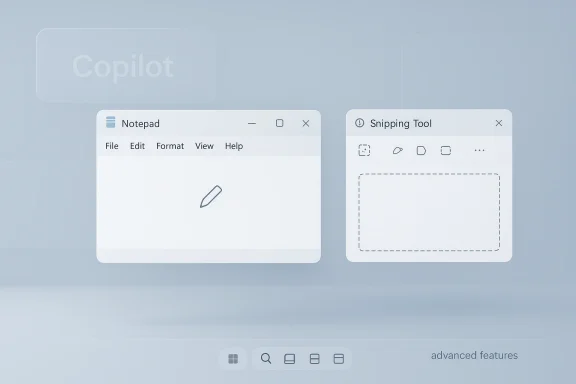
Microsoft is quietly changing course on one of Windows 11’s most visible AI strategies. In the latest Insider builds, the company is stripping the Copilot label and iconography from some core apps, including Notepad and Snipping Tool, even as the underlying AI features remain in place. The shift does not mean Microsoft is backing away from artificial intelligence; instead, it suggests the company is trying to make Windows feel less crowded, less promotional, and more deliberate. That matters because it reveals something bigger than a UI tweak: Microsoft may be moving from AI everywhere to AI where it actually helps.
For the last two years, Microsoft has treated Copilot as both a product and a brand umbrella. It has appeared in Windows itself, in the Microsoft 365 suite, in Edge, in standalone apps, and in a growing number of inbox utilities that used to be simple, utility-first tools. That strategy made sense in the wake of the generative AI boom, when every software vendor wanted to signal relevance and momentum. But it also created a problem: the Copilot name became so pervasive that it started to feel less like a helpful assistant and more like a marketing overlay.
The current reversal is subtle but important. Microsoft’s own Windows Insider messaging now says the company is “reducing unnecessary Copilot entry points,” with explicit references to Snipping Tool, Photos, Widgets, and Notepad. That phrasing is revealing because it suggests the issue is not whether AI belongs in Windows, but whether users should be confronted with AI branding at every turn. In other words, Microsoft is not removing the capability; it is reducing the visual insistence of the capability.
This is also a classic platform reaction. When a feature begins to dominate the interface, users often stop seeing the benefit and start seeing clutter. The backlash around Copilot in Windows has been less about raw machine intelligence and more about the feeling that ordinary workflows were being instrumented, branded, and rebranded faster than users could adapt. Microsoft appears to have recognized that the most irritating thing about an AI feature is often not the AI itself, but the way it is framed.
The change fits a broader arc in Windows 11 product design. Microsoft has spent much of the last cycle trying to turn formerly utilitarian inbox apps into “smart” experiences. Some of those changes have been legitimate upgrades, especially where local hardware acceleration on Copilot+ PCs makes AI-assisted editing faster and more private. But a lot of the rollout has felt scattered. The current trimming of Copilot entry points looks like an attempt to restore a little discipline.
But the Windows implementation quickly became more complicated than the sales pitch. A single branded assistant gave way to a broad family of features, some cloud-based, some local, some subscription-gated, and some tied to new hardware. That fragmentation made it hard for users to understand what Copilot actually was. Was it a chat assistant? A set of writing tools? A taskbar button? A side panel? An AI-powered image editor? In practice, it became all of those things at once.
The latest changes appear to be a response to that confusion. Microsoft’s March 2026 Windows Insider post, published by Pavan Davuluri, says the company is reducing unnecessary Copilot entry points and being more intentional about where AI appears in Windows. That is not just messaging polish. It is the public admission of a product design problem that emerged after months of aggressive AI expansion.
The timing is also important. Windows 11 is now deep into a cycle where the company has been experimenting with new AI experiences across Notepad, Paint, Photos, Snipping Tool, and the Copilot app itself. Some of those features have landed well. Others have clearly been harder to defend. The branding rollback suggests Microsoft is separating the technology story from the UI story so it can keep shipping AI without forcing every app to behave like a demo.
The result was predictable:
That is a meaningful course correction because it shows the company has identified the difference between adoption and accommodation. Users may accept AI, but they still want it to stay in its lane.
That matters because Notepad is one of the few Windows apps where minimalism is part of the product identity. Users do not open Notepad expecting a generative AI workspace. They expect a fast, plain editor that loads instantly and stays out of the way. Introducing Copilot branding into that environment risked violating the unwritten social contract of the app.
The updated terminology is also a small but telling act of rhetorical cleanup. “Writing Tools” sounds functional. “AI features” sounds experimental. “Copilot” sounds like a brand campaign. Microsoft seems to be deciding that the least jarring option is to make the feature feel like part of the app rather than a satellite product bolted onto it.
The change also hints at a more mature design philosophy:
It also gives the company more room to evolve the backend without constantly restaging the branding. If a feature moves from cloud AI to local model execution or changes how it is monetized, “Advanced features” remains a flexible umbrella. That is smart product language, even if it also functions as a small act of camouflage.
This makes sense if the goal is to encourage users to ask AI to analyze what is on screen. But it also risks breaking the rhythm of a tool that many people use dozens of times a day. Users who want a snip want it quickly. They do not necessarily want a follow-up prompt, a branded callout, or a detour into an AI menu.
Microsoft’s broader list of apps under revision includes Photos and Widgets, which suggests the company is reducing Copilot’s reach in several high-traffic areas rather than making a one-off change. That is important because it indicates strategy, not just a cleanup pass. The brand is being pulled back from interfaces where it may have crossed the line from helpful to noisy.
That leaves Microsoft with a design choice:
The irony is that Microsoft may actually improve AI adoption by making it less obvious. Users are often more willing to try a feature when it feels optional and contextually useful rather than ever-present and over-marketed. That is a lesson many software companies eventually relearn the hard way.
Microsoft has an opportunity here to learn something valuable from the Insider reaction. If users praise the cleaner look and the more subtle naming, the company can expand the model to broader releases. If they complain that the AI feels hidden or inconsistent, Microsoft can adjust the placement without fully restoring the old branding. Either way, the preview channel gives the company room to negotiate with the audience in real time.
That testing approach is also useful because Windows 11 now spans so many device types. A branded AI button that makes sense on a Copilot+ laptop may feel gratuitous on a desktop tower used for spreadsheets and file management. Insider feedback can help Microsoft separate genuine utility from hardware-specific enthusiasm.
The current Copilot rollback is a textbook example of a tone problem being treated as a design problem:
At the same time, Microsoft still has to prove that the underlying AI can be controlled, audited, and disabled where needed. Branding changes alone do not solve governance concerns. They only make the feature feel less disruptive.
The backlash to Copilot has been especially noticeable because it has come at a time when users already feel overloaded by prompts, overlays, recommendations, and subscription nudges across software generally. Windows is not the only platform dealing with this fatigue, but it is one of the most visible. A single desktop environment that adds both system-level AI and app-level AI can quickly feel overdesigned.
Competitively, Microsoft cannot afford to look anti-AI, but it also cannot afford to look tone-deaf. Apple is still pushing its own intelligence story in a relatively restrained way. Google continues to emphasize AI across services, but often with a product-layered rather than OS-layered feel. Microsoft’s challenge is to keep pace without making Windows feel like the most insistent platform of the bunch.
That shift created three problems:
That consumer resistance can become a market issue because opinion leaders, reviewers, and enthusiasts shape the narrative around Windows. If the narrative becomes “Microsoft won’t stop shoving AI into everything,” it starts to matter beyond a single UI change.
That distinction is important because the public conversation often collapses branding and functionality into one thing. But users do not actually object to all AI. Many object to AI that is too loud, too frequent, or too ambiguous in purpose. Microsoft seems to be betting that if it lowers the temperature, users will tolerate, and maybe even like, the functionality more.
This is also a sign that the company understands the difference between a demo and a product. A demo wants attention. A product wants repeat use. Repeated use usually depends on trust, consistency, and restraint. If the AI is good, it does not need to announce itself every time.
That matters because local execution can make the feature feel less like a marketing gimmick and more like a real system capability. It also gives Microsoft a cleaner justification for keeping AI in the product even as it tones down the label.
That is probably the right direction for Windows, especially as the company keeps integrating AI into more meaningful workflows.
The biggest opportunities are practical rather than flashy:
The main risks are worth watching closely:
The deeper strategic question is whether Copilot becomes a visible consumer brand or a quiet system layer. Microsoft appears to be testing the second option, at least in the most basic Windows utilities. That could prove to be the better long-term model if the company wants AI to feel dependable rather than performative.
Source: eWeek Microsoft Begins Scrubbing Copilot Branding from Windows 11 Apps
 Overview
For the last two years, Microsoft has treated Copilot as both a product and a brand umbrella. It has appeared in Windows itself, in the Microsoft 365 suite, in Edge, in standalone apps, and in a growing number of inbox utilities that used to be simple, utility-first tools. That strategy made sense in the wake of the generative AI boom, when every software vendor wanted to signal relevance and momentum. But it also created a problem: the Copilot name became so pervasive that it started to feel less like a helpful assistant and more like a marketing overlay.The current reversal is subtle but important. Microsoft’s own Windows Insider messaging now says the company is “reducing unnecessary Copilot entry points,” with explicit references to Snipping Tool, Photos, Widgets, and Notepad. That phrasing is revealing because it suggests the issue is not whether AI belongs in Windows, but whether users should be confronted with AI branding at every turn. In other words, Microsoft is not removing the capability; it is reducing the visual insistence of the capability.
This is also a classic platform reaction. When a feature begins to dominate the interface, users often stop seeing the benefit and start seeing clutter. The backlash around Copilot in Windows has been less about raw machine intelligence and more about the feeling that ordinary workflows were being instrumented, branded, and rebranded faster than users could adapt. Microsoft appears to have recognized that the most irritating thing about an AI feature is often not the AI itself, but the way it is framed.
The change fits a broader arc in Windows 11 product design. Microsoft has spent much of the last cycle trying to turn formerly utilitarian inbox apps into “smart” experiences. Some of those changes have been legitimate upgrades, especially where local hardware acceleration on Copilot+ PCs makes AI-assisted editing faster and more private. But a lot of the rollout has felt scattered. The current trimming of Copilot entry points looks like an attempt to restore a little discipline.
Why the branding matters
Branding decisions can look cosmetic, but on a desktop OS they shape user trust. If every tool surfaces a Copilot badge, users begin to assume the entire system is steering them toward AI whether they want it or not. That is a problem for an operating system that still has to serve power users, enterprise admins, and people who want nothing more than a fast text editor or a clean screenshot utility.- The new approach suggests Microsoft is learning that visibility is not the same thing as value.
- It also shows that AI can be present without being foregrounded.
- For some users, that will feel like a welcome correction.
- For others, it may look like a branding retreat after overreach.
- Either way, the signal is clear: Copilot must now justify its place inside Windows.
Background
Microsoft’s Copilot strategy did not begin with Windows 11 apps. It grew out of a larger corporate bet that generative AI would become the new interface layer for consumer and enterprise software. The company invested heavily in OpenAI, folded Copilot into Microsoft 365, and then pushed the brand into Windows as a system-level assistant. That was a bold play, and in some ways a rational one: if AI was going to become a daily productivity feature, Microsoft wanted the word “Copilot” to be synonymous with the experience.But the Windows implementation quickly became more complicated than the sales pitch. A single branded assistant gave way to a broad family of features, some cloud-based, some local, some subscription-gated, and some tied to new hardware. That fragmentation made it hard for users to understand what Copilot actually was. Was it a chat assistant? A set of writing tools? A taskbar button? A side panel? An AI-powered image editor? In practice, it became all of those things at once.
The latest changes appear to be a response to that confusion. Microsoft’s March 2026 Windows Insider post, published by Pavan Davuluri, says the company is reducing unnecessary Copilot entry points and being more intentional about where AI appears in Windows. That is not just messaging polish. It is the public admission of a product design problem that emerged after months of aggressive AI expansion.
The timing is also important. Windows 11 is now deep into a cycle where the company has been experimenting with new AI experiences across Notepad, Paint, Photos, Snipping Tool, and the Copilot app itself. Some of those features have landed well. Others have clearly been harder to defend. The branding rollback suggests Microsoft is separating the technology story from the UI story so it can keep shipping AI without forcing every app to behave like a demo.
The long road to Copilot saturation
Microsoft’s push into AI was never just about raw capability. It was about habit formation. By placing Copilot buttons in frequently used apps, the company hoped to normalize AI-assisted behavior at the point of need. That strategy works when the feature is useful and discrete. It starts to fail when the same brand appears everywhere and the workflow becomes more about encountering the assistant than completing the task.The result was predictable:
- users started to associate Copilot with clutter,
- editors and utilities felt less focused,
- and some people interpreted the changes as unwanted bloat rather than optional enhancement.
From AI feature to interface problem
Microsoft’s challenge is not that AI is unwelcome in Windows. It is that AI can become too visible for its own good. When a feature is always shouting its name, it can feel less like assistance and more like intrusion. The current softening of Copilot branding suggests Microsoft wants to preserve the functionality while reducing the sense that Windows is being repurposed as a marketing platform.That is a meaningful course correction because it shows the company has identified the difference between adoption and accommodation. Users may accept AI, but they still want it to stay in its lane.
What Changed in Notepad
Notepad is the clearest example of the new strategy. In the newest preview build, the once-prominent Copilot button in the toolbar has been replaced with a more neutral pen icon. The features behind it still exist, but the branding has changed from overt AI promotion to a more generic writing workflow. Microsoft has also renamed the app’s AI-related settings section from “AI features” to “Advanced features”, which makes the experience feel less like a showcase and more like an optional enhancement.That matters because Notepad is one of the few Windows apps where minimalism is part of the product identity. Users do not open Notepad expecting a generative AI workspace. They expect a fast, plain editor that loads instantly and stays out of the way. Introducing Copilot branding into that environment risked violating the unwritten social contract of the app.
The updated terminology is also a small but telling act of rhetorical cleanup. “Writing Tools” sounds functional. “AI features” sounds experimental. “Copilot” sounds like a brand campaign. Microsoft seems to be deciding that the least jarring option is to make the feature feel like part of the app rather than a satellite product bolted onto it.
Why Notepad is the symbolic battleground
Notepad is not just another app. It is a cultural artifact in Windows, a piece of software that has always represented simplicity, speed, and reliability. That makes it the perfect test case for whether Microsoft can add intelligence without destroying trust. If users feel the company has over-optimized Notepad into something heavier and noisier, the backlash will be outsized because the app carries symbolic weight.The change also hints at a more mature design philosophy:
- keep the AI capability available,
- reduce the branding pressure,
- and preserve the basic utility of the app.
The settings rename is not trivial
Renaming “AI features” to “Advanced features” may sound cosmetic, but it changes the relationship between the user and the feature. “AI” signals a philosophical category and invites concerns about data use, cloud processing, and subscription gating. “Advanced features” sounds like a normal product setting, something optional and bounded. That helps Microsoft lower the emotional temperature around the feature without removing it.It also gives the company more room to evolve the backend without constantly restaging the branding. If a feature moves from cloud AI to local model execution or changes how it is monetized, “Advanced features” remains a flexible umbrella. That is smart product language, even if it also functions as a small act of camouflage.
- Pen icon: less intrusive, more editor-like.
- Writing Tools: a softer name for AI writing assistance.
- Advanced features: a broader, less charged settings label.
- Same function, different framing: the essential theme of the update.
Snipping Tool and Other Inbox Apps
The other major change is in Snipping Tool, where Microsoft has removed the Copilot button that used to appear after a user selected part of the screen to capture. That placement was always likely to annoy some users, because Snipping Tool is fundamentally about quick capture, not assistant-driven workflow expansion. By inserting Copilot into that moment, Microsoft turned a simple utility into a gateway for AI actions.This makes sense if the goal is to encourage users to ask AI to analyze what is on screen. But it also risks breaking the rhythm of a tool that many people use dozens of times a day. Users who want a snip want it quickly. They do not necessarily want a follow-up prompt, a branded callout, or a detour into an AI menu.
Microsoft’s broader list of apps under revision includes Photos and Widgets, which suggests the company is reducing Copilot’s reach in several high-traffic areas rather than making a one-off change. That is important because it indicates strategy, not just a cleanup pass. The brand is being pulled back from interfaces where it may have crossed the line from helpful to noisy.
The utility-first principle
The more utility-focused the app, the more visible branding mistakes tend to matter. In a complex creative tool, users may accept extra buttons as the price of functionality. In a utility like Snipping Tool, every extra affordance has a higher cost because the user’s mental model is narrow and task-oriented.That leaves Microsoft with a design choice:
- either keep the app aggressively AI-forward,
- or preserve the classic utility feel and tuck AI behind a less dramatic path.
A broader Windows cleanup effort
This is not happening in isolation. Windows 11 has spent years accumulating shell changes, app-level promotions, taskbar nudges, and embedded suggestions. The result has often been an experience that feels more crowded than elegant. Pulling back Copilot branding from inbox apps is part of a broader attempt to reduce friction and make the OS feel less like a billboard.The irony is that Microsoft may actually improve AI adoption by making it less obvious. Users are often more willing to try a feature when it feels optional and contextually useful rather than ever-present and over-marketed. That is a lesson many software companies eventually relearn the hard way.
The Insider Strategy
These changes are limited to Windows Insider builds for now, which is exactly where Microsoft should test a branding reversal of this kind. Insider channels are the company’s pressure valve, the place where it can measure whether users think a new direction is smart, half-baked, or too late. That matters because the backlash to Copilot was always likely to be loudest among enthusiasts and early adopters, the same people most likely to notice interface churn immediately.Microsoft has an opportunity here to learn something valuable from the Insider reaction. If users praise the cleaner look and the more subtle naming, the company can expand the model to broader releases. If they complain that the AI feels hidden or inconsistent, Microsoft can adjust the placement without fully restoring the old branding. Either way, the preview channel gives the company room to negotiate with the audience in real time.
That testing approach is also useful because Windows 11 now spans so many device types. A branded AI button that makes sense on a Copilot+ laptop may feel gratuitous on a desktop tower used for spreadsheets and file management. Insider feedback can help Microsoft separate genuine utility from hardware-specific enthusiasm.
Why preview matters more than ever
The Windows Insider Program has become a critical place for Microsoft to validate not just features but tone. Does the OS feel helpful? Does it feel pushy? Does it feel modern without feeling chaotic? Those questions are increasingly about the emotional texture of the system, not just whether a function works.The current Copilot rollback is a textbook example of a tone problem being treated as a design problem:
- the AI stays,
- the naming becomes calmer,
- and the interface loses some of its promotional edge.
Enterprise implications
Enterprises are likely to welcome the reduced visibility, even if they still need to govern the AI behind it. Corporate IT teams tend to dislike unnecessary user-facing novelty because it generates support calls, documentation overhead, and compliance questions. A subtler AI presence makes Windows easier to standardize, especially in environments where users do not all want the same feature set.At the same time, Microsoft still has to prove that the underlying AI can be controlled, audited, and disabled where needed. Branding changes alone do not solve governance concerns. They only make the feature feel less disruptive.
User Backlash and Market Pressure
There is a clear competitive dynamic behind this move. Microsoft is trying to remain a leader in consumer AI while also defending Windows from the perception that it is becoming bloated with promotional AI features. That is a hard balancing act because the same aggressive positioning that signals innovation to analysts can irritate actual users who just want an operating system that behaves predictably.The backlash to Copilot has been especially noticeable because it has come at a time when users already feel overloaded by prompts, overlays, recommendations, and subscription nudges across software generally. Windows is not the only platform dealing with this fatigue, but it is one of the most visible. A single desktop environment that adds both system-level AI and app-level AI can quickly feel overdesigned.
Competitively, Microsoft cannot afford to look anti-AI, but it also cannot afford to look tone-deaf. Apple is still pushing its own intelligence story in a relatively restrained way. Google continues to emphasize AI across services, but often with a product-layered rather than OS-layered feel. Microsoft’s challenge is to keep pace without making Windows feel like the most insistent platform of the bunch.
The branding problem in plain English
A lot of software companies underestimate how quickly users tire of a brand when it appears too often. Copilot began as a compelling name because it suggested partnership rather than automation. But once it was stamped across multiple surfaces, it began to sound like a campaign rather than a capability.That shift created three problems:
- it diluted the meaning of the brand,
- it made Windows feel visually busier,
- and it invited skepticism about whether the AI was truly useful.
Consumer sentiment is not a side issue
For consumer Windows users, the issue is largely aesthetic and behavioral. They want the OS to feel clean, understandable, and fast. If an AI button is there only when it is contextually useful, many will accept it. If it appears as an evergreen promotional artifact, they will resist it.That consumer resistance can become a market issue because opinion leaders, reviewers, and enthusiasts shape the narrative around Windows. If the narrative becomes “Microsoft won’t stop shoving AI into everything,” it starts to matter beyond a single UI change.
The AI Still Stays
The crucial thing to understand is that this is not a retreat from AI capability. It is a change in presentation. In Notepad, the writing assistance remains available under different labels. In Snipping Tool, the AI support may still be reachable through a less prominent path. In the broader Windows ecosystem, Microsoft continues to invest heavily in Copilot and in local AI features on Copilot+ hardware.That distinction is important because the public conversation often collapses branding and functionality into one thing. But users do not actually object to all AI. Many object to AI that is too loud, too frequent, or too ambiguous in purpose. Microsoft seems to be betting that if it lowers the temperature, users will tolerate, and maybe even like, the functionality more.
This is also a sign that the company understands the difference between a demo and a product. A demo wants attention. A product wants repeat use. Repeated use usually depends on trust, consistency, and restraint. If the AI is good, it does not need to announce itself every time.
Cloud versus local intelligence
The architectural story here is more nuanced than the branding story. Microsoft has been expanding local AI paths on Copilot+ PCs, which changes the privacy and latency profile of features like writing assistance. That means the company can support a more grounded, device-native narrative rather than relying entirely on cloud-powered branding.That matters because local execution can make the feature feel less like a marketing gimmick and more like a real system capability. It also gives Microsoft a cleaner justification for keeping AI in the product even as it tones down the label.
- Local AI feels faster.
- Local AI feels more private.
- Local AI can justify a quieter interface.
- Local AI helps Microsoft separate utility from hype.
Copilot as infrastructure, not icon
The best version of this strategy may be one where Copilot becomes less of an icon and more of an infrastructure layer. Users do not need to see it everywhere if it is consistently available where useful. That would let Microsoft continue investing in the platform while reducing the sense that every app is trying to sell the same feature in a different wrapper.That is probably the right direction for Windows, especially as the company keeps integrating AI into more meaningful workflows.
Strengths and Opportunities
Microsoft’s move has real upside if it is handled carefully. It addresses a user pain point without abandoning the company’s AI roadmap, and it gives the Windows team a chance to make Copilot feel more earned than forced.The biggest opportunities are practical rather than flashy:
- Cleaner interface design that makes Windows feel less cluttered.
- Better user trust by reducing the impression of forced AI branding.
- Higher feature adoption if AI is presented as useful rather than promotional.
- Improved enterprise acceptance through a calmer and more controllable UI.
- Stronger product coherence across inbox apps and the broader Windows ecosystem.
- Better positioning for Copilot+ PCs where local AI can justify itself through performance.
- A chance to reset the narrative around Windows AI from hype to utility.
Risks and Concerns
The rollback is smart, but it is not risk-free. If Microsoft overcorrects, it could make users think the company has lost confidence in Copilot or is hiding features it once touted aggressively. That would be a problem in a market where perception matters almost as much as capability.The main risks are worth watching closely:
- Brand confusion if users no longer know which features are AI-powered.
- Inconsistent UI behavior if some apps still highlight Copilot while others do not.
- Perception of retreat if the change is read as an admission that the original rollout failed.
- Enterprise skepticism if the company keeps changing labels faster than admins can document them.
- Feature discoverability issues if users cannot easily find useful AI tools when they need them.
- Narrative whiplash if Microsoft swings too far between “AI everywhere” and “AI quietly tucked away.”
- Support and training overhead when names, icons, and settings labels keep shifting.
Looking Ahead
The next phase will likely depend on whether Microsoft sees the current changes as a design cleanup or the start of a broader brand reset. If the Insider feedback is positive, expect more Windows inbox apps to adopt subtler AI affordances and fewer explicit Copilot callouts. If the feedback is mixed, Microsoft may keep the functionality while experimenting with icon placement, naming, and surface area until it finds a balance that satisfies both product and user sentiment.The deeper strategic question is whether Copilot becomes a visible consumer brand or a quiet system layer. Microsoft appears to be testing the second option, at least in the most basic Windows utilities. That could prove to be the better long-term model if the company wants AI to feel dependable rather than performative.
What to watch next
- Whether Photos and Widgets receive the same branding treatment as Notepad and Snipping Tool.
- Whether the new labels remain stable or change again in later Insider flights.
- Whether Copilot+ features continue to expand while branding becomes less prominent.
- Whether enterprise admins get clearer controls for AI-related app behavior.
- Whether Microsoft extends the same design philosophy to more parts of Windows 11.
- Whether users respond positively to a calmer, less promotional interface.
Source: eWeek Microsoft Begins Scrubbing Copilot Branding from Windows 11 Apps
Last edited:
