

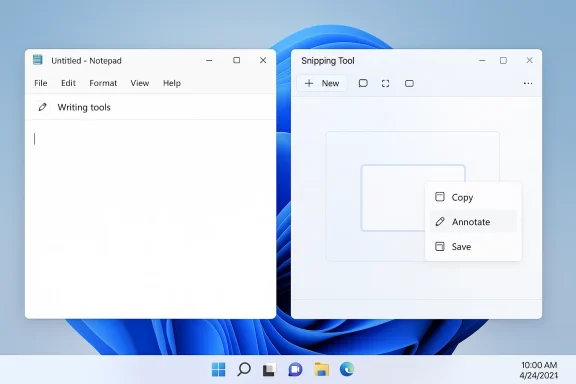
Microsoft is quietly recalibrating one of the most visible parts of its Windows 11 AI strategy. In the latest Insider-facing changes, Notepad and Snipping Tool are shedding their obvious Copilot buttons in favor of more neutral labels and contextual menus, while Microsoft keeps the underlying AI features intact. That may sound cosmetic, but it is actually a meaningful signal: the company appears to be backing away from blanket AI branding and toward a more selective, less intrusive model of integration. The move fits a broader Windows quality push that also emphasizes reliability, customization, and fewer disruptive surfaces across the desktop.
Microsoft’s Copilot push in Windows did not arrive as a single launch; it unfolded as a steady expansion of AI entry points across the operating system. Over the past two years, the company has embedded Copilot into the taskbar, inbox apps, system touchpoints, and even hardware like dedicated keyboard keys, all in service of making AI feel like the default interface for Windows. That strategy was easy to describe and harder to live with, because every new surface raised the same question: is this actually helping, or is it simply another place for Microsoft to advertise its AI ambitions?
The tension became most visible in simple utilities. Notepad had historically represented speed and restraint, while Snipping Tool was supposed to be a quick capture-and-markup app. Once AI buttons began appearing there, the experience stopped feeling neutral. Microsoft kept adding features such as rewrite, summarize, and related Copilot workflows, but the visual language often felt heavier than the task itself. That mismatch is a major reason why the latest change matters: it is less about functionality and more about where that functionality shows up.
There is also a historical pattern here that Windows veterans will recognize. Microsoft often starts with an expansive platform vision, then gradually adjusts when the practical friction becomes impossible to ignore. The company did something similar in the past with interface changes, system defaults, and cloud integration: first push hard, then refine after user backlash. The current Copilot rollback fits that pattern closely, except AI is now central to Microsoft’s broader business strategy, which makes even a small retreat feel more consequential.
What makes this phase different is that Microsoft is not removing AI; it is trying to change the emotional tone around AI. The company’s latest Insider messaging explicitly says it is reducing “unnecessary Copilot entry points” in apps like Snipping Tool, Photos, Widgets, and Notepad. That phrasing is telling. It suggests Microsoft has concluded that ubiquity is not the same thing as usefulness, and that too many Copilot prompts can make a desktop feel more like a sales channel than a productivity platform.
This is not limited to one app. Microsoft’s own Windows Insider blog says the company is reducing unnecessary Copilot entry points in Snipping Tool, Photos, Widgets, and Notepad as part of a broader push to be more intentional about where Copilot appears. In practical terms, that means fewer launch surfaces, fewer toolbar badges, and fewer moments when users are forced to notice the assistant before they have even finished the taslogs.windows.com]
There is also a psychological effect Microsoft may be trying to reverse. When users rein places that do not obviously need it, they start to read the product as clutter rather than assistance. By lowering the visual volume, Microsoft is trying to make Copilot feel less like an obligation and more like an option. That is a subtle but important reset.
Key takeaways from the UI change:
That broader quality push is acknowledges a problem Microsoft has sometimes tried to gloss over: Windows 11 has not only been judged on features, but on how often it gets in the way. Users have complained about clutter, reduced customization, and a sense that the OS is increasingly opinionated. By reducing unnecessary Copilot entry points, Microsoft is trying to show that it understands the difference between a useful enhancement and an intrusive one.
This is why the changes carry more strategic weight than a simple rename. Microsoft is effectively conceding that some surfaces are too small, too simple, or too task-focused to carry persistent AI branding. That is not a defeat for Copilot; it is an admission that the best AI interface is often the one that stays out of the way until needed. That is a useful lesson, and an expensive one.
Important context for the timing:
The moveols** label is important because it reframes the feature from a brand-driven AI showcase into a task-driven utility. Users do not necessarily object to AI-assisted drafting or summarization; they object to being reminded of Copilot every time they open a text editor. Microsoft seems to have realized that the app’s value comes from being understated, not from being a billboard for AI.
There is also a practical enterprise angle. Notepad has long been a universal utility in Windows environments because it is predictable, fast, and easy to explain. If Microsoft can preserve that simplicity while still offering AI-assisted writing when requested, it may improve adoption without sacrificing trust. That balance is exactly what the company needs more of.
Notepad-specific implications:
Microsoft has already used Snipping Tool as a launchpad for more advanced functions like text extraction, image markup, and related capture workflows. That made it a tempting candidate for Copilot integration, but it also made the app vulnerable to feature creep. A tool built for immediacy can quickly become bloated if every new capability gets the same level of visual prominence.
This also helps Microsoft avoid one of the most common traps in product design: mistaking availability for necessity. Just because AI can analyze a screenshot does not mean the screen should be dominated by AI prompts. The user’s first goal is still to capture content. If Microsoft preserves that priority order, Snipping Tool becomes easier to live with. If it does not, the app becomes another place where productivity feels interrupted.
Snipping Tool lessons:
This broader reset is revealing because it suggests Microsoft has moved from a “Copilot everywhere” phase to a “Copilot where it belongs” phase. That is a meaningful shift in strategy, not just in design. It acknowledges that Windows is not one monolithic canvas for AI marketing; it is a collection of very different workflows, each with its own expectations.
The interesting part is that Microsoft may be learning which surfaces can absorb AI and which ones repel it. That knowledge is essential if the company we the next phase of Windows. The best AI integrations are often invisible until the moment they are needed. That is a more mature product philosophy than the one Microsoft was signaling a year ago.
What this broader change suggests:
For enterprises, the implications are more operational. IT teams care less about branding language and more about consistency, predictability, and support burden. A feature that looks intrusive in a home environment can become a governance issue in a managed fleet, especially if employees see it as mandatory or distracting. Microsoft’s willingness to de-emphasize Copilot may therefore reduce friction with admins who value user choice and controlled rollout.
There is also a strategic enterprise signoft appears to be reminding business customers that Windows 11 can still be tuned toward productivity rather than spectacle. That is important because the company’s AI pitch only works if custain in control. In enterprise software, control is credibility.
Enterprise and consumer contrasts:
Microsoft’s move also matters competitively because desktop AI is becoming a comparison game. The company wants Copilot to define the Windows experience, but if that experience feels cluttered, rivals gain an opening. A restrained, contextual Copilot is more defensible than a loud, omnipresent one because it better matches how people actually work.
Against macOS, the advantage is not AI volume but flexibility. Apple has generally been more conservative about systemwide AI surface area, and Windows can still win users by preserving configurability while modernizing selectively. Against lighter desktop platforms, Microsoft’s challenge is to avoid making Windows feel heavy while still proving that it offers the richest toolset. That is a difficult balance, but a necessary one.
This is especially important as AI features become commoditized. If every platform offers summarization, rewriting, and screenshot analysis, then the winning differentiator becomes how naturally those capabilities fit into the workflow. Microsoft seems to have recognized that lesson later than some users would have liked, but it the same.
Competitive takeaways:
Windows users are likely to reward practical restraint more than flashy AI branding. They have already shown that they will embrace useful features when those features respect the job being done. The challenge for Microsoft is to maintain the AI story without making every application feel like an advertisement for that story. That is harder than adding more buttons, but it is far more sustainable.
Watch for the following in upcoming Insider builds and broader rollout waves:
Source: The Tech Buzz https://www.techbuzz.ai/articles/microsoft-quietly-pulls-copilot-buttons-from-windows-11/
 Background
Microsoft’s Copilot push in Windows did not arrive as a single launch; it unfolded as a steady expansion of AI entry points across the operating system. Over the past two years, the company has embedded Copilot into the taskbar, inbox apps, system touchpoints, and even hardware like dedicated keyboard keys, all in service of making AI feel like the default interface for Windows. That strategy was easy to describe and harder to live with, because every new surface raised the same question: is this actually helping, or is it simply another place for Microsoft to advertise its AI ambitions?The tension became most visible in simple utilities. Notepad had historically represented speed and restraint, while Snipping Tool was supposed to be a quick capture-and-markup app. Once AI buttons began appearing there, the experience stopped feeling neutral. Microsoft kept adding features such as rewrite, summarize, and related Copilot workflows, but the visual language often felt heavier than the task itself. That mismatch is a major reason why the latest change matters: it is less about functionality and more about where that functionality shows up.
There is also a historical pattern here that Windows veterans will recognize. Microsoft often starts with an expansive platform vision, then gradually adjusts when the practical friction becomes impossible to ignore. The company did something similar in the past with interface changes, system defaults, and cloud integration: first push hard, then refine after user backlash. The current Copilot rollback fits that pattern closely, except AI is now central to Microsoft’s broader business strategy, which makes even a small retreat feel more consequential.
What makes this phase different is that Microsoft is not removing AI; it is trying to change the emotional tone around AI. The company’s latest Insider messaging explicitly says it is reducing “unnecessary Copilot entry points” in apps like Snipping Tool, Photos, Widgets, and Notepad. That phrasing is telling. It suggests Microsoft has concluded that ubiquity is not the same thing as usefulness, and that too many Copilot prompts can make a desktop feel more like a sales channel than a productivity platform.
What Microsoft Is Changing
The mostiw builds, the Copilot badge in Notepad is being replaced by a more generic writing tools label and pen-style icon, while Snipping Tool is losing the attention-grabbing Copilot button in favor of subtler, context-based access. The underlying AI features remain available, but they are being tucked into menus rather than presented as a constant branded invitation. That is a classic example of Microsoft reducing friction without actually deleting capability.This is not limited to one app. Microsoft’s own Windows Insider blog says the company is reducing unnecessary Copilot entry points in Snipping Tool, Photos, Widgets, and Notepad as part of a broader push to be more intentional about where Copilot appears. In practical terms, that means fewer launch surfaces, fewer toolbar badges, and fewer moments when users are forced to notice the assistant before they have even finished the taslogs.windows.com]
From branding to context
The shift from a branded button to a contextual menu is not merely a design cleanup. It changes the relationship between the user and the feature. A branded button asks for attention; a contextual menu waits until it is relevant. That difference matters in software like Notepad and Snipping Tool, where users value speed, clarity, and *low cketing presence.There is also a psychological effect Microsoft may be trying to reverse. When users rein places that do not obviously need it, they start to read the product as clutter rather than assistance. By lowering the visual volume, Microsoft is trying to make Copilot feel less like an obligation and more like an option. That is a subtle but important reset.
Key takeaways from the UI change:
- Copilot branding is being de-emphasized, not removed.
- Writing tools and similar neutral labels are replacing explicit Copilot buttons in some surfaces.
- The functionality remains, but it is now accessed more quietly through menus and context actions.
- Microsoft is clearly trying to reduce the sense that AI is being pushed at users in every app.
Why Microsoft Is Doing This Now
The timing matters. Microsoft’s 2026 Windows quality messaging pairs the Copilot changes with a broader promise to make Windows 11 feel more deliberate, less disruptive, and more responsive to user feedback. The company is also talking about restoring familiar controls, improving update behavior, and reducing annoying shell friction. In other words, Copilot is only one piece of a larger course correction.That broader quality push is acknowledges a problem Microsoft has sometimes tried to gloss over: Windows 11 has not only been judged on features, but on how often it gets in the way. Users have complained about clutter, reduced customization, and a sense that the OS is increasingly opinionated. By reducing unnecessary Copilot entry points, Microsoft is trying to show that it understands the difference between a useful enhancement and an intrusive one.
A reaction to user fatigue
The Copilot repositioning also reads like a reaction to user fatigue. AI prompts are easiest to tolerate when they are obviously useful and hardest to tolerate when they seem to appear for branding reasons. That low-friction apps. Nobody expects Notepad to behave like a chatbot platform, and nobody opens Snipping Tool hoping to be sold on an assistant before they capture a screenshot.This is why the changes carry more strategic weight than a simple rename. Microsoft is effectively conceding that some surfaces are too small, too simple, or too task-focused to carry persistent AI branding. That is not a defeat for Copilot; it is an admission that the best AI interface is often the one that stays out of the way until needed. That is a useful lesson, and an expensive one.
Important context for the timing:
- Microsoft is trying to make Windows 11 feel more intentional and less noisy.
- The company is balancing AI expansion with broader quality and
- User pushback has been especially strong where AI appeared to be attached to convenience tools that did not need it.
- The rollback is happening while Windows 11 is being positioned as the default modern desktop for both consumers and enterprises.
Notepad: A Symbolic Rebrand
Notepad is the clearest example of why Microsoft is recalibrating. The app is supposed to be quick, plain, and almost invisible in its simplicity. Adding Copilot to the toolbar made the app feel more like a platform demo than a lightweight utility, even if the underlying features such as rewrite and summarize were genuinely helpful in certain workflows.The moveols** label is important because it reframes the feature from a brand-driven AI showcase into a task-driven utility. Users do not necessarily object to AI-assisted drafting or summarization; they object to being reminded of Copilot every time they open a text editor. Microsoft seems to have realized that the app’s value comes from being understated, not from being a billboard for AI.
Why the label matters
A neutral label changes expectations. “Copilot” signals a separate assistant and invites a conversational model, while “writing tools” suggests a small set of inline capabilities tied to the document at hand. That distinction is subtle, but in interface design subtlety is often the whole game. Users are more likely to trust a tool that feels embedded in the workflow than one that feels like a push notification in app form.There is also a practical enterprise angle. Notepad has long been a universal utility in Windows environments because it is predictable, fast, and easy to explain. If Microsoft can preserve that simplicity while still offering AI-assisted writing when requested, it may improve adoption without sacrificing trust. That balance is exactly what the company needs more of.
Notepad-specific implications:
- AI stays available for drafting, rewriting, and summarizing.
- The interface becomes less brand-heavy and more task-oriented.
- Users who dislike AI noise are less likely to feel confronted by it on every launch.
- The change may improve the oddeels like Notepad.
Snipping Tool and the Problem of Overreach
Snipping Tool is the other half of the story, and in some ways it is even more revealing than Notepad. Screenshot capture is a tiny job with a clear destination: grab, annotate, share, move on. That is why an oversized AI badge in the capture f place. Microsoft’s choice to soften that presence says a lot about how the company now understands friction.Microsoft has already used Snipping Tool as a launchpad for more advanced functions like text extraction, image markup, and related capture workflows. That made it a tempting candidate for Copilot integration, but it also made the app vulnerable to feature creep. A tool built for immediacy can quickly become bloated if every new capability gets the same level of visual prominence.
The case for quieter capture
The best utilities are often the least memorable. Users want them to work reliably and get out of the way. By removing a visible Copilot button from Snipping Tool, Microsoft is betting that AI will be more persuasive when it appears as a natural follow-up to a capture rather than as a preloaded sales pitch. That is a smarter interaction model, and one that should age better.This also helps Microsoft avoid one of the most common traps in product design: mistaking availability for necessity. Just because AI can analyze a screenshot does not mean the screen should be dominated by AI prompts. The user’s first goal is still to capture content. If Microsoft preserves that priority order, Snipping Tool becomes easier to live with. If it does not, the app becomes another place where productivity feels interrupted.
Snipping Tool lessons:
- Capture workflows work best when theybiguous*.
- AI analysis is the capture, not when it hijacks the setup.
- Visual restraint improves perceived performance even when the feature set stays rich.
- Microsoft is trying to make the tool feel like a utility again, not a Copilot showroom.
Photos, Widgets, and the Wider Windows 11 Reset
Microsoft’s change is bigger than two apps because the company says the same philosophy applies to Photos and Widgets as well. That matters because those surfaces are part of the everyday Windows experience, yet neither is an obvious place to center an AI brand. In both cases, less visible Copilot presence may actually make the apps more usable.This broader reset is revealing because it suggests Microsoft has moved from a “Copilot everywhere” phase to a “Copilot where it belongs” phase. That is a meaningful shift in strategy, not just in design. It acknowledges that Windows is not one monolithic canvas for AI marketing; it is a collection of very different workflows, each with its own expectations.
Different apps, different tolerances
Photos and Widgets sit in a different emotional category than Notepad and Snipping Tool, but the core problem is the same: users want quick access to a job, not a mandatory detour through AI branding. Photos is supposed to help people browse and organize images. Widgets is supposed to offer glanceable information. In both cases, any extra UI has to justify itself very quickly. (blogs.windows.com)The interesting part is that Microsoft may be learning which surfaces can absorb AI and which ones repel it. That knowledge is essential if the company we the next phase of Windows. The best AI integrations are often invisible until the moment they are needed. That is a more mature product philosophy than the one Microsoft was signaling a year ago.
What this broader change suggests:
- Microsoft is trimming multiple Copilot entry points, not just one.
- The company is emphasizing intentional placement over saturation.
- Windows 11 is being repositioned as a calmer desktop, not a nonstop AI demo.
- The strategy may improve user sentiment without materially reducing capability.
Enterprise vs Consumer Impact
For consumers, this is mostly about relief. Many users were not asking for less AI because they dislike the underlying technology; they were asking for fewer reminders that AI exists. A quieter Notepad and a less branded Snipping Tool can make Windows 11 feel less pushy and more polished. That could matter a lot for long-time Windows users who have been irritated by the sense that every update brings one more layer of visible promotion.For enterprises, the implications are more operational. IT teams care less about branding language and more about consistency, predictability, and support burden. A feature that looks intrusive in a home environment can become a governance issue in a managed fleet, especially if employees see it as mandatory or distracting. Microsoft’s willingness to de-emphasize Copilot may therefore reduce friction with admins who value user choice and controlled rollout.
Why enterprises will notice
Enterprises have long memories when it comes to UI churn and surprise behavior. If AI entry points are too loud, support desks hear about it. If they are contextual and easier to ignore, the noise level drops. That may sound minor, but at scale it matters. A small interface change can save countless help-desk tickets simply by reducing confusion.There is also a strategic enterprise signoft appears to be reminding business customers that Windows 11 can still be tuned toward productivity rather than spectacle. That is important because the company’s AI pitch only works if custain in control. In enterprise software, control is credibility.
Enterprise and consumer contrasts:
- Consumers want fewer interruptions and more visible polish.
- Enterprises want fewer surprises and more predictable behavior.
- Both groups benefit when AI appears only where it adds obvious value.
- Microsoft is clearly trying to meet both audiences without alienating either one.
Microsoft’s move also matters competitively because desktop AI is becoming a comparison game. The company wants Copilot to define the Windows experience, but if that experience feels cluttered, rivals gain an opening. A restrained, contextual Copilot is more defensible than a loud, omnipresent one because it better matches how people actually work.
Against macOS, the advantage is not AI volume but flexibility. Apple has generally been more conservative about systemwide AI surface area, and Windows can still win users by preserving configurability while modernizing selectively. Against lighter desktop platforms, Microsoft’s challenge is to avoid making Windows feel heavy while still proving that it offers the richest toolset. That is a difficult balance, but a necessary one.
AI branding versus AI utility
There is a broader market lesson here: users are increasingly comfortable with AI when it saves time, but they are far less forgiving when it feels like a layer of branding. Microsoft’s earlier Copilot strategy leaned heavily into visibilitable but also more vulnerable to backlash. The new approach may reduce hype, but it could improve trust. And trust is usually the more valuable currency. ([blogs.windows.dows.com/windows-insider/2026/03/20/our-commitment-to-windows-quality/)This is especially important as AI features become commoditized. If every platform offers summarization, rewriting, and screenshot analysis, then the winning differentiator becomes how naturally those capabilities fit into the workflow. Microsoft seems to have recognized that lesson later than some users would have liked, but it the same.
Competitive takeaways:
- Less intrusive Copilot placement may strengthen Windows’ reputation with power users.
- The change helps Microsoft compete on workflow quality instead of sheer AI visibility.
- Microsoft’s biggest rival is not another button; it is user indifference.
- Contextual AI is more likely to win long-term adoption than aggressive AI branding.
Strengths and Opportunities
Microsoft’s course correction is not just damage control. It gives the company a chance to keep Copilot relevant while reducing the backlash that comes from overexposure. If handled well, this could make Windows 11 feel calmer without making it feel less capable.- Reduces visual clutter in apps where users want speed and simplicity.
- Preserves the actual AI functionality while changing the presentation.
- Improves the odds that users will view Copilot as helpful rather than intrusive.
- Strengthens Microsoft’s broader Windows quality message.
- Could make enterprise admins more comfortable with Windows 11’s AI direction.
- Gives Microsoft room to refine AI placement based on real usage data.
Risks and Concerns
The danger is that this move will be read as a retreat if Microsoft does not explain it carefully. Users who were already skeptical of Copilot may see the change as proof that the company overreached, while enthusiastic users may worry that Microsoft is backing away from AI ambition just when it was supposed to be accelerating.- The shift could be interpreted as a brand rollback rather than a UX improvement.
- Microsoft may still leave some users frustrated if too many AI prompts remain elsewhere.
- Quiet changes can create confusion if the new labels are not consistently explained.
- If performance and update frustrations continue, Copilot de-emphasis may not be enough to improve sentiment.
- Enterprise customers may still want more explicit controls over AI surfacing.
- Microsoft risks appearing reactive if it keeps adjusting AI surfaces after criticism.
Looking Ahead
The key question is whether this is the start of a broader philosophy shift or just a localized cleanup. Microsoft’s own language about being more intentional with Copilot suggests the former, but the company will need to prove it across more of Windows. If the same restraint shows up in File Explorer, search, update prompts, and system recommendations, the change will feel real rather than cosmetic.Windows users are likely to reward practical restraint more than flashy AI branding. They have already shown that they will embrace useful features when those features respect the job being done. The challenge for Microsoft is to maintain the AI story without making every application feel like an advertisement for that story. That is harder than adding more buttons, but it is far more sustainable.
Watch for the following in upcoming Insider builds and broader rollout waves:
- Whether the writing tools label becomes the standard pattern across more inbox apps.
- Whether Microsoft keeps reducing Copilot surfaces beyond Notepad and Snipping Tool.
- Whether more Windows quality fixes arrive alongside the AI adjustments.
- Whether enterprise policy controls become more prominent around AI entry points.
- Whether Microsoft can make Copilot feel optional, useful, and unobtrusive at the same time.
Source: The Tech Buzz https://www.techbuzz.ai/articles/microsoft-quietly-pulls-copilot-buttons-from-windows-11/
