Microsoft is preparing Windows 11 to prefer its built-in IPP-based Windows Ready Print path for new eligible printer installations starting in July 2026, while still allowing users and administrators to fall back to traditional OEM driver workflows where needed. That is the plain-English version of a change buried beneath Start menu customization and taskbar polish in Experimental build 26300.8553. The larger story is that Microsoft is no longer treating printer drivers as a boring compatibility layer. It is treating them as technical debt, security exposure, and one of the last stubbornly vendor-specific rituals left in everyday Windows administration.
The rename from Modern Print Platform to Windows Ready Print is not cosmetic in the way many Microsoft rebrands are cosmetic. “Modern Print Platform” sounded like plumbing, the sort of phrase that appears in deployment documentation and then disappears into a procurement spreadsheet. “Windows Ready Print” is a promise: buy or connect the right printer, and Windows should be ready to use it without a scavenger hunt through manufacturer utilities, unsigned-looking installers, or control panels that appear to have been preserved in amber since Windows 7.
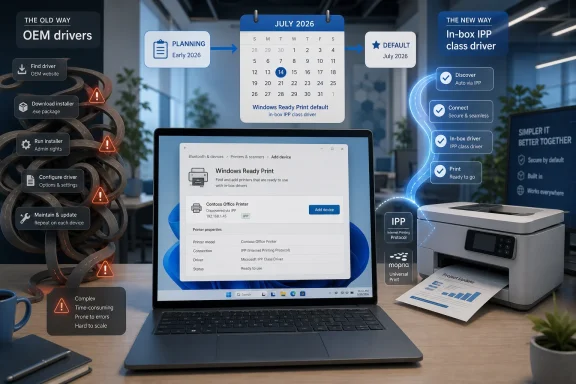
That promise matters because printing remains one of the least modern parts of the Windows experience. The industry has spent two decades moving toward class drivers, app-store-delivered extensions, and network printing standards, yet many users still understand printer setup as a small act of superstition. Plug in the device, wait, download a package, refuse a toolbar, install a scan utility, reboot if threatened, and hope the right queue appears.
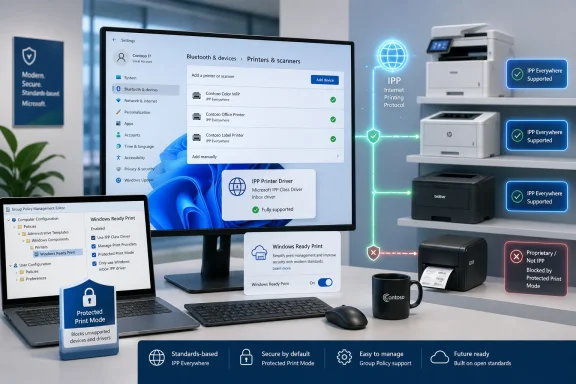
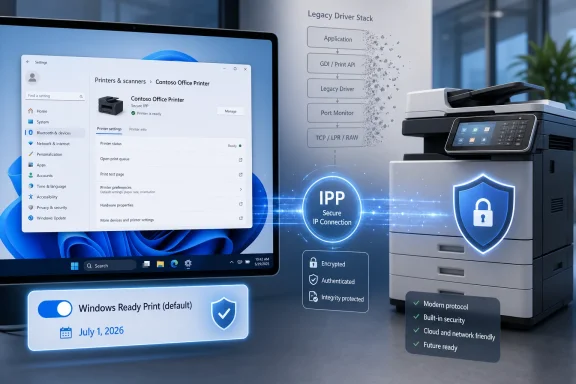
Windows Ready Print is Microsoft’s attempt to make the default path the standards-based path. On eligible devices, new printer installations will favor the native Windows IPP printer driver rather than the traditional vendor driver route. If this works as advertised, printer installation becomes less about matching a PC to a manufacturer’s driver package and more about letting Windows talk to a compliant device through a common protocol.
The word “eligible” is doing a lot of work. Microsoft is not saying that every printer on every desk will suddenly become driverless in the useful sense of the word. It is saying that when Windows can make the modern choice, it intends to make that choice first.
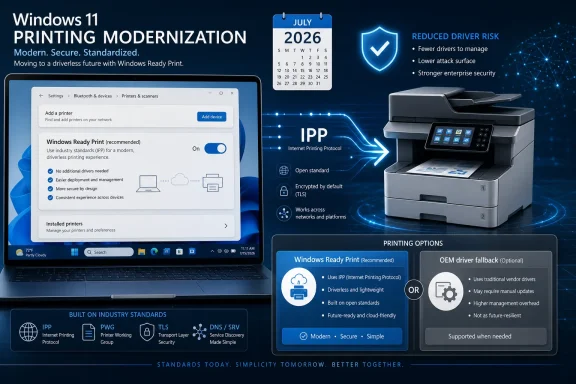
Microsoft is also building in a visible escape hatch. Users will be able to choose between installing through Windows Ready Print or using the traditional OEM process through the Printers & Scanners area in Settings. Administrators get a corresponding Group Policy control, which means this is not just a consumer convenience toggle but part of a managed transition strategy.
That design tells us Microsoft knows the migration will be uneven. The home user with a recent network printer may never notice the shift except that setup becomes quieter. The IT admin with label printers, specialty finishing hardware, secure release systems, badge-driven print stations, or MFP workflows tied to vendor utilities will notice immediately if a default changes what features appear after installation.
This is why the framing matters. Microsoft is not simply “ending printer drivers,” even if that makes for a cleaner headline. It is demoting third-party printer drivers from the default path and pushing the ecosystem toward standards that make those drivers less necessary for ordinary printing.
That is the context behind Windows protected print mode, which restricts printing to the modern print stack and removes third-party drivers when enabled. Microsoft’s documentation has been blunt about the direction of travel: fewer third-party print drivers means less driver management and a smaller attack surface. Windows Ready Print is the more approachable front door to the same strategic house.
For years, the print driver model asked Windows to trust a large and varied supply chain of vendor code. Some of that code is excellent. Some of it is old, overprivileged, rarely updated, or bundled with management utilities that belong nowhere near a hardened endpoint. Microsoft’s security argument is that the safest third-party driver is often the one you never had to install.
That argument will resonate with security teams, especially in organizations that have lived through emergency print spooler mitigations, driver signing headaches, or change-control fights over printer packages. It will not automatically satisfy users who depend on vendor-specific features. Security simplification almost always arrives with a compatibility invoice.
Mopria certification is the other half of the story. Windows protected print mode is designed around Mopria-certified devices, and Microsoft has said many existing printers already meet that bar. For buyers, that means certification labels and compatibility databases are going to matter more than they used to. For IT departments, it means printer procurement is becoming endpoint-security procurement by another name.
This is the part of the transition that could quietly improve the market. If Windows increasingly rewards standards-compliant printers with smoother installation, vendors have a stronger incentive to make the standard path good. The old playbook of shipping a minimally functional class-driver experience while reserving the “real” experience for a bloated proprietary package becomes harder to defend.
But standards do not magically cover every edge case. Printing a document is one thing; scanning, finishing, stapling, secure pull printing, accounting codes, watermarks, color controls, fax functions, and device-specific management are another. The future Microsoft wants is one where the base print path is standardized and vendor differentiation moves into apps, extensions, cloud management, or device-side services rather than privileged drivers.
For home users, the choice may be simple: use the Windows path unless something is missing. If a printer installs cleanly, prints reliably, and exposes enough basic options, most people will never seek out an OEM package again. That is exactly the outcome Microsoft wants.
For managed fleets, the decision is less casual. Admins will want to test whether Windows Ready Print preserves required capabilities for each printer class before allowing it to become the default. The risk is not just that a printer fails to install; the subtler risk is that it installs successfully but lacks a workflow someone depends on.
That is the classic enterprise compatibility trap. A change that looks harmless in a lab can become expensive when it removes a finishing option used by legal, a badge-authenticated release flow used by finance, or a scan-to-folder behavior used by operations. Microsoft is giving organizations a policy lever because it knows the real migration will be governed by exceptions.
That does not mean OEMs disappear from the experience. It means their software has to justify itself after the printer already works. That is a very different power dynamic. If Windows can print without the vendor bundle, users are less likely to install the bundle unless it delivers clear value.
This could be good for users and uncomfortable for vendors. The best OEM utilities may become cleaner and more modular because they are no longer smuggled in as part of basic device enablement. The worst may simply be ignored. Either way, Microsoft is trying to separate “I need to print” from “I need to accept the manufacturer’s entire Windows software stack.”
There is a historical irony here. Windows became dominant partly because it supported an enormous universe of hardware through vendor drivers. Now Microsoft is using that dominance to compress a messy driver ecosystem into a smaller, more controlled, more standards-based model. The company is not abandoning hardware compatibility, but it is redefining what compatibility should require.
Microsoft’s shift puts those devices on a more visible clock. Not necessarily because they will stop working in July 2026, but because the default Windows experience will increasingly route around the legacy assumptions that kept them convenient. A printer that requires a vendor V3 or V4 driver may remain usable, but it becomes an exception to manage rather than the center of the Windows printing model.
That distinction is critical for avoiding panic. If a printer works today, this specific Windows Ready Print default does not automatically mean it stops working tomorrow. But if an organization is buying hardware in 2026, it should treat Mopria and IPP compatibility as baseline requirements, not nice-to-have features. Buying a printer that depends on legacy driver workflows now is like buying a new line-of-business app that requires Internet Explorer mode and hoping the future will be patient.
There is also a sustainability angle that Microsoft will have to navigate carefully. Users dislike being told that functioning hardware is obsolete because a platform vendor changed its security model. Microsoft’s best defense will be making the modern path broad enough that the number of stranded devices is small, and making the fallback path clear enough that specialist environments are not blindsided.
That sequencing is smart. Microsoft learned from past Windows transitions that users rebel when compatibility changes arrive as a wall. A toggle, a policy, and a phased default give the ecosystem time to adapt while still making the direction unmistakable.
The company is also aligning printing with the broader Windows security posture. Windows 11 has steadily moved toward hardware-backed security, tighter driver controls, virtualization-based protections, and more opinionated defaults. Printing could not remain an exception forever, especially when print drivers historically enjoyed deep system integration.
The uncomfortable truth is that old printer compatibility has often been purchased with trust Windows should not have to extend. Windows Ready Print is Microsoft saying that trust now has to be earned through standards, certification, and modern architecture rather than inherited from decades of driver compatibility.
Print servers complicate the picture. Many organizations have spent years centralizing printer deployment precisely because local printer installation is unreliable and hard to govern. A Windows default that improves local discovery does not automatically replace the governance, accounting, security, and deployment logic built into enterprise print systems.
The more interesting question is how third-party print management vendors adapt. If Windows standardizes the endpoint driver layer, vendors may shift further toward identity, policy, analytics, secure release, and cloud orchestration. That would be a healthier market than one built around packaging and repackaging drivers.
For smaller businesses, the transition could be a relief. A world where most printers install through Windows without an OEM package means fewer admin credentials typed into random installers, fewer support calls about driver updates, and fewer mysteries when replacing a PC. That is the upside Microsoft will emphasize, and it is real.
 Microsoft Gives Driverless Printing a Consumer Name
The rename from Modern Print Platform to Windows Ready Print is not cosmetic in the way many Microsoft rebrands are cosmetic. “Modern Print Platform” sounded like plumbing, the sort of phrase that appears in deployment documentation and then disappears into a procurement spreadsheet. “Windows Ready Print” is a promise: buy or connect the right printer, and Windows should be ready to use it without a scavenger hunt through manufacturer utilities, unsigned-looking installers, or control panels that appear to have been preserved in amber since Windows 7.That promise matters because printing remains one of the least modern parts of the Windows experience. The industry has spent two decades moving toward class drivers, app-store-delivered extensions, and network printing standards, yet many users still understand printer setup as a small act of superstition. Plug in the device, wait, download a package, refuse a toolbar, install a scan utility, reboot if threatened, and hope the right queue appears.
Windows Ready Print is Microsoft’s attempt to make the default path the standards-based path. On eligible devices, new printer installations will favor the native Windows IPP printer driver rather than the traditional vendor driver route. If this works as advertised, printer installation becomes less about matching a PC to a manufacturer’s driver package and more about letting Windows talk to a compliant device through a common protocol.
The word “eligible” is doing a lot of work. Microsoft is not saying that every printer on every desk will suddenly become driverless in the useful sense of the word. It is saying that when Windows can make the modern choice, it intends to make that choice first.
The July 2026 Switch Is a Default, Not a Guillotine
The most important practical detail is that Microsoft is changing the default behavior for new installations, not ripping out every installed legacy queue overnight. Beginning in July 2026, newly added eligible printers are expected to default to Windows Ready Print. Existing installations are not the immediate target of this specific toggle, which is an important distinction for anyone managing print queues in offices, labs, classrooms, warehouses, or medical environments.Microsoft is also building in a visible escape hatch. Users will be able to choose between installing through Windows Ready Print or using the traditional OEM process through the Printers & Scanners area in Settings. Administrators get a corresponding Group Policy control, which means this is not just a consumer convenience toggle but part of a managed transition strategy.
That design tells us Microsoft knows the migration will be uneven. The home user with a recent network printer may never notice the shift except that setup becomes quieter. The IT admin with label printers, specialty finishing hardware, secure release systems, badge-driven print stations, or MFP workflows tied to vendor utilities will notice immediately if a default changes what features appear after installation.
This is why the framing matters. Microsoft is not simply “ending printer drivers,” even if that makes for a cleaner headline. It is demoting third-party printer drivers from the default path and pushing the ecosystem toward standards that make those drivers less necessary for ordinary printing.
PrintNightmare Still Haunts the Architecture
Microsoft’s printer strategy cannot be separated from the last several years of print spooler security history. The Windows print stack has been a recurring source of pain because it sits at a dangerous intersection: privileged services, device drivers, network discovery, remote installation, and user expectations that printing should just work. When something in that chain goes wrong, it is not merely annoying. It can become a security incident.That is the context behind Windows protected print mode, which restricts printing to the modern print stack and removes third-party drivers when enabled. Microsoft’s documentation has been blunt about the direction of travel: fewer third-party print drivers means less driver management and a smaller attack surface. Windows Ready Print is the more approachable front door to the same strategic house.
For years, the print driver model asked Windows to trust a large and varied supply chain of vendor code. Some of that code is excellent. Some of it is old, overprivileged, rarely updated, or bundled with management utilities that belong nowhere near a hardened endpoint. Microsoft’s security argument is that the safest third-party driver is often the one you never had to install.
That argument will resonate with security teams, especially in organizations that have lived through emergency print spooler mitigations, driver signing headaches, or change-control fights over printer packages. It will not automatically satisfy users who depend on vendor-specific features. Security simplification almost always arrives with a compatibility invoice.
IPP Is the Bet, Mopria Is the Gatekeeper
The technical center of Windows Ready Print is the Internet Printing Protocol, or IPP. In modern printing, IPP is not an exotic feature; it is the basis for a broad class of driverless or near-driverless printing experiences across platforms. Microsoft’s built-in IPP class driver is intended to let Windows communicate with compatible printers without requiring the old model of a vendor-supplied driver package for every device family.Mopria certification is the other half of the story. Windows protected print mode is designed around Mopria-certified devices, and Microsoft has said many existing printers already meet that bar. For buyers, that means certification labels and compatibility databases are going to matter more than they used to. For IT departments, it means printer procurement is becoming endpoint-security procurement by another name.
This is the part of the transition that could quietly improve the market. If Windows increasingly rewards standards-compliant printers with smoother installation, vendors have a stronger incentive to make the standard path good. The old playbook of shipping a minimally functional class-driver experience while reserving the “real” experience for a bloated proprietary package becomes harder to defend.
But standards do not magically cover every edge case. Printing a document is one thing; scanning, finishing, stapling, secure pull printing, accounting codes, watermarks, color controls, fax functions, and device-specific management are another. The future Microsoft wants is one where the base print path is standardized and vendor differentiation moves into apps, extensions, cloud management, or device-side services rather than privileged drivers.
The Escape Hatch Is Also a Warning Label
The new Settings toggle and Group Policy option are not merely nice touches. They are Microsoft’s acknowledgment that Windows Ready Print will not be universally better on day one for every environment. A default that can be overridden is both a migration tool and a liability-management tool.For home users, the choice may be simple: use the Windows path unless something is missing. If a printer installs cleanly, prints reliably, and exposes enough basic options, most people will never seek out an OEM package again. That is exactly the outcome Microsoft wants.
For managed fleets, the decision is less casual. Admins will want to test whether Windows Ready Print preserves required capabilities for each printer class before allowing it to become the default. The risk is not just that a printer fails to install; the subtler risk is that it installs successfully but lacks a workflow someone depends on.
That is the classic enterprise compatibility trap. A change that looks harmless in a lab can become expensive when it removes a finishing option used by legal, a badge-authenticated release flow used by finance, or a scan-to-folder behavior used by operations. Microsoft is giving organizations a policy lever because it knows the real migration will be governed by exceptions.
OEMs Lose the Installer as Their First Line of Defense
Printer manufacturers have long used driver packages as a distribution channel for more than drivers. Those packages install utilities, monitoring tools, ink or toner prompts, scanning suites, firmware update agents, cloud print connectors, and sometimes far more than the user intended. Windows Ready Print threatens that arrangement by making the driverless path the normal path.That does not mean OEMs disappear from the experience. It means their software has to justify itself after the printer already works. That is a very different power dynamic. If Windows can print without the vendor bundle, users are less likely to install the bundle unless it delivers clear value.
This could be good for users and uncomfortable for vendors. The best OEM utilities may become cleaner and more modular because they are no longer smuggled in as part of basic device enablement. The worst may simply be ignored. Either way, Microsoft is trying to separate “I need to print” from “I need to accept the manufacturer’s entire Windows software stack.”
There is a historical irony here. Windows became dominant partly because it supported an enormous universe of hardware through vendor drivers. Now Microsoft is using that dominance to compress a messy driver ecosystem into a smaller, more controlled, more standards-based model. The company is not abandoning hardware compatibility, but it is redefining what compatibility should require.
The Old Printer in the Corner Becomes a Policy Decision
The hardest cases will be older printers that still function mechanically but do not fit comfortably into the modern model. Windows users are famously reluctant to retire printers that still print. Offices are full of devices that survive not because they are elegant, secure, or easy to manage, but because toner is stocked, the lease is paid, and nobody wants to touch the print server.Microsoft’s shift puts those devices on a more visible clock. Not necessarily because they will stop working in July 2026, but because the default Windows experience will increasingly route around the legacy assumptions that kept them convenient. A printer that requires a vendor V3 or V4 driver may remain usable, but it becomes an exception to manage rather than the center of the Windows printing model.
That distinction is critical for avoiding panic. If a printer works today, this specific Windows Ready Print default does not automatically mean it stops working tomorrow. But if an organization is buying hardware in 2026, it should treat Mopria and IPP compatibility as baseline requirements, not nice-to-have features. Buying a printer that depends on legacy driver workflows now is like buying a new line-of-business app that requires Internet Explorer mode and hoping the future will be patient.
There is also a sustainability angle that Microsoft will have to navigate carefully. Users dislike being told that functioning hardware is obsolete because a platform vendor changed its security model. Microsoft’s best defense will be making the modern path broad enough that the number of stranded devices is small, and making the fallback path clear enough that specialist environments are not blindsided.
Windows Protected Print Is the Destination, Windows Ready Print Is the On-Ramp
Windows Ready Print should be read as the approachable consumer and admin-facing on-ramp to the more consequential Windows protected print mode. Protected print mode is the hard-edged version of the strategy: it uses the modern print stack exclusively and removes unsupported third-party driver queues when enabled. Windows Ready Print is gentler because it changes how new printers are ranked and installed while preserving choice.That sequencing is smart. Microsoft learned from past Windows transitions that users rebel when compatibility changes arrive as a wall. A toggle, a policy, and a phased default give the ecosystem time to adapt while still making the direction unmistakable.
The company is also aligning printing with the broader Windows security posture. Windows 11 has steadily moved toward hardware-backed security, tighter driver controls, virtualization-based protections, and more opinionated defaults. Printing could not remain an exception forever, especially when print drivers historically enjoyed deep system integration.
The uncomfortable truth is that old printer compatibility has often been purchased with trust Windows should not have to extend. Windows Ready Print is Microsoft saying that trust now has to be earned through standards, certification, and modern architecture rather than inherited from decades of driver compatibility.
The Admin Work Starts Before the Toggle Arrives
For IT departments, the right response is not to wait for July 2026 and then discover what changed. The right response is to inventory printers and queues now, identify which devices are Mopria-certified, test Windows Ready Print behavior on representative hardware, and document where OEM drivers remain necessary. That work is tedious, but it is less tedious than a help-desk spike caused by missing finishing options or broken scan workflows.Print servers complicate the picture. Many organizations have spent years centralizing printer deployment precisely because local printer installation is unreliable and hard to govern. A Windows default that improves local discovery does not automatically replace the governance, accounting, security, and deployment logic built into enterprise print systems.
The more interesting question is how third-party print management vendors adapt. If Windows standardizes the endpoint driver layer, vendors may shift further toward identity, policy, analytics, secure release, and cloud orchestration. That would be a healthier market than one built around packaging and repackaging drivers.
For smaller businesses, the transition could be a relief. A world where most printers install through Windows without an OEM package means fewer admin credentials typed into random installers, fewer support calls about driver updates, and fewer mysteries when replacing a PC. That is the upside Microsoft will emphasize, and it is real.
The Printer Driver Era Ends One Default at a Time
The concrete lesson from Microsoft’s move is that the future of Windows printing will not arrive as a single dramatic cutoff. It will arrive through defaults, rankings, policies, certifications, and security baselines that gradually make the old model feel abnormal. That is how platform transitions usually succeed: not by removing every old path immediately, but by making the new path the one users encounter first.- Windows 11 will begin preferring Windows Ready Print for new eligible printer installations starting in July 2026.
- The change applies to new printer installations rather than automatically converting every existing printer queue.
- Users will still be able to choose the traditional OEM installation path where it is needed.
- Administrators will be able to govern the behavior through Group Policy, which makes testing and staged rollout essential.
- Windows protected print mode remains the stricter version of Microsoft’s strategy because it relies exclusively on the modern print stack and removes unsupported third-party driver queues.
- Printer procurement should now treat IPP, Mopria certification, and standards-based feature support as core requirements.
References
- Primary source: Neowin
Published: Wed, 10 Jun 2026 08:10:00 GMT
Microsoft wants to end printer driver headaches with Windows Ready Print - Neowin
Microsoft is reshaping how printers work in Windows 11, a key change arriving next month could affect future device installations. www.neowin.net
- Official source: learn.microsoft.com
Windows Protected Print Mode | Microsoft Learn
Describes Windows protected print mode.learn.microsoft.com - Related coverage: notebookcheck.net
Windows 11 Insider Build 26300.8553 finally lets you customize the Start menu - Notebookcheck News
Windows 11 Insider Preview Build 26300.8553 brings a modular Start menu with Small, Large, and Automatic size presets and new privacy tools to the Experimental channel. www.notebookcheck.net
- Related coverage: notebookcheck.org
Windows 11 Insider Build 26300.8553 permite por fin personalizar el menú Inicio - NotebookCheck.org News
Windows 11 Insider Preview Build 26300.8553 trae un menú Inicio modular con preajustes de tamaño Pequeño, Grande y Automático y nuevas herramientas de privacidad al canal Experimental. www.notebookcheck.org
- Related coverage: fdaytalk.com
Windows 11 Finally Lets You Resize the Start Menu
Windows 11 build 26300.8553 adds a modular Start menu with section toggles, resize options, and profile hiding. See every change in the May 2026 Insider builds.www.fdaytalk.com - Related coverage: myq-solution.com
Windows Protected Print (WPP) Mode and the end of third-party printer drivers | MyQ
Microsoft is moving Windows printing toward a new model built around the IPP class driver, Mopria compatibility, and Print Support Apps. The change…www.myq-solution.com
- Related coverage: pureinfotech.com
Build 26300.8553 for Windows 11 26H2 adds resizable Start menu and system tweaks - Pureinfotech
Builds 26300.8554 and 26220.8544 for Windows 11 add Start menu resizing, smarter Search, taskbar fixes, and new loading animations. pureinfotech.com
- Related coverage: tomshardware.com
Microsoft Announces Endgame for Third-Party Windows Printer Drivers | Tom's Hardware
Microsoft sets a 2027 "end of servicing" deadline for third-party printer drivers distributed via Windows Update.www.tomshardware.com - Related coverage: techspot.com
Microsoft is retiring legacy Windows printer drivers, one step at a time | TechSpot
Starting in January 2026, Microsoft will no longer distribute new "official" printer drivers through Windows Update. First announced back in 2023, the move is meant to improve...www.techspot.com - Related coverage: teknoburada.net
Windows 11 Insider Build 26300.8553 Yayınlandı: İşte Yenilikler - TeknoBurada
Windows 11 Insider Build 26300.8553, Başlat menüsüne uzun zamandır beklenen kişiselleştirme seçenekleri getiriyor.www.teknoburada.net - Related coverage: windowscentral.com
I dug into the Windows 11 features insiders got in May 2026 and here’s what matters most | Windows Central
May 2026 brought a wave of Windows 11 improvements, focusing on accessibility, productivity, personalization, and system modernization.www.windowscentral.com - Related coverage: bunyaminkaya.com
Windows 11 Build 26300.8553 ile Gelen Yenilikler
Öne Çıkanlar Windows 11 Build 26300.8553, Başlat Menüsü için küçük, büyük ve otomatik olmak üzere yeni boyut seçenekleri sunuyor. Windowsbunyaminkaya.com - Related coverage: techradar.com
'If your printer works today, it will continue to work' - Microsoft says it isn't killing off your old printer for good after all | TechRadar
Legacy printer drivers are still being supportedwww.techradar.com - Related coverage: kyoceradocumentsolutions.us
</rdf:Alt> </dc:title> <dc:description> <rdf:Alt> <rdf:li xml:lang="x-default"/> </rdf:Alt> </dc:description> <dc:creator> <rdf:Seq> <rdf:li>mark.de
</rdf:Alt> </dc:description> <dc:creator> <rdf:Seq> <rdf:li>[email protected]www.kyoceradocumentsolutions.us
- Related coverage: delmarvadocumentsolutions.com