

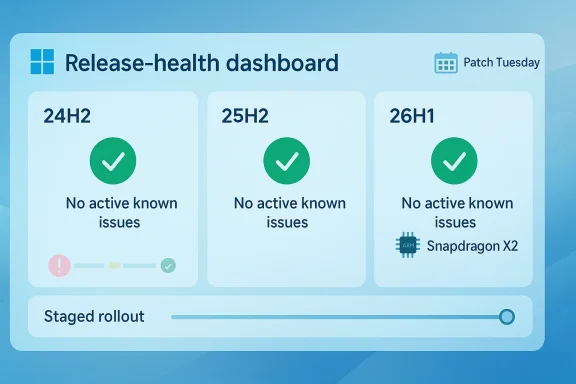
Microsoft’s latest Windows release-health pages paint an unusual picture: at least for the moment, Windows 11’s mainstream 24H2 and 25H2 branches show no active known issues, and Microsoft’s 26H1 hardware-optimized branch also lists no active known issues. That is a notable milestone for a platform that spent much of the past year carrying a visible backlog of bugs, safeguard holds, and compatibility headaches. It is also a reminder that on Windows, “no known issues” does not mean “no issues,” only that Microsoft currently has nothing publicly acknowledged in its release-health dashboard.
For Windows users, the phrase known issues matters more than it should. It is the public record of what Microsoft has admitted, triaged, and decided to keep visible while fixes roll out, and it often shapes when organizations feel safe deploying a feature update. When that list shrinks to zero, the signal is partly technical and partly psychological: the platform looks steadier, even if the underlying code quality has not suddenly transformed overnight.
That is the state Windows 11 appears to be in as of early April 2026. Microsoft’s release-health pages for Windows 11 version 25H2 and Windows 11 version 26H1 currently show no active known issues at the top of their dashboards, while the 24H2 page has also been cleared of open items after a long sequence of resolutions. Microsoft’s own wording on the 26H1 page is especially blunt: there are no active known issues at this time.
That said, the relief is conditional. Microsoft has already documented that Windows 11 24H2 remains on a fixed lifecycle path and will reach end of updates for Home and Pro on October 13, 2026, while 25H2 is now the version Microsoft wants users and admins to move toward. In other words, the company is not just clearing the issue queue; it is also using the moment to push its installed base onto the newest supported branch. (learn.microsoft.com)
The timing is also telling. Microsoft has been spending the better part of the last year unwinding a backlog of high-visibility issues, including Microsoft account sign-in failures, WUSA installation failures from network shares, and the Samsung Galaxy Connect / Continuity Service access problem that could block access to the C: drive on some devices. Those items are now marked resolved or external, which is why the dashboard can legitimately look clean today even though the recent history was anything but. (learn.microsoft.com)
There is also an asymmetry between enterprise and consumer visibility. Enterprises often encounter issues first because they deploy widely, manage more hardware variation, and use scripts, WUSA, group policy, or custom authentication paths that home users never touch. That is why many release-health entries are written in terms of platforms and build numbers rather than simple consumer prose. (learn.microsoft.com)
In practice, that gives Microsoft two layers of control. First, it can clear a bug from the page once the root cause is fixed or the issue is determined to be external. Second, it can continue pacing the update through the ecosystem so that a newly surfaced problem does not spread too quickly. That dual mechanism is one reason Windows release-health pages are more strategic than they may first appear.
Another important fix was the WUSA/shared-folder failure that could break update installation when multiple .msu files were present on a network share. That may sound niche, but it is precisely the sort of problem that frustrates IT admins and patch-management teams, which are often the people deciding whether Windows is ready for broad enterprise deployment. Microsoft marked that issue resolved with KB5079391 on March 26, 2026. (learn.microsoft.com)
The Samsung C: drive incident was equally notable, even though Microsoft ultimately said the root cause was not Windows itself. Microsoft and Samsung concluded the symptom stemmed from the Samsung Galaxy Connect app, and mitigation steps were introduced in mid-March 2026 to prevent more devices from being affected. That kind of external problem still lands on Microsoft’s release-health page because users experience it as a Windows failure, regardless of whether the blame belongs to an OEM. (learn.microsoft.com)
The broader narrative also reflects how Windows servicing has changed. Microsoft increasingly treats stability as a moving target, fixed through cumulative updates, out-of-band patches, and staged feature rollout rather than through one dramatic service-pack-style reset. The result is that “clean” is now a rolling achievement, not a permanent state.
It also reveals how Microsoft uses stability as a deployment lever. A clean release-health board reduces the psychological barrier to upgrade and may help counter the lingering reputation damage created by 24H2’s rough edges. For home users, the message is simple: the latest branch is not only new, but currently the least problematic one on paper.
Enterprises will read the same data differently. They will care less about headline “no issues” branding and more about whether their specific line-of-business apps, drivers, authentication paths, and management tools have been validated against 25H2. A clean dashboard helps, but it does not replace testing. That distinction remains critical.
That means the “zero issues” label is partly a consequence of the release’s narrow scope. A tightly controlled, preinstalled-only platform is easier to launch cleanly than a mass-market upgrade path spanning millions of heterogeneous PCs. In other words, 26H1’s pristine page is real, but it is not directly comparable to the messier life of a general-purpose Windows feature update.
It also reflects Microsoft’s broader Windows-on-Arm strategy. By tying 26H1 to new devices rather than existing upgrades, Microsoft can optimize first-run experience, firmware integration, and driver quality more tightly than in a universal rollout. That should reduce the odds of headline problems at launch, though it also limits the release’s relevance to the average Windows user.
Preview updates already show the company working on those touchpoints. The March 2026 preview update KB5079391 includes improvements to safe mode taskbar reliability and to applying the Start menu layout through Group Policy when
The irony is that Microsoft does not need Windows to be flawless; it needs it to be predictably good enough for the majority of deployments. A cleaner release-health story and a more coherent taskbar/Start menu roadmap help it defend that position.
The lesson from 24H2 is that enterprise friction can surface in unexpected places. WUSA failures from network shares are a classic example of a problem that is almost invisible to casual users but highly disruptive to IT operations. When Microsoft resolves those issues, it improves not only update quality but also the credibility of the Windows servicing model. (learn.microsoft.com)
That does not mean enterprises should rush. It means the burden of proof has shifted. Microsoft can now say the release is clear in public, and organizations will need more specific internal reasons to remain cautious.
The other watch item is whether Microsoft follows the issue cleanup with more visible UX improvements. The company has already indicated that Windows Update, taskbar behavior, and Start menu experience are on the agenda, which means the next phase is supposed to be about making Windows feel better, not just making it less broken. If those changes arrive smoothly, Microsoft may finally start to reverse some of the skepticism that has surrounded recent Windows 11 releases.
Source: Neowin Microsoft says Windows 11 has no known issues
 Overview
For Windows users, the phrase known issues matters more than it should. It is the public record of what Microsoft has admitted, triaged, and decided to keep visible while fixes roll out, and it often shapes when organizations feel safe deploying a feature update. When that list shrinks to zero, the signal is partly technical and partly psychological: the platform looks steadier, even if the underlying code quality has not suddenly transformed overnight.That is the state Windows 11 appears to be in as of early April 2026. Microsoft’s release-health pages for Windows 11 version 25H2 and Windows 11 version 26H1 currently show no active known issues at the top of their dashboards, while the 24H2 page has also been cleared of open items after a long sequence of resolutions. Microsoft’s own wording on the 26H1 page is especially blunt: there are no active known issues at this time.
That said, the relief is conditional. Microsoft has already documented that Windows 11 24H2 remains on a fixed lifecycle path and will reach end of updates for Home and Pro on October 13, 2026, while 25H2 is now the version Microsoft wants users and admins to move toward. In other words, the company is not just clearing the issue queue; it is also using the moment to push its installed base onto the newest supported branch. (learn.microsoft.com)
The timing is also telling. Microsoft has been spending the better part of the last year unwinding a backlog of high-visibility issues, including Microsoft account sign-in failures, WUSA installation failures from network shares, and the Samsung Galaxy Connect / Continuity Service access problem that could block access to the C: drive on some devices. Those items are now marked resolved or external, which is why the dashboard can legitimately look clean today even though the recent history was anything but. (learn.microsoft.com)
How Windows release health works
Microsoft’s release-health pages are not the same thing as a formal bug tracker, and that distinction is important. They are curated dashboards meant to tell customers which issues are still open, which have been resolved, and which updates are being held back by safeguard logic. That makes them less exhaustive than the total universe of Windows defects, but more useful for deciding whether to deploy a release at scale. (learn.microsoft.com)Why “no known issues” is not the same as “perfect”
The obvious caveat is that known is doing a lot of work here. Microsoft can only mark down what it has confirmed, reproduced, or accepted from trusted reports, and many smaller regressions never make it onto the public page. A fresh Patch Tuesday build can also introduce a new bug hours after a clean dashboard snapshot, which is why “zero open issues” should be read as a current status, not a guarantee.There is also an asymmetry between enterprise and consumer visibility. Enterprises often encounter issues first because they deploy widely, manage more hardware variation, and use scripts, WUSA, group policy, or custom authentication paths that home users never touch. That is why many release-health entries are written in terms of platforms and build numbers rather than simple consumer prose. (learn.microsoft.com)
The role of safeguard holds
Microsoft uses safeguard holds to slow or block rollout on systems where compatibility is uncertain. That means the absence of listed issues does not automatically mean every PC can or should receive the latest feature update immediately. The company still relies on staged deployment and machine-learning-based rollout logic, especially for 25H2, which is being offered automatically to eligible 24H2 devices that are not managed by IT departments. (learn.microsoft.com)In practice, that gives Microsoft two layers of control. First, it can clear a bug from the page once the root cause is fixed or the issue is determined to be external. Second, it can continue pacing the update through the ecosystem so that a newly surfaced problem does not spread too quickly. That dual mechanism is one reason Windows release-health pages are more strategic than they may first appear.
- Release-health pages track what Microsoft is publicly acknowledging.
- Safeguard holds can still limit rollout even when the page looks clean.
- A clean dashboard does not eliminate hidden or unreported regressions.
- Enterprises often surface issues earlier than consumers.
- The dashboard is a deployment aid, not a quality certificate.
The road from a messy 24H2 launch to a clean dashboard
The most interesting part of this story is not that Windows 11 is temporarily “bug-free” on paper; it is how much work it took to reach that point. Windows 11 version 24H2 shipped with a substantial backlog of compatibility and reliability issues, and Microsoft spent months resolving them one by one. The public record shows that the company was still clearing issues in March 2026, which makes the current zero-open-issues state more of a finish line for the release-health tracker than a declaration of universal stability. (learn.microsoft.com)The big fixes that changed the mood
A few fixes mattered disproportionately because they affected core trust in the platform. Microsoft’s March 2026 out-of-band update KB5085516 addressed a Microsoft account sign-in problem that could affect Teams Free, OneDrive, Edge, Word, Excel, and Microsoft 365 Copilot when the update introduced a bad network-state interaction. That kind of bug is damaging because it hits both daily consumer workflows and business-adjacent cloud identity scenarios. (learn.microsoft.com)Another important fix was the WUSA/shared-folder failure that could break update installation when multiple .msu files were present on a network share. That may sound niche, but it is precisely the sort of problem that frustrates IT admins and patch-management teams, which are often the people deciding whether Windows is ready for broad enterprise deployment. Microsoft marked that issue resolved with KB5079391 on March 26, 2026. (learn.microsoft.com)
The Samsung C: drive incident was equally notable, even though Microsoft ultimately said the root cause was not Windows itself. Microsoft and Samsung concluded the symptom stemmed from the Samsung Galaxy Connect app, and mitigation steps were introduced in mid-March 2026 to prevent more devices from being affected. That kind of external problem still lands on Microsoft’s release-health page because users experience it as a Windows failure, regardless of whether the blame belongs to an OEM. (learn.microsoft.com)
Why the clean page still matters
A zero-issue dashboard is meaningful because it changes the conversation. Instead of asking whether a particular bug is still open, administrators can focus on whether the update path itself is now healthy enough to accelerate adoption. That matters especially for Windows 11 24H2 devices that are approaching their support deadline and for organizations deciding whether to jump to 25H2. (learn.microsoft.com)The broader narrative also reflects how Windows servicing has changed. Microsoft increasingly treats stability as a moving target, fixed through cumulative updates, out-of-band patches, and staged feature rollout rather than through one dramatic service-pack-style reset. The result is that “clean” is now a rolling achievement, not a permanent state.
- KB5085516 fixed Microsoft account sign-in problems.
- KB5079391 resolved a WUSA/network-share update failure.
- The Samsung access issue was treated as an external app-level problem.
- Each fix reduced both user pain and rollout friction.
- The dashboard’s cleanliness is a servicing milestone, not a verdict on Windows quality.
Windows 11 25H2 and the support clock
Microsoft’s current posture is clear: 25H2 is the version it wants people on, and 24H2 is no longer the long-term destination. The 24H2 release-health page states that Home and Pro editions will reach end of updates on October 13, 2026, and that eligible unmanaged devices will automatically receive 25H2 when ready. That is the real business logic behind the “zero known issues” message. (learn.microsoft.com)Rolling forward instead of standing still
The practical effect is that Microsoft has a stronger hand when it tells users to update. If the currently supported branch shows no open issues, then reluctance to move to 25H2 becomes harder to justify on stability grounds alone. That does not remove every compatibility concern, but it does shift the burden back to the user or IT department to explain why they should remain on an older branch. (learn.microsoft.com)It also reveals how Microsoft uses stability as a deployment lever. A clean release-health board reduces the psychological barrier to upgrade and may help counter the lingering reputation damage created by 24H2’s rough edges. For home users, the message is simple: the latest branch is not only new, but currently the least problematic one on paper.
Consumer impact versus enterprise impact
For consumers, this mostly translates into fewer reasons to fear the upgrade prompt. If 25H2 is automatically offered on eligible 24H2 systems and the release-health page stays clear, the average user is unlikely to resist the change for long. That matters because consumers usually react to visible instability, not servicing policy.Enterprises will read the same data differently. They will care less about headline “no issues” branding and more about whether their specific line-of-business apps, drivers, authentication paths, and management tools have been validated against 25H2. A clean dashboard helps, but it does not replace testing. That distinction remains critical.
- 25H2 is the new preferred branch.
- 24H2 Home/Pro reaches end of updates on October 13, 2026.
- Automatic upgrade pressure is increasing for eligible devices.
- Consumers benefit most from the reduced friction.
- Enterprises still need validation against their own environments.
26H1: the special-case release
Microsoft’s Windows 11 version 26H1 is not a conventional broad feature update. It is a hardware-optimized release intended for new devices using Qualcomm Snapdragon X2 series silicon, and Microsoft says it is not offered through Windows Update as an in-place upgrade for existing devices. That makes its zero-known-issues status interesting, but in a very different way from 24H2 and 25H2.Why 26H1 matters even if most users will never see it
The 26H1 page says there are no active known issues, but the more important fact is that the branch exists to support a specific new hardware generation, not to solve a consumer upgrade problem. Microsoft says the first devices begin with Snapdragon X2 series processors, and that 26H1 follows a different servicing path from 24H2 and 25H2.That means the “zero issues” label is partly a consequence of the release’s narrow scope. A tightly controlled, preinstalled-only platform is easier to launch cleanly than a mass-market upgrade path spanning millions of heterogeneous PCs. In other words, 26H1’s pristine page is real, but it is not directly comparable to the messier life of a general-purpose Windows feature update.
The strategic signal for Arm PCs
The fact that Microsoft is reserving a special release for next-generation Arm hardware tells us where it thinks the platform is headed. It is effectively building a runway for newer silicon while keeping the mainstream 24H2/25H2 line stable enough for the existing installed base. That split is smart, because it avoids forcing a single release train to satisfy both bleeding-edge hardware and conservative enterprise deployment at the same time.It also reflects Microsoft’s broader Windows-on-Arm strategy. By tying 26H1 to new devices rather than existing upgrades, Microsoft can optimize first-run experience, firmware integration, and driver quality more tightly than in a universal rollout. That should reduce the odds of headline problems at launch, though it also limits the release’s relevance to the average Windows user.
- 26H1 is hardware-specific, not a mass upgrade.
- Snapdragon X2 devices are the first beneficiaries.
- Narrow scope makes a clean launch more plausible.
- The release highlights Microsoft’s Arm ambitions.
- Most Windows users will stay on 24H2 or 25H2.
The taskbar, Start menu, and the “fix Windows” campaign
Microsoft has also been signaling that the next phase is not just bug fixing, but experience fixing. The company has said it wants to address popular user requests, improve Windows Update, and refine the taskbar and Start menu, with some of those changes already appearing in preview builds. That is an important distinction: the release-health clean-up is about removing problems, while the UI work is about making Windows feel more coherent.Why usability changes matter more than slogans
Windows users often judge quality through friction, not feature count. If the taskbar is awkward, the Start menu is inconsistent, or Windows Update feels intrusive, the operating system is perceived as broken even when it is technically stable. Microsoft seems to understand that the next reputation battle is as much about feel as about fixes.Preview updates already show the company working on those touchpoints. The March 2026 preview update KB5079391 includes improvements to safe mode taskbar reliability and to applying the Start menu layout through Group Policy when
desktopAppLink is present in JSON. That sounds obscure, but it is exactly the sort of behind-the-scenes correction that makes Windows feel less brittle in managed environments.What this means for rivals
This matters competitively because Windows is now in a broader platform contest, not just a desktop OS contest. Microsoft is competing with ChromeOS in education, macOS in premium consumer and creator segments, and even managed VDI and cloud PC environments where frictionless provisioning is a major selling point. Every visible cleanup in Windows strengthens its case as the default business desktop, while every UI misstep gives rivals an opening.The irony is that Microsoft does not need Windows to be flawless; it needs it to be predictably good enough for the majority of deployments. A cleaner release-health story and a more coherent taskbar/Start menu roadmap help it defend that position.
- Microsoft is shifting from bug cleanup to experience cleanup.
- Taskbar and Start menu reliability remain strategic priorities.
- Preview builds show the company polishing enterprise-friendly behavior.
- UI friction still shapes how people perceive Windows quality.
- Competitive pressure comes from both desktop rivals and cloud-first alternatives.
Enterprise deployment and patch confidence
Enterprises care about Windows health in a way consumer users usually do not. A single unresolved issue can delay an entire ring of deployment, force a temporary workaround, or trigger a rollback plan that consumes administrator time. That is why a clean release-health page is operationally useful even when the underlying market narrative is mostly consumer-facing. (learn.microsoft.com)Why administrators will still test before trusting
Microsoft’s dashboards do not replace validation in the real world. Managed environments often have profile customizations, roaming settings, security software, line-of-business integrations, and hardware fleets that expose bugs mainstream home users never encounter. In that sense, the release-health page is only the first filter, not the final approval.The lesson from 24H2 is that enterprise friction can surface in unexpected places. WUSA failures from network shares are a classic example of a problem that is almost invisible to casual users but highly disruptive to IT operations. When Microsoft resolves those issues, it improves not only update quality but also the credibility of the Windows servicing model. (learn.microsoft.com)
A better story for deployment teams
Still, there is no question that this clean state helps Microsoft’s pitch. A month or two ago, administrators could point to active issues and delay the jump to 25H2 or new cumulative updates. With the current dashboards showing no open issues, the justification for delay becomes weaker unless a particular environment has its own local blockers.That does not mean enterprises should rush. It means the burden of proof has shifted. Microsoft can now say the release is clear in public, and organizations will need more specific internal reasons to remain cautious.
- Release-health pages are useful but not sufficient for enterprise decisions.
- Admins still need ring-based testing and local validation.
- The clean dashboard strengthens Microsoft’s deployment pitch.
- The biggest blocker now may be internal compatibility, not Microsoft’s public bug list.
- Update confidence is as much about operations as it is about code.
Strengths and Opportunities
The biggest strength of Microsoft’s current position is that the company has turned a year of awkward bug cleanup into a coherent stability narrative. The opportunity now is to convert that narrative into faster 25H2 adoption, stronger trust in servicing, and a smoother launch path for 26H1 hardware.- Clearer update messaging gives Microsoft a more credible stability story.
- 25H2 momentum can accelerate once public issue lists are empty.
- Enterprise confidence improves when rollout blockers disappear.
- Arm hardware planning looks more deliberate with 26H1 as a special case.
- Windows Update credibility rises when the platform appears better maintained.
- User frustration may fall if future patches feel less disruptive.
- Competitive positioning improves against cleaner-feeling rivals.
Risks and Concerns
The obvious risk is complacency. A clean dashboard can lull users and even Microsoft itself into thinking the hard part is over, when in reality the next Patch Tuesday could instantly reintroduce visible problems. The other risk is reputational: if new bugs appear soon after this milestone, the “no known issues” moment will look fragile in hindsight.- New regressions can appear at any time, especially around Patch Tuesday.
- Public confidence may outpace actual stability in edge cases.
- Enterprise environments can still hit problems not listed on the dashboard.
- OEM issues may be mistaken for Windows bugs, muddying accountability.
- Cleanup fatigue could return if Microsoft’s fixes create new side effects.
- Upgrade pressure may frustrate users who are not ready to move to 25H2.
- Special releases like 26H1 could fragment support expectations.
Looking Ahead
What happens next will be a test of whether Microsoft can keep the Windows 11 health pages clean while the update cadence continues. The next Patch Tuesday cycle is the obvious pressure point, because any newly confirmed issue will immediately complicate the tidy story Microsoft has just created. If the dashboard stays empty through the next rounds of servicing, the current moment will look less like a lucky snapshot and more like a sign of maturing discipline. (learn.microsoft.com)The other watch item is whether Microsoft follows the issue cleanup with more visible UX improvements. The company has already indicated that Windows Update, taskbar behavior, and Start menu experience are on the agenda, which means the next phase is supposed to be about making Windows feel better, not just making it less broken. If those changes arrive smoothly, Microsoft may finally start to reverse some of the skepticism that has surrounded recent Windows 11 releases.
- Watch for the next Patch Tuesday cycle.
- Monitor whether 25H2 keeps a clean release-health page.
- Track whether 26H1 stays issue-free on Snapdragon X2 devices.
- Observe whether Start menu and taskbar improvements land without regressions.
- Watch enterprise feedback on rollout speed and stability.
Source: Neowin Microsoft says Windows 11 has no known issues
