

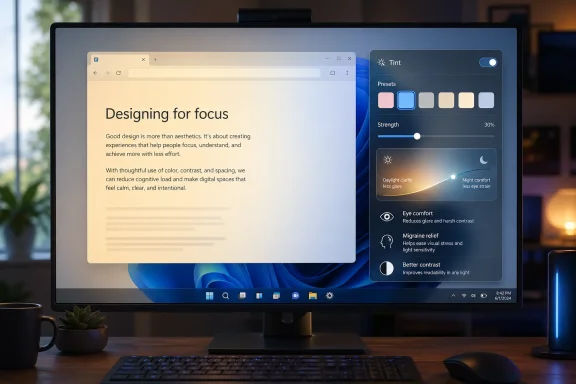
 Microsoft Is Testing a Smarter Replacement for Windows 11’s Night Light
Microsoft appears to be experimenting with a more flexible alternative to Windows 11’s long-running Night Light feature, potentially giving users far more control over how their screens look and feel during long sessions at the PC. The new feature, reportedly called Screen Tint, was spotted hidden inside a Windows 11 preview build and looks like a broader, more customizable accessibility and comfort tool rather than a simple blue-light filter.Night Light has been part of Windows for years. Its purpose is straightforward: reduce the amount of blue light emitted by the display by shifting the screen toward warmer, orange-toned colors. The idea is that warmer colors can be easier on the eyes at night and may make evening screen use less disruptive to sleep. For many users, that has been enough. Turn it on manually, schedule it from sunset to sunrise, adjust the strength slider, and Windows takes care of the rest.
But Night Light has always been a one-note feature. It does one thing, in one general color direction. If you like the warmer tone, it can be useful. If the orange tint bothers you, interferes with color-sensitive work, makes text harder to read, or simply does not address your particular type of eye strain, there is not much room to personalize it. That is where Screen Tint could represent a meaningful upgrade.
According to PCWorld, the hidden Screen Tint feature was discovered by well-known Windows feature watcher phantomofearth in Windows 11 preview build 26300.8289. The feature is not officially announced by Microsoft yet, and it is not broadly available to regular Windows 11 users. That makes it experimental for now. Still, the discovery is notable because it suggests Microsoft may be thinking beyond the traditional “make the screen warmer at night” approach and toward a more personal set of display-comfort options.
Screen Tint reportedly includes six preset tint colors, a custom tint option, and a strength slider. Each preset appears to include a short explanation describing what it may be most useful for. Among the examples mentioned are a pink tint that is said to help with migraines, a blue tint intended to reduce glare, and a gray tint aimed at users who become tired by strong black-and-white contrast.
If Microsoft follows through, Screen Tint could become one of the more practical accessibility additions to Windows 11 because it would address a common problem: different people experience screen discomfort in different ways.
Why Night Light Needed an Upgrade
Night Light is simple, and that simplicity has been both its strength and its weakness. It gives users a quick way to warm the display color temperature, especially at night. On laptops, tablets, and desktops used after dark, that can make the screen feel less harsh. It is easy to enable from Quick Settings or the Settings app, and it can be scheduled automatically.However, modern PC use has changed since features like Night Light became mainstream. People now spend hours in front of screens for work, study, gaming, streaming, messaging, creative editing, and accessibility-dependent tasks. Many users are not just trying to fall asleep more easily after using a PC at night. They are trying to reduce glare during the day, soften high-contrast interfaces, manage light sensitivity, reduce visual fatigue, or make Windows more comfortable during long work sessions.
A warm orange filter is not the right solution for all of those needs. In fact, it can create new problems. A designer, photographer, video editor, or anyone doing color-sensitive work may avoid Night Light because it distorts colors too aggressively. A user with migraine triggers may not find a warm screen useful at all. Another user may prefer a desaturated or low-contrast view rather than a warmer one. Someone else may need different tints for different lighting conditions, times of day, or tasks.
Screen Tint, as described, seems designed to meet those more varied needs. Instead of assuming that one warm tone helps everyone, it appears to give Windows users a set of tint profiles and the ability to create their own. That is a more modern accessibility philosophy: let users shape the experience around their bodies, environments, and preferences.
What Screen Tint Appears to Offer
The most important difference between Screen Tint and Night Light is range. Night Light is essentially a blue-light reduction feature. Screen Tint looks more like a full-screen overlay or color adjustment tool with multiple color choices.Based on the report, Screen Tint includes six preset colors. Microsoft has not publicly documented those presets, so the full list is not yet official. But the examples already seen are enough to show the direction Microsoft may be taking. Pink is presented as potentially useful for migraine relief. Blue is described as a way to reduce screen glare. Gray is intended for people who find sharp black-and-white contrast tiring.
The feature also reportedly includes a custom tint option. That could be especially important. Presets are useful starting points, but display comfort is highly personal. A tint that works well on one monitor may feel too strong on another. A color that helps one person may bother another. Even the same user may want different settings on a bright laptop screen, an OLED monitor, or an external display in a dim room.
A strength slider would let users fine-tune the effect rather than simply turning it on or off. That matters because tinting can quickly become overwhelming if it is too intense. A subtle 10 or 20 percent tint may be enough to soften glare or reduce contrast without making the entire system feel unnatural. A stronger tint may be useful during migraines, late-night reading, or prolonged document work. Giving users control over intensity makes the feature more adaptable and less likely to be abandoned after a quick test.
If implemented well, Screen Tint could sit somewhere between Night Light, Color Filters, contrast themes, and third-party screen overlay tools. It would not necessarily replace every accessibility feature Windows already has, but it could fill an important gap between basic color temperature adjustment and more specialized visual accessibility settings.
Why This Matters for Accessibility
Microsoft has spent years expanding the accessibility features built into Windows. Windows 11 already includes tools such as Narrator, Magnifier, Live Captions, color filters, contrast themes, text size controls, mouse pointer customization, focus tools, voice access, and more. Screen Tint would fit naturally into that broader accessibility direction.The key idea is that accessibility is not limited to a small set of users or a single category of disability. Visual comfort affects a wide range of people, including users with migraines, light sensitivity, color vision differences, low vision, sensory sensitivities, concentration challenges, and ordinary eye fatigue from long workdays.
Many users who would benefit from screen adjustments do not necessarily think of themselves as needing accessibility tools. They may simply say their screen is too harsh, white backgrounds hurt their eyes, dark mode is not enough, glare is distracting, or they get headaches after long sessions. By making display tinting more prominent and customizable, Microsoft could make Windows more comfortable for a much broader group.
Screen Tint also reflects an important shift: accessibility features are increasingly becoming mainstream usability features. Captions, high contrast, text scaling, reduced motion, focus modes, and display adjustments are useful not only for users with disabilities but for anyone working in different environments or under different conditions. A screen that is comfortable at noon may be painful at midnight. A bright white document may be fine for ten minutes but tiring after six hours. A user may not need a permanent accessibility setting but may need temporary relief.
A built-in Screen Tint feature could make that kind of adjustment normal, quick, and system-wide.
How Screen Tint Could Improve Daily Windows Use
If Screen Tint becomes a regular Windows 11 feature, it could be useful in several everyday scenarios.For office workers and students, it could soften harsh document backgrounds during long writing or reading sessions. Many people spend hours staring at white pages in Word, PDFs, browsers, spreadsheets, and email clients. Dark mode helps in some apps, but not every website or program handles dark mode well. A gray or custom tint could provide a more consistent layer of visual comfort across the system.
For users with migraines or light sensitivity, Screen Tint could offer a quick way to apply a preferred color overlay without needing third-party software. Many migraine sufferers already experiment with screen brightness, color temperature, reduced contrast, dark mode, tinted glasses, or custom overlays. A built-in tool would not be a medical treatment, and Microsoft would need to be careful about how it describes the benefits. But giving users more control over visual stimuli is still valuable.
For laptop users in bright rooms, a glare-reducing tint may help make the display feel less piercing. Brightness controls alone do not always solve glare or visual harshness. Sometimes reducing contrast or shifting color can make a screen more usable without simply dimming everything.
For gamers, readers, developers, and night owls, Screen Tint could provide alternatives to the orange cast of Night Light. A programmer staring at dark-themed code for hours may want a subtle gray or blue adjustment. A reader may want a warm tint. A gamer may want to avoid heavy color distortion but still reduce harshness during late sessions. A custom tint could make that possible.
For people who move between different displays, the feature could be useful if Windows allows settings to apply per display or per profile. That remains unknown. But it would be especially helpful because external monitors vary widely in brightness, color temperature, panel type, HDR behavior, and factory calibration.
The Big Question: Will It Replace Night Light?
The PCWorld headline frames Screen Tint as a potential replacement for Night Light, but it is too early to know exactly how Microsoft will position it. Screen Tint could replace Night Light, absorb it, sit beside it, or remain hidden and never ship.From a product design standpoint, replacing Night Light with Screen Tint would make sense if Microsoft includes a warm-color preset that behaves like the current Night Light feature. There is no need to maintain two separate tools if one can do everything the older feature does and more. Screen Tint could include a “warm night” mode for blue-light reduction while also offering other presets.
On the other hand, Microsoft may choose to keep Night Light because users already understand it. It is a familiar name with a clear purpose. Screen Tint may be more complex, and Microsoft might not want to disrupt established workflows. In that case, Screen Tint could appear under Accessibility while Night Light remains under Display settings.
There is also the possibility that Screen Tint is intended primarily as an accessibility feature rather than a general display setting. The post that revealed it reportedly described it as a new accessibility feature. If that is the case, Microsoft might place it near color filters, contrast themes, and vision settings rather than directly replacing Night Light in the Display section.
The final design will matter. If Screen Tint is buried too deeply in Settings, many users who could benefit from it may never find it. If it is accessible from Quick Settings, like Night Light, it could become a practical everyday tool.
Microsoft Has Not Announced It Yet
It is important to treat Screen Tint as an experimental feature for now. The feature was hidden in a Windows 11 preview build, and Microsoft has not publicly confirmed a rollout date, final name, complete feature set, or availability plan.Hidden features in Windows Insider builds are not guarantees. Microsoft often tests interface elements, settings pages, and feature flags that change significantly before release. Some ship months later. Some are delayed. Some are removed entirely. Others appear only for specific testing channels or limited groups of Insiders.
That uncertainty is especially important here because Screen Tint touches display behavior. Anything that changes the entire screen output has to work reliably across graphics drivers, multiple monitors, HDR displays, color profiles, remote sessions, games, video playback, accessibility tools, and enterprise configurations. Microsoft will need to make sure it does not conflict with existing color management features or create confusion for users who rely on accurate color.
Still, the fact that the feature exists in a preview build suggests that Microsoft is at least exploring a more advanced successor to Night Light.
The Challenge of Color Accuracy
One possible concern with Screen Tint is color accuracy. Any full-screen tint can distort colors, which is fine for comfort but risky for certain tasks. A user editing photos, grading video, designing a logo, checking brand colors, or preparing print work may not want any tint applied. Even a subtle overlay can change how whites, grays, skin tones, and shadows appear.Night Light already has this problem, which is why many creative professionals avoid it while working. Screen Tint could make the issue more visible because it offers more color choices. Microsoft may need to include clear reminders that tinting affects color appearance and may not be suitable for color-critical work.
Ideally, Windows would make Screen Tint easy to toggle, schedule, and temporarily disable. It would also be helpful if users could exclude certain apps, though that may be technically more complicated. For example, a user might want Screen Tint active in browsers and document apps but disabled in Photoshop, video editors, games, or media players.
Another challenge is HDR. High dynamic range displays already behave differently from standard displays, and Windows has separate HDR calibration and color management features. A screen tint overlay must be carefully implemented so it does not produce strange results on HDR monitors or interfere with automatic color management.
The Difference Between Screen Tint and Color Filters
Windows already has Color Filters, so some users may wonder why Screen Tint is needed. Color Filters are primarily designed for users with color vision differences. They include options such as grayscale, inverted colors, and filters for different types of color blindness. These are important accessibility tools, but they are not the same as a comfort tint.A color filter changes the way colors are mapped so users can distinguish visual information more easily. A screen tint, by contrast, appears to apply a color wash or tone over the display to alter comfort, glare, brightness perception, or contrast. The use cases overlap, but they are not identical.
Screen Tint could therefore become a more approachable tool for users who do not need color-blindness filters but do need relief from harsh light, glare, migraines, or visual fatigue. It could also be less disruptive than high contrast themes, which change the appearance of Windows and apps more dramatically.
That middle ground is valuable. Many users want something gentler than a full contrast theme but more flexible than Night Light.
A More Personalized Windows
Screen Tint also fits a larger trend in Windows 11: Microsoft is trying to make the operating system more adaptive to individual preferences. Some of that work is about productivity, some about accessibility, and some about aesthetics. Users can adjust themes, text size, pointer size, captions, focus modes, color profiles, HDR settings, and more.But display comfort remains one of the most personal parts of computing. Two people can look at the same screen and have completely different reactions. One may find a bright white background clean and readable. Another may find it painful. One may love dark mode. Another may see halos or eye strain from bright text on a black background. One may prefer warm colors. Another may find warm tint muddy or unpleasant.
A customizable Screen Tint feature acknowledges that there is no single “comfortable” display setting. Comfort depends on the person, the monitor, the room, the task, the time of day, and the user’s health or sensory needs.
That is why the custom color option may be the most important part of the whole feature. Presets are helpful, but custom settings let users discover what actually works for them.
What Users Should Do Now
For now, most Windows 11 users do not need to do anything. Screen Tint is not officially released, and enabling hidden features in preview builds is not something regular users should rely on. Hidden Windows features can be incomplete, unstable, or removed without warning.Users who want better display comfort today can still use existing Windows options. Night Light remains available for warmer colors at night. Brightness controls can reduce intensity on built-in displays. Dark mode and contrast themes can reduce harsh white interfaces. Color filters can help users with color vision needs. Text size, Magnifier, and display scaling can make content easier to read. Some monitors also include built-in low blue light, reading, eye care, or color temperature modes.
Third-party tools can also provide screen tinting and color overlay features, though built-in Windows support would be preferable for many users because it would be easier to trust, easier to find, and more likely to work consistently across the system.
If Microsoft does release Screen Tint, it could become one of the first settings users try when setting up a new PC, especially if they experience eye strain or dislike the default screen appearance.
Why This Could Be a Bigger Deal Than It Sounds
At first glance, Screen Tint may sound like a small feature. It changes the color of the screen. Windows already has brightness controls. Night Light already exists. Many monitors already have eye-care modes.But small comfort features can have a large impact because they affect every minute of PC use. A keyboard shortcut, a better caption setting, a less painful screen tone, or a more readable contrast level can determine whether someone can comfortably work for an hour or an entire day.
Screen Tint could be especially meaningful because it is system-wide. Many accessibility and comfort problems come from inconsistency. One app supports dark mode, another does not. One website is readable, another is harsh. One document has a good background, another is bright white. A screen-level tint could smooth out those differences.
It also gives users agency. Rather than forcing people to accept one default display style, Windows could let them choose the visual tone that feels best. That may sound cosmetic, but for users with light sensitivity, migraines, eye fatigue, or sensory overload, it can be deeply practical.
The Rollout Is Still Unclear
The biggest unknown is timing. PCWorld notes that Microsoft has not said when or whether Screen Tint will roll out more broadly. Because the feature is hidden in a preview build, it could arrive in a future Windows 11 update, appear first for Windows Insiders, change names, or disappear.Microsoft may also need to refine the language around some presets. Claims such as helping with migraines should be handled carefully. A tint may help some users feel more comfortable, but migraine triggers and relief strategies vary widely. Microsoft will likely want to avoid presenting any color as a guaranteed medical solution.
The company will also need to decide how Screen Tint interacts with Night Light, Color Filters, contrast themes, HDR, and color profiles. Too many overlapping display settings can confuse users. A clean interface will be essential.
Still, the direction is promising. Windows 11 already includes many accessibility tools, but Screen Tint could add a missing layer of everyday visual customization. If implemented well, it would make Windows more comfortable not just at night, but throughout the entire day.
A Sensible Evolution of Night Light
Night Light was built around a simple idea: warmer colors can make nighttime screen use easier on the eyes. Screen Tint appears to take that idea and expand it into something more flexible. Instead of assuming everyone wants orange, it gives users multiple color choices. Instead of focusing only on sleep and blue light, it considers glare, contrast fatigue, migraines, and personal comfort. Instead of offering a single strength slider for one color temperature, it appears to pair tint selection with adjustable intensity.That makes Screen Tint less like a gimmick and more like a natural next step for Windows display settings.
The feature may never become the exact “Night Light replacement” suggested by early reporting, but it clearly points toward a better approach. People do not all see screens the same way. They should not be limited to the same screen comfort setting.
If Microsoft ships Screen Tint widely, Windows 11 users could soon have a built-in way to make their PCs feel less harsh, more readable, and more personally tuned. For anyone who spends long hours in front of a monitor, that could be a small but welcome quality-of-life improvement.
Source: PCWorld
Source: PCWorld Microsoft tests replacing Windows 11's Night Light with something better
