

Microsoft is preparing to make the Windows 11 search box on both the Taskbar and Start menu four pixels taller, a small interface change noted in Windows Central’s reporting on a recent preview-build changelog. The change is not yet broadly visible to testers, and Microsoft has not publicly explained the reason in the reporting available. The practical takeaway is narrow but useful: Windows Search is getting a modest visual adjustment, while Microsoft’s separate Ask Copilot experience remains an opt-in, commercial-focused Taskbar feature rather than a confirmed replacement for standard Windows Search.
Windows Central’s Zac Bowden highlighted the change with the appropriate amount of disbelief: Microsoft is making the search box “4 whole pixels” taller. The adjustment affects the Taskbar search box and the Start menu search field. Windows Central credits its visual comparison to Zac Bowden and thanks phantomofearth for spotting the detail. The report also says a Microsoft engineer confirmed that the change is not yet actually being previewed, even though it appeared in a changelog for a recent Windows 11 preview build.
That distinction matters. This is not a report that Copilot is taking over Windows Search. It is not evidence that Ask Copilot is being enabled by default. It is a small shell-design change that appears to be queued for Windows 11 testing, with a likely connection to Microsoft’s effort to make search and Copilot-adjacent surfaces feel more visually consistent. Anything beyond that should be treated as analysis, not established fact.
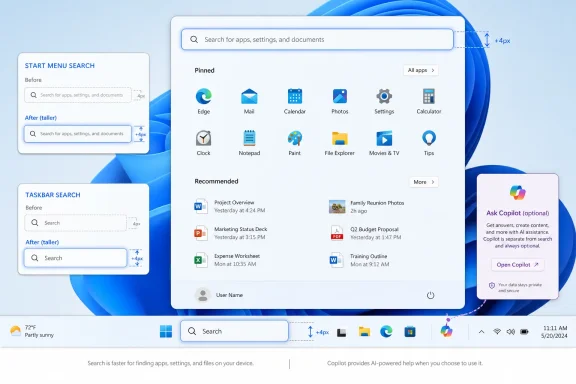
The specific change is simple: the Windows 11 search box is becoming four pixels taller in both the Taskbar and the Start menu.
That is a tiny measurement, but it is visible because these are high-frequency parts of the Windows shell. The Taskbar and Start menu are not side panels or optional apps. They are default navigation surfaces that many users touch dozens of times a day to launch apps, search for files, open settings, or begin a web query. Even a small adjustment can make the interface feel different because it changes alignment, spacing, and the visual weight of a familiar control.
Windows Central’s comparison shows the taller search field appearing chunkier than the current version. In the Taskbar, that means a more prominent search box. In the Start menu, the taller search field slightly changes the balance of the top area and pushes the surrounding layout downward. The change does not appear to alter what Windows Search does; it changes how the input field looks.
Microsoft has not provided an explanation in the available reporting. The safest reading is that the company is making a visual alignment pass across Windows 11 search-related surfaces. A reasonable analysis is that this also helps standard Windows Search sit more comfortably beside the newer Ask Copilot design, which Windows Central describes as a thicker but narrower Taskbar search-style experience. But that remains an interpretation of the UI direction, not a stated Microsoft rationale.
Windows Central’s report makes clear that Ask Copilot is a separate experience from the standard Windows Search interface. It is currently aimed at commercial customers and must be manually enabled before use. That opt-in detail is important for users and especially for administrators. A taller search box and an enabled Ask Copilot experience are not the same event.
There is still a reason people are watching the change. Windows Search has long been a sensitive area because it sits at the boundary between local utility, web results, Microsoft services, and now Copilot-related experiences. Users often think of Search as a fast way to launch apps and find files. Microsoft has also used search surfaces to connect users to web results and account-based services. Because of that history, even a small visual change can prompt questions about where the default Windows desktop is headed.
Those questions are fair, but they need to be separated from the facts. The fact is a four-pixel-taller search field. The analysis is that Microsoft may be visually harmonizing standard Search with newer Copilot-style interaction surfaces. The unsupported leap would be to claim that this proves an AI takeover of the Taskbar or Start menu. It does not.
Standard Windows Search is the familiar search experience surfaced through the Taskbar and Start menu. Users rely on it to find apps, settings, files, and other results. The reported UI change applies to this standard search box in both places.
Ask Copilot, as described by Windows Central, is an alternative Taskbar search experience with Copilot chat integrated into the UI. It is currently aimed at commercial customers and must be manually enabled. It is visually related because it uses a thicker, narrower search-style box, but it is not the same product as the ordinary Windows Search field.
That distinction should lower the temperature around the change. A taller Windows Search box is not the same as turning on Ask Copilot. It is a visual adjustment to the existing search surface.
At the same time, the similarity is not meaningless. If Microsoft is making standard Search look more like the Ask Copilot surface, that suggests a desire for visual consistency across the older search experience and the newer Copilot-related one. That is a design observation, not proof of a forced transition. But it is still useful context for anyone tracking how Windows 11’s shell is evolving.
The Start button’s position, the Taskbar’s behavior, the shape of search, and the layout of the Start menu all affect daily workflows. People may not consciously measure pixels, but they notice when familiar interface elements look heavier, sit differently, or take up more room. Administrators notice for a different reason: even cosmetic changes can make screenshots, training materials, help-desk scripts, and user guidance feel out of date.
Search is also a particularly sensitive control. It is both a utility and an entry point. For many users, it is the fastest way to open an app or setting. For Microsoft, it is also a place where the operating system can connect local results, web results, cloud-connected data, and assistant experiences. That creates a tension: users want speed and predictability; Microsoft wants a powerful input surface that can do more.
The taller search box does not resolve that tension. It simply makes the search field a little more visually prominent. If the experience remains fast and familiar, most users will likely adapt quickly. If later changes blur the line between local search, web search, and Copilot-mediated responses, the earlier visual change will be remembered as part of a broader shift. For now, the available evidence supports only the smaller conclusion: Microsoft is adjusting the UI, and the change is notable because of where it appears.
Windows Insider features can be staged, partially documented, hidden behind rollout controls, or prepared before they become visible to every tester. A changelog mention is not always the same thing as a feature being available on every device in a given preview channel. Users should not assume they can install a build and immediately see the taller search field.
For administrators, the point is even more practical: do not update internal guidance, training screenshots, or deployment notes until the change appears in the specific Insider or production channel your organization uses. Preview notes are useful signals, but they are not a substitute for validation on real devices with your actual policies, scaling settings, language packs, accessibility settings, and Taskbar configurations.
This is especially true for shell changes. A four-pixel search box increase is unlikely to break applications or create a security issue, but it can still create small support ripples. Users may ask why their Start menu looks different. Help-desk staff may need to distinguish a normal Windows UI change from a policy change. Documentation teams may need to update screenshots. Accessibility testers may want to check whether the larger field helps or affects layout density.
The right response is not alarm. It is basic preview hygiene: verify before documenting, test before communicating, and avoid assuming that every changelog item has reached every machine.
For IT teams, the useful action is to separate two questions. First, test the standard Windows Search UI change when it appears in the channels you monitor. Second, decide how your organization wants to handle Ask Copilot if it becomes available in your environment. Because Windows Central describes Ask Copilot as a manually enabled experience aimed at commercial customers, admins should confirm whether it is enabled, blocked, piloted, or not present under their current policy baseline.
Managed environments should also review whether existing controls, user guidance, and support scripts clearly distinguish standard Windows Search from Ask Copilot. If users see both a familiar search box and a Copilot-enabled alternative, confusion is more likely than technical breakage. A short internal note explaining what changed, what did not change, and whether Ask Copilot is available may prevent unnecessary tickets.
Still, users who care about keeping Windows Search predictable should pay attention to defaults. The important questions are not whether a rectangle is four pixels taller. They are whether Windows Search continues to prioritize the results users expect, whether web or assistant behavior becomes more prominent, and whether any Copilot-related experience is clearly labeled and optional.
The cleanest user experience would preserve the classic search workflow while making any Copilot-enabled alternative obvious and controllable. Users should be able to tell whether they are using standard Windows Search or an assistant-backed experience. They should not have to guess whether a query is being treated as a local search, a web search, or a Copilot request.
That clarity matters more than the pixel count. A small visual change is manageable. A confusing change in expectations would be more disruptive.
The first admin question is whether the taller search field affects your managed desktop baseline. It may change screenshots, training documents, or the appearance of locked-down Start layouts. It may also matter for environments using custom Taskbar configurations or tightly controlled user experience policies. None of that makes the change dangerous; it simply makes it worth testing.
The second admin question is Ask Copilot. Because the reporting describes Ask Copilot as manually enabled and aimed at commercial customers, organizations should treat it as a policy and change-management item rather than a surprise consumer feature. Decide whether to test it, defer it, block it where possible, or prepare a limited pilot. Then make sure help-desk teams know the difference between the standard search box and any Copilot-enabled alternative.
The third question is communication. If users notice that Search looks different, a short explanation is better than silence. If Ask Copilot appears in some environments but not others, explain that too. The support burden from small UI changes often comes from ambiguity rather than the change itself.
The Start menu search box is tied to muscle memory. Many users press the Windows key, type an app name or setting, and hit Enter. They do not think of this as “search” in a broad product sense; they think of it as a launcher. Any change to that field is measured against speed and predictability.
Making the Start menu search field taller may be about consistency. It may make the control easier to see. It may align Start with Taskbar search styling. The available reporting does not provide Microsoft’s stated rationale, so those possibilities should remain possibilities rather than claims.
The key point is that the Start menu is a constrained surface. Search competes for space with pinned apps, recommendations, account controls, and power options. Even a small increase in the search field’s footprint changes the visual balance at the top of the menu. That does not make the change bad, but it reinforces that Microsoft is willing to keep tuning the most familiar parts of Windows around input-first experiences.
For users, the best outcome is simple: the Start menu remains a fast switchboard for apps, files, and settings, while any assistant-style experience remains clearly separate and optional. For Microsoft, the challenge is to improve the interface without making users feel that a familiar launcher is turning into something less predictable.
That does not mean every visual adjustment is a strategic maneuver. Sometimes a taller box is just a taller box. Windows also needs visual consistency, accessibility review, and interface polish. A search field that better matches related UI components may be a straightforward design cleanup.
The problem for Microsoft is trust. Windows users have seen enough service integrations, web tie-ins, account prompts, and default changes to interpret even small shell updates through a defensive lens. If Microsoft wants users and admins to accept Copilot-related surfaces in Windows, it needs to keep the boundaries clear: what is standard Search, what is Ask Copilot, what is enabled by default, what is manually enabled, and what administrators can control.
The four-pixel change will probably not be remembered on its own. Most users will either never notice it or adjust quickly. What will matter is what follows. If the taller search box is just a polish pass, the story ends quietly. If it becomes part of a clearer separation between classic search and optional Copilot experiences, that could be a manageable evolution. If later changes make search feel less local, less predictable, or harder to govern, this small adjustment will be seen as an early visible step in a larger shift.
For now, the answer is restrained: Microsoft is preparing a slightly taller Windows 11 search box for the Taskbar and Start menu; Ask Copilot remains a separate, manually enabled commercial-focused experience in the available reporting; and users and admins should watch Insider testing before treating the change as anything more than a modest but symbolically interesting UI update.
Windows Central’s Zac Bowden highlighted the change with the appropriate amount of disbelief: Microsoft is making the search box “4 whole pixels” taller. The adjustment affects the Taskbar search box and the Start menu search field. Windows Central credits its visual comparison to Zac Bowden and thanks phantomofearth for spotting the detail. The report also says a Microsoft engineer confirmed that the change is not yet actually being previewed, even though it appeared in a changelog for a recent Windows 11 preview build.
That distinction matters. This is not a report that Copilot is taking over Windows Search. It is not evidence that Ask Copilot is being enabled by default. It is a small shell-design change that appears to be queued for Windows 11 testing, with a likely connection to Microsoft’s effort to make search and Copilot-adjacent surfaces feel more visually consistent. Anything beyond that should be treated as analysis, not established fact.
 What Is Changing
The specific change is simple: the Windows 11 search box is becoming four pixels taller in both the Taskbar and the Start menu.That is a tiny measurement, but it is visible because these are high-frequency parts of the Windows shell. The Taskbar and Start menu are not side panels or optional apps. They are default navigation surfaces that many users touch dozens of times a day to launch apps, search for files, open settings, or begin a web query. Even a small adjustment can make the interface feel different because it changes alignment, spacing, and the visual weight of a familiar control.
Windows Central’s comparison shows the taller search field appearing chunkier than the current version. In the Taskbar, that means a more prominent search box. In the Start menu, the taller search field slightly changes the balance of the top area and pushes the surrounding layout downward. The change does not appear to alter what Windows Search does; it changes how the input field looks.
Microsoft has not provided an explanation in the available reporting. The safest reading is that the company is making a visual alignment pass across Windows 11 search-related surfaces. A reasonable analysis is that this also helps standard Windows Search sit more comfortably beside the newer Ask Copilot design, which Windows Central describes as a thicker but narrower Taskbar search-style experience. But that remains an interpretation of the UI direction, not a stated Microsoft rationale.
What This Does Not Mean
The four-pixel change should not be exaggerated. Based on the available reporting, it does not mean standard Windows Search is being replaced. It does not mean Copilot chat is being forced into the Start menu. It does not mean Ask Copilot is now enabled for all users. It does not mean Microsoft has announced a broad consumer rollout for a new AI search box.Windows Central’s report makes clear that Ask Copilot is a separate experience from the standard Windows Search interface. It is currently aimed at commercial customers and must be manually enabled before use. That opt-in detail is important for users and especially for administrators. A taller search box and an enabled Ask Copilot experience are not the same event.
There is still a reason people are watching the change. Windows Search has long been a sensitive area because it sits at the boundary between local utility, web results, Microsoft services, and now Copilot-related experiences. Users often think of Search as a fast way to launch apps and find files. Microsoft has also used search surfaces to connect users to web results and account-based services. Because of that history, even a small visual change can prompt questions about where the default Windows desktop is headed.
Those questions are fair, but they need to be separated from the facts. The fact is a four-pixel-taller search field. The analysis is that Microsoft may be visually harmonizing standard Search with newer Copilot-style interaction surfaces. The unsupported leap would be to claim that this proves an AI takeover of the Taskbar or Start menu. It does not.
Standard Windows Search and Ask Copilot Are Separate Experiences
The most important distinction is between standard Windows Search and Ask Copilot.Standard Windows Search is the familiar search experience surfaced through the Taskbar and Start menu. Users rely on it to find apps, settings, files, and other results. The reported UI change applies to this standard search box in both places.
Ask Copilot, as described by Windows Central, is an alternative Taskbar search experience with Copilot chat integrated into the UI. It is currently aimed at commercial customers and must be manually enabled. It is visually related because it uses a thicker, narrower search-style box, but it is not the same product as the ordinary Windows Search field.
| Surface | Where it appears | Core role | Availability posture | Visual direction |
|---|---|---|---|---|
| Standard Windows Search | Taskbar and Start menu | Default Windows search experience for apps, settings, files, and other results | The reported height change is expected to appear first in Insider testing before any broader rollout | Search box becoming four pixels taller |
| Ask Copilot | Taskbar | Alternative experience with Copilot chat built into the UI | Currently aimed at commercial customers and manually enabled before use | Thicker, narrower search-style box |
At the same time, the similarity is not meaningless. If Microsoft is making standard Search look more like the Ask Copilot surface, that suggests a desire for visual consistency across the older search experience and the newer Copilot-related one. That is a design observation, not proof of a forced transition. But it is still useful context for anyone tracking how Windows 11’s shell is evolving.
Why a Tiny Shell Change Gets Attention
A four-pixel adjustment would be easy to dismiss if it appeared inside a standalone app. In the Windows shell, it gets more scrutiny because the Taskbar and Start menu carry years of user muscle memory.The Start button’s position, the Taskbar’s behavior, the shape of search, and the layout of the Start menu all affect daily workflows. People may not consciously measure pixels, but they notice when familiar interface elements look heavier, sit differently, or take up more room. Administrators notice for a different reason: even cosmetic changes can make screenshots, training materials, help-desk scripts, and user guidance feel out of date.
Search is also a particularly sensitive control. It is both a utility and an entry point. For many users, it is the fastest way to open an app or setting. For Microsoft, it is also a place where the operating system can connect local results, web results, cloud-connected data, and assistant experiences. That creates a tension: users want speed and predictability; Microsoft wants a powerful input surface that can do more.
The taller search box does not resolve that tension. It simply makes the search field a little more visually prominent. If the experience remains fast and familiar, most users will likely adapt quickly. If later changes blur the line between local search, web search, and Copilot-mediated responses, the earlier visual change will be remembered as part of a broader shift. For now, the available evidence supports only the smaller conclusion: Microsoft is adjusting the UI, and the change is notable because of where it appears.
The Insider Status Is Important
Windows Central reports that the change appeared in a changelog, while also noting that a Microsoft engineer confirmed it is not yet actually being previewed. That mismatch is important for anyone trying to test or document the change.Windows Insider features can be staged, partially documented, hidden behind rollout controls, or prepared before they become visible to every tester. A changelog mention is not always the same thing as a feature being available on every device in a given preview channel. Users should not assume they can install a build and immediately see the taller search field.
For administrators, the point is even more practical: do not update internal guidance, training screenshots, or deployment notes until the change appears in the specific Insider or production channel your organization uses. Preview notes are useful signals, but they are not a substitute for validation on real devices with your actual policies, scaling settings, language packs, accessibility settings, and Taskbar configurations.
This is especially true for shell changes. A four-pixel search box increase is unlikely to break applications or create a security issue, but it can still create small support ripples. Users may ask why their Start menu looks different. Help-desk staff may need to distinguish a normal Windows UI change from a policy change. Documentation teams may need to update screenshots. Accessibility testers may want to check whether the larger field helps or affects layout density.
The right response is not alarm. It is basic preview hygiene: verify before documenting, test before communicating, and avoid assuming that every changelog item has reached every machine.
What To Do Now
For most Windows 11 users, there is nothing urgent to do. This is a visual change, not a security update, migration requirement, or confirmed behavior change. If you are not in the Windows Insider Program, you may not see anything yet. If you are in the Insider Program, check whether the change is actually visible on your device before drawing conclusions from screenshots or release notes.For IT teams, the useful action is to separate two questions. First, test the standard Windows Search UI change when it appears in the channels you monitor. Second, decide how your organization wants to handle Ask Copilot if it becomes available in your environment. Because Windows Central describes Ask Copilot as a manually enabled experience aimed at commercial customers, admins should confirm whether it is enabled, blocked, piloted, or not present under their current policy baseline.
Managed environments should also review whether existing controls, user guidance, and support scripts clearly distinguish standard Windows Search from Ask Copilot. If users see both a familiar search box and a Copilot-enabled alternative, confusion is more likely than technical breakage. A short internal note explaining what changed, what did not change, and whether Ask Copilot is available may prevent unnecessary tickets.
Action checklist for admins
- Watch Insider release notes, but verify the taller Taskbar and Start menu search boxes on actual test devices before updating documentation.
- Confirm whether Ask Copilot is available in your tenant or device configuration, and whether it is enabled, blocked, piloted, or outside scope.
- Review Taskbar and Start menu configuration policies so support teams know what users should see.
- Check internal screenshots, onboarding material, and help-desk scripts that reference Windows 11 Search.
- Prepare a short user-facing explanation that distinguishes standard Windows Search from Ask Copilot if both surfaces become visible.
- Validate the UI with common display scaling, accessibility, localization, and device configurations used in your organization.
Implications for Users
For everyday users, the main implication is visual familiarity. The search field may look slightly larger in the Taskbar and Start menu, but the available reporting does not say that standard search behavior is changing. If the box gets taller and nothing else changes, this will likely become background noise after a short adjustment period.Still, users who care about keeping Windows Search predictable should pay attention to defaults. The important questions are not whether a rectangle is four pixels taller. They are whether Windows Search continues to prioritize the results users expect, whether web or assistant behavior becomes more prominent, and whether any Copilot-related experience is clearly labeled and optional.
The cleanest user experience would preserve the classic search workflow while making any Copilot-enabled alternative obvious and controllable. Users should be able to tell whether they are using standard Windows Search or an assistant-backed experience. They should not have to guess whether a query is being treated as a local search, a web search, or a Copilot request.
That clarity matters more than the pixel count. A small visual change is manageable. A confusing change in expectations would be more disruptive.
Implications for Admins
For administrators, the issue is less about aesthetics and more about governance. Windows Search sits on devices used in regulated industries, schools, enterprises, small businesses, and public-sector environments. A change to the Taskbar or Start menu is visible to users immediately, even if the technical impact is minor.The first admin question is whether the taller search field affects your managed desktop baseline. It may change screenshots, training documents, or the appearance of locked-down Start layouts. It may also matter for environments using custom Taskbar configurations or tightly controlled user experience policies. None of that makes the change dangerous; it simply makes it worth testing.
The second admin question is Ask Copilot. Because the reporting describes Ask Copilot as manually enabled and aimed at commercial customers, organizations should treat it as a policy and change-management item rather than a surprise consumer feature. Decide whether to test it, defer it, block it where possible, or prepare a limited pilot. Then make sure help-desk teams know the difference between the standard search box and any Copilot-enabled alternative.
The third question is communication. If users notice that Search looks different, a short explanation is better than silence. If Ask Copilot appears in some environments but not others, explain that too. The support burden from small UI changes often comes from ambiguity rather than the change itself.
Why the Start Menu Part Matters
The Taskbar gets most of the attention because Ask Copilot is described as a Taskbar experience. But the Start menu search field is also part of the reported height change, and that makes the adjustment more than a Taskbar-only styling issue.The Start menu search box is tied to muscle memory. Many users press the Windows key, type an app name or setting, and hit Enter. They do not think of this as “search” in a broad product sense; they think of it as a launcher. Any change to that field is measured against speed and predictability.
Making the Start menu search field taller may be about consistency. It may make the control easier to see. It may align Start with Taskbar search styling. The available reporting does not provide Microsoft’s stated rationale, so those possibilities should remain possibilities rather than claims.
The key point is that the Start menu is a constrained surface. Search competes for space with pinned apps, recommendations, account controls, and power options. Even a small increase in the search field’s footprint changes the visual balance at the top of the menu. That does not make the change bad, but it reinforces that Microsoft is willing to keep tuning the most familiar parts of Windows around input-first experiences.
For users, the best outcome is simple: the Start menu remains a fast switchboard for apps, files, and settings, while any assistant-style experience remains clearly separate and optional. For Microsoft, the challenge is to improve the interface without making users feel that a familiar launcher is turning into something less predictable.
A Small Change With a Larger Context
The Windows 11 search box change is small enough to mock and small enough to ignore, but it sits in a larger context that makes it worth covering. Microsoft has been adding Copilot branding and assistant experiences across Windows and Microsoft 365, and Ask Copilot is one more example of that direction. The search box is where that direction becomes especially sensitive because search is a default behavior, not a destination users deliberately seek out for experimentation.That does not mean every visual adjustment is a strategic maneuver. Sometimes a taller box is just a taller box. Windows also needs visual consistency, accessibility review, and interface polish. A search field that better matches related UI components may be a straightforward design cleanup.
The problem for Microsoft is trust. Windows users have seen enough service integrations, web tie-ins, account prompts, and default changes to interpret even small shell updates through a defensive lens. If Microsoft wants users and admins to accept Copilot-related surfaces in Windows, it needs to keep the boundaries clear: what is standard Search, what is Ask Copilot, what is enabled by default, what is manually enabled, and what administrators can control.
The four-pixel change will probably not be remembered on its own. Most users will either never notice it or adjust quickly. What will matter is what follows. If the taller search box is just a polish pass, the story ends quietly. If it becomes part of a clearer separation between classic search and optional Copilot experiences, that could be a manageable evolution. If later changes make search feel less local, less predictable, or harder to govern, this small adjustment will be seen as an early visible step in a larger shift.
For now, the answer is restrained: Microsoft is preparing a slightly taller Windows 11 search box for the Taskbar and Start menu; Ask Copilot remains a separate, manually enabled commercial-focused experience in the available reporting; and users and admins should watch Insider testing before treating the change as anything more than a modest but symbolically interesting UI update.
References
- Primary source: Windows Central
Published: Thu, 09 Jul 2026 11:49:55 GMT
Microsoft is making Windows 11's search box 4 whole pixels taller for some reason | Windows Central
An upcoming change to Windows 11 will see the default search box in Start and on the Taskbar appear larger as Microsoft increases its height by 4 pixels.www.windowscentral.com - Official source: blogs.windows.com
Announcing Windows 11 Insider Preview Build 22557
Hello Windows Insiders, today we are releasing Windows 11 Insider Preview Build 22557 to the Dev Channel. TL;DR Windows Insiders will notice that the name of the branch we are releasing builds froblogs.windows.com - Official source: adoption.microsoft.com
- Official source: news.microsoft.com
- Related coverage: techradar.com
Microsoft introduces 'Ask Copilot' box to Windows 11's taskbar – but only if you want AI there | TechRadar
Copilot replaces the traditional search box, if you opt inwww.techradar.com - Related coverage: pcgamer.com
Saved you a click: The latest Windows 11 24H2 Insider preview build offers internet speed check right from the taskbar | PC Gamer
Testing patience.www.pcgamer.com
- Related coverage: tomsguide.com
How to disable Copilot in Windows 11 | Tom's Guide
Completely disable Copilot in Windows 11 in just a few simple steps.www.tomsguide.com - Official source: support.microsoft.com
Windows Copilot+ AI components - Microsoft Support
 support.microsoft.com
- Official source: microsoft.com
Copilot on Windows: Your Built-In AI Assistant | Microsoft Windows
Discover how Copilot on Windows transforms productivity with AI-powered assistance built right into your computer. Launch Copilot on Windows today.www.microsoft.com - Official source: blogs.microsoft.com
Announcing Microsoft Copilot, your everyday AI companion - The Official Microsoft Blog
Updated November 15, 2023: To simplify the user experience and make Copilot more accessible to everyone, Bing Chat and Bing Chat Enterprise will now simply become Microsoft Copilot. For more information: https://aka.ms/BingIgnite We are entering a new era of AI, one that is fundamentally...blogs.microsoft.com - Official source: learn.microsoft.com
Pin Microsoft 365 Copilot and its companion apps to the Windows taskbar | Microsoft Learn
Learn how to improve the use of Microsoft 365 Copilot across your organization by pinning the Copilot app to the Windows taskbar.learn.microsoft.com - Official source: techcommunity.microsoft.com
- Official source: cdn-dynmedia-1.microsoft.com
- Related coverage: axios.com
Microsoft Windows Copilot gets new features
The company moves to define the AI PC it first introduced in 2024.www.axios.com
