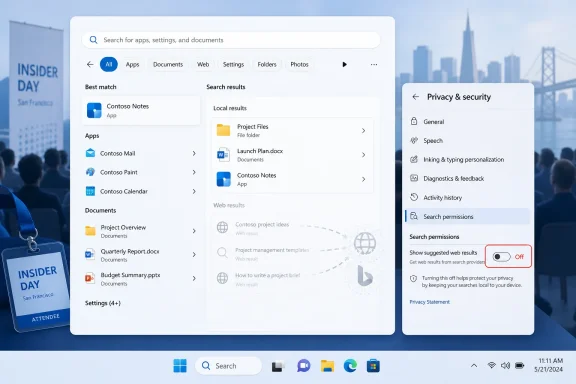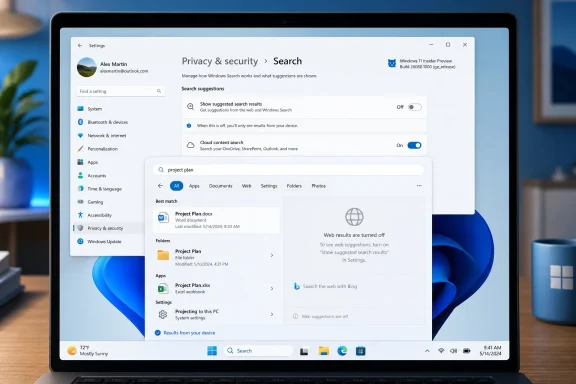
Microsoft is developing a Windows 11 setting that will let users turn off web results in the operating system’s built-in search, previewing the option at a Windows Insider meetup in San Francisco ahead of Build 2026, with Insider testing expected before any broad rollout. That sounds like a small checkbox, but it lands on one of Windows 11’s most persistent irritations: the feeling that the Start menu stopped being a reliable launcher and became a promotional surface. Microsoft is not abandoning connected search; it is conceding that desktop search needs a cleaner contract with the user. The question now is whether this is a genuine course correction or another narrow escape hatch in an OS increasingly shaped by defaults most people never change.
For years, the complaint about Windows Search has not simply been that it can search the web. The complaint has been that Windows often behaves as though the web is equally relevant when the user is obviously trying to open Notepad, find a local document, or launch an installed control panel. That breaks the mental model of the Start menu: type the thing on my PC, press Enter, get the thing on my PC.
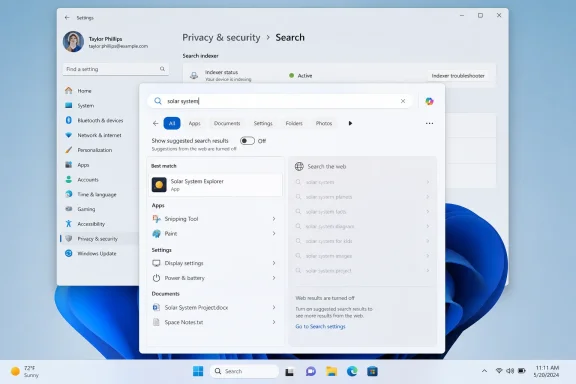
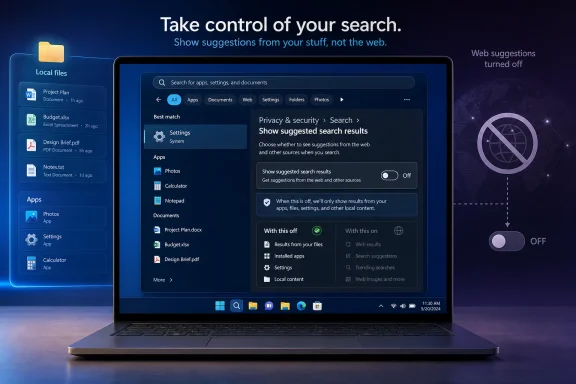
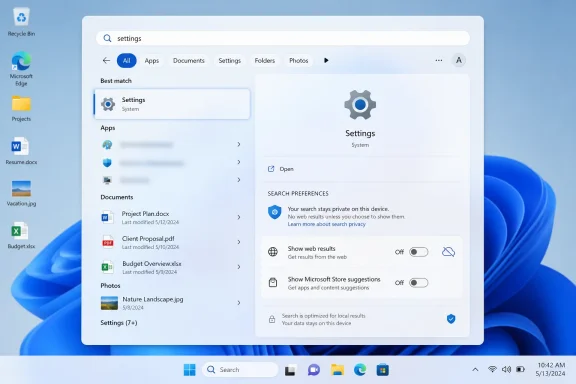
The forthcoming setting reportedly lives under Privacy & security > Search, in a section called “Show suggested search results.” The demoed toggle would allow users to disable web searches inside Windows Search, and the same interface appears to hint at separate control over Microsoft Store suggestions. That distinction matters because web results and Store results are different symptoms of the same larger design choice: Microsoft has treated local search real estate as a discovery channel.
The company has long argued, implicitly if not always explicitly, that the Windows shell should help users find not only files and apps but also online answers, services, and installable software. That may make sense from a platform strategy perspective. It makes less sense when a power user types the name of a local utility and gets a Bing result, a promotional card, or a store suggestion before the thing they already installed.
The new toggle is therefore less about adding a feature than removing friction. Microsoft is taking something that required Registry edits or policy workarounds and moving it into Settings, where ordinary users can actually find it. That is the right direction, even if it arrives after years of users asking why the obvious option was missing.
That failure has been especially visible because Windows Search sits in the daily path of the operating system. This is not a niche setting hidden behind an advanced workflow. Search is one of the first places users go when the desktop is messy, when a settings page has moved, or when muscle memory from older Windows versions kicks in. When that surface feels noisy, Windows itself feels noisy.
Microsoft’s decision to put the control under Privacy & security is also revealing. Web search inside the Start menu is not merely a relevance issue; it is a trust issue. Even when the data handling is disclosed and governed by existing Windows privacy settings, users see a local query box sending them toward online services and understandably ask why the OS is doing that at all.
A Settings toggle does not solve every concern, but it changes the posture. It says that local-first search is a legitimate preference, not a hack. For administrators, it also suggests a cleaner future in which user-facing controls, policy, and enterprise deployment behavior can align instead of depending on folklore.
That perception has been reinforced by years of adjacent Windows behavior: prompts to use Edge, web widgets, search highlights, MSN feed surfaces, and Copilot entry points. Some of those features are useful, and some are easy enough to ignore. But taken together, they created a sense that Windows 11 was less a desktop operating system than a negotiation over Microsoft services.
Search is particularly sensitive because it is not decorative. A widget feed can be hidden, a Copilot icon can be removed, and an Edge prompt can be dismissed. But if typing into Start produces web clutter when the user wanted a local app, the interruption lands at the exact moment Windows is supposed to feel fastest and most obedient.
That is why a disable-web-results toggle has symbolic weight beyond its actual code. It marks a rare case where Microsoft appears to be giving users a direct off switch for a behavior that benefits Microsoft’s broader service ecosystem. The company has often preferred tuning, relevance improvements, or gradual experiments. Here, it seems to be moving toward a plain choice.
If a search box cannot reliably distinguish between “open the installed app” and “search the web for the app’s name,” users are not likely to trust it with richer, context-aware queries. AI features make the stakes higher because they promise interpretation rather than exact matching. A product that feels overeager with Bing results will be judged harshly when it becomes overeager with AI actions.
Microsoft appears to understand at least part of that. Recent Insider work has focused on making files and apps appear more reliably ahead of web suggestions when local content is the stronger match. That is a relevance fix, not just a preference toggle, and it may matter more for users who leave web search enabled. The ideal Windows Search should not require the user to choose between local usefulness and online convenience; it should understand priority.
Still, opt-outs are necessary when defaults have lost trust. Microsoft can improve ranking all it wants, but users who have spent years fighting web results will want the ability to shut the door completely. The upcoming toggle gives them that, assuming it survives testing and reaches mainstream Windows 11 builds intact.
Windows has always had a tension between being a neutral environment and being a Microsoft-managed marketplace. Windows 8 made that tension obvious with the Store-centric Start screen. Windows 10 and 11 made it subtler, distributing recommendations across Start, search, widgets, settings, and file associations. The Store result in search is one more small tile in that mosaic.
For consumers, the annoyance is usually simple: “I searched for something I have, and Windows showed me something I could get.” For administrators, the concern is more operational. Store surfacing can collide with software standardization, app control policies, and help desk expectations. If a company has approved a specific PDF editor, chat client, or remote support tool, search suggestions that promote alternatives are not merely clutter; they are governance leakage.
That is why the best version of this change would separate controls cleanly. Let web results be one choice. Let Store suggestions be another. Let search highlights, cloud content, work account content, and local indexing all remain legible rather than bundled into one vague “experience” switch. Windows needs fewer mystery toggles and more honest boundaries.
Search is a performance feature as much as a discovery feature. When web results appear, users often perceive delay even if the local result eventually wins. The mere presence of remote suggestions creates the suspicion that Windows is doing extra work before completing the obvious task. In a desktop OS, perceived performance is product truth.
File Explorer has suffered from a similar reputational problem. It has gained tabs, a modernized command bar, OneDrive awareness, gallery views, and cloud integration, but many users still judge it by how quickly it opens a folder, deletes a pile of files, or responds to right-clicks. If Microsoft wants to convince skeptics that Windows 11 is getting calmer and faster, Explorer and Search are the right places to start.
The 30 percent bulk delete figure, if it reaches shipping builds, is a good example of the kind of improvement that rarely headlines a keynote but changes daily satisfaction. Nobody buys a PC because deleting files is faster. Plenty of people decide an OS feels bloated when deleting files is inexplicably slow.
The fixed bottom taskbar became a symbol of that tradeoff. Longtime Windows users were accustomed to moving it around, resizing it, and bending the desktop to match their habits. Windows 11 asked them to accept a more opinionated design. Some did; many did not.
Restoring taskbar movement and giving users more control over search both suggest Microsoft is rebalancing the OS away from aesthetic simplification and toward practical accommodation. That does not mean the company is reversing Windows 11 wholesale. It means it is selectively returning affordances whose absence created disproportionate anger.
This is what mature platform stewardship looks like when it is done well: not every old option comes back, but the ones that anchor workflows do. A movable taskbar is not nostalgia if it supports vertical monitors, ultrawide setups, accessibility needs, or simply years of muscle memory. A local-search toggle is not anti-cloud if it makes the Start menu usable again.
That pipeline is good for telemetry and risk management, but it is exhausting for users trying to understand what Windows actually does. Two people on Windows 11 can have the same marketing version and different shell behaviors. A feature can be announced, tested, hidden, expanded, paused, and revived before a normal user ever sees it. Microsoft’s servicing model has become sophisticated enough that “Windows 11 has this feature” is often an oversimplification.
For IT departments, that ambiguity matters. A user-facing toggle is useful only if administrators know when it arrives, how it maps to policy, whether it is available on managed devices, and whether it behaves consistently across Windows 11 24H2, 25H2, and future enablement-package releases. The more Microsoft uses staged deployment to reduce risk, the more it owes customers clear documentation.
The same applies to enthusiasts. Windows Insiders are willing to live with rough edges, but they are also the people most likely to notice when a promised quality-of-life feature exists in screenshots but not on their machine. If Microsoft wants this change to build goodwill, it should be unusually direct about rollout scope.
That question used to be easier to answer. A desktop search box searched the desktop. A browser searched the web. A store sold apps. A news panel showed news. Windows 11 has blurred those boundaries in pursuit of convenience, monetization, and ecosystem stickiness. The web-results toggle is a small act of unblurring.
The better long-term model would be local by default in local surfaces, explicit when crossing into web or cloud surfaces, and transparent when Microsoft services are being promoted. That does not require turning Windows into a minimalist offline shell. It requires respecting context.
There is a reason privacy and performance complaints often travel together. Users experience both as loss of control. If the OS is slow, it feels like the machine is not obeying. If the OS sends local intent into online surfaces, it feels like the machine is not listening. Windows Search has managed to trigger both reactions, which is why this toggle has been requested so persistently.
Windows has already seen region-specific changes around browser choice, search providers, and uninstallable components. The company knows that defaults are no longer merely design decisions; they can become competition issues. A search box that routes users to Bing is not just a UX annoyance in that environment. It is a strategic surface regulators may understand very well.
That does not mean the new toggle is a legal concession. The PCMag report frames it as a Windows 11 quality and user-control improvement, and Microsoft previewed it in the context of broader OS refinements. But it would be naïve to ignore the larger pattern: Microsoft is under pressure from users, competitors, and regulators to make Windows less coercive.
The smartest version of Microsoft’s strategy would get ahead of that pressure. Do not wait until a watchdog forces regional changes. Give all users clear controls, make the defaults defensible, and let Microsoft services compete on usefulness rather than placement.
The toggle is therefore a test of Microsoft’s humility. The company has spent much of the Windows 11 era asking users to accept a more curated desktop: centered taskbar, simplified context menus, integrated widgets, cloud-forward account flows, and AI-inflected surfaces. Some of those changes are defensible. But curation becomes paternalism when the escape routes are hidden or missing.
Search is a particularly good place to reestablish trust because the user’s intent is so direct. They type a word. Windows responds. If the response is clean, fast, and local when appropriate, the OS feels competent. If the response is promotional, delayed, or oddly web-first, the OS feels like it has an agenda.
Microsoft’s challenge is that it cannot fix that perception with one setting. It has to apply the same philosophy elsewhere: fewer surprise service insertions, clearer defaults, faster shell interactions, and more respect for existing workflows. The search toggle is a promising signal because it aligns product behavior with user intent.
That contract becomes more important as Windows gains AI and semantic capabilities. Natural-language search can be genuinely powerful when it helps users find a file whose name they forgot or a setting buried three layers deep. But semantic search without user trust risks becoming another black box. People do not want an assistant that guesses wrong and promotes services while doing it.
The two-character search improvement mentioned in recent preview coverage points in the same direction. Users want less ceremony and faster matches. They want to type “vl” and get VLC, “vs” and get Visual Studio, “gp” and get Group Policy, without waiting for the internet to weigh in. Desktop search is at its best when it feels almost mechanical.
There is room for web intelligence in Windows, but it must be subordinate to context. The desktop is not the browser. The Start menu is not a search engine home page. The taskbar is not ad inventory. These distinctions sound old-fashioned only because modern platforms have spent years trying to collapse them.
Microsoft’s next version of Windows 11 does not need to win back users with another grand vision of AI PCs, cloud-connected workflows, or service-powered productivity. It first needs to prove that when someone types into the Start menu, Windows understands the difference between a command and an opportunity. If the web-results toggle ships broadly, works cleanly, and is joined by similar controls elsewhere, it will mark a modest but meaningful shift: away from Windows as a funnel, and back toward Windows as the fast, local, user-directed operating system people thought they already owned.
Microsoft Finally Treats Search Clutter as a Product Bug
For years, the complaint about Windows Search has not simply been that it can search the web. The complaint has been that Windows often behaves as though the web is equally relevant when the user is obviously trying to open Notepad, find a local document, or launch an installed control panel. That breaks the mental model of the Start menu: type the thing on my PC, press Enter, get the thing on my PC.The forthcoming setting reportedly lives under Privacy & security > Search, in a section called “Show suggested search results.” The demoed toggle would allow users to disable web searches inside Windows Search, and the same interface appears to hint at separate control over Microsoft Store suggestions. That distinction matters because web results and Store results are different symptoms of the same larger design choice: Microsoft has treated local search real estate as a discovery channel.
The company has long argued, implicitly if not always explicitly, that the Windows shell should help users find not only files and apps but also online answers, services, and installable software. That may make sense from a platform strategy perspective. It makes less sense when a power user types the name of a local utility and gets a Bing result, a promotional card, or a store suggestion before the thing they already installed.
The new toggle is therefore less about adding a feature than removing friction. Microsoft is taking something that required Registry edits or policy workarounds and moving it into Settings, where ordinary users can actually find it. That is the right direction, even if it arrives after years of users asking why the obvious option was missing.
The Registry Hack Was Always an Admission of Failure
The old workaround for disabling web results in Windows Search has been the sort of thing IT pros know, enthusiasts share, and normal users should never be asked to touch. Editing the Registry to suppress search suggestions is technically doable, but it is also a design indictment. If a basic preference requires navigating policy keys and DWORD values, the product has failed the people who do not read deployment blogs for fun.That failure has been especially visible because Windows Search sits in the daily path of the operating system. This is not a niche setting hidden behind an advanced workflow. Search is one of the first places users go when the desktop is messy, when a settings page has moved, or when muscle memory from older Windows versions kicks in. When that surface feels noisy, Windows itself feels noisy.
Microsoft’s decision to put the control under Privacy & security is also revealing. Web search inside the Start menu is not merely a relevance issue; it is a trust issue. Even when the data handling is disclosed and governed by existing Windows privacy settings, users see a local query box sending them toward online services and understandably ask why the OS is doing that at all.
A Settings toggle does not solve every concern, but it changes the posture. It says that local-first search is a legitimate preference, not a hack. For administrators, it also suggests a cleaner future in which user-facing controls, policy, and enterprise deployment behavior can align instead of depending on folklore.
Bing’s Placement in Windows Became the Story Microsoft Couldn’t Outrun
The reason this debate has lasted so long is that web results in Windows Search were never perceived as a neutral convenience. They were perceived as Bing distribution. Microsoft may see a unified search box; users often see the OS steering them into Microsoft’s browser-and-search economy.That perception has been reinforced by years of adjacent Windows behavior: prompts to use Edge, web widgets, search highlights, MSN feed surfaces, and Copilot entry points. Some of those features are useful, and some are easy enough to ignore. But taken together, they created a sense that Windows 11 was less a desktop operating system than a negotiation over Microsoft services.
Search is particularly sensitive because it is not decorative. A widget feed can be hidden, a Copilot icon can be removed, and an Edge prompt can be dismissed. But if typing into Start produces web clutter when the user wanted a local app, the interruption lands at the exact moment Windows is supposed to feel fastest and most obedient.
That is why a disable-web-results toggle has symbolic weight beyond its actual code. It marks a rare case where Microsoft appears to be giving users a direct off switch for a behavior that benefits Microsoft’s broader service ecosystem. The company has often preferred tuning, relevance improvements, or gradual experiments. Here, it seems to be moving toward a plain choice.
Local Search Has to Win Before AI Can Be Trusted
The timing is awkward but instructive. Microsoft has spent the last few years pushing AI into Windows, from Copilot integrations to semantic search features on Copilot+ PCs. Those efforts depend on a basic assumption: users will trust Windows to understand intent. But Windows has struggled with a simpler version of the same problem for years.If a search box cannot reliably distinguish between “open the installed app” and “search the web for the app’s name,” users are not likely to trust it with richer, context-aware queries. AI features make the stakes higher because they promise interpretation rather than exact matching. A product that feels overeager with Bing results will be judged harshly when it becomes overeager with AI actions.
Microsoft appears to understand at least part of that. Recent Insider work has focused on making files and apps appear more reliably ahead of web suggestions when local content is the stronger match. That is a relevance fix, not just a preference toggle, and it may matter more for users who leave web search enabled. The ideal Windows Search should not require the user to choose between local usefulness and online convenience; it should understand priority.
Still, opt-outs are necessary when defaults have lost trust. Microsoft can improve ranking all it wants, but users who have spent years fighting web results will want the ability to shut the door completely. The upcoming toggle gives them that, assuming it survives testing and reaches mainstream Windows 11 builds intact.
The Store Suggestion Hint Shows the Real Battle Is Over Surfaces
The PCMag report notes that the demoed interface also suggested Microsoft may be looking at a way to disable Microsoft Store appearances in search. That may sound secondary, but it is arguably just as important. Store recommendations inside search can be helpful when a user lacks an app to open a file type, but they become aggravating when they compete with installed software or local results.Windows has always had a tension between being a neutral environment and being a Microsoft-managed marketplace. Windows 8 made that tension obvious with the Store-centric Start screen. Windows 10 and 11 made it subtler, distributing recommendations across Start, search, widgets, settings, and file associations. The Store result in search is one more small tile in that mosaic.
For consumers, the annoyance is usually simple: “I searched for something I have, and Windows showed me something I could get.” For administrators, the concern is more operational. Store surfacing can collide with software standardization, app control policies, and help desk expectations. If a company has approved a specific PDF editor, chat client, or remote support tool, search suggestions that promote alternatives are not merely clutter; they are governance leakage.
That is why the best version of this change would separate controls cleanly. Let web results be one choice. Let Store suggestions be another. Let search highlights, cloud content, work account content, and local indexing all remain legible rather than bundled into one vague “experience” switch. Windows needs fewer mystery toggles and more honest boundaries.
Performance Complaints Made the UX Argument Harder to Dismiss
Microsoft also reportedly told attendees it has been improving search speeds, File Explorer launch time, and bulk delete performance, with an internal build showing a 30 percent improvement in bulk delete. These are the sorts of claims that sound mundane until you remember how many Windows 11 complaints reduce to latency. Users can forgive a lot if the shell feels instant; they forgive very little when the shell hesitates.Search is a performance feature as much as a discovery feature. When web results appear, users often perceive delay even if the local result eventually wins. The mere presence of remote suggestions creates the suspicion that Windows is doing extra work before completing the obvious task. In a desktop OS, perceived performance is product truth.
File Explorer has suffered from a similar reputational problem. It has gained tabs, a modernized command bar, OneDrive awareness, gallery views, and cloud integration, but many users still judge it by how quickly it opens a folder, deletes a pile of files, or responds to right-clicks. If Microsoft wants to convince skeptics that Windows 11 is getting calmer and faster, Explorer and Search are the right places to start.
The 30 percent bulk delete figure, if it reaches shipping builds, is a good example of the kind of improvement that rarely headlines a keynote but changes daily satisfaction. Nobody buys a PC because deleting files is faster. Plenty of people decide an OS feels bloated when deleting files is inexplicably slow.
The Movable Taskbar Is Part of the Same Apology Tour
The same Insider-era discussion includes work on taskbar flexibility, including the ability to move the taskbar to the left, right, or top of the screen and shrink it to fit more apps. That is not directly about web search, but it belongs to the same story. Windows 11 launched with a cleaner visual identity and a more constrained shell, and Microsoft spent years hearing that “cleaner” too often meant “less capable.”The fixed bottom taskbar became a symbol of that tradeoff. Longtime Windows users were accustomed to moving it around, resizing it, and bending the desktop to match their habits. Windows 11 asked them to accept a more opinionated design. Some did; many did not.
Restoring taskbar movement and giving users more control over search both suggest Microsoft is rebalancing the OS away from aesthetic simplification and toward practical accommodation. That does not mean the company is reversing Windows 11 wholesale. It means it is selectively returning affordances whose absence created disproportionate anger.
This is what mature platform stewardship looks like when it is done well: not every old option comes back, but the ones that anchor workflows do. A movable taskbar is not nostalgia if it supports vertical monitors, ultrawide setups, accessibility needs, or simply years of muscle memory. A local-search toggle is not anti-cloud if it makes the Start menu usable again.
The Insider Pipeline Is Still a Fog Machine
The biggest caveat is timing. Microsoft has previewed the web-results toggle, but it has not provided a firm release date. The feature is expected to arrive first for Windows Insiders, and from there it may move through the now-familiar maze of gradual rollouts, channel differences, controlled feature flags, and build-specific availability.That pipeline is good for telemetry and risk management, but it is exhausting for users trying to understand what Windows actually does. Two people on Windows 11 can have the same marketing version and different shell behaviors. A feature can be announced, tested, hidden, expanded, paused, and revived before a normal user ever sees it. Microsoft’s servicing model has become sophisticated enough that “Windows 11 has this feature” is often an oversimplification.
For IT departments, that ambiguity matters. A user-facing toggle is useful only if administrators know when it arrives, how it maps to policy, whether it is available on managed devices, and whether it behaves consistently across Windows 11 24H2, 25H2, and future enablement-package releases. The more Microsoft uses staged deployment to reduce risk, the more it owes customers clear documentation.
The same applies to enthusiasts. Windows Insiders are willing to live with rough edges, but they are also the people most likely to notice when a promised quality-of-life feature exists in screenshots but not on their machine. If Microsoft wants this change to build goodwill, it should be unusually direct about rollout scope.
Privacy Settings Are Becoming Windows’ Confession Booth
Placing the setting under Privacy & security may be technically defensible, but it also highlights how many Windows debates now end up in that part of Settings. Search history, cloud content, app permissions, diagnostics, advertising identifiers, and suggested results all orbit the same question: who is the PC serving at this moment?That question used to be easier to answer. A desktop search box searched the desktop. A browser searched the web. A store sold apps. A news panel showed news. Windows 11 has blurred those boundaries in pursuit of convenience, monetization, and ecosystem stickiness. The web-results toggle is a small act of unblurring.
The better long-term model would be local by default in local surfaces, explicit when crossing into web or cloud surfaces, and transparent when Microsoft services are being promoted. That does not require turning Windows into a minimalist offline shell. It requires respecting context.
There is a reason privacy and performance complaints often travel together. Users experience both as loss of control. If the OS is slow, it feels like the machine is not obeying. If the OS sends local intent into online surfaces, it feels like the machine is not listening. Windows Search has managed to trigger both reactions, which is why this toggle has been requested so persistently.
Europe’s Shadow Hangs Over Every Toggle
Microsoft’s growing willingness to expose switches for integrated services also sits against a broader regulatory backdrop. In Europe, platform holders have faced increasing pressure to separate core operating system functions from bundled services, give users more choice, and avoid self-preferencing. Even when a particular Windows setting is not directly caused by regulation, the climate affects product judgment.Windows has already seen region-specific changes around browser choice, search providers, and uninstallable components. The company knows that defaults are no longer merely design decisions; they can become competition issues. A search box that routes users to Bing is not just a UX annoyance in that environment. It is a strategic surface regulators may understand very well.
That does not mean the new toggle is a legal concession. The PCMag report frames it as a Windows 11 quality and user-control improvement, and Microsoft previewed it in the context of broader OS refinements. But it would be naïve to ignore the larger pattern: Microsoft is under pressure from users, competitors, and regulators to make Windows less coercive.
The smartest version of Microsoft’s strategy would get ahead of that pressure. Do not wait until a watchdog forces regional changes. Give all users clear controls, make the defaults defensible, and let Microsoft services compete on usefulness rather than placement.
The Real Win Is Not the Toggle, but the Philosophy Behind It
If this feature ships, some users will immediately turn off web results and never think about it again. Others will leave them on, especially if Microsoft’s ranking improvements make local apps and files win more consistently. That is fine. The point is not that every Windows user wants the same search behavior. The point is that Windows should stop pretending they do.The toggle is therefore a test of Microsoft’s humility. The company has spent much of the Windows 11 era asking users to accept a more curated desktop: centered taskbar, simplified context menus, integrated widgets, cloud-forward account flows, and AI-inflected surfaces. Some of those changes are defensible. But curation becomes paternalism when the escape routes are hidden or missing.
Search is a particularly good place to reestablish trust because the user’s intent is so direct. They type a word. Windows responds. If the response is clean, fast, and local when appropriate, the OS feels competent. If the response is promotional, delayed, or oddly web-first, the OS feels like it has an agenda.
Microsoft’s challenge is that it cannot fix that perception with one setting. It has to apply the same philosophy elsewhere: fewer surprise service insertions, clearer defaults, faster shell interactions, and more respect for existing workflows. The search toggle is a promising signal because it aligns product behavior with user intent.
Windows Search Needs a Contract Users Can Understand
A useful Windows Search contract would be simple. If I search from the taskbar or Start menu, show me my apps, settings, files, and device content first. If I ask for the web, go to the web. If I opt into cloud content, include it clearly. If Microsoft wants to suggest something, label it and let me turn it off.That contract becomes more important as Windows gains AI and semantic capabilities. Natural-language search can be genuinely powerful when it helps users find a file whose name they forgot or a setting buried three layers deep. But semantic search without user trust risks becoming another black box. People do not want an assistant that guesses wrong and promotes services while doing it.
The two-character search improvement mentioned in recent preview coverage points in the same direction. Users want less ceremony and faster matches. They want to type “vl” and get VLC, “vs” and get Visual Studio, “gp” and get Group Policy, without waiting for the internet to weigh in. Desktop search is at its best when it feels almost mechanical.
There is room for web intelligence in Windows, but it must be subordinate to context. The desktop is not the browser. The Start menu is not a search engine home page. The taskbar is not ad inventory. These distinctions sound old-fashioned only because modern platforms have spent years trying to collapse them.
The Switch Windows Users Will Actually Notice
The practical implications are straightforward, but they cut across different Windows audiences. This is why the feature matters beyond the screenshot.- Windows 11 users should finally get a Settings-based way to disable web results in Search, instead of relying on Registry edits or third-party tweaking guides.
- The change should make Start and taskbar search feel less cluttered for people who primarily use it to launch apps, open settings, and find local files.
- Administrators will still need to see how Microsoft exposes the behavior through policy, because a consumer toggle is not the same as fleet management.
- Microsoft’s hinted control over Store suggestions could be just as important as the web toggle for managed PCs and users who dislike promotional results.
- The feature has no firm public release date, so Insider availability should be treated as the next milestone rather than proof that every Windows 11 PC will get it immediately.
- The broader value depends on Microsoft pairing the toggle with faster, more reliable local ranking, because an off switch is not a substitute for good defaults.
Microsoft’s next version of Windows 11 does not need to win back users with another grand vision of AI PCs, cloud-connected workflows, or service-powered productivity. It first needs to prove that when someone types into the Start menu, Windows understands the difference between a command and an opportunity. If the web-results toggle ships broadly, works cleanly, and is joined by similar controls elsewhere, it will mark a modest but meaningful shift: away from Windows as a funnel, and back toward Windows as the fast, local, user-directed operating system people thought they already owned.
References
- Primary source: PCMag UK
Published: Tue, 02 Jun 2026 17:35:08 GMT
Loading…
uk.pcmag.com - Official source: support.microsoft.com
Loading…
support.microsoft.com - Related coverage: tomshardware.com
How to Disable Windows Web Search and Speed Up Your PC
Stop Windows from showing you web results when you just want files and apps.www.tomshardware.com
- Related coverage: windowscentral.com
Loading…
www.windowscentral.com - Related coverage: windowslatest.com
Microsoft says Windows 11's Search will stop forcing web over your apps and local files in most cases
Windows 11's Search bar on the taskbar often prioritizes web results over apps and files, but that might soon change.
www.windowslatest.com
- Related coverage: makeuseof.com
Loading…
www.makeuseof.com
- Related coverage: techradar.com
Loading…
www.techradar.com - Related coverage: pcworld.com
Loading…
www.pcworld.com - Related coverage: pureinfotech.com
Loading…
pureinfotech.com - Related coverage: winbuzzer.com
Loading…
winbuzzer.com - Related coverage: techbout.com
Loading…
www.techbout.com - Official source: microsoft.com
Loading…
www.microsoft.com - Official source: blogs.windows.com
Loading…
blogs.windows.com