

Microsoft is reportedly preparing Windows 11 Settings toggles that would let users disable web results and Microsoft Store suggestions in Windows Search, after years in which the taskbar and Start search boxes mixed local files, apps, settings, Bing links, and promotional app recommendations. If the reporting holds, this is not just another small preference checkbox. It is Microsoft admitting, however quietly, that one of Windows 11’s most visible daily surfaces has drifted from utility into distribution strategy.
Windows Search has always carried more symbolic weight than its pixel count suggests. It is where users go when they do not want to browse, remember, or be marketed to. They want the spreadsheet, the printer setting, the obscure Control Panel remnant, the app they installed last year, or the document whose filename they only half remember.
That is why the web-heavy Windows 11 search experience has irritated so many people. A search box inside the operating system ought to privilege the operating system. When a local query produces Bing results, Store entries, “suggested” apps, and other cloud-flavored distractions before the thing sitting on the user’s own disk, the system feels less like an assistant and more like a sales associate.
The reported change would add dedicated controls under Windows 11’s search-related Settings area, including an option to turn off web search results and another to suppress Microsoft Store suggestions. For ordinary users, that means a cleaner Start and taskbar search experience. For IT administrators, it means Microsoft may be moving a long-standing policy-and-registry workaround into a place humans can actually find.
The distinction matters. Windows has already had enterprise controls for limiting web results in Search through Group Policy, registry settings, and device-management channels. But a consumer-facing Settings toggle changes the politics of the feature. It says the choice is not merely an administrative lockdown scenario; it is a legitimate user preference.
That is not because registry and policy controls are inherently bad. In enterprise Windows, they are necessary. The problem is that a basic desktop preference became something users had to research, script, or push through Intune instead of toggling in the interface where Microsoft puts far less important options.
The mismatch has been especially obvious on Windows 11 Home. A Pro or Enterprise administrator can reach for Group Policy. A home user annoyed by Bing appearing in the Start menu is usually told to edit the registry, install a third-party utility, or live with it. That is a poor bargain for a feature as central as search.
Microsoft’s apparent course correction is therefore less about discovering a new capability than legitimizing an old complaint. The web results were not universally loved but hidden behind a lack of accessible controls. The absence of a toggle functioned as pressure: use Microsoft’s integrated search stack unless you know how to escape it.
That is the heart of the annoyance. A person typing “Photoshop,” “Spotify,” or “Instagram” into Search may be trying to launch an installed app, find a file, or check a setting. If Windows responds with Store listings for software that is not installed, the operating system is making a commercial inference before satisfying the user’s original intent.
Store suggestions are particularly sensitive because they blur discovery and promotion. Microsoft can reasonably argue that helping users find apps is useful. But when those suggestions appear inside a search workflow, they compete with the basic promise of the desktop: show me what is already mine.
The rumored separate toggle for Store recommendations would be more important than it sounds. It would recognize that web search and app promotion are related but not identical irritants. Users may tolerate one while rejecting the other, and administrators may have different policy reasons for disabling each.
That regional inconsistency has become its own source of frustration. A setting that appears on one PC but not another, depending on geography, language, account state, or build channel, makes Windows feel less like a coherent product and more like a compliance matrix. Users notice when the same operating system behaves differently because the law gives one group more leverage.
If Microsoft now rolls out web-search and Store-suggestion controls more broadly, it will be tempting to frame the move as pure customer responsiveness. That may be partly true. But the more realistic reading is that customer pressure, regulatory pressure, and product-quality pressure are finally pointing in the same direction.
This is where Microsoft’s incentives become complicated. Bing integration, Edge promotion, Store discovery, Microsoft account nudges, and Copilot placement are all part of a larger services strategy. Windows is not just the thing Microsoft sells; it is a platform that can direct attention toward things Microsoft wants users to use. A clean search toggle is therefore a small act of restraint inside a product that has often struggled with restraint.
When someone types a filename, project codename, client name, or internal tool into Windows Search, they may not expect the operating system to treat that input as a web-search opportunity. Even if the data handling is limited, disclosed, or policy-governed, the user experience creates a trust problem. The desktop feels like it is listening for chances to leave the device.
That perception matters in professional environments. Lawyers, journalists, engineers, medical staff, financial analysts, and government workers often search for terms that carry meaning outside the machine. The fewer ambiguous cloud handoffs in the default workflow, the easier it is for users and administrators to reason about exposure.
A visible toggle is not a substitute for good telemetry documentation or enterprise controls. But it is a meaningful privacy affordance because it changes the default mental model. Users can say: this search surface is for my PC, not the web.
The performance cost is not only network latency. It is cognitive latency. Every irrelevant web card or Store listing makes the user scan, reject, and refocus. A search interface that offers more categories than the user asked for can still be slower even if the machine is technically fast.
That is why “more relevant results” has become such a loaded phrase for Windows Search. Microsoft does not merely need better ranking. It needs a clearer hierarchy of intent. If the user is typing the name of an installed app, local app launch should win. If the user is typing a known settings term, settings should win. If the user is typing a filename, local and indexed content should not have to compete with Bing.
The reported toggles would let users enforce that hierarchy themselves. Rather than trusting Microsoft’s ranking model to infer intent correctly every time, users could remove whole classes of unwanted results. That is crude, but it is also refreshingly honest.
A Settings toggle will not replace enterprise management. In fact, administrators will still want policy-backed enforcement, reporting, and configuration drift controls. But a visible user-facing control can reduce support friction, especially in small businesses and lightly managed fleets where every preference does not justify a formal policy object.
There is also a training advantage. When a feature has a normal Settings switch, help desks can explain it without sounding like they are asking users to perform surgery. “Go to Settings and turn off web results” is a very different sentence from “Open Registry Editor and create a DWORD under a Policies key.”
Microsoft should be careful here. If the toggle exists but is overridden by policy, disabled by region, hidden behind staged rollout logic, or renamed across builds, the support benefit evaporates. The best version of this change is boring, global, and predictable.
But that is exactly why it matters. The more Microsoft asks users to trust intelligent, contextual, cloud-aware features, the more it must preserve spaces where the machine behaves plainly. Not every interaction should be interpreted, expanded, enriched, or monetized. Sometimes the right answer is the local executable.
AI features also raise the stakes for search boundaries. As Windows becomes better at indexing, summarizing, and connecting user data, users will want sharper distinctions between local computation, cloud services, enterprise content, and public web search. A desktop that cannot clearly separate those modes will invite suspicion.
Microsoft’s challenge is not to make Windows less capable. It is to make capability consensual. The future Windows search experience may well include local semantic search, AI summaries, Copilot actions, enterprise knowledge retrieval, and web answers. But those features need to be layered on top of user intent, not imposed over it.
The charitable interpretation is that Microsoft is experimenting in public, learning which integrations help and which annoy. The less charitable interpretation is that Microsoft pushes until users, regulators, or enterprise customers push back. Both can be true at once.
What makes Search different is frequency. Users may ignore Widgets, skip the Store, or remove some taskbar icons. Search is harder to avoid. It is wired into the Start menu, the taskbar, File Explorer workflows, Settings discovery, and muscle memory accumulated over decades.
That makes unwanted content in Search feel more invasive than unwanted content elsewhere. A promotional tile in a feed is clutter. A promotional result in a search box is interference.
Windows 11 feature delivery is also messier than the old service-pack world. Changes can arrive through cumulative updates, controlled feature rollouts, Microsoft Store component updates, Experience Packs, server-side flags, and Insider flights that do not map cleanly to a single public release. A user reading about a new toggle may not see it for weeks or months, even on a fully patched PC.
That matters because this is the kind of feature where partial rollout can create confusion. If one user can disable Store suggestions and another cannot, the immediate assumption will be that something is broken. If the setting appears in the European Economic Area but not in the United States, users will assume Microsoft is choosing compliance over consistency. If it appears and later disappears, the backlash will be worse than if it had never been seen.
Microsoft’s best move would be to document the behavior plainly once it ships. The company should say what the toggles disable, what they do not disable, whether they affect Start, taskbar Search, File Explorer, Settings, search highlights, Store recommendations, Copilot entry points, and managed devices. Ambiguity is what made this debate last so long.
That principle has been eroded gradually. Each individual addition could be defended as useful. Web results can save a trip to the browser. Store suggestions can help users find apps. Cloud content can surface work files. Search highlights can make the interface feel alive. But accumulated together, they changed the feel of the tool.
Windows enthusiasts often complain about “bloat,” but the sharper complaint is misplaced ambition. A desktop search interface does not need to be a portal to everything Microsoft owns. It needs to be fast, legible, and faithful to the query.
If Microsoft ships these controls broadly, it will deserve credit. Not because it invented user choice, but because it would be reversing a product habit that many users had come to regard as permanent. Sometimes the most welcome Windows feature is the one that lets Windows get out of the way.
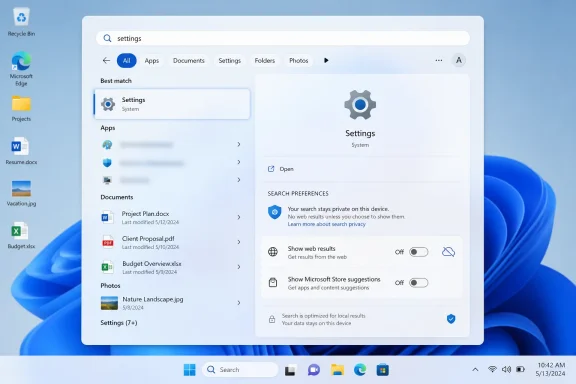 Microsoft Finally Notices the Search Box Is Not a Billboard
Windows Search has always carried more symbolic weight than its pixel count suggests. It is where users go when they do not want to browse, remember, or be marketed to. They want the spreadsheet, the printer setting, the obscure Control Panel remnant, the app they installed last year, or the document whose filename they only half remember.That is why the web-heavy Windows 11 search experience has irritated so many people. A search box inside the operating system ought to privilege the operating system. When a local query produces Bing results, Store entries, “suggested” apps, and other cloud-flavored distractions before the thing sitting on the user’s own disk, the system feels less like an assistant and more like a sales associate.
The reported change would add dedicated controls under Windows 11’s search-related Settings area, including an option to turn off web search results and another to suppress Microsoft Store suggestions. For ordinary users, that means a cleaner Start and taskbar search experience. For IT administrators, it means Microsoft may be moving a long-standing policy-and-registry workaround into a place humans can actually find.
The distinction matters. Windows has already had enterprise controls for limiting web results in Search through Group Policy, registry settings, and device-management channels. But a consumer-facing Settings toggle changes the politics of the feature. It says the choice is not merely an administrative lockdown scenario; it is a legitimate user preference.
The Old Workarounds Were a Symptom of a Bad Default
Until now, disabling web results in Windows 11 has generally meant leaving the paved road. Power users have relied on registry edits such asDisableSearchBoxSuggestions, Group Policy settings that block web search, or device-management profiles in managed environments. These tools work, but they are the kind of fixes that make Windows feel like a system maintained by rumor and folklore.That is not because registry and policy controls are inherently bad. In enterprise Windows, they are necessary. The problem is that a basic desktop preference became something users had to research, script, or push through Intune instead of toggling in the interface where Microsoft puts far less important options.
The mismatch has been especially obvious on Windows 11 Home. A Pro or Enterprise administrator can reach for Group Policy. A home user annoyed by Bing appearing in the Start menu is usually told to edit the registry, install a third-party utility, or live with it. That is a poor bargain for a feature as central as search.
Microsoft’s apparent course correction is therefore less about discovering a new capability than legitimizing an old complaint. The web results were not universally loved but hidden behind a lack of accessible controls. The absence of a toggle functioned as pressure: use Microsoft’s integrated search stack unless you know how to escape it.
Bing Was Never the Only Intruder
The most visible complaint has been Bing, but the broader issue is Microsoft’s habit of turning Windows surfaces into recommendation channels. Search results have not merely shown web links. They have also exposed Store app suggestions, service prompts, and cloud-connected content that can look suspiciously like advertising when the user’s intent is local.That is the heart of the annoyance. A person typing “Photoshop,” “Spotify,” or “Instagram” into Search may be trying to launch an installed app, find a file, or check a setting. If Windows responds with Store listings for software that is not installed, the operating system is making a commercial inference before satisfying the user’s original intent.
Store suggestions are particularly sensitive because they blur discovery and promotion. Microsoft can reasonably argue that helping users find apps is useful. But when those suggestions appear inside a search workflow, they compete with the basic promise of the desktop: show me what is already mine.
The rumored separate toggle for Store recommendations would be more important than it sounds. It would recognize that web search and app promotion are related but not identical irritants. Users may tolerate one while rejecting the other, and administrators may have different policy reasons for disabling each.
The European Shadow Over Windows Settings
Microsoft’s search changes do not arrive in a vacuum. The company has spent the last few years adjusting Windows behavior under regulatory pressure, especially in Europe, where the Digital Markets Act has forced large platform companies to rethink default apps, service tying, and user choice. Windows users in some regions have already seen controls that are not always exposed globally.That regional inconsistency has become its own source of frustration. A setting that appears on one PC but not another, depending on geography, language, account state, or build channel, makes Windows feel less like a coherent product and more like a compliance matrix. Users notice when the same operating system behaves differently because the law gives one group more leverage.
If Microsoft now rolls out web-search and Store-suggestion controls more broadly, it will be tempting to frame the move as pure customer responsiveness. That may be partly true. But the more realistic reading is that customer pressure, regulatory pressure, and product-quality pressure are finally pointing in the same direction.
This is where Microsoft’s incentives become complicated. Bing integration, Edge promotion, Store discovery, Microsoft account nudges, and Copilot placement are all part of a larger services strategy. Windows is not just the thing Microsoft sells; it is a platform that can direct attention toward things Microsoft wants users to use. A clean search toggle is therefore a small act of restraint inside a product that has often struggled with restraint.
A Cleaner Search Box Is Also a Privacy Signal
The privacy argument is not that Windows Search secretly turns every local query into a scandal. Microsoft documents multiple privacy and policy controls around Windows Search, cloud content, and web results, and managed environments can already restrict many of those connections. The issue is simpler: users understand a local search box differently from a browser search bar.When someone types a filename, project codename, client name, or internal tool into Windows Search, they may not expect the operating system to treat that input as a web-search opportunity. Even if the data handling is limited, disclosed, or policy-governed, the user experience creates a trust problem. The desktop feels like it is listening for chances to leave the device.
That perception matters in professional environments. Lawyers, journalists, engineers, medical staff, financial analysts, and government workers often search for terms that carry meaning outside the machine. The fewer ambiguous cloud handoffs in the default workflow, the easier it is for users and administrators to reason about exposure.
A visible toggle is not a substitute for good telemetry documentation or enterprise controls. But it is a meaningful privacy affordance because it changes the default mental model. Users can say: this search surface is for my PC, not the web.
Performance Is the Practical Argument Everyone Understands
Privacy concerns can sound abstract until the search panel hesitates. Performance complaints are more immediate. If Windows Search pauses, reshuffles results, or surfaces a web suggestion above a local match, users experience that as wasted time, not as a strategic platform feature.The performance cost is not only network latency. It is cognitive latency. Every irrelevant web card or Store listing makes the user scan, reject, and refocus. A search interface that offers more categories than the user asked for can still be slower even if the machine is technically fast.
That is why “more relevant results” has become such a loaded phrase for Windows Search. Microsoft does not merely need better ranking. It needs a clearer hierarchy of intent. If the user is typing the name of an installed app, local app launch should win. If the user is typing a known settings term, settings should win. If the user is typing a filename, local and indexed content should not have to compete with Bing.
The reported toggles would let users enforce that hierarchy themselves. Rather than trusting Microsoft’s ranking model to infer intent correctly every time, users could remove whole classes of unwanted results. That is crude, but it is also refreshingly honest.
Enterprise IT Already Knew the Answer
For sysadmins, the news is less revelation than validation. Many managed Windows environments already restrict consumer web integrations, cloud content, app suggestions, and promotional experiences as part of baseline configuration. The difference is that these controls are scattered across Group Policy, registry settings, Intune policy catalogs, privacy baselines, and various Windows components.A Settings toggle will not replace enterprise management. In fact, administrators will still want policy-backed enforcement, reporting, and configuration drift controls. But a visible user-facing control can reduce support friction, especially in small businesses and lightly managed fleets where every preference does not justify a formal policy object.
There is also a training advantage. When a feature has a normal Settings switch, help desks can explain it without sounding like they are asking users to perform surgery. “Go to Settings and turn off web results” is a very different sentence from “Open Registry Editor and create a DWORD under a Policies key.”
Microsoft should be careful here. If the toggle exists but is overridden by policy, disabled by region, hidden behind staged rollout logic, or renamed across builds, the support benefit evaporates. The best version of this change is boring, global, and predictable.
The Copilot Era Makes Basic Search More Important, Not Less
The timing is notable because Microsoft has spent the past few years flooding Windows messaging with AI. Copilot, Recall, semantic search, cloud-connected assistance, and on-device AI features have dominated the Windows roadmap conversation. Against that backdrop, a simple “turn off web results” toggle sounds almost quaint.But that is exactly why it matters. The more Microsoft asks users to trust intelligent, contextual, cloud-aware features, the more it must preserve spaces where the machine behaves plainly. Not every interaction should be interpreted, expanded, enriched, or monetized. Sometimes the right answer is the local executable.
AI features also raise the stakes for search boundaries. As Windows becomes better at indexing, summarizing, and connecting user data, users will want sharper distinctions between local computation, cloud services, enterprise content, and public web search. A desktop that cannot clearly separate those modes will invite suspicion.
Microsoft’s challenge is not to make Windows less capable. It is to make capability consensual. The future Windows search experience may well include local semantic search, AI summaries, Copilot actions, enterprise knowledge retrieval, and web answers. But those features need to be layered on top of user intent, not imposed over it.
Microsoft’s Product Habit Meets User Fatigue
Windows 11’s search controversy belongs to a larger pattern. Microsoft repeatedly adds service-connected surfaces to the operating system, waits for backlash, then partially reins them in with settings, policies, or regional concessions. We have seen versions of this story with Edge prompts, default app handling, OneDrive nudges, Start menu recommendations, Widgets, lock-screen content, and Microsoft account pressure.The charitable interpretation is that Microsoft is experimenting in public, learning which integrations help and which annoy. The less charitable interpretation is that Microsoft pushes until users, regulators, or enterprise customers push back. Both can be true at once.
What makes Search different is frequency. Users may ignore Widgets, skip the Store, or remove some taskbar icons. Search is harder to avoid. It is wired into the Start menu, the taskbar, File Explorer workflows, Settings discovery, and muscle memory accumulated over decades.
That makes unwanted content in Search feel more invasive than unwanted content elsewhere. A promotional tile in a feed is clutter. A promotional result in a search box is interference.
The Setting Must Survive the Rollout Machine
The largest uncertainty is still deployment. Reports describe unreleased or preview behavior, and Microsoft often tests Windows features in Insider channels before changing names, regions, defaults, or availability. A control spotted in one build is not a guarantee of a stable public feature.Windows 11 feature delivery is also messier than the old service-pack world. Changes can arrive through cumulative updates, controlled feature rollouts, Microsoft Store component updates, Experience Packs, server-side flags, and Insider flights that do not map cleanly to a single public release. A user reading about a new toggle may not see it for weeks or months, even on a fully patched PC.
That matters because this is the kind of feature where partial rollout can create confusion. If one user can disable Store suggestions and another cannot, the immediate assumption will be that something is broken. If the setting appears in the European Economic Area but not in the United States, users will assume Microsoft is choosing compliance over consistency. If it appears and later disappears, the backlash will be worse than if it had never been seen.
Microsoft’s best move would be to document the behavior plainly once it ships. The company should say what the toggles disable, what they do not disable, whether they affect Start, taskbar Search, File Explorer, Settings, search highlights, Store recommendations, Copilot entry points, and managed devices. Ambiguity is what made this debate last so long.
The Real Win Is Making Windows Respect Intent Again
The reported toggle is not revolutionary in the engineering sense. It does not reinvent indexing, fix every search-ranking bug, or settle the debate over Microsoft’s service integrations. But it could restore an important principle: the search box should obey the user’s intent before serving the platform owner’s agenda.That principle has been eroded gradually. Each individual addition could be defended as useful. Web results can save a trip to the browser. Store suggestions can help users find apps. Cloud content can surface work files. Search highlights can make the interface feel alive. But accumulated together, they changed the feel of the tool.
Windows enthusiasts often complain about “bloat,” but the sharper complaint is misplaced ambition. A desktop search interface does not need to be a portal to everything Microsoft owns. It needs to be fast, legible, and faithful to the query.
If Microsoft ships these controls broadly, it will deserve credit. Not because it invented user choice, but because it would be reversing a product habit that many users had come to regard as permanent. Sometimes the most welcome Windows feature is the one that lets Windows get out of the way.
The Search Box Gets Its Exit Ramp
This change is still reported, still subject to Microsoft’s rollout machinery, and still likely to vary by build until the company says exactly what is shipping. But the direction is clear enough to matter: Windows Search appears to be moving toward a model where web and Store content are optional rather than unavoidable.- Microsoft is reportedly preparing Windows 11 Settings controls to disable web search results inside Windows Search.
- A separate reported control would suppress Microsoft Store suggestions, addressing a different kind of search clutter.
- Existing enterprise controls already allow web-search restrictions, but a visible Settings toggle would make the choice accessible to ordinary users.
- The practical payoff is a cleaner local search experience for apps, files, and settings.
- The broader significance is that Microsoft may be conceding that Windows Search should not double as a Bing and Store promotion surface by default.
- The remaining uncertainty is rollout: preview features can change, and Microsoft has not yet turned every tested Windows feature into a universal public setting.
References
- Primary source: The Hans India
Published: 2026-06-08T13:45:08.426724
Loading…
www.thehansindia.com - Related coverage: makeuseof.com

How to Disable Bing Web Searches in Windows 11
Sick of Bing giving its opinion on your Windows 11 searches? Here's how to turn it off. www.makeuseof.com
- Official source: support.microsoft.com
Windows Search and privacy - Microsoft Support
Learn how to connect Windows Search with your accounts in the cloud, manage your Windows Search and SafeSearch settings, clear search history, and more. support.microsoft.com
- Related coverage: windowscentral.com
Loading…
www.windowscentral.com - Related coverage: howtogeek.com
Loading…
www.howtogeek.com - Related coverage: pureinfotech.com

Windows 11 Search keeps showing web results? Here’s how to turn it off – Goodbye Bing
To disable web search in Start menu or Windows Search box, use Group Policy or Registry on Windows 11. This also removes the Copilot button. pureinfotech.com
- Official source: techcommunity.microsoft.com
25H2 - Microsoft Store recommendations in search | Microsoft Community Hub
I've been trying to remove Microsoft Store app recommendations from search results for a while now. I'm completely uninterested in them, and I'm also afraid... techcommunity.microsoft.com
- Related coverage: techradar.com
Loading…
www.techradar.com - Related coverage: guidingtech.com

5 Ways to Remove Bing from Windows 11
Don't like the Bing search engine on your computer? Here are five ways using which you can remove Bing from Windows 11.www.guidingtech.com
- Related coverage: tomshardware.com

How to Disable Windows Web Search and Speed Up Your PC
Stop Windows from showing you web results when you just want files and apps.www.tomshardware.com
- Related coverage: geeksforgeeks.org
Loading…
www.geeksforgeeks.org - Related coverage: windowslatest.com

Microsoft says Windows 11's Search will stop forcing web over your apps and local files in most cases
Windows 11's Search bar on the taskbar often prioritizes web results over apps and files, but that might soon change. www.windowslatest.com
- Related coverage: tech.yahoo.com
Microsoft to Let Windows 11 Users Disable Web Results in Search
At a Windows Insider meetup in San Francisco, Microsoft previewed a few upcoming enhancements to the OS, including a way to shut off web search from the main search function.tech.yahoo.com
- Official source: answers.microsoft.com
Loading…
answers.microsoft.com - Related coverage: windowsforum.com
Loading…
windowsforum.com