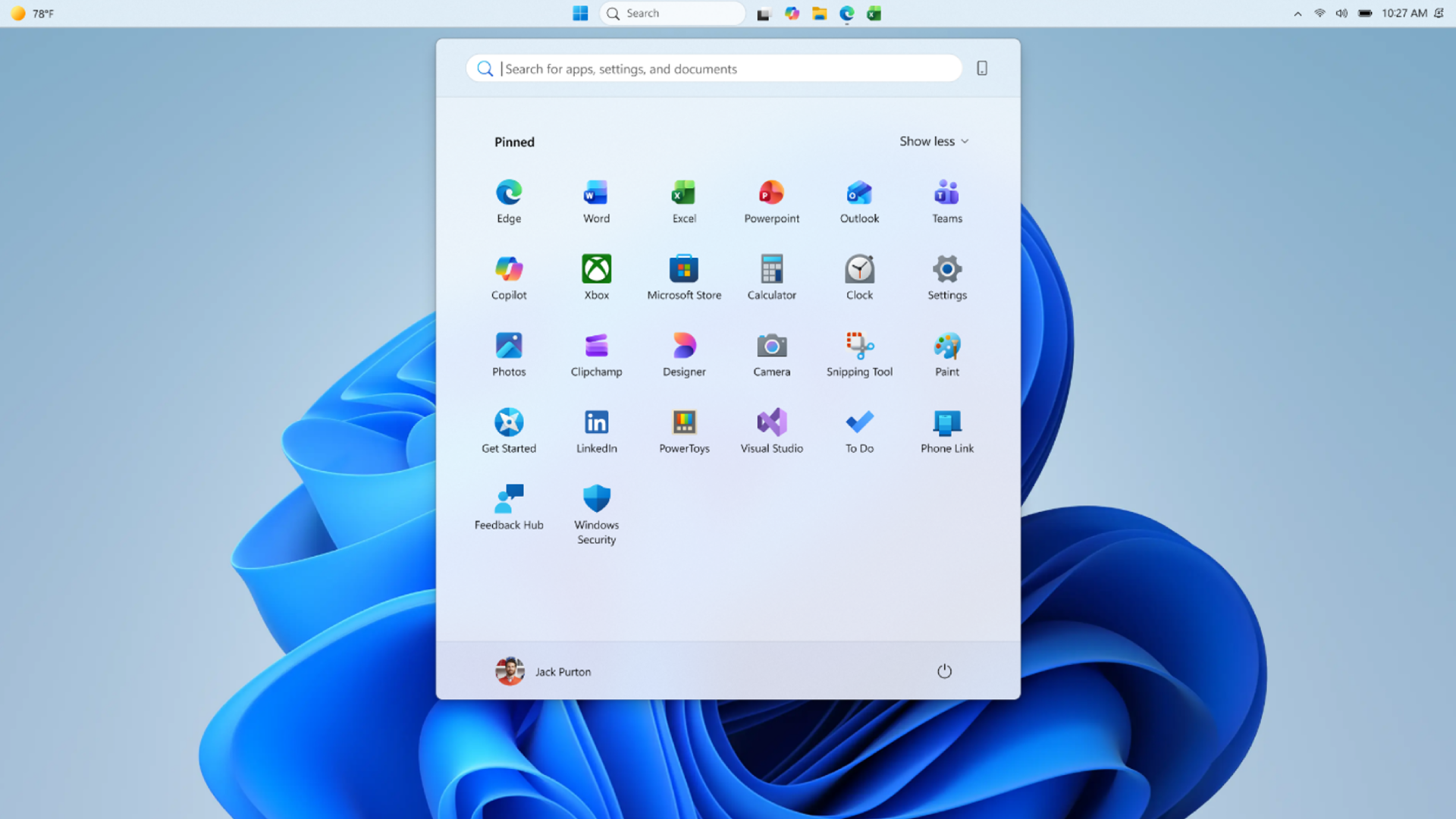
Windows 11 Let Users Turn Off Web Results in Search: Settings Toggle

Microsoft is developing a Windows 11 setting that will let users turn off web results in the operating system’s built-in search interface, with the option previewed at a Windows Insider event in San Francisco ahead of Build 2026 and expected to reach Insider builds before general release. The change sounds small because it is small: a toggle in Settings, not a redesign of Windows. But it matters because Windows Search has become one of the clearest examples of Microsoft confusing an operating system feature with an ecosystem funnel. If Microsoft follows through, the company will be admitting something users have been saying for years: when someone presses the Windows key and starts typing, they are usually trying to find something on their PC.

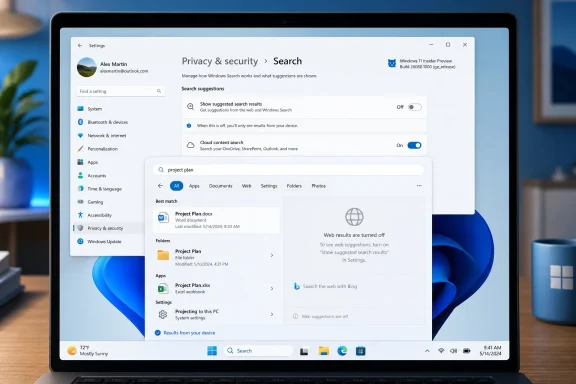
Windows settings page shows Privacy & Security > Search options on a laptop screen.Microsoft Finally Finds the Off Switch It Should Have Shipped Years Ago​

The promised setting reportedly lives under Privacy & security > Search, in a section called “Show suggested search results.” There, users will be able to toggle off web searches from Windows Search. The same interface also appears to include a way to suppress Microsoft Store results, suggesting Microsoft is not merely changing a label but rethinking what belongs in local search results.
That distinction matters. Windows Search has long been a collision zone between user intent and corporate intent. The user wants Notepad, a file, a setting, or an installed app. Microsoft has often seen the same keystrokes as an opportunity to surface Bing, web suggestions, Store entries, news-adjacent content, or some other service hook.
For technically confident users, the workaround has been familiar: Registry edits, Group Policy, third-party tweak tools, or region-dependent behavior. For everyone else, the answer was effectively “live with it.” That made the irritation worse, because the problem was not that web search existed. The problem was that opting out required knowledge Windows users should not need.
The new toggle, if it ships broadly, converts a hack into a preference. That is the sort of move Windows needs more often. Not every user wants the same interface, and not every useful feature should be welded to the default experience.

The Start Menu Became a Search Engine Landing Page​

The Windows Search controversy has never been just about aesthetics. Search is one of the fastest interaction paths in a desktop operating system. It sits between muscle memory and action: press Start, type a few letters, hit Enter. Anything that slows, distracts, or misranks that chain makes Windows feel worse, even if the rest of the system is technically functioning.
Web results disrupt that chain because they import ambiguity into a space where users expect precision. If I type the name of an installed application, I do not want a web panel to compete with the app. If I type a local file name, I do not want Windows to behave as if I have opened a browser. If I mistype a control panel item, I would rather see a clean failure than a Bing-powered guess masquerading as help.
Microsoft has often defended these blended experiences as convenience. In theory, one search box for apps, files, settings, cloud content, and the web sounds elegant. In practice, the Windows desktop is not a blank search portal. It is a working environment, and a working environment should privilege the machine in front of the user before reaching outward.
That is why the new setting feels less like a feature addition than a correction. A desktop search box can include the web, but it should not treat the web as a peer to local results by default for every user in every context. Search should be local first, cloud-aware second, and web-capable only when the user asks for it.

Bing Was Always the Subtext​

Microsoft’s insistence on web results in Windows Search has been difficult to separate from Bing. The company can plausibly argue that web suggestions help users discover information faster, but the commercial incentives are obvious. Every accidental or semi-intentional web query routed through Windows is another surface where Microsoft can reinforce Bing, Edge, Microsoft Start, ads, and account-connected services.
That is why users have described the experience as clutter rather than assistance. It often feels less like Windows is helping and more like Windows is taking a toll. The operating system becomes a distribution channel for Microsoft’s web properties, and the Start menu becomes another place where the company asks for attention.
This is not unique to Microsoft. Apple uses macOS to privilege iCloud and Spotlight suggestions. Google’s platforms are built around search and account identity. But Windows occupies a particular role in homes, schools, factories, hospitals, government offices, and enterprise fleets. Its users are often not choosing a lifestyle ecosystem; they are using the platform required to get work done.
That makes the threshold for promotional intrusion lower. A Windows laptop is not just a consumer device. It is a terminal for payroll, CAD, patient records, legal filings, code repositories, and admin consoles. When search becomes noisy, the cost is not only annoyance. It is friction at scale.

The Registry Era Was a Quiet Indictment​

The most damning evidence against Microsoft’s old approach is the ecosystem of workarounds that grew around it. Guides explaining how to disable Bing results in Windows Search have circulated for years. They usually involve creating or editing policy keys, changing DWORD values, restarting Explorer, or leaning on Pro-only management tools.
That is absurd for a mainstream preference. A user should not have to edit the Registry to tell Windows that desktop search should search the desktop. The Registry is powerful, but it is not a humane user interface, and it is not where ordinary defaults should be negotiated.
For administrators, the situation has been slightly better because Group Policy and mobile device management can impose more disciplined behavior. But even there, the split between consumer settings, regional controls, edition differences, and evolving Windows 11 builds has produced unnecessary uncertainty. Admins want predictable controls, not folklore.
The rumored Settings toggle is therefore a usability change and a governance change. It gives individuals a visible switch. It also signals that Microsoft may be willing to make search behavior legible instead of burying it behind policy plumbing.

Performance Complaints Gave the Backlash Its Teeth​

Search quality is one side of the complaint. Performance is the other. PCMag’s report says Microsoft also highlighted improvements to search speed, faster File Explorer launch behavior, and a 30 percent improvement in bulk delete performance in an internal build. Those claims matter because they place the web-search toggle inside a broader Windows performance narrative.
For the past few years, Windows 11 has had an image problem among enthusiasts. The operating system is modern, secure, and visually cleaner than its predecessors in many ways, but it has also acquired a reputation for latency in the places users touch constantly: Start, Search, File Explorer, context menus, taskbar behavior, and Settings. Those are not benchmark footnotes. They are the daily texture of the OS.
When Windows Search returns irrelevant web content, the user may blame Bing. When it also feels slow, the user blames Windows. That combination is corrosive. It suggests the operating system is spending time doing things the user did not ask for before completing the thing the user did ask for.
Microsoft appears to understand that perception now. The company has recently talked more openly about improving Windows fundamentals, reducing friction, and making the interface calmer. A web-results toggle fits that theme because it removes a source of both visual and behavioral noise.

The Taskbar Reversal Tells the Same Story​

The same Insider preview discussion reportedly included features that Windows 11 users have requested since launch: the ability to move the taskbar to the left, right, or top of the screen, and an option to shrink the taskbar so more apps can fit. These are not flashy AI features. They are old-fashioned desktop affordances.
That is precisely why they matter. Windows 11 initially launched with a simplified taskbar that removed capabilities many Windows 10 users relied on. Microsoft’s argument, implicitly, was that the new shell was cleaner and more modern. The user response was that clean is not the same as capable.
The movable taskbar and smaller taskbar options suggest Microsoft is continuing its slow retreat from some of Windows 11’s most rigid design decisions. That retreat should not be read as failure. It is what mature platform stewardship looks like when the first version gets the balance wrong.
The same pattern applies to Search. Microsoft has spent years pushing toward a more connected, service-aware Windows shell. Users have spent years saying that some of those connections make the desktop worse. The new toggle is Microsoft conceding that customization is not clutter; sometimes customization is the only way to keep a general-purpose operating system general-purpose.

Two-Character Search Is the Kind of Boring Upgrade Windows Needs​

Another reported change allows Windows 11 search to work with as few as two characters. That sounds almost comically minor until you consider how people actually use search. Users type fragments, initials, abbreviations, project prefixes, and partial file names. A good search system should meet that behavior rather than demand formal queries.
This is where Microsoft’s practical work on Windows can pay off more than its headline AI demos. Better indexing, faster local lookup, improved ranking, shorter query thresholds, quicker File Explorer launches, and faster file operations are the improvements that make Windows feel trustworthy. They do not require a keynote flourish. They require engineering discipline.
The risk for Microsoft is that it has trained users to expect the wrong thing from Windows announcements. When the company talks about the future, it often talks about Copilot, cloud integration, and AI-assisted workflows. Those may become important. But the credibility to sell those ideas depends on the basics working beautifully first.
A search box that finds local files quickly is not glamorous. A File Explorer window that opens without hesitation is not visionary. But for Windows users, those are the difference between an operating system that feels like a tool and one that feels like an argument.

Privacy Settings Are Becoming the New Control Panel​

Placing the web-search toggle under Privacy & security is also revealing. Microsoft is framing the change not merely as customization but as a privacy-adjacent control. That makes sense because Windows Search can involve local content, account-connected cloud data, web history, Microsoft services, and suggested results.
But it also exposes how overloaded Windows privacy settings have become. The modern Settings app is now where users go not only to limit data collection, but also to reduce recommendations, disable suggestions, change search behavior, manage account integration, and suppress parts of Microsoft’s content ecosystem. Privacy has become the umbrella term for “please make Windows less interested in me.”
That is not entirely Microsoft’s fault. Modern operating systems are more networked than their predecessors, and users legitimately want controls over what data flows where. But Microsoft often worsens the confusion by using friendly language such as suggestions, highlights, recommendations, and personalized experiences when the practical user concern is simpler: stop injecting content into system surfaces.
The new search toggle will be more useful if Microsoft labels it plainly. “Show web results in Windows Search” is understandable. “Show suggested search results” is softer and more ambiguous. If the company wants credit for listening, it should make the switch unmistakable.

Europe’s Shadow Hangs Over the Toggle​

It is impossible to discuss Windows search controls without mentioning regional pressure. European regulatory scrutiny has pushed large platform vendors to offer more choice around default apps, search providers, browser behavior, and bundled services. Some Windows users in Europe have already seen controls or behaviors that differ from those elsewhere.
That does not mean this particular toggle exists only because of regulators. Microsoft has enough user-feedback evidence to justify it on product grounds alone. But the broader pattern is clear: when platform owners face pressure, they suddenly discover that hardwired defaults can become configurable.
For users outside Europe, that is the interesting part. A control that begins as a compliance accommodation can become a global feature if the company decides uniformity is easier than fragmentation. Conversely, Microsoft could choose to keep some choices regional, which would inflame the very frustration it is trying to reduce.
The right answer is simple: ship the toggle everywhere. Windows Search is not a jurisdiction-specific irritation. Users in Sydney, Seattle, Berlin, São Paulo, and Singapore all understand the difference between searching a PC and searching the web.

Enterprise IT Will Ask for Policy, Not Promises​

For IT departments, the consumer-facing toggle is only half the story. Administrators will want to know whether the behavior is controllable through Group Policy, Intune, provisioning packages, and documented configuration service providers. A switch in Settings is useful for individuals; a stable policy is what makes it deployable.
The enterprise case for disabling web results is straightforward. Some organizations want to reduce data leakage. Others want to minimize distraction. Many simply want a predictable user experience where typing an internal tool name does not produce web suggestions or Store promotions. In regulated environments, even the perception that local search is blending with external services can trigger review.
Microsoft should also document how the new control interacts with existing settings for search highlights, cloud content search, work or school account results, Microsoft Store suggestions, and Edge or Bing integrations. Windows has accumulated too many overlapping switches with similar-sounding descriptions. If the new toggle becomes one more ambiguous layer, Microsoft will squander part of the win.
The company has an opportunity to reset the model. Local device search, organizational search, cloud account search, Store discovery, and public web search should be distinct categories with clear administrative boundaries. That is how Windows can be both consumer-friendly and enterprise-manageable.

Microsoft’s AI Push Made the Basics More Politically Important​

The timing of this change is not accidental in the larger sense. Microsoft has spent the last several product cycles saturating Windows messaging with AI. Copilot, Recall, semantic search, AI agents, image tools, and cloud-assisted experiences have all competed for attention. Some of those ideas are ambitious; some are useful; some have been controversial before they even reached ordinary users.
The backlash has not been anti-technology so much as anti-priority. Users look at sluggish shell surfaces, inconsistent dark mode, noisy widgets, Start menu ads, and web-polluted search, then hear Microsoft describe a future full of AI overlays. The obvious response is: fix the operating system first.
That is why a humble search toggle lands harder than its size suggests. It is evidence that Microsoft may be recalibrating. Not abandoning AI, not retreating from services, but recognizing that the desktop cannot be treated merely as a launchpad for whatever strategic initiative is currently ascendant.
Windows has survived for decades because it is adaptable. The more Microsoft turns it into a fixed set of funnels, the less Windows-like it feels. Giving users control over web results is a small restoration of that older bargain.

The Calmer Windows Pitch Now Has to Become Real​

Microsoft has reportedly talked about bringing a calmer tone to Windows 11, including changes such as hiding the MSN News feed from the Widgets board. That is the right vocabulary, but calmness cannot be achieved through cosmetic restraint alone. It requires Microsoft to stop treating every surface as inventory.
Search, widgets, Start, notifications, Settings, Edge prompts, Microsoft account nudges, Store recommendations, and Copilot entry points all contribute to the emotional state of using Windows. Each individual prompt or suggestion can be defended. Together, they can make the OS feel needy.
The search toggle is encouraging because it removes rather than adds. Modern software companies are much better at adding surfaces than subtracting them. Subtraction requires confidence that the core product is valuable without constant cross-promotion.
If Microsoft wants Windows 11 to feel calmer, it should apply the same principle elsewhere. Make recommendations opt-in where possible. Separate system functions from content feeds. Give administrators clean policy controls. Let users choose whether the shell is quiet or promotional.

The Toggle Is Small, but the Concession Is Not​

This is not a revolution in Windows. It will not make Windows Search perfect, and it will not end the long argument over Microsoft’s use of the desktop to promote its services. But it is a meaningful concession because it moves control from hidden machinery into visible settings.
The practical reading is simple:
  • Windows 11 users are expected to get a Settings toggle that disables web results in the built-in search experience.
  • The setting was previewed at a Windows Insider event and is likely to appear in Insider builds before mainstream rollout.
  • Microsoft also appears to be testing controls that reduce Microsoft Store suggestions in search.
  • Search and File Explorer performance improvements are part of the same broader effort to make Windows feel faster and less cluttered.
  • The change will matter most if Microsoft ships it globally and backs it with clear enterprise policy controls.
  • The larger lesson is that Windows users still value direct, local, predictable OS behavior more than ecosystem promotion.
Microsoft should not mistake relief for applause. Users are glad to get the switch because they should have had it all along. Still, if this marks the beginning of a Windows design cycle built around restraint, performance, and explicit user choice, it could be more than a toggle. It could be the first sign that Microsoft is remembering the desktop is not a captive audience; it is a workspace, and the best thing an operating system can do is get out of the way.

References​

  1. Primary source: PCMag Australia
    Published: Tue, 02 Jun 2026 17:35:08 GMT
  2. Official source: support.microsoft.com
  3. Related coverage: windowscentral.com
  4. Related coverage: techradar.com
  5. Related coverage: windowslatest.com
  6. Related coverage: tomshardware.com
  1. Official source: microsoft.com
  2. Related coverage: allthings.how
  3. Related coverage: winbuzzer.com
  4. Related coverage: teachucomp.com
 

Microsoft is developing a Windows 11 setting that will let users turn off web results in the operating system’s built-in search, previewing the option at a Windows Insider meetup in San Francisco ahead of Build 2026, with Insider testing expected before any broad rollout. That sounds like a small checkbox, but it lands on one of Windows 11’s most persistent irritations: the feeling that the Start menu stopped being a reliable launcher and became a promotional surface. Microsoft is not abandoning connected search; it is conceding that desktop search needs a cleaner contract with the user. The question now is whether this is a genuine course correction or another narrow escape hatch in an OS increasingly shaped by defaults most people never change.

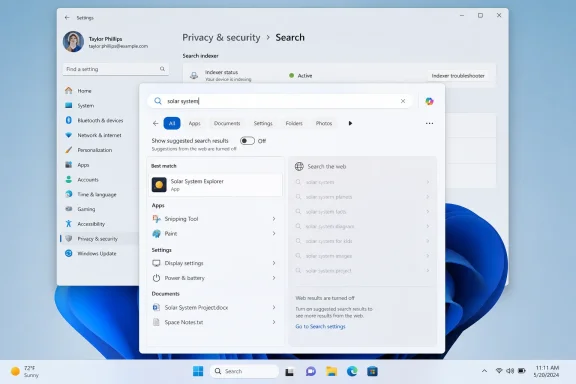
Windows “Privacy & security” settings page showing search index status and search suggestions for “solar system.”Microsoft Finally Treats Search Clutter as a Product Bug​

For years, the complaint about Windows Search has not simply been that it can search the web. The complaint has been that Windows often behaves as though the web is equally relevant when the user is obviously trying to open Notepad, find a local document, or launch an installed control panel. That breaks the mental model of the Start menu: type the thing on my PC, press Enter, get the thing on my PC.
The forthcoming setting reportedly lives under Privacy & security > Search, in a section called “Show suggested search results.” The demoed toggle would allow users to disable web searches inside Windows Search, and the same interface appears to hint at separate control over Microsoft Store suggestions. That distinction matters because web results and Store results are different symptoms of the same larger design choice: Microsoft has treated local search real estate as a discovery channel.
The company has long argued, implicitly if not always explicitly, that the Windows shell should help users find not only files and apps but also online answers, services, and installable software. That may make sense from a platform strategy perspective. It makes less sense when a power user types the name of a local utility and gets a Bing result, a promotional card, or a store suggestion before the thing they already installed.
The new toggle is therefore less about adding a feature than removing friction. Microsoft is taking something that required Registry edits or policy workarounds and moving it into Settings, where ordinary users can actually find it. That is the right direction, even if it arrives after years of users asking why the obvious option was missing.

The Registry Hack Was Always an Admission of Failure​

The old workaround for disabling web results in Windows Search has been the sort of thing IT pros know, enthusiasts share, and normal users should never be asked to touch. Editing the Registry to suppress search suggestions is technically doable, but it is also a design indictment. If a basic preference requires navigating policy keys and DWORD values, the product has failed the people who do not read deployment blogs for fun.
That failure has been especially visible because Windows Search sits in the daily path of the operating system. This is not a niche setting hidden behind an advanced workflow. Search is one of the first places users go when the desktop is messy, when a settings page has moved, or when muscle memory from older Windows versions kicks in. When that surface feels noisy, Windows itself feels noisy.
Microsoft’s decision to put the control under Privacy & security is also revealing. Web search inside the Start menu is not merely a relevance issue; it is a trust issue. Even when the data handling is disclosed and governed by existing Windows privacy settings, users see a local query box sending them toward online services and understandably ask why the OS is doing that at all.
A Settings toggle does not solve every concern, but it changes the posture. It says that local-first search is a legitimate preference, not a hack. For administrators, it also suggests a cleaner future in which user-facing controls, policy, and enterprise deployment behavior can align instead of depending on folklore.

Bing’s Placement in Windows Became the Story Microsoft Couldn’t Outrun​

The reason this debate has lasted so long is that web results in Windows Search were never perceived as a neutral convenience. They were perceived as Bing distribution. Microsoft may see a unified search box; users often see the OS steering them into Microsoft’s browser-and-search economy.
That perception has been reinforced by years of adjacent Windows behavior: prompts to use Edge, web widgets, search highlights, MSN feed surfaces, and Copilot entry points. Some of those features are useful, and some are easy enough to ignore. But taken together, they created a sense that Windows 11 was less a desktop operating system than a negotiation over Microsoft services.
Search is particularly sensitive because it is not decorative. A widget feed can be hidden, a Copilot icon can be removed, and an Edge prompt can be dismissed. But if typing into Start produces web clutter when the user wanted a local app, the interruption lands at the exact moment Windows is supposed to feel fastest and most obedient.
That is why a disable-web-results toggle has symbolic weight beyond its actual code. It marks a rare case where Microsoft appears to be giving users a direct off switch for a behavior that benefits Microsoft’s broader service ecosystem. The company has often preferred tuning, relevance improvements, or gradual experiments. Here, it seems to be moving toward a plain choice.

Local Search Has to Win Before AI Can Be Trusted​

The timing is awkward but instructive. Microsoft has spent the last few years pushing AI into Windows, from Copilot integrations to semantic search features on Copilot+ PCs. Those efforts depend on a basic assumption: users will trust Windows to understand intent. But Windows has struggled with a simpler version of the same problem for years.
If a search box cannot reliably distinguish between “open the installed app” and “search the web for the app’s name,” users are not likely to trust it with richer, context-aware queries. AI features make the stakes higher because they promise interpretation rather than exact matching. A product that feels overeager with Bing results will be judged harshly when it becomes overeager with AI actions.
Microsoft appears to understand at least part of that. Recent Insider work has focused on making files and apps appear more reliably ahead of web suggestions when local content is the stronger match. That is a relevance fix, not just a preference toggle, and it may matter more for users who leave web search enabled. The ideal Windows Search should not require the user to choose between local usefulness and online convenience; it should understand priority.
Still, opt-outs are necessary when defaults have lost trust. Microsoft can improve ranking all it wants, but users who have spent years fighting web results will want the ability to shut the door completely. The upcoming toggle gives them that, assuming it survives testing and reaches mainstream Windows 11 builds intact.

The Store Suggestion Hint Shows the Real Battle Is Over Surfaces​

The PCMag report notes that the demoed interface also suggested Microsoft may be looking at a way to disable Microsoft Store appearances in search. That may sound secondary, but it is arguably just as important. Store recommendations inside search can be helpful when a user lacks an app to open a file type, but they become aggravating when they compete with installed software or local results.
Windows has always had a tension between being a neutral environment and being a Microsoft-managed marketplace. Windows 8 made that tension obvious with the Store-centric Start screen. Windows 10 and 11 made it subtler, distributing recommendations across Start, search, widgets, settings, and file associations. The Store result in search is one more small tile in that mosaic.
For consumers, the annoyance is usually simple: “I searched for something I have, and Windows showed me something I could get.” For administrators, the concern is more operational. Store surfacing can collide with software standardization, app control policies, and help desk expectations. If a company has approved a specific PDF editor, chat client, or remote support tool, search suggestions that promote alternatives are not merely clutter; they are governance leakage.
That is why the best version of this change would separate controls cleanly. Let web results be one choice. Let Store suggestions be another. Let search highlights, cloud content, work account content, and local indexing all remain legible rather than bundled into one vague “experience” switch. Windows needs fewer mystery toggles and more honest boundaries.

Performance Complaints Made the UX Argument Harder to Dismiss​

Microsoft also reportedly told attendees it has been improving search speeds, File Explorer launch time, and bulk delete performance, with an internal build showing a 30 percent improvement in bulk delete. These are the sorts of claims that sound mundane until you remember how many Windows 11 complaints reduce to latency. Users can forgive a lot if the shell feels instant; they forgive very little when the shell hesitates.
Search is a performance feature as much as a discovery feature. When web results appear, users often perceive delay even if the local result eventually wins. The mere presence of remote suggestions creates the suspicion that Windows is doing extra work before completing the obvious task. In a desktop OS, perceived performance is product truth.
File Explorer has suffered from a similar reputational problem. It has gained tabs, a modernized command bar, OneDrive awareness, gallery views, and cloud integration, but many users still judge it by how quickly it opens a folder, deletes a pile of files, or responds to right-clicks. If Microsoft wants to convince skeptics that Windows 11 is getting calmer and faster, Explorer and Search are the right places to start.
The 30 percent bulk delete figure, if it reaches shipping builds, is a good example of the kind of improvement that rarely headlines a keynote but changes daily satisfaction. Nobody buys a PC because deleting files is faster. Plenty of people decide an OS feels bloated when deleting files is inexplicably slow.

The Movable Taskbar Is Part of the Same Apology Tour​

The same Insider-era discussion includes work on taskbar flexibility, including the ability to move the taskbar to the left, right, or top of the screen and shrink it to fit more apps. That is not directly about web search, but it belongs to the same story. Windows 11 launched with a cleaner visual identity and a more constrained shell, and Microsoft spent years hearing that “cleaner” too often meant “less capable.”
The fixed bottom taskbar became a symbol of that tradeoff. Longtime Windows users were accustomed to moving it around, resizing it, and bending the desktop to match their habits. Windows 11 asked them to accept a more opinionated design. Some did; many did not.
Restoring taskbar movement and giving users more control over search both suggest Microsoft is rebalancing the OS away from aesthetic simplification and toward practical accommodation. That does not mean the company is reversing Windows 11 wholesale. It means it is selectively returning affordances whose absence created disproportionate anger.
This is what mature platform stewardship looks like when it is done well: not every old option comes back, but the ones that anchor workflows do. A movable taskbar is not nostalgia if it supports vertical monitors, ultrawide setups, accessibility needs, or simply years of muscle memory. A local-search toggle is not anti-cloud if it makes the Start menu usable again.

The Insider Pipeline Is Still a Fog Machine​

The biggest caveat is timing. Microsoft has previewed the web-results toggle, but it has not provided a firm release date. The feature is expected to arrive first for Windows Insiders, and from there it may move through the now-familiar maze of gradual rollouts, channel differences, controlled feature flags, and build-specific availability.
That pipeline is good for telemetry and risk management, but it is exhausting for users trying to understand what Windows actually does. Two people on Windows 11 can have the same marketing version and different shell behaviors. A feature can be announced, tested, hidden, expanded, paused, and revived before a normal user ever sees it. Microsoft’s servicing model has become sophisticated enough that “Windows 11 has this feature” is often an oversimplification.
For IT departments, that ambiguity matters. A user-facing toggle is useful only if administrators know when it arrives, how it maps to policy, whether it is available on managed devices, and whether it behaves consistently across Windows 11 24H2, 25H2, and future enablement-package releases. The more Microsoft uses staged deployment to reduce risk, the more it owes customers clear documentation.
The same applies to enthusiasts. Windows Insiders are willing to live with rough edges, but they are also the people most likely to notice when a promised quality-of-life feature exists in screenshots but not on their machine. If Microsoft wants this change to build goodwill, it should be unusually direct about rollout scope.

Privacy Settings Are Becoming Windows’ Confession Booth​

Placing the setting under Privacy & security may be technically defensible, but it also highlights how many Windows debates now end up in that part of Settings. Search history, cloud content, app permissions, diagnostics, advertising identifiers, and suggested results all orbit the same question: who is the PC serving at this moment?
That question used to be easier to answer. A desktop search box searched the desktop. A browser searched the web. A store sold apps. A news panel showed news. Windows 11 has blurred those boundaries in pursuit of convenience, monetization, and ecosystem stickiness. The web-results toggle is a small act of unblurring.
The better long-term model would be local by default in local surfaces, explicit when crossing into web or cloud surfaces, and transparent when Microsoft services are being promoted. That does not require turning Windows into a minimalist offline shell. It requires respecting context.
There is a reason privacy and performance complaints often travel together. Users experience both as loss of control. If the OS is slow, it feels like the machine is not obeying. If the OS sends local intent into online surfaces, it feels like the machine is not listening. Windows Search has managed to trigger both reactions, which is why this toggle has been requested so persistently.

Europe’s Shadow Hangs Over Every Toggle​

Microsoft’s growing willingness to expose switches for integrated services also sits against a broader regulatory backdrop. In Europe, platform holders have faced increasing pressure to separate core operating system functions from bundled services, give users more choice, and avoid self-preferencing. Even when a particular Windows setting is not directly caused by regulation, the climate affects product judgment.
Windows has already seen region-specific changes around browser choice, search providers, and uninstallable components. The company knows that defaults are no longer merely design decisions; they can become competition issues. A search box that routes users to Bing is not just a UX annoyance in that environment. It is a strategic surface regulators may understand very well.
That does not mean the new toggle is a legal concession. The PCMag report frames it as a Windows 11 quality and user-control improvement, and Microsoft previewed it in the context of broader OS refinements. But it would be naïve to ignore the larger pattern: Microsoft is under pressure from users, competitors, and regulators to make Windows less coercive.
The smartest version of Microsoft’s strategy would get ahead of that pressure. Do not wait until a watchdog forces regional changes. Give all users clear controls, make the defaults defensible, and let Microsoft services compete on usefulness rather than placement.

The Real Win Is Not the Toggle, but the Philosophy Behind It​

If this feature ships, some users will immediately turn off web results and never think about it again. Others will leave them on, especially if Microsoft’s ranking improvements make local apps and files win more consistently. That is fine. The point is not that every Windows user wants the same search behavior. The point is that Windows should stop pretending they do.
The toggle is therefore a test of Microsoft’s humility. The company has spent much of the Windows 11 era asking users to accept a more curated desktop: centered taskbar, simplified context menus, integrated widgets, cloud-forward account flows, and AI-inflected surfaces. Some of those changes are defensible. But curation becomes paternalism when the escape routes are hidden or missing.
Search is a particularly good place to reestablish trust because the user’s intent is so direct. They type a word. Windows responds. If the response is clean, fast, and local when appropriate, the OS feels competent. If the response is promotional, delayed, or oddly web-first, the OS feels like it has an agenda.
Microsoft’s challenge is that it cannot fix that perception with one setting. It has to apply the same philosophy elsewhere: fewer surprise service insertions, clearer defaults, faster shell interactions, and more respect for existing workflows. The search toggle is a promising signal because it aligns product behavior with user intent.

Windows Search Needs a Contract Users Can Understand​

A useful Windows Search contract would be simple. If I search from the taskbar or Start menu, show me my apps, settings, files, and device content first. If I ask for the web, go to the web. If I opt into cloud content, include it clearly. If Microsoft wants to suggest something, label it and let me turn it off.
That contract becomes more important as Windows gains AI and semantic capabilities. Natural-language search can be genuinely powerful when it helps users find a file whose name they forgot or a setting buried three layers deep. But semantic search without user trust risks becoming another black box. People do not want an assistant that guesses wrong and promotes services while doing it.
The two-character search improvement mentioned in recent preview coverage points in the same direction. Users want less ceremony and faster matches. They want to type “vl” and get VLC, “vs” and get Visual Studio, “gp” and get Group Policy, without waiting for the internet to weigh in. Desktop search is at its best when it feels almost mechanical.
There is room for web intelligence in Windows, but it must be subordinate to context. The desktop is not the browser. The Start menu is not a search engine home page. The taskbar is not ad inventory. These distinctions sound old-fashioned only because modern platforms have spent years trying to collapse them.

The Switch Windows Users Will Actually Notice​

The practical implications are straightforward, but they cut across different Windows audiences. This is why the feature matters beyond the screenshot.
  • Windows 11 users should finally get a Settings-based way to disable web results in Search, instead of relying on Registry edits or third-party tweaking guides.
  • The change should make Start and taskbar search feel less cluttered for people who primarily use it to launch apps, open settings, and find local files.
  • Administrators will still need to see how Microsoft exposes the behavior through policy, because a consumer toggle is not the same as fleet management.
  • Microsoft’s hinted control over Store suggestions could be just as important as the web toggle for managed PCs and users who dislike promotional results.
  • The feature has no firm public release date, so Insider availability should be treated as the next milestone rather than proof that every Windows 11 PC will get it immediately.
  • The broader value depends on Microsoft pairing the toggle with faster, more reliable local ranking, because an off switch is not a substitute for good defaults.
This is not the flashiest Windows change Microsoft could make in 2026. It may be one of the most revealing. A company confident in its platform should not fear giving users a switch that makes the platform quieter.
Microsoft’s next version of Windows 11 does not need to win back users with another grand vision of AI PCs, cloud-connected workflows, or service-powered productivity. It first needs to prove that when someone types into the Start menu, Windows understands the difference between a command and an opportunity. If the web-results toggle ships broadly, works cleanly, and is joined by similar controls elsewhere, it will mark a modest but meaningful shift: away from Windows as a funnel, and back toward Windows as the fast, local, user-directed operating system people thought they already owned.

References​

  1. Primary source: PCMag UK
    Published: Tue, 02 Jun 2026 17:35:08 GMT
  2. Official source: support.microsoft.com
  3. Related coverage: tomshardware.com

  4. Related coverage: windowscentral.com

  5. Related coverage: windowslatest.com
  6. Related coverage: makeuseof.com
  1. Related coverage: techradar.com
  2. Related coverage: pcworld.com
  3. Related coverage: pureinfotech.com
  4. Related coverage: winbuzzer.com
  5. Related coverage: techbout.com
  6. Official source: microsoft.com
  7. Official source: blogs.windows.com
 

Microsoft is developing a Windows 11 setting that will let users turn off web results in the operating system’s search experience, a change shown at a Windows Insider meetup in San Francisco on June 1, 2026, ahead of Microsoft Build. It is a small toggle with a long shadow. For years, Windows Search has behaved less like a local tool and more like a funnel into Bing, Edge, Microsoft Store, and whatever else Redmond wanted to surface. Now Microsoft appears to be conceding what users have been saying since Windows 11 launched: search should first be about the computer in front of you.

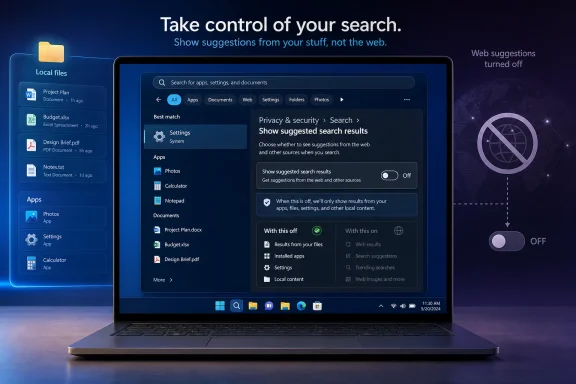
Laptop screen shows settings to control search suggestions, with web suggestions turned off.Microsoft Finally Admits Search Became a Billboard​

The reported setting is expected to live under Privacy & security > Search, in a section called “Show suggested search results.” That placement matters. Microsoft is not framing this as a power-user tweak, a registry escape hatch, or an enterprise-only policy. It is placing the switch where ordinary users might plausibly find it.
That is a reversal in spirit, if not yet in shipping code. Windows 11’s search box has long mixed local apps, documents, settings, web suggestions, Bing results, and promotional surfaces into one panel. Microsoft’s argument was always convenience: type once, find anything. The lived experience was often different: type the name of an app and watch the operating system suggest the internet.
This is why the change feels bigger than its setting label. Windows users have not merely complained that web results exist. They have complained that web results interrupt the basic muscle memory of using a desktop operating system. A search box that cannot reliably prioritize installed software and local files is not “integrated”; it is distracted.

The Registry Hack Was the Real Product Feedback​

Until now, users who wanted to remove web search results often had to rely on registry edits, group policy, third-party scripts, or unofficial guides. That is never a healthy sign for a mainstream feature. When the recommended fix for a daily annoyance begins with opening Registry Editor, the product has already failed the average user.
The registry workaround also created the usual Windows split-brain problem. Enthusiasts could fix the behavior. Managed enterprise fleets could suppress parts of it through policy. Everyone else had to accept the default, even if the default made the machine feel slower and more cluttered.
Microsoft has always had an uneasy relationship with defaults. The company knows that most users never change them, which is why Windows defaults are so commercially valuable. Search is especially valuable because it sits at the junction between user intent and Microsoft’s services. Every accidental Bing query is a tiny reminder that the operating system is also a distribution channel.
That is the heart of the backlash. Users were not imagining that Windows Search had become promotional real estate. They were reacting to a design that routinely blurred the line between finding something on your PC and sending a query to Microsoft’s web stack.

Privacy Is the Right Drawer, but Performance Is the Bigger Complaint​

Putting the control under Privacy & security is logical. Web search means typed queries may leave the local machine. Even if Microsoft handles that data under published privacy rules, many users do not want local intent transmitted externally by default.
But privacy is only half the story. The more common complaint is performance. Windows Search has too often felt slower than it should because the interface is doing more than one job. It is not just finding a file or app; it is also preparing suggestions, fetching remote results, and deciding how to rank Microsoft’s ecosystem against the user’s local machine.
That matters because search is one of the most frequently touched parts of Windows. A delay of half a second, repeated dozens of times a day, becomes part of the emotional texture of the OS. It is the difference between a computer that feels responsive and one that feels as if it is negotiating with a server before obeying you.
Microsoft reportedly also said it has been improving search speeds, File Explorer launch performance, and bulk delete performance. Those are not glamorous Build-stage demos. They are exactly the sort of improvements Windows users have been asking for while the company has spent much of the last two years talking about Copilot, agents, and AI PCs.

The Microsoft Store Toggle Would Be Another Quiet Concession​

The same interface reportedly hints at a separate ability to suppress Microsoft Store results from search. If that ships, it may be nearly as important as the web toggle. Store results can be useful when a user clearly wants to install something, but they are irritating when they crowd out installed software or system utilities.
Windows 11 has often treated search as a recommendation engine. That is a subtle but important design choice. A search engine answers intent; a recommendation engine tries to shape it. Microsoft’s problem is that Windows users usually open Start search with a very specific intention: launch Notepad, open Device Manager, find a document, change a setting.
The Store belongs in that flow only when it is clearly subordinate. If Microsoft lets users reduce or disable Store suggestions, it would signal a broader shift away from the idea that every Windows surface must cross-promote another Microsoft property.
That would be welcome, but it also raises a question Microsoft cannot avoid: why did it take this long? Windows 11 launched in 2021. The frustration with web results, Store suggestions, and search clutter is not new. The company is now correcting a mistake that users identified almost immediately.

Build 2026 Is Becoming a Windows Apology Tour​

The timing is hard to ignore. Microsoft showed the search toggle a day before Build 2026, while also highlighting Insider work on the taskbar and other shell improvements. The same recent wave of Windows 11 changes includes testing movable taskbar positions, smaller taskbar options, and refinements to search ranking.
Taken together, these are not random quality-of-life tweaks. They look like a strategic course correction. Microsoft appears to understand that Windows 11’s reputation problem is not only about missing features. It is about trust.
Users tolerated Windows 11’s redesign when it felt like the beginning of a cleaner, more modern desktop. They became less forgiving when basic customization disappeared, ads and recommendations multiplied, and AI features arrived faster than fixes for old regressions. The complaint was never simply “we hate change.” It was “why are you changing the parts we use every day while ignoring the parts you broke?”
The movable taskbar is a useful comparison. Microsoft removed a long-standing Windows capability, spent years hearing complaints, and is now testing its return. The web-search toggle follows the same pattern: remove or obscure user control, absorb years of annoyance, then reintroduce the obvious option as a fresh improvement.

Insiders Get the Levers First, Everyone Else Gets the Waiting Game​

There is no confirmed public release date for the web-search toggle. The likely path is familiar: internal builds, Windows Insider testing, controlled rollout, and eventually mainstream availability if telemetry and feedback satisfy Microsoft.
That means regular Windows 11 users should not expect the switch to appear immediately. It may land first in an Insider channel, and even there it could be limited by feature flags or staged rollout logic. Microsoft increasingly ships Windows features as experiments rather than discrete releases, which makes timelines harder to predict.
For IT administrators, the key question is whether this becomes manageable through policy. A consumer-facing toggle is good. A policy-backed control is better. Enterprises, schools, and regulated environments need predictable behavior, not a per-user scavenger hunt through Settings.
If Microsoft is serious about reducing Windows noise, it should expose the control cleanly for management tools. Search behavior is not cosmetic in a business environment. It affects training, help desk calls, privacy posture, and user productivity.

The AI Context Makes This More Than a Search Story​

This change also lands in the middle of Microsoft’s aggressive AI push. Windows has become a staging ground for Copilot, Recall, semantic search, cloud-connected suggestions, and agentic workflows. In that environment, a simple “turn off web results” option becomes a referendum on consent.
The company wants Windows to become more intelligent and more predictive. That future requires users to trust the OS with more context, not less. But trust is cumulative. If the search box cannot respect a user who only wants to find Calculator, why should that user trust deeper AI features that index activity, summarize content, or route requests through cloud services?
Microsoft’s challenge is not technical ambition. It is restraint. The best version of AI in Windows will need to know when to disappear. The best version of search will need to know when the answer is already on the PC.
That is why this toggle is symbolically powerful. It suggests Microsoft may be learning that control is not the enemy of engagement. Sometimes the way to make users like a feature is to let them turn part of it off.

The Desktop Still Belongs to the Person Sitting at It​

Windows remains the default operating system for much of the world’s practical computing. That gives Microsoft enormous freedom, but it also gives the company a duty to avoid turning the desktop into a perpetual upsell surface. Users are not wrong to expect the Start menu and search box to behave like utilities rather than campaigns.
The PC is not a phone home screen. It is where people reconcile spreadsheets, manage servers, edit photos, write code, troubleshoot drivers, configure networks, and do thousands of other tasks that depend on speed and predictability. Search sits at the front door of that workflow.
When Microsoft inserts web noise into that doorway, it makes Windows feel less like an operating system and more like a portal. That distinction may sound philosophical, but it shows up in everyday frustration. The user types. The machine hesitates. The result is not the thing the user asked for.
A toggle cannot undo years of irritation, but it can mark a change in posture. It says the user’s local intent deserves priority. For Windows, that should never have been controversial.

The Toggle That Carries More Weight Than Its Label​

The practical take is straightforward: if Microsoft ships this broadly and implements it cleanly, Windows 11 search will become less annoying for a large group of users. The strategic take is more interesting. Microsoft is quietly retreating from one of its most disliked assumptions: that the Windows shell should always be an entry point to Microsoft’s online services.
  • Windows 11 is expected to gain a user-facing setting to disable web results in Search rather than requiring registry edits.
  • The control was shown in Settings under Privacy & security > Search, which suggests Microsoft understands the privacy dimension of local queries.
  • Microsoft appears to be considering similar control over Microsoft Store suggestions in search results.
  • The change has no confirmed general release date and will likely reach Windows Insider builds before stable Windows 11 systems.
  • The move fits a broader pattern of Microsoft restoring user control after years of complaints about Windows 11’s taskbar, search, and shell behavior.
  • The real test will be whether Microsoft gives consumers, enterprises, and managed fleets durable controls rather than another partially rolled-out experiment.
The hopeful reading is that Microsoft is rediscovering the value of a quieter Windows. The cynical reading is that years of telemetry, complaints, and regulatory pressure finally made the old search model more trouble than it was worth. Either way, the direction is welcome: Windows works best when it treats the web, the Store, and AI as optional layers on top of the PC — not as toll booths between the user and their own machine.

References​

  1. Primary source: PCMag
    Published: Tue, 02 Jun 2026 19:55:20 GMT
  2. Official source: support.microsoft.com
  3. Related coverage: howtogeek.com
  4. Related coverage: fdaytalk.com
  5. Related coverage: techradar.com
  6. Related coverage: thefpsreview.com
  1. Related coverage: windowsforum.com
  2. Related coverage: windowscentral.com
  3. Related coverage: windowslatest.com
  4. Related coverage: pureinfotech.com
  5. Related coverage: alternativeto.net
  6. Related coverage: dignited.com
  7. Related coverage: windowsreport.com
  8. Related coverage: tomshardware.com
  9. Related coverage: pcgamer.com
  10. Related coverage: tomsguide.com
  11. Official source: microsoft.com
  12. Official source: build.microsoft.com
  13. Related coverage: notebookcheck.com
  14. Related coverage: chatforest.com
  15. Official source: news.microsoft.com
  16. Related coverage: sageweekly.com
  17. Related coverage: lensmor.com
  18. Official source: blogs.windows.com
 

Microsoft is reportedly preparing Windows 11 Settings toggles that would let users disable web results and Microsoft Store suggestions in Windows Search, after years in which the taskbar and Start search boxes mixed local files, apps, settings, Bing links, and promotional app recommendations. If the reporting holds, this is not just another small preference checkbox. It is Microsoft admitting, however quietly, that one of Windows 11’s most visible daily surfaces has drifted from utility into distribution strategy.

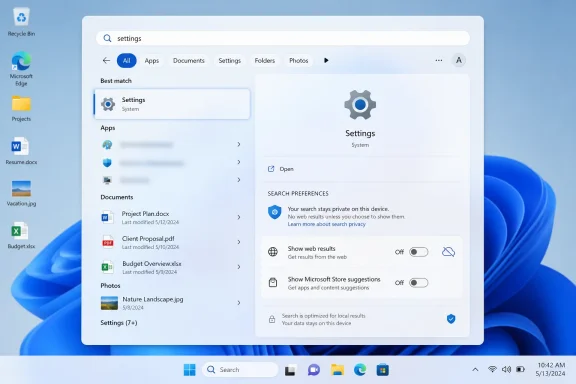
Windows search results showing “Settings” with system options and privacy preferences displayed.Microsoft Finally Notices the Search Box Is Not a Billboard​

Windows Search has always carried more symbolic weight than its pixel count suggests. It is where users go when they do not want to browse, remember, or be marketed to. They want the spreadsheet, the printer setting, the obscure Control Panel remnant, the app they installed last year, or the document whose filename they only half remember.
That is why the web-heavy Windows 11 search experience has irritated so many people. A search box inside the operating system ought to privilege the operating system. When a local query produces Bing results, Store entries, “suggested” apps, and other cloud-flavored distractions before the thing sitting on the user’s own disk, the system feels less like an assistant and more like a sales associate.
The reported change would add dedicated controls under Windows 11’s search-related Settings area, including an option to turn off web search results and another to suppress Microsoft Store suggestions. For ordinary users, that means a cleaner Start and taskbar search experience. For IT administrators, it means Microsoft may be moving a long-standing policy-and-registry workaround into a place humans can actually find.
The distinction matters. Windows has already had enterprise controls for limiting web results in Search through Group Policy, registry settings, and device-management channels. But a consumer-facing Settings toggle changes the politics of the feature. It says the choice is not merely an administrative lockdown scenario; it is a legitimate user preference.

The Old Workarounds Were a Symptom of a Bad Default​

Until now, disabling web results in Windows 11 has generally meant leaving the paved road. Power users have relied on registry edits such as DisableSearchBoxSuggestions, Group Policy settings that block web search, or device-management profiles in managed environments. These tools work, but they are the kind of fixes that make Windows feel like a system maintained by rumor and folklore.
That is not because registry and policy controls are inherently bad. In enterprise Windows, they are necessary. The problem is that a basic desktop preference became something users had to research, script, or push through Intune instead of toggling in the interface where Microsoft puts far less important options.
The mismatch has been especially obvious on Windows 11 Home. A Pro or Enterprise administrator can reach for Group Policy. A home user annoyed by Bing appearing in the Start menu is usually told to edit the registry, install a third-party utility, or live with it. That is a poor bargain for a feature as central as search.
Microsoft’s apparent course correction is therefore less about discovering a new capability than legitimizing an old complaint. The web results were not universally loved but hidden behind a lack of accessible controls. The absence of a toggle functioned as pressure: use Microsoft’s integrated search stack unless you know how to escape it.

Bing Was Never the Only Intruder​

The most visible complaint has been Bing, but the broader issue is Microsoft’s habit of turning Windows surfaces into recommendation channels. Search results have not merely shown web links. They have also exposed Store app suggestions, service prompts, and cloud-connected content that can look suspiciously like advertising when the user’s intent is local.
That is the heart of the annoyance. A person typing “Photoshop,” “Spotify,” or “Instagram” into Search may be trying to launch an installed app, find a file, or check a setting. If Windows responds with Store listings for software that is not installed, the operating system is making a commercial inference before satisfying the user’s original intent.
Store suggestions are particularly sensitive because they blur discovery and promotion. Microsoft can reasonably argue that helping users find apps is useful. But when those suggestions appear inside a search workflow, they compete with the basic promise of the desktop: show me what is already mine.
The rumored separate toggle for Store recommendations would be more important than it sounds. It would recognize that web search and app promotion are related but not identical irritants. Users may tolerate one while rejecting the other, and administrators may have different policy reasons for disabling each.

The European Shadow Over Windows Settings​

Microsoft’s search changes do not arrive in a vacuum. The company has spent the last few years adjusting Windows behavior under regulatory pressure, especially in Europe, where the Digital Markets Act has forced large platform companies to rethink default apps, service tying, and user choice. Windows users in some regions have already seen controls that are not always exposed globally.
That regional inconsistency has become its own source of frustration. A setting that appears on one PC but not another, depending on geography, language, account state, or build channel, makes Windows feel less like a coherent product and more like a compliance matrix. Users notice when the same operating system behaves differently because the law gives one group more leverage.
If Microsoft now rolls out web-search and Store-suggestion controls more broadly, it will be tempting to frame the move as pure customer responsiveness. That may be partly true. But the more realistic reading is that customer pressure, regulatory pressure, and product-quality pressure are finally pointing in the same direction.
This is where Microsoft’s incentives become complicated. Bing integration, Edge promotion, Store discovery, Microsoft account nudges, and Copilot placement are all part of a larger services strategy. Windows is not just the thing Microsoft sells; it is a platform that can direct attention toward things Microsoft wants users to use. A clean search toggle is therefore a small act of restraint inside a product that has often struggled with restraint.

A Cleaner Search Box Is Also a Privacy Signal​

The privacy argument is not that Windows Search secretly turns every local query into a scandal. Microsoft documents multiple privacy and policy controls around Windows Search, cloud content, and web results, and managed environments can already restrict many of those connections. The issue is simpler: users understand a local search box differently from a browser search bar.
When someone types a filename, project codename, client name, or internal tool into Windows Search, they may not expect the operating system to treat that input as a web-search opportunity. Even if the data handling is limited, disclosed, or policy-governed, the user experience creates a trust problem. The desktop feels like it is listening for chances to leave the device.
That perception matters in professional environments. Lawyers, journalists, engineers, medical staff, financial analysts, and government workers often search for terms that carry meaning outside the machine. The fewer ambiguous cloud handoffs in the default workflow, the easier it is for users and administrators to reason about exposure.
A visible toggle is not a substitute for good telemetry documentation or enterprise controls. But it is a meaningful privacy affordance because it changes the default mental model. Users can say: this search surface is for my PC, not the web.

Performance Is the Practical Argument Everyone Understands​

Privacy concerns can sound abstract until the search panel hesitates. Performance complaints are more immediate. If Windows Search pauses, reshuffles results, or surfaces a web suggestion above a local match, users experience that as wasted time, not as a strategic platform feature.
The performance cost is not only network latency. It is cognitive latency. Every irrelevant web card or Store listing makes the user scan, reject, and refocus. A search interface that offers more categories than the user asked for can still be slower even if the machine is technically fast.
That is why “more relevant results” has become such a loaded phrase for Windows Search. Microsoft does not merely need better ranking. It needs a clearer hierarchy of intent. If the user is typing the name of an installed app, local app launch should win. If the user is typing a known settings term, settings should win. If the user is typing a filename, local and indexed content should not have to compete with Bing.
The reported toggles would let users enforce that hierarchy themselves. Rather than trusting Microsoft’s ranking model to infer intent correctly every time, users could remove whole classes of unwanted results. That is crude, but it is also refreshingly honest.

Enterprise IT Already Knew the Answer​

For sysadmins, the news is less revelation than validation. Many managed Windows environments already restrict consumer web integrations, cloud content, app suggestions, and promotional experiences as part of baseline configuration. The difference is that these controls are scattered across Group Policy, registry settings, Intune policy catalogs, privacy baselines, and various Windows components.
A Settings toggle will not replace enterprise management. In fact, administrators will still want policy-backed enforcement, reporting, and configuration drift controls. But a visible user-facing control can reduce support friction, especially in small businesses and lightly managed fleets where every preference does not justify a formal policy object.
There is also a training advantage. When a feature has a normal Settings switch, help desks can explain it without sounding like they are asking users to perform surgery. “Go to Settings and turn off web results” is a very different sentence from “Open Registry Editor and create a DWORD under a Policies key.”
Microsoft should be careful here. If the toggle exists but is overridden by policy, disabled by region, hidden behind staged rollout logic, or renamed across builds, the support benefit evaporates. The best version of this change is boring, global, and predictable.

The Copilot Era Makes Basic Search More Important, Not Less​

The timing is notable because Microsoft has spent the past few years flooding Windows messaging with AI. Copilot, Recall, semantic search, cloud-connected assistance, and on-device AI features have dominated the Windows roadmap conversation. Against that backdrop, a simple “turn off web results” toggle sounds almost quaint.
But that is exactly why it matters. The more Microsoft asks users to trust intelligent, contextual, cloud-aware features, the more it must preserve spaces where the machine behaves plainly. Not every interaction should be interpreted, expanded, enriched, or monetized. Sometimes the right answer is the local executable.
AI features also raise the stakes for search boundaries. As Windows becomes better at indexing, summarizing, and connecting user data, users will want sharper distinctions between local computation, cloud services, enterprise content, and public web search. A desktop that cannot clearly separate those modes will invite suspicion.
Microsoft’s challenge is not to make Windows less capable. It is to make capability consensual. The future Windows search experience may well include local semantic search, AI summaries, Copilot actions, enterprise knowledge retrieval, and web answers. But those features need to be layered on top of user intent, not imposed over it.

Microsoft’s Product Habit Meets User Fatigue​

Windows 11’s search controversy belongs to a larger pattern. Microsoft repeatedly adds service-connected surfaces to the operating system, waits for backlash, then partially reins them in with settings, policies, or regional concessions. We have seen versions of this story with Edge prompts, default app handling, OneDrive nudges, Start menu recommendations, Widgets, lock-screen content, and Microsoft account pressure.
The charitable interpretation is that Microsoft is experimenting in public, learning which integrations help and which annoy. The less charitable interpretation is that Microsoft pushes until users, regulators, or enterprise customers push back. Both can be true at once.
What makes Search different is frequency. Users may ignore Widgets, skip the Store, or remove some taskbar icons. Search is harder to avoid. It is wired into the Start menu, the taskbar, File Explorer workflows, Settings discovery, and muscle memory accumulated over decades.
That makes unwanted content in Search feel more invasive than unwanted content elsewhere. A promotional tile in a feed is clutter. A promotional result in a search box is interference.

The Setting Must Survive the Rollout Machine​

The largest uncertainty is still deployment. Reports describe unreleased or preview behavior, and Microsoft often tests Windows features in Insider channels before changing names, regions, defaults, or availability. A control spotted in one build is not a guarantee of a stable public feature.
Windows 11 feature delivery is also messier than the old service-pack world. Changes can arrive through cumulative updates, controlled feature rollouts, Microsoft Store component updates, Experience Packs, server-side flags, and Insider flights that do not map cleanly to a single public release. A user reading about a new toggle may not see it for weeks or months, even on a fully patched PC.
That matters because this is the kind of feature where partial rollout can create confusion. If one user can disable Store suggestions and another cannot, the immediate assumption will be that something is broken. If the setting appears in the European Economic Area but not in the United States, users will assume Microsoft is choosing compliance over consistency. If it appears and later disappears, the backlash will be worse than if it had never been seen.
Microsoft’s best move would be to document the behavior plainly once it ships. The company should say what the toggles disable, what they do not disable, whether they affect Start, taskbar Search, File Explorer, Settings, search highlights, Store recommendations, Copilot entry points, and managed devices. Ambiguity is what made this debate last so long.

The Real Win Is Making Windows Respect Intent Again​

The reported toggle is not revolutionary in the engineering sense. It does not reinvent indexing, fix every search-ranking bug, or settle the debate over Microsoft’s service integrations. But it could restore an important principle: the search box should obey the user’s intent before serving the platform owner’s agenda.
That principle has been eroded gradually. Each individual addition could be defended as useful. Web results can save a trip to the browser. Store suggestions can help users find apps. Cloud content can surface work files. Search highlights can make the interface feel alive. But accumulated together, they changed the feel of the tool.
Windows enthusiasts often complain about “bloat,” but the sharper complaint is misplaced ambition. A desktop search interface does not need to be a portal to everything Microsoft owns. It needs to be fast, legible, and faithful to the query.
If Microsoft ships these controls broadly, it will deserve credit. Not because it invented user choice, but because it would be reversing a product habit that many users had come to regard as permanent. Sometimes the most welcome Windows feature is the one that lets Windows get out of the way.

The Search Box Gets Its Exit Ramp​

This change is still reported, still subject to Microsoft’s rollout machinery, and still likely to vary by build until the company says exactly what is shipping. But the direction is clear enough to matter: Windows Search appears to be moving toward a model where web and Store content are optional rather than unavoidable.
  • Microsoft is reportedly preparing Windows 11 Settings controls to disable web search results inside Windows Search.
  • A separate reported control would suppress Microsoft Store suggestions, addressing a different kind of search clutter.
  • Existing enterprise controls already allow web-search restrictions, but a visible Settings toggle would make the choice accessible to ordinary users.
  • The practical payoff is a cleaner local search experience for apps, files, and settings.
  • The broader significance is that Microsoft may be conceding that Windows Search should not double as a Bing and Store promotion surface by default.
  • The remaining uncertainty is rollout: preview features can change, and Microsoft has not yet turned every tested Windows feature into a universal public setting.
The bigger lesson for Microsoft is that Windows users are not hostile to connected features; they are hostile to connected features that hijack local intent. If Windows 11 gives users a durable way to keep Search focused on the PC in front of them, it will be a small settings change with an outsized trust dividend — and a useful test of whether Microsoft can make the AI-heavy future of Windows feel optional, legible, and under the user’s control.

References​

  1. Primary source: The Hans India
    Published: 2026-06-08T13:45:08.426724
  2. Related coverage: makeuseof.com
  3. Official source: support.microsoft.com
  4. Related coverage: windowscentral.com
  5. Related coverage: howtogeek.com
  6. Related coverage: pureinfotech.com
  1. Official source: techcommunity.microsoft.com
  2. Related coverage: techradar.com
  3. Related coverage: guidingtech.com
  4. Related coverage: tomshardware.com
  5. Related coverage: geeksforgeeks.org
  6. Related coverage: windowslatest.com
  7. Related coverage: tech.yahoo.com
  8. Official source: answers.microsoft.com
  9. Related coverage: windowsforum.com
 

Back
Top