

Microsoft is testing Windows 11 Search changes in Insider builds that make local files, apps, and settings win before Bing web suggestions, including when users type partial or misspelled queries into the Start menu or taskbar search box. The change is small on the surface, but it cuts into one of Windows 11’s most persistent irritations: a local command launcher that too often behaved like a web funnel. If Microsoft ships this broadly, Windows Search will become less of a Bing billboard and more like the system utility users thought they were opening in the first place.
The Windows Search box has always carried two identities. To users, it is a fast way to open Notepad, find a PDF, jump to Settings, or locate the file they swear they saved yesterday. To Microsoft, it has also been a distribution channel: for Bing, for web suggestions, for Store recommendations, and now potentially for AI-assisted discovery.
That tension is why this change matters. A search box in the operating system is not just another input field. It sits at the point where user intent is most raw: a few letters, a typo, a project name, a client name, a half-remembered filename, or a medical billing code typed before the user has decided what they are asking.
The reported update moves Windows Search toward a more defensible default. Local intent should be presumed local until the user makes a web search explicit. That sounds obvious, but for years Windows has too often acted as if every incomplete thought typed into Start deserved a trip through Bing.
This is not merely a privacy tweak. It is a product philosophy correction. Microsoft appears to be conceding that the operating system’s search surface became too clever, too network-dependent, and too eager to monetize or enrich what should have been a simple local lookup.
But the typo is only the most visible symptom. The deeper problem is that Windows Search had blurred the boundary between finding something on my device and asking Microsoft’s services for help. A mistyped app name or fragment of a document title became an invitation for web suggestions, and the system often rewarded that ambiguity with online results rather than patience.
Good local search is forgiving. It should understand partial terms, tolerate mistakes, rank installed apps above random web content, and avoid punishing users for typing quickly. The fact that Bing often caught the query before local search did made Windows feel less like a modern indexed desktop and more like a browser toolbar wearing an operating system costume.
That explains the backlash. Users were not simply annoyed that a typo could open Bing. They were annoyed that Windows seemed to misunderstand the most basic hierarchy of trust: my files first, my apps first, my settings first, the internet later.
The new behavior reportedly addresses that by improving local-first ranking and making web results conditional rather than assumed. If that sticks, it should reduce the absurd class of errors where a file exists locally but Search still decides the best match is a Bing query or Microsoft Store suggestion.
Microsoft can reasonably argue that it has controls, policies, and data-handling practices around search suggestions. That is not the same as saying the default experience is sensible. Privacy is not only about whether a company promises not to misuse data; it is also about whether the product avoids collecting or transmitting data that it does not need in the first place.
The best privacy design often looks boring. It removes unnecessary paths. It waits for explicit intent. It keeps local activity local unless the user asks otherwise. In that sense, this Windows Search change is more meaningful than a dense privacy statement because it alters the default flow of data at the moment of input.
The move also lands differently after years of heightened scrutiny around Windows telemetry, account integration, Edge promotion, and the rollout controversies around AI features such as Recall. Microsoft has spent the Windows 11 era insisting that connected experiences are useful and manageable. Users have often heard something else: the PC is becoming less theirs by default.
A local-first Search model is a modest but important counter-signal. It tells users that Microsoft can still separate an operating-system task from a cloud-service opportunity. That is the distinction Windows needs to preserve if it wants trust in its next wave of AI-powered features.
The problem is execution and incentive. Universal search only works when ranking is excellent and when the system is humble about uncertain intent. If the user types “printer,” the operating system can reasonably surface printer settings before a web article about printers. If the user types “word,” Microsoft Word should beat the web. If the user types a partial filename, local indexed content should not lose to a shopping result or a generic Bing suggestion.
Windows 11 too often violated that expectation. Web content did not merely supplement the local experience; it competed with it. Sometimes it appeared to win because it was easier for Microsoft to generate a confident web suggestion than to return a correct local result from an imperfect index.
That is where the distribution strategy became visible. Bing needed usage. Microsoft Store needed discovery. Edge benefited when web searches launched through Microsoft’s preferred path. The Start menu and taskbar search box became valuable real estate precisely because users reached for them reflexively.
Users are not naïve about that trade. They tolerate cross-promotion when the underlying feature is excellent. They resent it when the promotion makes the feature worse. Windows Search crossed that line often enough that many power users reached for registry edits, Group Policy settings, third-party launchers, or tools such as Everything simply to get back to the basic promise of fast local search.
Admins care about defaults because defaults become incidents at scale. One user typing a confidential project codename into Start may not matter. Ten thousand endpoints doing partial-query lookups all day create a different risk surface, especially when the behavior is poorly understood by ordinary users.
The new direction should appeal to IT departments because it aligns Search with a cleaner model: local queries are local, web queries are web, and the user or admin can decide when the boundary is crossed. That is easier to explain in policy documents, easier to defend in audits, and easier to support when a user asks why a search launched Edge instead of opening the file they wanted.
It also matters for performance. A network-assisted search path can introduce delay, visual churn, and inconsistent ranking. A local-first path should feel faster not because the PC is magically more powerful, but because Windows is no longer waiting on or interleaving remote suggestions for a task that an index should handle locally.
The caveat is that Microsoft must expose these controls in a way administrators can actually manage. A hidden Insider toggle is not an enterprise feature. Group Policy, Intune settings, documentation, and stable behavior across monthly updates will determine whether this becomes a serious manageability improvement or just another consumer-facing checkbox.
Windows users in the European Economic Area have already seen differences that users elsewhere often do not get. That asymmetry has become one of the strangest parts of modern Windows: the same operating system can expose more user choice depending on where the PC is configured to live.
If Microsoft is now testing broader Search toggles outside Europe, that suggests the company may be turning a compliance burden into a general product improvement. That would be the right move. There is no technical reason users in the United States, Canada, India, Australia, or elsewhere should have weaker control over whether local desktop search includes Bing.
The broader lesson is uncomfortable for Microsoft. Some of the company’s most user-friendly defaults now seem to arrive only after regulatory pressure, public criticism, or competitive embarrassment. That does not make the resulting changes bad. It does mean users are right to ask why obvious choices had to be dragged into existence.
The answer is business gravity. Windows is not just an operating system; it is the front door to Microsoft 365, Edge, Bing, Copilot, OneDrive, the Store, Game Pass, and identity services. Every local surface is tempting as a cloud-service on-ramp. Search is especially tempting because it captures intent.
A better Windows Search requires Microsoft to resist that temptation. The company does not have to remove web search. It has to stop treating the user’s local search gesture as consent for a connected experience.
That premise will fail if users do not trust the boundary between local processing and cloud processing. If people believe that every query, filename, screenshot, or semantic clue might leave the machine unless they discover the right toggle, they will disable features wholesale or avoid using them for anything sensitive. Microsoft cannot build an AI operating system on a foundation of suspicion.
Local-first Search is therefore not a retreat from AI. It is a prerequisite for credible AI. A system that can search your PC semantically, understand rough descriptions, and retrieve local content needs to be extremely clear about where that processing occurs. “All data stays on device unless you ask otherwise” is the kind of principle users can understand.
That principle must be more than marketing. It has to show up in defaults, network behavior, admin controls, and visible UI. If Windows Search becomes faster and more private because it stops treating every partial query as a Bing opportunity, users may be more willing to trust future features that ask for deeper access.
This is where Microsoft’s product teams face a difficult internal tradeoff. Bing integration can produce measurable engagement. Store recommendations can produce clicks. Copilot entry points can promote adoption. But the operating system’s credibility is harder to measure and easier to squander.
The Search change suggests someone inside Microsoft understands that. A PC feature that users trust and use constantly is more valuable in the long run than a search box that boosts Bing impressions while training people to install third-party launchers.
That does not automatically fix every Windows Search problem. Indexing remains a long-running sore spot, especially on systems with external drives, cloud placeholders, network shares, or messy file libraries. Some users will still prefer specialized search utilities because they are faster, more predictable, and more transparent.
But local-first ranking reduces one major source of perceived slowness: waiting for the wrong category of answer. A search that immediately shows the app you wanted feels fast even if the index is not perfect. A search that spins, flashes web results, then misses the local file feels broken even if the underlying service is technically doing a lot.
This is why the change could have an outsized effect on Windows 11’s day-to-day feel. Search is not a glamorous feature, but it is muscle memory. Every delay and misfire accumulates. Every unnecessary Bing launch teaches the user that Windows is not listening.
A cleaner Search experience also helps Microsoft’s own apps. If users can reliably launch Settings pages, Office apps, PowerShell, Terminal, Device Manager, or local documents with a few keystrokes, they are less likely to pin everything, clutter the taskbar, or abandon the built-in experience. Good search reduces friction across the whole OS.
In that sense, Microsoft is not giving something up by reducing Bing’s role. It is repairing a core interaction that made Windows feel less polished than it should.
A proper rollout would do several things. It would make local-first behavior the default for ordinary users. It would provide an obvious setting to disable web suggestions entirely. It would separate Microsoft Store recommendations from web results. It would give administrators policy controls. And it would avoid resetting those preferences during feature updates.
The wording also matters. If the setting is buried under vague language like “suggested search results,” many users will not understand that it controls Bing or web behavior. Microsoft has often softened labels around service integration, presumably to make toggles sound less like ads and more like features. That approach may help adoption metrics, but it damages trust.
The best label is the plain one: web results in Windows Search. Users know what that means. Admins know what that means. If Microsoft believes web results add value, it can explain that in the UI without obscuring the switch.
There is also a difference between demotion and disablement. Prioritizing local results ahead of web suggestions is helpful, but it does not fully answer the privacy concern if partial queries are still transmitted before explicit web intent. The strongest version of this update would ensure that local input remains local unless web search is selected or clearly invoked.
That is the line Microsoft should draw. Anything less will invite the same argument under a new interface.
Windows users have lived through a decade of creeping service integration. Edge prompts, Microsoft account nudges, OneDrive defaults, Start menu recommendations, web results, widgets, Copilot buttons, and Store suggestions have all competed for attention inside what used to be neutral system space. Some of those features are useful. The cumulative effect has been exhaustion.
Search became one of the clearest examples because the mismatch was so obvious. When a user types the name of a local app, they are not asking for a marketplace. When they type a filename, they are not asking for a web search. When they misspell a setting, they are not consenting to send a fragment of that mistake to a remote service.
Microsoft does not need to abandon connected Windows experiences. It needs to make them opt-in by intent rather than opt-out by archaeology. A user who wants Bing in the Search box should have it. A user who wants local-only search should not have to edit the registry or pretend to live in a different regulatory region.
This is especially true as Windows becomes more context-aware. The more powerful the platform gets, the more disciplined it must be about defaults. Trust cannot be bolted on after the feature ships; it has to be visible in the first interaction.
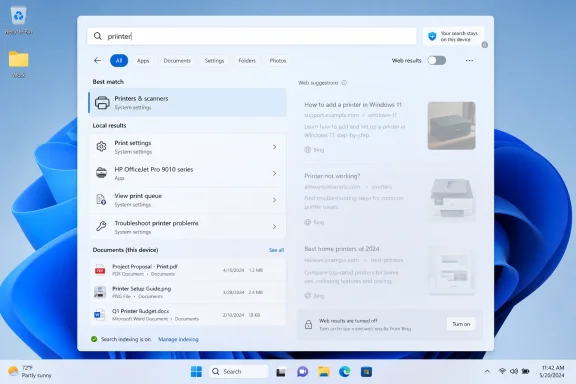 Microsoft Finally Treats the Search Box Like Part of the PC
The Windows Search box has always carried two identities. To users, it is a fast way to open Notepad, find a PDF, jump to Settings, or locate the file they swear they saved yesterday. To Microsoft, it has also been a distribution channel: for Bing, for web suggestions, for Store recommendations, and now potentially for AI-assisted discovery.That tension is why this change matters. A search box in the operating system is not just another input field. It sits at the point where user intent is most raw: a few letters, a typo, a project name, a client name, a half-remembered filename, or a medical billing code typed before the user has decided what they are asking.
The reported update moves Windows Search toward a more defensible default. Local intent should be presumed local until the user makes a web search explicit. That sounds obvious, but for years Windows has too often acted as if every incomplete thought typed into Start deserved a trip through Bing.
This is not merely a privacy tweak. It is a product philosophy correction. Microsoft appears to be conceding that the operating system’s search surface became too clever, too network-dependent, and too eager to monetize or enrich what should have been a simple local lookup.
The Typo Was Never the Real Problem
The headline version of the story is easy: Windows Search will stop sending your typos to Bing. That is the part users immediately understand, because nearly everyone has mashed the Windows key, typed a few letters, hit Enter, and watched Edge launch a useless web search for something that was clearly meant to be local.But the typo is only the most visible symptom. The deeper problem is that Windows Search had blurred the boundary between finding something on my device and asking Microsoft’s services for help. A mistyped app name or fragment of a document title became an invitation for web suggestions, and the system often rewarded that ambiguity with online results rather than patience.
Good local search is forgiving. It should understand partial terms, tolerate mistakes, rank installed apps above random web content, and avoid punishing users for typing quickly. The fact that Bing often caught the query before local search did made Windows feel less like a modern indexed desktop and more like a browser toolbar wearing an operating system costume.
That explains the backlash. Users were not simply annoyed that a typo could open Bing. They were annoyed that Windows seemed to misunderstand the most basic hierarchy of trust: my files first, my apps first, my settings first, the internet later.
The new behavior reportedly addresses that by improving local-first ranking and making web results conditional rather than assumed. If that sticks, it should reduce the absurd class of errors where a file exists locally but Search still decides the best match is a Bing query or Microsoft Store suggestion.
A Privacy Win Built From Product Humility
There is a privacy angle here, and it is not imaginary. When a system sends partial search queries to a remote service as a user types, it is handling information that may not have been intended for the web at all. That information might be harmless, but it might also contain names, internal project codes, fragments of legal matters, patient references, source file names, or the first few characters of something much more sensitive.Microsoft can reasonably argue that it has controls, policies, and data-handling practices around search suggestions. That is not the same as saying the default experience is sensible. Privacy is not only about whether a company promises not to misuse data; it is also about whether the product avoids collecting or transmitting data that it does not need in the first place.
The best privacy design often looks boring. It removes unnecessary paths. It waits for explicit intent. It keeps local activity local unless the user asks otherwise. In that sense, this Windows Search change is more meaningful than a dense privacy statement because it alters the default flow of data at the moment of input.
The move also lands differently after years of heightened scrutiny around Windows telemetry, account integration, Edge promotion, and the rollout controversies around AI features such as Recall. Microsoft has spent the Windows 11 era insisting that connected experiences are useful and manageable. Users have often heard something else: the PC is becoming less theirs by default.
A local-first Search model is a modest but important counter-signal. It tells users that Microsoft can still separate an operating-system task from a cloud-service opportunity. That is the distinction Windows needs to preserve if it wants trust in its next wave of AI-powered features.
Search Became a Distribution Strategy Before It Became Good Enough
The irony is that Microsoft had a legitimate product idea. A single search box that can find local apps, documents, settings, web answers, enterprise content, cloud files, and store apps is not inherently bad. Apple, Google, Microsoft, and Linux desktop environments have all pursued versions of universal search because users do not want to remember which silo contains which answer.The problem is execution and incentive. Universal search only works when ranking is excellent and when the system is humble about uncertain intent. If the user types “printer,” the operating system can reasonably surface printer settings before a web article about printers. If the user types “word,” Microsoft Word should beat the web. If the user types a partial filename, local indexed content should not lose to a shopping result or a generic Bing suggestion.
Windows 11 too often violated that expectation. Web content did not merely supplement the local experience; it competed with it. Sometimes it appeared to win because it was easier for Microsoft to generate a confident web suggestion than to return a correct local result from an imperfect index.
That is where the distribution strategy became visible. Bing needed usage. Microsoft Store needed discovery. Edge benefited when web searches launched through Microsoft’s preferred path. The Start menu and taskbar search box became valuable real estate precisely because users reached for them reflexively.
Users are not naïve about that trade. They tolerate cross-promotion when the underlying feature is excellent. They resent it when the promotion makes the feature worse. Windows Search crossed that line often enough that many power users reached for registry edits, Group Policy settings, third-party launchers, or tools such as Everything simply to get back to the basic promise of fast local search.
The Enterprise Case Is Even Stronger Than the Consumer One
For home users, the old behavior was irritating and mildly creepy. For managed environments, it was a governance headache. A law firm, hospital, financial office, manufacturer, or public agency does not want fragments of local lookup behavior casually treated as web-search material, even if the vendor says the data is handled responsibly.Admins care about defaults because defaults become incidents at scale. One user typing a confidential project codename into Start may not matter. Ten thousand endpoints doing partial-query lookups all day create a different risk surface, especially when the behavior is poorly understood by ordinary users.
The new direction should appeal to IT departments because it aligns Search with a cleaner model: local queries are local, web queries are web, and the user or admin can decide when the boundary is crossed. That is easier to explain in policy documents, easier to defend in audits, and easier to support when a user asks why a search launched Edge instead of opening the file they wanted.
It also matters for performance. A network-assisted search path can introduce delay, visual churn, and inconsistent ranking. A local-first path should feel faster not because the PC is magically more powerful, but because Windows is no longer waiting on or interleaving remote suggestions for a task that an index should handle locally.
The caveat is that Microsoft must expose these controls in a way administrators can actually manage. A hidden Insider toggle is not an enterprise feature. Group Policy, Intune settings, documentation, and stable behavior across monthly updates will determine whether this becomes a serious manageability improvement or just another consumer-facing checkbox.
Europe Forced the Door Open, but Everyone Else May Benefit
One reason this development feels plausible is that Microsoft has already had to create more granular controls in some markets. The European Union’s Digital Markets Act pushed large platform owners to loosen defaults, separate bundled services, and give users more meaningful choice around browsers, search providers, and integrated services.Windows users in the European Economic Area have already seen differences that users elsewhere often do not get. That asymmetry has become one of the strangest parts of modern Windows: the same operating system can expose more user choice depending on where the PC is configured to live.
If Microsoft is now testing broader Search toggles outside Europe, that suggests the company may be turning a compliance burden into a general product improvement. That would be the right move. There is no technical reason users in the United States, Canada, India, Australia, or elsewhere should have weaker control over whether local desktop search includes Bing.
The broader lesson is uncomfortable for Microsoft. Some of the company’s most user-friendly defaults now seem to arrive only after regulatory pressure, public criticism, or competitive embarrassment. That does not make the resulting changes bad. It does mean users are right to ask why obvious choices had to be dragged into existence.
The answer is business gravity. Windows is not just an operating system; it is the front door to Microsoft 365, Edge, Bing, Copilot, OneDrive, the Store, Game Pass, and identity services. Every local surface is tempting as a cloud-service on-ramp. Search is especially tempting because it captures intent.
A better Windows Search requires Microsoft to resist that temptation. The company does not have to remove web search. It has to stop treating the user’s local search gesture as consent for a connected experience.
AI Makes the Boundary More Important, Not Less
This change arrives as Microsoft is pushing Windows deeper into AI-assisted computing. Copilot+ PCs, semantic indexing, Recall, Click to Do, and natural-language search all depend on an ambitious premise: Windows can understand more about what users are doing and help them retrieve it later.That premise will fail if users do not trust the boundary between local processing and cloud processing. If people believe that every query, filename, screenshot, or semantic clue might leave the machine unless they discover the right toggle, they will disable features wholesale or avoid using them for anything sensitive. Microsoft cannot build an AI operating system on a foundation of suspicion.
Local-first Search is therefore not a retreat from AI. It is a prerequisite for credible AI. A system that can search your PC semantically, understand rough descriptions, and retrieve local content needs to be extremely clear about where that processing occurs. “All data stays on device unless you ask otherwise” is the kind of principle users can understand.
That principle must be more than marketing. It has to show up in defaults, network behavior, admin controls, and visible UI. If Windows Search becomes faster and more private because it stops treating every partial query as a Bing opportunity, users may be more willing to trust future features that ask for deeper access.
This is where Microsoft’s product teams face a difficult internal tradeoff. Bing integration can produce measurable engagement. Store recommendations can produce clicks. Copilot entry points can promote adoption. But the operating system’s credibility is harder to measure and easier to squander.
The Search change suggests someone inside Microsoft understands that. A PC feature that users trust and use constantly is more valuable in the long run than a search box that boosts Bing impressions while training people to install third-party launchers.
The Fastest Search Result Is the One That Never Leaves the Machine
Performance is the least ideological part of the story, but it may be what users notice first. When web suggestions are removed or demoted, the search interface has less to do. It can rank local apps, files, and settings without building a mixed page of Bing cards, Store entries, and web interpretations.That does not automatically fix every Windows Search problem. Indexing remains a long-running sore spot, especially on systems with external drives, cloud placeholders, network shares, or messy file libraries. Some users will still prefer specialized search utilities because they are faster, more predictable, and more transparent.
But local-first ranking reduces one major source of perceived slowness: waiting for the wrong category of answer. A search that immediately shows the app you wanted feels fast even if the index is not perfect. A search that spins, flashes web results, then misses the local file feels broken even if the underlying service is technically doing a lot.
This is why the change could have an outsized effect on Windows 11’s day-to-day feel. Search is not a glamorous feature, but it is muscle memory. Every delay and misfire accumulates. Every unnecessary Bing launch teaches the user that Windows is not listening.
A cleaner Search experience also helps Microsoft’s own apps. If users can reliably launch Settings pages, Office apps, PowerShell, Terminal, Device Manager, or local documents with a few keystrokes, they are less likely to pin everything, clutter the taskbar, or abandon the built-in experience. Good search reduces friction across the whole OS.
In that sense, Microsoft is not giving something up by reducing Bing’s role. It is repairing a core interaction that made Windows feel less polished than it should.
The Toggle Must Survive the Journey From Insider Build to Real PCs
The most important unanswered question is not whether Microsoft is testing the behavior. It is whether the behavior will ship broadly, ship clearly, and stay shipped. Windows history is full of promising Insider experiments that changed, vanished, or arrived in watered-down form.A proper rollout would do several things. It would make local-first behavior the default for ordinary users. It would provide an obvious setting to disable web suggestions entirely. It would separate Microsoft Store recommendations from web results. It would give administrators policy controls. And it would avoid resetting those preferences during feature updates.
The wording also matters. If the setting is buried under vague language like “suggested search results,” many users will not understand that it controls Bing or web behavior. Microsoft has often softened labels around service integration, presumably to make toggles sound less like ads and more like features. That approach may help adoption metrics, but it damages trust.
The best label is the plain one: web results in Windows Search. Users know what that means. Admins know what that means. If Microsoft believes web results add value, it can explain that in the UI without obscuring the switch.
There is also a difference between demotion and disablement. Prioritizing local results ahead of web suggestions is helpful, but it does not fully answer the privacy concern if partial queries are still transmitted before explicit web intent. The strongest version of this update would ensure that local input remains local unless web search is selected or clearly invoked.
That is the line Microsoft should draw. Anything less will invite the same argument under a new interface.
The Search Box Is Becoming a Test of Microsoft’s Restraint
The most concrete reading of the current reports is that Windows 11 Search is becoming more configurable and less Bing-forward. That is good news. The more interesting reading is that Microsoft may be rediscovering a principle it has repeatedly violated: operating system surfaces should serve user intent before corporate strategy.Windows users have lived through a decade of creeping service integration. Edge prompts, Microsoft account nudges, OneDrive defaults, Start menu recommendations, web results, widgets, Copilot buttons, and Store suggestions have all competed for attention inside what used to be neutral system space. Some of those features are useful. The cumulative effect has been exhaustion.
Search became one of the clearest examples because the mismatch was so obvious. When a user types the name of a local app, they are not asking for a marketplace. When they type a filename, they are not asking for a web search. When they misspell a setting, they are not consenting to send a fragment of that mistake to a remote service.
Microsoft does not need to abandon connected Windows experiences. It needs to make them opt-in by intent rather than opt-out by archaeology. A user who wants Bing in the Search box should have it. A user who wants local-only search should not have to edit the registry or pretend to live in a different regulatory region.
This is especially true as Windows becomes more context-aware. The more powerful the platform gets, the more disciplined it must be about defaults. Trust cannot be bolted on after the feature ships; it has to be visible in the first interaction.
The Small Switch That Says the Quiet Part Out Loud
This is the practical read for Windows users and administrators watching the change move through testing:- Windows 11 Search is being adjusted so local files, apps, and settings are more likely to appear before Bing web suggestions, especially for partial or imperfect queries.
- Microsoft is reportedly testing controls that can turn off web results and Microsoft Store suggestions inside the Search experience.
- The privacy improvement depends on whether Windows truly waits for web-search intent before sending query text to Bing, not merely whether Bing results are visually ranked lower.
- The change should make everyday Search feel faster because the interface has fewer remote suggestions and irrelevant categories competing with local results.
- Enterprise value will depend on stable policy controls, clear documentation, and settings that survive feature updates.
- The broader significance is that Microsoft appears to be acknowledging that Windows Search became too cloud-forward for a task many users consider local by default.
References
- Primary source: explosion.com
Published: 2026-06-25T20:10:23.009213
Windows Search Will Stop Sending Your Typos to Bing — Explosion
Microsoft is updating Windows Search to stop sending your half-typed queries to Bing, making local file search faster and more private by default.www.explosion.com - Related coverage: windowscentral.com
“Windows Search needs less Bing” — Microsoft is finally adding an off switch in Windows 11 | Windows Central
Microsoft is testing a hidden Search setting that finally gives users more control over Bing results on Windows 11.www.windowscentral.com - Official source: support.microsoft.com
Windows Search and Privacy | Microsoft Support
Learn how to connect Windows Search with your accounts in the cloud, manage your Windows Search and SafeSearch settings, clear search history, and more.support.microsoft.com - Related coverage: windowslatest.com
Tested: Microsoft just debloated Windows 11 Search without Bing, and it's crazy fast
Windows 11 build 26300.8697 hides a toggle to remove Bing from Search. We tested it hands-on: faster results, cleaner UI, local files first. www.windowslatest.com
- Related coverage: techrepublic.com
Windows 11 Search Could Get a Bing Results Toggle - TechRepublic
Microsoft is testing a Windows 11 Search toggle for Bing web results and Store suggestions, but the setting is not publicly available yet.www.techrepublic.com
- Related coverage: windowsforum.com
Windows 11 Search Gets Local-First Fix: Typos No Longer Send You to Bing | Windows Forum
Microsoft confirmed in Windows 11 Insider Experimental Preview Build 26300.8687, released June 12, 2026, that Windows Search is being changed so mistyped...windowsforum.com
- Related coverage: techradar.com
Microsoft is fixing one of the most baffling things about Windows 11 — 'spam' in search results | TechRadar
Why didn't this happen long before now? Search mewww.techradar.com - Related coverage: thedroidguy.com
Disable Web Search & Bing in Windows 11 Start Menu | The Droid Guy
Disable Bing and web results in the Windows 11 Start menu with registry, Group Policy, and Search permissions tweaks for fast, private, local-only search.thedroidguy.com - Related coverage: pcgamer.com
Windows 11 Search will soon see through your typos and actually find what you're looking for | PC Gamer
Dotting the 'i's, crossing the 't's.www.pcgamer.com - Related coverage: tomshardware.com
How to Disable Windows Web Search and Speed Up Your PC | Tom's Hardware
Stop Windows from showing you web results when you just want files and apps.www.tomshardware.com - Related coverage: techbout.com
How to Disable Web Results in Windows Search - Techbout
You can disable Web Results in Windows Search (Taskbar or Start Menu Search Box) by creating a New Registry key on your computer.www.techbout.com - Official source: blogs.windows.com
Previewing Improved Windows Search on Copilot+ PCs with Windows Insiders in the Dev Channel
Hello Windows Insiders, today we are releasing Windows 11 Insider Preview Build 26120.2992 (KB5050083) to the Dev Channel. With this update, we are previewing improved Windows Search with Windows Insiders with Snapdrblogs.windows.com - Official source: download.microsoft.com
- Official source: news.microsoft.com
