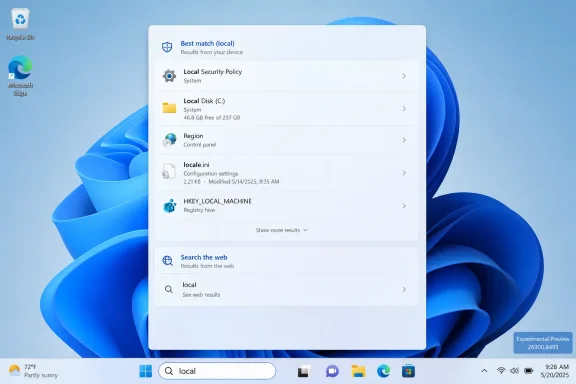
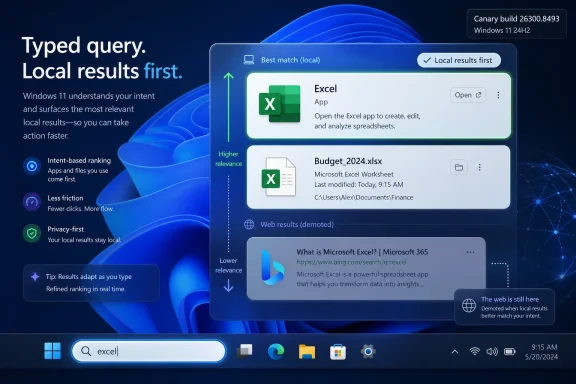
Microsoft is testing a Windows 11 Search change in Experimental Preview Build 26300.8493 that makes apps and local files appear ahead of web suggestions when they are the stronger match, after years of complaints that Start and taskbar search too often favored Bing over the PC. The change is small in release-note language and large in user meaning. It suggests Microsoft has finally accepted that the fastest way to improve Windows Search is not to make it more ambitious, but to make it less presumptuous. For an operating system still trying to win back trust from power users, that distinction matters.
Windows Search has long suffered from a category error. Users open Start, type the name of an app, a setting, or a file, and expect the operating system to behave like a local command surface. Microsoft has often treated the same interaction as a funnel into a broader Microsoft services experience.
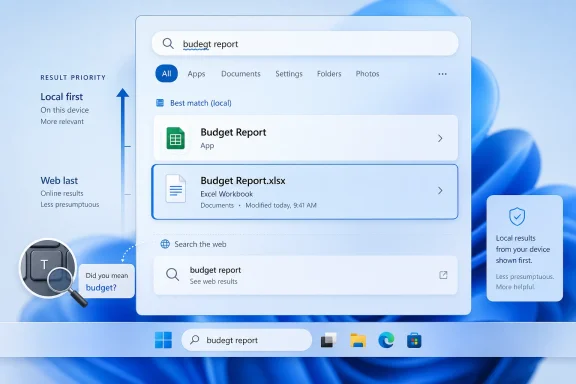
That tension is why this latest Insider change is more interesting than its modest wording suggests. Microsoft says it has started making the Windows Search box more relevant, beginning with making it easier to find files and apps. In practical terms, files and applications should now more reliably appear ahead of web suggestions when the local content is the stronger match.
That sounds obvious because it is obvious. But obviousness has not always been Windows 11’s design principle. The operating system has repeatedly asked users to accept that the “modern” version of a familiar feature may be less direct, less customizable, or more cloud-connected than the one it replaced.
Search became one of the clearest examples. It was not broken in the theatrical sense; most of the time, it returned something. The problem was that “something” too often felt like Microsoft’s answer rather than the user’s answer.
This is what might be called the Bing tax: not a monetary cost, but a repeated cognitive toll. Each misplaced suggestion forces the user to verify whether Windows understood the intent. Over time, that turns a muscle-memory action into a small negotiation with the operating system.
The consequences are especially visible for IT pros and experienced Windows users. These are people who often use Start search as a launcher, a settings router, and a quick file retriever. They do not need a search engine result for a term that happens to overlap with a document, script, internal tool, or local executable.
Microsoft’s new ranking behavior appears aimed at precisely this pain point. If local content is a stronger match, it should win. That does not remove web search, but it changes the hierarchy in a way that better matches the user’s likely intent.
Microsoft’s March quality push explicitly framed search consistency across Taskbar, Start, File Explorer, and Settings as part of the Windows 11 repair agenda. That language matters. It treats Search not as a decorative feature or a Bing endpoint, but as connective tissue across the shell.
The current Insider build appears to be one of the first visible pieces of that broader promise. Windows Latest reports that preview builds are already better at surfacing apps and files, including cases involving typos or ambiguous queries. If that holds up across wider testing, it would represent a meaningful behavioral fix rather than a cosmetic refresh.
Still, Microsoft’s wording is careful. Files and apps appear ahead of web suggestions when local content is a stronger match. That leaves plenty of room for Bing-backed results to remain prominent when Microsoft decides the match is not strong enough.
That distinction is central to understanding the direction of Windows 11. Microsoft is not retreating from cloud-connected Windows. It is trying to make cloud-connected Windows less annoying.
There is a defensible version of web integration in system search. A query that is obviously not local can reasonably produce a web suggestion. A user searching for weather, a public figure, or a general term may welcome the shortcut. The issue has been Windows’ willingness to treat too many local-looking actions as opportunities for the web.
The ideal version of this feature is not web search versus local search. It is intent-aware search that knows when to stay on the device. Microsoft’s latest change is a step toward that ideal, but only a step.
Power users know how to modify policy or Registry values. They also know that they should not have to. If Microsoft believes web suggestions are useful, it can leave them enabled by default while still offering a plain-language switch for users who want local-only behavior.
The lack of a mainstream toggle keeps the debate unnecessarily ideological. Instead of arguing over whether web search belongs in Windows at all, Microsoft could let users choose. That would turn a trust problem into a preference.
There are signs Microsoft understands the broader issue. Windows Latest says Microsoft is internally testing clearer separation between local and web-generated results. If that reaches public builds, it could reduce the sense that Windows is blending fundamentally different sources into one undifferentiated answer pile.
That caveat matters because Windows enthusiasts have lived through enough preview enthusiasm to be skeptical. A good change in an Insider build is not the same as a fixed Windows. It is an indication of direction.
But direction counts. Microsoft’s 2026 Windows quality messaging has been unusually direct about long-standing user complaints, including performance, reliability, taskbar behavior, Start customization, File Explorer polish, and search consistency. The Search ranking change fits neatly inside that campaign.
The company is not merely adding another AI button or cloud panel. It is addressing a basic behavior that has made Windows 11 feel less obedient than Windows should feel. That is the sort of change that can matter more than a headline feature.
These are not futuristic features. They are repairs to trust. Microsoft is filling in gaps created when Windows 11 launched with a cleaner visual design but fewer shell options.
That pattern has become difficult to ignore. Windows 11’s original pitch emphasized modernity, polish, security, and a simplified interface. The 2026 quality push is quieter and more revealing: it is about restoring control, reducing friction, and making the OS feel less like it is arguing with the person using it.
Search is a perfect candidate for this treatment because it is both mundane and central. Users touch it constantly. When it fails, it fails in front of everyone.
If one employee searches for an internal file name and gets a web result, that is not just a bad UX moment. It is a reminder that Windows blends local and online surfaces in ways that can be difficult to explain. Even when no sensitive data is exposed, the optics are poor.
A more consistent ranking model helps. If apps and files reliably surface ahead of web suggestions, help desks receive fewer “Windows can’t find my app” complaints. Users are less likely to assume indexing is broken. Admins have an easier time teaching people what to expect.
But enterprise IT will still want policy clarity. A better default is welcome; a controllable default is better. Microsoft’s credibility with organizations depends not only on what Windows does, but on whether admins can define what Windows is allowed to do.
Windows Latest’s testing suggests the new behavior improves typo handling and local-result priority. That is important because a search system that only works for exact input is not really intelligent. It is merely literal.
This is where Microsoft’s internal benchmark of “accurate results,” as reported by Windows Latest, becomes meaningful. Accuracy in desktop search is not the same as accuracy in web search. Desktop accuracy is about understanding the user’s working context: installed apps, recent documents, indexed locations, file names, extensions, and settings.
If Microsoft gets that right, Windows Search becomes less of a gamble. Users will type with confidence rather than hesitation. That confidence is the real product.
Microsoft’s promise of a more consistent experience across Taskbar, Start, File Explorer, and Settings is therefore ambitious. Consistency is easy to promise at the UI level and hard to deliver at the behavioral level. A search box that looks the same but ranks results differently is still inconsistent.
There is also the performance question. File Explorer search has long been criticized for feeling slow or unpredictable, especially outside indexed locations. If Microsoft wants users to believe in Windows Search again, ranking improvements need to arrive with speed improvements.
The best outcome would be a search stack that feels coherent without becoming simplistic. Start should remain fast and launcher-like. Explorer should be deeper and file-aware. Settings should understand plain-language intent. The user should not have to learn three separate search personalities.
That does not mean AI has no place in Windows Search. Semantic search, natural-language queries, and better context awareness could all help. But if the foundation is wrong, AI becomes decoration on a crooked shelf.
A search box that sends “calculator” to the web before showing Calculator does not need a large language model. It needs better ranking discipline. A system that confuses a local file query with a movie search needs clearer intent detection before it needs generative gloss.
Microsoft’s most persuasive Windows improvements in 2026 may turn out to be the least glamorous ones. The company appears to be rediscovering that users do not experience operating systems as keynote demos. They experience them as hundreds of tiny interactions that either respect or interrupt their flow.
This is the balance Windows 11 has struggled to strike. Microsoft wants Windows to be a gateway to services: search, news, Microsoft account features, OneDrive, Edge, Copilot, and the Microsoft Store. Users want Windows to be a reliable platform that launches their apps and manages their files.
Those goals are not always incompatible. OneDrive can be useful. Web search can be convenient. Cloud identity can simplify device setup. The conflict begins when service promotion outranks the user’s immediate intent.
The Search change is therefore a test of restraint. Microsoft does not need to abandon its ecosystem ambitions. It needs to stop making users feel like every basic OS action has been quietly enrolled in them.
Search cannot solve all of that. But it can become a symbol of whether Microsoft’s quality campaign is real. If a daily feature becomes faster, more predictable, and more respectful of local intent, users will notice.
That is why this matters more than its place in the changelog. Search is a trust interface. It is where the user asks Windows, “Do you know what I mean?” For too long, the answer has sometimes felt like, “Would you like to ask Bing instead?”
A better answer would be boring in the best possible way. Here is your app. Here is your file. Here is the setting you wanted. The web can wait.
The company should be able to ship this in stages. First, prioritize strong local matches. Then label local and web results clearly. Then improve typo tolerance and recent-file awareness. Then give users and administrators obvious controls over web integration.
That sequence would also let Microsoft preserve the parts of web search that make sense. A local-first model is not the same as an offline-only model. It simply says the PC should answer for itself before outsourcing the question.
For WindowsForum readers, the practical advice is to watch the Insider builds but avoid declaring victory too early. The current behavior needs to survive testing, reach stable Windows 11 releases, and behave consistently across hardware, regions, account types, and managed environments.
The concrete points are straightforward:
 Microsoft Discovers That Search Should Search the Computer First
Windows Search has long suffered from a category error. Users open Start, type the name of an app, a setting, or a file, and expect the operating system to behave like a local command surface. Microsoft has often treated the same interaction as a funnel into a broader Microsoft services experience.That tension is why this latest Insider change is more interesting than its modest wording suggests. Microsoft says it has started making the Windows Search box more relevant, beginning with making it easier to find files and apps. In practical terms, files and applications should now more reliably appear ahead of web suggestions when the local content is the stronger match.
That sounds obvious because it is obvious. But obviousness has not always been Windows 11’s design principle. The operating system has repeatedly asked users to accept that the “modern” version of a familiar feature may be less direct, less customizable, or more cloud-connected than the one it replaced.
Search became one of the clearest examples. It was not broken in the theatrical sense; most of the time, it returned something. The problem was that “something” too often felt like Microsoft’s answer rather than the user’s answer.
The Bing Tax Was Paid in Tiny Moments of Friction
The irritation around Windows Search has never been only about Bing. It has been about priority, latency, and trust. When a user types the name of a local application and sees a web answer pushed into the foreground, the machine is no longer behaving like a tool under the user’s control.This is what might be called the Bing tax: not a monetary cost, but a repeated cognitive toll. Each misplaced suggestion forces the user to verify whether Windows understood the intent. Over time, that turns a muscle-memory action into a small negotiation with the operating system.
The consequences are especially visible for IT pros and experienced Windows users. These are people who often use Start search as a launcher, a settings router, and a quick file retriever. They do not need a search engine result for a term that happens to overlap with a document, script, internal tool, or local executable.
Microsoft’s new ranking behavior appears aimed at precisely this pain point. If local content is a stronger match, it should win. That does not remove web search, but it changes the hierarchy in a way that better matches the user’s likely intent.
The Change Matters Because Windows Search Is Really Three Products Wearing One Coat
Part of the difficulty is that “Windows Search” is not one thing in user perception. It is the Start menu search box, the taskbar search surface, File Explorer search, Settings search, and the indexing machinery underneath all of them. When one of those layers behaves inconsistently, the whole system feels unreliable.Microsoft’s March quality push explicitly framed search consistency across Taskbar, Start, File Explorer, and Settings as part of the Windows 11 repair agenda. That language matters. It treats Search not as a decorative feature or a Bing endpoint, but as connective tissue across the shell.
The current Insider build appears to be one of the first visible pieces of that broader promise. Windows Latest reports that preview builds are already better at surfacing apps and files, including cases involving typos or ambiguous queries. If that holds up across wider testing, it would represent a meaningful behavioral fix rather than a cosmetic refresh.
Still, Microsoft’s wording is careful. Files and apps appear ahead of web suggestions when local content is a stronger match. That leaves plenty of room for Bing-backed results to remain prominent when Microsoft decides the match is not strong enough.
Microsoft Is Not Removing the Web From Windows Search
Anyone hoping this is the beginning of a clean divorce between Windows Search and the web should temper expectations. Microsoft has not said that web results are going away. The company has said it is changing relevance behavior so local matches win more often when they should.That distinction is central to understanding the direction of Windows 11. Microsoft is not retreating from cloud-connected Windows. It is trying to make cloud-connected Windows less annoying.
There is a defensible version of web integration in system search. A query that is obviously not local can reasonably produce a web suggestion. A user searching for weather, a public figure, or a general term may welcome the shortcut. The issue has been Windows’ willingness to treat too many local-looking actions as opportunities for the web.
The ideal version of this feature is not web search versus local search. It is intent-aware search that knows when to stay on the device. Microsoft’s latest change is a step toward that ideal, but only a step.
Settings Still Lags Behind the Registry Reality
The other unresolved issue is control. Today, users who want to disable web search integration in Windows Search generally have to rely on policy or Registry-based methods rather than a simple Settings toggle. That remains a poor fit for a feature that affects ordinary daily use.Power users know how to modify policy or Registry values. They also know that they should not have to. If Microsoft believes web suggestions are useful, it can leave them enabled by default while still offering a plain-language switch for users who want local-only behavior.
The lack of a mainstream toggle keeps the debate unnecessarily ideological. Instead of arguing over whether web search belongs in Windows at all, Microsoft could let users choose. That would turn a trust problem into a preference.
There are signs Microsoft understands the broader issue. Windows Latest says Microsoft is internally testing clearer separation between local and web-generated results. If that reaches public builds, it could reduce the sense that Windows is blending fundamentally different sources into one undifferentiated answer pile.
The Insider Channel Is a Signal, Not a Shipping Promise
The build in question is part of Microsoft’s Experimental Channel testing, which means nobody should confuse it with a guaranteed production rollout in its exact current form. Experimental builds are where Microsoft can try interface and behavior changes before they reach mainstream users. Some survive intact, some mutate, and some disappear.That caveat matters because Windows enthusiasts have lived through enough preview enthusiasm to be skeptical. A good change in an Insider build is not the same as a fixed Windows. It is an indication of direction.
But direction counts. Microsoft’s 2026 Windows quality messaging has been unusually direct about long-standing user complaints, including performance, reliability, taskbar behavior, Start customization, File Explorer polish, and search consistency. The Search ranking change fits neatly inside that campaign.
The company is not merely adding another AI button or cloud panel. It is addressing a basic behavior that has made Windows 11 feel less obedient than Windows should feel. That is the sort of change that can matter more than a headline feature.
Windows 11’s Repair Job Is Happening One Old Complaint at a Time
The Search change should be read alongside Microsoft’s other recent Windows 11 reversals and refinements. The movable taskbar is being tested after years of frustration from users who wanted the flexibility Windows 10 and earlier versions allowed. Start menu sizing and taskbar personalization are also getting renewed attention.These are not futuristic features. They are repairs to trust. Microsoft is filling in gaps created when Windows 11 launched with a cleaner visual design but fewer shell options.
That pattern has become difficult to ignore. Windows 11’s original pitch emphasized modernity, polish, security, and a simplified interface. The 2026 quality push is quieter and more revealing: it is about restoring control, reducing friction, and making the OS feel less like it is arguing with the person using it.
Search is a perfect candidate for this treatment because it is both mundane and central. Users touch it constantly. When it fails, it fails in front of everyone.
Enterprise IT Will Care Less About Bing and More About Predictability
For administrators, the annoyance of web-first search is only part of the story. The bigger concern is predictability. In managed environments, search behavior affects training, support documentation, privacy expectations, and user confidence.If one employee searches for an internal file name and gets a web result, that is not just a bad UX moment. It is a reminder that Windows blends local and online surfaces in ways that can be difficult to explain. Even when no sensitive data is exposed, the optics are poor.
A more consistent ranking model helps. If apps and files reliably surface ahead of web suggestions, help desks receive fewer “Windows can’t find my app” complaints. Users are less likely to assume indexing is broken. Admins have an easier time teaching people what to expect.
But enterprise IT will still want policy clarity. A better default is welcome; a controllable default is better. Microsoft’s credibility with organizations depends not only on what Windows does, but on whether admins can define what Windows is allowed to do.
The Real Test Is Typo Tolerance and Ambiguous Intent
Search quality is often judged in edge cases. Anyone can return Notepad when the user types “notepad.” The harder problem is messy human input: partial names, typos, abbreviations, recently created files, synced folders, and queries that could be either local or web-based.Windows Latest’s testing suggests the new behavior improves typo handling and local-result priority. That is important because a search system that only works for exact input is not really intelligent. It is merely literal.
This is where Microsoft’s internal benchmark of “accurate results,” as reported by Windows Latest, becomes meaningful. Accuracy in desktop search is not the same as accuracy in web search. Desktop accuracy is about understanding the user’s working context: installed apps, recent documents, indexed locations, file names, extensions, and settings.
If Microsoft gets that right, Windows Search becomes less of a gamble. Users will type with confidence rather than hesitation. That confidence is the real product.
File Explorer Search Remains the Harder Mountain
Start and taskbar search get the attention, but File Explorer search may be the more stubborn problem. Explorer has to deal with local drives, OneDrive, network shares, indexed and non-indexed locations, metadata, content search, file types, and corporate storage patterns. It is a much messier surface than a launcher.Microsoft’s promise of a more consistent experience across Taskbar, Start, File Explorer, and Settings is therefore ambitious. Consistency is easy to promise at the UI level and hard to deliver at the behavioral level. A search box that looks the same but ranks results differently is still inconsistent.
There is also the performance question. File Explorer search has long been criticized for feeling slow or unpredictable, especially outside indexed locations. If Microsoft wants users to believe in Windows Search again, ranking improvements need to arrive with speed improvements.
The best outcome would be a search stack that feels coherent without becoming simplistic. Start should remain fast and launcher-like. Explorer should be deeper and file-aware. Settings should understand plain-language intent. The user should not have to learn three separate search personalities.
AI Is Not the Answer to Every Search Problem
This Search change is notable partly because it is not being sold primarily as an AI breakthrough. Microsoft has spent the last several years inserting Copilot branding and AI language across its product line. Yet the Windows frustrations most users complain about are often simpler: slow menus, inconsistent controls, missing options, unreliable search, and intrusive recommendations.That does not mean AI has no place in Windows Search. Semantic search, natural-language queries, and better context awareness could all help. But if the foundation is wrong, AI becomes decoration on a crooked shelf.
A search box that sends “calculator” to the web before showing Calculator does not need a large language model. It needs better ranking discipline. A system that confuses a local file query with a movie search needs clearer intent detection before it needs generative gloss.
Microsoft’s most persuasive Windows improvements in 2026 may turn out to be the least glamorous ones. The company appears to be rediscovering that users do not experience operating systems as keynote demos. They experience them as hundreds of tiny interactions that either respect or interrupt their flow.
The Politics of Defaults Are the Politics of Windows
Defaults are where Microsoft’s product strategy becomes visible. If web results are enabled by default, Bing remains present. If local results are ranked first when appropriate, users feel less manipulated. If a Settings toggle eventually appears, Microsoft signals that user agency matters.This is the balance Windows 11 has struggled to strike. Microsoft wants Windows to be a gateway to services: search, news, Microsoft account features, OneDrive, Edge, Copilot, and the Microsoft Store. Users want Windows to be a reliable platform that launches their apps and manages their files.
Those goals are not always incompatible. OneDrive can be useful. Web search can be convenient. Cloud identity can simplify device setup. The conflict begins when service promotion outranks the user’s immediate intent.
The Search change is therefore a test of restraint. Microsoft does not need to abandon its ecosystem ambitions. It needs to stop making users feel like every basic OS action has been quietly enrolled in them.
A Better Search Box Will Not Fix Windows 11 Alone
It would be easy to overstate this change. Windows 11 still has broader issues: inconsistent settings migration, legacy-modern UI collisions, performance complaints, update fatigue, Edge and account nudges, and the lingering sense that some Windows 10-era flexibility was traded away too casually.Search cannot solve all of that. But it can become a symbol of whether Microsoft’s quality campaign is real. If a daily feature becomes faster, more predictable, and more respectful of local intent, users will notice.
That is why this matters more than its place in the changelog. Search is a trust interface. It is where the user asks Windows, “Do you know what I mean?” For too long, the answer has sometimes felt like, “Would you like to ask Bing instead?”
A better answer would be boring in the best possible way. Here is your app. Here is your file. Here is the setting you wanted. The web can wait.
The Windows Search Fix Microsoft Can Actually Ship
The most encouraging part of this story is that it does not require Microsoft to invent a new category. It requires Microsoft to tune ranking, clarify sources, improve consistency, and expose controls. These are hard engineering and product decisions, but they are not science fiction.The company should be able to ship this in stages. First, prioritize strong local matches. Then label local and web results clearly. Then improve typo tolerance and recent-file awareness. Then give users and administrators obvious controls over web integration.
That sequence would also let Microsoft preserve the parts of web search that make sense. A local-first model is not the same as an offline-only model. It simply says the PC should answer for itself before outsourcing the question.
For WindowsForum readers, the practical advice is to watch the Insider builds but avoid declaring victory too early. The current behavior needs to survive testing, reach stable Windows 11 releases, and behave consistently across hardware, regions, account types, and managed environments.
The Changelog Line That Admits the Old Model Was Wrong
This is the rare Windows tweak whose importance lies in what it implies. By saying files and apps should more reliably appear ahead of web suggestions when local content is stronger, Microsoft is implicitly acknowledging that the prior balance was off. The company may not frame it as a correction, but users will.The concrete points are straightforward:
- Windows 11 Search is being changed in Insider testing so apps and files can outrank web suggestions when they are the better match.
- The change appears in Experimental Preview Build 26300.8493, so it is not yet a guarantee for every stable Windows 11 machine.
- Microsoft’s broader 2026 Windows quality push includes a more consistent search experience across Taskbar, Start, File Explorer, and Settings.
- Web results are not being removed from Windows Search, and Microsoft has not announced a simple Settings toggle to disable them.
- The most important next step is clearer separation between local and web results, especially for users and organizations that want predictable behavior.
- If Microsoft ships this carefully, the improvement could matter more in daily use than many larger Windows feature announcements.
References
- Primary source: Windows Latest
Published: Wed, 20 May 2026 00:00:03 GMT
Microsoft says Windows 11's Search will stop forcing web over your apps and local files in most cases
Windows 11's Search bar on the taskbar often prioritizes web results over apps and files, but that might soon change. www.windowslatest.com
- Related coverage: windowscentral.com
Microsoft finally begins testing movable and resizable Taskbar on Windows 11, restoring key customization features many users missed | Windows Central
Microsoft is now testing the option to move the Taskbar to the side of your screen on Windows 11.www.windowscentral.com - Related coverage: techradar.com
Windows 11 is getting some much-wanted features for the Start menu and taskbar, and that's great to see — but it's not the change I really want | TechRadar
The thing that tops my wish-list won't ever happen...www.techradar.com - Official source: blogs.windows.com
Our commitment to Windows quality
Hello Windows Insiders, I want to speak to you directly, as an engineer who has spent his career building technology that people depend on every day. Windows touches more people's lives than almost any technology on Earth. Every day, we hear from thblogs.windows.com - Related coverage: tomshardware.com
Microsoft promises major improvements to Windows 11 performance, reliability, and updates — lower RAM usage, fewer Copilot interactions, and enhanced File Explorer incoming | Tom's Hardware
It only took four years to get the taskbar working properly.www.tomshardware.com - Related coverage: windowsreport.com
Taskbar Repositioning Option Now Live With New Windows 11 Experimental (Dev) Build
Microsoft’s latest Experimental build adds movable Taskbar support, smaller Taskbar buttons, improved Search, updated widgets, and more. windowsreport.com
- Related coverage: techrepublic.com
Windows 11 Start Menu, Taskbar Are Getting More Customization
Microsoft is testing Windows 11 taskbar and Start menu updates, including movable taskbar positions, cleaner Start controls, and compact layout options.www.techrepublic.com
- Related coverage: technine.be
Windows 11 Insider Experimental Preview Build 26300.8493 – TechNine
Share this post:Share this post:www.technine.be - Related coverage: pureinfotech.com
Microsoft confirms major Windows 11 upgrades – movable Taskbar, less AI clutter, fewer update interruptions, more - Pureinfotech
Windows 11 gets long-awaited fixes as Microsoft improves Taskbar, updates, and performance while refining its AI approach. pureinfotech.com
- Related coverage: ntcompatible.com
Windows 11 Insider Experimental Preview Build 26300.8493 released
Windows 11 Build 26300 finally lets you move the taskbar to any screen edge and shrink its height for better screen real estate on compact displays. Widgets get quieter notifications while Windows Search prioritizes local files over web results, making everyday navigation noticeably faster.www.ntcompatible.com