Starting in April 2026, Microsoft is doing something Windows users have not seen before: surfacing Secure Boot certificate status directly inside the Windows Security app. That matters because the company’s original Secure Boot certificates, issued in 2011, are now approaching expiration in June 2026, and Microsoft is pushing the updated 2023 certificates through Windows Update to keep the boot chain protected. At the same time, the April Patch Tuesday release has reignited debate over how aggressively Microsoft uses Windows Update not just to fix security flaws, but to steer user behavior and promote its own browser stack.
For most of the Windows era, the operating system’s security model has evolved in layers rather than through dramatic visible changes to everyday users. The current shift around Secure Boot is different because it touches the earliest stage of startup, where trust is established before Windows proper begins loading. That makes it one of the most sensitive maintenance tasks Microsoft has attempted across the Windows ecosystem in recent memory.
Secure Boot was introduced as part of the broader UEFI transition and has long relied on Microsoft-issued certificates to validate firmware and boot components. Those certificates, first issued in 2011, are now nearing the end of their validity window, with expiration beginning in June 2026 and continuing through later months depending on the certificate chain in question. Microsoft says the replacement certificates are being delivered automatically through Windows Update, but some devices may need OEM firmware support to complete the transition.
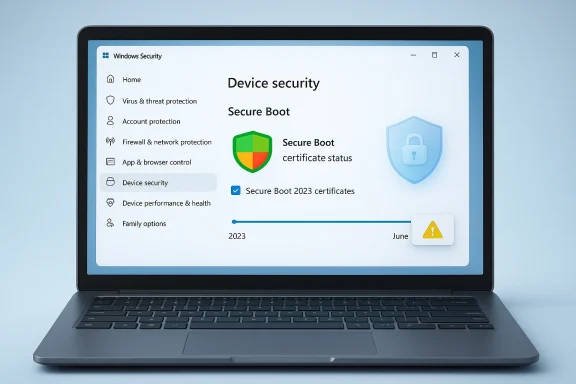
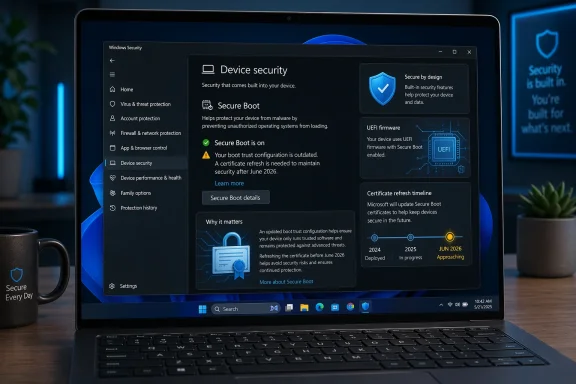
The company’s decision to expose status in the Windows Security app is more than a cosmetic tweak. It reflects a recognition that users and IT teams need a simple, at-a-glance signal to know whether a device is on the old trust chain, is still waiting for an update, or has run into a hardware or firmware limitation. Microsoft now describes distinct states such as fully updated, not yet updated, and requires action, each paired with colored badges and explanatory text.
That visibility matters because the impact is not identical across the Windows installed base. Newer devices manufactured in roughly the last two years are more likely to already carry the 2023 certificate set, while older systems may still depend on the 2011 lineage. In other words, the problem is not just “patch or don’t patch”; it is a coordinated migration across a sprawling hardware ecosystem with uneven firmware quality, inconsistent management practices, and millions of endpoints in enterprise and consumer settings.
The significance of the 2026 certificate transition is that the old trust anchors are finally aging out. Microsoft says the current certificates begin expiring in June 2026, and once a device reaches that point without the refreshed certificates, it may still boot normally but lose the ability to receive some boot-chain security updates. That distinction is crucial: the machine may not immediately break, but its protection against future boot-level threats becomes progressively weaker.
That matters because certificate expiration is the sort of problem that can remain invisible until the cost of delay is already high. Microsoft’s new alerts are an admission that boot-time trust needs better user-facing telemetry, especially when the solution depends on a blend of Windows servicing, OEM firmware, and device-specific compatibility. It is a rare case where more visibility is also a more honest security posture.
Key implications:
The timing is not accidental. The company needs enough lead time to identify devices that cannot be updated automatically because of firmware or hardware limitations. By surfacing status in April and expanding alerting in May, Microsoft can create a two-step warning runway before the June 2026 certificate deadline begins to bite. That is a sensible operational choice, even if it also reveals how much coordination is required behind the scenes.
In practice, the experience will vary. Devices managed by organizations may receive certificate updates through IT tooling, while home PCs might depend on whether they are current on cumulative updates and whether the firmware chain cooperates. That variation is exactly why Microsoft is trying to normalize the status information inside the Windows Security app instead of leaving the issue buried in support articles and OEM documentation.
Numbered action path for users:
For enterprises, the challenge is more complicated because firmware, device models, and management policy all interact. Microsoft’s guidance for IT professionals notes that some devices may be blocked by compatibility issues, and it even documents temporary pauses for certain configurations while those issues are investigated. That kind of exception handling is normal in fleet management, but it makes the rollout feel less like a universal update and more like a large-scale remediation campaign.
This also has audit consequences. A device that boots successfully may still be out of compliance if it cannot receive the new certificate set, and Microsoft says that could leave it at risk as new boot-chain vulnerabilities emerge. In regulated environments, that is the kind of gap that turns into a policy finding long before it turns into an incident report.
Enterprise takeaways:
What makes the month especially controversial is the reported behavior in which Windows 11 opens Microsoft Edge automatically for some users after the first restart following the update. That has drawn criticism because it looks less like a neutral post-update confirmation flow and more like product promotion embedded in an operating-system mechanism. Microsoft has previously described similar behavior as a limited experiment, saying it was trying to understand how people access the web after boot.
The deeper issue is trust. If users begin to associate Windows Update with product messaging rather than purely security and stability improvements, then even legitimate maintenance features risk being viewed with suspicion. That is a self-inflicted credibility problem Microsoft can ill afford at the same moment it is asking users to trust a new Secure Boot status system and a new certificate migration path.
Important contrasts:
Microsoft says the coordinated rollout spans Windows servicing, firmware updates, and hardware configurations delivered by OEMs worldwide. That is a telling phrase because it underscores just how many moving parts exist between a Windows update being available and a device being truly remediated. A modern Windows machine is not a single product; it is a layered trust stack built by multiple vendors over several years.
There is also a generational hardware divide. Newer machines are more likely to be ready because OEMs have had time to ship the refreshed certificates in firmware, while older systems may depend on consumer patch habits or administrative discipline. That means the same Microsoft announcement lands differently depending on whether a PC is two years old, six years old, or sitting in a managed corporate image.
Historical lesson bullets:
The most useful consumer mindset is to treat this as a checkup, not a one-click fix. If the app shows that the device is not yet updated, the next step is usually to let Windows Update finish its work and keep the device online long enough for the certificate payloads to arrive. If the app says the device requires action, the user is likely dealing with a hardware or firmware boundary, not a simple missing patch.
Consumers should also be alert to the fact that Windows Security may surface status changes progressively. Microsoft says more prominent notifications, including system alerts, will arrive in May 2026, which means the app is only the first layer of the user experience. If you rely on Windows in a personal or small-business setting, it is wise to treat those alerts as actionable rather than ornamental.
Consumer checklist:
The advantage is obvious: Microsoft can coordinate a mass trust refresh without asking users to understand UEFI internals. The downside is equally obvious: if something goes wrong, Microsoft absorbs blame for an issue that may actually stem from OEM firmware, update policies, or inconsistent device histories. That is the price of centralization in a fragmented ecosystem.
The strategic value is that Windows remains relevant in a threat landscape where firmware-level attacks are no longer theoretical. The strategic risk is that user fatigue could set in if every major maintenance event comes with new prompts, warnings, and cross-promotional behavior. Microsoft must therefore balance clarity with restraint, because the wrong UI choices can undermine even the best security program.
Strategic points:
The second question is whether Microsoft keeps the experience focused on security. If the company continues to intertwine update flows with Edge promotion or other product nudges, it may weaken the credibility of the very notifications it now needs users to trust. A secure platform is not just one that blocks malware; it is one that users believe is telling them the truth.
Source: https://www.forbes.com/sites/zakdof...rosoft-changes-windows-update-after-15-years/
 Overview
For most of the Windows era, the operating system’s security model has evolved in layers rather than through dramatic visible changes to everyday users. The current shift around Secure Boot is different because it touches the earliest stage of startup, where trust is established before Windows proper begins loading. That makes it one of the most sensitive maintenance tasks Microsoft has attempted across the Windows ecosystem in recent memory.Secure Boot was introduced as part of the broader UEFI transition and has long relied on Microsoft-issued certificates to validate firmware and boot components. Those certificates, first issued in 2011, are now nearing the end of their validity window, with expiration beginning in June 2026 and continuing through later months depending on the certificate chain in question. Microsoft says the replacement certificates are being delivered automatically through Windows Update, but some devices may need OEM firmware support to complete the transition.
The company’s decision to expose status in the Windows Security app is more than a cosmetic tweak. It reflects a recognition that users and IT teams need a simple, at-a-glance signal to know whether a device is on the old trust chain, is still waiting for an update, or has run into a hardware or firmware limitation. Microsoft now describes distinct states such as fully updated, not yet updated, and requires action, each paired with colored badges and explanatory text.
That visibility matters because the impact is not identical across the Windows installed base. Newer devices manufactured in roughly the last two years are more likely to already carry the 2023 certificate set, while older systems may still depend on the 2011 lineage. In other words, the problem is not just “patch or don’t patch”; it is a coordinated migration across a sprawling hardware ecosystem with uneven firmware quality, inconsistent management practices, and millions of endpoints in enterprise and consumer settings.
Why Secure Boot Certificates Matter Now
Secure Boot is easy to misunderstand because it operates below the level where most users ever look. It is not a typical app or driver update; it is a trust mechanism that checks whether the software starting the machine has been signed by an approved authority. That means it can block bootkit-style attacks before traditional antivirus products even have a chance to load, which is precisely why Microsoft and security vendors treat it as a foundational control.The significance of the 2026 certificate transition is that the old trust anchors are finally aging out. Microsoft says the current certificates begin expiring in June 2026, and once a device reaches that point without the refreshed certificates, it may still boot normally but lose the ability to receive some boot-chain security updates. That distinction is crucial: the machine may not immediately break, but its protection against future boot-level threats becomes progressively weaker.
What the new status view changes
The Windows Security app now shows whether the device has received the updates, whether action is needed, and whether a limitation is blocking full remediation. Microsoft says the interface can present a green checkmark, a yellow caution indicator, or a red stop state, with text that clarifies what is happening and what the user should do next. The aim is not merely to inform; it is to reduce the chance that a silent firmware issue becomes a security blind spot.That matters because certificate expiration is the sort of problem that can remain invisible until the cost of delay is already high. Microsoft’s new alerts are an admission that boot-time trust needs better user-facing telemetry, especially when the solution depends on a blend of Windows servicing, OEM firmware, and device-specific compatibility. It is a rare case where more visibility is also a more honest security posture.
Key implications:
- Boot-level attacks are harder to stop than ordinary malware.
- Certificate renewal is a maintenance issue, not a feature upgrade.
- Old hardware is more likely to need manual intervention.
- Enterprise fleets may encounter device-specific exceptions.
- Visibility is now part of the remediation strategy.
How Microsoft Is Rolling It Out
Microsoft says the Secure Boot certificate updates are delivered automatically through Windows Update, which is the least disruptive path for the broadest set of users. The company also states that the Windows Security app enhancements begin rolling out in April 2026, with additional notifications outside the app arriving in May 2026. That staggered approach suggests Microsoft wants the telemetry in place before the expiration pressure peaks.The timing is not accidental. The company needs enough lead time to identify devices that cannot be updated automatically because of firmware or hardware limitations. By surfacing status in April and expanding alerting in May, Microsoft can create a two-step warning runway before the June 2026 certificate deadline begins to bite. That is a sensible operational choice, even if it also reveals how much coordination is required behind the scenes.
The device experience
For most users, the flow should be simple: install the latest Windows updates, open Windows Security, and check the Secure Boot status. Microsoft says a fully updated device will show the green indicator and explicitly state that all required certificate updates have been applied, while older devices will carry text describing what remains outstanding. In theory, this should turn a hidden firmware event into a visible, actionable status check.In practice, the experience will vary. Devices managed by organizations may receive certificate updates through IT tooling, while home PCs might depend on whether they are current on cumulative updates and whether the firmware chain cooperates. That variation is exactly why Microsoft is trying to normalize the status information inside the Windows Security app instead of leaving the issue buried in support articles and OEM documentation.
Numbered action path for users:
- Install the latest Windows cumulative update.
- Open Windows Security and check Device security > Secure Boot.
- Confirm the text says all required certificate updates have been applied.
- If the device is marked not yet updated, reconnect to the internet and run Windows Update again.
- If the device requires action, contact the OEM or IT administrator.
The Enterprise Problem Is Bigger Than the Home Problem
For consumers, the biggest risk is complacency. A home user may see “Secure Boot is on” and assume everything is fine, even if the old certificate set remains in place. Microsoft is explicitly warning that a green checkmark alone does not prove the certificate migration is complete, which is a subtle but important distinction. On is not the same thing as fully updated.For enterprises, the challenge is more complicated because firmware, device models, and management policy all interact. Microsoft’s guidance for IT professionals notes that some devices may be blocked by compatibility issues, and it even documents temporary pauses for certain configurations while those issues are investigated. That kind of exception handling is normal in fleet management, but it makes the rollout feel less like a universal update and more like a large-scale remediation campaign.
Why IT teams should care
The most important enterprise implication is that secure boot compliance is becoming a visible operational metric. That means patching teams, endpoint teams, and firmware teams can no longer treat it as an abstract dependency; they have to coordinate around it. Microsoft’s own guidance highlights the role of OEM firmware updates and diagnostic reporting, which is a reminder that hardware vendors remain part of the security chain.This also has audit consequences. A device that boots successfully may still be out of compliance if it cannot receive the new certificate set, and Microsoft says that could leave it at risk as new boot-chain vulnerabilities emerge. In regulated environments, that is the kind of gap that turns into a policy finding long before it turns into an incident report.
Enterprise takeaways:
- Fleet visibility is now a security requirement.
- Firmware ownership matters as much as Windows patching.
- Compliance gaps may exist even when devices appear healthy.
- Unsupported hardware could require replacement planning.
- Reporting will likely become part of standard device governance.
Windows Update Is Doing More Than Security Maintenance
The Secure Boot changes are the substantive story, but they are not the only reason Windows Update is in the headlines. Microsoft’s April Patch Tuesday also fixed a large volume of security vulnerabilities, including actively exploited issues, which reinforces the point that the update pipeline now carries both urgent risk reduction and long-tail trust maintenance. This is no longer just “install the latest patch”; it is an ecosystem hygiene exercise.What makes the month especially controversial is the reported behavior in which Windows 11 opens Microsoft Edge automatically for some users after the first restart following the update. That has drawn criticism because it looks less like a neutral post-update confirmation flow and more like product promotion embedded in an operating-system mechanism. Microsoft has previously described similar behavior as a limited experiment, saying it was trying to understand how people access the web after boot.
Security UX or browser promotion?
The tension here is obvious. On the one hand, operating systems do sometimes use the first post-update session to explain what changed. On the other hand, opening a browser window by default, especially without a close button or obvious opt-out in the moment, feels like a nudge that is difficult to interpret charitably. The optics are even worse when the browser in question is Microsoft Edge, which has long struggled to gain meaningful market share against Chrome.The deeper issue is trust. If users begin to associate Windows Update with product messaging rather than purely security and stability improvements, then even legitimate maintenance features risk being viewed with suspicion. That is a self-inflicted credibility problem Microsoft can ill afford at the same moment it is asking users to trust a new Secure Boot status system and a new certificate migration path.
Important contrasts:
- Secure Boot notices are defensive and security-oriented.
- Edge auto-launch is promotional and behavior-shaping.
- Both happen in update context, which amplifies user sensitivity.
- User trust is now an operating-system asset.
- Good intentions do not automatically create good optics.
Historical Context: Why This Took 15 Years
Secure Boot certificates are not being refreshed because Microsoft suddenly discovered a problem in 2026. They are being refreshed because the original trust material is reaching the end of a planned lifespan that traces back to the Windows 8 UEFI era. In that sense, the current shift is less a crisis than the inevitable consequence of a long-lived platform design.Microsoft says the coordinated rollout spans Windows servicing, firmware updates, and hardware configurations delivered by OEMs worldwide. That is a telling phrase because it underscores just how many moving parts exist between a Windows update being available and a device being truly remediated. A modern Windows machine is not a single product; it is a layered trust stack built by multiple vendors over several years.
The long arc of trust management
The 2011 certificates were good enough for an entire era of PCs, but no trust anchor is meant to last forever. Eventually, operational safety requires rotation, not just patching, and that is what Microsoft is doing now. The lesson is that foundational security systems need lifecycle planning just as much as applications do.There is also a generational hardware divide. Newer machines are more likely to be ready because OEMs have had time to ship the refreshed certificates in firmware, while older systems may depend on consumer patch habits or administrative discipline. That means the same Microsoft announcement lands differently depending on whether a PC is two years old, six years old, or sitting in a managed corporate image.
Historical lesson bullets:
- Security roots age out, even when the platform remains stable.
- OEM firmware can be as important as Windows itself.
- Visible status becomes necessary when invisible assumptions expire.
- Old devices often inherit the cost of long transitions.
- Lifecycle planning is the real story behind the certificate change.
Consumer Impact: What Home Users Should Actually Do
For home users, the advice is straightforward but easy to ignore: make sure Windows Update is current and then verify the Secure Boot status in Windows Security. Microsoft says most devices will receive the updated certificates automatically, but that is not a guarantee for every device, especially older hardware or systems with unusual firmware constraints.The most useful consumer mindset is to treat this as a checkup, not a one-click fix. If the app shows that the device is not yet updated, the next step is usually to let Windows Update finish its work and keep the device online long enough for the certificate payloads to arrive. If the app says the device requires action, the user is likely dealing with a hardware or firmware boundary, not a simple missing patch.
What the consumer should watch for
Microsoft’s messaging is careful because it needs to avoid panic. The company is not saying that every PC will stop booting in June; it is saying that the systems most exposed to boot-chain threats will lose the ability to get future protection unless they receive the new certificates. That is a serious issue, but it is also a more nuanced one than the “your PC will die” interpretation some posts online may imply.Consumers should also be alert to the fact that Windows Security may surface status changes progressively. Microsoft says more prominent notifications, including system alerts, will arrive in May 2026, which means the app is only the first layer of the user experience. If you rely on Windows in a personal or small-business setting, it is wise to treat those alerts as actionable rather than ornamental.
Consumer checklist:
- Run Windows Update and install the latest cumulative patch.
- Open Windows Security and inspect Secure Boot status.
- Do not rely only on the green checkmark.
- Keep the device online long enough for automatic delivery.
- Escalate to the OEM if the app says the device needs action.
What This Means for Microsoft’s Security Strategy
Microsoft is increasingly using Windows itself as a security distribution platform, not just a desktop OS. That includes delivering certificate transitions, boot-chain safeguards, and in-app guidance that makes complex infrastructure changes visible to non-experts. In a world of persistent firmware threats, that approach is logical, even if it is operationally messy.The advantage is obvious: Microsoft can coordinate a mass trust refresh without asking users to understand UEFI internals. The downside is equally obvious: if something goes wrong, Microsoft absorbs blame for an issue that may actually stem from OEM firmware, update policies, or inconsistent device histories. That is the price of centralization in a fragmented ecosystem.
Security at platform scale
This also illustrates a broader shift in how Microsoft thinks about security operations. Rather than waiting for admins to notice a documentation change, the company is embedding status signals into the operating system itself and extending notifications beyond the app when necessary. That is a more modern approach to trust maintenance, but it also blurs the line between an OS and a managed security service.The strategic value is that Windows remains relevant in a threat landscape where firmware-level attacks are no longer theoretical. The strategic risk is that user fatigue could set in if every major maintenance event comes with new prompts, warnings, and cross-promotional behavior. Microsoft must therefore balance clarity with restraint, because the wrong UI choices can undermine even the best security program.
Strategic points:
- Windows is becoming a trust orchestration layer.
- Security UX now matters as much as patch content.
- Firmware visibility is a competitive advantage.
- OEM coordination remains the hardest part.
- Excessive prompting can erode user confidence.
Strengths and Opportunities
The strongest aspect of this rollout is that it finally gives users a practical way to see whether a deeply technical security transition has happened on their device. That should reduce guesswork, improve compliance, and make it easier for both consumers and IT teams to act before June 2026 arrives. It also gives Microsoft a platform to harden the Windows boot chain without requiring a separate utility or arcane manual checks.- Better visibility for a hidden security dependency.
- Automatic delivery for most supported devices.
- Clear status states that reduce ambiguity.
- Improved enterprise compliance through shared telemetry.
- Lower user friction compared with manual certificate management.
- Stronger protection against boot-level threats.
- Earlier warning before expiration pressure spikes.
Risks and Concerns
The main risk is that users will misread the status signals, assume they are protected, and stop looking deeper. Microsoft’s own warning about the green checkmark makes clear that visibility alone is not enough if the wording is not precise enough to distinguish a functional boot state from a fully refreshed certificate chain. That is a communication risk as much as a technical one.- Misinterpretation of “Secure Boot on” as “fully updated.”
- Hardware limitations on older or noncompliant devices.
- OEM delays that slow the final mile of remediation.
- Enterprise complexity across mixed device fleets.
- User distrust if update UX feels promotional.
- Notification fatigue if warnings become too frequent.
- False reassurance when the status badge looks green but the certificate state is incomplete.
Looking Ahead
The next few weeks will tell us whether Microsoft’s new Secure Boot status view is merely informative or truly actionable for a broad range of PCs. The most important practical question is whether the automatic certificate rollout reaches enough older systems before June 2026 to prevent a wave of exceptions, warnings, and support calls. If the answer is yes, this will be remembered as a quiet but important platform transition.The second question is whether Microsoft keeps the experience focused on security. If the company continues to intertwine update flows with Edge promotion or other product nudges, it may weaken the credibility of the very notifications it now needs users to trust. A secure platform is not just one that blocks malware; it is one that users believe is telling them the truth.
- May 2026 alerts should expose lagging systems more clearly.
- OEM firmware updates may become the deciding factor for some PCs.
- Enterprise reporting will likely mature quickly around these states.
- Edge-related update behavior may trigger more scrutiny.
- June 2026 is the real deadline for the old certificate chain.
- User trust will determine whether Microsoft’s messaging succeeds.
Source: https://www.forbes.com/sites/zakdof...rosoft-changes-windows-update-after-15-years/
Last edited: