

Microsoft’s latest Windows 11 security guidance settles a question that has lingered for years: for many users, Microsoft Defender Antivirus is enough. In a new Microsoft article, the company says Windows 11 includes built-in antivirus protection that is active by default, continuously updated, and designed to cover everyday risk without extra software, a position that aligns with Microsoft’s broader pitch for Windows 11 as a layered, secure-by-default platform. That does not mean every third-party suite is obsolete, but it does mean the old reflex of installing a separate antivirus on every new PC is losing its grip. The real story is less about antivirus itself and more about how much of modern security Microsoft believes it can now absorb into the operating system. ars, the Windows security conversation was shaped by a simple assumption: if you wanted to be safe, you bought antivirus. That made sense in the era of Windows XP and Windows 7, when built-in protection was limited and paid suites filled genuine gaps in malware defense, browser filtering, and family controls. Microsoft spent much of the last decade trying to rewrite that script by turning Windows Security into a layered defense system rather than a basic scanner, and Windows 11 is where that effort has become most visible.
The current messageicrosoft is no longer speaking in tentative terms. It now says the built-in protection stack in Windows 11 covers common attack paths and that, for many users, Defender eliminates the need for additional software. That is a meaningful shift from the “best effort” posture many people still associate with Windows security. It reflects both product maturity and a broader market reality: antivirus is no longer just about detecting files after the fact, but about stopping risky links, unsafe downloads, and suspicious behavior before they become an incident.
Microsoft’s wording also matters because overpromise. The company is not claiming that no one should ever use third-party protection. Instead, it frames the decision around how a PC is used and which features matter to the user. That nuance is important because modern threats have moved beyond straightforward malware into phishing, fake login pages, credential theft, and social engineering, which means a simple file scanner is only one piece of the picture.
At the same time, the company’s support and product messaging make clear that the built-in stack is not a minimalist placeholder. Microsoft points to real-time scanning, cloud intelligence, SmartScreen reputation checks, and ransomware protections as part of the default Windows 11 experience. In other words, Defender is not being sold as a single app, but as the centerpiece of a broader security posture that starts when the device is first turned on.
What makes this moment different is that Microsoft is saying the quiet part out loud. For ordinary users with current updates, default settings, and cautious browsing habits, the company now believes the built-in baseline is strong enough. That is less a marketing claim than a recognition that the security stack has evolved to the point where the old “install a second antivirus just in case” advice is often more habit than necessity.
Microsoft’s guidance is more measured than the headline suggests. The company says that for many Windows 11 users, Defender covers everyday risk without requiring additional software, and that any decision to add a third-party product should depend on the user’s actual needs. That is a strong endorsement of the built-in stack, but it is not a blanket dismissal of all alternatives.
The practical message is straightforward: Windows 11 already includes the protections most home users need, provided the machine is updated and the defaults are left intact. Microsoft’s documentation emphasizes that Defender runs continuously, receives updates through Windows Update, and works alongside SmartScreen to help block unsafe sites, files, and apps. In this model, the antivirus question is no longer “what should I install?” but “what extra value am I actually buying?”
That is a reasonable thesis because most consumer infections do not begin with a sophisticated exploit. They begin with a bad click, a fake installer, a convincing phishing page, or a user overriding a warning they should have respected. Windows 11’s security stack is aimed at those moments of human error, which is why Microsoft talks so much about default-on protections and reputation checks. Security is being positioned as interruption, not just cleanup.
This is the most important nuance in Microsoft’s message: the company is narrowing the category, not erasing it. Antivirus as a standalone detection engine is becoming commoditized. Antivirus as a broader package of account safety, household management, and identity services still has a market, but that market is no longer the same thing as “basic protection.”
That world has changed. Microsoft steadily folded security deeper into the OS, first with Windows Defender, then with SmartScreen, cloud-backed intelligence, exploit mitigation, and more integrated update handling. By the time Windows 11 arrived, the company could credibly claim that the platform itself had become the primary security product, with Defeible front end to a larger system.
It also changes the user experience in ways that are easy to overlook. Security software used to mean extra installs, trial periods, pop-ups, browser hooks, and background scans that could make a PC feel heavier than it should. Microsoft’s pitch is that the system should now protect itself without forcing people to think about it every day, which is a far more modern idea of security.
There is also a business reason to make the message explicit. If users understand that Windows 11 already includes a credible baseline, Microsoft can reduce dependence on the old fear-based antivirus market and strengthen the value proposition of the operating system itself. That is a subtle but powerful shift in how Windows is sold and understood.
The architecture matters because it addresses threats at different stages. Defender handles malware scanning and behavior monitoring, while SmartScreen is designed to flag unsafe websites, downloads, and apps before they are launched. Controlled folder access adds another layer by protecting important files from unauthorized changes, including ransomware activity.
The platform integration is more than a convenience feature. Because Defender is part of the operating system, it can respond more cleanly to system signals and avoid the duplication that often happens when multiple real-time scanners compete for the same files. Microsoft notes that if another antivirus is installed and active, Defender shifts out of the way, which helps prevent the kind of conflicts that used to make security software notorious for slowing PCs down.
That distinction matters because many modern attacks are disguised as legitimate software, promotional downloads, or fake login screens. A conventional scanner can miss those scenarios if the payload is new or cleverly packaged, but a reputation-based system can still intervene at the moment of trust. Microsoft’s emphasis on SmartScreen shows that it understands the modern attack path is often social, not just technical.
Microsoft’s own guidance suggests that this feature is especially useful when important work files live in standard user folders or cloud-synced locations. That is a sensible approach because the value of ransomware protection is not abstract; it becomes very concrete the moment a file can no longer be recovered. A good antivirus is useful, but a backup-aware, folder-protecting system is better.
The confidence also comes from the way threats themselves have changed. Traditional malware is still real, but many compromises now begin with phishing, malicious documents, fake update prompts, or browser-based deception. That reality plays into the strengths of a layered platform that can combine file scanning, reputation checks, account safety, and cloud intelligence.
That is why Microsoft leans so heavily on SmartScreen and on user behavior. The best security posture today is not only about blocking known malicious files; it is about reducing the chances that a user will be tricked into authorizing the wrong action. In that sense, Windows 11 security is as much about behavioral guidance as it is about code.
This is also why Microsoft can make the “no additional software” argument without sounding reckless. A built-in security stack that updates automatically, covers the major attack vectors, and avoids competing real-time scanners is a very different proposition from the weak default protections people remember from the past. The market has matured, and Microsoft’s language is catching up to that fact.
In other words, Microsoft’s message is more believable now because the product has earned it. The company is not asking users to trust a promise; it is pointing to a security architecture that has become both technically mature and operationally simpler.
This is an important market distinction. The antivirus engine is increasingly a commodity, but the bundle around it may still have value. If a user wants a password manager, VPN, credit monitoring, or family supervision dashboard in one subscription, third-party software can still make sense even if Defender handles the core protection job well.
For some households, that bundle is genuinely useful. Families want oversight tools. Small offices want simpler administration. Some users simply prefer having one vendor handle multiple layers of protection and service. Those are legitimate reasons to pay, even if the old “you absolutely need antivirus” argument is no longer persuasive.
That distinction is especially important for advanced home users and small offices, who often sit between consumer and enterprise requirements. They may not need full corporate endpoint tooling, but they may still need more than a single default scanner. For them, the best answer may be Defender plus a few carefully chosen tools rather than a full third-party security suite.
That difference explains why “Defender is enough” is mostly a consumer statement. In corporate environments, security is not just about blocking malware on a single machine. It is about coordinating a fleet, managing risk across identities and devices, and making sure the organization can respond quickly when something goes wrong.
This is also why Microsoft can simplify the consumer story so effectively. A secure Windows PC does not need to feel like a project. It should behave more like a utility, with sensible defaults and low maintenance overhead. That is the model Microsoft is now promoting.
That is why business security decisions rarely mirror consumer advice. A company may choose a security stack based on manageability rather than whether one product scores slightly higher in home-use malware blocking. Microsoft knows that distinction, and its consumer messaging is not meant to replace enterprise planning. It is meant to reinforce the strength of the default Windows experience.
For those users, the decision is less about whether Defender is “good enough” in an abstract sense and more about whether extra features justify extra cost and complexity. Microsoft’s guidance is persuasive because it forces that question directly. The old instinct to buy more protection first and ask why later is no longer the only rational choice.
That does not mean third-party vendors disappear. It means they will have to prove value in areas that Windows does not fully cover, especially identity services, family management, cross-device dashboards, and business controls. In other words, the category survives by becoming more specific and more service-oriented.
Source: TechRadar https://www.techradar.com/computing...many-windows-11-users-need-but-is-that-right/
The current messageicrosoft is no longer speaking in tentative terms. It now says the built-in protection stack in Windows 11 covers common attack paths and that, for many users, Defender eliminates the need for additional software. That is a meaningful shift from the “best effort” posture many people still associate with Windows security. It reflects both product maturity and a broader market reality: antivirus is no longer just about detecting files after the fact, but about stopping risky links, unsafe downloads, and suspicious behavior before they become an incident.
Microsoft’s wording also matters because overpromise. The company is not claiming that no one should ever use third-party protection. Instead, it frames the decision around how a PC is used and which features matter to the user. That nuance is important because modern threats have moved beyond straightforward malware into phishing, fake login pages, credential theft, and social engineering, which means a simple file scanner is only one piece of the picture.
At the same time, the company’s support and product messaging make clear that the built-in stack is not a minimalist placeholder. Microsoft points to real-time scanning, cloud intelligence, SmartScreen reputation checks, and ransomware protections as part of the default Windows 11 experience. In other words, Defender is not being sold as a single app, but as the centerpiece of a broader security posture that starts when the device is first turned on.
What makes this moment different is that Microsoft is saying the quiet part out loud. For ordinary users with current updates, default settings, and cautious browsing habits, the company now believes the built-in baseline is strong enough. That is less a marketing claim than a recognition that the security stack has evolved to the point where the old “install a second antivirus just in case” advice is often more habit than necessity.
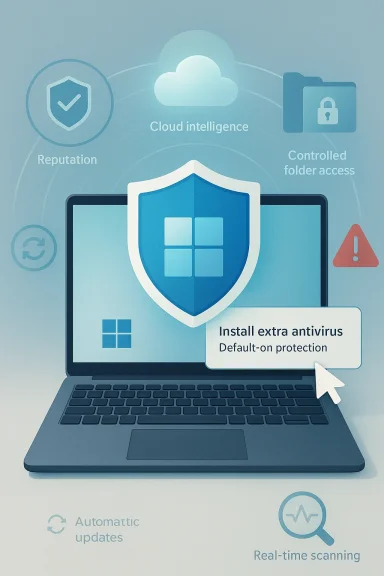 What Microsoft Is Actually Saying
Microsoft’s guidance is more measured than the headline suggests. The company says that for many Windows 11 users, Defender covers everyday risk without requiring additional software, and that any decision to add a third-party product should depend on the user’s actual needs. That is a strong endorsement of the built-in stack, but it is not a blanket dismissal of all alternatives.The practical message is straightforward: Windows 11 already includes the protections most home users need, provided the machine is updated and the defaults are left intact. Microsoft’s documentation emphasizes that Defender runs continuously, receives updates through Windows Update, and works alongside SmartScreen to help block unsafe sites, files, and apps. In this model, the antivirus question is no longer “what should I install?” but “what extra value am I actually buying?”
The consumer baseline
Microsoft is essentially describing a security floor, not a luxury add-on. That baseline includes built-in malware scanning, reputation-based blocking, and ransomware mitigation, all of which are designed to interrupt the kinds of mistakes that most often lead to consumer compromise. The operating assumption is that if a user keeps Windows current and avoids sketchy downloads, the built-in stack is usually enough.That is a reasonable thesis because most consumer infections do not begin with a sophisticated exploit. They begin with a bad click, a fake installer, a convincing phishing page, or a user overriding a warning they should have respected. Windows 11’s security stack is aimed at those moments of human error, which is why Microsoft talks so much about default-on protections and reputation checks. Security is being positioned as interruption, not just cleanup.
Where Microsoft draws the line
Microsoft also acknowledges that added software may still make sense in specific scenarios. The company explicitly points to people who manage multiple devices, share a PC with family, or want extras such as identity monitoring and parental controls. That is a useful distinction because it shows Microsoft sees third-party antivirus less as a raw malware necessity and more as a service bundle for particular use cases.This is the most important nuance in Microsoft’s message: the company is narrowing the category, not erasing it. Antivirus as a standalone detection engine is becoming commoditized. Antivirus as a broader package of account safety, household management, and identity services still has a market, but that market is no longer the same thing as “basic protection.”
- Defender is the baseline, not an optional extra.
- Extra software is situational, not universally required.
- Feature bundles matter as much as malware detection for many buyers.
- Windows 11’s built-in stack is meant to work quietly in the background.
- Microsoft is steering users toward simplicity over security sprawl.
Background
The old antivirus model was built for a different era of Windows. On earlier platforms, users often depended on third-party suites because Microsoft’s own security tools were either weak, inconvenient, or simply not trusted. Those products became standard not just because they blocked malware, but because they offered a sense of completeness in a fragmented security environment.That world has changed. Microsoft steadily folded security deeper into the OS, first with Windows Defender, then with SmartScreen, cloud-backed intelligence, exploit mitigation, and more integrated update handling. By the time Windows 11 arrived, the company could credibly claim that the platform itself had become the primary security product, with Defeible front end to a larger system.
From add-on to platform feature
The shift from add-on antivirus to integrated security matters because it changes how protection behaves. A built-in engine can communicate more cleanly with Windows components, share telemetry more effectively, and receive updates through the same channel that maintains the rest of the operating system. That reduces friction and lowers the odds that users will fall behind on signatures or ignore renewal prompts.It also changes the user experience in ways that are easy to overlook. Security software used to mean extra installs, trial periods, pop-ups, browser hooks, and background scans that could make a PC feel heavier than it should. Microsoft’s pitch is that the system should now protect itself without forcing people to think about it every day, which is a far more modern idea of security.
Why the message lands now
Microsoft’s timing is not accidental. The company has been pushing Windows 11 as a secure-by-default platform for years, and the latest guidance gives that claim consumer-facing clarity. It also arrives in an environment where modern attacks increasingly rely on phishing and social engineering rather than obvious malware payloads, which makes layered, platform-integrated protection more relevant than ever.There is also a business reason to make the message explicit. If users understand that Windows 11 already includes a credible baseline, Microsoft can reduce dependence on the old fear-based antivirus market and strengthen the value proposition of the operating system itself. That is a subtle but powerful shift in how Windows is sold and understood.
- Windows 11 security is the result of a long platform evolution.
- Built-in protection now serves as the first line of defense.
- Microsoft is replacing “install something else” with “configure the defaults.”
- The company’s message reflects both technical maturity and product strategy.
How Windows 11 Security Works Today
Windows 11 security is not one tool; it is a stack. Microsoft describes a combination of Microsoft Defender Antivirus, SmartScreen, reputation-based protection, ransomware safeguards, and ongoing intelligence updates that work together to block common threats. That layered design is the reason Microsoft can now argue that many users do not need anything else installed.The architecture matters because it addresses threats at different stages. Defender handles malware scanning and behavior monitoring, while SmartScreen is designed to flag unsafe websites, downloads, and apps before they are launched. Controlled folder access adds another layer by protecting important files from unauthorized changes, including ransomware activity.
Defender as the primary engine
Microsoft Defender Antivirus is now the primary malware protection engine in Windows 11. Microsoft says it runs continuously, scans files when they are opened or executed, and uses cloud-delivered intelligence to help identify emerging threats. That cloud-backed approach is important because static definitions alone are no longer enough to keep pace with rapidly evolving malware.The platform integration is more than a convenience feature. Because Defender is part of the operating system, it can respond more cleanly to system signals and avoid the duplication that often happens when multiple real-time scanners compete for the same files. Microsoft notes that if another antivirus is installed and active, Defender shifts out of the way, which helps prevent the kind of conflicts that used to make security software notorious for slowing PCs down.
SmartScreen and reputation-based protection
SmartScreen remains one of Windows 11’s most underrated defenses. It is designed to warn users about risky downloads, suspicious websites, and untrusted apps by checking reputation signals before execution. In practice, that means it can stop a threat before it ever becomes a file on disk, which is a much better outcome than trying to clean up afterward.That distinction matters because many modern attacks are disguised as legitimate software, promotional downloads, or fake login screens. A conventional scanner can miss those scenarios if the payload is new or cleverly packaged, but a reputation-based system can still intervene at the moment of trust. Microsoft’s emphasis on SmartScreen shows that it understands the modern attack path is often social, not just technical.
Ransomware protection and file safety
Controlled folder access gives Windows 11 a practical answer to one of the most damaging consumer threats: ransomware. By default, it protects common folders such as Documents, Pictures, Music, Videos, and Desktop, and it can be extended to additional locations if the user wants more coverage. That is the kind of defense that matters when the goal is to preserve data, not merely detect malicious code.Microsoft’s own guidance suggests that this feature is especially useful when important work files live in standard user folders or cloud-synced locations. That is a sensible approach because the value of ransomware protection is not abstract; it becomes very concrete the moment a file can no longer be recovered. A good antivirus is useful, but a backup-aware, folder-protecting system is better.
- Defender scans files and monitors behavior in real time.
- SmartScreen helps stop unsafe sites and downloads before execution.
- Controlled folder access protects important data from unauthorized changes.
- Windows Update keeps the protection layer current automatically.
Why Microsoft Feels Confident Now
Microsoft’s confidence is not built on branding alone. It is supported by the fact that independent testing has generally shown Defender to be a serious product, not a weak freebie. That matters because Microsoft’s claim about “everyday risk” would be hard to sustain if the built-in engine regularly underperformed against mainstream threats.The confidence also comes from the way threats themselves have changed. Traditional malware is still real, but many compromises now begin with phishing, malicious documents, fake update prompts, or browser-based deception. That reality plays into the strengths of a layered platform that can combine file scanning, reputation checks, account safety, and cloud intelligence.
Modern threats are not just viruses
One of the biggest shifts in consumer security is that the word “antivirus” is increasingly too narrow. The threat landscape now includes credential theft, scam pages, compromised downloads, and social engineering campaigns that may never look like classic malware at all. Microsoft’s messaging reflects that shift by treating Defender as part of a broader trust and reputation system rather than a lone detector.That is why Microsoft leans so heavily on SmartScreen and on user behavior. The best security posture today is not only about blocking known malicious files; it is about reducing the chances that a user will be tricked into authorizing the wrong action. In that sense, Windows 11 security is as much about behavioral guidance as it is about code.
Platform integration is the real advantage
Defender has a structural edge because it sits inside the operating system. It benefits from Microsoft’s control over the update pipeline, security architecture, and system-level telemetry in a way that third-party tools cannot fully match. That integration makes the product harder to bypass and easier to maintain, which is especially valuable for users who do not want to become their own security administrators.This is also why Microsoft can make the “no additional software” argument without sounding reckless. A built-in security stack that updates automatically, covers the major attack vectors, and avoids competing real-time scanners is a very different proposition from the weak default protections people remember from the past. The market has matured, and Microsoft’s language is catching up to that fact.
Independent validation still matters
Microsoft’s own posture is stronger because it no longer stands alone. Third-party testing has continued to show Defender as competitive in consumer scenarios, which helps explain why the old automatic assumption that paid antivirus must be better has weakened. That is not the same as saying Defender wins every comparison, but it is enough to make the built-in option credible for mainstream users.In other words, Microsoft’s message is more believable now because the product has earned it. The company is not asking users to trust a promise; it is pointing to a security architecture that has become both technically mature and operationally simpler.
- Defender’s credibility has improved through product evolution and testing.
- Modern threats favor layered, reputation-based defense.
- The OS-level integration is a meaningful security advantage.
- The built-in stack now feels adequate to more users than before.
When Third-Party Antivirus Still Makes Sense
Microsoft is not pretending every user should uninstall every other protection product. The company specifically says additional tools may still help if you manage multiple devices, share a PC with family, or want identity monitoring, parental controls, or similar extras. That is a sensible carve-out because many paid suites now compete on services rather than raw malware detection.This is an important market distinction. The antivirus engine is increasingly a commodity, but the bundle around it may still have value. If a user wants a password manager, VPN, credit monitoring, or family supervision dashboard in one subscription, third-party software can still make sense even if Defender handles the core protection job well.
The bundle economy
Many security companies have already repositioned themselves as broader digital safety platforms. That is not accidental. They know the basic scan engine is harder to monetize when Windows ships with a strong default option, so they lean into features that Microsoft does not emphasize as heavily for consumers.For some households, that bundle is genuinely useful. Families want oversight tools. Small offices want simpler administration. Some users simply prefer having one vendor handle multiple layers of protection and service. Those are legitimate reasons to pay, even if the old “you absolutely need antivirus” argument is no longer persuasive.
Where the value is, and is not
The key question is whether users are buying better malware protection or additional convenience. Microsoft’s current messaging suggests the first gap is much smaller than it used to be, while the second remains open. That means buyers should think in terms of features, support, and management rather than assume a paid subscription automatically delivers meaningfully stronger safety.That distinction is especially important for advanced home users and small offices, who often sit between consumer and enterprise requirements. They may not need full corporate endpoint tooling, but they may still need more than a single default scanner. For them, the best answer may be Defender plus a few carefully chosen tools rather than a full third-party security suite.
- Third-party security still has room where features matter.
- Family controls and identity monitoring remain meaningful differentiators.
- The market is shifting from detection to services and convenience.
- Small offices and advanced users sit in the middle ground.
Enterprise Versus Consumer Reality
Microsoft’s message lands differently depending on the audience. For consumers, the point is simplicity: Windows 11 includes a strong baseline, it updates automatically, and it should already be active on the device. For enterprises, the question is broader and much less settled, because businesses care about policy enforcement, telemetry, incident response, and integration with management systems.That difference explains why “Defender is enough” is mostly a consumer statement. In corporate environments, security is not just about blocking malware on a single machine. It is about coordinating a fleet, managing risk across identities and devices, and making sure the organization can respond quickly when something goes wrong.
Home users want low friction
Most consumers want protection that works silently and does not demand much thought. Windows 11’s built-in stack is well suited to that expectation because it is on by default, updated through the operating system, and designed to stay out of the way unless needed. That is exactly what a mainstream personal PC should do.This is also why Microsoft can simplify the consumer story so effectively. A secure Windows PC does not need to feel like a project. It should behave more like a utility, with sensible defaults and low maintenance overhead. That is the model Microsoft is now promoting.
Businesses need broader control
Enterprises, by contrast, need more than local protection. They need central visibility, compliance controls, endpoint analytics, and response workflows that go beyond what a home user would ever care about. Microsoft’s Defender for Endpoint documentation reflects this broader world, where active versus passive mode, management integration, and policy enforcement matter as much as raw detection rates.That is why business security decisions rarely mirror consumer advice. A company may choose a security stack based on manageability rather than whether one product scores slightly higher in home-use malware blocking. Microsoft knows that distinction, and its consumer messaging is not meant to replace enterprise planning. It is meant to reinforce the strength of the default Windows experience.
The middle ground is growing
The most interesting audience is neither pure consumer nor full enterprise. Freelancers, small offices, family IT administrators, and power users increasingly want more than a simple antivirus engine but less than a managed corporate platform. That middle ground is where a lot of the antivirus market now lives.For those users, the decision is less about whether Defender is “good enough” in an abstract sense and more about whether extra features justify extra cost and complexity. Microsoft’s guidance is persuasive because it forces that question directly. The old instinct to buy more protection first and ask why later is no longer the only rational choice.
- Consumers value simplicity and automatic protection.
- Enterprises value scale, telemetry, and control.
- The middle market is where feature bundles still matter most.
- Microsoft’s guidance is strongest as consumer advice, not enterprise policy.
Strengths and Opportunities
Microsoft’s position has several clear advantages. It strengthens the idea that Windows 11 is secure by design, reduces the friction of setup, and gives the company a cleaner story about the value of the operating system itself. It also reflects a market where the built-in baseline is now good enough for a much larger share of users than it once was.What Microsoft gains
- Lower friction for new Windows 11 users.
- Less confusion about whether another antivirus is necessary.
- Better alignment between OS security and user behavior.
- Stronger trust in the built-in Windows Security experience.
- Reduced need for users to manage overlapping security products.
- A clearer path to improving security through regular updates.
- A more modern platform story that emphasizes layered defense.
Risks and Concerns
The biggest risk is overconfidence. If users hear “you don’t need extra antivirus” and translate it into “I’m safe no matter what,” they may become less careful about phishing, suspicious downloads, or update hygiene. No built-in stack can fully compensate for bad habits, and Microsoft’s guidance only works if users keep the rest of the security model intact.What could go wrong
- User complacency after hearing that Defender is enough.
- Confusion between adequate protection and complete protection.
- Feature mismatch for users who need identity or family tools.
- Performance or complexity issues if multiple security products are stacked.
- Enterprises misreading consumer guidance as corporate policy.
- Users disabling defaults they do not fully understand.
- A false sense of security against phishing and account takeover.
Looking Ahead
The most likely future is not a comeback of bloated antivirus bundles. It is a continued move toward platform-integrated security, where the operating system, browser, identity layer, and endpoint engine work together as a single system. Microsoft is already steering Windows 11 in that direction by emphasizing Defender, SmartScreen, ransomware protections, and automatic updates as the standard baseline.That does not mean third-party vendors disappear. It means they will have to prove value in areas that Windows does not fully cover, especially identity services, family management, cross-device dashboards, and business controls. In other words, the category survives by becoming more specific and more service-oriented.
What to watch next
- Whether Microsoft continues to simplify Windows Security messaging.
- Whether third-party vendors lean even harder into bundled services.
- How well Defender keeps pace with phishing-heavy attack patterns.
- Whether consumers increasingly accept built-in protection as the default.
- How enterprise security guidance stays separated from consumer advice.
Source: TechRadar https://www.techradar.com/computing...many-windows-11-users-need-but-is-that-right/
