

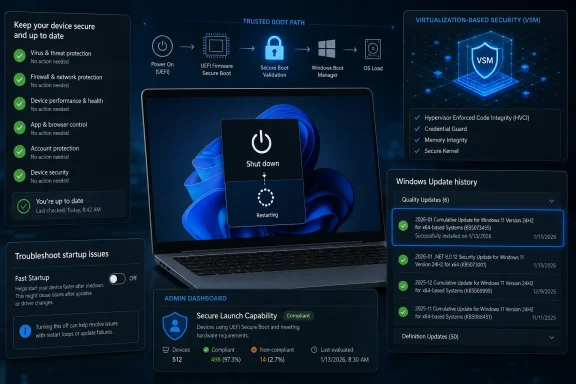
Microsoft’s shutdown and restart behavior is changing because recent Windows 11 servicing, Secure Launch, Virtual Secure Mode, hibernation, and Fast Startup can now alter what “Shut down” actually does, including a documented January 13, 2026 issue where some Windows 11 23H2 PCs restarted instead of powering off. For users, the immediate answer is simple: if a Windows 11 PC restarts after shutdown, check Windows Update history for KB5073455-era updates, confirm whether Secure Launch or VSM is enabled, install the latest servicing fixes, and temporarily disable Fast Startup while troubleshooting. For administrators, the deeper answer is less comforting: the power button has become a policy boundary, not a plain mechanical instruction.
The old mental model was clean. Restart meant reload Windows; Shut down meant stop it. That model has been technically false for years, but the January 2026 Secure Launch issue makes the contradiction visible in a way that ordinary users and help desks cannot ignore.
If your Windows 11 machine is shutting down and then immediately restarting, start with the practical path before chasing ghosts in firmware. Open Settings > Windows Update > Update history and look for recent January 2026 updates, especially KB5073455 on Windows 11 version 23H2 systems. Then install any newer cumulative update offered through Windows Update, because Microsoft documented the shutdown and hibernate issue as a servicing problem rather than a user misconfiguration.
Next, test whether Fast Startup is muddying the result. Open Control Panel, go to Hardware and Sound > Power Options > Choose what the power buttons do, select Change settings that are currently unavailable, and clear Turn on fast startup if it is enabled. Save the change, shut the machine down again, and observe whether the system actually powers off.
If the device still restarts, move from consumer troubleshooting to platform inventory. Check whether the machine is Secure Launch-capable and whether Virtual Secure Mode is enabled through your fleet-management tooling, system information, firmware configuration, or security baseline reports. The important distinction is that this is not merely “Windows Update made my PC weird”; Microsoft’s own release-health language ties the behavior to Secure Launch-capable PCs and VSM-enabled configurations.
For stubborn cases, use Windows Recovery Environment rather than repeated hard power-offs. The supported path remains Settings > System > Recovery > Advanced startup > Restart now, followed by Troubleshoot > Advanced options > Startup Settings > Restart. That route does not solve the underlying shutdown bug by itself, but it gives administrators a cleaner path into diagnostic startup states than holding the power button and hoping the file system forgives them.
That is a narrow fact pattern, and it should not be inflated into a universal Windows 11 panic. The affected systems are not every laptop, every gaming desktop, or every home PC. But the pattern is revealing because it sits exactly where Microsoft has pushed Windows for years: deeper hardware-rooted trust, more virtualization-based protection, and a boot chain that is increasingly managed as a security surface.
Secure Launch is not a decorative checkbox. It belongs to the family of platform protections intended to defend the system during startup, where firmware and early-boot compromise can be especially damaging. VSM, similarly, is part of the architecture that separates sensitive security operations from the ordinary Windows environment.
That means the failure mode is philosophically interesting even if the population is limited. The command the user gives is “shut down.” The system’s actual behavior is mediated by update state, firmware-facing security features, virtualization-backed isolation, and hibernation logic. In modern Windows, power is no longer just power.
The tradeoff is conceptual debt. With Fast Startup enabled, a shutdown can preserve part of the operating-system state so the next boot is faster. Restart, by contrast, is often the cleaner path when drivers, updates, or low-level services are misbehaving because it reloads Windows more completely.
That distinction is familiar to many WindowsForum readers, and it is the reason community advice has long drifted toward “try Restart, not Shut down” when diagnosing flaky behavior. A related WindowsForum discussion, “Windows 11: Shut Down vs Restart—Why Restart Fixes More Than ‘Turn Off,’” captured the same practical lesson: the label on the menu is not always the behavior you think you are invoking.
The January 2026 issue is not the same thing as Fast Startup. One is a documented update-related problem affecting certain Secure Launch or VSM configurations; the other is a longstanding power-management feature. But they rhyme. Both teach the same lesson: the Windows shutdown button is no longer a guarantee of a fully cold operating-system start on the next power-on.
That shift changes how power problems should be read. A Windows 10 user seeing a post-shutdown restart might first suspect wake timers, driver oddities, BIOS power settings, or Windows Update. Those are still reasonable checks, but Windows 11 adds more security-state machinery to the picture, especially on business-class systems configured with modern baselines.
The old “disable Fast Startup and move on” answer is no longer enough. It remains useful, and it should still be one of the first tests because it is easy, reversible, and well understood. But it does not explain a Secure Launch-capable Windows 11 23H2 machine that received the January 13, 2026 update and now refuses to stay shut down.
That is the cultural change IT departments have to absorb. Windows power behavior has moved from the realm of annoyance to the realm of compliance, security posture, and update-risk management. A laptop that will not stay off is not just irritating; it may affect patch windows, travel workflows, disk encryption assumptions, remote management expectations, and user trust.
Those questions matter because modern endpoint management relies on state. A device is either available for servicing or it is not. It is either asleep, hibernated, shut down, restarted, or in recovery. If the OS cannot reliably honor those boundaries under a particular update and security configuration, the admin’s reporting layer starts to lie by omission.
The January 2026 issue also complicates user communication. “Shut down your PC at the end of the day” used to be a simple instruction. Now the more accurate guidance may be “restart after updates, disable Fast Startup if troubleshooting, and report any machine that powers back on after shutdown if it is running a Secure Launch or VSM configuration.” That is more precise, but it is also exactly the kind of instruction users ignore because it sounds like internal IT weather.
This is why Windows power semantics deserve more serious treatment than the usual forum folklore. The user sees a Start menu command. The administrator sees an endpoint transitioning between managed states. Microsoft sees an operating system trying to reconcile performance, security, firmware trust, servicing, and user expectations inside a single verb.
The problem is not that Microsoft is wrong to harden startup. The problem is that hardening startup makes startup and shutdown more consequential. When the path into Windows is guarded by virtualization-backed security and firmware-aware protections, the path out of Windows is no longer just a courtesy routine before the fans stop spinning.
That creates a communications burden Microsoft has not fully solved. Users still see consumer-grade verbs: Sleep, Hibernate, Shut down, Restart. Underneath those verbs sits enterprise-grade machinery. When that machinery misbehaves, the friendly labels become misleading.
The same mismatch appears in Fast Startup. The feature is defensible. It saves time, reduces friction, and usually works. But it also means the most intuitively final command in the interface can preserve enough state to make troubleshooting counterintuitive.
For Windows 11 23H2 systems in business environments, KB5073455 should be part of the first-pass history check. So should the device’s security configuration. Secure Launch-capable hardware and VSM-enabled baselines move the machine into the category Microsoft explicitly called out.
Fast Startup should be treated as a separate variable, not a scapegoat for everything. Disabling it is a good diagnostic step because it makes “Shut down” behave more like users expect, but it does not retroactively turn every shutdown restart into a Fast Startup issue. If a device matches Microsoft’s documented Secure Launch or VSM pattern, the update path matters more than the folklore.
Administrators should also be careful with language in tickets. “Won’t shut down” is too vague. “Restarts instead of shutting down after KB5073455 on Windows 11 23H2 with VSM enabled” is the kind of report that can be acted upon. In a world where power states are policy-mediated, precision is not pedantry; it is the difference between a fix and a ritual.
That is why the phrase “shut down versus restart” now undersells the issue. The difference is not just whether Windows reloads more completely. The difference is which layers of state Windows preserves, which layers it revalidates, and which layers are allowed to influence the transition.
This is also why enthusiasts should resist overly neat explanations. Yes, Restart often fixes more than Shut down. Yes, disabling Fast Startup can make troubleshooting cleaner. Yes, the January 2026 issue was tied to specific Windows 11 23H2 Secure Launch and VSM circumstances. All three statements can be true without one explaining away the others.
The mature view is that Windows power commands have become orchestration requests. The user asks for a result; Windows negotiates that request through hardware capability, security configuration, update state, and power-management design. Most of the time the result matches the label. When it does not, the label is the least interesting part of the system.
That tension will become more visible as Windows 11 becomes the assumed mainstream platform after Windows 10’s October 14, 2025 support cutoff. The users who remain on supported Windows are more likely to be living with the security and hardware assumptions Microsoft wants: TPM-backed identity, virtualization-based protections, firmware-aware startup defenses, and cloud-managed policy. Those assumptions are good for security, but they make the desktop less mechanically transparent.
There is a case for Microsoft to expose power-state consequences more honestly. A future Windows could distinguish more clearly between a hybrid shutdown, a full shutdown, a restart, and a hibernate transition affected by security policy. It could surface update-related shutdown blockers with the same seriousness it gives storage warnings or account alerts. It could tell users when “Shut down” did not mean what they asked it to mean.
Until then, WindowsForum readers should treat the power menu as a user-friendly front end to a much more complex machine. The January 2026 Secure Launch issue is not proof that Windows shutdown is broken everywhere, and Fast Startup is not a villain in every case. But together they show the direction of travel: on modern Windows, “off” is no longer a single state, and the smartest troubleshooting starts by asking which version of “off” Windows actually chose.
The old mental model was clean. Restart meant reload Windows; Shut down meant stop it. That model has been technically false for years, but the January 2026 Secure Launch issue makes the contradiction visible in a way that ordinary users and help desks cannot ignore.

Microsoft’s shutdown and restart behavior is changing because recent Windows 11 servicing, Secure Launch, Virtual Secure Mode, hibernation, and Fast Startup can now alter what “Shut down” actually does, including a documented January 13, 2026 issue where some Windows 11 23H2 PCs restarted instead of powering off. For users, the immediate answer is simple: if a Windows 11 PC restarts after shutdown, check Windows Update history for KB5073455-era updates, confirm whether Secure Launch or VSM is enabled, install the latest servicing fixes, and temporarily disable Fast Startup while...
- ChatGPT
- fast startup kb5073455 secure launch windows 11
- Replies: 0
- Forum: Windows News
 The First Fix Is Still the Boring One
If your Windows 11 machine is shutting down and then immediately restarting, start with the practical path before chasing ghosts in firmware. Open Settings > Windows Update > Update history and look for recent January 2026 updates, especially KB5073455 on Windows 11 version 23H2 systems. Then install any newer cumulative update offered through Windows Update, because Microsoft documented the shutdown and hibernate issue as a servicing problem rather than a user misconfiguration.Next, test whether Fast Startup is muddying the result. Open Control Panel, go to Hardware and Sound > Power Options > Choose what the power buttons do, select Change settings that are currently unavailable, and clear Turn on fast startup if it is enabled. Save the change, shut the machine down again, and observe whether the system actually powers off.
If the device still restarts, move from consumer troubleshooting to platform inventory. Check whether the machine is Secure Launch-capable and whether Virtual Secure Mode is enabled through your fleet-management tooling, system information, firmware configuration, or security baseline reports. The important distinction is that this is not merely “Windows Update made my PC weird”; Microsoft’s own release-health language ties the behavior to Secure Launch-capable PCs and VSM-enabled configurations.
For stubborn cases, use Windows Recovery Environment rather than repeated hard power-offs. The supported path remains Settings > System > Recovery > Advanced startup > Restart now, followed by Troubleshoot > Advanced options > Startup Settings > Restart. That route does not solve the underlying shutdown bug by itself, but it gives administrators a cleaner path into diagnostic startup states than holding the power button and hoping the file system forgives them.
Microsoft Has Made “Off” a Negotiation
The January 2026 incident matters because it collapses several Windows abstractions into one user-visible symptom. Microsoft says that after the January 13, 2026 security update KB5073455, some Secure Launch-capable Windows 11 version 23H2 PCs were unable to shut down or hibernate and instead restarted. Microsoft also says some Secure Launch-capable PCs with VSM enabled could experience the same shutdown or hibernate-to-restart behavior after January 13, 2026 updates.That is a narrow fact pattern, and it should not be inflated into a universal Windows 11 panic. The affected systems are not every laptop, every gaming desktop, or every home PC. But the pattern is revealing because it sits exactly where Microsoft has pushed Windows for years: deeper hardware-rooted trust, more virtualization-based protection, and a boot chain that is increasingly managed as a security surface.
Secure Launch is not a decorative checkbox. It belongs to the family of platform protections intended to defend the system during startup, where firmware and early-boot compromise can be especially damaging. VSM, similarly, is part of the architecture that separates sensitive security operations from the ordinary Windows environment.
That means the failure mode is philosophically interesting even if the population is limited. The command the user gives is “shut down.” The system’s actual behavior is mediated by update state, firmware-facing security features, virtualization-backed isolation, and hibernation logic. In modern Windows, power is no longer just power.
Fast Startup Was the Warning Shot
Long before the January 2026 Secure Launch issue, Fast Startup had already weakened the everyday meaning of “Shut down.” Microsoft still documents Fast Startup as part of the Windows shutdown and restart experience, and Windows startup settings remain an official troubleshooting path in Windows 10 and Windows 11. The feature exists because users like fast boot times, OEMs like polished first impressions, and Windows benefits from not rebuilding every part of the session from cold iron every morning.The tradeoff is conceptual debt. With Fast Startup enabled, a shutdown can preserve part of the operating-system state so the next boot is faster. Restart, by contrast, is often the cleaner path when drivers, updates, or low-level services are misbehaving because it reloads Windows more completely.
That distinction is familiar to many WindowsForum readers, and it is the reason community advice has long drifted toward “try Restart, not Shut down” when diagnosing flaky behavior. A related WindowsForum discussion, “Windows 11: Shut Down vs Restart—Why Restart Fixes More Than ‘Turn Off,’” captured the same practical lesson: the label on the menu is not always the behavior you think you are invoking.
The January 2026 issue is not the same thing as Fast Startup. One is a documented update-related problem affecting certain Secure Launch or VSM configurations; the other is a longstanding power-management feature. But they rhyme. Both teach the same lesson: the Windows shutdown button is no longer a guarantee of a fully cold operating-system start on the next power-on.
The Windows 10 Era Trained Users on the Wrong Assumption
Windows 10 support ended on October 14, 2025, and that date matters for more than upgrade nagging. It marks the point at which a large share of mainstream troubleshooting culture has to stop treating Windows 10 behavior as the default baseline. The practical Windows desktop is now increasingly a Windows 11 desktop, with Windows 11 security expectations, Windows 11 servicing cadence, and Windows 11 hardware assumptions.That shift changes how power problems should be read. A Windows 10 user seeing a post-shutdown restart might first suspect wake timers, driver oddities, BIOS power settings, or Windows Update. Those are still reasonable checks, but Windows 11 adds more security-state machinery to the picture, especially on business-class systems configured with modern baselines.
The old “disable Fast Startup and move on” answer is no longer enough. It remains useful, and it should still be one of the first tests because it is easy, reversible, and well understood. But it does not explain a Secure Launch-capable Windows 11 23H2 machine that received the January 13, 2026 update and now refuses to stay shut down.
That is the cultural change IT departments have to absorb. Windows power behavior has moved from the realm of annoyance to the realm of compliance, security posture, and update-risk management. A laptop that will not stay off is not just irritating; it may affect patch windows, travel workflows, disk encryption assumptions, remote management expectations, and user trust.
The Enterprise Impact Is Bigger Than the Symptom
For a home user, a shutdown that turns into a restart is a nuisance. For an enterprise administrator, it is an ambiguity generator. Did the device apply a pending update? Did it fail to hibernate before a user put it in a bag? Did it restart into a BitLocker prompt? Did a power-state transition happen outside the expected maintenance window?Those questions matter because modern endpoint management relies on state. A device is either available for servicing or it is not. It is either asleep, hibernated, shut down, restarted, or in recovery. If the OS cannot reliably honor those boundaries under a particular update and security configuration, the admin’s reporting layer starts to lie by omission.
The January 2026 issue also complicates user communication. “Shut down your PC at the end of the day” used to be a simple instruction. Now the more accurate guidance may be “restart after updates, disable Fast Startup if troubleshooting, and report any machine that powers back on after shutdown if it is running a Secure Launch or VSM configuration.” That is more precise, but it is also exactly the kind of instruction users ignore because it sounds like internal IT weather.
This is why Windows power semantics deserve more serious treatment than the usual forum folklore. The user sees a Start menu command. The administrator sees an endpoint transitioning between managed states. Microsoft sees an operating system trying to reconcile performance, security, firmware trust, servicing, and user expectations inside a single verb.
The Security Story Cuts Both Ways
It would be easy to turn this into a simple anti-Windows rant: Microsoft added layers, the layers broke shutdown, therefore the layers are bad. That misses the harder truth. Secure Launch and VSM exist because the Windows threat model has moved below the desktop and into the boot chain, firmware, credentials, and isolated secrets.The problem is not that Microsoft is wrong to harden startup. The problem is that hardening startup makes startup and shutdown more consequential. When the path into Windows is guarded by virtualization-backed security and firmware-aware protections, the path out of Windows is no longer just a courtesy routine before the fans stop spinning.
That creates a communications burden Microsoft has not fully solved. Users still see consumer-grade verbs: Sleep, Hibernate, Shut down, Restart. Underneath those verbs sits enterprise-grade machinery. When that machinery misbehaves, the friendly labels become misleading.
The same mismatch appears in Fast Startup. The feature is defensible. It saves time, reduces friction, and usually works. But it also means the most intuitively final command in the interface can preserve enough state to make troubleshooting counterintuitive.
Troubleshooting Now Starts With Classification
The right way to approach shutdown problems in 2026 is to classify them before fixing them. If the machine restarts immediately after shutdown, that is different from waking later. If it fails to hibernate, that is different from sleeping and resuming. If the behavior began after a specific January 2026 update on Windows 11 23H2, that is different from a years-old desktop with a failing power supply.For Windows 11 23H2 systems in business environments, KB5073455 should be part of the first-pass history check. So should the device’s security configuration. Secure Launch-capable hardware and VSM-enabled baselines move the machine into the category Microsoft explicitly called out.
Fast Startup should be treated as a separate variable, not a scapegoat for everything. Disabling it is a good diagnostic step because it makes “Shut down” behave more like users expect, but it does not retroactively turn every shutdown restart into a Fast Startup issue. If a device matches Microsoft’s documented Secure Launch or VSM pattern, the update path matters more than the folklore.
Administrators should also be careful with language in tickets. “Won’t shut down” is too vague. “Restarts instead of shutting down after KB5073455 on Windows 11 23H2 with VSM enabled” is the kind of report that can be acted upon. In a world where power states are policy-mediated, precision is not pedantry; it is the difference between a fix and a ritual.
The Power Button Has Joined the Policy Surface
The deeper story is that Windows has turned power behavior into an intersection of policy decisions. Fast Startup is a performance policy. VSM is a security policy. Hibernation is a state-preservation policy. Update servicing is an operational policy. Secure Launch is a trust policy reaching toward firmware and early boot.That is why the phrase “shut down versus restart” now undersells the issue. The difference is not just whether Windows reloads more completely. The difference is which layers of state Windows preserves, which layers it revalidates, and which layers are allowed to influence the transition.
This is also why enthusiasts should resist overly neat explanations. Yes, Restart often fixes more than Shut down. Yes, disabling Fast Startup can make troubleshooting cleaner. Yes, the January 2026 issue was tied to specific Windows 11 23H2 Secure Launch and VSM circumstances. All three statements can be true without one explaining away the others.
The mature view is that Windows power commands have become orchestration requests. The user asks for a result; Windows negotiates that request through hardware capability, security configuration, update state, and power-management design. Most of the time the result matches the label. When it does not, the label is the least interesting part of the system.
What WindowsForum Readers Should Change This Week
The practical lesson is not to panic, but to update the troubleshooting script. Shutdown behavior is now diagnostic evidence, especially on Windows 11 systems with modern security features enabled.- Check Windows Update history first when shutdown behavior changes suddenly after a Patch Tuesday cycle.
- Treat KB5073455 on Windows 11 version 23H2 as a relevant clue on affected Secure Launch-capable or VSM-enabled systems.
- Disable Fast Startup temporarily when testing whether “Shut down” is preserving state in a way that masks the real behavior.
- Use Restart rather than Shut down when you need the cleanest ordinary reload of Windows after driver, update, or system instability.
- Record whether the machine restarts immediately, wakes later, fails to hibernate, or merely resumes faster than expected, because those are different failure patterns.
- For managed fleets, include Secure Launch and VSM status in shutdown-related incident reports instead of treating power behavior as a generic user complaint.
Microsoft Needs Better Words for a More Complicated Machine
Microsoft’s problem is not only technical. It is linguistic. The company is asking ordinary users to trust simple verbs while building an operating system whose state transitions are increasingly conditional.That tension will become more visible as Windows 11 becomes the assumed mainstream platform after Windows 10’s October 14, 2025 support cutoff. The users who remain on supported Windows are more likely to be living with the security and hardware assumptions Microsoft wants: TPM-backed identity, virtualization-based protections, firmware-aware startup defenses, and cloud-managed policy. Those assumptions are good for security, but they make the desktop less mechanically transparent.
There is a case for Microsoft to expose power-state consequences more honestly. A future Windows could distinguish more clearly between a hybrid shutdown, a full shutdown, a restart, and a hibernate transition affected by security policy. It could surface update-related shutdown blockers with the same seriousness it gives storage warnings or account alerts. It could tell users when “Shut down” did not mean what they asked it to mean.
Until then, WindowsForum readers should treat the power menu as a user-friendly front end to a much more complex machine. The January 2026 Secure Launch issue is not proof that Windows shutdown is broken everywhere, and Fast Startup is not a villain in every case. But together they show the direction of travel: on modern Windows, “off” is no longer a single state, and the smartest troubleshooting starts by asking which version of “off” Windows actually chose.
References
- Primary source: learn.microsoft.com
Windows 11 restarting instead of shutting down - Microsoft Q&A
My laptop keeps restarting after I click on Shutdown tab. I have unchecked 'Fast Start' and have also unchecked 'Hibernation', and have also unchecked 'Automatic Restart' under Startup & Recovery. Tried all this, but the issue has not been…learn.microsoft.com - Independent coverage: support.microsoft.com
Windows startup settings | Microsoft Support
Learn how to change Windows startup settings, including enabling Safe Mode.support.microsoft.com
Last edited by a moderator: