

Microsoft’s Sound Recorder for Windows 11 is the built-in audio recording app for capturing microphone audio in files of up to three hours each, with basic controls for recording, pausing, renaming, sharing, deleting, and managing microphone permissions while other apps continue running. That sounds mundane, and in the best possible case it is. But Microsoft’s tiny FAQ says more about modern Windows than the size of the app suggests: the operating system still ships with useful local tools, yet those tools increasingly sit in an awkward space between convenience, Store-app fragility, and unclear data ownership. Sound Recorder is not trying to be Audacity, OBS, or a podcast studio; the real question is whether Windows users can still trust the inbox utility to do the simple job without surprises.
Sound Recorder exists for moments when the full machinery of content creation is overkill. A student wants to capture a lecture. A sysadmin wants a quick spoken note while troubleshooting a rack-side problem. A journalist wants backup audio. A home user wants to record a thought before it disappears.
That is exactly the kind of task an operating system should handle without ceremony. The user should not have to comparison-shop codec support, navigate a dark-patterned freeware installer, or sign into a cloud service just to capture microphone input. Windows has long benefited from these small utilities because they make the PC feel complete.
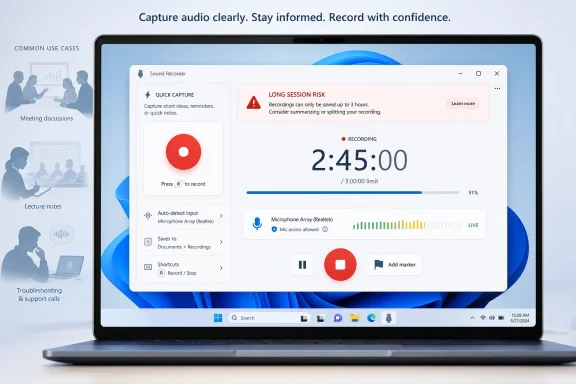
The modern version of Sound Recorder, however, is not merely a nostalgic accessory. It is a Windows 11 app with the current design language, permission prompts, app-container behavior, and a Microsoft Support page that quietly defines its boundaries. The most important boundary is the three-hour-per-file limit, which sounds generous until it collides with a long meeting, deposition, lecture, stream, accessibility workflow, or remote job.
That limit changes the app’s character. Sound Recorder is fine for casual capture, but it should not be treated as a fire-and-forget archival recorder. Microsoft’s own phrasing puts the ceiling in plain sight, and users who ignore it are likely to discover the line at the worst possible time.
For many users, three hours sounds like forever. Most voice notes are minutes long, most troubleshooting clips are shorter still, and many meetings end before the limit matters. But Windows is not just a consumer toy; it is also the platform underneath court reporting, education, research, support desks, accessibility workflows, and remote work setups where “just record it” can mean half a day of audio.
The danger is psychological. A visible recording timer creates confidence. If an app appears to be recording, users assume it will save what it has captured unless the disk fills, the machine sleeps, or the app crashes. A hard application-level limit is different: it requires the user to know the rules before pressing Record.
Microsoft could argue that the FAQ is the documentation and the limit is disclosed. That is true as far as it goes. But modern software needs to surface critical constraints in the interface, not bury them in support pages users usually read only after something goes wrong.
The fix is not complicated. A recorder with a three-hour cap should warn at the start of long sessions, display a countdown as it approaches the limit, and offer automatic rollover into a new file. That behavior is common in cameras and field recorders because losing the end of a session is not a minor inconvenience; it can be the only part that mattered.
On a traditional desktop utility, users expect files to live in a folder they can back up, copy, rename, sync, or recover. On a modern packaged app, the boundary between “my file” and “the app’s data” can be less obvious. The FAQ’s warning makes clear that Sound Recorder’s recordings are not something users should treat casually if they matter.
This is a subtle but important shift in the Windows experience. The old mental model was file-first: create a document, save it somewhere, and the application is merely the tool that opens it. The app-first model reverses the emphasis: content appears inside an application, and export or sharing becomes a separate step.
For casual users, that can feel simpler. For administrators and power users, it is a liability. If a recording is important, it should be moved out of the app’s private world as soon as possible. If it is evidence, compliance material, paid work, or irreplaceable personal audio, the app should be treated as the capture tool, not the archive.
This is where Microsoft’s minimalist documentation accidentally becomes operational guidance. Rename recordings promptly. Share or export them promptly. Do not uninstall the app until you have confirmed the recordings exist where you expect them to exist. That sounds obvious, but Windows utilities historically did not require this level of caution.
The problem is that better security often means more places for an ordinary task to fail. A user can have a working microphone at the hardware level, a correct input device in Sound settings, and still have an app-level permission problem. In managed environments, policy can add another layer.
For IT pros, this is familiar terrain. The troubleshooting path is not “does the mic work?” but “does the mic work for this user, in this session, for this app, under this policy, with this input device selected?” Sound Recorder is simple, but it rides on the same Windows privacy and device stack as more complex software.
That matters because Sound Recorder is likely to be the app users reach for when they are not thinking like technicians. If it fails, they may assume the microphone is broken or the driver is bad. In reality, the fix may be a privacy toggle.
The support article’s instruction to adjust microphone access and input volume is useful, but it also highlights how Windows now splits responsibility across app UI, Settings, privacy controls, device selection, and audio driver behavior. The more modular Windows becomes, the more the humble recorder becomes a diagnostic front end for the whole audio subsystem.
Windows 11’s return to the Sound Recorder name was not just nostalgia. It fit a broader pattern: Microsoft has spent the Windows 11 cycle modernizing and recombining inbox apps, from Notepad and Paint to Media Player and Snipping Tool. The company wants Windows to feel less like a pile of legacy components and more like a coherent product again.
That project has produced real wins. Notepad is no longer frozen in amber. Paint has gained features that would once have required a separate editor. Snipping Tool has become a more capable capture utility. In that context, Sound Recorder is part of a larger argument that Windows should ship with respectable basics.
But the recorder also shows the limits of Microsoft’s app modernization strategy. A beautiful utility with a hard recording cap, app-contained storage, and limited workflow guarantees is still a utility users must understand before trusting. Modern design does not automatically mean modern robustness.
The best version of Sound Recorder would embrace its role as the dependable local fallback. It does not need multitrack editing or mastering tools. It does need obvious limits, predictable file handling, and a clear distinction between casual capture and serious recording.
If all you need is microphone audio, the built-in app is attractive precisely because it is already there. No installer. No adware. No trial countdown. No “free” app that gates export behind a subscription. For a platform that has spent decades fighting the reputation of risky downloads, that matters.
Yet the moment the user needs system audio capture, longer unattended sessions, scheduled recording, automatic file splitting, noise reduction, transcript integration, or stronger export controls, Sound Recorder runs out of road. At that point, the Store and the wider Windows software ecosystem become necessary. The inbox app is a starting point, not a destination.
That is not a failure by itself. Operating systems should not bundle every professional tool. The issue is whether the boundary is clear. A user who knows Sound Recorder is a quick microphone recorder can make an informed choice. A user who assumes “Windows recorder” means “safe for my four-hour remote assignment” may be making a costly mistake.
Microsoft’s support page is accurate, but accuracy is not the same as product communication. The app itself should do more of the warning.
Sound Recorder’s core controls are intentionally basic. Start recording. Pause. Resume. Stop. Rename. Share. Delete. Adjust microphone permission and volume through Windows Settings. That is the shape of a tool meant to be understood in seconds.
There is value in that restraint. Many users do not want a waveform editor, a plug-in host, a compressor, or a library manager. They want an obvious red button and a saved result. If Microsoft overloaded the app with semi-professional features, it would become worse for the majority of people who only need a quick recording.
The trouble is that simplicity creates trust, and trust creates risk. A simple app feels safer than a complex one, even when the complex one has better safeguards. Sound Recorder’s clean surface can hide the operational details that matter most: duration limits, storage behavior, permission state, input source, and backup strategy.
That is the central contradiction of the app. It is useful because it is uncomplicated, but the scenarios where recordings matter are often complicated. Microsoft does not need to turn Sound Recorder into a workstation. It does need to make the app’s boundaries impossible to miss.
Sound Recorder’s FAQ focuses on microphone capture, which is sensible for the product. But user expectations are broader. People often say they want to “record sound” when they mean a meeting, a browser tab, a lecture stream, a game, a voice chat, or some mixture of microphone and system output.
That mismatch is where frustration begins. Windows includes multiple capture surfaces — Sound Recorder, Snipping Tool screen recording, Xbox Game Bar, browser APIs, meeting-app recording, third-party tools — and each has different rules. Some capture the microphone. Some capture an app window. Some capture system audio. Some refuse to record the desktop. Some depend on privacy prompts that users barely remember approving.
For enthusiasts, this is manageable. For normal users, it is a maze disguised as choice. Microsoft has improved the pieces, but it has not fully solved the mental model. The operating system still lacks one plain-language capture center that explains what can be recorded, where it will be saved, and what legal or privacy implications may apply.
Sound Recorder therefore becomes a symbol of a larger Windows problem. The small tools work, but the platform story is fragmented. Users can do almost anything, provided they already know which component Microsoft expects them to use.
Some businesses will want the app available because it helps users capture notes, training, field reports, or accessibility-related audio. Others may restrict it because recording meetings or conversations can create legal and compliance exposure. The answer depends on jurisdiction, industry, and policy.
The app’s local and app-contained nature cuts both ways. Local capture may be preferable to cloud recording in sensitive environments. But if recordings remain inside an app container until shared, administrators need to understand where user data lives, how it is backed up, and what happens during app removal or profile migration.
This is not unique to Sound Recorder. It is part of the broader management challenge created by Store-delivered inbox apps. Microsoft can update components outside the old monolithic Windows servicing model, which is good for agility. But it also means admins must track capabilities at the app layer, not just the OS build layer.
For WindowsForum’s sysadmin audience, the advice is straightforward: treat inbox apps as software inventory, not wallpaper. If a tool can create user data, capture audio, or move files through share targets, it belongs in policy discussions.
In those moments, the app’s limitations are acceptable because the job is short and immediate. The three-hour ceiling is irrelevant. App-contained storage is tolerable. The lack of advanced editing is a feature because it keeps the interface obvious.
That is the right mental model: Sound Recorder is the Windows equivalent of the camera app’s quick snapshot. It is not Lightroom. It is not a surveillance system. It is not a production recorder. It is the thing you use because the best recorder is the one already installed.
Users get into trouble when they promote it beyond that role. A three-hour maximum per file is enough for many meetings, but not enough for all-day work. A basic share command is fine for casual use, but not a records-management plan. A microphone permission prompt is fine for a personal laptop, but not a deployment strategy.
Microsoft’s app is good enough to be useful. It is not explicit enough to be foolproof.
A visible input meter is not merely decorative. It confirms that the selected microphone is producing signal. A duration warning is not clutter. It prevents silent failure at the edge of a known limit. A “show in folder” or export-first workflow is not a power-user indulgence. It reinforces that recordings are user files, not mysterious app possessions.
This is the kind of polish that separates a basic tool from a trustworthy one. Microsoft has spent years refining Windows’ visual language, but trust is built in the boring details. A recorder earns confidence by making loss difficult.
The irony is that Sound Recorder’s job is easier than many Windows features. It does not need AI. It does not need a subscription. It does not need cross-device magic. It needs to be brutally clear about capture, duration, storage, and export.
That may sound unglamorous, but unglamorous reliability is exactly what operating systems are supposed to provide.
At the same time, users who intentionally start recording need confidence that the recording is local, controllable, and not accidentally entangled with a cloud workflow they did not choose. The built-in recorder’s simplicity helps here. It is not marketed as a transcription service or collaboration platform. It is a local utility, and that restraint is welcome.
But sharing is where the privacy story becomes user-dependent. Once a recording is sent through Mail, another app, a cloud-synced folder, or a messaging client, the privacy properties change. The recorder can capture the audio, but it cannot control the lifecycle after the user hands the file away.
This is why OS-level capture tools should educate without nagging. A one-time reminder about consent and local laws may be appropriate in some contexts, but constant warnings would make the app annoying. The better approach is clarity: show what is being captured, show where it is stored, and make deletion and export understandable.
For enterprise, policy should do the rest. For consumers, the app should assume good faith while making the consequences visible.
The problem is that many users will never see it. They will open Start, type “recorder,” press the obvious button, and trust the result. If the FAQ contains information that prevents data loss, then the app should contain that information too.
This is a broader Microsoft habit. The company often documents sharp edges accurately but fails to surface them at the moment of risk. Windows Update deadlines, OneDrive folder redirection, Recall configuration, BitLocker recovery keys, Store app data, and privacy permissions have all lived somewhere along that spectrum: documented, but not always understood.
Sound Recorder is a small example with low systemic risk, which makes it a good test case. If Microsoft cannot make a microphone recorder self-explanatory, what hope is there for the features that involve AI indexes, encrypted backups, cross-device sync, and enterprise policy overlays?
The good news is that small apps can be fixed quickly. A few interface changes would dramatically improve user trust without changing the app’s mission.
Microsoft’s Sound Recorder is a reminder that the health of Windows is measured not only by Copilot demos, kernel security, or the next annual feature update, but by whether the everyday tools behave predictably when ordinary users trust them. The app does the basic job, and for many people that will be enough; the next step is for Microsoft to make its limits as visible as its red Record button, because the future of Windows depends as much on small moments of confidence as on headline features.
 Microsoft’s Smallest Recorder Carries a Surprisingly Big Burden
Sound Recorder exists for moments when the full machinery of content creation is overkill. A student wants to capture a lecture. A sysadmin wants a quick spoken note while troubleshooting a rack-side problem. A journalist wants backup audio. A home user wants to record a thought before it disappears.That is exactly the kind of task an operating system should handle without ceremony. The user should not have to comparison-shop codec support, navigate a dark-patterned freeware installer, or sign into a cloud service just to capture microphone input. Windows has long benefited from these small utilities because they make the PC feel complete.
The modern version of Sound Recorder, however, is not merely a nostalgic accessory. It is a Windows 11 app with the current design language, permission prompts, app-container behavior, and a Microsoft Support page that quietly defines its boundaries. The most important boundary is the three-hour-per-file limit, which sounds generous until it collides with a long meeting, deposition, lecture, stream, accessibility workflow, or remote job.
That limit changes the app’s character. Sound Recorder is fine for casual capture, but it should not be treated as a fire-and-forget archival recorder. Microsoft’s own phrasing puts the ceiling in plain sight, and users who ignore it are likely to discover the line at the worst possible time.
The Three-Hour Ceiling Is the Feature Everyone Should Notice First
The headline fact is simple: Sound Recorder can record audio for up to three hours per recording file. Microsoft does not frame this as a bug, a temporary limitation, or a storage-dependent recommendation. It is the app’s design contract.For many users, three hours sounds like forever. Most voice notes are minutes long, most troubleshooting clips are shorter still, and many meetings end before the limit matters. But Windows is not just a consumer toy; it is also the platform underneath court reporting, education, research, support desks, accessibility workflows, and remote work setups where “just record it” can mean half a day of audio.
The danger is psychological. A visible recording timer creates confidence. If an app appears to be recording, users assume it will save what it has captured unless the disk fills, the machine sleeps, or the app crashes. A hard application-level limit is different: it requires the user to know the rules before pressing Record.
Microsoft could argue that the FAQ is the documentation and the limit is disclosed. That is true as far as it goes. But modern software needs to surface critical constraints in the interface, not bury them in support pages users usually read only after something goes wrong.
The fix is not complicated. A recorder with a three-hour cap should warn at the start of long sessions, display a countdown as it approaches the limit, and offer automatic rollover into a new file. That behavior is common in cameras and field recorders because losing the end of a session is not a minor inconvenience; it can be the only part that mattered.
A Local Utility Should Not Make Users Think Like Evidence Clerks
Microsoft says recordings are stored within the Sound Recorder app, and that uninstalling the app deletes the recordings. That sentence deserves more attention than it will get from most users.On a traditional desktop utility, users expect files to live in a folder they can back up, copy, rename, sync, or recover. On a modern packaged app, the boundary between “my file” and “the app’s data” can be less obvious. The FAQ’s warning makes clear that Sound Recorder’s recordings are not something users should treat casually if they matter.
This is a subtle but important shift in the Windows experience. The old mental model was file-first: create a document, save it somewhere, and the application is merely the tool that opens it. The app-first model reverses the emphasis: content appears inside an application, and export or sharing becomes a separate step.
For casual users, that can feel simpler. For administrators and power users, it is a liability. If a recording is important, it should be moved out of the app’s private world as soon as possible. If it is evidence, compliance material, paid work, or irreplaceable personal audio, the app should be treated as the capture tool, not the archive.
This is where Microsoft’s minimalist documentation accidentally becomes operational guidance. Rename recordings promptly. Share or export them promptly. Do not uninstall the app until you have confirmed the recordings exist where you expect them to exist. That sounds obvious, but Windows utilities historically did not require this level of caution.
The Permission Model Is Better Than the Old Days, but It Adds Another Failure Point
Sound Recorder needs microphone permission, and Windows 11 routes that through Privacy & security settings. This is the right architecture. Microphone access should be explicit, revocable, and visible to the user.The problem is that better security often means more places for an ordinary task to fail. A user can have a working microphone at the hardware level, a correct input device in Sound settings, and still have an app-level permission problem. In managed environments, policy can add another layer.
For IT pros, this is familiar terrain. The troubleshooting path is not “does the mic work?” but “does the mic work for this user, in this session, for this app, under this policy, with this input device selected?” Sound Recorder is simple, but it rides on the same Windows privacy and device stack as more complex software.
That matters because Sound Recorder is likely to be the app users reach for when they are not thinking like technicians. If it fails, they may assume the microphone is broken or the driver is bad. In reality, the fix may be a privacy toggle.
The support article’s instruction to adjust microphone access and input volume is useful, but it also highlights how Windows now splits responsibility across app UI, Settings, privacy controls, device selection, and audio driver behavior. The more modular Windows becomes, the more the humble recorder becomes a diagnostic front end for the whole audio subsystem.
The Return of “Sound Recorder” Was Also a Branding Reset
Windows veterans know the name. Sound Recorder has existed in one form or another across generations of Windows, though its role and capabilities have shifted repeatedly. Windows 10 moved users toward Voice Recorder, a sparse modern app that fit the UWP era’s preference for simplified, touch-friendly utilities.Windows 11’s return to the Sound Recorder name was not just nostalgia. It fit a broader pattern: Microsoft has spent the Windows 11 cycle modernizing and recombining inbox apps, from Notepad and Paint to Media Player and Snipping Tool. The company wants Windows to feel less like a pile of legacy components and more like a coherent product again.
That project has produced real wins. Notepad is no longer frozen in amber. Paint has gained features that would once have required a separate editor. Snipping Tool has become a more capable capture utility. In that context, Sound Recorder is part of a larger argument that Windows should ship with respectable basics.
But the recorder also shows the limits of Microsoft’s app modernization strategy. A beautiful utility with a hard recording cap, app-contained storage, and limited workflow guarantees is still a utility users must understand before trusting. Modern design does not automatically mean modern robustness.
The best version of Sound Recorder would embrace its role as the dependable local fallback. It does not need multitrack editing or mastering tools. It does need obvious limits, predictable file handling, and a clear distinction between casual capture and serious recording.
Microsoft’s Inbox Apps Are Now Competing With the Store They Promote
There is a strange tension in Windows 11. Microsoft wants the Microsoft Store to be the safe place to find apps, but it also wants Windows itself to include enough built-in functionality that users do not have to go hunting for basics. Sound Recorder sits directly on that line.If all you need is microphone audio, the built-in app is attractive precisely because it is already there. No installer. No adware. No trial countdown. No “free” app that gates export behind a subscription. For a platform that has spent decades fighting the reputation of risky downloads, that matters.
Yet the moment the user needs system audio capture, longer unattended sessions, scheduled recording, automatic file splitting, noise reduction, transcript integration, or stronger export controls, Sound Recorder runs out of road. At that point, the Store and the wider Windows software ecosystem become necessary. The inbox app is a starting point, not a destination.
That is not a failure by itself. Operating systems should not bundle every professional tool. The issue is whether the boundary is clear. A user who knows Sound Recorder is a quick microphone recorder can make an informed choice. A user who assumes “Windows recorder” means “safe for my four-hour remote assignment” may be making a costly mistake.
Microsoft’s support page is accurate, but accuracy is not the same as product communication. The app itself should do more of the warning.
The App Is Useful Because It Does Less
It is easy to mock a recorder that does not aspire to be a studio. That would miss the point. The best inbox utilities are often the ones that stay in their lane.Sound Recorder’s core controls are intentionally basic. Start recording. Pause. Resume. Stop. Rename. Share. Delete. Adjust microphone permission and volume through Windows Settings. That is the shape of a tool meant to be understood in seconds.
There is value in that restraint. Many users do not want a waveform editor, a plug-in host, a compressor, or a library manager. They want an obvious red button and a saved result. If Microsoft overloaded the app with semi-professional features, it would become worse for the majority of people who only need a quick recording.
The trouble is that simplicity creates trust, and trust creates risk. A simple app feels safer than a complex one, even when the complex one has better safeguards. Sound Recorder’s clean surface can hide the operational details that matter most: duration limits, storage behavior, permission state, input source, and backup strategy.
That is the central contradiction of the app. It is useful because it is uncomplicated, but the scenarios where recordings matter are often complicated. Microsoft does not need to turn Sound Recorder into a workstation. It does need to make the app’s boundaries impossible to miss.
Windows Audio Still Has Too Many Paths for Ordinary Users
Recording audio on Windows sounds like one thing, but it is several things. Microphone input is not the same as system audio. A Bluetooth headset microphone is not the same as a laptop array microphone. An app-level permission toggle is not the same as a device being enabled. A recording app can be working perfectly while still capturing the wrong source.Sound Recorder’s FAQ focuses on microphone capture, which is sensible for the product. But user expectations are broader. People often say they want to “record sound” when they mean a meeting, a browser tab, a lecture stream, a game, a voice chat, or some mixture of microphone and system output.
That mismatch is where frustration begins. Windows includes multiple capture surfaces — Sound Recorder, Snipping Tool screen recording, Xbox Game Bar, browser APIs, meeting-app recording, third-party tools — and each has different rules. Some capture the microphone. Some capture an app window. Some capture system audio. Some refuse to record the desktop. Some depend on privacy prompts that users barely remember approving.
For enthusiasts, this is manageable. For normal users, it is a maze disguised as choice. Microsoft has improved the pieces, but it has not fully solved the mental model. The operating system still lacks one plain-language capture center that explains what can be recorded, where it will be saved, and what legal or privacy implications may apply.
Sound Recorder therefore becomes a symbol of a larger Windows problem. The small tools work, but the platform story is fragmented. Users can do almost anything, provided they already know which component Microsoft expects them to use.
The Enterprise View Is Less About Recording and More About Control
In managed environments, Sound Recorder is not just a convenience app. It is an audio capture tool that may intersect with policy, privacy, records retention, legal discovery, and data loss prevention. That does not mean every organization should panic about it. It does mean administrators should know whether it is present, permitted, and appropriate.Some businesses will want the app available because it helps users capture notes, training, field reports, or accessibility-related audio. Others may restrict it because recording meetings or conversations can create legal and compliance exposure. The answer depends on jurisdiction, industry, and policy.
The app’s local and app-contained nature cuts both ways. Local capture may be preferable to cloud recording in sensitive environments. But if recordings remain inside an app container until shared, administrators need to understand where user data lives, how it is backed up, and what happens during app removal or profile migration.
This is not unique to Sound Recorder. It is part of the broader management challenge created by Store-delivered inbox apps. Microsoft can update components outside the old monolithic Windows servicing model, which is good for agility. But it also means admins must track capabilities at the app layer, not just the OS build layer.
For WindowsForum’s sysadmin audience, the advice is straightforward: treat inbox apps as software inventory, not wallpaper. If a tool can create user data, capture audio, or move files through share targets, it belongs in policy discussions.
The Best Use Case Is Still the Emergency Recording
Sound Recorder shines when the alternative is missing the moment. You are on a call and need a local backup. You are testing a microphone and want proof of input. You are documenting a strange fan noise, a spoken error message, or a user report. You need to capture something now and sort it later.In those moments, the app’s limitations are acceptable because the job is short and immediate. The three-hour ceiling is irrelevant. App-contained storage is tolerable. The lack of advanced editing is a feature because it keeps the interface obvious.
That is the right mental model: Sound Recorder is the Windows equivalent of the camera app’s quick snapshot. It is not Lightroom. It is not a surveillance system. It is not a production recorder. It is the thing you use because the best recorder is the one already installed.
Users get into trouble when they promote it beyond that role. A three-hour maximum per file is enough for many meetings, but not enough for all-day work. A basic share command is fine for casual use, but not a records-management plan. A microphone permission prompt is fine for a personal laptop, but not a deployment strategy.
Microsoft’s app is good enough to be useful. It is not explicit enough to be foolproof.
The Missing Feature Is Not Editing — It Is Confidence
Power users often ask for more features. In Sound Recorder’s case, the more urgent request is better assurance. The app should tell users exactly what it is recording, how long it can continue, where the result will live, and what will happen when limits are reached.A visible input meter is not merely decorative. It confirms that the selected microphone is producing signal. A duration warning is not clutter. It prevents silent failure at the edge of a known limit. A “show in folder” or export-first workflow is not a power-user indulgence. It reinforces that recordings are user files, not mysterious app possessions.
This is the kind of polish that separates a basic tool from a trustworthy one. Microsoft has spent years refining Windows’ visual language, but trust is built in the boring details. A recorder earns confidence by making loss difficult.
The irony is that Sound Recorder’s job is easier than many Windows features. It does not need AI. It does not need a subscription. It does not need cross-device magic. It needs to be brutally clear about capture, duration, storage, and export.
That may sound unglamorous, but unglamorous reliability is exactly what operating systems are supposed to provide.
The Privacy Conversation Cuts Both Ways
Audio recording is inherently sensitive. A microphone can capture bystanders, private conversations, background media, children, medical information, work discussions, and location clues. Windows is right to put microphone access behind permissions.At the same time, users who intentionally start recording need confidence that the recording is local, controllable, and not accidentally entangled with a cloud workflow they did not choose. The built-in recorder’s simplicity helps here. It is not marketed as a transcription service or collaboration platform. It is a local utility, and that restraint is welcome.
But sharing is where the privacy story becomes user-dependent. Once a recording is sent through Mail, another app, a cloud-synced folder, or a messaging client, the privacy properties change. The recorder can capture the audio, but it cannot control the lifecycle after the user hands the file away.
This is why OS-level capture tools should educate without nagging. A one-time reminder about consent and local laws may be appropriate in some contexts, but constant warnings would make the app annoying. The better approach is clarity: show what is being captured, show where it is stored, and make deletion and export understandable.
For enterprise, policy should do the rest. For consumers, the app should assume good faith while making the consequences visible.
Microsoft Should Treat the FAQ as a Product Spec, Not a Support Afterthought
Support pages are usually written to answer what users already asked. In this case, the FAQ reads like a compact product spec: maximum duration, basic controls, storage behavior, sharing flow, deletion, microphone permission, and input volume. That is enough to understand the app’s intended role.The problem is that many users will never see it. They will open Start, type “recorder,” press the obvious button, and trust the result. If the FAQ contains information that prevents data loss, then the app should contain that information too.
This is a broader Microsoft habit. The company often documents sharp edges accurately but fails to surface them at the moment of risk. Windows Update deadlines, OneDrive folder redirection, Recall configuration, BitLocker recovery keys, Store app data, and privacy permissions have all lived somewhere along that spectrum: documented, but not always understood.
Sound Recorder is a small example with low systemic risk, which makes it a good test case. If Microsoft cannot make a microphone recorder self-explanatory, what hope is there for the features that involve AI indexes, encrypted backups, cross-device sync, and enterprise policy overlays?
The good news is that small apps can be fixed quickly. A few interface changes would dramatically improve user trust without changing the app’s mission.
The Practical Contract for Anyone Pressing Record
Sound Recorder is worth using, but it should be used with the right expectations. The app is a quick local microphone recorder for Windows 11, not a professional capture system or a guaranteed long-session archive. That distinction is the difference between a handy utility and a lost afternoon.- Sound Recorder can record for up to three hours per recording file, so users should split long sessions before they reach that boundary.
- Recordings should be exported, shared, or otherwise backed up before uninstalling the app or making profile changes.
- Microphone access depends on Windows privacy settings, so a working device can still fail inside the app if permission is disabled.
- The app is best suited to quick voice capture, meeting backups, notes, and troubleshooting clips rather than unattended all-day recording.
- Administrators should decide whether Sound Recorder belongs in their managed Windows image based on recording policy, compliance needs, and user workflows.
Microsoft’s Sound Recorder is a reminder that the health of Windows is measured not only by Copilot demos, kernel security, or the next annual feature update, but by whether the everyday tools behave predictably when ordinary users trust them. The app does the basic job, and for many people that will be enough; the next step is for Microsoft to make its limits as visible as its red Record button, because the future of Windows depends as much on small moments of confidence as on headline features.
References
- Primary source: Microsoft Support
Published: Wed, 20 May 2026 10:09:30 Z
Sound Recorder app for Windows: FAQ | Microsoft Support
Answers to frequently asked questions about the Sound Recorder app for Windows, including how to record and how to share your recordings.support.microsoft.com - Related coverage: windowscentral.com
How to get started using Sound Recorder app on Windows 11 | Windows Central
On Windows 11, you can use the Sound Recorder to record audio from the microphone on your webcam or the one connected to your device, and in this guide, you will learn how.www.windowscentral.com - Related coverage: howtogeek.com
How to Record Audio on Windows 11
Use Sound Recorder for simple recording and Audacity for advanced recording. www.howtogeek.com
- Related coverage: arstechnica.com
Windows 11’s Sound Recorder is bringing back features that were removed years ago - Ars Technica
Another new app with an old name, it replaces the current Voice Recorder app.arstechnica.com - Related coverage: makeuseof.com
How to Record Audio on Windows 11
Record through your microphone or grab your computer's audio on Windows 11. www.makeuseof.com
- Related coverage: windowslatest.com
Hands on with Windows 11's new Sound Recorder, Microsoft says more to come
Ahead of Windows 11 version 22H2 release later this year, Microsoft is refreshing apps that ship with its operating system. Many apps have already received a design makeover, including MS Paint, Photos, Notepad, and even a new Outlook has been confirmed for fall 2022. Microsoft is now rolling... www.windowslatest.com
- Official source: learn.microsoft.com
How to create a .wav file using sound recorder in win 8.1? - Microsoft Q&A
How to create a .wav file using sound recorder in win 8.1? Original title: .WAV file in WIN 8.1learn.microsoft.com - Related coverage: pureinfotech.com
Windows 11 gets redesigned version of Sound Recorder app - Pureinfotech
Sound Recorder app replaces the Voice Recorder app and brings a new interface that matches the design of Windows 11. First look here. pureinfotech.com
- Official source: microsoft.com
