

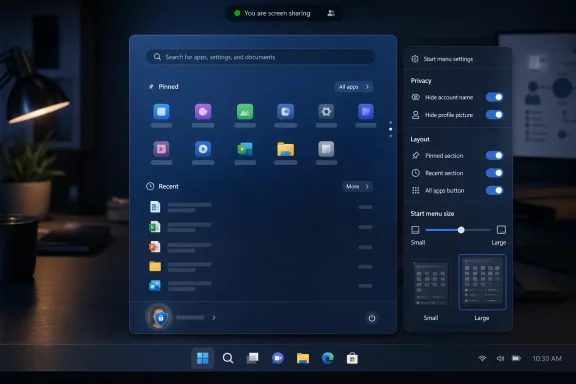
Microsoft is testing a Windows 11 Start menu update in Insider Experimental builds as of May 29, 2026, adding controls to hide the user name and profile picture, resize Start, and toggle major sections such as Pinned, Recent, and All apps. The visible change is small enough to look like housekeeping. The strategic change is larger: Microsoft is finally admitting that Start is not a billboard, a feed, or a design manifesto, but shared working space. After five years of Windows 11 arguments, the company is moving from trust us toward configure it yourself.
The Start menu has always been more than an app launcher. It is the psychological front door of Windows, the place where a user’s sense of ownership either begins or breaks down. When Microsoft changes it, the reaction is never just about pixels; it is about whether the PC still feels like a machine under the user’s control.
Windows 11’s original Start menu arrived in October 2021 with a clean, centered, almost appliance-like design. It removed Live Tiles, deemphasized hierarchy, and presented a fixed grid of pinned apps above a Recommended area that many users neither asked for nor trusted. Microsoft framed that design as modern and simplified, but for many longtime Windows users it felt like subtraction dressed as taste.
The new Insider work reverses some of that posture. Microsoft is not restoring the Windows 10 Start menu, and it is not giving power users a full layout editor. But it is adding the kinds of controls that should have existed from the beginning: the ability to choose a smaller or larger Start menu, hide major content sections, and suppress account identity from the menu surface.
The user profile change is especially telling. The option to hide your name and profile picture may seem minor, but it lands in the real world of screen sharing, streaming, conference-room demos, classroom machines, lab systems, and support calls. For an operating system that increasingly assumes cloud identity and account integration, a simple privacy toggle is not cosmetic. It is a concession that identity surfaces can leak context.
That change has made Windows’ small identity disclosures more consequential. A profile photo can reveal a personal account on a machine where only a corporate identity should appear. A display name can expose a legal name where a presenter uses a different public identity. Even when nothing sensitive is exposed, the presence of identity furniture makes Start feel less like a neutral launcher and more like an account portal.
Microsoft’s answer is appropriately boring: a toggle. That is exactly why it matters. The best privacy features are not grand speeches about security architecture; they are switches that prevent accidental disclosure before a user has to think about it.
The company’s stated framing is that hiding the name and profile picture helps when sharing a screen, presenting, or streaming. That is credible, but it also hints at a deeper problem with Windows 11’s design era. Microsoft made the shell more personal at the same time work made the desktop more public. Those two trends were always going to collide.
“Recent” is a less presumptuous word. It describes a mechanical relationship to user activity rather than an editorial one. For a company trying to rebuild trust in the Windows shell, that distinction matters.
The Recommended area has long sat at the intersection of convenience and suspicion. In its best form, it can surface documents a user genuinely needs. In its worst form, it feels like empty real estate reserved for Microsoft’s priorities. Windows users have been conditioned by years of prompts, ads, account nudges, Edge pushes, and OneDrive invitations to inspect every shell surface for ulterior motives.
Renaming the section does not solve all of that. But it does reveal that Microsoft understands the brand damage baked into the word “recommended.” A Start menu should not sound like a content platform. It should sound like a place where your own stuff lives.
This is not radical customization by historical Windows standards. It is not a return to the intensely configurable Start experiences of earlier eras, nor does it offer the full freedom that third-party utilities like Start11 have made a business of supplying. But compared with Windows 11’s original fixed Start menu, it is a philosophical retreat.
That retreat is overdue. The original Windows 11 shell treated consistency as if it were the same thing as usability. Centered icons, simplified menus, reduced density, and limited taskbar choices produced a cleaner screenshot, but they also removed spatial habits that many users had built over years.
The Start menu suffered most because it sits at the center of muscle memory. People do not merely “use” Start; they build routines around where items appear, how quickly lists open, and which sections can be ignored. A fixed design imposes not only a look, but a rhythm.
That institutional shift is the story. Windows 11 launched with a design language that seemed to prioritize coherence across devices over the messy variety of real PC use. Yet PCs are messy by nature. A gaming desktop, a managed enterprise laptop, a kiosk, a developer workstation, a classroom machine, and a family computer do not need the same Start menu.
The new settings acknowledge that the Start menu is not a universal object. Some users want pinned apps and nothing else. Some want an all-apps list. Some want recent files. Some want a compact surface that stays out of the way. Some want none of the identity ornamentation that Microsoft has layered into the shell.
Windows has traditionally won by absorbing those differences rather than pretending they do not exist. The Start menu’s new controls are a partial return to that older bargain.
That does not mean admins will suddenly embrace Insider builds or rush toward Experimental channel features. They will not. The practical enterprise question is whether these controls eventually become manageable through policy, provisioning, or deployment tooling. If they remain purely end-user settings, their usefulness in managed fleets will be limited.
Still, the direction is welcome. Every unnecessary shell surface is another thing help desks must explain, lock down, or work around. If a user opens Start during a screen share and exposes a personal profile photo, that is not a catastrophic breach, but it is the kind of small operational embarrassment IT teams prefer to prevent.
The same applies to the renamed Recent area. In a managed workplace, the Start menu’s document surface can be helpful, but it can also display items at awkward moments. The ability to hide that section independently gives organizations and users more room to decide whether convenience is worth the exposure.
The timing also sits inside Microsoft’s broader reshuffling of the Windows Insider Program. Build labels, channels, and platform branches have been in motion, with Microsoft distinguishing between mainstream Windows 11 development and future-platform work. That makes the Start changes both visible and provisional.
For enthusiasts, that creates the usual temptation to enable preview builds just to get a long-awaited shell option. For most people, that is still a bad trade. A better Start menu is not worth the instability risk of running pre-release Windows on a primary machine.
The useful lesson is not “install this now.” It is that Microsoft has moved these ideas from rumor and feedback into shipping test builds. That gives the Windows community something concrete to evaluate, complain about, and refine before the settings reach normal users.
Microsoft likes the second idea because it connects Windows to Microsoft accounts, cloud services, AI assistance, recommendations, and cross-device workflows. Users often prefer the first idea because it preserves autonomy. The tension between those two definitions runs through nearly every modern Windows argument.
The new Start work is interesting because it moves toward the first definition. Letting a user hide sections is personal. Letting a user choose a compact layout is personal. Letting a user remove their visible name and photo is personal. These are not algorithmic flourishes; they are acts of subtraction.
That is why the update feels more meaningful than the size of the feature list suggests. It is Microsoft saying, however quietly, that a user may want less Windows in Windows. In 2026, after years of complaints about prompts, promotions, defaults, and cloud nudges, that is not a small admission.
The best Start menus have tended to be boring. They help users launch, find, resume, and shut down. They do not ask to be admired. They certainly do not need to serve as a canvas for every product group that wants a place in the shell.
Windows 11’s Start menu became controversial because Microsoft forgot that restraint cuts both ways. A simplified layout can be elegant, but only if users do not feel trapped inside it. A recommendation area can be useful, but only if users trust its purpose. A profile surface can be friendly, but only if it does not expose more than the moment requires.
The new customization work does not erase those tensions. It gives users escape hatches. In Windows shell design, escape hatches are often the difference between annoyance and acceptance.
Windows 11 gave that market fresh oxygen. Users who wanted denser menus, left-aligned workflows, more traditional app lists, or deeper layout control found Microsoft’s defaults too narrow. Utilities filled the gap not because they were gimmicks, but because they treated user preference as a feature rather than a threat.
Microsoft does not need to clone those tools. In fact, it probably should not. The built-in Start menu must remain simple enough for mainstream users and manageable enough for enterprise deployments. But it does need to cover the most common complaints so that ordinary users do not feel forced into shell surgery.
The Experimental changes are a start in that direction. Small and large layouts address density. Section toggles address clutter. The privacy option addresses identity exposure. None of these will satisfy the most demanding tweakers, but they reduce the sense that Microsoft is deaf to everyday feedback.
If a user types part of a file name and Windows fails to find it, the entire Start experience feels unreliable. If search only works when users remember exact prefixes or naming conventions, it punishes the messy reality of human memory. Better substring search is one of those changes that should be invisible when it works and infuriating when absent.
This is where Microsoft can make Windows feel genuinely smarter without forcing a branded assistant into the foreground. Finding “April” inside “MeetingNotesApril” is not glamorous. It is useful. The Windows shell needs more of that kind of intelligence and fewer moments where “smart” means “promotional.”
Start, Recent, Search, and File Explorer form a continuum of retrieval. Microsoft’s challenge is to make that continuum faster and more predictable without turning it into another feed. The renamed Recent section and improved search behavior both point in the right direction, provided the execution remains user-centered.
For many Windows 10 users, the Start menu was one of the emotional blockers. Hardware requirements got the headlines, but interface friction drove daily irritation. Users who could tolerate a TPM requirement on paper still had to live with centered taskbar icons, simplified context menus, and a Start menu that felt less capable.
By making Start more configurable, Microsoft is lowering one of the psychological costs of migration. That does not mean every Windows 10 loyalist will be persuaded. But it does suggest Microsoft understands that adoption is not only about compatibility and security updates. It is also about whether the new OS respects the habits people bring with them.
The company’s mistake was treating those habits as legacy baggage. In Windows, habit is infrastructure. Break enough of it at once, and even technically superior changes feel hostile.
The Start menu update has a chance to be different because its core direction is subtractive. It adds controls that let users remove things. It renames a section in a way that reduces overreach. It offers sizing choices instead of forcing one geometry. It acknowledges privacy without turning the answer into a subscription feature.
That does not make Microsoft a born-again champion of user control. It makes the company pragmatic. The Windows shell is too important to be governed entirely by design ideology, and the backlash to Windows 11’s rigidity has lasted too long to dismiss as a power-user tantrum.
The lesson Microsoft should take is simple: configurable defaults age better than perfect defaults. A design that can be shaped survives more use cases than a design that must be defended.
 Microsoft Finally Gives Start Back to the Person Sitting at the Keyboard
The Start menu has always been more than an app launcher. It is the psychological front door of Windows, the place where a user’s sense of ownership either begins or breaks down. When Microsoft changes it, the reaction is never just about pixels; it is about whether the PC still feels like a machine under the user’s control.Windows 11’s original Start menu arrived in October 2021 with a clean, centered, almost appliance-like design. It removed Live Tiles, deemphasized hierarchy, and presented a fixed grid of pinned apps above a Recommended area that many users neither asked for nor trusted. Microsoft framed that design as modern and simplified, but for many longtime Windows users it felt like subtraction dressed as taste.
The new Insider work reverses some of that posture. Microsoft is not restoring the Windows 10 Start menu, and it is not giving power users a full layout editor. But it is adding the kinds of controls that should have existed from the beginning: the ability to choose a smaller or larger Start menu, hide major content sections, and suppress account identity from the menu surface.
The user profile change is especially telling. The option to hide your name and profile picture may seem minor, but it lands in the real world of screen sharing, streaming, conference-room demos, classroom machines, lab systems, and support calls. For an operating system that increasingly assumes cloud identity and account integration, a simple privacy toggle is not cosmetic. It is a concession that identity surfaces can leak context.
The Account Menu Became a Privacy Problem Because Windows Became a Stage
On a personal laptop used only at home, a name and avatar in Start may feel harmless. On a work PC connected to Teams, Outlook, OneDrive, Entra ID, and a dozen browser profiles, it is a different story. The desktop is now routinely projected, recorded, streamed, remotely controlled, and screen-shared.That change has made Windows’ small identity disclosures more consequential. A profile photo can reveal a personal account on a machine where only a corporate identity should appear. A display name can expose a legal name where a presenter uses a different public identity. Even when nothing sensitive is exposed, the presence of identity furniture makes Start feel less like a neutral launcher and more like an account portal.
Microsoft’s answer is appropriately boring: a toggle. That is exactly why it matters. The best privacy features are not grand speeches about security architecture; they are switches that prevent accidental disclosure before a user has to think about it.
The company’s stated framing is that hiding the name and profile picture helps when sharing a screen, presenting, or streaming. That is credible, but it also hints at a deeper problem with Windows 11’s design era. Microsoft made the shell more personal at the same time work made the desktop more public. Those two trends were always going to collide.
“Recommended” Loses the Marketing Fight and Becomes “Recent”
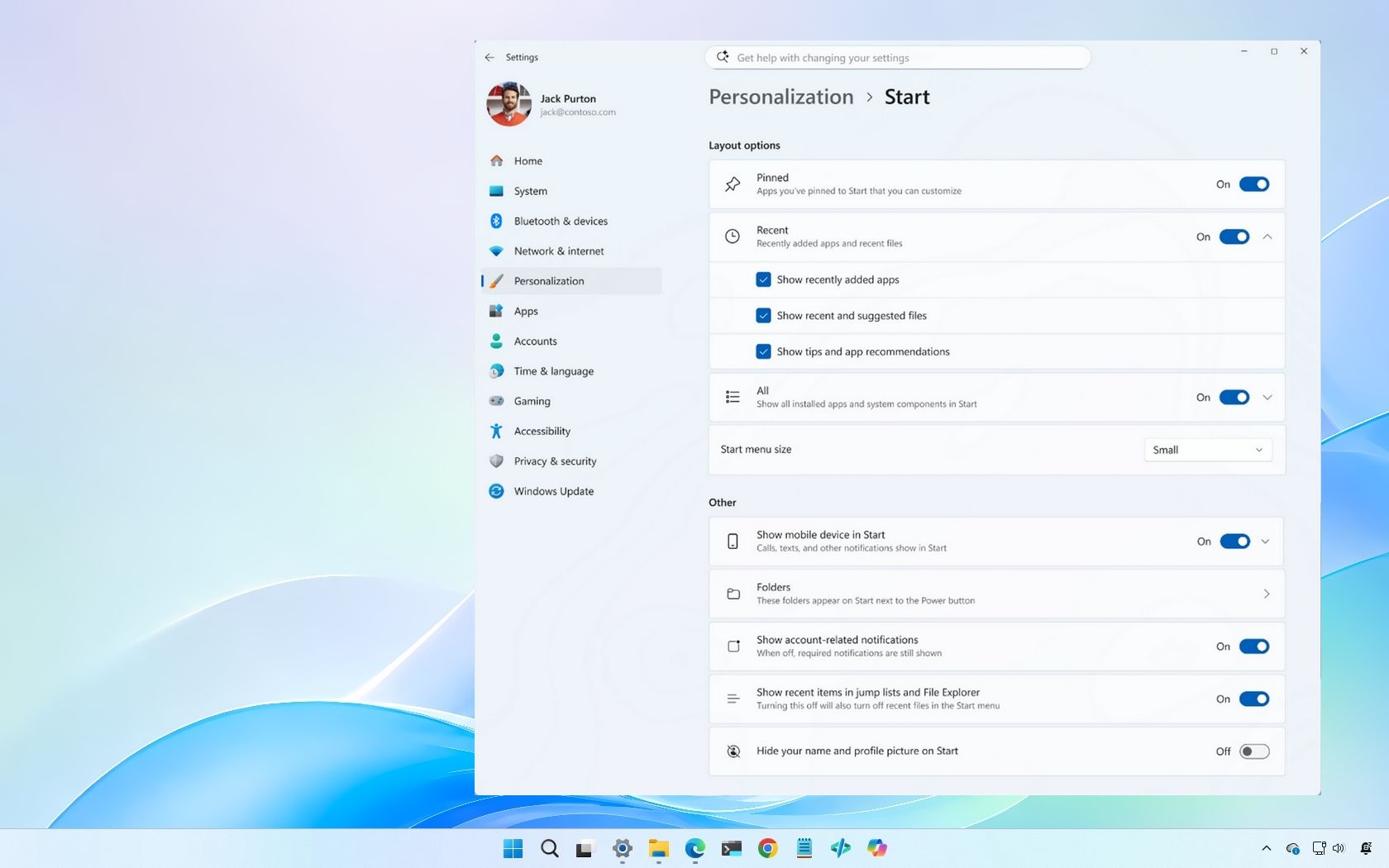
Microsoft is also renaming the Recommended section to Recent, a change that sounds semantic until you remember how much of the Windows 11 Start backlash centered on that area. “Recommended” carried a whiff of algorithmic interference. It suggested that Windows was not just showing what you had used, but deciding what you should see.“Recent” is a less presumptuous word. It describes a mechanical relationship to user activity rather than an editorial one. For a company trying to rebuild trust in the Windows shell, that distinction matters.
The Recommended area has long sat at the intersection of convenience and suspicion. In its best form, it can surface documents a user genuinely needs. In its worst form, it feels like empty real estate reserved for Microsoft’s priorities. Windows users have been conditioned by years of prompts, ads, account nudges, Edge pushes, and OneDrive invitations to inspect every shell surface for ulterior motives.
Renaming the section does not solve all of that. But it does reveal that Microsoft understands the brand damage baked into the word “recommended.” A Start menu should not sound like a content platform. It should sound like a place where your own stuff lives.
The Fixed Start Menu Was Always the Wrong Hill to Die On
The more important change is not any single toggle; it is Microsoft’s willingness to let Start become modular. In the new Experimental build, users can independently show or hide Pinned, Recent, and All apps. They can choose between small and large layouts in addition to an automatic default.This is not radical customization by historical Windows standards. It is not a return to the intensely configurable Start experiences of earlier eras, nor does it offer the full freedom that third-party utilities like Start11 have made a business of supplying. But compared with Windows 11’s original fixed Start menu, it is a philosophical retreat.
That retreat is overdue. The original Windows 11 shell treated consistency as if it were the same thing as usability. Centered icons, simplified menus, reduced density, and limited taskbar choices produced a cleaner screenshot, but they also removed spatial habits that many users had built over years.
The Start menu suffered most because it sits at the center of muscle memory. People do not merely “use” Start; they build routines around where items appear, how quickly lists open, and which sections can be ignored. A fixed design imposes not only a look, but a rhythm.
The New Controls Are Small Because the Political Fight Was Big
One reason these changes feel modest is that they are technically straightforward. Hiding a section, changing a menu size, or suppressing an account picture is not a moonshot. The hard part was institutional: Microsoft had to decide that letting users make Start less Microsoft-designed was not a defeat.That institutional shift is the story. Windows 11 launched with a design language that seemed to prioritize coherence across devices over the messy variety of real PC use. Yet PCs are messy by nature. A gaming desktop, a managed enterprise laptop, a kiosk, a developer workstation, a classroom machine, and a family computer do not need the same Start menu.
The new settings acknowledge that the Start menu is not a universal object. Some users want pinned apps and nothing else. Some want an all-apps list. Some want recent files. Some want a compact surface that stays out of the way. Some want none of the identity ornamentation that Microsoft has layered into the shell.
Windows has traditionally won by absorbing those differences rather than pretending they do not exist. The Start menu’s new controls are a partial return to that older bargain.
Enterprise IT Will Read This as Risk Reduction, Not Personalization
For consumers, this update is about taste. For administrators, it is about reducing accidental exposure and support friction. A Start menu that can hide account identity and remove unwanted sections is easier to standardize for classrooms, shared workstations, call centers, conference rooms, and regulated environments.That does not mean admins will suddenly embrace Insider builds or rush toward Experimental channel features. They will not. The practical enterprise question is whether these controls eventually become manageable through policy, provisioning, or deployment tooling. If they remain purely end-user settings, their usefulness in managed fleets will be limited.
Still, the direction is welcome. Every unnecessary shell surface is another thing help desks must explain, lock down, or work around. If a user opens Start during a screen share and exposes a personal profile photo, that is not a catastrophic breach, but it is the kind of small operational embarrassment IT teams prefer to prevent.
The same applies to the renamed Recent area. In a managed workplace, the Start menu’s document surface can be helpful, but it can also display items at awkward moments. The ability to hide that section independently gives organizations and users more room to decide whether convenience is worth the exposure.
The Experimental Channel Is a Warning Label, Not a Delivery Date
These changes are currently in the Windows Insider Experimental channel, which matters. Experimental is where Microsoft can test interaction models, collect telemetry, and change its mind before broader release. Users should not treat this as a finished feature drop for stable Windows 11 systems.The timing also sits inside Microsoft’s broader reshuffling of the Windows Insider Program. Build labels, channels, and platform branches have been in motion, with Microsoft distinguishing between mainstream Windows 11 development and future-platform work. That makes the Start changes both visible and provisional.
For enthusiasts, that creates the usual temptation to enable preview builds just to get a long-awaited shell option. For most people, that is still a bad trade. A better Start menu is not worth the instability risk of running pre-release Windows on a primary machine.
The useful lesson is not “install this now.” It is that Microsoft has moved these ideas from rumor and feedback into shipping test builds. That gives the Windows community something concrete to evaluate, complain about, and refine before the settings reach normal users.
Microsoft Is Learning the Difference Between Personal and Personalized
Windows 11 has often blurred two ideas that users experience very differently. A personal computer is one the user controls. A personalized system is one that adapts, suggests, decorates, and integrates based on identity and behavior.Microsoft likes the second idea because it connects Windows to Microsoft accounts, cloud services, AI assistance, recommendations, and cross-device workflows. Users often prefer the first idea because it preserves autonomy. The tension between those two definitions runs through nearly every modern Windows argument.
The new Start work is interesting because it moves toward the first definition. Letting a user hide sections is personal. Letting a user choose a compact layout is personal. Letting a user remove their visible name and photo is personal. These are not algorithmic flourishes; they are acts of subtraction.
That is why the update feels more meaningful than the size of the feature list suggests. It is Microsoft saying, however quietly, that a user may want less Windows in Windows. In 2026, after years of complaints about prompts, promotions, defaults, and cloud nudges, that is not a small admission.
The Start Menu Is Still Carrying Too Much Strategy
Even with these changes, Start remains burdened by Microsoft’s broader ambitions. It is expected to launch apps, surface documents, reinforce account identity, connect to phone experiences, host search entry points, and participate in whatever AI-adjacent workflow Microsoft wants to elevate next. No amount of polish can fully resolve that contradiction.The best Start menus have tended to be boring. They help users launch, find, resume, and shut down. They do not ask to be admired. They certainly do not need to serve as a canvas for every product group that wants a place in the shell.
Windows 11’s Start menu became controversial because Microsoft forgot that restraint cuts both ways. A simplified layout can be elegant, but only if users do not feel trapped inside it. A recommendation area can be useful, but only if users trust its purpose. A profile surface can be friendly, but only if it does not expose more than the moment requires.
The new customization work does not erase those tensions. It gives users escape hatches. In Windows shell design, escape hatches are often the difference between annoyance and acceptance.
The Third-Party Start Menu Market Was a Symptom Microsoft Could Not Ignore
The persistence of third-party Start menu replacements has always been a referendum on Microsoft’s confidence. When users pay for utilities to restore behaviors the operating system used to provide, the market is sending a message. It is not merely nostalgia; it is unmet demand.Windows 11 gave that market fresh oxygen. Users who wanted denser menus, left-aligned workflows, more traditional app lists, or deeper layout control found Microsoft’s defaults too narrow. Utilities filled the gap not because they were gimmicks, but because they treated user preference as a feature rather than a threat.
Microsoft does not need to clone those tools. In fact, it probably should not. The built-in Start menu must remain simple enough for mainstream users and manageable enough for enterprise deployments. But it does need to cover the most common complaints so that ordinary users do not feel forced into shell surgery.
The Experimental changes are a start in that direction. Small and large layouts address density. Section toggles address clutter. The privacy option addresses identity exposure. None of these will satisfy the most demanding tweakers, but they reduce the sense that Microsoft is deaf to everyday feedback.
Search Improvements Matter Because Start Is Also a Retrieval System
Alongside the Start changes, Microsoft is testing Windows Search improvements, including better substring matching for files with compound names or content. That may sound unrelated, but it belongs in the same usability story. Start is no longer just where users browse apps; it is where many users expect to retrieve work.If a user types part of a file name and Windows fails to find it, the entire Start experience feels unreliable. If search only works when users remember exact prefixes or naming conventions, it punishes the messy reality of human memory. Better substring search is one of those changes that should be invisible when it works and infuriating when absent.
This is where Microsoft can make Windows feel genuinely smarter without forcing a branded assistant into the foreground. Finding “April” inside “MeetingNotesApril” is not glamorous. It is useful. The Windows shell needs more of that kind of intelligence and fewer moments where “smart” means “promotional.”
Start, Recent, Search, and File Explorer form a continuum of retrieval. Microsoft’s challenge is to make that continuum faster and more predictable without turning it into another feed. The renamed Recent section and improved search behavior both point in the right direction, provided the execution remains user-centered.
The Windows 10 Deadline Gives Start a New Political Role
These Start changes are arriving in the shadow of Windows 10’s support deadline. With free support for Windows 10 scheduled to end on October 14, 2025, Microsoft has spent the past year pushing holdouts toward Windows 11 while also trying to soften the landing for users who disliked the newer shell. In 2026, that migration pressure has not disappeared; it has simply changed shape.For many Windows 10 users, the Start menu was one of the emotional blockers. Hardware requirements got the headlines, but interface friction drove daily irritation. Users who could tolerate a TPM requirement on paper still had to live with centered taskbar icons, simplified context menus, and a Start menu that felt less capable.
By making Start more configurable, Microsoft is lowering one of the psychological costs of migration. That does not mean every Windows 10 loyalist will be persuaded. But it does suggest Microsoft understands that adoption is not only about compatibility and security updates. It is also about whether the new OS respects the habits people bring with them.
The company’s mistake was treating those habits as legacy baggage. In Windows, habit is infrastructure. Break enough of it at once, and even technically superior changes feel hostile.
The Real Test Is Whether Microsoft Can Stop “Improving” the Shell Into Distrust
Windows users have become wary of improvement language. Too often, a new Windows experience has meant another prompt, another default reset, another cloud upsell, another panel that cannot be removed, or another setting buried under friendlier wording. That history makes even good changes arrive under suspicion.The Start menu update has a chance to be different because its core direction is subtractive. It adds controls that let users remove things. It renames a section in a way that reduces overreach. It offers sizing choices instead of forcing one geometry. It acknowledges privacy without turning the answer into a subscription feature.
That does not make Microsoft a born-again champion of user control. It makes the company pragmatic. The Windows shell is too important to be governed entirely by design ideology, and the backlash to Windows 11’s rigidity has lasted too long to dismiss as a power-user tantrum.
The lesson Microsoft should take is simple: configurable defaults age better than perfect defaults. A design that can be shaped survives more use cases than a design that must be defended.
The Menu Microsoft Should Have Shipped Is Finally Coming Into View
The practical read on this Insider build is not complicated, but the implications are larger than the changelog. Microsoft is testing a Start menu that behaves more like a user surface and less like a fixed corporate artifact.- Microsoft is testing these Start menu controls in Windows 11 Insider Experimental builds, so they should be treated as preview features rather than guaranteed stable-channel behavior.
- The new option to hide the account name and profile picture is a meaningful privacy improvement for screen sharing, streaming, classrooms, support sessions, and shared machines.
- The renamed Recent section is a tacit acknowledgment that “Recommended” sounded too much like algorithmic steering for a core Windows surface.
- Section-level controls for Pinned, Recent, and All apps matter because they let users remove clutter instead of merely rearranging it.
- Small and large Start menu options address one of Windows 11’s oldest shell complaints: Microsoft’s assumption that one density fits everyone.
- The value for IT departments will depend on whether these settings become manageable at scale through policy, provisioning, or other administrative controls.
References
- Primary source: thurrott.com
Published: 2026-06-01T23:10:24.728041
Loading…
www.thurrott.com - Related coverage: windowscentral.com
“A cleaner, more useful Start menu” — Windows 11 is getting 4 upgrades soon
Microsoft is finally fixing some of the biggest frustrations with the Windows 11 Start menu, including resizing and better customization controls. www.windowscentral.com
- Official source: learn.microsoft.com

Customize the Windows 11 Start menu
How to pin OEM apps in the Windows 11 start menulearn.microsoft.com - Related coverage: pcworld.com
Loading…
www.pcworld.com - Official source: microsoft.com
Loading…
www.microsoft.com - Official source: support.microsoft.com
Loading…
support.microsoft.com
- Related coverage: techradar.com
Loading…
www.techradar.com - Related coverage: tomsguide.com
Loading…
www.tomsguide.com - Related coverage: scscc.club
Loading…
www.scscc.club - Related coverage: fullcirclecomputing.com
Loading…
www.fullcirclecomputing.com - Official source: blogs.windows.com

Announcing new builds for 29 May 2026
Hello Windows Insiders, This week we continue to expand the rollout of the new Windows Insider Program changes to devices in channels already announced. New builds this week Today we are releasing new Windows 11 Insider Preview B blogs.windows.com
- Related coverage: notebookcheck.net

Windows 11 Insider Build 26300.8553 finally lets you customize the Start menu
Windows 11 Insider Preview Build 26300.8553 brings a modular Start menu with Small, Large, and Automatic size presets and new privacy tools to the Experimental channel. www.notebookcheck.net
- Related coverage: windowslatest.com

Tested: Windows 11's new Start menu lets you fully customize it, and it works surprisingly well
Windows 11’s new Start menu finally adds smaller layouts, removable sections, and deeper customization after years of user complaints. www.windowslatest.com
- Related coverage: notebookcheck.org

Windows 11 Insider Build 26300.8553 permite por fin personalizar el menú Inicio
Windows 11 Insider Preview Build 26300.8553 trae un menú Inicio modular con preajustes de tamaño Pequeño, Grande y Automático y nuevas herramientas de privacidad al canal Experimental. www.notebookcheck.org
- Related coverage: dataconomy.com

Windows 11 update adds major Start menu customization options
Microsoft is testing updates for Windows 11 that will enhance customization options for the Start menu and taskbar, with rollouts dataconomy.com
- Related coverage: windowsreport.com
Loading…
windowsreport.com - Official source: download.microsoft.com
Loading…
download.microsoft.com