

The Windows 11 Start menu may finally be getting the kind of flexibility users have wanted since launch, and that alone makes this one of the more meaningful interface changes Microsoft has tested in years. Early reporting indicates a broader redesign that would let people hide major sections, adjust the menu’s footprint more deliberately, and enjoy a snappier response under heavy system load. If Microsoft ships it in broadly available form during 2026, it could mark a quiet but important reset for a feature that has frustrated power users, enterprise admins, and casual Windows fans alike.
When Windows 11 arrived, its Start menu became an instant lightning rod. Microsoft had clearly decided to push the menu toward a cleaner, more curated design, but the trade-off was obvious: less control, more whitespace, and a persistent Recommended area that many users considered unwanted clutter rather than a helpful feature. That tension has remained a recurring complaint through multiple releases, even as Microsoft gradually added a few layout options and personalization toggles.
The latest reports suggest that Microsoft is no longer treating that criticism as background noise. Instead, it appears to be reworking Start as a more modular experience, with the ability to disable whole sections rather than merely minimizing or ignoring them. That matters because the complaint has never really been about one specific panel; it has been about the broader feeling that Start is being arranged for users instead of by them.
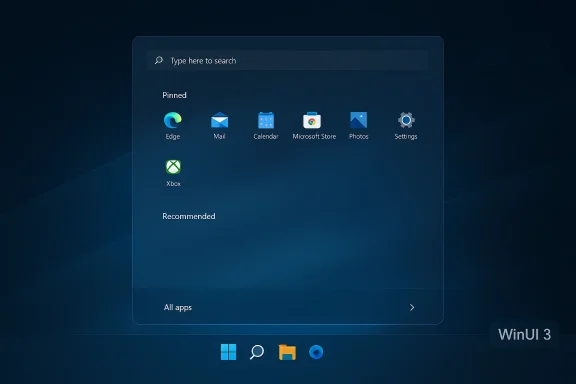
There is also a technical story underneath the design story. Microsoft has been steadily moving more Windows shell experiences toward WinUI 3, and the Start menu appears to be part of that migration. The promise is not just visual polish, but better responsiveness, better scaling across device sizes, and less friction when the PC is under load. In other words, this is not merely a cosmetic refresh. It is an attempt to make the launcher feel more like a modern Windows surface and less like a legacy artifact with a new coat of paint.
That said, it is important to separate confirmed behavior from leaked features. Microsoft has already shown in official Insider builds that the new Start menu can be larger, more responsive to screen size, and more capable of showing different app views. But some of the more aggressive claims — like hiding every major section or making Start fully minimalist — still appear to come from reports rather than final documentation. The broad direction is credible. The exact endpoint is still fluid.
The most controversial element has been the Recommended section. Microsoft has framed it as a convenience layer for recently used files, new apps, and suggested content. Many users, however, see it as a persistent advertisement for Microsoft’s priorities, especially when the section remains visible even after being emptied. That empty reserved space is what makes the feature feel imposed rather than optional.
Microsoft has slowly improved some of this. The company’s support documentation now acknowledges more Start personalization options than it did at launch, including layout behavior and ways to collapse some sections when content is removed or recommendations are disabled. That is an important sign, because it shows the company understands the complaint in principle even if it has not fully solved it in product design. The current implementation still stops short of the kind of complete control many users want.
Microsoft also said that the updated Start menu could collapse sections and adapt depending on how many items were pinned or recommended. That is more than a visual tweak; it is a statement that Start should respond to actual usage patterns rather than enforce a fixed grid. This is the philosophical foundation for the deeper customization now being reported.
Still, the current experience is not the same as the rumored future state. The existence of some collapsible behavior does not automatically mean users will get full freedom to hide every section or manually set Start’s size regardless of screen class. That is why the latest reporting matters: it suggests Microsoft may be taking the next step from partial adaptability to explicit user control.
The result is that Start often feels like a compromise between a launcher and a content surface. That split identity makes it harder for the menu to satisfy both audiences. A gamer with a handful of launchers wants speed and minimal distraction. An office worker wants predictable access to pinned productivity apps. A consumer who barely uses Start at all wants the least visible version possible. Windows 11 has historically satisfied none of those groups perfectly.
This distinction matters because it explains why small toggles have not fully solved the problem. Letting users turn off tips or recent files is useful, but if the layout still reserves a block for that content, the menu still feels compromised. The rumored new behavior — hiding the entire section instead of leaving a placeholder — would be a meaningful shift in how Microsoft thinks about user control. It would acknowledge that unused space is not neutral; it is a design cost.
If Microsoft really does allow manual sizing independent of hardware class, that would be a quietly significant improvement. It would mean the Start menu is finally being treated like a user-chosen interface, not a fixed response to display resolution. That kind of freedom is especially valuable on ultrawide monitors, docking setups, and hybrid laptops where screen behavior changes constantly. It also helps mobile professionals who want consistency across devices.
Microsoft has already acknowledged in official Insider language that it wants “faster responsiveness in core Windows experiences like the Start menu” by moving more experiences to WinUI 3. That is a strong confirmation that performance is not an afterthought but a deliberate engineering goal.
This is especially relevant because the Start menu is deeply tied to search. If the menu opens slowly or the input box is sluggish, the entire launcher loses credibility. Users do not separate “Start” from “search”; they experience them as one workflow. That means improving one without the other would only partially solve the problem.
The issue is not just speed in a vacuum. It is reliability under stress. A menu that opens quickly on an idle desktop but stutters during multitasking does not create confidence. Microsoft seems to understand that modern productivity is messy and that the launcher must survive alongside everything else users are doing.
The June 2025 Dev Channel build is the strongest official evidence that Start is being rethought. Microsoft explicitly described a larger, more responsive menu with updated app views, and it noted that the new layout could show fewer or more sections depending on device size and content. That is concrete. The rest — especially deeper section hiding and size overrides — is more speculative but still plausible.
The company has also publicly tied broader Windows quality work to the Start menu. Its March 2026 quality update highlighted system performance, app responsiveness, and faster behavior in core experiences such as Start. That makes the performance story feel official even if the exact implementation details are still evolving.
That caution is important because Windows leaks are often directionally right but operationally incomplete. A prototype can show a hidden section that later returns as a collapsed row. A size override can become a limited toggle. A responsive redesign can lose some of its modularity by the time it reaches retail builds. The idea is clear; the final packaging is not.
That is especially true in enterprise environments where Start is often standardized. If Microsoft makes the menu more personal by default, it may also need to provide stronger management controls so businesses can keep desktops consistent. In other words, more flexibility for consumers often means more complexity for IT.
That is why hiding the Recommended section could land so well. It is a small change with a large psychological effect. The menu would feel cleaner, and users would feel like the system finally respected their preferences rather than second-guessing them. That can matter as much as raw functionality.
There is also a design satisfaction to owning your workspace. When users can hide sections they never touch, the interface stops feeling like a compromise and starts feeling intentional. That can improve the emotional relationship people have with the OS, which is not trivial in a product used every day.
That balance could also reduce the need for third-party Start replacements. Many users rely on tools that alter the Start experience because Microsoft does not give them enough control. If the native menu becomes more customizable, some of that demand should recede. Should, however, is the key word; users of legacy tools are often loyal precisely because those tools offer predictability.
If Microsoft allows more granular hiding of sections, organizations may welcome the opportunity to standardize a cleaner desktop. A menu without unnecessary recommendations can reduce distractions and keep the user experience closer to business needs. That said, enterprises also value uniformity, so flexibility cannot come at the cost of manageability.
This matters because Windows deployment workflows often assume a known Start configuration. When Microsoft changes the shell, organizations need time to adjust scripts, images, and user guidance. A more modular Start menu might actually simplify some deployments if it lets admins suppress noisy areas by default. But it could also complicate onboarding if end users see different layouts depending on edition, build, or enrollment state.
At the same time, Microsoft must avoid creating a fragmented UI across its consumer and enterprise channels. The company has done this before with different feature availability in Insider, retail, and managed builds. The more Start becomes customizable, the more important it is that documentation stays clear and edition behavior stays predictable.
If Microsoft gets this right, it can blunt one of the easiest criticisms of Windows 11: that it looks modern but behaves rigidly. A more personal Start menu would help Microsoft argue that Windows remains the most adaptable mainstream desktop platform. That message matters both for individual users and for hardware partners who sell the Windows experience alongside the device.
There is also an ecosystem argument. Windows has always won partly because it can be shaped to different roles: office desktop, gaming rig, developer machine, kiosk, or classroom system. A more flexible Start reinforces that tradition. It says Windows is not trying to impose one productivity ideology on everyone.
That is not just a UX win; it is a trust win. When users feel they no longer need to patch over the shell, they may become more comfortable staying inside the stock Windows environment. That also reduces support risk, compatibility risk, and update breakage associated with shell-modifying tools.
That said, symbolic wins must be backed by real-world usability. If the new menu ships but still feels cluttered, the criticism will not disappear. Windows users are unusually vocal about shell changes because they live with them all day. They will know immediately whether Microsoft has actually listened.
What makes this change so notable is that it touches both philosophy and engineering. Microsoft is not only trying to make Start look different; it is trying to make the menu feel less imposed, more adaptive, and more reliable. That combination is rare enough in Windows UX history to deserve attention. If the company keeps moving in this direction, the Start menu could finally become a strength instead of a complaint magnet.
Source: Android Headlines Windows 11 Update May Bring Deep Customization to the Start Menu this Year
 Overview
When Windows 11 arrived, its Start menu became an instant lightning rod. Microsoft had clearly decided to push the menu toward a cleaner, more curated design, but the trade-off was obvious: less control, more whitespace, and a persistent Recommended area that many users considered unwanted clutter rather than a helpful feature. That tension has remained a recurring complaint through multiple releases, even as Microsoft gradually added a few layout options and personalization toggles.The latest reports suggest that Microsoft is no longer treating that criticism as background noise. Instead, it appears to be reworking Start as a more modular experience, with the ability to disable whole sections rather than merely minimizing or ignoring them. That matters because the complaint has never really been about one specific panel; it has been about the broader feeling that Start is being arranged for users instead of by them.
There is also a technical story underneath the design story. Microsoft has been steadily moving more Windows shell experiences toward WinUI 3, and the Start menu appears to be part of that migration. The promise is not just visual polish, but better responsiveness, better scaling across device sizes, and less friction when the PC is under load. In other words, this is not merely a cosmetic refresh. It is an attempt to make the launcher feel more like a modern Windows surface and less like a legacy artifact with a new coat of paint.
That said, it is important to separate confirmed behavior from leaked features. Microsoft has already shown in official Insider builds that the new Start menu can be larger, more responsive to screen size, and more capable of showing different app views. But some of the more aggressive claims — like hiding every major section or making Start fully minimalist — still appear to come from reports rather than final documentation. The broad direction is credible. The exact endpoint is still fluid.
Background
Windows users have always had a complicated relationship with Start. In the Windows 95 era and through the classic Windows 7 experience, Start was a productivity anchor: one button, one menu, one predictable launch surface. Windows 8 broke that expectation dramatically, and Microsoft spent years trying to rebuild trust in the idea that Start could be modern without becoming hostile. Windows 11 was supposed to be the clean reset, but in practice it reintroduced a familiar complaint: the interface looked refined, yet it felt constrained.The most controversial element has been the Recommended section. Microsoft has framed it as a convenience layer for recently used files, new apps, and suggested content. Many users, however, see it as a persistent advertisement for Microsoft’s priorities, especially when the section remains visible even after being emptied. That empty reserved space is what makes the feature feel imposed rather than optional.
Why Start Became a Flashpoint
The issue is not simply that people dislike suggestions. Windows users have tolerated suggestions in File Explorer, Edge, the taskbar, and search for years. The frustration comes from the structural asymmetry: Start in Windows 11 allocates a lot of visual real estate to content users may not want, while limiting the degree to which they can reclaim that space. For power users, that creates a feeling of lost efficiency. For casual users, it creates confusion.Microsoft has slowly improved some of this. The company’s support documentation now acknowledges more Start personalization options than it did at launch, including layout behavior and ways to collapse some sections when content is removed or recommendations are disabled. That is an important sign, because it shows the company understands the complaint in principle even if it has not fully solved it in product design. The current implementation still stops short of the kind of complete control many users want.
The Role of Insider Builds
The Windows Insider program has become the main venue where Microsoft tests these interface changes, and the Start menu is no exception. In June 2025, Microsoft officially introduced a new Start menu experience in the Dev Channel with larger-screen scaling, improved section responsiveness, and alternate ways to view installed apps. The company described a layout that showed pinned apps at the top, recommendations in the middle, and installed apps at the bottom, with the visible size adjusting based on screen real estate. That is already a major structural shift compared with the original Windows 11 menu.Microsoft also said that the updated Start menu could collapse sections and adapt depending on how many items were pinned or recommended. That is more than a visual tweak; it is a statement that Start should respond to actual usage patterns rather than enforce a fixed grid. This is the philosophical foundation for the deeper customization now being reported.
What Microsoft Has Already Shown
The official support and Insider material gives the story credibility. Microsoft support now documents that Start can be customized in ways that include changing layout behavior, organizing pinned apps, and controlling how the menu displays different areas. The company has also acknowledged that when recommendations or pinned content are removed, the related sections can collapse. That is a strong hint that the shell is already moving in the direction of modularity.Still, the current experience is not the same as the rumored future state. The existence of some collapsible behavior does not automatically mean users will get full freedom to hide every section or manually set Start’s size regardless of screen class. That is why the latest reporting matters: it suggests Microsoft may be taking the next step from partial adaptability to explicit user control.
The Customization Problem
The core issue with Windows 11 Start has been control, or rather the lack of it. Microsoft’s design language has leaned toward simplicity, but simplicity without reversibility often feels like restriction. Users can pin apps, manage a few display toggles, and clean up recommendations, yet they cannot truly recompose the menu around how they work.The result is that Start often feels like a compromise between a launcher and a content surface. That split identity makes it harder for the menu to satisfy both audiences. A gamer with a handful of launchers wants speed and minimal distraction. An office worker wants predictable access to pinned productivity apps. A consumer who barely uses Start at all wants the least visible version possible. Windows 11 has historically satisfied none of those groups perfectly.
The Recommended Section Debate
The Recommended area is the most obvious symbol of that tension. Microsoft sees it as a convenience layer, but users see it as occupied territory. Even when the content is cleared, the empty reserved space remains visible in many builds, which is exactly why the feedback has been so persistent. What people want is not just fewer recommendations; they want the right to remove the category entirely.This distinction matters because it explains why small toggles have not fully solved the problem. Letting users turn off tips or recent files is useful, but if the layout still reserves a block for that content, the menu still feels compromised. The rumored new behavior — hiding the entire section instead of leaving a placeholder — would be a meaningful shift in how Microsoft thinks about user control. It would acknowledge that unused space is not neutral; it is a design cost.
Screen Size and Forced Layouts
The other long-running frustration is the way Windows 11 scales the Start menu. Users on larger displays can end up with more menu real estate than they want, while others on smaller screens may be limited to a tighter configuration. In theory, adaptive layout is good design. In practice, it becomes irritating when users cannot override it.If Microsoft really does allow manual sizing independent of hardware class, that would be a quietly significant improvement. It would mean the Start menu is finally being treated like a user-chosen interface, not a fixed response to display resolution. That kind of freedom is especially valuable on ultrawide monitors, docking setups, and hybrid laptops where screen behavior changes constantly. It also helps mobile professionals who want consistency across devices.
A Better Mental Model
The most useful way to think about the rumored redesign is as a shift from a static app launcher to a configurable launch workspace. That sounds subtle, but it is a real change in product philosophy. Once users can hide sections they never use, the menu stops being a rigid template and starts becoming an adaptable shell.- Pinned apps become the primary action layer.
- Recommendations become optional instead of unavoidable.
- All apps can be treated as an advanced view rather than a mandatory one.
- Menu size becomes a preference, not a hardware side effect.
The WinUI 3 Rebuild
Microsoft’s reported Start menu work is also interesting because of the underlying technology. The move toward WinUI 3 suggests the company is trying to modernize the shell with a framework that can improve responsiveness and consistency across Windows experiences. That matters because the Start menu is one of the most frequently invoked UI surfaces in the OS, and even tiny delays become very noticeable.Microsoft has already acknowledged in official Insider language that it wants “faster responsiveness in core Windows experiences like the Start menu” by moving more experiences to WinUI 3. That is a strong confirmation that performance is not an afterthought but a deliberate engineering goal.
Why Framework Migration Matters
A framework rebuild is not just a developer preference. It can affect rendering speed, memory behavior, animation smoothness, and how well components handle rapid input. When users complain that the Start menu lags or that search misses the first few keystrokes under load, they are really describing a chain of UI bottlenecks. Microsoft appears to be attacking that chain at the framework level rather than merely optimizing a few visual transitions.This is especially relevant because the Start menu is deeply tied to search. If the menu opens slowly or the input box is sluggish, the entire launcher loses credibility. Users do not separate “Start” from “search”; they experience them as one workflow. That means improving one without the other would only partially solve the problem.
Performance Under Pressure
One of the most useful parts of the reporting is the emphasis on responsiveness during heavy CPU usage. That scenario matters more than benchmark demos because it reflects real-world Windows behavior. People launch Start while downloads are running, games are compiling shaders, cloud sync is active, or multiple apps are already consuming system resources. If Start still appears instantly in those moments, the product feels trustworthy.The issue is not just speed in a vacuum. It is reliability under stress. A menu that opens quickly on an idle desktop but stutters during multitasking does not create confidence. Microsoft seems to understand that modern productivity is messy and that the launcher must survive alongside everything else users are doing.
A Sequential View of the Rebuild
The reported engineering approach appears to have at least three stages:- Move more Start components into WinUI 3.
- Make the layout responsive and modular rather than fixed.
- Improve launch and input behavior when the system is under load.
Official Signals Versus Leaks
A big part of the current discussion is the difference between what Microsoft has actually confirmed and what reporters have inferred from internal testing. That distinction matters because the company often prototypes aggressive interface changes before settling on a final public release. Some features shown in Insider builds arrive broadly. Others are revised, delayed, or quietly removed.The June 2025 Dev Channel build is the strongest official evidence that Start is being rethought. Microsoft explicitly described a larger, more responsive menu with updated app views, and it noted that the new layout could show fewer or more sections depending on device size and content. That is concrete. The rest — especially deeper section hiding and size overrides — is more speculative but still plausible.
What Is Confirmed
The confirmed elements include a new Start menu in Insider testing, responsive sizing, alternate installed-app views, and collapsing sections. Microsoft has also continued to promote Start as a place where users can access features like Phone Link, reflecting its vision of Start as a richer launch surface rather than a barebones app list.The company has also publicly tied broader Windows quality work to the Start menu. Its March 2026 quality update highlighted system performance, app responsiveness, and faster behavior in core experiences such as Start. That makes the performance story feel official even if the exact implementation details are still evolving.
What Remains Unconfirmed
The unconfirmed portion is the most exciting part for enthusiasts: fully hiding the Recommended section, hiding All apps, and manually resizing the menu regardless of device class. Those are the features that would most directly answer long-standing user complaints. But until Microsoft posts them in official release notes or support guidance, they remain best treated as reported plans rather than guaranteed ship features.That caution is important because Windows leaks are often directionally right but operationally incomplete. A prototype can show a hidden section that later returns as a collapsed row. A size override can become a limited toggle. A responsive redesign can lose some of its modularity by the time it reaches retail builds. The idea is clear; the final packaging is not.
Why the Distinction Matters for Users
For users, the practical implication is simple: do not assume every rumored feature will appear exactly as described. For organizations, the implication is even more important, because policy planning and training depend on stable UI behavior. If Microsoft is indeed preparing a more configurable Start menu, admins will want to know how it interacts with provisioning, Start layout policies, and image deployment.That is especially true in enterprise environments where Start is often standardized. If Microsoft makes the menu more personal by default, it may also need to provide stronger management controls so businesses can keep desktops consistent. In other words, more flexibility for consumers often means more complexity for IT.
Consumer Impact
For everyday users, a deeper Start menu overhaul would mostly be about comfort and speed. People who dislike the current Windows 11 layout are not asking for novelty; they are asking for the menu to get out of the way. A slimmer, more configurable Start would reduce visual noise and make the desktop feel less opinionated.That is why hiding the Recommended section could land so well. It is a small change with a large psychological effect. The menu would feel cleaner, and users would feel like the system finally respected their preferences rather than second-guessing them. That can matter as much as raw functionality.
The Case for Minimalist Start
A minimalist Start menu resonates especially with keyboard-first users, developers, and anyone who already launches apps via search or taskbar shortcuts. These users do not need curated content; they need low-friction access. If Microsoft allows the Start surface to shrink into a leaner launcher, it will likely be welcomed by exactly the audience most likely to criticize Windows 11 online.There is also a design satisfaction to owning your workspace. When users can hide sections they never touch, the interface stops feeling like a compromise and starts feeling intentional. That can improve the emotional relationship people have with the OS, which is not trivial in a product used every day.
The Convenience Argument
To be fair, not everyone hates recommendations. Some people like seeing recently used files and app suggestions. For them, the value of the new Start menu will be optionality rather than removal. The best interface changes are often the ones that let both camps coexist, and that seems to be the direction Microsoft is taking.That balance could also reduce the need for third-party Start replacements. Many users rely on tools that alter the Start experience because Microsoft does not give them enough control. If the native menu becomes more customizable, some of that demand should recede. Should, however, is the key word; users of legacy tools are often loyal precisely because those tools offer predictability.
What Consumers Will Notice First
Consumers are likely to notice a few things before anything else:- The menu opens faster.
- Empty recommendation space disappears.
- The menu feels less forced on large displays.
- Search and typing feel more immediate.
- The launcher looks more aligned with personal workflow.
Enterprise Impact
In enterprise settings, the Start menu is not just a convenience feature. It is part of the desktop contract between IT and users. Any change to its behavior affects onboarding, support calls, training material, and policy enforcement. That is why even small Start changes can carry outsized consequences in managed environments.If Microsoft allows more granular hiding of sections, organizations may welcome the opportunity to standardize a cleaner desktop. A menu without unnecessary recommendations can reduce distractions and keep the user experience closer to business needs. That said, enterprises also value uniformity, so flexibility cannot come at the cost of manageability.
Policy and Image Management
For IT teams, the main question is how deeply the customization can be controlled through policy or provisioning. If Microsoft exposes the new Start behavior only through consumer settings, enterprises will still need their own methods to enforce layouts. If it adds policy-level controls, the change becomes far more useful at scale.This matters because Windows deployment workflows often assume a known Start configuration. When Microsoft changes the shell, organizations need time to adjust scripts, images, and user guidance. A more modular Start menu might actually simplify some deployments if it lets admins suppress noisy areas by default. But it could also complicate onboarding if end users see different layouts depending on edition, build, or enrollment state.
Support and Training Effects
Support desks also care about consistency. Every extra clickable section creates a possible source of confusion, especially for non-technical users. If the Recommended area can be fully hidden, trainers may be able to teach a simpler story: use pinned apps, use search, and ignore the rest. That would be a modest but genuine support win.At the same time, Microsoft must avoid creating a fragmented UI across its consumer and enterprise channels. The company has done this before with different feature availability in Insider, retail, and managed builds. The more Start becomes customizable, the more important it is that documentation stays clear and edition behavior stays predictable.
Why IT Will Watch Closely
Enterprise administrators will be watching for three things in particular:- Whether the new menu can be controlled with policy.
- Whether it affects taskbar and shell consistency.
- Whether it changes profile or provisioning behavior.
- Whether hidden sections remain truly hidden after updates.
- Whether accessibility and touch behavior remain stable.
Competitive Implications
The Windows shell is not usually discussed in competitive terms, but it should be. UI decisions influence how people compare Windows with macOS, ChromeOS, Linux desktops, and even mobile-first computing habits. Start is one of the first Windows surfaces users see every day, so it shapes perception far beyond its size.If Microsoft gets this right, it can blunt one of the easiest criticisms of Windows 11: that it looks modern but behaves rigidly. A more personal Start menu would help Microsoft argue that Windows remains the most adaptable mainstream desktop platform. That message matters both for individual users and for hardware partners who sell the Windows experience alongside the device.
Against macOS and Simpler Launchers
Apple’s Launchpad and modern macOS search workflows have their own constraints, but the broader perception is that macOS lets users keep the interface relatively out of the way. Windows 11 has sometimes felt like it wanted to curate the user’s attention. By making Start more modular, Microsoft can narrow that perception gap.There is also an ecosystem argument. Windows has always won partly because it can be shaped to different roles: office desktop, gaming rig, developer machine, kiosk, or classroom system. A more flexible Start reinforces that tradition. It says Windows is not trying to impose one productivity ideology on everyone.
Against Third-Party Replacement Tools
The biggest competitive pressure may come not from rival operating systems, but from within the Windows ecosystem itself. Third-party Start menu tools have existed for years because users want control Microsoft would not give them. If the native Start menu finally becomes configurable enough, Microsoft could reduce the appeal of those utilities.That is not just a UX win; it is a trust win. When users feel they no longer need to patch over the shell, they may become more comfortable staying inside the stock Windows environment. That also reduces support risk, compatibility risk, and update breakage associated with shell-modifying tools.
Broader Market Messaging
Microsoft’s broader message with recent Windows work has been clear: the company wants Windows to feel faster, more personal, and more modern without sacrificing stability. The Start menu fits that message perfectly because it is both symbolic and practical. If it becomes more responsive and more customizable, Microsoft can point to it as evidence that the OS still evolves in response to feedback.That said, symbolic wins must be backed by real-world usability. If the new menu ships but still feels cluttered, the criticism will not disappear. Windows users are unusually vocal about shell changes because they live with them all day. They will know immediately whether Microsoft has actually listened.
Strengths and Opportunities
The biggest opportunity here is not simply a prettier Start menu, but a chance for Microsoft to correct one of Windows 11’s most persistent UX mistakes. If the company executes well, it can turn a symbol of frustration into a showcase for user control and responsiveness.- Restores user agency by letting people tailor the menu to their workflow.
- Reduces visual clutter for users who do not want recommendation content.
- Improves perceived speed when the menu opens and search responds under load.
- Strengthens Windows 11’s modern identity without forcing a single layout.
- Cuts reliance on third-party shell tools for basic customization.
- Makes large-screen devices feel more efficient by allowing better use of space.
- Improves accessibility and focus for users who prefer fewer on-screen distractions.
Risks and Concerns
The danger is that Microsoft could overpromise flexibility and underdeliver on execution. A Start menu that looks more configurable but still hides its best options behind feature flags, build limitations, or inconsistent rollout would only deepen frustration.- Feature fragmentation could leave users with different experiences across channels.
- Policy complexity may increase for enterprise admins if controls are not well documented.
- Incomplete hiding behavior could preserve the “wasted space” complaint.
- Performance regressions are possible whenever shell code is reworked.
- Accessibility issues may appear if new layouts are not fully tested with touch and assistive tech.
- Consistency problems could arise if Start behaves differently across screen sizes or device classes.
- User confusion may grow if settings are renamed, relocated, or only partially effective.
Looking Ahead
The next phase will likely hinge on how Microsoft chooses to package the new Start menu in Insider builds. If the company expands the modular controls, formalizes the size options, and keeps improving responsiveness, the feature could become one of the defining usability wins of the Windows 11 cycle. If it only partially lands, it may still be an improvement, but not the clean break users are hoping for.What makes this change so notable is that it touches both philosophy and engineering. Microsoft is not only trying to make Start look different; it is trying to make the menu feel less imposed, more adaptive, and more reliable. That combination is rare enough in Windows UX history to deserve attention. If the company keeps moving in this direction, the Start menu could finally become a strength instead of a complaint magnet.
- Watch for official Insider blog posts that confirm the exact customization set.
- Monitor whether Recommended can be fully removed or only collapsed.
- Look for evidence that manual sizing works regardless of device class.
- Check whether WinUI 3 improvements actually reduce lag under load.
- See if enterprise policy controls arrive alongside consumer toggles.
Source: Android Headlines Windows 11 Update May Bring Deep Customization to the Start Menu this Year
