

Microsoft’s new Start menu for Windows 11 has arrived in preview form — and the reaction from long‑time users is loud, highly polarized, and focused less on aesthetics than on control.
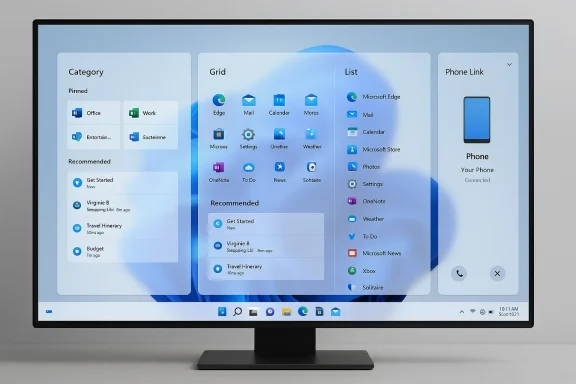
Microsoft shipped the redesigned Start menu as part of the optional KB5067036 non‑security preview rolled out to Windows 11 24H2 and 25H2 channels, a staged deployment that begins in Insider and Release Preview rings before wider enablement. The update replaces the older two‑pane launcher with a single, vertically scrollable Start surface and introduces three distinct presentation modes for app discovery — Category, Grid, and List — while also adding tighter Phone Link integration and personalization toggles.
Those technical changes sound straightforward on paper: promote “All apps” to the main surface, let users hide the Recommended feed, and offer multiple ways to present installed apps. In practice, the rollout has become a flashpoint because the update changes not only how apps are found, but who decides how they’re grouped and presented. Community coverage and early hands‑on reporting from major outlets confirm the features and rollout method; independent reporting also documents that the redesign expands the Start surface substantially on larger screens.
What is not fully verifiable today is the internal implementation detail of the automatic grouping mechanism. Some community sources and speculative reporting say Microsoft may be using a small language model or heuristic classifier to assign apps to categories; that claim surfaced in independent blogs but has not been confirmed by Microsoft with technical detail. For now, treat any claim about the exact classifier (model, ruleset, or local vs cloud‑based inference) as unverified speculation. Microsoft could disclose more in documentation or engineering blog posts later, and if they do, those details should be treated as authoritative.
But the rollout exposes three correlated failures of execution:
Conversely, if Microsoft persists with locked automation and large defaults, the UX will continue to push serious power users toward third‑party shells, increasing fragmentation and eroding trust among a vocal segment of the Windows base.
Source: Windows Central Windows 11’s new Start menu is here and users aren’t happy
 Background / Overview
Microsoft shipped the redesigned Start menu as part of the optional KB5067036 non‑security preview rolled out to Windows 11 24H2 and 25H2 channels, a staged deployment that begins in Insider and Release Preview rings before wider enablement. The update replaces the older two‑pane launcher with a single, vertically scrollable Start surface and introduces three distinct presentation modes for app discovery — Category, Grid, and List — while also adding tighter Phone Link integration and personalization toggles.Those technical changes sound straightforward on paper: promote “All apps” to the main surface, let users hide the Recommended feed, and offer multiple ways to present installed apps. In practice, the rollout has become a flashpoint because the update changes not only how apps are found, but who decides how they’re grouped and presented. Community coverage and early hands‑on reporting from major outlets confirm the features and rollout method; independent reporting also documents that the redesign expands the Start surface substantially on larger screens.
What changed: a concise technical rundown
- A single, vertically scrollable Start surface combines Pinned apps, the Recommended area, and the All apps list into one unified view.
- Three All apps presentation modes: Category (apps grouped automatically into folders), Grid (multi‑column alphabetical grid), and List (compact alphabetized list). The OS remembers your last‑used view.
- Ability to hide the Recommended section so installed apps can take visual priority.
- A Phone Link panel (mobile device integration) can appear inside Start for paired devices, exposing recent activity and basic phone controls.
- The feature is delivered via staged enablement: installing the KB does not guarantee immediate activation because Microsoft gates the experience server‑side.
Community reaction: why users are upset
The reporting that followed the public previews shows a consistent pattern in early feedback: users appreciate the attempt to fix the friction of the old Start menu, but many bristle at the execution details that reduce density and limit local control. A notable summary of community sentiment appears in contemporaneous reporting and public discussion threads, where these are the recurring complaints:- Too big / low information density: On large desktop monitors the new Start takes up far more screen real estate than many users expect, with wider padding, oversized tiles, and an interface that feels closer to a full‑screen launcher than a compact menu. Early hands‑on reviews and many user posts directly called the menu “huge” or “wasteful of space.”
- Automatic categories with no manual control: The Category mode groups apps automatically (examples given: Productivity, Utilities & Tools, Others), but users report misclassification — notably, game launchers like Steam and Epic sometimes appear in separate groups instead of a single “Games” category, and Microsoft 365 apps may be placed oddly. Crucially, there’s no official UI to rename, delete, or manually reassign categories today. That absence of editability is the core grievance.
- Perceived automation over user choice: The redesign signals a philosophical tension: Microsoft is surfacing “smart” groupings and richer visual presentation, but many users prefer explicit control over automatic ordering and placement. The backlash centers on losing familiar muscle memory more than on a dislike of new visuals.
- Third‑party workarounds resurfacing: Frustrated power users are talking about — and turning to — third‑party Start menu replacements like Start11, Open‑Shell, and other shells to regain density and granular control. This adoption pattern tells a story of a portion of the community that will not wait for Microsoft to add options.
The design tradeoffs Microsoft faces
The density vs. clarity paradox
Designers often choose between density (cramming lots of actionable items into a small area for power users) and clarity (larger targets, spacing, and clear groupings for discoverability and touch). The new Start tilts toward clarity and discoverability: Category and Grid modes help users visually parse large app catalogs and Phone Link adds cross‑device continuity. But on a 27‑inch desktop with 4K resolution, that same approach feels like visual waste rather than pragmatic help for someone who launches 40–50 apps a day.- Strength: The new layout reduces the number of clicks to reach any installed app by surfacing the All apps list on the main page, which is an objectively better information architecture for many workflows.
- Risk: The default visual density and locked automation create friction for users who prefer the compact, alphabetized list they’ve used for years — and as a result, the update can feel like a step backward for efficiency.
Automation without edit controls — a critical omission
Automatic grouping has obvious benefits: it mimics modern mobile patterns (e.g., iOS App Library), helps new or casual users discover tools, and reduces setup overhead. However, the community response makes one thing clear: automation without a user override is a fragile bet.- Strength: Auto‑grouping surfaces related apps together and can reduce the initial tedium of organizing a new PC.
- Risk: Misclassification and locked group names (no rename, no manual reassign) break trust. If a user can’t correct a mistake, the feature moves from “helpful” to “obstructive.”
On performance and reliability
Beyond aesthetics and ergonomics, some early users report transient functional issues: icons not rendering until the menu restarts, flickering when hovering over areas of the taskbar, laggy animations, and other preview‑grade glitches. These reports are common during staged preview rollouts, but they matter: when visible regressions hit high‑end hardware, the perception is that the change prioritizes visual overhaul over polish.- Independent hands‑on coverage and early user threads both logged such behavior during the preview phase; Microsoft’s staged rollouts via KB5067036 are meant to limit the blast radius, but they don’t eliminate the frustration of encountering graphical or interaction bugs on otherwise well‑spec’d machines.
Where Microsoft could meaningfully improve the experience (practical roadmap)
The community feedback provides a clear, prioritized list of fixes that would likely convert detractors into satisfied users. Here are practical, deliverable changes that respect Microsoft’s design goals while restoring user agency:- Add manual category editing:
- Allow users to rename, merge, split, and delete auto‑created categories.
- Provide a drag‑and‑drop mechanism to move apps between categories.
- Offer density controls:
- Provide at least two density presets (Compact/Comfortable) to control icon spacing, padding, and grid sizing.
- Make Category mode opt‑in:
- Default to List or Grid on desktop devices and offer Category as a highlighted alternative for touch/tablet users.
- Surface toggles in Settings and in the Start menu itself:
- Quick actions to disable Category grouping, hide Recommended, or switch views without navigating deep Settings pages.
- Expose a “visual profile” selector:
- A system profile that lets users choose a traditional “Windows 7/10” mode or the modern Windows 11 mode (a concept suggested repeatedly in community threads). This could be a single global toggle that retains compatibility with enterprise UI training and user comfort.
The corporate and ecosystem implications
Third‑party Start menus aren’t a negligible niche; they have traction because they solve exactly the control problems this update highlights. If Microsoft does not provide richer official customization, a measurable segment of users will continue to install replacements — an awkward outcome for an OS vendor who benefits when users stay within first‑party UX.- Enterprise IT: Organizations that lock down images or deliver standardized training will view a rolling, server‑gated redesign as a lifecycle management headache. Staged enablement helps, but the lack of a built‑in “classic” profile complicates enterprise rollout plans and training documentation.
- Third‑party vendors: Customization vendors gain a recruitment benefit from high‑profile UX changes that displease power users. That’s healthy competition but also a sign Microsoft risks fragmenting its UX if it doesn’t address control gaps.
What’s verifiable and what remains speculative
Several concrete facts are independently verifiable: the update packaging (KB5067036), the three Start views (Category/Grid/List), the ability to hide the Recommended feed, and the staged rollout method. These points are corroborated by Microsoft’s preview behavior, The Verge’s hands‑on testing, and detailed coverage from outlets such as TechRepublic and Windows Central.What is not fully verifiable today is the internal implementation detail of the automatic grouping mechanism. Some community sources and speculative reporting say Microsoft may be using a small language model or heuristic classifier to assign apps to categories; that claim surfaced in independent blogs but has not been confirmed by Microsoft with technical detail. For now, treat any claim about the exact classifier (model, ruleset, or local vs cloud‑based inference) as unverified speculation. Microsoft could disclose more in documentation or engineering blog posts later, and if they do, those details should be treated as authoritative.
A realistic final assessment
Conceptually, the updated Start menu addresses a longstanding friction: the need to open a separate “All apps” panel to find installed software. The three‑view model is flexible in principle and the Phone Link integration is a thoughtful nod to cross‑device workflows. Independent coverage recognizes these strengths and notes the improvement in discoverability for casual users.But the rollout exposes three correlated failures of execution:
- Microsoft shipped automation without simple manual overrides.
- The default visual density is too low for many desktop power users.
- Preview‑grade performance and graphical inconsistencies amplify user anger.
Practical guidance for users today
- If you prefer compact UI or complete control: consider waiting before accepting the staged enablement, or use a third‑party Start menu replacement until Microsoft exposes more controls. Community tools remain the fastest way to restore a classic workflow.
- If you’re curious and willing to test: enable the optional KB5067036 preview and try the List view immediately — several early adopters found List mode restores a familiar, efficient interaction. Keep an eye on Settings for added toggles as Microsoft iterates.
- For IT admins: treat the staged rollout as a rollout risk. Test internally, communicate the possibility of server‑side gating to end users, and consider standardizing on a UI profile or third‑party shell if training overhead is a concern.
Where this goes next
Microsoft has a clear path to repair the experience without abandoning the design intent: expose manual controls, add density presets, and provide a migration toggle for users and organizations that want the old behavior. The community response today is not a demand to cancel the redesign — it is a request for choice. If Microsoft provides that, the controversy will likely cool quickly.Conversely, if Microsoft persists with locked automation and large defaults, the UX will continue to push serious power users toward third‑party shells, increasing fragmentation and eroding trust among a vocal segment of the Windows base.
Conclusion
The new Windows 11 Start menu demonstrates both the promise and peril of modern UX decisions at scale. It fixes long‑standing navigation friction by elevating the All apps list and adding flexible views, but it also amplifies a perennial lesson for platform vendors: users may forgive new features, but not the removal of control. Early reporting and community reaction make that clear — the design is promising, the execution is incomplete, and the path forward is obvious: add choice back into the hands of users.Source: Windows Central Windows 11’s new Start menu is here and users aren’t happy
