

Microsoft’s latest Windows 11 search push is not really about flashy AI or a brand-new shell. It is about something far more basic and far more important: making the Start menu behave the way people already expect it to behave when they press Win and start typing. That sounds like a small usability fix, but for millions of users it is the difference between a launcher that feels instinctive and one that feels unpredictable. Microsoft is now openly acknowledging that gap and signaling that it wants to close it.
Windows has always treated the Start experience as a fast path to everything, but the promise has changed over time. In older versions, the Start menu was a home base for apps, files, settings, and system actions, while Windows Search increasingly became the place where those things were unified. Windows 11 inherited that model, but many users have complained that the implementation is too eager to mix local results, web suggestions, and promoted content. Microsoft’s own documentation still shows the Start menu as a multi-section surface with Pinned, All, and Recommended areas, which makes it clear that the company views Start as both a launcher and a discovery layer.
That dual purpose is part of the problem. If you are an experienced user, you often want the Start menu to do one thing well: accept a few keystrokes and launch the right app or file immediately. If the system keeps surfacing alternate suggestions, web items, or store content, then the interface becomes less predictable at the moment you need speed most. Microsoft has been hearing that feedback for years through community forums, Microsoft Q&A, and its Insider channels, where users repeatedly describe Start search as inconsistent or even broken in edge cases.
The timing matters because Microsoft has already promised broader improvements to Windows quality in 2026. In a March 20, 2026 Windows Insider Blog post, the company said it is improving search so it can surface apps, files, and settings more clearly, with results from content on the device “easy to understand” and distinct from web results. That is not just a small tweak. It is an admission that Windows 11 search has not been living up to the promise of a consistent, trustworthy system-wide lookup experience.
What makes this new round of feedback especially notable is that Microsoft is not just speaking about abstract search quality. It is also talking about a very specific user habit: pressing the Win key and typing immediately. That behavior is common among power users, enterprise staff, and long-time Windows users who treat Start as a command launcher. If Microsoft can make that interaction reliable again, it could improve daily productivity more than a dozen cosmetic changes ever would.
Microsoft’s design director, Diego Baca, reportedly agreed that search performance and predictability from Start are areas the company is “absolutely looking at.” That wording matters because it suggests Microsoft sees predictability as a separate quality from raw speed. A fast system that surfaces the wrong things is still frustrating, especially when users are trying to perform a high-frequency, low-friction action like opening an app.
There is also a human-factors issue here. People build habits around muscle memory, and the Win-key-to-type workflow is one of Windows’ best-known shortcuts. If that shortcut becomes inconsistent, the user experiences it as a platform regression even if the underlying search engine is technically more powerful. Microsoft appears to understand that reliability is the feature people notice most when it is missing.
That tension is central to Microsoft’s challenge. The company wants Start to feel modern and intelligent, but users frequently want it to feel deterministic and boring. In launcher design, boring is good because boring means the computer did what you expected without drama.
The company also said it is evolving how Windows is built behind the scenes, with deeper validation and broader testing across real-world hardware and usage scenarios. That is important because search behavior often breaks in the messy overlap between indexing, permissions, device performance, and user expectations. If Microsoft wants the Start menu to feel dependable, it needs the entire search stack to behave consistently under varied loads and on different machine classes.
This is also where Windows 11’s interface strategy becomes politically important inside Microsoft. A more coherent search layer reduces internal fragmentation and makes the operating system feel more unified. It also provides a better foundation for future AI-assisted features, because a system that cannot reliably surface the obvious answer will struggle to justify more ambitious semantic features.
There is also an enterprise angle. IT departments tend to value predictable search because it reduces help-desk calls and user confusion, especially in managed environments where app discovery and policy-driven settings matter. A more trustworthy Start menu is therefore not just a consumer nicety; it is a deployment-quality improvement.
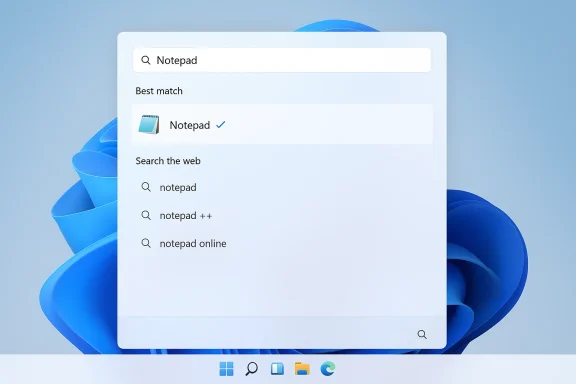
That expectation becomes even stronger for simple app launches. Nobody wants to type “Notepad” and then navigate a mixture of document matches, web entries, and store suggestions just to open a native utility. The more common the task, the less tolerance there is for ambiguity. Microsoft seems to be rediscovering that the desktop still rewards obviousness.
The most interesting part of this debate is that it is not really about power users versus casual users. It is about whether Windows can be predictable enough to serve both without making either group compromise too much. A better Start search would likely benefit everyone because it would reduce accidental clicks for casual users while preserving speed for advanced ones.
That’s why the complaint about “nothing showing up right away” matters. Even a brief delay after pressing Win and typing can make the whole system feel off, especially on machines that otherwise seem perfectly capable. Perception matters here as much as engineering, because users experience the UI as one continuous interaction, not as a collection of subsystems.
At the same time, Microsoft has already publicly confirmed related search changes and a more consistent experience across Windows surfaces. That combination of public commitment and internal testing makes the current moment feel less like speculation and more like a staged rollout of a larger search overhaul. The only unresolved question is how quickly those changes will escape internal builds and reach ordinary users.
That caution may frustrate users who want relief now, but it also makes sense from a platform perspective. If Microsoft is serious about building a more trustworthy search layer, it cannot afford a half-finished rollout that simply swaps one class of confusion for another. Stability should be the release criterion, not just feature presence.
This is especially relevant because Microsoft now has a chance to reset expectations around Windows 11. If the company can demonstrate that it is listening to straightforward usability complaints and fixing them, the platform regains credibility in a way that marketing language alone cannot achieve. That is the kind of shift users remember.
That matters because taskbar and Start are psychologically linked. Users who customize the taskbar often expect the same philosophy of control to extend to the rest of the shell. If Microsoft is willing to make the taskbar more adaptable, it is easier to believe that the company is also willing to make search less opinionated and more direct.
There is also a practical relationship between taskbar control and search predictability. A desktop that respects user preference at the shell level tends to feel more trustworthy at the launcher level too. The less the OS surprises you, the more you are willing to keep using its built-in tools.
That is why these seemingly separate changes should be read as part of one design philosophy. Microsoft is trying to recover the reputation of the Windows shell as something practical, not just visually updated. If it succeeds, the benefits will extend far beyond the Start menu itself.
That distinction is important because semantic search is not automatically better for the Start menu. If users are looking for a precise app name, machine interpretation should not override direct matching unless there is a clear benefit. In other words, AI is useful when it reduces ambiguity, not when it introduces it.
This is why the upcoming Start changes are potentially more important than a flashy semantic feature demo. If Microsoft can improve the basic search pipeline, it can then layer smarter experiences on top without sacrificing reliability. That sequencing matters. First make it correct; then make it clever.
The best outcome would be a layered model where exact app matches remain stable, local content is easy to distinguish, and web or store suggestions are clearly secondary. That would preserve the utility of AI without letting AI compromise the deterministic behavior that made Start search useful in the first place.
The chance here is bigger than Start alone. A more predictable search experience could improve the perception of Windows 11 as a whole, especially for users who compare it unfavorably with Windows 10 or with third-party launchers.
The company also benefits from the fact that the criticism is specific and actionable. Users are not asking for a miracle. They are asking for the OS to stop second-guessing obvious commands and to behave more like a dependable tool. That is a very fixable problem if Microsoft stays disciplined.
A second risk is that Microsoft overcorrects and makes Start search too conservative. If the system stops surfacing useful suggestions or slows down its learning behavior, casual users may lose convenience even as power users gain predictability. The balance is delicate, and the wrong tuning could merely shift frustration from one audience to another.
There is also a broader strategic concern. If Microsoft keeps layering AI features on top of a search experience that still feels inconsistent, it risks convincing users that it is prioritizing headlines over basics. The company can avoid that impression only by making the core launcher experience boringly reliable.
The other thing to watch is whether Microsoft tightens the relationship between Start search and the rest of Windows search. A more unified model across taskbar, Start, File Explorer, and Settings would be a meaningful platform win. It would also show that the company is fixing the architecture, not just the symptoms.
If Microsoft gets this right, the payoff will be subtle but significant. Users will not write praise threads about search behaving normally, but they will feel the difference every day. And in desktop software, that quiet absence of friction is often the highest compliment an operating system can earn.
Microsoft’s Start menu overhaul will not be judged by slogans or by how clever the result cards look. It will be judged by whether pressing Win and typing instantly feels obvious again. If the company can restore that sense of certainty, Windows 11 will have taken a genuine step toward becoming a better operating system in the way that matters most: not by inventing a new habit, but by respecting the old one.
Source: Windows Latest Microsoft wants Windows 11 Start menu to feel more predictable when you press Win and type
 Background
Windows has always treated the Start experience as a fast path to everything, but the promise has changed over time. In older versions, the Start menu was a home base for apps, files, settings, and system actions, while Windows Search increasingly became the place where those things were unified. Windows 11 inherited that model, but many users have complained that the implementation is too eager to mix local results, web suggestions, and promoted content. Microsoft’s own documentation still shows the Start menu as a multi-section surface with Pinned, All, and Recommended areas, which makes it clear that the company views Start as both a launcher and a discovery layer.That dual purpose is part of the problem. If you are an experienced user, you often want the Start menu to do one thing well: accept a few keystrokes and launch the right app or file immediately. If the system keeps surfacing alternate suggestions, web items, or store content, then the interface becomes less predictable at the moment you need speed most. Microsoft has been hearing that feedback for years through community forums, Microsoft Q&A, and its Insider channels, where users repeatedly describe Start search as inconsistent or even broken in edge cases.
The timing matters because Microsoft has already promised broader improvements to Windows quality in 2026. In a March 20, 2026 Windows Insider Blog post, the company said it is improving search so it can surface apps, files, and settings more clearly, with results from content on the device “easy to understand” and distinct from web results. That is not just a small tweak. It is an admission that Windows 11 search has not been living up to the promise of a consistent, trustworthy system-wide lookup experience.
What makes this new round of feedback especially notable is that Microsoft is not just speaking about abstract search quality. It is also talking about a very specific user habit: pressing the Win key and typing immediately. That behavior is common among power users, enterprise staff, and long-time Windows users who treat Start as a command launcher. If Microsoft can make that interaction reliable again, it could improve daily productivity more than a dozen cosmetic changes ever would.
The Predictability Problem
The key complaint is not merely that Windows Search can be slow. It is that the results can feel unstable as you type or click, which undermines trust. A user might expect “Notepad” to yield the Notepad app, yet the search surface may start mixing in documents, web results, or Microsoft Store suggestions. Once that happens, the whole point of typing in Start begins to erode because the fastest path to the right app becomes a small guessing game.Microsoft’s design director, Diego Baca, reportedly agreed that search performance and predictability from Start are areas the company is “absolutely looking at.” That wording matters because it suggests Microsoft sees predictability as a separate quality from raw speed. A fast system that surfaces the wrong things is still frustrating, especially when users are trying to perform a high-frequency, low-friction action like opening an app.
Why predictability matters more than novelty
For many users, a launcher should behave like a memory aid, not a marketing surface. The more Start tries to infer intent from partial input, the more it risks getting in the way of the user’s own intent. In practice, that means a predictable result set can be more valuable than a clever one, especially when users already know exactly what they want.There is also a human-factors issue here. People build habits around muscle memory, and the Win-key-to-type workflow is one of Windows’ best-known shortcuts. If that shortcut becomes inconsistent, the user experiences it as a platform regression even if the underlying search engine is technically more powerful. Microsoft appears to understand that reliability is the feature people notice most when it is missing.
- Predictable results reduce misclicks.
- Stable app rankings lower cognitive load.
- Fewer surprise web suggestions make Start feel more local.
- Trust in the launcher increases daily usage efficiency.
- Power users benefit disproportionately from consistency.
The cost of mixed result types
Windows 11 search has often blurred the line between local content and online discovery. That can be useful for a casual user, but it can also create friction for anyone simply trying to launch an installed program. When a query for a local app becomes a hybrid of app, file, web, and store signals, the interface stops feeling like a tool and starts feeling like an ad- or recommendation engine.That tension is central to Microsoft’s challenge. The company wants Start to feel modern and intelligent, but users frequently want it to feel deterministic and boring. In launcher design, boring is good because boring means the computer did what you expected without drama.
Microsoft’s Public Signals
Microsoft’s newest public messaging makes it clear that search quality is back on the table as a first-class Windows goal. The March 20 quality post emphasized more relevant Start recommendations, clearer device-only search results, and a more consistent search experience across Taskbar, Start, File Explorer, and Settings. That is a broad commitment, and it implies that Start search is being addressed as part of a larger platform-wide cleanup rather than as a one-off tweak.The company also said it is evolving how Windows is built behind the scenes, with deeper validation and broader testing across real-world hardware and usage scenarios. That is important because search behavior often breaks in the messy overlap between indexing, permissions, device performance, and user expectations. If Microsoft wants the Start menu to feel dependable, it needs the entire search stack to behave consistently under varied loads and on different machine classes.
A broader consistency agenda
Microsoft’s language suggests it is trying to harmonize the search experience across multiple entry points rather than leaving each surface to evolve separately. That matters because users do not think in terms of isolated subsystems. They simply expect search to work the same way whether they invoke it from Start, File Explorer, Settings, or the taskbar.This is also where Windows 11’s interface strategy becomes politically important inside Microsoft. A more coherent search layer reduces internal fragmentation and makes the operating system feel more unified. It also provides a better foundation for future AI-assisted features, because a system that cannot reliably surface the obvious answer will struggle to justify more ambitious semantic features.
- Search consistency across surfaces is now a stated goal.
- Device-only results are being made easier to distinguish.
- Better validation may improve quality before public rollout.
- Start, taskbar, File Explorer, and Settings are all in scope.
- The effort appears to be part of a larger Windows quality reset.
Why this is more than just a UX polish story
It would be easy to dismiss all this as interface tuning, but search is one of the core control planes of a modern desktop OS. If search is unreliable, every other component that depends on it inherits that weakness. That includes app discovery, file access, settings navigation, and even the perceived responsiveness of the machine.There is also an enterprise angle. IT departments tend to value predictable search because it reduces help-desk calls and user confusion, especially in managed environments where app discovery and policy-driven settings matter. A more trustworthy Start menu is therefore not just a consumer nicety; it is a deployment-quality improvement.
What Users Actually Want
The feedback Microsoft is responding to is remarkably consistent: users want the Win-key workflow to open the right app, quickly, and without second-guessing. They do not want the menu to pause, change its mind, or introduce unrelated items just because they clicked something or typed one more letter. In other words, users want search to feel like a direct command, not an evolving recommendation feed.That expectation becomes even stronger for simple app launches. Nobody wants to type “Notepad” and then navigate a mixture of document matches, web entries, and store suggestions just to open a native utility. The more common the task, the less tolerance there is for ambiguity. Microsoft seems to be rediscovering that the desktop still rewards obviousness.
The power-user standard
Power users often judge a launcher by whether it respects shortcuts and reduces friction. They are usually willing to memorize more commands, use keyboard navigation, or switch to specialized tools if the default behavior feels slow or noisy. That means Microsoft risks losing exactly the audience that tends to evangelize productivity features if Start search remains inconsistent.The most interesting part of this debate is that it is not really about power users versus casual users. It is about whether Windows can be predictable enough to serve both without making either group compromise too much. A better Start search would likely benefit everyone because it would reduce accidental clicks for casual users while preserving speed for advanced ones.
- Users want direct launching, not constant re-ranking.
- Clicking should not cause search results to become unstable.
- Local apps should remain obvious when the query clearly matches them.
- Simple tasks need the least clutter.
- Reliability is a universal design feature, not a niche one.
Why “just use search” is not a complete answer
Microsoft has long promoted search as a universal way to find things in Windows, but a universal tool has to be dependable in the narrowest cases too. If the straightforward path is flaky, users will retreat to older habits, third-party launchers, or File Explorer. That is not just a UX loss; it is a lost opportunity for Microsoft to keep users inside its intended workflow.That’s why the complaint about “nothing showing up right away” matters. Even a brief delay after pressing Win and typing can make the whole system feel off, especially on machines that otherwise seem perfectly capable. Perception matters here as much as engineering, because users experience the UI as one continuous interaction, not as a collection of subsystems.
The Internal Roadmap Hints
The most intriguing part of the latest reporting is that Microsoft appears to be testing improvements internally already. According to the coverage, the company has not given a public timetable, but the work is underway behind the scenes. That usually means the broad direction is settled, even if the exact ship vehicle is not.At the same time, Microsoft has already publicly confirmed related search changes and a more consistent experience across Windows surfaces. That combination of public commitment and internal testing makes the current moment feel less like speculation and more like a staged rollout of a larger search overhaul. The only unresolved question is how quickly those changes will escape internal builds and reach ordinary users.
Timing is the real unknown
Windows feature work often moves in layers: internal validation, Insider testing, broader preview rollout, and finally general availability. Search changes are particularly likely to move cautiously because they affect core workflows and are easy to regress in edge cases. A bad search update can create immediate user frustration, so Microsoft has strong incentive to test carefully.That caution may frustrate users who want relief now, but it also makes sense from a platform perspective. If Microsoft is serious about building a more trustworthy search layer, it cannot afford a half-finished rollout that simply swaps one class of confusion for another. Stability should be the release criterion, not just feature presence.
- Internal testing usually precedes broader Insider exposure.
- Search regressions can affect the entire desktop experience.
- Timetables are often flexible when core UX is involved.
- Microsoft appears to be treating search as foundational, not ornamental.
- Public messaging suggests the company is committed, even if dates are vague.
What the roadmap likely implies
A realistic read of Microsoft’s signals is that Start search and the taskbar experience are being modernized together. That would align with the company’s broader quality push, where the goal is less about introducing novelty and more about making Windows feel faster, clearer, and more coherent. It also suggests Microsoft is aware that users judge the OS by moments of friction, not by feature checklists.This is especially relevant because Microsoft now has a chance to reset expectations around Windows 11. If the company can demonstrate that it is listening to straightforward usability complaints and fixing them, the platform regains credibility in a way that marketing language alone cannot achieve. That is the kind of shift users remember.
The Taskbar Connection
The search conversation is not happening in isolation. Microsoft has also hinted that some Windows 10-era taskbar behaviors could return, including more flexible placement and customization controls. Diego Baca reportedly responded positively to feedback about taskbar movement, and the reporting suggests Microsoft may restore some of the older freedom that users lost in Windows 11.That matters because taskbar and Start are psychologically linked. Users who customize the taskbar often expect the same philosophy of control to extend to the rest of the shell. If Microsoft is willing to make the taskbar more adaptable, it is easier to believe that the company is also willing to make search less opinionated and more direct.
Why shell flexibility matters
Windows 10 gave users more freedom to position and manage the taskbar, and many power users still regard that flexibility as a core desktop advantage. Windows 11’s more fixed shell has been a recurring point of complaint because it reduced customization without always delivering an obvious usability gain in return. Bringing back more control would therefore be read as a corrective, not a gimmick.There is also a practical relationship between taskbar control and search predictability. A desktop that respects user preference at the shell level tends to feel more trustworthy at the launcher level too. The less the OS surprises you, the more you are willing to keep using its built-in tools.
- Taskbar control signals a broader respect for user choice.
- Shell flexibility can reinforce trust in Start behavior.
- Windows 10 habits remain influential among longtime users.
- Customization is often a proxy for perceived competence.
- Control and predictability usually travel together.
Consumer and enterprise implications
For consumers, taskbar and Start control are about convenience and comfort. For enterprises, they are about reducing training costs and preserving workflow continuity during migrations from Windows 10 to Windows 11. The more Windows 11 feels like a respectful evolution rather than a constrained redesign, the easier it is for IT to justify the transition.That is why these seemingly separate changes should be read as part of one design philosophy. Microsoft is trying to recover the reputation of the Windows shell as something practical, not just visually updated. If it succeeds, the benefits will extend far beyond the Start menu itself.
AI, Search, and the New Desktop Logic
Microsoft’s broader search story now sits in the shadow of AI, and that creates both opportunity and tension. On one hand, semantic search can help users find files or content with more natural queries. On the other hand, the classic launcher use case remains brutally simple: launch the obvious thing quickly. Microsoft has to avoid confusing those two modes.That distinction is important because semantic search is not automatically better for the Start menu. If users are looking for a precise app name, machine interpretation should not override direct matching unless there is a clear benefit. In other words, AI is useful when it reduces ambiguity, not when it introduces it.
Semantic search versus launcher search
Copilot-related search improvements show Microsoft is thinking about the future of discovery on Windows, including natural-language file finding on Copilot+ PCs. But the Start menu’s immediate job is still more mechanical than conversational. The best launcher is often the one that solves the problem before the user has to think in a more elaborate way.This is why the upcoming Start changes are potentially more important than a flashy semantic feature demo. If Microsoft can improve the basic search pipeline, it can then layer smarter experiences on top without sacrificing reliability. That sequencing matters. First make it correct; then make it clever.
- AI should assist precision, not obscure it.
- Semantic search works best when the user is exploratory.
- Launcher search works best when the user is decisive.
- Microsoft needs both modes to coexist cleanly.
- Predictability is the foundation for any later intelligence.
The risk of overreach
There is a real risk that Microsoft could overestimate how much “smarter” search users want in the Start menu. If the system becomes too eager to infer intent, it can feel like it is ignoring the user’s explicit input. That is especially dangerous in Windows, where the Start menu is one of the fastest keyboard-driven interfaces on the desktop.The best outcome would be a layered model where exact app matches remain stable, local content is easy to distinguish, and web or store suggestions are clearly secondary. That would preserve the utility of AI without letting AI compromise the deterministic behavior that made Start search useful in the first place.
Strengths and Opportunities
Microsoft’s current position is actually stronger than its critics may assume. It has a clear user pain point, an obvious path to improvement, and a broader Windows quality initiative that can support the work. The opportunity is not just to reduce complaints but to rebuild confidence in one of the OS’s most fundamental interactions.The chance here is bigger than Start alone. A more predictable search experience could improve the perception of Windows 11 as a whole, especially for users who compare it unfavorably with Windows 10 or with third-party launchers.
- Clear user demand for predictable launcher behavior.
- Broad platform relevance across Start, taskbar, File Explorer, and Settings.
- Potential enterprise upside through lower training and support overhead.
- Better trust signals by separating local results from web content.
- A chance to win back power users who value keyboard-first workflows.
- A foundation for smarter search that does not sacrifice determinism.
- Positive PR momentum if Microsoft ships visible usability gains in 2026.
Why this could become a reputation win
If Microsoft ships a cleaner Start search, it can point to a tangible quality improvement that users will notice immediately. Unlike some interface changes that are arguable or subjective, predictability has a clear before-and-after feel. That makes it one of the rare Windows stories that can generate goodwill without requiring a major redesign.The company also benefits from the fact that the criticism is specific and actionable. Users are not asking for a miracle. They are asking for the OS to stop second-guessing obvious commands and to behave more like a dependable tool. That is a very fixable problem if Microsoft stays disciplined.
Risks and Concerns
The biggest risk is that Microsoft improves the surface but not the underlying behavior. Search can look cleaner while still feeling inconsistent if ranking logic, indexing latency, or result blending remains unstable. That would disappoint users who are expecting a substantive fix rather than a cosmetic one.A second risk is that Microsoft overcorrects and makes Start search too conservative. If the system stops surfacing useful suggestions or slows down its learning behavior, casual users may lose convenience even as power users gain predictability. The balance is delicate, and the wrong tuning could merely shift frustration from one audience to another.
- Delayed rollout could frustrate users who need relief now.
- Overly cautious ranking may reduce helpful suggestions.
- Mixed local/web results could continue to confuse simple queries.
- Insufficient testing might introduce new regressions.
- Too much AI inference could undermine direct matching.
- Taskbar changes may trigger debates about customization priorities.
- Enterprise compatibility could be affected if behavior changes too quickly.
The hidden challenge: trust is fragile
Search quality is one of those things users only think about when it is wrong. That makes it easy for Microsoft to underestimate how much goodwill is at stake. Once users stop trusting Start, they often adopt workarounds and never fully return, even after the original problem is fixed.There is also a broader strategic concern. If Microsoft keeps layering AI features on top of a search experience that still feels inconsistent, it risks convincing users that it is prioritizing headlines over basics. The company can avoid that impression only by making the core launcher experience boringly reliable.
What to Watch Next
The next phase will depend on whether Microsoft can translate its public promises into visible behavior changes in Insider builds and, eventually, in mainstream Windows 11 releases. If the Start menu becomes faster, steadier, and less likely to change results mid-search, users will notice immediately. If not, the current goodwill will fade quickly.The other thing to watch is whether Microsoft tightens the relationship between Start search and the rest of Windows search. A more unified model across taskbar, Start, File Explorer, and Settings would be a meaningful platform win. It would also show that the company is fixing the architecture, not just the symptoms.
Practical signals that the plan is real
- Internal testing moving into broader Insider channels.
- More stable app matches for direct Win-key searches.
- Clearer separation between device results and web content.
- Taskbar customization returning in a limited but useful form.
- Less result churn when users click or refine queries.
- Visible improvements in everyday launch speed.
The release question
The biggest unanswered question is timing. Microsoft has clearly acknowledged the issue, but it has not given a public date for when the improved behavior will reach all users. That means the next few months will be a test of whether the company can keep momentum without overpromising.If Microsoft gets this right, the payoff will be subtle but significant. Users will not write praise threads about search behaving normally, but they will feel the difference every day. And in desktop software, that quiet absence of friction is often the highest compliment an operating system can earn.
Microsoft’s Start menu overhaul will not be judged by slogans or by how clever the result cards look. It will be judged by whether pressing Win and typing instantly feels obvious again. If the company can restore that sense of certainty, Windows 11 will have taken a genuine step toward becoming a better operating system in the way that matters most: not by inventing a new habit, but by respecting the old one.
Source: Windows Latest Microsoft wants Windows 11 Start menu to feel more predictable when you press Win and type
