

Loughborough University has told students and staff that a Windows 11 and Microsoft 365 user-experience update will begin rolling out on 17 June 2026, changing the default view of the Start menu to a new layout intended to improve navigation and accessibility. The announcement is small, local, and administrative, but it points to a bigger truth about modern Windows: the most disruptive changes are no longer always the headline-grabbing ones. They arrive as defaults, toggles, and “no action required” interface shifts that quietly rewrite muscle memory across managed PCs. For users, this is a convenience story; for IT departments, it is another reminder that Windows is now a continuously negotiated workplace surface, not a static operating system.
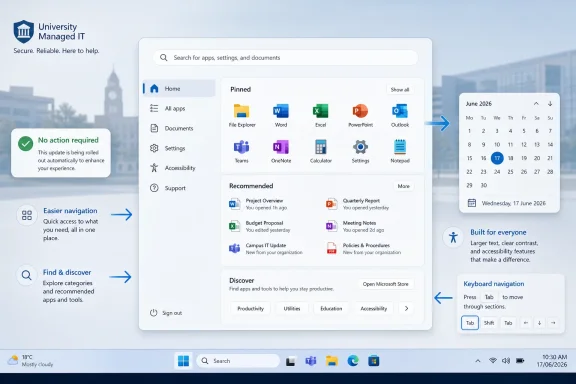
The stated change is modest: the Start menu default view is being updated, and the new layout will appear automatically. There is no migration wizard, no licensing drama, and no instruction to reinstall anything. In the language of institutional IT, this is the safest kind of change: visible enough to announce, small enough to avoid a campaign.
But the Start menu is not just another UI panel. It is the place Windows users go when memory fails, when desktop shortcuts are missing, when search is unreliable, or when an app has vanished into the fog of enterprise provisioning. Changing its default view alters one of the few remaining universal rituals in Windows.
That is why a university notice about Microsoft 365 app improvements is more revealing than it first appears. It captures the modern cadence of Microsoft’s desktop strategy: ship steady interface changes through managed update channels, frame them as usability improvements, and leave local IT teams to soften the landing. The operating system becomes less of a product release and more of a rolling policy environment.
For most users, the new view may simply feel cleaner or more navigable. For others, it will be another moment of “where did that go?” The point is not that the change is bad. The point is that Microsoft has made the default desktop experience a moving target again.
The latest generation of Start menu changes tries to recover some of what Windows 11 lost. Microsoft has been moving toward a larger, more flexible menu that surfaces the app list more directly, offers category-style organization, and reduces the sense that users must click through a second layer just to find installed software. That is a reasonable answer to a real complaint: Windows 11’s original Start menu often felt elegant at the expense of efficiency.
Still, defaults matter more than options. A new layout that users can preview or later adjust is one thing; a new layout that appears automatically is another. Many users never change defaults, and many managed environments deliberately prevent or discourage customization. The first-run experience becomes the permanent experience.
This is especially true in education, government, and enterprise deployments, where devices are often shared, rebuilt, or tightly configured. A Start menu default is not just a personal preference. It can affect helpdesk scripts, training screenshots, classroom instructions, accessibility guidance, and the informal knowledge users pass to one another.
Yet “no action required” has a second meaning in the Microsoft 365 era: the vendor and the tenant have already decided enough for the user. This is the fundamental trade-off of evergreen software. Users get security fixes, feature improvements, and interface refinements without the old pain of big-bang upgrades. They also get fewer moments where change is explicitly consented to.
That bargain has generally been good for security. The old Windows world, in which machines sat unpatched for months because updates were disruptive or frightening, was a gift to attackers. The new model is better at keeping fleets current and reducing version sprawl.
But user-experience changes are not security patches. They affect productivity in ways that are harder to quantify and easier to dismiss. A new Start menu layout will not break encryption or expose a database, but it can slow down a finance worker trying to find Excel, a lecturer launching Teams before class, or a technician walking a user through a fix over the phone.
This is why local IT communications matter. Loughborough’s notice does what good institutional messaging should do: it gives a date, states the impact plainly, and tells users that the change will happen automatically. The brevity is not a weakness. For a small UI shift, overexplaining can create more anxiety than the update itself.
For users, the distinction between “Windows changed” and “Microsoft 365 changed” is often academic. They open the laptop, sign in with an organizational account, launch apps from Start, sync files through OneDrive, and collaborate through Teams. The experience is continuous even when the engineering boundaries are not.
Microsoft benefits from that continuity. It can improve discovery of apps and services, steer users toward cloud-connected workflows, and make the desktop feel more coherent across devices. A redesigned Start menu can become a softer on-ramp to Microsoft 365 apps, web apps, Copilot surfaces, and recommended content.
That is also where skepticism is justified. The Start menu has always been part launcher, part billboard. Windows 11’s Recommended area, account prompts, Microsoft Store nudges, and web-connected search have all contributed to the feeling that Start is not entirely yours. Any new default layout will be judged not only by whether it is easier to navigate, but by whether it respects the user’s intent.
The best version of this update is a Start menu that reduces friction and makes installed apps easier to find. The worst version is one that makes users feel managed, marketed to, or subtly redirected. Microsoft has been trying to thread that needle for years, with mixed results.
The old measure of a good launcher was speed for power users. The modern measure is broader: can a new user understand it, can a keyboard user traverse it, can screen-reader behavior remain predictable, and can a user with limited short-term memory find the same app tomorrow that they found today? In that context, a better default view can be more than cosmetic.
But accessibility claims should always be tested against real workflows. Grouped app categories can help some users by reducing clutter, while confusing others if the grouping logic is opaque. Larger layouts can improve readability, while also consuming more screen space. Recommendations can save time, while also creating ambiguity about what is installed, what is recent, and what is being promoted.
This is where Microsoft’s design goals and institutional realities can diverge. A university environment includes students on personal learning journeys, staff with fixed administrative workflows, researchers with specialized tools, and support teams dealing with all of them. A single default layout must serve a surprisingly diverse population.
The real verdict will come from helpdesk tickets, not release notes. If calls about missing apps drop, Microsoft was right. If users spend the first week asking why their Start menu looks different, the gain may still arrive, but only after a tax on attention.
In the old enterprise Windows model, organizations often controlled change by controlling versions. In the current model, they control change by managing rings, channels, policies, and communications. The work has shifted from preventing change to pacing it.
That shift is not always appreciated outside IT. Users tend to see only the visible difference: a new button, a moved setting, a changed menu. Administrators see the invisible choreography behind it: update channels, device states, Microsoft’s phased rollouts, tenant configuration, known issues, and the need to keep documentation aligned with what users actually see.
This is why even a “small” Start menu update deserves a formal notice. Without one, the first line of support becomes rumor control. With one, the same change becomes an expected part of the service lifecycle.
The tension is that Microsoft’s cloud cadence does not always respect local rhythms. Universities have exam periods, enrollment cycles, research deadlines, and teaching schedules. Businesses have quarter-end reporting, audit windows, and frontline operations. A global rollout date can land neatly on Microsoft’s roadmap and awkwardly on everyone else’s.
That distinction matters because Windows 11 has already asked users to absorb a steady stream of interface changes. The centered taskbar, revised context menus, Settings migration, redesigned system tray, new Outlook push, Teams integration changes, Copilot surfaces, and Start menu revisions all contribute to a sense that the desktop is in motion. Individually, many of these changes are defensible. Collectively, they can make Windows feel less settled than an operating system used for work should feel.
Microsoft’s challenge is that it is trying to modernize Windows without repeating the trauma of Windows 8. It wants cleaner design, better app discovery, stronger cloud integration, and more AI-adjacent surfaces. But it must do that for an audience that includes people who treat the PC as an appliance, not a lifestyle platform.
The Start menu is the test case because it exposes the difference between design progress and operational trust. A better layout can win users over quickly if it solves a daily annoyance. A forced-feeling layout can revive old anxieties about Microsoft changing things because it can.
For administrators, the practical response is not to resist every interface update. That is a losing strategy and often a bad security posture. The better response is to treat UX changes as change-management events, even when Microsoft markets them as minor improvements.
Support teams should expect the confusion to be uneven. Power users may adapt instantly or complain loudly. Casual users may not know what changed but may sense that the old path no longer works. New users may benefit the most because they have fewer habits to unlearn.
The most likely pain point is not the existence of a new layout but the mismatch between different machines. In phased rollouts, one lab PC may show the new Start menu while another still shows the previous arrangement. A staff member’s managed laptop may differ from a home PC. A support article may be correct for one channel and wrong for another.
That is the quiet cost of gradual deployment. It reduces the blast radius of bugs, but it increases the period during which multiple realities coexist. Windows users have become accustomed to this, but accustomed is not the same as satisfied.
Microsoft often describes these changes as improvements to discoverability. That is a worthy goal, especially in environments where users rely on a growing mix of desktop apps, web apps, packaged apps, and cloud services. But discovery is only improved when the system’s organization matches the user’s expectations. If the menu’s categories feel arbitrary, discovery becomes scavenger hunting.
That model is here to stay. It is better for security, better for service consistency, and better for Microsoft’s ability to evolve the platform. It is also more demanding of trust. Users must believe that automatic change is usually in their interest, and administrators must believe they will get enough notice and control to keep their organizations functional.
The Start menu update is therefore a useful microcosm. It is small enough that nobody should panic. It is visible enough that people will notice. It is justified in the language of navigation and accessibility. And it arrives automatically, which is the defining fact of modern Microsoft software.
For Windows enthusiasts, the interesting question is whether Microsoft has finally accepted that Start must be both simple and information-dense. For sysadmins, the interesting question is whether the new default produces fewer tickets than it creates. For ordinary users, the only question that matters is whether they can still find Word, Excel, Teams, Outlook, and the line-of-business app they use twice a day.
 Microsoft Moves the Furniture Without Calling It a Renovation
The stated change is modest: the Start menu default view is being updated, and the new layout will appear automatically. There is no migration wizard, no licensing drama, and no instruction to reinstall anything. In the language of institutional IT, this is the safest kind of change: visible enough to announce, small enough to avoid a campaign.But the Start menu is not just another UI panel. It is the place Windows users go when memory fails, when desktop shortcuts are missing, when search is unreliable, or when an app has vanished into the fog of enterprise provisioning. Changing its default view alters one of the few remaining universal rituals in Windows.
That is why a university notice about Microsoft 365 app improvements is more revealing than it first appears. It captures the modern cadence of Microsoft’s desktop strategy: ship steady interface changes through managed update channels, frame them as usability improvements, and leave local IT teams to soften the landing. The operating system becomes less of a product release and more of a rolling policy environment.
For most users, the new view may simply feel cleaner or more navigable. For others, it will be another moment of “where did that go?” The point is not that the change is bad. The point is that Microsoft has made the default desktop experience a moving target again.
The Start Menu Is Still Windows’ Most Political Rectangle
Microsoft has spent three decades learning that the Start menu is where design theory meets user resentment. Windows 8 tried to replace it with a full-screen Start experience and triggered one of the company’s most famous course corrections. Windows 10 restored the Start menu as a compromise between old habits and new app models. Windows 11 then stripped it down, centered it, simplified it, and made it feel more like a launcher than a command center.The latest generation of Start menu changes tries to recover some of what Windows 11 lost. Microsoft has been moving toward a larger, more flexible menu that surfaces the app list more directly, offers category-style organization, and reduces the sense that users must click through a second layer just to find installed software. That is a reasonable answer to a real complaint: Windows 11’s original Start menu often felt elegant at the expense of efficiency.
Still, defaults matter more than options. A new layout that users can preview or later adjust is one thing; a new layout that appears automatically is another. Many users never change defaults, and many managed environments deliberately prevent or discourage customization. The first-run experience becomes the permanent experience.
This is especially true in education, government, and enterprise deployments, where devices are often shared, rebuilt, or tightly configured. A Start menu default is not just a personal preference. It can affect helpdesk scripts, training screenshots, classroom instructions, accessibility guidance, and the informal knowledge users pass to one another.
The “No Action Required” Promise Cuts Both Ways
The phrase “no action is required” is meant to reassure, and in practical terms it probably should. Users will not need to install anything manually. Administrators will not need to walk every employee through a special setup process. The change will arrive as part of the normal service rhythm.Yet “no action required” has a second meaning in the Microsoft 365 era: the vendor and the tenant have already decided enough for the user. This is the fundamental trade-off of evergreen software. Users get security fixes, feature improvements, and interface refinements without the old pain of big-bang upgrades. They also get fewer moments where change is explicitly consented to.
That bargain has generally been good for security. The old Windows world, in which machines sat unpatched for months because updates were disruptive or frightening, was a gift to attackers. The new model is better at keeping fleets current and reducing version sprawl.
But user-experience changes are not security patches. They affect productivity in ways that are harder to quantify and easier to dismiss. A new Start menu layout will not break encryption or expose a database, but it can slow down a finance worker trying to find Excel, a lecturer launching Teams before class, or a technician walking a user through a fix over the phone.
This is why local IT communications matter. Loughborough’s notice does what good institutional messaging should do: it gives a date, states the impact plainly, and tells users that the change will happen automatically. The brevity is not a weakness. For a small UI shift, overexplaining can create more anxiety than the update itself.
Microsoft 365 Is Becoming the Delivery Vehicle for Windows Habits
The wording of the announcement places the change under a “Microsoft 365 Update,” even though the Start menu is traditionally understood as part of Windows. That blur is not accidental. Microsoft 365 is no longer merely a bundle of Office apps plus cloud storage; it is the productivity identity layer through which Windows, Teams, OneDrive, Outlook, Copilot, and enterprise policy increasingly meet.For users, the distinction between “Windows changed” and “Microsoft 365 changed” is often academic. They open the laptop, sign in with an organizational account, launch apps from Start, sync files through OneDrive, and collaborate through Teams. The experience is continuous even when the engineering boundaries are not.
Microsoft benefits from that continuity. It can improve discovery of apps and services, steer users toward cloud-connected workflows, and make the desktop feel more coherent across devices. A redesigned Start menu can become a softer on-ramp to Microsoft 365 apps, web apps, Copilot surfaces, and recommended content.
That is also where skepticism is justified. The Start menu has always been part launcher, part billboard. Windows 11’s Recommended area, account prompts, Microsoft Store nudges, and web-connected search have all contributed to the feeling that Start is not entirely yours. Any new default layout will be judged not only by whether it is easier to navigate, but by whether it respects the user’s intent.
The best version of this update is a Start menu that reduces friction and makes installed apps easier to find. The worst version is one that makes users feel managed, marketed to, or subtly redirected. Microsoft has been trying to thread that needle for years, with mixed results.
Accessibility Is the Strongest Argument, but It Must Be Proven in Use
The announcement says the new layout is designed to improve navigation and accessibility. That is the right target. A Start menu that is more legible, better organized, and less dependent on hidden submenus can genuinely help users with visual, cognitive, or motor accessibility needs.The old measure of a good launcher was speed for power users. The modern measure is broader: can a new user understand it, can a keyboard user traverse it, can screen-reader behavior remain predictable, and can a user with limited short-term memory find the same app tomorrow that they found today? In that context, a better default view can be more than cosmetic.
But accessibility claims should always be tested against real workflows. Grouped app categories can help some users by reducing clutter, while confusing others if the grouping logic is opaque. Larger layouts can improve readability, while also consuming more screen space. Recommendations can save time, while also creating ambiguity about what is installed, what is recent, and what is being promoted.
This is where Microsoft’s design goals and institutional realities can diverge. A university environment includes students on personal learning journeys, staff with fixed administrative workflows, researchers with specialized tools, and support teams dealing with all of them. A single default layout must serve a surprisingly diverse population.
The real verdict will come from helpdesk tickets, not release notes. If calls about missing apps drop, Microsoft was right. If users spend the first week asking why their Start menu looks different, the gain may still arrive, but only after a tax on attention.
The Calendar Is the Control Plane
The 17 June rollout date is the most concrete detail in the notice, and it matters because calendars are how IT departments turn cloud change into local governance. A date lets support teams prepare screenshots, warn service desks, update knowledge-base articles, and avoid confusing the Start menu change with unrelated problems. It also gives users a mental bookmark: if the interface looks different after that date, it is not necessarily a fault.In the old enterprise Windows model, organizations often controlled change by controlling versions. In the current model, they control change by managing rings, channels, policies, and communications. The work has shifted from preventing change to pacing it.
That shift is not always appreciated outside IT. Users tend to see only the visible difference: a new button, a moved setting, a changed menu. Administrators see the invisible choreography behind it: update channels, device states, Microsoft’s phased rollouts, tenant configuration, known issues, and the need to keep documentation aligned with what users actually see.
This is why even a “small” Start menu update deserves a formal notice. Without one, the first line of support becomes rumor control. With one, the same change becomes an expected part of the service lifecycle.
The tension is that Microsoft’s cloud cadence does not always respect local rhythms. Universities have exam periods, enrollment cycles, research deadlines, and teaching schedules. Businesses have quarter-end reporting, audit windows, and frontline operations. A global rollout date can land neatly on Microsoft’s roadmap and awkwardly on everyone else’s.
Managed Windows Now Lives Between Stability and Familiarity
Enterprise IT has historically prized stability, but modern Windows forces a distinction between technical stability and experiential stability. A machine can be patched, secure, compliant, and technically healthy while still feeling unstable to the person using it. Familiarity is part of reliability.That distinction matters because Windows 11 has already asked users to absorb a steady stream of interface changes. The centered taskbar, revised context menus, Settings migration, redesigned system tray, new Outlook push, Teams integration changes, Copilot surfaces, and Start menu revisions all contribute to a sense that the desktop is in motion. Individually, many of these changes are defensible. Collectively, they can make Windows feel less settled than an operating system used for work should feel.
Microsoft’s challenge is that it is trying to modernize Windows without repeating the trauma of Windows 8. It wants cleaner design, better app discovery, stronger cloud integration, and more AI-adjacent surfaces. But it must do that for an audience that includes people who treat the PC as an appliance, not a lifestyle platform.
The Start menu is the test case because it exposes the difference between design progress and operational trust. A better layout can win users over quickly if it solves a daily annoyance. A forced-feeling layout can revive old anxieties about Microsoft changing things because it can.
For administrators, the practical response is not to resist every interface update. That is a losing strategy and often a bad security posture. The better response is to treat UX changes as change-management events, even when Microsoft markets them as minor improvements.
The Helpdesk Will Decide Whether This Was a Feature or a Speed Bump
The first few days after 17 June will reveal more than the announcement can. If users barely notice the change, that is success. If they notice it and prefer it, that is rare success. If they notice it only because they cannot find what they need, the rollout becomes another example of Microsoft underestimating the value of muscle memory.Support teams should expect the confusion to be uneven. Power users may adapt instantly or complain loudly. Casual users may not know what changed but may sense that the old path no longer works. New users may benefit the most because they have fewer habits to unlearn.
The most likely pain point is not the existence of a new layout but the mismatch between different machines. In phased rollouts, one lab PC may show the new Start menu while another still shows the previous arrangement. A staff member’s managed laptop may differ from a home PC. A support article may be correct for one channel and wrong for another.
That is the quiet cost of gradual deployment. It reduces the blast radius of bugs, but it increases the period during which multiple realities coexist. Windows users have become accustomed to this, but accustomed is not the same as satisfied.
Microsoft often describes these changes as improvements to discoverability. That is a worthy goal, especially in environments where users rely on a growing mix of desktop apps, web apps, packaged apps, and cloud services. But discovery is only improved when the system’s organization matches the user’s expectations. If the menu’s categories feel arbitrary, discovery becomes scavenger hunting.
The Small Notice Says the Big Thing About Windows in 2026
There is a reason this kind of update now arrives through an institutional news post rather than a boxed-product launch. Windows in 2026 is not experienced as a series of grand versions so much as a stream of managed deltas. Some are security fixes. Some are policy changes. Some are design revisions. Some are Microsoft 365 nudges wearing Windows clothing.That model is here to stay. It is better for security, better for service consistency, and better for Microsoft’s ability to evolve the platform. It is also more demanding of trust. Users must believe that automatic change is usually in their interest, and administrators must believe they will get enough notice and control to keep their organizations functional.
The Start menu update is therefore a useful microcosm. It is small enough that nobody should panic. It is visible enough that people will notice. It is justified in the language of navigation and accessibility. And it arrives automatically, which is the defining fact of modern Microsoft software.
For Windows enthusiasts, the interesting question is whether Microsoft has finally accepted that Start must be both simple and information-dense. For sysadmins, the interesting question is whether the new default produces fewer tickets than it creates. For ordinary users, the only question that matters is whether they can still find Word, Excel, Teams, Outlook, and the line-of-business app they use twice a day.
The June 17 Change Is Small Enough to Miss and Useful Enough to Watch
This is not a crisis rollout, and treating it as one would be melodramatic. But it is exactly the sort of change that shows how Windows evolves now: quietly, automatically, and through defaults that shape millions of daily interactions.- The new Start menu default view is scheduled to begin appearing from 17 June 2026 for the affected Loughborough University users.
- The change is being presented as automatic, with no manual action required from students or staff.
- The stated goal is better navigation and accessibility, which will depend on how well the new layout matches real user workflows.
- The main operational risk is short-term confusion, especially where screenshots, training material, or support instructions still show the previous view.
- The broader significance is that Microsoft 365-era Windows changes increasingly arrive as managed experience updates rather than traditional version upgrades.
References
- Primary source: Loughborough University
Published: 2026-06-15T08:12:06.694262
Current Students and Staff | Loughborough University
You may have already noticed some small changes to the Microsoft 365 apps you use every day. These updates are part of Microsoft’s regular improvements to enhance functionality and user experience.www.lboro.ac.uk - Related coverage: windowscentral.com
Microsoft revamps the Start menu in Windows 11 — scrollable layout, new views, and fewer clicks | Windows Central
The new Start menu in Windows 11 25H2 and 24H2 brings category and grid views, Phone Link integration, and the ability to hide the Recommended section.www.windowscentral.com - Related coverage: windowslatest.com
Microsoft confirms wider release of Windows 11’s revamped Start menu, explains why it "redesigned" the Start again
Microsoft told Windows Latest that the new Windows 11 Start menu is now widely rolling out as part of January update. www.windowslatest.com
- Official source: support.microsoft.com
The new look of Office - Microsoft Support
 support.microsoft.com
- Official source: microsoft.com
Microsoft 365 Roadmap | Microsoft 365
The Microsoft 365 Roadmap lists updates that are currently planned for applicable subscribers. Check here for more information on the status of new features and updates.www.microsoft.com
- Official source: learn.microsoft.com
Customize The Start Layout For Managed Windows Devices | Microsoft Learn
Learn how to customize the Windows Start layout, export its configuration, and deploy the customization to other devices.learn.microsoft.com
- Related coverage: pcworld.com
Windows 11's newly revamped Start menu design is annoyingly large | PCWorld
The new Start menu is being rolled out to all users on Windows 11 25H2 with no option to keep using the old design.www.pcworld.com - Related coverage: techradar.com
Windows 11 is finally getting the Start menu changes we all wanted — and a surprise bonus | TechRadar
The new Start menu looks excellent, and Microsoft is tackling issues with rusty old parts of the Windows 11 interfacewww.techradar.com - Related coverage: tomsguide.com
Microsoft reportedly redesigning Start Menu in Windows 11 after actually listening to user complaints | Tom's Guide
Microsoft is reportedly working on yet another redesign of the Start Menu in Windows.www.tomsguide.com - Official source: cdn-dynmedia-1.microsoft.com
