

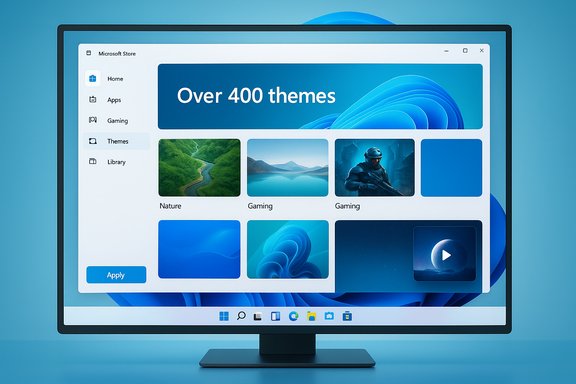
Windows 11’s personalization story took a visible step forward this month: Microsoft has reintroduced a dedicated Themes department inside the Microsoft Store, centralizing hundreds of curated theme packs and making one‑click personalization far easier to find and apply. This change — a clear effort to raise discoverability for desktop personalization — was highlighted in recent coverage and user reporting, and it confirms Microsoft’s renewed focus on making Windows 11 feel more personal without forcing users into manual file handling. The move is welcome, but it’s also partial: the Store themes are, for now, primarily wallpaper and accent‑color collections rather than full, system‑wide theme packages that swap sounds, cursors, fonts, and screensavers automatically. The arrival of a Themes hub in the Microsoft Store is significant for discoverability and for creators, and it sits alongside another long‑requested customization feature — native support for video/live wallpapers in Insider builds — which together mark a coherent, if cautious, revival of personalization in Windows. As Pocket‑lint reported on the change and what it does and doesn’t do, users should weigh the benefits for convenience and curation against the current limitations and the broader opportunities Microsoft could pursue.
For users, the immediate benefits are clear: faster access to curated looks and a safer distribution channel for wallpaper content. For power users and third‑party creators, the current model raises questions about integration and future extensibility. The underlying technical pieces are now in motion — Store distribution, native video wallpaper support in test builds, and explicit mention of third‑party personalization apps in Microsoft’s communications — but the truly transformative step will be when Microsoft opens a richer theming API and Store packaging format that lets creators ship complete, system‑level theme experiences safely through the Store.
Until then, the Themes department is a welcome, incremental improvement: a tidy, modern interface for the most common personalization tasks and a tangible sign that Microsoft intends to make Windows 11 feel more like a personal workspace again.
Source: Pocket-lint Windows 11 finally caught up to Android phones with this long overdue feature
 Background
The long arc of theming on Windows
Personalization has been part of Windows since the 1990s — from Microsoft Plus! and Visual Styles in Windows XP through the theming engine in Windows 7 and the Store‑distributed theme packs in Windows 10. Over time, Windows added support for wallpaper slideshows, accent colors, sounds, cursors, and other theme elements, but discovery and distribution changed as Microsoft pushed more content through the Microsoft Store. Recent years had seen the Store’s theming presence diminish, making it harder for average users to find and apply curated themes. The newly announced Themes department attempts to reverse that trend by surfacing editorial picks, categories, and an “apply” path that ties directly into Windows Settings.Why now — the competitive context
Customization has become a battleground across platforms. Android OEMs have long shipped OEM theming engines and skins, and Google’s own Material You and successive evolutions of Android theming have pushed the mobile side into dynamic, system‑driven personalization. Microsoft’s timing for the Store Themes relaunch comes as other platforms are amplifying native theming capabilities, and it lands alongside fresh activity in Windows Insiders (notably native video wallpapers returning in test builds). The combination looks less like a single reactive move and more like a multi‑front nudge to make Windows feel modern, expressive, and discoverable in the Store.What’s in the new Microsoft Store Themes department
The basics — what Microsoft announced
Microsoft’s Windows Experience Blog describes the Themes department as a centralized catalog hosting over 400 themes, including dozens of new collections at launch. Each entry in the catalog is presented as a curated package that bundles wallpapers and accent colors, and the Store page provides editorial groupings (Nature, Gaming, New Releases, Top themes) and an Explore all themes listing for alphabetical browsing. Microsoft emphasized simplified application flows that integrate with Settings so that applying a theme is a one‑click action from the Store.- Over 400 themes available in the Store hub.
- Editorial curation by category (Nature, Gaming, Seasonal, etc..
- One‑click apply that connects Store downloads to Windows Settings.
Confirmed scope and constraints
Microsoft’s blog text and the Store listings emphasize wallpapers and accent colors as the core elements of these theme packs. Microsoft’s existing documentation for Windows themes shows that Windows historically supported additional elements (sounds, cursors, screen savers, etc., but the new Store themes are explicitly framed as wallpaper + color collections — not full system‑element swap bundles. That detail is important: the Store’s Themes department simplifies discovery but does not yet reintroduce a one‑click swap for sounds, cursors, or fonts. In short, this is a modernized, Store‑first distribution and discovery experience for wallpaper/color themes rather than a full return to the more expansive theme packs of the past.How to get the Themes department and apply themes
Rollout and requirements
The Themes department is rolling out gradually to Windows 11 users via Store updates. Microsoft recommends keeping Windows Update and the Microsoft Store app up to date to increase your chances of seeing the new Themes tab. The new Themes department appears as a left‑pane tab in the Microsoft Store; selecting it opens curated collections and category filters. To help ensure you receive changes promptly:- Keep Windows 11 updated via Settings > Windows Update.
- Update the Microsoft Store app from the Store page or allow automatic app updates.
- Enable “Get the latest updates as soon as they’re available” in Windows Update (for faster staging).
Applying a theme — one click flow
- Open Microsoft Store > select the Themes tab.
- Browse or search themes by category or editorial picks.
- Click a theme to see previews and the “Apply” button.
- Applying a theme integrates the wallpaper and accent color into Settings > Personalization > Themes.
Strengths: Why this is a net positive
Visibility and curation matter
Windows has long had theming capability — but discoverability has been the weak link. Centralizing themes in a curated Store section fixes that friction. Casual users who want a fresh desktop without tinkering will find curated collections, editorial picks, and categories far easier to browse than a static, alphabetized download directory. This will likely increase theme adoption and may generate a renewed creative economy for creators who want Store distribution.Integration with the Store model
By distributing themes through the Microsoft Store, Microsoft benefits from Store update mechanisms, infrastructure for ratings/reviews, moderation, and the same discovery tools used for apps and games. That can encourage more creators (indie artists, game studios, photography outlets) to ship packs, and it creates a consistent path to keep theme content fresh and curated. The Store model also provides safer distribution than scattered third‑party ZIP downloads.Low friction for the majority use case
For most users, a wallpaper change and an accent color tweak are the primary personalization actions. The new department makes those changes trivial and immediate. In workplaces or classrooms where IT allows Store access, curated themes can also be an easy way for organizations to offer branded desktop looks or seasonal imagery without complex deployment.Limitations and missed opportunities
Not a full theme system — yet
The most notable limitation is scope. The Store themes, as described in Microsoft’s announcement, are largely wallpaper + accent color packages. They do not currently automate the rest of a full Windows theme — system sounds, cursors, fonts, and screensavers remain outside the automatic apply workflow. That contrasts with the broader theming capabilities Windows historically supported. Users who expect a return to the days when a single .themepack could switch wallpapers, sounds, icons, and cursors will be disappointed. Microsoft’s blog is explicit on the wallpapers/colors focus, and independent reporting confirms the narrower scope.Third‑party themers remain separate
Popular third‑party tools like Wallpaper Engine, Lively Wallpaper, and Seelen UI have deep feature sets that go beyond static wallpaper + color — including animated/interactive backgrounds, layered effects, audio‑reactive wallpapers, and full UI skinning. Right now, there is no formal Store‑level integration enabling those ecosystems to plug into Settings’ theme apply flow. The absence of a Store/Settings contract for richer themes limits the appeal for power users who want system‑wide theming. This is a practical missed opportunity for Microsoft to standardize and host richer creative ecosystems on the Store.Potential for fragmentation
If Microsoft keeps Store themes limited to wallpapers/colors while allowing third‑party themers to remain standalone, we risk a bifurcated personalization landscape: a friendly, curated path for casual users vs. a fragmented set of advanced tools for enthusiasts. Without a clear Store‑to‑Settings API for third‑party theme packs, creators will continue shipping apps rather than official theme packs — which reduces the clean, uniform experience Microsoft appears to be aiming for. This remains a design and policy gap to watch.Live wallpapers: DreamScene returns in the Insider channel
Native video wallpaper support in Insider builds
Separately from the Store Themes hub, Windows Insiders spotted native video/live wallpaper support resurfacing in recent test builds. Enthusiasts discovered an experimental feature that allows video files (MP4, MKV, MOV, etc. to be used as desktop backgrounds — a spiritual return of Vista’s DreamScene. Multiple outlets captured the discovery and demonstrations, and the feature is visible in Dev/Beta builds (build series referenced as 26×20.6690 in early reports) behind an experimental feature flag. The capability currently appears limited to the desktop background (not the lock screen) and is gated for Insiders.How it was discovered and enabled
Windows feature sleuths on social platforms called out the hidden toggle and a specific feature ID that Insiders can enable (via tools that flip hidden feature flags). Coverage shows that once enabled, Settings > Personalization > Background gains the option to pick a video file as the desktop background, and the system will loop the clip while the desktop is visible. Third‑party apps like Wallpaper Engine and Lively Wallpaper already offer similar functionality, but native support removes dependency on additional software for users who want simple video wallpapers.Cross‑verification
This return of video wallpapers is reported by multiple independent outlets (Tom’s Hardware, PCWorld, HotHardware, and others), corroborating the Insider discovery and the feature’s experimental nature. That breadth of reporting makes the claim verifiable for Insiders, though Microsoft hasn’t yet placed the feature into stable channels or made a formal general‑availability commitment. For users outside the Insider program, the native option is not yet generally available.Security, performance, and manageability considerations
Performance impact
Animated or video wallpapers consume CPU/GPU and memory resources in ways that static wallpapers do not. Microsoft’s earlier DreamScene experiment was removed in part due to performance concerns on older hardware; modern PCs are far more capable, but system impact will vary by device, codec efficiency, and whether the video is hardware‑accelerated. Insiders testing video wallpapers should monitor CPU/GPU usage and battery impact on laptops. Third‑party tools have long offered throttles and “pause on full screen” behaviors; Microsoft will need to bake similar heuristics into native support for a polished experience. Multiple reports caution about the potential for increased power draw on laptops.Security and content moderation
Moving theme distribution into the Microsoft Store brings moderation benefits (malware scanning, content policy enforcement, ratings), but it also centralizes trust and developer onboarding. Creators who previously distributed theme packs via independent sites must now meet Store policies to reach users. That tradeoff strengthens safety for mainstream users, but it could raise friction for small creators who prefer direct distribution. Microsoft’s Store infrastructure reduces risk of malicious theme packs that once proliferated via ad networks and random ZIP files.IT control and enterprise policy
For enterprise and education environments, administrators will want policy controls over themes and Store content. The simplified theme apply flow could be an asset if Management tooling allows sanctioned theme rollout (for branding or seasonal comms). Conversely, IT may need new Group Policy or Intune controls to block Store theme application where standard desktop images are mandated. Microsoft’s enterprise management ecosystem typically follows consumer changes, so look for admins to request explicit controls as the Themes hub matures.The third‑party theming ecosystem: opportunity and friction
Where Wallpaper Engine, Lively, and others fit
Third‑party tools remain far richer in capability: animated/interactive wallpapers, layered scenes, audio responsiveness, and advanced performance settings. They also have established communities and marketplaces (user‑created content, Steam Workshop, etc.. Microsoft could leverage the Store to provide a sanctioned pipeline for these creators while preserving their advanced capabilities — but that would require a clearly defined plugin or packaging format and a Settings handshake that accepts richer metadata than “wallpaper + color.” Right now, third‑party apps are referenced in Microsoft’s blog as personalization options, but they remain separate apps, not integrated Store theme packs.What Microsoft could do next (speculative — flagged)
It would be logical for Microsoft to open a richer theme pack format and an API that lets third‑party creators register theme installers or plug into Settings so their packs can be previewed/applied like Store themes. That would unify the casual and power user experiences and allow creative ecosystems to flourish in the Store. This is a reasonable product direction, but it remains speculative until Microsoft publishes developer guidance or a Store theme publisher program that supports richer assets. Consider this a probable opportunity rather than a confirmed roadmap. This is currently unverified and should be treated as forward‑looking speculation.What this means for Windows users — practical takeaways
- If you want cleaner access to curated wallpapers and color themes, the new Microsoft Store Themes department is a meaningful improvement: easier browsing, editorial curation, and one‑click apply.
- If you expect full system theme swaps (sounds, cursors, fonts) via the Store today, that expectation will be disappointed — the current Store packs focus on wallpapers and accent colors. Administrators and advanced users should continue using custom deployments or third‑party tools for full theme automation.
- For enthusiasts who want animated or video wallpapers, Insider builds show native video wallpaper support returning — a welcome sign that Microsoft is listening to personalization demand. However, that feature is experimental in Insider channels and not yet generally available. Monitor Insider releases and official Microsoft announcements for public rollout timing.
Quick checklist: how to get the Themes tab faster
- Update Windows 11 to the latest public release (or join Insider channels if you want earliest access).
- Update the Microsoft Store and enable automatic app updates.
- Check Microsoft Store > left pane for the Themes tab.
- If you don’t see it, wait — the rollout is staged and may take days to weeks in some regions.
Conclusion
The Microsoft Store Themes department is a pragmatic, well‑scoped win for discoverability and simple personalization: it makes it far easier for everyday users to find and apply quality wallpaper and accent‑color packages without manual file fiddling. At the same time, the implementation is conservative — it stops short of restoring full system‑wide theme packs and doesn’t yet provide a Store‑to‑Settings contract for advanced themers. The simultaneous return of experimental video wallpaper support in Insider builds broadens the personalization conversation and shows Microsoft is open to reintroducing formerly niche features when OS telemetry and modern hardware make them practical again.For users, the immediate benefits are clear: faster access to curated looks and a safer distribution channel for wallpaper content. For power users and third‑party creators, the current model raises questions about integration and future extensibility. The underlying technical pieces are now in motion — Store distribution, native video wallpaper support in test builds, and explicit mention of third‑party personalization apps in Microsoft’s communications — but the truly transformative step will be when Microsoft opens a richer theming API and Store packaging format that lets creators ship complete, system‑level theme experiences safely through the Store.
Until then, the Themes department is a welcome, incremental improvement: a tidy, modern interface for the most common personalization tasks and a tangible sign that Microsoft intends to make Windows 11 feel more like a personal workspace again.
Source: Pocket-lint Windows 11 finally caught up to Android phones with this long overdue feature
