

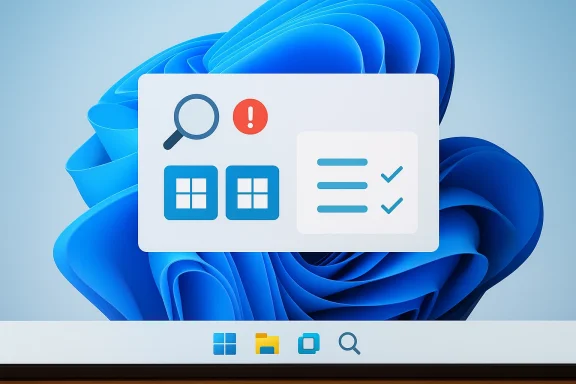
Microsoft’s Windows Learning Center is giving Windows 11 users a strange new kind of confusion: official guidance that appears to show two Start buttons on the taskbar. The mistake matters because it isn’t happening in a fan forum or a concept mockup; it’s showing up in Microsoft-owned how-to material meant to teach people what Windows 11 actually looks like. In a moment when Microsoft is trying to make Copilot feel more central to the Windows experience, an obvious interface error undermines the company’s own credibility. The irony is especially sharp because Microsoft’s current taskbar and Start documentation is explicit that Windows has one Start button and one Start experience on the taskbar, not two. com](Customize the Taskbar in Windows - Microsoft Support))
The immediate problem is simple: Windows 11 has one Start button, and Microsoft’s support documentation says so plainly. The taskbar is described as a central Windows element with a single Start entry, alongside Search, Task View, apps, and the system tray. Microsoft’s accessibility and taskbar guidance also frames the Start button as a single, specific control, usually at the left side of the taskbar in Windows 11 and always tied to one Start menu surface. (support.microsoft.com)
That makes the learning-center blunder more than a design oddity. When a tutorial image for a product training page shows a second Start button or otherwise suggests duplicated system controls, it risks teaching tupport content is supposed to do: it introduces doubt where clarity should exist. For experienced users, the error may be laughable; for beginners, it can be genuinely misleading.
This lands at a sensitive time for Microsoft’s Windows strategy. Over the last year, the company has repeatedly described Windows 11 as the home for AI on the PC, with Copilot+ features such as Recall, Click to Do, and improved search positioned as defining experiences. Microsoft has also expanded AI image tools inside Paint and Notepad, and it has made Copilot increasingly visible across consumer and enterprise surfaces. In other words, the company is asking users to trust AI more deeply inside the operating system itself. (blogs.windows.com)
That is why sloppy AI-generated visuals are especially costly. A decorative illustration in a lifestyle article is one thing. An AI-generated image s tutorial is something else entirely, because support material has a higher burden of accuracy than marketing copy. The more Microsoft pitches Windows as an intelligent, AI-assisted platform, the more it has to prove that its own internal content pipeline is careful, not merely fast.
There is also a broader product-history angle here. Windows 11 has already been criticized for reducing some of the flexibility power users were used to in earlier versions, and Microsoft has spent years balancing modernized visuals against user expectations shaped by decades of muscle memory. Even Microsoft’s own support pages still note that the taskbar is fundamentally a single launcher and control surface, while newer Windows 11 Start redesigns continue to evolve around one unified menu rather than multiple Start paradigms. (support.microsoft.com)
The reputational damage is subtle but real. AI errors in internaare often contained by human review. AI errors in a public tutorial become durable, searchable, and copyable. Once a confusing image is live on a Microsoft help page, it can be screenshotted, reposted, and interpreted as proof that Windows 11 itself is inconsistent. That is the kind of trust erosion that slowly accumulates.
This is also where Copilot’s broader reputation enters the picture. Microsoft has already acknowledged, in effect, that AI systems make mistakes. The company’s own consumer Copilot materials emphasize capabilities, but they also come with the familiar caveat that AI can be wrong. The irony is that Microsoft appears to have ignored that warning when assembling a helr ordinary users. (blogs.windows.com)
At the same time, Windows 11’s Start menu is not frozen in amber. Microsoft has been testing and refining a new scrollable Start layout with pinned apps, recommended items, and all-apps views, along with different navigation patterns and Phone Link integration. So the menu is changing, but it is changing within one Start system, not branching into two taskbar identities. (windowscentral.com)
This is particularly awkward because Microsoft has been positioning Windows 11 as the home for AI on the PC, not just a host for isolated features. From consumer AI experiences to Copilot+ hardware messaging, the company has been saying that intelligence is now partentity. But if the company cannot keep a basic tutorial image accurate, skeptics will ask whether the platform is becoming more intelligent or simply more automated. (blogs.windows.com)
Windows 11 already asks users to adapt to a reworked interface language, from the centered taskbar to the evolving Start experience and the ongoing presence of Copilot-related elements across the desktop. The more change Microsoft introduces, the more important it becomes to keep the documentation plainspoken and visually literal. A weird illustration is the last thing apport.microsoft.com](Customize the Taskbar in Windows - Microsoft Support))
That matters because Microsoft has been marketing Copilot as a practical companion, not just a novelty engine. If the assistant is meant to explain, summarize, and guide, then it has to be more than visually polished. It has to be operationally trustworthy. Competitors will happily frame this as a Microsoft problem, not an AI problem.
The broader Windows 11 roadmap suggests Microsoft is not slowing down on AI, but it is becoming more selective and more cautious about where those features surface. That trend makes this documentation error even more instructive, because it shows how easily a small lapse can undercut a much larger strategic message. If Microsoft wants Windows 11 to feel AI-native without feeling careless, the quality bar for every AI-assisted asset has to rise. (blogs.windows.com)
Source: Windows Central Windows 11 doesn’t have two Start menus, but Copilot thinks it does
 Background
The immediate problem is simple: Windows 11 has one Start button, and Microsoft’s support documentation says so plainly. The taskbar is described as a central Windows element with a single Start entry, alongside Search, Task View, apps, and the system tray. Microsoft’s accessibility and taskbar guidance also frames the Start button as a single, specific control, usually at the left side of the taskbar in Windows 11 and always tied to one Start menu surface. (support.microsoft.com)That makes the learning-center blunder more than a design oddity. When a tutorial image for a product training page shows a second Start button or otherwise suggests duplicated system controls, it risks teaching tupport content is supposed to do: it introduces doubt where clarity should exist. For experienced users, the error may be laughable; for beginners, it can be genuinely misleading.
This lands at a sensitive time for Microsoft’s Windows strategy. Over the last year, the company has repeatedly described Windows 11 as the home for AI on the PC, with Copilot+ features such as Recall, Click to Do, and improved search positioned as defining experiences. Microsoft has also expanded AI image tools inside Paint and Notepad, and it has made Copilot increasingly visible across consumer and enterprise surfaces. In other words, the company is asking users to trust AI more deeply inside the operating system itself. (blogs.windows.com)
That is why sloppy AI-generated visuals are especially costly. A decorative illustration in a lifestyle article is one thing. An AI-generated image s tutorial is something else entirely, because support material has a higher burden of accuracy than marketing copy. The more Microsoft pitches Windows as an intelligent, AI-assisted platform, the more it has to prove that its own internal content pipeline is careful, not merely fast.
There is also a broader product-history angle here. Windows 11 has already been criticized for reducing some of the flexibility power users were used to in earlier versions, and Microsoft has spent years balancing modernized visuals against user expectations shaped by decades of muscle memory. Even Microsoft’s own support pages still note that the taskbar is fundamentally a single launcher and control surface, while newer Windows 11 Start redesigns continue to evolve around one unified menu rather than multiple Start paradigms. (support.microsoft.com)
Why the Two-Start-Button Error Matters
The obvious response is to shrug and call it a harmthat misses the core issue. Official Windows documentation is not a place where visual plausibility is good enough; it needs functional correctness. A misrendered interface in a teaching page can cause users to wonder whether their installation is broken, whether they are on the wrong build, or whether Microsoft has introduced a feature they somehow missed.Trust is the real product here
Microsoft is not just publisis publishing authority. A support page acts like a contract between the vendor and the user: this is what the product does, this is what it looks like, and this is how you operate it. When the image shows something impossible, the entire page becomes less useful, even if the written instructions remain correct. That is the editorial problem.The reputational damage is subtle but real. AI errors in internaare often contained by human review. AI errors in a public tutorial become durable, searchable, and copyable. Once a confusing image is live on a Microsoft help page, it can be screenshotted, reposted, and interpreted as proof that Windows 11 itself is inconsistent. That is the kind of trust erosion that slowly accumulates.
A support page is not a concept board
Microsoft has every right to use AI-generated art in consumer-facing materials, but the context matters. If a page is meant to explain a feature, then the illustration should reinforce reality rather than merely evoke a mood. The support documentation for the taskbar and Start menu makes the structure of the UI explicit, so a conflicting illustration is not harmless decoration; it is editorial noise. (support.microsoft.com)- Official help content should prioritize accuracy over aesthetics.
- AI-generated visuals can work in marketing, but they are risky in procedural guides.
- A single interface error can make a whole page feel unreliable.
- Users who are new to Windows 11 are the most likely to be misled.
- Microsoft’s own documentation becomes harder to trust when it contradicts itself.
Copilot, AI Art, and Microsoft’s Messaging Problem
The awkwardness here is not just the image; it is the message. Microsoft has spent the last two years building a narrative that Copilot is the future of Windows interaction, from chat and vision features to image generation and productivity assistance. At the same time, the company is trying to persuade users that Copilot is safe, reliable, and useful in everyday workflows. An official page that showcases an AI mistake cuts against all three claims. (blogs.windows.com)When branding becomes a liability
Microsoft has labeled some of its visuals as AI-generated, which is at least transparent. But transparency is only the first step. If the labeled output still contains glaring UI mistakes, then the label itself becomes an admission that the content was not sufficiently reviewed before publication. That can create the uncomfortable impression that Microsoft is using Copilot to produce material about Windows without adequately validating whether the result reflects Windows.This is also where Copilot’s broader reputation enters the picture. Microsoft has already acknowledged, in effect, that AI systems make mistakes. The company’s own consumer Copilot materials emphasize capabilities, but they also come with the familiar caveat that AI can be wrong. The irony is that Microsoft appears to have ignored that warning when assembling a helr ordinary users. (blogs.windows.com)
AI in the OS versus AI in the docs
There is a difference eatures inside Windows and using AI to explain Windows. In-product AI can be tested, measured, corrected, and hidden behind user consent flows. Documentation is more brittle. It has to be precise at the moment a user needs help, which is exactly when confusion is most expensive. That distinction matters, and Microsoft’s current content strategy appears to blur it.- Copilot can be a product feature.
- Copilot can also be a content tool.
- Those two roles have different error tolerances.
- Tutorials demand far stricter review than social-media marketing.
- An AI label does not excuse a broken example.
The Windows 11 Start Menu Reality
The reason this story keeps drawing attention is that the Start menu remains one of the most recognizable parts of Windows. Microsoft’s documentation describes the Start button as a single entry point on the taskbar, and Windows 11’s taskbar guidance still treats that area as a fixed system surface rather than a playground for alternate interpretations. The basic mental model is stable even as the menu itself evolves. (support.microsoft.com)One taskbar, one Start button
Microsoft’s support pages list the taskbar’s components as Widgets, Start, Search, Task view, Applications, and the System tray. That list alone makes the duplication in the AI-generated image look ridiculous. It is not a matter of opinion or UI style; it is a direct contradiction of the documented structure of the desktop. (support.microsoft.com)At the same time, Windows 11’s Start menu is not frozen in amber. Microsoft has been testing and refining a new scrollable Start layout with pinned apps, recommended items, and all-apps views, along with different navigation patterns and Phone Link integration. So the menu is changing, but it is changing within one Start system, not branching into two taskbar identities. (windowscentral.com)
Why users notice immediately
The Start button is one of those UI elements people recognize in milliseconds. That makes it especially vulnerable to editorial mistakes because the error is instantly visible, even to nontechnical usere gets the most basic desktop anchor wrong, readers are likely to suspect that the rest of the page may be unreliable too.- The Start button is a core desktop landmark.
- Windows 11’s taskbar is designed around a single launcher.
- Start-menu redesigns do not imply multiple Start buttons.
- A visual inconsistency on a support page is immediately noticeable.
- The error undermines the perceived qualitsystem. (support.microsoft.com)
Why Microsoft’s Timing Is So Unhelpful
The timing of this mistake is almost worse than the mistake itself. Microsoft is currently trying to project discipline around Windows 11 AI features, emphasizing a more selective and less noisy approach in several areas. Recent reporting suggests the company has already pulled back on some more aggressive Copilot plans, which implies it knows the market is sensitive to AI overreach.A company seeking restraint, then tripping over itself
That context makes a public tutorial error feel self-defeating. If Microsoft is reducing intrusive AI experiments in the OS, then a badly reviewed AI-generated support image sends the opposite signal: that the company still wants the optics of AI everywhere, even where the execution is weakest. The optics are beginning to outrun the craftsmanship.This is particularly awkward because Microsoft has been positioning Windows 11 as the home for AI on the PC, not just a host for isolated features. From consumer AI experiences to Copilot+ hardware messaging, the company has been saying that intelligence is now partentity. But if the company cannot keep a basic tutorial image accurate, skeptics will ask whether the platform is becoming more intelligent or simply more automated. (blogs.windows.com)
The lesson from support content
Suppoically been one of Microsoft’s strongest trust-building tools. Users may argue with product choices, but they often rely on Microsoft’s own docs when they need exact steps. That trust is fragile, though, and it can be broken by a handful of visible mistakes. Once users start doubting the screenshots, they may also start doubting the instructions beside them. (support.microsoft.com)- Microsoft needs its help content to feel boringly correct.
- AI-generated art is not automatically suitable for documentation.
- The company’s current AI messaging makes mistakes more visible.
- The more Windows 11 leans into AI, the more accuracy matters.
- Small editorial failures can damage a big strategic narrative.
Consumer Impact: New Users Feel It First
For experienced Windows users, the image is a joke. For someone who is less technical, it is a support problem. Microsoft’s Windows Learning Center is exactly where a confused user goes when trying to figure out basic system behavior, which means these pages have to meet a much higher standard than product marketing.Beginners need visual certainty
New users often trthan text because images are easier to parse than written instructions. If the screenshot appears to show two Start menus or two Start controls, a novice may conclude that they are missing a setting, running a different build, or suffering from a system glitch. That kind of confusion i is the main reason support docs exist.Windows 11 already asks users to adapt to a reworked interface language, from the centered taskbar to the evolving Start experience and the ongoing presence of Copilot-related elements across the desktop. The more change Microsoft introduces, the more important it becomes to keep the documentation plainspoken and visually literal. A weird illustration is the last thing apport.microsoft.com](Customize the Taskbar in Windows - Microsoft Support))
The support burden gets heavier
Microsoft’s official help ecosystem does not just instruct users; it also deflects support burden away from call centers and IT desks. When documentation misfires, those costs come back in the form of extra tickets, more forum posts, and more time spent convincing uses fine. That is operational drag, not just an aesthetic issue.- Beginners trust screenshots as proof.
- A bad tutorial image can create fake troubleshooting work.
- Support load increases when docs are visually inconsistent.
- Windows 11’s evolving UI makes accuracy more important.
- Confusing help pages can make users doubt their own devices.
Enterprise and IT Implications
Enterprise teams may not care about the artistry of the image, but they absolutely care about predictability and governance. If Microsoft’s consumer-facing learning materials can be wrong about a core UI element, IT admins have one more reason to insist that Microsoft AI outputs are not automatically authoritative. Documentation quality is part of deployment confidence.Governance starts with obvr organizations, Windows support content often becomes a first-reference source for helpdesk staff and internal training teams. If that source contains an obvious error, it creates friction all the way down the chain. A helpdesk agent may have to explain why the official guideot a great look for a vendor that wants to sell AI assistance as a productivity multiplier.
The problem is even more interesting in light of Microsoft’s broader AI strategy. The company is pushing Copilot deeper into enterprise tools, while simultaneously narrowing or rethinking some OS-level consumer experiments. That suggests Microsoft is becoming more selective about where AI belongs. Tutorials with glaring mistakes show why that selectivity is necessary. (blogs.windows.com)What admins infer from this
Enterprise IT professionals tend to generalize from small incidents. If a help page is careless, they may assume the same carelessness could show up in AI summaries, policy guidance, or automated workflows. That is why trust calibration matters: once Microsoft sells AI as a systemwide layer, every visible error becomes part of the procurement conversation.- IT teams rely on Microsoft docs for internal training.
- A bad visual can contaminate support workflows.
- AI credibility affects governance conversatis cumulative, not isolated.
- Enterprises are more likely than consumers to notice process failures.
The Competitive Angle: Copilot vs. the Rest
Microsoft’s AI rivals do not need to do much to benefit from this story. Every time Copilot is associated with a sloppy output, competitors get another example to contrast their own approach to reliability, user trust, or editorial discipline. In a market crowded with assistants, the perception of accuracy is a strategic asset. (blogs.windows.com)Why accuracy beats flashiness
The AI market is full of systems that can generatemages. The differentiator is whether those outputs hold up when the stakes are higher than a social post. Microsoft’s own support documentation makes Windows fidelity nonnegotiable, so when Copilot-generated art misses something as basic as the taskbar layout, the contrast is stark. (support.microsoft.com)That matters because Microsoft has been marketing Copilot as a practical companion, not just a novelty engine. If the assistant is meant to explain, summarize, and guide, then it has to be more than visually polished. It has to be operationally trustworthy. Competitors will happily frame this as a Microsoft problem, not an AI problem.
The irony of AI-enabled guidance
Microsoft’s own efforts in Paint and Notepad show the upside of AI done well: usy labeled capabilities that expand what the user can do. But using generated art in a how-to guide is a different proposition entirely. The latter is not about enabling creativity; it is about conveying exact facts, and that is a much narrower tolerance zone. (blogs.windows.com)- Competitors benefit when Copilot looks careless.
- Polished output is not the same as reliable output.
- Documentation is a higher-stakes use case than image generation.
- Microsoft’s AI brand gains less when its own pages are wrong.
- Trust, not novelty, is becoming the key competitive battleground.
Strengths and Opportunities
Despite the blunder, Microsoft still has real strengths here. The company owns the platform, the documentation stack, aich means it can fix this quickly and establish stronger editorial guardrails. If it learns the right lesson, the incident could become a useful pressure test for how Microsoft handles AI-generated content in Windows support material.- Microsoft can correct the pages without a platform update.
- The issue provides a clear case for stricter content review.
- Copilot labeling creates a pathway for transparent disclosure.
- Better editorial policy could prevent future support confusion.
- Microsoft can use thets AI content governance.
- The company can distinguish between creative AI and procedural AI.
- Strong documentation can still reinforce Windows 11 confidence.
Risks and Concerns
The downside is that this kind of mistake feeds a larger narrative that Microsoft is prioritizing AI branding over product accuracy. That risk grows every time a generative system is used in a context where factual correctness matters more than presentation. If Microsoft does not respond decisively, the error may become shorthand for a broader skepticism about Copilot’s place inside Windows.- Users may assume more Microsoft AI content is similarly unreliable.
- Beginners could be misled by the incorrect visual example.
- Helpdesk teams may have to spend time debunking official pages.
- Microsoft’s AI messaging may look more promotional than practical.
- Editorial confidence in Windows Learning Center ror may be reused as evidence in anti-AI arguments.
- If repeated, the pattern could damage trust in Copilot branding.
Looking Ahead
The next few weeks will show whether this is treated as a one-off embarrassment or as a sign that Microsoft is still learning where AI belongs in the Windows content pipeline. The obvious fix is to replace the faulty visuals, but the better fix is less visible: stronger human review before AI-generated material reaches support documentation. Microsoft’s challenge is not proving that Copilot can create images. It is proving that the company knows when not to let Copilot speak for Windows. (support.microsoft.com)The broader Windows 11 roadmap suggests Microsoft is not slowing down on AI, but it is becoming more selective and more cautious about where those features surface. That trend makes this documentation error even more instructive, because it shows how easily a small lapse can undercut a much larger strategic message. If Microsoft wants Windows 11 to feel AI-native without feeling careless, the quality bar for every AI-assisted asset has to rise. (blogs.windows.com)
- Watch whether Microsoft quietly edits the learning pages.
- Look for changes in how AI-generated support images are labeled.
- Expect more scrutiny of Copilot branding in Windows tutorials.
- Monitor whether Microsoft tightens editorial review for docs.
- See whether the company publicly acknowledges the mistake.
- Track whether similar errors appear elsewhere in Windows support content.
Source: Windows Central Windows 11 doesn’t have two Start menus, but Copilot thinks it does
