

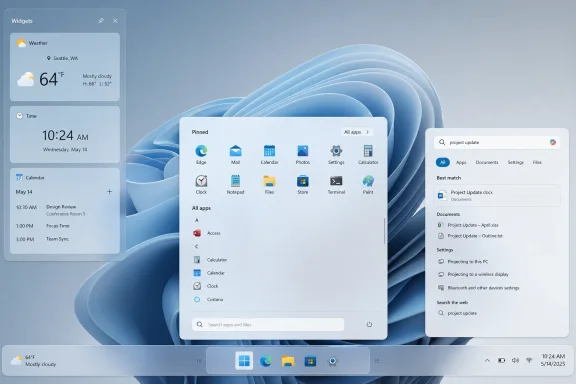
Microsoft’s latest reminder that Windows 11 has a trust problem arrived this week through a fan-made Behance redesign by Raditya Aryaputra, spotlighted by Windows Central, that imagines a cleaner Start menu, quieter Search, simpler Widgets, and a desktop stripped of ads and AI clutter. The concept matters less as a product proposal than as a verdict. It shows that many Windows enthusiasts are no longer asking Microsoft for novelty; they are asking it to stop interrupting them.
That is an uncomfortable place for the world’s dominant desktop operating system to find itself in 2026. Windows 10 support ended on October 14, 2025, and the consumer Extended Security Updates program only buys most holdouts limited time. Microsoft has leverage, but leverage is not affection. The question hanging over Windows 11 is whether Redmond can turn a mandatory migration into a desirable one before the patience of its most loyal users runs out.
Aryaputra’s “Redefining Windows” project is not radical in the way concept art often is. It does not propose a holographic desktop, a full-screen AI command center, or some glassy future interface that could only exist in a marketing reel. Its seduction is restraint.
The redesigned Start menu is smaller, cleaner, and centered on pinned apps, the app list, and search. Forced recommendations and advertising vanish. The pitch is almost embarrassingly simple: when a user opens Start, assume they want to start something.
That assumption used to be Windows’ center of gravity. Over the last decade, the operating system has accumulated surfaces that behave less like tools and more like storefronts: recommendations, web suggestions, promotional tiles, Microsoft account nudges, cloud prompts, and now AI entry points. Each may be defensible in isolation. Together, they create the feeling that the OS is negotiating with the user.
The concept’s power comes from refusing that negotiation. It treats the desktop as a workspace rather than an engagement funnel. That alone explains why it landed so cleanly with the Windows enthusiast crowd.
Windows 95 changed the consumer PC. Windows XP made the NT line feel approachable. Windows 7 cleaned up Vista’s ambitions and became the safe corporate default. Windows 10 repaired much of the Windows 8 rupture by accepting that desktop users wanted a desktop-first operating system.
Windows 11’s issue is different. It changed visible pieces of the shell while removing or delaying familiar affordances, and it did so while surrounding the user with more commercial and cloud-driven prompts. The centered taskbar was not the core problem. The problem was that the new shell often felt less flexible than the old one.
That distinction matters because Microsoft’s defenders sometimes treat complaints about Windows 11 as nostalgia. But the most durable criticism is not “make it look like Windows 10.” It is “give me back control.” A fan-made redesign that keeps the Windows 11 aesthetic while removing the nagging makes that point more effectively than a thousand angry forum posts.
The recommended area has been the obvious flashpoint. Microsoft can describe it as convenience, continuity, or intelligent surfacing. Many users experience it as dead space at best and an unwanted promotional surface at worst. When the most prominent part of the launcher is not fully trusted, the whole shell inherits the suspicion.
Aryaputra’s concept responds by making the Start menu boring in the best sense. Pinned applications, app list, search. Compact layout. No forced recommendations. No ad-like intrusions pretending to be productivity.
This is why the concept feels less like fantasy and more like common sense. A launcher should launch. The more Microsoft asks the Start menu to cross-sell services or infer intentions, the more it risks turning the most-used part of Windows into the least-loved one.
The proposed redesign imagines Search as a direct route to apps, files, settings, and shortcuts, with Copilot present only as an unobtrusive assistant. That last word matters. The argument is not necessarily anti-AI. It is anti-ambush.
Microsoft has spent the last few years trying to make Copilot feel inevitable across Windows, Office, Edge, and the broader Microsoft ecosystem. The problem is that inevitability is not the same as usefulness. When AI appears before the user has asked for it, it becomes clutter, even if the underlying feature is technically impressive.
A restrained Search surface would do more for Copilot than another wave of buttons. If AI is genuinely useful, it can survive being optional, contextual, and quiet. If it cannot, then the branding was doing more work than the product.
Aryaputra’s version pares the panel back to pinned widgets and removes the news feed. That single cut changes the entire premise. The panel becomes a dashboard rather than a content mall.
This is not a small philosophical distinction. A dashboard respects that the user came for information and wants to leave. A feed assumes the user’s attention is available for capture. Microsoft has repeatedly blurred that line in Windows 11, and users have noticed.
There may be people who genuinely like the feed, and Windows should be broad enough to accommodate them. But a serious desktop OS should default to utility, not consumption. The fan concept gets that ordering right.
Reports around Microsoft’s Windows K2 effort suggest the company knows this. Windows Central has described K2 as an internal push to improve Windows 11 fundamentals and user sentiment through 2026 and into 2027, including long-requested shell work such as taskbar improvements and a redesigned Start menu. If that reporting holds, Microsoft is no longer pretending that the backlash is just noise.
That is encouraging, but it also underlines how avoidable the problem was. Windows users tend to accept new defaults if old choices remain available. What they resent is being told that a less capable replacement is progress.
The fan redesign’s movable and resizable taskbar is therefore not just a nostalgia play. It is a demand for an OS that understands different workflows. A 13-inch laptop, a 49-inch ultrawide, a multi-monitor trading desk, and a kiosk-style touch machine do not want the same taskbar behavior.
That sounds obvious, but it marks a tonal shift from the years when Windows was repeatedly treated as a distribution channel for whatever Microsoft needed to push next. The Store. Bing. Edge. Microsoft accounts. OneDrive. Teams. Widgets. Copilot. Each initiative had its own logic, but the cumulative effect was a desktop that sometimes seemed to belong to Microsoft first and the user second.
K2, if it is real in the way Windows Central describes it, is an attempt to rebalance that relationship. A better compositor, faster shell surfaces, and fewer unnecessary entry points are not flashy keynote material. They are the kind of work users notice only when it is missing.
The risk is that Microsoft treats K2 as polish rather than repentance. If the company improves animations while keeping the same advertising and AI pressure, it will have misunderstood the complaint. The problem is not just jank. The problem is intent.
In Notepad, the distinction is especially delicate. If an app has survived for decades by being plain, fast, and predictable, then bolting a heavily branded AI affordance onto it feels like vandalism to a certain kind of Windows user. Renaming the feature to “Writing tools” may reduce the heat, but it does not settle the deeper question.
That deeper question is whether AI belongs everywhere simply because Microsoft can put it everywhere. There are obvious places where AI assistance may help: accessibility, search, automation, summarization, troubleshooting, and scripting. There are also places where users open an app precisely because it does not try to be clever.
Notepad is the canary because its virtue is restraint. If Microsoft cannot resist over-instrumenting Notepad, users have reason to doubt its restraint elsewhere. If it can, that is a small but meaningful signal that Windows might still have room for quiet tools.
But enthusiasts are the early warning system for Windows. They are the people relatives ask for buying advice, the admins who shape workplace defaults, the developers who decide whether Windows remains their daily driver, and the forum regulars who turn small annoyances into durable narratives. When they sour on an OS, the sentiment does not stay neatly contained.
Windows 8 proved this. Microsoft could point to touch trends and tablet ambitions all it wanted, but the desktop crowd’s rejection became part of the product’s public identity. Windows 10 succeeded partly because it looked like Microsoft had listened.
Windows 11 is not Windows 8. It is more coherent, more modern, and more salvageable. But it has drifted into a similar trust pattern: Microsoft says a change is for the user, while users suspect it is for Microsoft’s business model. That suspicion is poisonous because every future change must then prove it is not another trap.
For Microsoft, that deadline should have been an opportunity. Windows 11 could have been waiting as the obvious upgrade: cleaner, faster, more secure, and more pleasant. Instead, many users arrived at the migration moment with a list of grievances already in hand.
Hardware requirements amplified the resentment. TPM 2.0, newer CPU requirements, and the Copilot+ PC push all made strategic sense from Microsoft’s perspective: security baseline, platform modernization, and a new AI hardware story. From the user’s perspective, however, it often looked like a still-working PC had been demoted for reasons that were not always explained in human terms.
That gap between strategic logic and lived experience is where Microsoft keeps hurting itself. The company can be right about security and still wrong about tone. It can be right that old hardware cannot be supported forever and still fail to make Windows 11 feel like a reward rather than a toll booth.
That does not mean every tweak is wise or every debloat script is safe. IT pros have good reasons to be wary of unofficial tools that alter shell behavior or remove components in ways that complicate updates. But the demand itself is instructive.
Users are telling Microsoft exactly what they want by rebuilding it themselves. They want a smaller Start menu. They want fewer recommendations. They want local-first search. They want taskbar flexibility. They want widgets without a feed. They want AI features to ask permission before occupying permanent real estate.
A healthy platform can absorb this feedback. An unhealthy one treats it as resistance to be routed around. Microsoft’s next move will reveal which Windows 11 is becoming.
All of that may be true, but none of it absolves design choices. An advertisement in a Start menu is not a law of physics. A recommendation panel is not a public utility. A cloud prompt in a local workflow is not a moral obligation.
Windows occupies a special category because it is both a product people buy and the platform on which they do their work. That makes intrusive monetization feel different from a free social feed. When the OS itself becomes promotional, the user has nowhere lower in the stack to retreat.
This is why the fan redesign’s lack of ads feels almost luxurious. It is not because the interface is visually revolutionary. It is because it restores a boundary: the operating system should serve the user before it serves the company.
What they reject is saturation. If every app grows an AI button, every search box becomes a chatbot, and every blank space becomes a prompt, the desktop stops feeling calm. It becomes cognitively expensive.
Good AI integration should reduce surface area, not increase it. It should collapse repetitive tasks, expose hidden settings, explain errors, and automate drudgery. It should not require the user to visually parse a new branded affordance in every corner of the OS.
That is the lesson Microsoft should take from the Notepad reaction. The issue is not whether text rewriting can be useful. The issue is whether a basic text editor now has to participate in a corporate AI rollout. Users can smell the difference.
The real thing worth stealing is the hierarchy. In the concept, user intent comes first. Commercial surfaces disappear. AI becomes contextual. Search behaves like search. Widgets behave like widgets. The OS stops trying to turn every interaction into an opportunity for engagement.
That hierarchy is harder to implement than a mockup because it requires saying no internally. No to another promotional slot. No to another default-on cloud prompt. No to another AI badge in a utility app. No to another experiment that tests well as a growth funnel but poorly as a daily experience.
Microsoft is capable of that discipline when it wants to be. Windows 7 was disciplined. Windows 10, after the Windows 8 revolt, was disciplined enough to win back the room. Windows 11 now needs a similar course correction, not because it is doomed, but because its best version is still plainly within reach.
Every added consumer-facing surface becomes something to document, disable, explain, or support. Every AI integration raises questions about data handling, policy controls, licensing, user training, and compliance. Every promotional prompt risks becoming a help desk ticket.
The enterprise complaint is therefore less romantic but more consequential. A cluttered Windows experience is not merely annoying at scale; it is operational drag. When Microsoft adds a feature that users did not request, an admin somewhere has to determine whether to suppress it, tolerate it, or train around it.
This is another reason K2 matters. If Microsoft is serious about fundamentals, it should think beyond enthusiasts and ask what a calmer Windows would do for organizations. Less noise is not just nicer. It is cheaper to support.
This dream has many names and forms: LTSC envy, debloated ISOs, third-party shell tools, registry packs, “what Windows should be” concept art. Microsoft should not dismiss the pattern. When a user base repeatedly imagines the same alternative, it is describing an unmet need.
The company’s challenge is that it cannot simply ship “Windows Enthusiast Edition” and call it a day. Windows has to serve consumers, schools, gamers, developers, governments, enterprises, and OEM partners. It has to carry legacy software and future bets at the same time.
But broadness does not require noisiness. Defaults can be clean while features remain discoverable. AI can be available without being omnipresent. Recommendations can be opt-in. Feeds can be removable. The fan concept is not asking Microsoft to abandon ambition. It is asking Microsoft to put ambition in the right layer.
A confident Windows would trust that useful features can be found. It would let Copilot earn a place in workflows rather than demanding one. It would let the Start menu be a launcher, Search be a search tool, and Widgets be a dashboard. It would understand that the absence of clutter is itself a feature.
This matters more as Windows competes with macOS, ChromeOS, Linux desktops, iPadOS, and increasingly capable web-based workflows. Microsoft’s moat remains enormous, especially in gaming, enterprise, and legacy software. But user goodwill is not infinite, and the modern PC market gives frustrated users more exits than it once did.
Windows does not need to become minimalist in the Apple sense. It should remain configurable, backward-compatible, and slightly chaotic in the way Windows has always been. But there is a difference between productive complexity and imposed clutter. Microsoft has too often crossed it.
But the harsher reading is that a fan concept went viral because it did what Microsoft has struggled to do: imagine Windows from the user’s chair. If Redmond wants Windows 11 to win the post-Windows 10 era on affection rather than inevitability, it should study that concept closely. Not because every mockup should become a shipping feature, but because its central argument is right: the best next version of Windows may be the one that finally learns when to get out of the way.
Source: Windows Central https://www.windowscentral.com/micr...-concepts-from-this-windows-redesign-project/
That is an uncomfortable place for the world’s dominant desktop operating system to find itself in 2026. Windows 10 support ended on October 14, 2025, and the consumer Extended Security Updates program only buys most holdouts limited time. Microsoft has leverage, but leverage is not affection. The question hanging over Windows 11 is whether Redmond can turn a mandatory migration into a desirable one before the patience of its most loyal users runs out.
 The Fan Concept Works Because It Says Less
Aryaputra’s “Redefining Windows” project is not radical in the way concept art often is. It does not propose a holographic desktop, a full-screen AI command center, or some glassy future interface that could only exist in a marketing reel. Its seduction is restraint.The redesigned Start menu is smaller, cleaner, and centered on pinned apps, the app list, and search. Forced recommendations and advertising vanish. The pitch is almost embarrassingly simple: when a user opens Start, assume they want to start something.
That assumption used to be Windows’ center of gravity. Over the last decade, the operating system has accumulated surfaces that behave less like tools and more like storefronts: recommendations, web suggestions, promotional tiles, Microsoft account nudges, cloud prompts, and now AI entry points. Each may be defensible in isolation. Together, they create the feeling that the OS is negotiating with the user.
The concept’s power comes from refusing that negotiation. It treats the desktop as a workspace rather than an engagement funnel. That alone explains why it landed so cleanly with the Windows enthusiast crowd.
Windows 11’s Problem Is Not That It Changed
Every unpopular Windows release gets flattened into the same lazy argument: users hate change. That is too convenient for Microsoft and too insulting to users. Windows people have tolerated, and often embraced, massive shifts when the bargain made sense.Windows 95 changed the consumer PC. Windows XP made the NT line feel approachable. Windows 7 cleaned up Vista’s ambitions and became the safe corporate default. Windows 10 repaired much of the Windows 8 rupture by accepting that desktop users wanted a desktop-first operating system.
Windows 11’s issue is different. It changed visible pieces of the shell while removing or delaying familiar affordances, and it did so while surrounding the user with more commercial and cloud-driven prompts. The centered taskbar was not the core problem. The problem was that the new shell often felt less flexible than the old one.
That distinction matters because Microsoft’s defenders sometimes treat complaints about Windows 11 as nostalgia. But the most durable criticism is not “make it look like Windows 10.” It is “give me back control.” A fan-made redesign that keeps the Windows 11 aesthetic while removing the nagging makes that point more effectively than a thousand angry forum posts.
The Start Menu Became the Trial of Microsoft’s Intentions
The Start menu has always been more than a launcher. It is the symbolic front door of Windows, the place where Microsoft reveals what it thinks the PC is for. In Windows 11, that front door has too often felt like a compromise between user intent and corporate strategy.The recommended area has been the obvious flashpoint. Microsoft can describe it as convenience, continuity, or intelligent surfacing. Many users experience it as dead space at best and an unwanted promotional surface at worst. When the most prominent part of the launcher is not fully trusted, the whole shell inherits the suspicion.
Aryaputra’s concept responds by making the Start menu boring in the best sense. Pinned applications, app list, search. Compact layout. No forced recommendations. No ad-like intrusions pretending to be productivity.
This is why the concept feels less like fantasy and more like common sense. A launcher should launch. The more Microsoft asks the Start menu to cross-sell services or infer intentions, the more it risks turning the most-used part of Windows into the least-loved one.
Search Should Be a Tool, Not a Billboard
Windows Search is another place where the fan redesign understands the emotional temperature of the user base. Search is supposed to be fast, local when needed, predictable, and respectful. The moment it starts behaving like a web portal, it stops feeling like infrastructure and starts feeling like a campaign.The proposed redesign imagines Search as a direct route to apps, files, settings, and shortcuts, with Copilot present only as an unobtrusive assistant. That last word matters. The argument is not necessarily anti-AI. It is anti-ambush.
Microsoft has spent the last few years trying to make Copilot feel inevitable across Windows, Office, Edge, and the broader Microsoft ecosystem. The problem is that inevitability is not the same as usefulness. When AI appears before the user has asked for it, it becomes clutter, even if the underlying feature is technically impressive.
A restrained Search surface would do more for Copilot than another wave of buttons. If AI is genuinely useful, it can survive being optional, contextual, and quiet. If it cannot, then the branding was doing more work than the product.
Widgets Reveal the Difference Between Information and Inventory
The Widgets board is one of Windows 11’s strangest ideas: a potentially useful glanceable panel that has often felt compromised by the gravitational pull of MSN content. Weather, calendar, stocks, sports, traffic, and reminders make sense as widgets. A feed engineered to keep the user scrolling does not.Aryaputra’s version pares the panel back to pinned widgets and removes the news feed. That single cut changes the entire premise. The panel becomes a dashboard rather than a content mall.
This is not a small philosophical distinction. A dashboard respects that the user came for information and wants to leave. A feed assumes the user’s attention is available for capture. Microsoft has repeatedly blurred that line in Windows 11, and users have noticed.
There may be people who genuinely like the feed, and Windows should be broad enough to accommodate them. But a serious desktop OS should default to utility, not consumption. The fan concept gets that ordering right.
The Taskbar Is a Case Study in the Cost of Regression
The movable and resizable taskbar became an emblem of Windows 11’s early missteps because it represented a familiar kind of Microsoft mistake: removing a long-standing power-user feature in the name of simplification, then slowly rediscovering why it existed. To many users, the taskbar is not decoration. It is muscle memory.Reports around Microsoft’s Windows K2 effort suggest the company knows this. Windows Central has described K2 as an internal push to improve Windows 11 fundamentals and user sentiment through 2026 and into 2027, including long-requested shell work such as taskbar improvements and a redesigned Start menu. If that reporting holds, Microsoft is no longer pretending that the backlash is just noise.
That is encouraging, but it also underlines how avoidable the problem was. Windows users tend to accept new defaults if old choices remain available. What they resent is being told that a less capable replacement is progress.
The fan redesign’s movable and resizable taskbar is therefore not just a nostalgia play. It is a demand for an OS that understands different workflows. A 13-inch laptop, a 49-inch ultrawide, a multi-monitor trading desk, and a kiosk-style touch machine do not want the same taskbar behavior.
Windows K2 Is Microsoft Admitting the Fundamentals Matter Again
The most interesting thing about Windows K2 is not any single rumored feature. It is the premise. Microsoft appears to be treating Windows’ reputation as something that must be repaired through fundamentals: responsiveness, reliability, shell polish, and fewer rough edges.That sounds obvious, but it marks a tonal shift from the years when Windows was repeatedly treated as a distribution channel for whatever Microsoft needed to push next. The Store. Bing. Edge. Microsoft accounts. OneDrive. Teams. Widgets. Copilot. Each initiative had its own logic, but the cumulative effect was a desktop that sometimes seemed to belong to Microsoft first and the user second.
K2, if it is real in the way Windows Central describes it, is an attempt to rebalance that relationship. A better compositor, faster shell surfaces, and fewer unnecessary entry points are not flashy keynote material. They are the kind of work users notice only when it is missing.
The risk is that Microsoft treats K2 as polish rather than repentance. If the company improves animations while keeping the same advertising and AI pressure, it will have misunderstood the complaint. The problem is not just jank. The problem is intent.
Copilot’s Retrenchment Shows Microsoft Heard the Booing
Microsoft’s reported removal or de-emphasis of some Copilot branding in Windows apps such as Notepad and Snipping Tool is one of the more revealing Windows stories of 2026. It suggests the company has learned that users are not merely evaluating features. They are reacting to the campaign around those features.In Notepad, the distinction is especially delicate. If an app has survived for decades by being plain, fast, and predictable, then bolting a heavily branded AI affordance onto it feels like vandalism to a certain kind of Windows user. Renaming the feature to “Writing tools” may reduce the heat, but it does not settle the deeper question.
That deeper question is whether AI belongs everywhere simply because Microsoft can put it everywhere. There are obvious places where AI assistance may help: accessibility, search, automation, summarization, troubleshooting, and scripting. There are also places where users open an app precisely because it does not try to be clever.
Notepad is the canary because its virtue is restraint. If Microsoft cannot resist over-instrumenting Notepad, users have reason to doubt its restraint elsewhere. If it can, that is a small but meaningful signal that Windows might still have room for quiet tools.
Enthusiasts Are Not the Whole Market, but They Are the Warning System
It is tempting to dismiss the reaction to a Behance concept as enthusiast noise. Most PC users will never install a third-party Start menu replacement, debate taskbar alignment, or complain about shell composition. They use the machine they have, close the pop-ups they understand, and tolerate the rest.But enthusiasts are the early warning system for Windows. They are the people relatives ask for buying advice, the admins who shape workplace defaults, the developers who decide whether Windows remains their daily driver, and the forum regulars who turn small annoyances into durable narratives. When they sour on an OS, the sentiment does not stay neatly contained.
Windows 8 proved this. Microsoft could point to touch trends and tablet ambitions all it wanted, but the desktop crowd’s rejection became part of the product’s public identity. Windows 10 succeeded partly because it looked like Microsoft had listened.
Windows 11 is not Windows 8. It is more coherent, more modern, and more salvageable. But it has drifted into a similar trust pattern: Microsoft says a change is for the user, while users suspect it is for Microsoft’s business model. That suspicion is poisonous because every future change must then prove it is not another trap.
The Windows 10 Deadline Turned Preference Into Pressure
The end of Windows 10 support changed the emotional backdrop. Before October 14, 2025, staying on Windows 10 was a preference. After that date, it became a security and lifecycle decision, softened but not erased by Extended Security Updates.For Microsoft, that deadline should have been an opportunity. Windows 11 could have been waiting as the obvious upgrade: cleaner, faster, more secure, and more pleasant. Instead, many users arrived at the migration moment with a list of grievances already in hand.
Hardware requirements amplified the resentment. TPM 2.0, newer CPU requirements, and the Copilot+ PC push all made strategic sense from Microsoft’s perspective: security baseline, platform modernization, and a new AI hardware story. From the user’s perspective, however, it often looked like a still-working PC had been demoted for reasons that were not always explained in human terms.
That gap between strategic logic and lived experience is where Microsoft keeps hurting itself. The company can be right about security and still wrong about tone. It can be right that old hardware cannot be supported forever and still fail to make Windows 11 feel like a reward rather than a toll booth.
Third-Party Customization Is Thriving Because Windows Left Space Unloved
The customization scene around Windows 11 is not merely hobbyist tinkering. It is market feedback. Start menu replacements, taskbar tools, debloating scripts, registry tweaks, and UI mods exist because a portion of the user base believes Microsoft has left essential preferences underserved.That does not mean every tweak is wise or every debloat script is safe. IT pros have good reasons to be wary of unofficial tools that alter shell behavior or remove components in ways that complicate updates. But the demand itself is instructive.
Users are telling Microsoft exactly what they want by rebuilding it themselves. They want a smaller Start menu. They want fewer recommendations. They want local-first search. They want taskbar flexibility. They want widgets without a feed. They want AI features to ask permission before occupying permanent real estate.
A healthy platform can absorb this feedback. An unhealthy one treats it as resistance to be routed around. Microsoft’s next move will reveal which Windows 11 is becoming.
Ads Are a Design Choice, Not a Weather Pattern
One of the laziest defenses of modern software clutter is that it is inevitable. Services need discovery. Users need recommendations. Cloud features need onboarding. The business needs growth.All of that may be true, but none of it absolves design choices. An advertisement in a Start menu is not a law of physics. A recommendation panel is not a public utility. A cloud prompt in a local workflow is not a moral obligation.
Windows occupies a special category because it is both a product people buy and the platform on which they do their work. That makes intrusive monetization feel different from a free social feed. When the OS itself becomes promotional, the user has nowhere lower in the stack to retreat.
This is why the fan redesign’s lack of ads feels almost luxurious. It is not because the interface is visually revolutionary. It is because it restores a boundary: the operating system should serve the user before it serves the company.
AI Clutter Is Clutter Even When AI Is Useful
The backlash against AI in Windows is often caricatured as technophobia. That misses the point. Many of the same users who complain about Copilot buttons are perfectly comfortable using AI tools in a browser, editor, terminal, IDE, or workflow where the value is clear.What they reject is saturation. If every app grows an AI button, every search box becomes a chatbot, and every blank space becomes a prompt, the desktop stops feeling calm. It becomes cognitively expensive.
Good AI integration should reduce surface area, not increase it. It should collapse repetitive tasks, expose hidden settings, explain errors, and automate drudgery. It should not require the user to visually parse a new branded affordance in every corner of the OS.
That is the lesson Microsoft should take from the Notepad reaction. The issue is not whether text rewriting can be useful. The issue is whether a basic text editor now has to participate in a corporate AI rollout. Users can smell the difference.
Microsoft Should Steal the Concept, but Not the Pixels
It would be easy for Microsoft to look at Aryaputra’s redesign and borrow a few visual flourishes. A more compact Start menu here, a cleaner widget panel there, maybe a taskbar option resurrected with suitable fanfare. That would be welcome, but insufficient.The real thing worth stealing is the hierarchy. In the concept, user intent comes first. Commercial surfaces disappear. AI becomes contextual. Search behaves like search. Widgets behave like widgets. The OS stops trying to turn every interaction into an opportunity for engagement.
That hierarchy is harder to implement than a mockup because it requires saying no internally. No to another promotional slot. No to another default-on cloud prompt. No to another AI badge in a utility app. No to another experiment that tests well as a growth funnel but poorly as a daily experience.
Microsoft is capable of that discipline when it wants to be. Windows 7 was disciplined. Windows 10, after the Windows 8 revolt, was disciplined enough to win back the room. Windows 11 now needs a similar course correction, not because it is doomed, but because its best version is still plainly within reach.
The Enterprise View Is Colder but Not Kinder
Enterprise IT does not evaluate Windows through the same emotional lens as enthusiasts, but many of the conclusions overlap. Admins care about lifecycle, security baselines, manageability, application compatibility, and user disruption. They may not care whether a Behance concept looks elegant, but they care very much whether Microsoft keeps moving cheese around the shell.Every added consumer-facing surface becomes something to document, disable, explain, or support. Every AI integration raises questions about data handling, policy controls, licensing, user training, and compliance. Every promotional prompt risks becoming a help desk ticket.
The enterprise complaint is therefore less romantic but more consequential. A cluttered Windows experience is not merely annoying at scale; it is operational drag. When Microsoft adds a feature that users did not request, an admin somewhere has to determine whether to suppress it, tolerate it, or train around it.
This is another reason K2 matters. If Microsoft is serious about fundamentals, it should think beyond enthusiasts and ask what a calmer Windows would do for organizations. Less noise is not just nicer. It is cheaper to support.
The Clean Windows Fantasy Keeps Returning Because Microsoft Keeps Creating It
There is a recurring dream in the Windows community: Windows, but clean. Windows, but without ads. Windows, but without forced cloud accounts. Windows, but with classic flexibility and modern security. Windows, but with Microsoft’s ambitions placed behind the user’s preferences instead of in front of them.This dream has many names and forms: LTSC envy, debloated ISOs, third-party shell tools, registry packs, “what Windows should be” concept art. Microsoft should not dismiss the pattern. When a user base repeatedly imagines the same alternative, it is describing an unmet need.
The company’s challenge is that it cannot simply ship “Windows Enthusiast Edition” and call it a day. Windows has to serve consumers, schools, gamers, developers, governments, enterprises, and OEM partners. It has to carry legacy software and future bets at the same time.
But broadness does not require noisiness. Defaults can be clean while features remain discoverable. AI can be available without being omnipresent. Recommendations can be opt-in. Feeds can be removable. The fan concept is not asking Microsoft to abandon ambition. It is asking Microsoft to put ambition in the right layer.
A Quieter Windows Would Be a More Confident Windows
There is a confidence problem in modern Windows design. The OS often behaves as if users will not find Microsoft’s services unless those services are placed directly in their path. That may drive short-term discovery, but it also signals insecurity.A confident Windows would trust that useful features can be found. It would let Copilot earn a place in workflows rather than demanding one. It would let the Start menu be a launcher, Search be a search tool, and Widgets be a dashboard. It would understand that the absence of clutter is itself a feature.
This matters more as Windows competes with macOS, ChromeOS, Linux desktops, iPadOS, and increasingly capable web-based workflows. Microsoft’s moat remains enormous, especially in gaming, enterprise, and legacy software. But user goodwill is not infinite, and the modern PC market gives frustrated users more exits than it once did.
Windows does not need to become minimalist in the Apple sense. It should remain configurable, backward-compatible, and slightly chaotic in the way Windows has always been. But there is a difference between productive complexity and imposed clutter. Microsoft has too often crossed it.
The Redesign’s Real Feature Is Trust
The most concrete lessons from Aryaputra’s Windows 11 concept are not difficult to state, which is precisely why they are so damning. Microsoft does not need a moonshot to make Windows 11 feel better. It needs to restore trust at the points where users touch the OS every day.- The Start menu should prioritize pinned apps, the app list, and search rather than recommendations that users cannot fully trust.
- Windows Search should behave like a fast system tool before it behaves like a web or AI surface.
- The Widgets panel should default to glanceable utility, with feeds and news content treated as optional additions.
- The taskbar should recover the flexibility that long-time Windows users built into their workflows.
- Copilot and other AI features should be contextual, optional, and quiet enough to prove their value without branding pressure.
- Windows K2 will only matter if Microsoft treats clutter, ads, and unwanted prompts as fundamental quality problems rather than cosmetic complaints.
But the harsher reading is that a fan concept went viral because it did what Microsoft has struggled to do: imagine Windows from the user’s chair. If Redmond wants Windows 11 to win the post-Windows 10 era on affection rather than inevitability, it should study that concept closely. Not because every mockup should become a shipping feature, but because its central argument is right: the best next version of Windows may be the one that finally learns when to get out of the way.
Source: Windows Central https://www.windowscentral.com/micr...-concepts-from-this-windows-redesign-project/
