

Microsoft is using May 2026 Windows Insider builds and public blog posts from Marcus Ash to frame recent Windows 11 changes as proof that it is rebuilding trust through clearer testing channels, less disruptive updates, quieter defaults, and renewed attention to performance. That is the right message, delivered at the right moment, but it is also a dangerous one. Windows users have heard versions of this promise before, and this time Microsoft is not merely trying to ship features. It is trying to convince people that the operating system is once again being built with them rather than around them.
The most important thing about Microsoft’s latest Windows 11 charm offensive is not any single feature in the Insider builds. It is the admission embedded in the campaign: the problem is trust.
For years, Windows 11 has been treated by many users as a platform they tolerate rather than one they champion. The reasons are familiar to anyone who has had to support the operating system at home or at work: Start menu churn, taskbar regressions, update anxiety, webby inbox apps, promotional surfaces, Copilot uncertainty, and a growing sense that Microsoft was more interested in steering users toward services than polishing the daily experience of using a PC.
That is why the language coming from Redmond matters. Marcus Ash, now leading the Windows Insider Program, says Insiders have asked for transparency and a renewed sense of pride. Satya Nadella has reportedly told investors that Microsoft is doing the foundational work required to win back fans across Windows and Xbox. Pavan Davuluri has positioned the current Windows quality push around performance, reliability, and craft.
This is not the old Windows marketing playbook of “here are ten new things.” It is closer to a repair strategy. Microsoft is trying to show that the team understands why enthusiasts, admins, gamers, and everyday users became irritated in the first place.
The catch is that trust is not rebuilt by saying the word trust. It is rebuilt when a user clicks Start, opens File Explorer, checks Windows Update, ignores Widgets, and realizes that nothing is trying to surprise them.
When that system becomes confusing, Microsoft loses more than feedback. It loses credibility among the exact users most likely to explain Windows changes to everyone else.
The old Insider channel structure had become hard to parse. Canary, Dev, Beta, and Release Preview each had stated purposes, but feature delivery often felt detached from the channel labels. A user could install a build after reading an announcement and still not receive the feature being discussed because it was hidden behind a Controlled Feature Rollout. That made sense from a flighting and risk-management perspective. It was maddening from a human one.
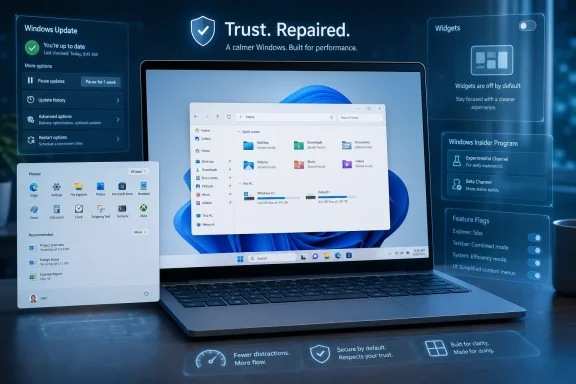
The rebooted model simplifies the story. Microsoft is moving toward two primary channels, Experimental and Beta, while keeping Release Preview as a more advanced option for those who want production-adjacent builds. In Beta, Microsoft says it is ending controlled feature rollouts so announced features actually appear when users install the relevant update. In Experimental, Microsoft is adding feature flags so testers can choose which new experiences to try.
That is a subtle but important reversal. Instead of Microsoft deciding invisibly which subset of Insiders gets the interesting thing, Insiders get more explicit control. For a community that has spent years using third-party tools to uncover hidden switches, official feature flags are more than a convenience. They are a concession that opacity became part of the problem.
The company is also promising easier movement between channels and easier exits from the program without requiring a clean install. That matters because testing Windows should not feel like joining a pact you can only escape by wiping your machine. If Microsoft wants more serious feedback from more serious users, it has to lower the cost of participation.
Windows enthusiasts are unusually tolerant of unfinished software. They will run unstable builds, file detailed Feedback Hub reports, compare screenshots, and debate registry keys late into the night. What they dislike is being told something exists when, on their machine, it does not.
Controlled rollouts were introduced for defensible engineering reasons. They allow Microsoft to limit blast radius, compare cohorts, and pull back features that generate crashes or negative signals. But the implementation often collided with the social function of the Insider Program. If the company tells its most engaged testers about a feature and then withholds it from many of them without clear explanation, the result is not safety. It is suspicion.
Official feature flags do not eliminate the need for staged deployment. Microsoft will still have to protect users from broken code. But they change the posture from “wait and see if you were selected” to “here is what is available, and here is how to try it.” That is a more adult relationship with the people volunteering their PCs and patience.
It also gives Microsoft a cleaner feedback signal. If users deliberately enable a feature, the company can reasonably assume they know they are testing something experimental. That reduces the awkward middle ground where Windows appears to have changed for no visible reason, which is one of the quickest ways to turn an enthusiast into a skeptic.
For IT pros, the principle matters even if the specific Insider toggle never reaches managed production environments. Admins live and die by predictability. Anything that moves Windows toward explicit controls and away from ambient mystery is a step in the right direction.
Nobody doubts that updates are necessary. The modern Windows ecosystem is too large, too targeted, and too exposed to run on nostalgia and crossed fingers. Security updates need to land quickly, and Microsoft is right to resist a world where millions of machines sit unpatched indefinitely because a user once clicked “later.”
But Windows Update has always carried a psychological cost. Users do not remember the hundreds of updates that quietly installed and improved security. They remember the meeting interrupted by a restart, the driver that broke audio, the machine that sat at a spinning percentage while work waited, or the forced update during setup when they just wanted to get to the desktop.
Microsoft’s latest Insider work directly acknowledges that frustration. The company is testing the ability to skip updates during the out-of-box experience, extend update pauses repeatedly, access shutdown and restart options that do not force an update, and see clearer information about available updates before approving installation. It is also grouping update choices more coherently in Settings.
That is not glamorous. It will not trend like a redesigned Start menu. But it may matter more.
The phrase “less disruption” should be carved into the door of every Windows planning meeting. The operating system exists to mediate between the user and their work, games, files, devices, and services. Every unexpected modal dialog, restart countdown, widget badge, promotion, or vanished setting is a withdrawal from the trust account.
The ideal Windows Update experience is not one that users love. It is one they barely have to think about, except when they deliberately choose to intervene.
That is why the new update controls need to be read as a balancing act rather than a surrender. Microsoft still wants devices secure by default. It still wants monthly quality updates to install quickly. It still needs to enforce minimum baselines, especially in consumer environments where many users are not equipped to evaluate risk.
The difference is that Microsoft appears to be acknowledging the user’s workflow as a legitimate concern, not a nuisance to be overridden. That is the same philosophical shift behind its newer “user transparency and consent” messaging around apps, AI agents, and system behavior. Windows can be secure, but it cannot feel like a landlord changing the locks while the tenant is in the shower.
For enterprise admins, the consumer-facing update tweaks may seem less important than policy, rings, deferrals, and Windows Update for Business controls. But sentiment flows across boundaries. Employees who distrust Windows at home bring that skepticism to work. Admins who spend years apologizing for update surprises become less receptive to Microsoft’s next management pitch.
The operational question for Microsoft is whether these Insider experiments survive contact with broad rollout. A toggle in a preview build is easy. A calmer, predictable update culture across hundreds of millions of PCs is hard.
That is why the promised File Explorer improvements are so important. Microsoft says it is focusing on faster launch, reduced flicker, smoother navigation, lower latency in search and context menus, and more reliable everyday file operations. These are not moonshot features. They are the experience of using a PC.
File Explorer has become a symbol of Windows 11’s uneven priorities. It has gained visual polish and tabs, but it has also drawn complaints about lag, inconsistent context menus, search delays, and moments where the shell simply feels heavier than it should. On high-end machines, that is irritating. On older or low-memory systems, it reinforces the view that Windows 11 asks too much and gives too little.
Performance is emotional. A 300-millisecond delay in a context menu does not sound like a scandal in a spreadsheet, but repeated hundreds of times a week it becomes an opinion about the whole product. A file copy that stalls, a search that hesitates, or an Explorer window that redraws awkwardly says “this system is not quite under your control.”
Microsoft’s commitment to lowering baseline memory usage and improving responsiveness under load is therefore not merely technical housekeeping. It is brand repair. The average user may never know what WinUI 3 is, but they will know if Start opens faster and Explorer stops feeling like a web app wearing a native costume.
The danger for Microsoft is that “faster” is easy to promise and hard to measure in a way users believe. Benchmarks can show improvements. Blog posts can cite reduced latency. But the only benchmark that really matters is whether the user stops noticing the delay.
The Windows inbox app problem has never been only about design. It is about motive. Users open Notepad, Photos, Paint, Snipping Tool, Outlook, Widgets, or the Microsoft Store with a simple expectation: perform the task cleanly. When those apps accumulate account prompts, AI experiments, service tie-ins, confusing redesigns, or inconsistent web wrappers, users sense that the app is serving multiple masters.
The recent push toward simpler UI is an implicit acknowledgment that Windows has been over-instrumented with ambition. Not every surface needs to be a growth channel. Not every app needs an AI sidebar. Not every convenience feature needs to route through a Microsoft account story.
This is especially important because Windows’ strength has always been ecosystem breadth, not vertically controlled elegance. People tolerate a lot from Windows because it runs the software, hardware, games, peripherals, line-of-business tools, utilities, and weird old drivers that make their lives work. But that tolerance is not affection.
If Microsoft wants affection again, the inbox experience has to feel disciplined. Apps should open quickly, respect defaults, avoid surprise promotions, and make their advanced features discoverable without being noisy. That is not anti-innovation. It is product maturity.
This is a small UX shift with a large message: Microsoft appears to understand that attention is not free.
Widgets in Windows 11 have often felt less like a personal dashboard and more like an aperture for MSN content, engagement loops, and weather-adjacent distraction. Some users like glanceable information. Many others saw the feature as another example of Windows pushing content into places that used to feel like theirs.
Making Widgets quiet by default does not remove the feature. It changes the presumption. Instead of assuming the user wants motion, badges, feed content, and hover behavior, Windows starts from a calmer baseline and lets the user opt into more activity.
That is exactly how operating-system features should behave. The desktop is not a social network feed. The taskbar is not a billboard. If a user wants more proactive widgets, they can enable them. If not, the system should respect the silence.
Microsoft’s broader Windows 11 rehabilitation will depend on whether this principle spreads. The company does not need to abandon services, AI, news, cloud storage, search, or commerce. It does need to stop making the OS feel like a series of attempts to win a little more of the user’s attention.
Windows 11’s Start menu has been controversial since launch because it broke with long-standing expectations while offering limited compensating power. It centered itself, reduced customization, emphasized recommendations, and removed behaviors users had spent years building muscle memory around. Some people adapted. Others never forgave it.
Reports that Microsoft is rebuilding the Start menu with WinUI 3, targeting substantially better responsiveness, adding more customization, and potentially removing ads or recommendations are therefore highly significant. If true, that would indicate Microsoft is no longer treating Start as a sacred expression of Windows 11’s original design ideology. It is treating it as a product surface that must earn its keep.
A faster Start menu is table stakes. A more customizable Start menu is a peace offering. A Start menu with fewer promotional intrusions would be a sign that Microsoft has absorbed the core complaint: users do not want their launcher to feel like rented space.
The taskbar carries similar baggage. Windows 11 removed or delayed functionality that power users considered basic, including richer positioning and behaviors that had existed in previous versions. Microsoft’s stated work on taskbar positioning and refinement suggests a willingness to unwind some of those decisions. That does not mean every Windows 10 behavior will return. It does mean Microsoft appears less committed to defending simplification for its own sake.
For a company trying to “win back fans,” that matters. Fans are not won back by telling them their preferences were wrong. They are won back by showing that their preferences were heard.
If K2 were a version, users could wait for a build number and judge the before-and-after. As an ongoing initiative, it is murkier. It becomes a set of priorities: quality, performance, reliability, reduced friction, better feedback loops, more transparent testing, calmer defaults, and renewed pride inside the Windows team.
That is both promising and risky. Promising because Windows does not need one big dramatic relaunch as much as it needs hundreds of accumulated improvements. Risky because ongoing initiatives can dissolve into branding if they lack visible accountability.
Microsoft has been here before in spirit. Windows Vista’s reputation forced Microsoft to rediscover fundamentals with Windows 7. Windows 8’s overreach created the conditions for Windows 10’s more conciliatory posture. Windows 11 now faces a different kind of backlash: not a single catastrophic failure, but a slow erosion of goodwill.
The difference in 2026 is that Microsoft’s consumer brand is under pressure from multiple directions. Windows 10’s support lifecycle has pushed reluctant users toward Windows 11. PC gamers are watching Valve and Linux gaming with more seriousness than they did a decade ago. AI features have generated excitement in some corners and irritation in others. Enterprise customers remain invested in Windows, but they are also tired of churn for churn’s sake.
Windows K2, then, is not just about making Windows 11 nicer. It is about preventing Windows from becoming a utility people resent.
The backlash is not simply anti-AI. Windows users have historically embraced powerful automation when it solves real problems. PowerShell, search indexing, OCR, voice typing, clipboard history, WSL, and system-wide accessibility features all reflect the same basic promise: let the computer do more work.
The problem arises when AI appears before reliability, privacy, and user control feel settled. If File Explorer lags, Start feels constrained, Widgets nag, and updates interrupt work, an AI feature can look less like innovation and more like misallocated attention. Users ask why Microsoft is building the future on top of a present that still needs sanding.
That is why Microsoft’s current emphasis on fundamentals is necessary. AI in Windows will only be accepted if it is subordinate to the user’s intent. It must be controllable, explainable, removable where appropriate, respectful of local data, and useful without becoming the operating system’s main character.
A calmer Windows is a prerequisite for a smarter Windows. If Microsoft gets the order wrong, every AI announcement will be interpreted through the lens of distrust.
The changes Microsoft is previewing could help. Less disruptive updates are good for users and help desks. More reliable File Explorer and shell performance reduce low-grade support noise. Clearer Insider channels can improve test planning for organizations that use preview builds to anticipate future changes. Better Feedback Hub behavior may improve signal quality, though enterprise admins will still rely heavily on their own telemetry and support channels.
But business environments will judge Microsoft by what happens after these features leave the Insider ecosystem. Do policies map cleanly to the new controls? Are defaults documented early enough for change management? Do update improvements respect existing management tools? Are AI and widget behaviors governable? Are regressions acknowledged quickly and fixed without requiring admins to become forum archaeologists?
There is also the question of cadence. Microsoft’s modern servicing model has trained organizations to expect continuous change, but not always to welcome it. Even good changes require testing, communication, and sometimes retraining. A Start menu rebuild may delight enthusiasts while still forcing IT teams to explain yet another interface shift.
That does not mean Microsoft should freeze Windows. It means the company has to distinguish between improvement and churn. Enterprise IT can tolerate change when the value is clear, the control plane is strong, and rollback paths are sane. It resents change when it feels like a consumer experiment smuggled into the workplace.
The best version of Windows K2 would give admins fewer fires, not more dashboards.
Most Windows users will never join an Insider channel. They will not read release notes, compare build numbers, or debate whether the Start menu should be rewritten in WinUI 3. They will simply use the PC they bought, complain when something gets in the way, and move on.
But enthusiasts shape the narrative around Windows. They write the Reddit threads, forum posts, guides, bug reports, YouTube explainers, and social media complaints that less technical users encounter when searching for help. They advise family members on whether to upgrade. They influence small businesses. They populate IT departments. They remember which promises Microsoft kept.
That is why the Insider Program’s tone matters. When Insiders feel ignored, the message that spreads is not “a niche beta-testing program is suboptimal.” The message is “Microsoft does not listen.” When Insiders see their feedback reflected in shipped changes, the message becomes more generous: “Maybe they are finally fixing it.”
The company appears to understand this again. The language of pride, transparency, and shared ownership is aimed directly at people who once felt emotionally invested in Windows. Microsoft does not need every user to become a fan. It does need the people who care most to stop feeling foolish for caring.
The less comforting part is that almost all of these changes are also reminders of how long the complaints have been obvious. Windows users did not suddenly discover that they dislike disruptive updates, confusing rollouts, laggy shell behavior, promotional clutter, and reduced customization. They have been saying it for years.
Still, the concrete direction is better than the usual cycle of promise and distraction.
If Microsoft delivers a faster, more customizable Start menu with fewer promotional distractions, it will buy itself real goodwill. If taskbar improvements restore flexibility without destabilizing the shell, the company will show that it can reverse unpopular decisions without losing face. If Search becomes more useful without becoming another Bing funnel, users may start to believe the “fundamentals” talk.
But if the next wave is heavy on branding and light on control, the backlash will be swift. The current mood is cautiously receptive, not forgiving. Windows users are willing to reward Microsoft for doing the right thing, but they are also primed to notice the first sign that the old habits are returning.
The lesson of this moment is that Windows does not need to be loved for its novelty. It needs to be trusted for its restraint. A great operating system knows when to speak, when to disappear, and when to let the user decide. Microsoft’s latest Insider builds suggest Redmond may finally be relearning that lesson; the hard part will be remembering it after the applause fades and the next strategic obsession arrives.
Source: Windows Central https://www.windowscentral.com/micr...-as-it-tries-to-reset-windows-11s-reputation/
 Microsoft Has Finally Named the Problem It Created
The most important thing about Microsoft’s latest Windows 11 charm offensive is not any single feature in the Insider builds. It is the admission embedded in the campaign: the problem is trust.For years, Windows 11 has been treated by many users as a platform they tolerate rather than one they champion. The reasons are familiar to anyone who has had to support the operating system at home or at work: Start menu churn, taskbar regressions, update anxiety, webby inbox apps, promotional surfaces, Copilot uncertainty, and a growing sense that Microsoft was more interested in steering users toward services than polishing the daily experience of using a PC.
That is why the language coming from Redmond matters. Marcus Ash, now leading the Windows Insider Program, says Insiders have asked for transparency and a renewed sense of pride. Satya Nadella has reportedly told investors that Microsoft is doing the foundational work required to win back fans across Windows and Xbox. Pavan Davuluri has positioned the current Windows quality push around performance, reliability, and craft.
This is not the old Windows marketing playbook of “here are ten new things.” It is closer to a repair strategy. Microsoft is trying to show that the team understands why enthusiasts, admins, gamers, and everyday users became irritated in the first place.
The catch is that trust is not rebuilt by saying the word trust. It is rebuilt when a user clicks Start, opens File Explorer, checks Windows Update, ignores Widgets, and realizes that nothing is trying to surprise them.
The Insider Program Was the First Thing Microsoft Had to Fix
Microsoft’s decision to start with the Windows Insider Program is more strategic than it might appear. The Insider Program is not just a beta channel; it is the company’s early-warning system, enthusiast club, telemetry funnel, and public proof-of-work all rolled into one.When that system becomes confusing, Microsoft loses more than feedback. It loses credibility among the exact users most likely to explain Windows changes to everyone else.
The old Insider channel structure had become hard to parse. Canary, Dev, Beta, and Release Preview each had stated purposes, but feature delivery often felt detached from the channel labels. A user could install a build after reading an announcement and still not receive the feature being discussed because it was hidden behind a Controlled Feature Rollout. That made sense from a flighting and risk-management perspective. It was maddening from a human one.
The rebooted model simplifies the story. Microsoft is moving toward two primary channels, Experimental and Beta, while keeping Release Preview as a more advanced option for those who want production-adjacent builds. In Beta, Microsoft says it is ending controlled feature rollouts so announced features actually appear when users install the relevant update. In Experimental, Microsoft is adding feature flags so testers can choose which new experiences to try.
That is a subtle but important reversal. Instead of Microsoft deciding invisibly which subset of Insiders gets the interesting thing, Insiders get more explicit control. For a community that has spent years using third-party tools to uncover hidden switches, official feature flags are more than a convenience. They are a concession that opacity became part of the problem.
The company is also promising easier movement between channels and easier exits from the program without requiring a clean install. That matters because testing Windows should not feel like joining a pact you can only escape by wiping your machine. If Microsoft wants more serious feedback from more serious users, it has to lower the cost of participation.
Feature Flags Are a Small Toggle With a Big Cultural Meaning
The feature-flags change may become one of the most consequential pieces of this reset because it tackles one of Microsoft’s oldest habits: announcing things before users can actually touch them.Windows enthusiasts are unusually tolerant of unfinished software. They will run unstable builds, file detailed Feedback Hub reports, compare screenshots, and debate registry keys late into the night. What they dislike is being told something exists when, on their machine, it does not.
Controlled rollouts were introduced for defensible engineering reasons. They allow Microsoft to limit blast radius, compare cohorts, and pull back features that generate crashes or negative signals. But the implementation often collided with the social function of the Insider Program. If the company tells its most engaged testers about a feature and then withholds it from many of them without clear explanation, the result is not safety. It is suspicion.
Official feature flags do not eliminate the need for staged deployment. Microsoft will still have to protect users from broken code. But they change the posture from “wait and see if you were selected” to “here is what is available, and here is how to try it.” That is a more adult relationship with the people volunteering their PCs and patience.
It also gives Microsoft a cleaner feedback signal. If users deliberately enable a feature, the company can reasonably assume they know they are testing something experimental. That reduces the awkward middle ground where Windows appears to have changed for no visible reason, which is one of the quickest ways to turn an enthusiast into a skeptic.
For IT pros, the principle matters even if the specific Insider toggle never reaches managed production environments. Admins live and die by predictability. Anything that moves Windows toward explicit controls and away from ambient mystery is a step in the right direction.
Windows Update Is Where Trust Usually Goes to Die
If the Insider Program is the place Microsoft had to start, Windows Update is the place it has to win.Nobody doubts that updates are necessary. The modern Windows ecosystem is too large, too targeted, and too exposed to run on nostalgia and crossed fingers. Security updates need to land quickly, and Microsoft is right to resist a world where millions of machines sit unpatched indefinitely because a user once clicked “later.”
But Windows Update has always carried a psychological cost. Users do not remember the hundreds of updates that quietly installed and improved security. They remember the meeting interrupted by a restart, the driver that broke audio, the machine that sat at a spinning percentage while work waited, or the forced update during setup when they just wanted to get to the desktop.
Microsoft’s latest Insider work directly acknowledges that frustration. The company is testing the ability to skip updates during the out-of-box experience, extend update pauses repeatedly, access shutdown and restart options that do not force an update, and see clearer information about available updates before approving installation. It is also grouping update choices more coherently in Settings.
That is not glamorous. It will not trend like a redesigned Start menu. But it may matter more.
The phrase “less disruption” should be carved into the door of every Windows planning meeting. The operating system exists to mediate between the user and their work, games, files, devices, and services. Every unexpected modal dialog, restart countdown, widget badge, promotion, or vanished setting is a withdrawal from the trust account.
The ideal Windows Update experience is not one that users love. It is one they barely have to think about, except when they deliberately choose to intervene.
Security by Default Still Needs Consent by Design
Microsoft’s challenge is that update control cannot simply mean update avoidance. The company is operating in a threat environment where unpatched endpoints become business risk, botnet material, and ransomware footholds. Windows is too big a target to indulge a purely laissez-faire model.That is why the new update controls need to be read as a balancing act rather than a surrender. Microsoft still wants devices secure by default. It still wants monthly quality updates to install quickly. It still needs to enforce minimum baselines, especially in consumer environments where many users are not equipped to evaluate risk.
The difference is that Microsoft appears to be acknowledging the user’s workflow as a legitimate concern, not a nuisance to be overridden. That is the same philosophical shift behind its newer “user transparency and consent” messaging around apps, AI agents, and system behavior. Windows can be secure, but it cannot feel like a landlord changing the locks while the tenant is in the shower.
For enterprise admins, the consumer-facing update tweaks may seem less important than policy, rings, deferrals, and Windows Update for Business controls. But sentiment flows across boundaries. Employees who distrust Windows at home bring that skepticism to work. Admins who spend years apologizing for update surprises become less receptive to Microsoft’s next management pitch.
The operational question for Microsoft is whether these Insider experiments survive contact with broad rollout. A toggle in a preview build is easy. A calmer, predictable update culture across hundreds of millions of PCs is hard.
File Explorer Is the Real Windows Brand
Microsoft can talk about AI agents, Copilot+ PCs, and cloud-connected experiences as much as it likes. For many users, Windows is still File Explorer, the taskbar, the Start menu, Settings, window management, and whether Bluetooth works after waking from sleep.That is why the promised File Explorer improvements are so important. Microsoft says it is focusing on faster launch, reduced flicker, smoother navigation, lower latency in search and context menus, and more reliable everyday file operations. These are not moonshot features. They are the experience of using a PC.
File Explorer has become a symbol of Windows 11’s uneven priorities. It has gained visual polish and tabs, but it has also drawn complaints about lag, inconsistent context menus, search delays, and moments where the shell simply feels heavier than it should. On high-end machines, that is irritating. On older or low-memory systems, it reinforces the view that Windows 11 asks too much and gives too little.
Performance is emotional. A 300-millisecond delay in a context menu does not sound like a scandal in a spreadsheet, but repeated hundreds of times a week it becomes an opinion about the whole product. A file copy that stalls, a search that hesitates, or an Explorer window that redraws awkwardly says “this system is not quite under your control.”
Microsoft’s commitment to lowering baseline memory usage and improving responsiveness under load is therefore not merely technical housekeeping. It is brand repair. The average user may never know what WinUI 3 is, but they will know if Start opens faster and Explorer stops feeling like a web app wearing a native costume.
The danger for Microsoft is that “faster” is easy to promise and hard to measure in a way users believe. Benchmarks can show improvements. Blog posts can cite reduced latency. But the only benchmark that really matters is whether the user stops noticing the delay.
Inbox Apps Need to Stop Behaving Like Strategy Documents
Microsoft is also highlighting simplified UI for inbox apps, which sounds modest until you remember how often built-in Windows apps have become vehicles for corporate ambiguity.The Windows inbox app problem has never been only about design. It is about motive. Users open Notepad, Photos, Paint, Snipping Tool, Outlook, Widgets, or the Microsoft Store with a simple expectation: perform the task cleanly. When those apps accumulate account prompts, AI experiments, service tie-ins, confusing redesigns, or inconsistent web wrappers, users sense that the app is serving multiple masters.
The recent push toward simpler UI is an implicit acknowledgment that Windows has been over-instrumented with ambition. Not every surface needs to be a growth channel. Not every app needs an AI sidebar. Not every convenience feature needs to route through a Microsoft account story.
This is especially important because Windows’ strength has always been ecosystem breadth, not vertically controlled elegance. People tolerate a lot from Windows because it runs the software, hardware, games, peripherals, line-of-business tools, utilities, and weird old drivers that make their lives work. But that tolerance is not affection.
If Microsoft wants affection again, the inbox experience has to feel disciplined. Apps should open quickly, respect defaults, avoid surprise promotions, and make their advanced features discoverable without being noisy. That is not anti-innovation. It is product maturity.
Widgets Becoming Quiet by Default Is a Bigger Concession Than It Looks
Among the recent Insider changes, the Widgets adjustments may be the most revealing. Microsoft is testing a quieter default experience that disables open-on-hover, turns off taskbar badging by default, opens directly to widgets on first launch, and limits taskbar alerts until the user chooses to engage.This is a small UX shift with a large message: Microsoft appears to understand that attention is not free.
Widgets in Windows 11 have often felt less like a personal dashboard and more like an aperture for MSN content, engagement loops, and weather-adjacent distraction. Some users like glanceable information. Many others saw the feature as another example of Windows pushing content into places that used to feel like theirs.
Making Widgets quiet by default does not remove the feature. It changes the presumption. Instead of assuming the user wants motion, badges, feed content, and hover behavior, Windows starts from a calmer baseline and lets the user opt into more activity.
That is exactly how operating-system features should behave. The desktop is not a social network feed. The taskbar is not a billboard. If a user wants more proactive widgets, they can enable them. If not, the system should respect the silence.
Microsoft’s broader Windows 11 rehabilitation will depend on whether this principle spreads. The company does not need to abandon services, AI, news, cloud storage, search, or commerce. It does need to stop making the OS feel like a series of attempts to win a little more of the user’s attention.
The Start Menu Is Where Microsoft Will Be Judged
The coming Start menu and taskbar work will likely define whether this trust campaign becomes real in the eyes of enthusiasts. Microsoft can improve update controls and Insider channels, but the Start menu is the emotional center of Windows.Windows 11’s Start menu has been controversial since launch because it broke with long-standing expectations while offering limited compensating power. It centered itself, reduced customization, emphasized recommendations, and removed behaviors users had spent years building muscle memory around. Some people adapted. Others never forgave it.
Reports that Microsoft is rebuilding the Start menu with WinUI 3, targeting substantially better responsiveness, adding more customization, and potentially removing ads or recommendations are therefore highly significant. If true, that would indicate Microsoft is no longer treating Start as a sacred expression of Windows 11’s original design ideology. It is treating it as a product surface that must earn its keep.
A faster Start menu is table stakes. A more customizable Start menu is a peace offering. A Start menu with fewer promotional intrusions would be a sign that Microsoft has absorbed the core complaint: users do not want their launcher to feel like rented space.
The taskbar carries similar baggage. Windows 11 removed or delayed functionality that power users considered basic, including richer positioning and behaviors that had existed in previous versions. Microsoft’s stated work on taskbar positioning and refinement suggests a willingness to unwind some of those decisions. That does not mean every Windows 10 behavior will return. It does mean Microsoft appears less committed to defending simplification for its own sake.
For a company trying to “win back fans,” that matters. Fans are not won back by telling them their preferences were wrong. They are won back by showing that their preferences were heard.
Windows K2 Sounds Like a Codename for an Apology
The phrase “Windows K2” is reportedly an internal label for Microsoft’s broader Windows 11 quality and trust push rather than a discrete product release. That distinction matters because it changes how success should be measured.If K2 were a version, users could wait for a build number and judge the before-and-after. As an ongoing initiative, it is murkier. It becomes a set of priorities: quality, performance, reliability, reduced friction, better feedback loops, more transparent testing, calmer defaults, and renewed pride inside the Windows team.
That is both promising and risky. Promising because Windows does not need one big dramatic relaunch as much as it needs hundreds of accumulated improvements. Risky because ongoing initiatives can dissolve into branding if they lack visible accountability.
Microsoft has been here before in spirit. Windows Vista’s reputation forced Microsoft to rediscover fundamentals with Windows 7. Windows 8’s overreach created the conditions for Windows 10’s more conciliatory posture. Windows 11 now faces a different kind of backlash: not a single catastrophic failure, but a slow erosion of goodwill.
The difference in 2026 is that Microsoft’s consumer brand is under pressure from multiple directions. Windows 10’s support lifecycle has pushed reluctant users toward Windows 11. PC gamers are watching Valve and Linux gaming with more seriousness than they did a decade ago. AI features have generated excitement in some corners and irritation in others. Enterprise customers remain invested in Windows, but they are also tired of churn for churn’s sake.
Windows K2, then, is not just about making Windows 11 nicer. It is about preventing Windows from becoming a utility people resent.
The AI Problem Is Really a Priority Problem
Any discussion of Windows trust in 2026 has to grapple with AI. Microsoft has invested heavily in Copilot, AI PCs, Recall-style concepts, agents, and natural-language interaction across its product line. Some of this work may become genuinely useful. Some of it has already made users nervous.The backlash is not simply anti-AI. Windows users have historically embraced powerful automation when it solves real problems. PowerShell, search indexing, OCR, voice typing, clipboard history, WSL, and system-wide accessibility features all reflect the same basic promise: let the computer do more work.
The problem arises when AI appears before reliability, privacy, and user control feel settled. If File Explorer lags, Start feels constrained, Widgets nag, and updates interrupt work, an AI feature can look less like innovation and more like misallocated attention. Users ask why Microsoft is building the future on top of a present that still needs sanding.
That is why Microsoft’s current emphasis on fundamentals is necessary. AI in Windows will only be accepted if it is subordinate to the user’s intent. It must be controllable, explainable, removable where appropriate, respectful of local data, and useful without becoming the operating system’s main character.
A calmer Windows is a prerequisite for a smarter Windows. If Microsoft gets the order wrong, every AI announcement will be interpreted through the lens of distrust.
Enterprise IT Will Believe the Logs Before the Blog Posts
For WindowsForum.com readers who manage fleets, the current Insider reset is encouraging but not sufficient. Enterprise confidence is earned through deployment outcomes, supportability, documentation clarity, policy consistency, and fewer Monday-morning surprises.The changes Microsoft is previewing could help. Less disruptive updates are good for users and help desks. More reliable File Explorer and shell performance reduce low-grade support noise. Clearer Insider channels can improve test planning for organizations that use preview builds to anticipate future changes. Better Feedback Hub behavior may improve signal quality, though enterprise admins will still rely heavily on their own telemetry and support channels.
But business environments will judge Microsoft by what happens after these features leave the Insider ecosystem. Do policies map cleanly to the new controls? Are defaults documented early enough for change management? Do update improvements respect existing management tools? Are AI and widget behaviors governable? Are regressions acknowledged quickly and fixed without requiring admins to become forum archaeologists?
There is also the question of cadence. Microsoft’s modern servicing model has trained organizations to expect continuous change, but not always to welcome it. Even good changes require testing, communication, and sometimes retraining. A Start menu rebuild may delight enthusiasts while still forcing IT teams to explain yet another interface shift.
That does not mean Microsoft should freeze Windows. It means the company has to distinguish between improvement and churn. Enterprise IT can tolerate change when the value is clear, the control plane is strong, and rollback paths are sane. It resents change when it feels like a consumer experiment smuggled into the workplace.
The best version of Windows K2 would give admins fewer fires, not more dashboards.
Enthusiasts Are Not the Whole Market, but They Set the Weather
Microsoft’s renewed attention to Insiders reflects an old truth: enthusiasts are not representative, but they are influential.Most Windows users will never join an Insider channel. They will not read release notes, compare build numbers, or debate whether the Start menu should be rewritten in WinUI 3. They will simply use the PC they bought, complain when something gets in the way, and move on.
But enthusiasts shape the narrative around Windows. They write the Reddit threads, forum posts, guides, bug reports, YouTube explainers, and social media complaints that less technical users encounter when searching for help. They advise family members on whether to upgrade. They influence small businesses. They populate IT departments. They remember which promises Microsoft kept.
That is why the Insider Program’s tone matters. When Insiders feel ignored, the message that spreads is not “a niche beta-testing program is suboptimal.” The message is “Microsoft does not listen.” When Insiders see their feedback reflected in shipped changes, the message becomes more generous: “Maybe they are finally fixing it.”
The company appears to understand this again. The language of pride, transparency, and shared ownership is aimed directly at people who once felt emotionally invested in Windows. Microsoft does not need every user to become a fan. It does need the people who care most to stop feeling foolish for caring.
Redmond’s Trust Repair Kit Is Finally Taking Shape
Microsoft’s latest Windows 11 work is not a victory lap. It is a down payment. The encouraging part is that the company is now touching the right surfaces: updates, Insider transparency, File Explorer, Widgets, Start, taskbar, Feedback Hub, and system performance.The less comforting part is that almost all of these changes are also reminders of how long the complaints have been obvious. Windows users did not suddenly discover that they dislike disruptive updates, confusing rollouts, laggy shell behavior, promotional clutter, and reduced customization. They have been saying it for years.
Still, the concrete direction is better than the usual cycle of promise and distraction.
- Microsoft is simplifying the Windows Insider Program around clearer Experimental and Beta channels so testers can better understand what kind of build they are choosing.
- Microsoft is moving away from opaque feature delivery in Beta and adding feature flags in Experimental so announced features are easier to find and test.
- Microsoft is testing Windows Update changes that give users more control over restarts, setup-time updates, pauses, and update visibility.
- Microsoft is making Widgets quieter by default, which signals a broader recognition that Windows needs fewer attention-grabbing surfaces.
- Microsoft is prioritizing File Explorer, Start, taskbar, memory usage, and responsiveness because those everyday surfaces shape whether Windows 11 feels trustworthy.
- Microsoft’s biggest challenge is no longer announcing improvements, but proving through repeated stable releases that the old incentives have changed.
The Next Builds Must Do More Than Arrive
The immediate next test will be the builds Microsoft ships later this month and through the rest of 2026. Ash has teased more work on Taskbar, Start, and Search. Those are not peripheral features. They are the public square of Windows.If Microsoft delivers a faster, more customizable Start menu with fewer promotional distractions, it will buy itself real goodwill. If taskbar improvements restore flexibility without destabilizing the shell, the company will show that it can reverse unpopular decisions without losing face. If Search becomes more useful without becoming another Bing funnel, users may start to believe the “fundamentals” talk.
But if the next wave is heavy on branding and light on control, the backlash will be swift. The current mood is cautiously receptive, not forgiving. Windows users are willing to reward Microsoft for doing the right thing, but they are also primed to notice the first sign that the old habits are returning.
The lesson of this moment is that Windows does not need to be loved for its novelty. It needs to be trusted for its restraint. A great operating system knows when to speak, when to disappear, and when to let the user decide. Microsoft’s latest Insider builds suggest Redmond may finally be relearning that lesson; the hard part will be remembering it after the applause fades and the next strategic obsession arrives.
Source: Windows Central https://www.windowscentral.com/micr...-as-it-tries-to-reset-windows-11s-reputation/
