

Microsoft’s Mark Russinovich said in May 2026 that nobody at Microsoft in the 1990s expected Win32, the Windows API lineage associated with Windows 95 and Windows NT, to remain a first-class application surface in Windows 11. That admission is less embarrassing than it sounds and more damning than Microsoft may intend. Win32 survived not because Windows failed to evolve, but because every serious attempt to replace it asked developers to abandon the one thing Windows had always promised: continuity. The real story is not that Windows still has 1990s code; it is that the Windows ecosystem never trusted Microsoft’s proposed futures as much as it trusted Microsoft’s past.
The mythology of Windows is usually told through user interfaces: the Start menu, the taskbar, Aero glass, live tiles, rounded corners, Copilot buttons. But the deeper Windows story was always about contracts. A Windows application written years ago is supposed to keep running, and if that means the operating system carries forward ancient assumptions, odd behaviors, compatibility shims, undocumented dependencies, and APIs designed for a very different hardware era, then so be it.
That is why Russinovich’s remark lands with such force. It is not surprising to Windows developers that Win32 remains central; it is surprising to hear Microsoft say out loud that this outcome was never really expected. The company that built its desktop empire on backward compatibility also spent much of the last two decades trying to persuade developers to move somewhere else.
Win32, in that sense, is not merely old plumbing. It is the political settlement between Microsoft and its developers. Microsoft gets to modernize the operating system around the edges, and developers get to assume that their applications will not be orphaned by the next grand platform pivot.
The bargain has been messy, but it has also been incredibly durable. Windows is still the place where industrial control software, finance tools, CAD packages, indie utilities, enterprise agents, game launchers, security tools, and small-business line-of-business applications can coexist. Many of them look dated. Many behave inconsistently. Many use UI conventions that feel as if they escaped from a beige tower PC. Yet they run, and that has mattered more than elegance.
Classic desktop applications can integrate deeply with Windows. They can hook into the shell, talk to hardware, install background services, manipulate files freely, and build interfaces with whatever toolkit their authors prefer. That openness created Windows’ software abundance. It also created the familiar Windows chaos: tray clutter, inconsistent dialogs, privilege prompts, brittle installers, shell extensions that crash Explorer, and apps that assume they own the machine.
Microsoft’s periodic attempts to move beyond Win32 were attempts to impose a new social contract. MFC wrapped Win32 for C++ developers. WinForms made Windows desktop programming approachable for .NET developers. WPF introduced XAML, hardware-accelerated rendering, and a more ambitious presentation model. Silverlight briefly imagined a cross-platform client future before the web moved on. Windows 8’s WinRT and later UWP tried to package the whole thing into a safer, sandboxed, touch-first application model.
Each framework solved a real problem. None replaced the bedrock. The pattern became familiar: Microsoft would announce a modern platform with confident language, developers would experiment, the platform would accrue caveats, Microsoft’s own first-party apps would use it inconsistently, and the broader ecosystem would wait.
Waiting was rational. If you were maintaining an application used by hospitals, factories, accountants, architects, schools, or governments, betting the product on Microsoft’s latest app model required faith that Microsoft itself often failed to demonstrate. Win32 did not need evangelism. It had inertia, documentation, examples, libraries, Stack Overflow answers, institutional memory, and the killer feature of not disappearing.
But Windows was not iOS, and PC users were not asking for their desktop to be demoted. Windows 8 treated the traditional desktop like a legacy compartment while simultaneously depending on it for almost everything people actually needed to do. The result was a platform split that felt ideological rather than practical.
Developers noticed the mismatch. The new app model restricted capabilities that serious desktop software often needed. It also arrived alongside a user experience many customers rejected. When Windows 10 repositioned the Universal Windows Platform as the path across phones, Xbox, tablets, and PCs, it briefly sounded like the old dream had been salvaged. Then Windows phone collapsed, the universal promise shrank, and desktop developers once again learned the same lesson: Microsoft’s app strategies could change faster than their customers’ deployment cycles.
That is how Win32 won without campaigning. It did not have to be beautiful. It only had to remain dependable while the alternatives kept changing their names.
A web app can target Windows, macOS, Linux, and the browser with a shared codebase. It can ship updates without waiting for Store approvals or enterprise imaging cycles. It can reuse web engineers in a labor market where native Windows expertise is rarer than JavaScript expertise. It can also survive Microsoft changing its mind.
Microsoft reinforced that path with WebView2, a control that lets developers embed the Chromium-based Edge engine inside desktop applications. Used carefully, WebView2 is a pragmatic bridge. It lets native apps host web content, reuse authentication flows, display rich documents, and move incrementally. Used carelessly, it becomes a permission slip to turn every desktop app into a browser tab wearing a trench coat.
Windows users have felt the consequences. Teams, Outlook’s newer client, Widgets, Clipchamp, Copilot surfaces, and many third-party apps have normalized the idea that a desktop application may consume memory like a browser because, in a meaningful sense, it is one. The old Windows complaint was that native apps were visually inconsistent. The new Windows complaint is that modern apps are visually consistent, network-dependent, and hungry.
The RAM argument can be overstated; modern operating systems cache aggressively, and unused memory is not automatically wasted memory. But the user perception is real. When a messaging app idles like a small browser instance, or a simple utility drags in a full web runtime, the compact efficiency once associated with desktop software feels lost. Windows became more modern and somehow less native.
Microsoft does not have that luxury. Windows has to run across an enormous hardware universe and serve customers whose tolerance for forced change is close to zero. A bank, school district, airline, manufacturer, or government agency does not admire a clean platform migration if it breaks the application that runs payroll, labeling, diagnostics, or compliance reporting.
That makes the Windows problem harder, but it also makes Microsoft’s self-inflicted wounds more costly. When Apple tells developers where to go, developers may complain, but the platform direction is usually legible. When Microsoft tells developers where to go, developers often ask which Microsoft app is using that framework, how long the last framework lasted, and whether the next Build conference will quietly change the answer.
This is the central tension of Windows in 2026. Microsoft wants the polish of a modern platform, the security of a controlled app model, the reach of the web, the performance of native code, the backward compatibility of Win32, and the developer enthusiasm of an ecosystem that has been asked to pivot too many times. It can have some of those things at once. It cannot get all of them by pretending the tradeoffs are gone.
That distinction is crucial. The failed replacement model said: leave the old world behind. The WinUI 3 model, at its best, says: modernize the surface without severing the roots. Developers can build Windows apps that look like Windows 11, use Fluent controls, support modern input and display expectations, and still operate with the trust and capability model traditional desktop software often requires.
This is less glamorous than a clean reboot, but it is much more plausible. Windows does not need another revolutionary app model that flatters Microsoft’s platform ambitions and frightens developers. It needs a migration path that respects the reason Win32 survived in the first place.
The danger is that Microsoft again mistakes framework availability for ecosystem confidence. Developers will not move because a slide says the future is native. They will move if Microsoft ships fast, coherent, reliable first-party applications using the same tools it recommends to everyone else. They will move if the Windows App SDK matures without whiplash. They will move if WinUI 3 apps are easy to deploy, easy to update, performant on modest hardware, and not treated as yesterday’s news when the next strategic obsession arrives.
Some of this is defensible. Administrative tools prize density, stability, and muscle memory. A sysadmin does not necessarily want a beloved control panel replaced by a spacious touch-first page that hides half the options. But Microsoft has too often used that truth as cover for neglect. Legacy is not the same as coherence.
Replacing old Win32 UI with WinUI 3 equivalents is therefore more than cosmetic. It is a test of whether Microsoft can modernize Windows without making it slower, shallower, or less capable. A modern Run dialog that appears quickly matters because it rebuts the cynical assumption that new Windows UI must be heavier than old Windows UI. A modern Properties dialog matters because it suggests Microsoft understands that dark mode cannot be an overlay sprinkled on top of 30 years of mismatched surfaces.
Still, the company must be careful. Enthusiasts and IT pros do not hate old UI because it is old. They hate inconsistency, dead ends, and half-migrations. If a rewritten dialog loses keyboard behavior, breaks automation, hides metadata, or adds latency, users will prefer the ancient version instantly. Nostalgia is not the point; reliability is.
That is a high bar. It is also the bar Windows must clear if Microsoft wants to win back power users while keeping mainstream users happy. A native app that looks modern but stutters is not a victory. A web app that uses fewer resources than a sloppy native app is not automatically the villain. The real distinction is not theology; it is craft.
This is where Microsoft’s own application portfolio becomes the evidence. If the new Outlook feels like a compromise, users will treat Microsoft’s native rhetoric skeptically. If Teams becomes faster and lighter, if system components move away from unnecessary web wrappers, if shell experiences become more consistent without becoming less capable, the argument will start to win itself.
Microsoft also has to resist the temptation to use AI as an excuse to paper over fundamentals. Windows users are not opposed to intelligence in the operating system. They are opposed to being given cloud-connected surfaces while local experiences remain inconsistent. A Copilot shortcut does not compensate for a sluggish context menu. A rewritten Settings home page does not absolve a broken file operation dialog. The desktop still has to feel like it is on the user’s side.
Microsoft’s modern app efforts have always had a security argument behind them. Sandboxing, Store distribution, app containers, clearer permissions, and controlled capabilities were meant to reduce the blast radius of desktop software. Enterprises understood the logic even when they rejected the implementation. They want manageability and containment, but not at the cost of losing the software estate that runs the business.
That is why the next phase of Windows modernization cannot be only about UI frameworks. It has to pair native performance with better isolation, clearer consent, stronger packaging, and administrative control. The future Windows desktop should make it easier to run powerful applications safely, not force a choice between unrestricted Win32 and underpowered sandboxed apps.
The coming wave of local AI agents makes this more urgent. An app or assistant that can inspect files, automate workflows, and act across applications needs sharper boundaries than the traditional desktop often provides. Win32 survived because it gave software deep access. The agent era will force Microsoft to decide how much of that access should remain ambient and how much must become explicit, reviewable, and reversible.
That is not unique to Microsoft. Every platform owner eventually learns that successful APIs become infrastructure. The difference is that Windows became the default workplace for too much of the world to allow graceful breakage. A consumer platform can push users through a painful transition every few years. A general-purpose PC platform inherits everything.
Seen that way, Win32 is not a failure to modernize. It is a reminder that successful platforms cannot simply declare their own history obsolete. Microsoft’s mistake was not keeping Win32 alive. The mistake was repeatedly presenting replacement strategies as if developers should ignore the evidence of previous replacement strategies.
The better path is humility: treat Win32 as the foundation, not the embarrassment; build modern frameworks that interoperate rather than demand purity; and prove through first-party software that native Windows can be fast, beautiful, secure, and durable. Microsoft does not need to kill Win32 to save Windows. It needs to stop making developers choose between the Windows that works and the Windows Microsoft wishes had happened.
Source: Windows Latest Microsoft admits Windows 11 is still built on 90s-era Win32, and no one saw it coming
 Win32 Was Supposed to Be a Bridge, Not the Continent
The mythology of Windows is usually told through user interfaces: the Start menu, the taskbar, Aero glass, live tiles, rounded corners, Copilot buttons. But the deeper Windows story was always about contracts. A Windows application written years ago is supposed to keep running, and if that means the operating system carries forward ancient assumptions, odd behaviors, compatibility shims, undocumented dependencies, and APIs designed for a very different hardware era, then so be it.That is why Russinovich’s remark lands with such force. It is not surprising to Windows developers that Win32 remains central; it is surprising to hear Microsoft say out loud that this outcome was never really expected. The company that built its desktop empire on backward compatibility also spent much of the last two decades trying to persuade developers to move somewhere else.
Win32, in that sense, is not merely old plumbing. It is the political settlement between Microsoft and its developers. Microsoft gets to modernize the operating system around the edges, and developers get to assume that their applications will not be orphaned by the next grand platform pivot.
The bargain has been messy, but it has also been incredibly durable. Windows is still the place where industrial control software, finance tools, CAD packages, indie utilities, enterprise agents, game launchers, security tools, and small-business line-of-business applications can coexist. Many of them look dated. Many behave inconsistently. Many use UI conventions that feel as if they escaped from a beige tower PC. Yet they run, and that has mattered more than elegance.
Microsoft Kept Replacing the Future Before Developers Could Arrive
The obvious question is why Microsoft, knowing the value of Win32, repeatedly tried to sideline it. The answer is that Win32 solved one problem magnificently while creating another: it gave developers power, but it gave Microsoft very little leverage over experience, security, distribution, and visual coherence.Classic desktop applications can integrate deeply with Windows. They can hook into the shell, talk to hardware, install background services, manipulate files freely, and build interfaces with whatever toolkit their authors prefer. That openness created Windows’ software abundance. It also created the familiar Windows chaos: tray clutter, inconsistent dialogs, privilege prompts, brittle installers, shell extensions that crash Explorer, and apps that assume they own the machine.
Microsoft’s periodic attempts to move beyond Win32 were attempts to impose a new social contract. MFC wrapped Win32 for C++ developers. WinForms made Windows desktop programming approachable for .NET developers. WPF introduced XAML, hardware-accelerated rendering, and a more ambitious presentation model. Silverlight briefly imagined a cross-platform client future before the web moved on. Windows 8’s WinRT and later UWP tried to package the whole thing into a safer, sandboxed, touch-first application model.
Each framework solved a real problem. None replaced the bedrock. The pattern became familiar: Microsoft would announce a modern platform with confident language, developers would experiment, the platform would accrue caveats, Microsoft’s own first-party apps would use it inconsistently, and the broader ecosystem would wait.
Waiting was rational. If you were maintaining an application used by hospitals, factories, accountants, architects, schools, or governments, betting the product on Microsoft’s latest app model required faith that Microsoft itself often failed to demonstrate. Win32 did not need evangelism. It had inertia, documentation, examples, libraries, Stack Overflow answers, institutional memory, and the killer feature of not disappearing.
Windows 8 Broke More Than the Start Menu
The Windows 8 era deserves special mention because it did not merely introduce a controversial interface. It damaged developer trust. Microsoft wanted a new class of secure, touch-friendly, full-screen apps distributed through the Store and built around WinRT. On paper, that strategy made sense. Apple had proved the power of a curated app model on iOS, and Microsoft was staring at a future in which tablets and phones threatened to make the desktop less central.But Windows was not iOS, and PC users were not asking for their desktop to be demoted. Windows 8 treated the traditional desktop like a legacy compartment while simultaneously depending on it for almost everything people actually needed to do. The result was a platform split that felt ideological rather than practical.
Developers noticed the mismatch. The new app model restricted capabilities that serious desktop software often needed. It also arrived alongside a user experience many customers rejected. When Windows 10 repositioned the Universal Windows Platform as the path across phones, Xbox, tablets, and PCs, it briefly sounded like the old dream had been salvaged. Then Windows phone collapsed, the universal promise shrank, and desktop developers once again learned the same lesson: Microsoft’s app strategies could change faster than their customers’ deployment cycles.
That is how Win32 won without campaigning. It did not have to be beautiful. It only had to remain dependable while the alternatives kept changing their names.
The Browser Became the Escape Hatch Microsoft Helped Build
If developers did not fully trust Microsoft’s native desktop roadmap, they did trust the web. That is the underappreciated irony behind the rise of Electron, WebView2, and web-wrapped desktop applications on Windows. The move to web technologies was not just laziness or fashion. It was a defensive maneuver.A web app can target Windows, macOS, Linux, and the browser with a shared codebase. It can ship updates without waiting for Store approvals or enterprise imaging cycles. It can reuse web engineers in a labor market where native Windows expertise is rarer than JavaScript expertise. It can also survive Microsoft changing its mind.
Microsoft reinforced that path with WebView2, a control that lets developers embed the Chromium-based Edge engine inside desktop applications. Used carefully, WebView2 is a pragmatic bridge. It lets native apps host web content, reuse authentication flows, display rich documents, and move incrementally. Used carelessly, it becomes a permission slip to turn every desktop app into a browser tab wearing a trench coat.
Windows users have felt the consequences. Teams, Outlook’s newer client, Widgets, Clipchamp, Copilot surfaces, and many third-party apps have normalized the idea that a desktop application may consume memory like a browser because, in a meaningful sense, it is one. The old Windows complaint was that native apps were visually inconsistent. The new Windows complaint is that modern apps are visually consistent, network-dependent, and hungry.
The RAM argument can be overstated; modern operating systems cache aggressively, and unused memory is not automatically wasted memory. But the user perception is real. When a messaging app idles like a small browser instance, or a simple utility drags in a full web runtime, the compact efficiency once associated with desktop software feels lost. Windows became more modern and somehow less native.
Apple’s Advantage Was Never Just Taste
The comparison with macOS is uncomfortable for Microsoft because Apple’s advantage is not merely that it has better taste. Apple has been more willing to force transitions, and its tighter control over hardware, software, and developer frameworks makes that possible. Carbon gave way to Cocoa. Intel gave way to Apple Silicon. Deprecated technologies eventually become impossible to ignore.Microsoft does not have that luxury. Windows has to run across an enormous hardware universe and serve customers whose tolerance for forced change is close to zero. A bank, school district, airline, manufacturer, or government agency does not admire a clean platform migration if it breaks the application that runs payroll, labeling, diagnostics, or compliance reporting.
That makes the Windows problem harder, but it also makes Microsoft’s self-inflicted wounds more costly. When Apple tells developers where to go, developers may complain, but the platform direction is usually legible. When Microsoft tells developers where to go, developers often ask which Microsoft app is using that framework, how long the last framework lasted, and whether the next Build conference will quietly change the answer.
This is the central tension of Windows in 2026. Microsoft wants the polish of a modern platform, the security of a controlled app model, the reach of the web, the performance of native code, the backward compatibility of Win32, and the developer enthusiasm of an ecosystem that has been asked to pivot too many times. It can have some of those things at once. It cannot get all of them by pretending the tradeoffs are gone.
WinUI 3 Is a Truce With Reality
The reason WinUI 3 matters is not that it magically solves Windows development. It matters because it represents a more realistic settlement. Instead of demanding that developers abandon Win32 for a sealed-off future, Microsoft is trying to offer a modern native UI framework through the Windows App SDK while preserving access to the desktop power developers still need.That distinction is crucial. The failed replacement model said: leave the old world behind. The WinUI 3 model, at its best, says: modernize the surface without severing the roots. Developers can build Windows apps that look like Windows 11, use Fluent controls, support modern input and display expectations, and still operate with the trust and capability model traditional desktop software often requires.
This is less glamorous than a clean reboot, but it is much more plausible. Windows does not need another revolutionary app model that flatters Microsoft’s platform ambitions and frightens developers. It needs a migration path that respects the reason Win32 survived in the first place.
The danger is that Microsoft again mistakes framework availability for ecosystem confidence. Developers will not move because a slide says the future is native. They will move if Microsoft ships fast, coherent, reliable first-party applications using the same tools it recommends to everyone else. They will move if the Windows App SDK matures without whiplash. They will move if WinUI 3 apps are easy to deploy, easy to update, performant on modest hardware, and not treated as yesterday’s news when the next strategic obsession arrives.
The Old Dialog Boxes Are Symbols, Not Just Code
Windows 11’s lingering legacy UI is a recurring joke because everyone has seen it. You click through a polished Settings page and eventually fall into a dialog that looks like it was preserved in amber. Font pickers, properties sheets, management consoles, network panels, environment variable editors, file dialogs, and shell surfaces carry decades of visual archaeology.Some of this is defensible. Administrative tools prize density, stability, and muscle memory. A sysadmin does not necessarily want a beloved control panel replaced by a spacious touch-first page that hides half the options. But Microsoft has too often used that truth as cover for neglect. Legacy is not the same as coherence.
Replacing old Win32 UI with WinUI 3 equivalents is therefore more than cosmetic. It is a test of whether Microsoft can modernize Windows without making it slower, shallower, or less capable. A modern Run dialog that appears quickly matters because it rebuts the cynical assumption that new Windows UI must be heavier than old Windows UI. A modern Properties dialog matters because it suggests Microsoft understands that dark mode cannot be an overlay sprinkled on top of 30 years of mismatched surfaces.
Still, the company must be careful. Enthusiasts and IT pros do not hate old UI because it is old. They hate inconsistency, dead ends, and half-migrations. If a rewritten dialog loses keyboard behavior, breaks automation, hides metadata, or adds latency, users will prefer the ancient version instantly. Nostalgia is not the point; reliability is.
Native Windows Has to Mean More Than “Not a Website”
The renewed enthusiasm for “100% native” Windows experiences is welcome, but the phrase needs discipline. Native should not simply mean that an app is not obviously running in a browser control. It should mean that the app respects Windows conventions, starts quickly, behaves predictably offline where appropriate, uses memory proportionately, integrates with accessibility and input systems, and does not feel like a mobile or web product stretched over a desktop monitor.That is a high bar. It is also the bar Windows must clear if Microsoft wants to win back power users while keeping mainstream users happy. A native app that looks modern but stutters is not a victory. A web app that uses fewer resources than a sloppy native app is not automatically the villain. The real distinction is not theology; it is craft.
This is where Microsoft’s own application portfolio becomes the evidence. If the new Outlook feels like a compromise, users will treat Microsoft’s native rhetoric skeptically. If Teams becomes faster and lighter, if system components move away from unnecessary web wrappers, if shell experiences become more consistent without becoming less capable, the argument will start to win itself.
Microsoft also has to resist the temptation to use AI as an excuse to paper over fundamentals. Windows users are not opposed to intelligence in the operating system. They are opposed to being given cloud-connected surfaces while local experiences remain inconsistent. A Copilot shortcut does not compensate for a sluggish context menu. A rewritten Settings home page does not absolve a broken file operation dialog. The desktop still has to feel like it is on the user’s side.
Enterprise IT Knows Bedrock Can Also Be Attack Surface
There is another reason Win32’s survival matters: security. The same openness that made classic Windows applications powerful also made them risky. Deep system access, shell extensions, legacy installers, unsigned components, side-loaded DLLs, and sprawling permission assumptions are not merely aesthetic problems. They are operational problems.Microsoft’s modern app efforts have always had a security argument behind them. Sandboxing, Store distribution, app containers, clearer permissions, and controlled capabilities were meant to reduce the blast radius of desktop software. Enterprises understood the logic even when they rejected the implementation. They want manageability and containment, but not at the cost of losing the software estate that runs the business.
That is why the next phase of Windows modernization cannot be only about UI frameworks. It has to pair native performance with better isolation, clearer consent, stronger packaging, and administrative control. The future Windows desktop should make it easier to run powerful applications safely, not force a choice between unrestricted Win32 and underpowered sandboxed apps.
The coming wave of local AI agents makes this more urgent. An app or assistant that can inspect files, automate workflows, and act across applications needs sharper boundaries than the traditional desktop often provides. Win32 survived because it gave software deep access. The agent era will force Microsoft to decide how much of that access should remain ambient and how much must become explicit, reviewable, and reversible.
The Real Microsoft Admission Is About Trust
Russinovich’s comment is memorable because it sounds like a confession about technology. It is really a confession about time. Microsoft underestimated how long software contracts last once millions of developers and organizations build on them.That is not unique to Microsoft. Every platform owner eventually learns that successful APIs become infrastructure. The difference is that Windows became the default workplace for too much of the world to allow graceful breakage. A consumer platform can push users through a painful transition every few years. A general-purpose PC platform inherits everything.
Seen that way, Win32 is not a failure to modernize. It is a reminder that successful platforms cannot simply declare their own history obsolete. Microsoft’s mistake was not keeping Win32 alive. The mistake was repeatedly presenting replacement strategies as if developers should ignore the evidence of previous replacement strategies.
The better path is humility: treat Win32 as the foundation, not the embarrassment; build modern frameworks that interoperate rather than demand purity; and prove through first-party software that native Windows can be fast, beautiful, secure, and durable. Microsoft does not need to kill Win32 to save Windows. It needs to stop making developers choose between the Windows that works and the Windows Microsoft wishes had happened.
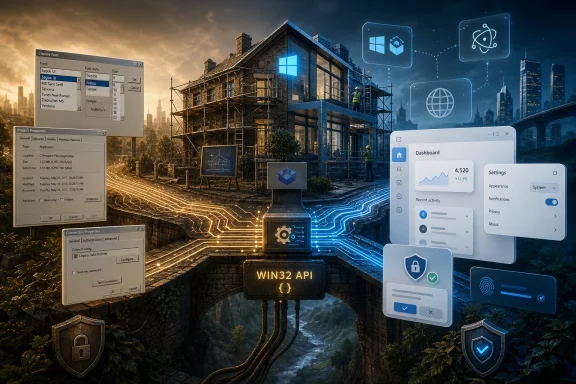
The Bedrock Is Staying, but the House Still Needs Renovation
The practical lesson for Windows users, developers, and IT departments is neither panic nor nostalgia. Win32’s continued relevance explains why Windows remains uniquely capable, and it also explains why Windows remains uniquely inconsistent. The path forward is not a bonfire of legacy code; it is a disciplined renovation of the layers users touch every day.- Microsoft’s admission matters because it confirms that Win32’s survival was not the original expectation, even inside the company that created it.
- Win32 endured because it offered developers stability, deep system access, and a compatibility promise that newer Windows app models failed to match.
- Microsoft’s abandoned or diminished frameworks taught developers to be cautious, which helped push many teams toward web technologies and cross-platform wrappers.
- WebView2 is useful as a bridge, but Windows suffers when too many desktop experiences become browser shells with desktop icons.
- WinUI 3 and the Windows App SDK have a credible role if Microsoft uses them to modernize Windows without cutting developers off from the capabilities they actually need.
- The success of this pivot will be measured less by announcements than by whether Microsoft’s own apps and shell components become faster, more coherent, and more trustworthy.
Source: Windows Latest Microsoft admits Windows 11 is still built on 90s-era Win32, and no one saw it coming
