

Microsoft’s Mark Russinovich said in May 2026 that Windows 11 still treats the 1990s-era Win32 API as a first-class platform because decades of applications, tools, and system behaviors were built on top of it. That is not a confession of engineering failure so much as an accidental mission statement for Windows itself. Microsoft has spent thirty years trying to modernize the desktop without breaking the compact it made with developers in the Windows 95 era. The result is an operating system that looks increasingly like 2026 on the surface, but still negotiates with 1995 every time a serious desktop app opens a window.
The easy dunk is that Windows 11 is a museum with rounded corners. Open Settings and you get animation, Mica materials, account prompts, and a visual language that wants to sit comfortably beside iOS, Android, and modern web apps. Open Control Panel, Device Manager, Disk Management, ODBC Data Sources, or any number of administrative snap-ins, and the illusion collapses into gray boxes, modal dialogs, and the unmistakable residue of a platform that learned its habits before Wi-Fi was ordinary.
But that split personality is also why Windows remains Windows. Its oldest public interfaces are not just leftovers; they are contracts. A line-of-business application written for a warehouse, a label printer utility, a CAD tool, a game launcher, a payroll system, or a diagnostic utility may not care whether the shell has fluent blur effects. It cares that the call it made yesterday still returns the answer it expects tomorrow.
Russinovich’s point, as reported from Microsoft’s own developer-facing remarks, is less “look how old this is” than “look how much is built on it.” Win32 became bedrock because Microsoft won the desktop by making Windows the place where developers could assume continuity. Once a platform becomes that successful, replacing it is not a product decision. It is an ecosystem negotiation with millions of silent vetoes.
That is the paradox Microsoft has never escaped. The company can ship a new Start menu, a new app model, a new design system, and a new security posture. But it cannot casually tell the world that the API surface underneath its desktop economy has reached end of life, because the world’s response would be measured in broken workflows rather than applause.
That is why the “1990s code” framing is both true and misleading. Some of the conceptual foundations date to the Windows NT and Windows 95 period, and the naming still carries that history. But the platform has been extended, wrapped, translated, hardened, virtualized, and dragged into 64-bit, high-DPI, multi-monitor, touch, pen, GPU-accelerated, cloud-managed, security-conscious computing.
Old APIs do not necessarily mean old binaries sitting untouched in a vault. Mature operating systems are more like cities than consumer gadgets. Streets get resurfaced, traffic lights get replaced, zoning changes, new utilities go underground, and yet the map still contains roads laid out generations ago because businesses, homes, and habits formed around them.
The uncomfortable truth for platform vendors is that successful APIs are hard to kill precisely because they were good enough to matter. Win32 was not elegant in the way modern developer platforms like to present themselves. It could be verbose, sharp-edged, and permissive to a fault. But it gave developers power, reach, and a reliable target across a vast range of hardware.
That bargain created the desktop software economy Microsoft still depends on. Windows became the place where serious PC software lived not because every API was beautiful, but because developers trusted that the rug would not be pulled out from under them. In platform terms, that trust is more valuable than aesthetic coherence.
The theory was defensible. The iPhone and iPad had changed user expectations. Android had made app stores ordinary. Browsers were becoming full application runtimes. Microsoft looked at Win32’s freedom and saw not only power, but malware, installer chaos, privilege sprawl, inconsistent UX, and an app ecosystem that could not easily be governed.
The execution was the problem. Windows 8 treated the new world not as an evolution of the desktop, but as a replacement for it. Users who needed keyboard, mouse, windows, taskbars, and existing software were told, in effect, that the future had arrived and their workflows were unfashionable. Developers saw an app model with restrictions, uncertain demand, and a distribution story that did not match how much of the Windows economy actually worked.
WinRT did not die entirely; pieces of that world evolved through UWP, XAML, app packaging, Windows Runtime components, and later the Windows App SDK. But it never became the universal successor to Win32. The traditional desktop did not politely step aside. It stayed where the money, users, and serious applications were.
That failure seems to have taught Microsoft a slower lesson. You cannot modernize Windows by pretending the desktop is an embarrassing legacy mode. You modernize Windows by giving the desktop a path forward that does not require developers to throw away decades of working code for the privilege of pleasing Microsoft’s current design language.
Settings may present a modern page for a task, while a deeper option still opens a legacy dialog. A security feature may be explained in consumer-friendly language, while the actual policy switch lives in Group Policy, Registry, PowerShell, Intune, or an MMC snap-in. A device configuration may begin in the new interface and end in something that looks like it was designed for a CRT.
For enthusiasts, this is annoying. For administrators, it can be workable because they know the layers. For ordinary users, it makes Windows feel inconsistent and occasionally untrustworthy. The problem is not nostalgia; it is cognitive load.
Microsoft’s challenge is that many of those old surfaces are not merely cosmetic. They are tied to administrative models, plug-ins, drivers, enterprise documentation, scripts, training, and support expectations. Removing them is expensive not because the pixels are sacred, but because the workflow around them is.
This is where Windows differs from platforms with tighter hardware, software, and distribution control. Apple can deprecate aggressively because it owns more of the stack and has conditioned its developer base to expect periodic breakage in exchange for forward motion. Microsoft’s desktop base is broader, older, messier, and far more entangled with businesses that value boring continuity over elegance.
The result is a product that often feels like it is trying to serve two masters: the consumer who wants a coherent modern OS and the enterprise that wants nothing surprising to happen on Tuesday morning. Win32 survives because the second constituency has veto power.
That frustration explains why talk of “100% native” Windows apps lands differently in 2026 than it might have five years ago. Native is no longer just a developer implementation detail. It has become a proxy for respect: respect for the machine, for performance, for accessibility, for offline behavior, and for the idea that the operating system should not need to host half a browser engine for every simple utility.
Win32 is central to that debate because it represents the thing web-first Windows experiences often lack: direct integration with the desktop. That does not mean every app should be a hand-written C program calling raw APIs. It means the best Windows software usually understands Windows as more than a viewport for HTML.
Microsoft’s modern answer is not simply “go back to 1995.” It is a layered strategy: keep Win32 available, keep improving the Windows App SDK, modernize UI through WinUI, use WebView2 where web content makes sense, and give developers ways to package, update, and secure traditional applications without pretending they are phone apps.
That is a more realistic approach than the old replacement fantasy. It accepts that the Windows desktop is not one platform but a federation of eras. The job is not to erase the oldest layer. The job is to make sure the oldest layer does not prevent the newest one from being fast, secure, and pleasant.
Modern platforms prefer containment. They want permissions, sandboxing, store review, signed components, predictable update channels, and a clearer relationship between user intent and system access. Win32 grew up in a different culture, where the PC owner was assumed to be in charge, applications were often trusted by default, and the networked threat model was far less punishing.
Microsoft has spent decades retrofitting defenses around that world: User Account Control, driver signing, SmartScreen, Defender, virtualization-based security, protected processes, application control, exploit mitigations, memory protections, and enterprise management policies. These layers matter. They have made modern Windows far harder to compromise than the Windows 95 or Windows XP mental model people still invoke.
But retrofitting is not the same as clean design. A platform that must preserve vast compatibility has less freedom to make every secure default a hard default. Every tightening risks breaking an old installer, a specialized driver, a macro-heavy workflow, an internal tool, or a vendor package that has not been seriously modernized in years.
That is why Microsoft’s future security posture will likely be gradual and policy-driven rather than revolutionary. Expect more signing requirements, more warnings, more reputation checks, more isolation for risky behaviors, and more enterprise controls that let administrators decide how much legacy risk they will tolerate. Do not expect Microsoft to wake up and declare Win32 untrusted by default across the consumer and enterprise desktop. That would be less a security policy than an economic event.
The uncomfortable compromise is that Windows must become more secure while still running the software that made it indispensable. That is a harder engineering problem than building a locked-down platform from scratch. It is also the reason Windows continues to matter in environments where locked-down platforms are too narrow.
Developers are not irrational when they hesitate. If you maintain a Windows application that earns money, runs in production, and satisfies customers, a rewrite is not a modernization ritual. It is a business risk. Rewrites break edge cases, reset performance assumptions, create new bugs, and consume engineering time that could have gone into features users actually requested.
That is why Win32 retains gravity. It is not just old; it is proven. Developers know how it behaves. Stack Overflow, internal wikis, vendor samples, old books, debugging habits, and decades of source code all reinforce it. Even when the API is awkward, its awkwardness is documented by history.
The more successful path for Microsoft is therefore not persuasion by replacement, but modernization by interop. Let a desktop app adopt a modern control here, a better packaging model there, a new notification path, a more secure update mechanism, a modern windowing feature, a better accessibility layer. Let developers renovate rather than relocate.
This is not as clean as a keynote slide. It does not produce a single platform diagram that makes everyone feel strategic. But it matches how Windows software actually lives: incrementally, commercially, under budget constraints, with customers who do not care which framework won an internal architecture debate.
Some of Windows 11’s roughness comes from strategy, not archaeology. Microsoft has often seemed unsure whether Windows is a local operating system, a cloud services billboard, an AI front end, an enterprise endpoint, a gaming platform, a developer workstation, or all of those things at once. The answer is “all of them,” but the product often exposes the tension instead of resolving it.
Legacy can be an excuse for slow improvement. It can also be a discipline. The best Windows engineering respects compatibility while still sanding down the sharp edges users actually feel. The worst Windows engineering uses compatibility as a shield for half-finished transitions and duplicated interfaces.
A thirty-year-old API is not inherently embarrassing. Many mature systems rely on old abstractions because those abstractions became stable enough to disappear into the background. What embarrasses users is when the seams show in daily use: two settings apps, three design languages, inconsistent dark mode, surprise web dependencies, sluggish shell components, and modern features that feel less reliable than the old things they replaced.
Microsoft’s task is not to apologize for Win32. It is to prove that Windows can be coherent above Win32. The old foundation can carry a modern house, but only if someone stops leaving renovation materials in the hallway.
That does not mean enterprises want stagnation. Administrators want better security baselines, cleaner update behavior, more predictable feature changes, stronger app control, and fewer consumer distractions. They want Microsoft to modernize Windows in ways that reduce support tickets, not increase them.
Win32’s persistence gives IT departments time. A legacy application can be contained, virtualized, packaged, monitored, or gradually replaced. A sudden platform break would turn technical debt into operational crisis. Microsoft knows this, which is why even its most ambitious modernization efforts tend to arrive with compatibility bridges and long tails.
The downside is that this patience can enable neglect. Vendors keep shipping crusty utilities because Windows lets them. Businesses delay modernization because the old app still launches. Microsoft preserves old layers because customers demand it, and customers demand it because vendors and internal teams never moved. Bedrock can support a city; it can also trap old plumbing.
The next phase for enterprise Windows should be less about whether Win32 stays and more about how clearly Microsoft separates supported continuity from tolerated risk. Old desktop applications will remain. The question is whether they run with modern deployment, identity, logging, update, and security expectations — or whether they continue to exist as unmanaged exceptions.
Yet AI on Windows will still have to coexist with Win32. The documents, windows, processes, file dialogs, accessibility trees, clipboard formats, shell extensions, and app behaviors that AI features need to understand are scattered across old and new frameworks. If Microsoft wants Windows to become context-aware, it must bridge the very fragmentation that decades of compatibility created.
This is where Win32’s endurance becomes strategically interesting. A platform with decades of app diversity is messy, but it is also rich. If Windows can safely observe, automate, and assist across traditional desktop apps, it has an advantage over ecosystems where workflows are narrower or more locked down. The boring old desktop may become valuable precisely because so much real work still happens there.
But there is danger in layering AI over inconsistency. If the underlying system is unpredictable, AI assistance can become another confusing abstraction. Users will not forgive a Copilot feature that understands a modern app but fails in the legacy one their company actually uses. Administrators will not welcome automation that cannot be governed, audited, or constrained.
The future Windows interface may be conversational, predictive, and model-assisted. But the trust still comes from deterministic foundations: permissions that make sense, APIs that behave, applications that respond, and compatibility that does not become chaos. The AI decade does not eliminate the Win32 problem. It raises the stakes.
The better reading is that Microsoft has inherited a rare asset and a rare constraint. Win32 is a durable compatibility layer that competitors would struggle to recreate. It is also a tax on every attempt to make Windows simpler, safer, and more elegant.
That means Microsoft should be judged less by whether it finally kills Win32 and more by whether it can make Win32 less visible when users do not need it, more governable when administrators do, and more pleasant when developers build on top of it. Compatibility should be the foundation, not the user experience.
For Windows enthusiasts, the lesson is to be skeptical of both extremes. The people who say “rewrite it all” are usually underestimating the scale of the ecosystem. The people who say “old code is fine” are often ignoring how much Windows’ credibility depends on craft, consistency, and performance. The real work sits between those slogans.
Source: XDA Windows 11 still relies on code from the 90s as its 'bedrock', says Microsoft's CTO
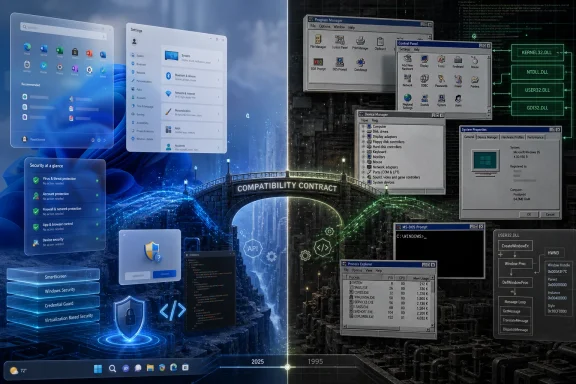 Windows Still Wins by Refusing to Forget
The easy dunk is that Windows 11 is a museum with rounded corners. Open Settings and you get animation, Mica materials, account prompts, and a visual language that wants to sit comfortably beside iOS, Android, and modern web apps. Open Control Panel, Device Manager, Disk Management, ODBC Data Sources, or any number of administrative snap-ins, and the illusion collapses into gray boxes, modal dialogs, and the unmistakable residue of a platform that learned its habits before Wi-Fi was ordinary.But that split personality is also why Windows remains Windows. Its oldest public interfaces are not just leftovers; they are contracts. A line-of-business application written for a warehouse, a label printer utility, a CAD tool, a game launcher, a payroll system, or a diagnostic utility may not care whether the shell has fluent blur effects. It cares that the call it made yesterday still returns the answer it expects tomorrow.
Russinovich’s point, as reported from Microsoft’s own developer-facing remarks, is less “look how old this is” than “look how much is built on it.” Win32 became bedrock because Microsoft won the desktop by making Windows the place where developers could assume continuity. Once a platform becomes that successful, replacing it is not a product decision. It is an ecosystem negotiation with millions of silent vetoes.
That is the paradox Microsoft has never escaped. The company can ship a new Start menu, a new app model, a new design system, and a new security posture. But it cannot casually tell the world that the API surface underneath its desktop economy has reached end of life, because the world’s response would be measured in broken workflows rather than applause.
Win32 Was Supposed to Be Infrastructure, Not Destiny
Win32’s longevity is easier to understand if you stop thinking of it as a single pile of old code and start thinking of it as the language Windows applications learned to speak. It is the programming model behind traditional desktop apps: windows, messages, menus, processes, files, registry access, handles, services, controls, and the everyday mechanics that make native Windows software feel native. Even when developers use higher-level frameworks, they often eventually meet Win32 somewhere in the stack.That is why the “1990s code” framing is both true and misleading. Some of the conceptual foundations date to the Windows NT and Windows 95 period, and the naming still carries that history. But the platform has been extended, wrapped, translated, hardened, virtualized, and dragged into 64-bit, high-DPI, multi-monitor, touch, pen, GPU-accelerated, cloud-managed, security-conscious computing.
Old APIs do not necessarily mean old binaries sitting untouched in a vault. Mature operating systems are more like cities than consumer gadgets. Streets get resurfaced, traffic lights get replaced, zoning changes, new utilities go underground, and yet the map still contains roads laid out generations ago because businesses, homes, and habits formed around them.
The uncomfortable truth for platform vendors is that successful APIs are hard to kill precisely because they were good enough to matter. Win32 was not elegant in the way modern developer platforms like to present themselves. It could be verbose, sharp-edged, and permissive to a fault. But it gave developers power, reach, and a reliable target across a vast range of hardware.
That bargain created the desktop software economy Microsoft still depends on. Windows became the place where serious PC software lived not because every API was beautiful, but because developers trusted that the rug would not be pulled out from under them. In platform terms, that trust is more valuable than aesthetic coherence.
Microsoft Tried to Reboot the Desktop and Learned the Wrong Lesson First
Microsoft has not been passive about this. The company has tried, repeatedly, to move Windows beyond the traditional desktop model. The most famous rupture came with Windows 8 and WinRT, when Microsoft attempted to push developers toward a new app platform designed around touch, sandboxing, distribution through the Store, and a cleaner security model.The theory was defensible. The iPhone and iPad had changed user expectations. Android had made app stores ordinary. Browsers were becoming full application runtimes. Microsoft looked at Win32’s freedom and saw not only power, but malware, installer chaos, privilege sprawl, inconsistent UX, and an app ecosystem that could not easily be governed.
The execution was the problem. Windows 8 treated the new world not as an evolution of the desktop, but as a replacement for it. Users who needed keyboard, mouse, windows, taskbars, and existing software were told, in effect, that the future had arrived and their workflows were unfashionable. Developers saw an app model with restrictions, uncertain demand, and a distribution story that did not match how much of the Windows economy actually worked.
WinRT did not die entirely; pieces of that world evolved through UWP, XAML, app packaging, Windows Runtime components, and later the Windows App SDK. But it never became the universal successor to Win32. The traditional desktop did not politely step aside. It stayed where the money, users, and serious applications were.
That failure seems to have taught Microsoft a slower lesson. You cannot modernize Windows by pretending the desktop is an embarrassing legacy mode. You modernize Windows by giving the desktop a path forward that does not require developers to throw away decades of working code for the privilege of pleasing Microsoft’s current design language.
The Control Panel Problem Is Really a Trust Problem
Control Panel has become the visual shorthand for Windows’ unresolved past. It is the screenshot people reach for when they want to show that Windows 11 is not a clean-sheet operating system. The criticism is fair, but incomplete. The deeper issue is not that old dialogs exist. It is that Microsoft often leaves users unsure which part of Windows is authoritative.Settings may present a modern page for a task, while a deeper option still opens a legacy dialog. A security feature may be explained in consumer-friendly language, while the actual policy switch lives in Group Policy, Registry, PowerShell, Intune, or an MMC snap-in. A device configuration may begin in the new interface and end in something that looks like it was designed for a CRT.
For enthusiasts, this is annoying. For administrators, it can be workable because they know the layers. For ordinary users, it makes Windows feel inconsistent and occasionally untrustworthy. The problem is not nostalgia; it is cognitive load.
Microsoft’s challenge is that many of those old surfaces are not merely cosmetic. They are tied to administrative models, plug-ins, drivers, enterprise documentation, scripts, training, and support expectations. Removing them is expensive not because the pixels are sacred, but because the workflow around them is.
This is where Windows differs from platforms with tighter hardware, software, and distribution control. Apple can deprecate aggressively because it owns more of the stack and has conditioned its developer base to expect periodic breakage in exchange for forward motion. Microsoft’s desktop base is broader, older, messier, and far more entangled with businesses that value boring continuity over elegance.
The result is a product that often feels like it is trying to serve two masters: the consumer who wants a coherent modern OS and the enterprise that wants nothing surprising to happen on Tuesday morning. Win32 survives because the second constituency has veto power.
Native Code Is Suddenly Fashionable Again
The irony of the current moment is that Microsoft’s old desktop story is becoming newly attractive. After years of web wrappers, Electron apps, Progressive Web Apps, and cloud-first experiences, many Windows users are tired of applications that behave like browser tabs wearing desktop costumes. They want speed, responsiveness, lower memory use, proper windowing, real keyboard behavior, system integration, and UI that does not feel streamed from a marketing department.That frustration explains why talk of “100% native” Windows apps lands differently in 2026 than it might have five years ago. Native is no longer just a developer implementation detail. It has become a proxy for respect: respect for the machine, for performance, for accessibility, for offline behavior, and for the idea that the operating system should not need to host half a browser engine for every simple utility.
Win32 is central to that debate because it represents the thing web-first Windows experiences often lack: direct integration with the desktop. That does not mean every app should be a hand-written C program calling raw APIs. It means the best Windows software usually understands Windows as more than a viewport for HTML.
Microsoft’s modern answer is not simply “go back to 1995.” It is a layered strategy: keep Win32 available, keep improving the Windows App SDK, modernize UI through WinUI, use WebView2 where web content makes sense, and give developers ways to package, update, and secure traditional applications without pretending they are phone apps.
That is a more realistic approach than the old replacement fantasy. It accepts that the Windows desktop is not one platform but a federation of eras. The job is not to erase the oldest layer. The job is to make sure the oldest layer does not prevent the newest one from being fast, secure, and pleasant.
Security Is Where the Bedrock Becomes a Burden
The strongest argument against Win32’s endurance is not visual inconsistency. It is security. The same openness that made Windows the dominant desktop platform also made it the dominant malware platform. Traditional desktop apps can be powerful in ways that are useful to administrators and terrifying in the hands of attackers.Modern platforms prefer containment. They want permissions, sandboxing, store review, signed components, predictable update channels, and a clearer relationship between user intent and system access. Win32 grew up in a different culture, where the PC owner was assumed to be in charge, applications were often trusted by default, and the networked threat model was far less punishing.
Microsoft has spent decades retrofitting defenses around that world: User Account Control, driver signing, SmartScreen, Defender, virtualization-based security, protected processes, application control, exploit mitigations, memory protections, and enterprise management policies. These layers matter. They have made modern Windows far harder to compromise than the Windows 95 or Windows XP mental model people still invoke.
But retrofitting is not the same as clean design. A platform that must preserve vast compatibility has less freedom to make every secure default a hard default. Every tightening risks breaking an old installer, a specialized driver, a macro-heavy workflow, an internal tool, or a vendor package that has not been seriously modernized in years.
That is why Microsoft’s future security posture will likely be gradual and policy-driven rather than revolutionary. Expect more signing requirements, more warnings, more reputation checks, more isolation for risky behaviors, and more enterprise controls that let administrators decide how much legacy risk they will tolerate. Do not expect Microsoft to wake up and declare Win32 untrusted by default across the consumer and enterprise desktop. That would be less a security policy than an economic event.
The uncomfortable compromise is that Windows must become more secure while still running the software that made it indispensable. That is a harder engineering problem than building a locked-down platform from scratch. It is also the reason Windows continues to matter in environments where locked-down platforms are too narrow.
Developers Never Really Wanted a Clean Break
Every few years, Microsoft presents developers with a new preferred way to build Windows apps. The names change: Win32, MFC, COM, .NET, WinForms, WPF, Silverlight, WinRT, UWP, WinUI, Windows App SDK, MAUI, WebView2. Each arrives with a story about productivity, modernity, security, reach, or design coherence. Each also inherits the credibility problem caused by the previous story not fully replacing the one before it.Developers are not irrational when they hesitate. If you maintain a Windows application that earns money, runs in production, and satisfies customers, a rewrite is not a modernization ritual. It is a business risk. Rewrites break edge cases, reset performance assumptions, create new bugs, and consume engineering time that could have gone into features users actually requested.
That is why Win32 retains gravity. It is not just old; it is proven. Developers know how it behaves. Stack Overflow, internal wikis, vendor samples, old books, debugging habits, and decades of source code all reinforce it. Even when the API is awkward, its awkwardness is documented by history.
The more successful path for Microsoft is therefore not persuasion by replacement, but modernization by interop. Let a desktop app adopt a modern control here, a better packaging model there, a new notification path, a more secure update mechanism, a modern windowing feature, a better accessibility layer. Let developers renovate rather than relocate.
This is not as clean as a keynote slide. It does not produce a single platform diagram that makes everyone feel strategic. But it matches how Windows software actually lives: incrementally, commercially, under budget constraints, with customers who do not care which framework won an internal architecture debate.
Windows 11’s Real Problem Is Not Age, But Uneven Craft
It is tempting to make Win32 the villain for everything users dislike about Windows 11. That would be too convenient. Old code is not why every modern surface feels inconsistent, why some inbox apps have leaned too heavily on web technologies, why context menus were redesigned and then partially walked back, or why Settings still does not fully replace Control Panel.Some of Windows 11’s roughness comes from strategy, not archaeology. Microsoft has often seemed unsure whether Windows is a local operating system, a cloud services billboard, an AI front end, an enterprise endpoint, a gaming platform, a developer workstation, or all of those things at once. The answer is “all of them,” but the product often exposes the tension instead of resolving it.
Legacy can be an excuse for slow improvement. It can also be a discipline. The best Windows engineering respects compatibility while still sanding down the sharp edges users actually feel. The worst Windows engineering uses compatibility as a shield for half-finished transitions and duplicated interfaces.
A thirty-year-old API is not inherently embarrassing. Many mature systems rely on old abstractions because those abstractions became stable enough to disappear into the background. What embarrasses users is when the seams show in daily use: two settings apps, three design languages, inconsistent dark mode, surprise web dependencies, sluggish shell components, and modern features that feel less reliable than the old things they replaced.
Microsoft’s task is not to apologize for Win32. It is to prove that Windows can be coherent above Win32. The old foundation can carry a modern house, but only if someone stops leaving renovation materials in the hallway.
The Enterprise Desktop Is the Vote Microsoft Cannot Ignore
For enterprise IT, Russinovich’s comment is almost reassuring. It says that Microsoft still understands the central fact of Windows deployment: compatibility is not a nice-to-have, it is the product. Companies do not run Windows because every interface is beautiful. They run it because their applications, management tools, peripherals, authentication systems, scripts, and operational assumptions depend on it.That does not mean enterprises want stagnation. Administrators want better security baselines, cleaner update behavior, more predictable feature changes, stronger app control, and fewer consumer distractions. They want Microsoft to modernize Windows in ways that reduce support tickets, not increase them.
Win32’s persistence gives IT departments time. A legacy application can be contained, virtualized, packaged, monitored, or gradually replaced. A sudden platform break would turn technical debt into operational crisis. Microsoft knows this, which is why even its most ambitious modernization efforts tend to arrive with compatibility bridges and long tails.
The downside is that this patience can enable neglect. Vendors keep shipping crusty utilities because Windows lets them. Businesses delay modernization because the old app still launches. Microsoft preserves old layers because customers demand it, and customers demand it because vendors and internal teams never moved. Bedrock can support a city; it can also trap old plumbing.
The next phase for enterprise Windows should be less about whether Win32 stays and more about how clearly Microsoft separates supported continuity from tolerated risk. Old desktop applications will remain. The question is whether they run with modern deployment, identity, logging, update, and security expectations — or whether they continue to exist as unmanaged exceptions.
The 1990s Foundation Now Has to Carry an AI Decade
The timing of this conversation matters because Microsoft is trying to make Windows central to an AI-driven computing cycle. Copilot, local models, NPUs, semantic indexing, developer tooling, and AI-assisted workflows all assume the operating system can become a more intelligent layer between user intent and application behavior. That future will not be built on nostalgia.Yet AI on Windows will still have to coexist with Win32. The documents, windows, processes, file dialogs, accessibility trees, clipboard formats, shell extensions, and app behaviors that AI features need to understand are scattered across old and new frameworks. If Microsoft wants Windows to become context-aware, it must bridge the very fragmentation that decades of compatibility created.
This is where Win32’s endurance becomes strategically interesting. A platform with decades of app diversity is messy, but it is also rich. If Windows can safely observe, automate, and assist across traditional desktop apps, it has an advantage over ecosystems where workflows are narrower or more locked down. The boring old desktop may become valuable precisely because so much real work still happens there.
But there is danger in layering AI over inconsistency. If the underlying system is unpredictable, AI assistance can become another confusing abstraction. Users will not forgive a Copilot feature that understands a modern app but fails in the legacy one their company actually uses. Administrators will not welcome automation that cannot be governed, audited, or constrained.
The future Windows interface may be conversational, predictive, and model-assisted. But the trust still comes from deterministic foundations: permissions that make sense, APIs that behave, applications that respond, and compatibility that does not become chaos. The AI decade does not eliminate the Win32 problem. It raises the stakes.
The Bedrock Story Leaves Microsoft With Fewer Excuses
Russinovich’s candor is useful because it punctures a myth Microsoft sometimes finds convenient: that Windows’ awkwardness is simply the unavoidable cost of supporting the past. Some of it is. Much of it is not. The existence of Win32 does not require every settings migration to take a decade, every inbox app to feel strategically provisional, or every new shell idea to ship before it is fully reconciled with old behavior.The better reading is that Microsoft has inherited a rare asset and a rare constraint. Win32 is a durable compatibility layer that competitors would struggle to recreate. It is also a tax on every attempt to make Windows simpler, safer, and more elegant.
That means Microsoft should be judged less by whether it finally kills Win32 and more by whether it can make Win32 less visible when users do not need it, more governable when administrators do, and more pleasant when developers build on top of it. Compatibility should be the foundation, not the user experience.
For Windows enthusiasts, the lesson is to be skeptical of both extremes. The people who say “rewrite it all” are usually underestimating the scale of the ecosystem. The people who say “old code is fine” are often ignoring how much Windows’ credibility depends on craft, consistency, and performance. The real work sits between those slogans.
The Parts of Windows 95 That Still Decide Windows 11
Microsoft’s accidental admission is not that Windows is obsolete. It is that Windows is path-dependent in a way few consumer technologies are allowed to be. The 1990s did not just leave code behind; they left promises.- Win32 remains central because too many applications, tools, frameworks, and business workflows depend on it for Microsoft to replace it abruptly.
- Microsoft’s attempts to reboot Windows app development failed when they asked desktop developers and users to abandon working models faster than the ecosystem could tolerate.
- Windows 11’s most visible weakness is not merely legacy code, but the uneven coexistence of modern interfaces, old tools, web-based apps, and duplicated settings paths.
- Security modernization will have to tighten the rules around legacy software without breaking the compatibility that keeps Windows entrenched in business and enthusiast environments.
- The most credible Windows strategy is not a clean break from Win32, but a disciplined modernization path that lets native apps gain modern UI, packaging, deployment, and security features incrementally.
Source: XDA Windows 11 still relies on code from the 90s as its 'bedrock', says Microsoft's CTO
