

Microsoft’s latest public reminder that Win32 remains central to Windows 11 landed in early May 2026, when Microsoft Dev Docs highlighted remarks from Azure CTO and Sysinternals creator Mark Russinovich about the decades-old API’s unexpected staying power. The uncomfortable truth is not that Windows 11 secretly “is” a 32-bit operating system; it is that modern Windows still depends on a compatibility contract written when beige towers, Visual Basic installers, and corporate line-of-business apps ruled the desktop. That distinction matters, because it separates a real engineering constraint from a slightly overheated internet narrative. Windows is modern in many ways, but it is still governed by an old promise: your stuff should keep working.
The first correction is the boring one, and therefore the most important. Windows 11 does not ship as a 32-bit operating system. Microsoft’s client OS crossed that line with Windows 11, which requires 64-bit-capable hardware and has no 32-bit edition in the way Windows 10 did.
But that does not mean Windows 11 has escaped 32-bit history. The Win32 API, despite the name, is not simply “32-bit code” in the consumer shorthand sense. It is the long-lived Windows application programming model that became the default language of desktop software, and it survived the transition from 32-bit x86 PCs to 64-bit Windows because Microsoft made that survival a product feature.
That is why the current discussion has generated so much confusion. When people hear “Win32,” they often imagine dusty binaries being dragged forward against their will. In reality, Win32 is both old and current: an API family with roots in the Windows NT and Windows 95 era, still used by modern applications, still documented by Microsoft, and still unavoidable for huge parts of the Windows desktop.
Russinovich’s point, as amplified by Microsoft’s own developer channels, was less a confession than a reminder from someone who has spent decades inside Windows internals. The surprise is not that legacy exists. The surprise is that the “legacy” API became so good at staying useful that it outlived multiple attempts to replace it.
This is where the easy joke about Windows being a “modern skin over old code” becomes too simple. Windows 11 is not just Windows 95 wearing rounded corners. The kernel, driver model, graphics stack, security boundaries, virtualization features, update mechanisms, memory protections, deployment tools, and hardware requirements have all changed dramatically over the decades.
Yet the joke sticks because the user-facing experience often exposes seams. Control Panel survives beside Settings. Old file dialogs appear inside new apps. System32 still confuses people by containing 64-bit components, while SysWOW64 houses 32-bit ones. A user can open a gleaming Windows 11 laptop in 2026 and still encounter visual fossils that look like they escaped from a Windows 2000 administrator console.
Those fossils are not merely neglect. They are artifacts of a platform that cannot be renovated like a social media app. Microsoft can redesign Notepad in a sprint; it cannot casually break an accounting package written in 2004 that still closes payroll every Friday.
Windows won the desktop not just because it was technically elegant — often it was not — but because it became the place where everything ran. Games, printer utilities, medical imaging software, CAD tools, finance terminals, warehouse scanners, school testing software, audio plug-ins, tax applications, weird tray utilities from motherboard vendors, and one-off internal apps all accumulated around Windows like coral around a reef.
Once that ecosystem existed, compatibility became the product. A new Windows release was not judged only by what it added; it was judged by what it did not break. For home users, that meant games and peripherals. For businesses, it meant workflows. For governments and hospitals, it meant systems that might have been written by a vendor that no longer exists.
That creates a trap for Microsoft. The company can tell developers to move to newer frameworks, and it has done so repeatedly. But Windows is not iOS, where the platform owner can break older assumptions with comparatively little institutional backlash. Windows is an operating system for environments where the app nobody wants to maintain may also be the app nobody can stop using.
This is why Win32’s persistence should not be read as a failure of imagination alone. It is also the cost of being the general-purpose PC platform. The very thing that makes Windows messy is the thing that makes it valuable.
WinRT, introduced with Windows 8, was the most aggressive consumer-facing attempt to redefine what a Windows app should be. It promised a more controlled, touch-friendly, sandboxed world, one that could span PCs and tablets and give Microsoft a cleaner answer to iOS and Android. But the new model collided with the old expectation: Windows users expected Windows software.
Windows RT, the ARM-based edition that shipped on devices like the original Surface RT, made the collision impossible to ignore. It looked like Windows, included a desktop, and carried the Windows name, but it could not run traditional x86 desktop applications. To ordinary buyers, that was not a subtle architectural distinction; it was a broken promise.
The failure of Windows RT was not just that the Microsoft Store lacked enough apps, though it did. It was that Microsoft sold a Windows device that did not fully participate in the Windows compact. The desktop was there, but the user’s software was not. That distinction may have made sense to product strategists, but it was poison at retail.
Microsoft learned the lesson the hard way. Later Windows on Arm efforts leaned back toward compatibility, eventually offering x86 and then broader emulation capabilities. The company did not abandon the dream of cleaner architectures, but it stopped pretending that Windows users would accept a hard cliff without a bridge.
Developers did not rush en masse to rewrite mature desktop applications as Store-first apps. Many had no business reason to do so. Others needed capabilities that sandboxed models complicated. Still others served enterprise customers who distributed software through management tools, private installers, or custom deployment pipelines.
Users, meanwhile, did not treat the Store as the sole front door to Windows software. They kept downloading installers from the web, using package managers, deploying MSI files, and running legacy setup programs. Microsoft eventually adapted by allowing more traditional desktop applications into the Store, a pragmatic concession that made the Store more useful but also undercut the original idea of a clean break.
That compromise is the Windows pattern in miniature. Microsoft proposes a new model. The ecosystem resists total migration. Microsoft bends the new model until it can coexist with the old one. The result is less pure, but more survivable.
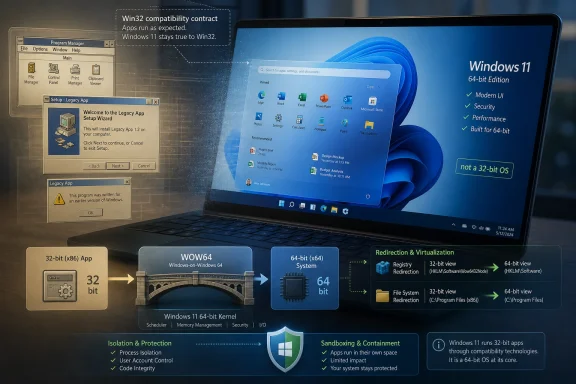
For many users, WOW64 is simply why an old installer still launches. For administrators, it is why there are separate Program Files directories, separate registry views, and occasional confusion when a 32-bit management tool cannot see the same thing a 64-bit one can. For developers, it is a compatibility layer that is both a blessing and a source of subtle bugs.
The existence of WOW64 does not mean Windows 11 is “really” a 32-bit OS. It means Windows 11 still hosts 32-bit applications because the Windows ecosystem still contains them. That is a different claim, and a more accurate one.
The distinction matters because it changes the stakes. If the problem were merely old code inside Windows, Microsoft could theoretically rewrite modules over time. The harder problem is old code outside Windows: applications, plug-ins, installers, drivers, automation scripts, and business processes that assume Windows behaves in a particular way.
But the phrase “complete rewrite” should set off alarms for anyone who has watched operating systems evolve. Rewrites are seductive because they imagine a world without accumulated mistakes. They are dangerous because they also discard accumulated fixes, hardware knowledge, obscure compatibility behavior, and decades of battle testing.
Windows startup performance is not held hostage solely by Win32. App launch time depends on storage, antivirus scanning, framework loading, app design, shell extensions, background services, graphics initialization, and a dozen other variables. A badly written modern app can feel slower than a lean Win32 utility from 2003. An old API is not automatically the bottleneck.
The more plausible benefit of reducing 32-bit and legacy surface area is not a magical across-the-board speed boost. It is reduced complexity. Fewer compatibility paths mean fewer places for bugs to hide, fewer weird redirections for administrators to understand, and fewer attack surfaces for defenders to monitor. That is valuable, but it is less dramatic than promising that Windows will suddenly boot like a game console.
Old software models often assume broad access to the file system, registry, interprocess communication, and user profile. Traditional desktop apps can be perfectly well behaved, but they were born in an era before modern app sandboxing became the default expectation. That makes them powerful, flexible, and sometimes dangerous.
Enterprises already understand this tension. They use application control, virtualization-based security, endpoint detection, least-privilege configurations, and increasingly aggressive software inventory practices because unmanaged desktop code is a risk. The problem is not that Win32 apps are inherently malicious. The problem is that the same openness that lets a niche hardware utility work also gives attackers room to maneuver.
A cleaner Windows application future would likely involve stronger isolation by default, clearer permission models, and better containment for untrusted or abandoned apps. That sounds more like mobile operating systems and browser sandboxes than traditional Windows. It also sounds like exactly the kind of transition that Windows users resist when it breaks their tools.
Microsoft’s challenge is to improve safety without destroying the platform’s utility. That is harder than declaring the old world obsolete.
Microsoft cannot copy that playbook wholesale. Apple sells a smaller hardware matrix, controls more of the stack, and has a customer base conditioned to accept periodic discontinuity. Microsoft supports a vast hardware and software ecosystem where customers often define success as “the upgrade did not interrupt work.”
That does not make Apple brave and Microsoft cowardly. It means the companies have different contracts with their users. Apple’s contract is that the future will arrive neatly, even if some past investments are cut loose. Microsoft’s contract is that the future will arrive while dragging a shocking amount of the past behind it.
The question is whether that contract can hold forever. As hardware becomes more specialized, security expectations rise, and cloud-managed endpoints become normal, the cost of indefinite compatibility keeps increasing. At some point, the burden becomes not just engineering debt but strategic drag.
That is why Microsoft’s newer Arm strategy is more cautious than Windows RT. Instead of telling users to accept a clean new app model, it tries to make old applications run well enough that the hardware transition feels boring. Boring is good. Boring is how platform shifts survive.
But the Arm transition also points toward a possible long-term architecture for legacy support. If Windows can emulate old instruction sets, isolate compatibility layers, and steer developers toward native modern binaries, it can gradually make legacy support feel less like the center of the OS and more like a service the OS provides.
That is probably closer to the real future than a dramatic rewrite. Windows will not wake up one morning reborn as a pure, compatibility-free operating system. It will keep moving old assumptions into compartments, one subsystem at a time.
A factory may depend on a control application written for a specific version of Windows. A clinic may rely on a vendor utility that talks to a device no longer sold. A local government office may have a records system that works only because an administrator carefully preserved the right runtime libraries. These are not edge cases in the moral sense. They are ordinary consequences of a platform that has been deployed everywhere for decades.
For those environments, “just rewrite it” is not a plan. The original vendor may be gone. The source code may be unavailable. The replacement system may cost millions. The migration may require downtime the organization cannot tolerate.
This is why Microsoft moves slowly. It can deprecate features, publish guidance, add warnings, and create modern alternatives, but it cannot behave as if every customer is a developer conference attendee with a greenfield codebase. Windows is not merely software; it is infrastructure.
Win32 gives developers reach. It runs across an enormous installed base. It exposes mature capabilities. It integrates with decades of tools, libraries, installers, debuggers, and documentation. It may be ugly in places, but it is predictable in the way old infrastructure often is.
By contrast, Microsoft’s modern Windows app story has often felt fragmented. Developers have seen WinRT, UWP, Windows App SDK, WinUI, .NET desktop frameworks, Progressive Web Apps, Store packaging changes, and shifting guidance about what “modern” means. Some of these technologies are useful. Some solve real problems. But the churn has weakened the case for betting everything on the latest blessed path.
That does not mean developers are irrationally clinging to the past. It means they are choosing the platform surface that gives them the best odds of reaching users with the least strategic uncertainty. In that market, Win32 remains a brutally effective incumbent.
But AI features sit on top of the same desktop reality as everything else. The system can summarize, search, and automate, but it still has to coexist with installers from another era and control panels that predate the smartphone. The contrast makes Windows feel stranger: futuristic at the edge, archaeological at the core.
That tension is not necessarily fatal. In fact, Windows’ ability to graft new capabilities onto old foundations is one reason it has lasted. But the AI era raises the cost of ambiguity. Features that observe user activity, index local content, or automate workflows need clearer security models and stronger trust boundaries. Legacy desktop behavior complicates that.
If Microsoft wants Windows to become an AI-native client, it will need more than accelerators and assistant branding. It will need a more coherent application and permissions story. Win32 can coexist with that future, but it cannot define all of it.
Modern, native, well-contained applications get the best performance, battery life, security posture, and integration with new Windows features. Older applications continue to run, but with more visible compatibility boundaries. Administrators get stronger policy controls over legacy execution. Developers get better migration tools and clearer incentives. Consumers get fewer surprises.
This is not glamorous, but it is how Windows usually changes. Microsoft rarely wins by forcing one clean door. It wins by adding a new hallway, encouraging traffic, and eventually making the old route inconvenient enough that most people stop using it.
Virtualization and sandboxing may be part of that story. So may application containers, MSIX-style packaging, cloud streaming for troublesome legacy apps, and improved emulation on Arm. The trick will be making these mechanisms invisible enough for users and controllable enough for IT departments.
The worst version of this future would be another Windows RT: a compatibility break disguised as a normal Windows experience. The best version would be more honest. It would tell users when they are running legacy software, explain what tradeoffs apply, and give organizations a managed path off the oldest dependencies.
Win32’s survival says Microsoft cannot simply declare a new desktop reality and expect the world to follow. It also says the Windows ecosystem has been slow to reward cleaner application models. And it says users, including the most technical users, often claim to want modernization until modernization threatens the one old program they still need.
The “decades-old code” framing makes for a punchy headline, but the deeper story is about governance. Who gets to decide when an old platform contract expires? Microsoft? Developers? Enterprise customers? Gamers? Hardware vendors? The answer, historically, has been everyone and no one, which is why the result is so messy.
That mess is not going away in 2026. If anything, it will become more visible as Windows tries to be both an AI PC platform and the world’s most accommodating legacy desktop.
Source: Poc Network // Tech Microsoft says Windows 11 is still built upon decades-old 32-bit code | Poc Network // Tech
 Windows 11 Is 64-Bit, but Windows Is Still Win32 Country
The first correction is the boring one, and therefore the most important. Windows 11 does not ship as a 32-bit operating system. Microsoft’s client OS crossed that line with Windows 11, which requires 64-bit-capable hardware and has no 32-bit edition in the way Windows 10 did.But that does not mean Windows 11 has escaped 32-bit history. The Win32 API, despite the name, is not simply “32-bit code” in the consumer shorthand sense. It is the long-lived Windows application programming model that became the default language of desktop software, and it survived the transition from 32-bit x86 PCs to 64-bit Windows because Microsoft made that survival a product feature.
That is why the current discussion has generated so much confusion. When people hear “Win32,” they often imagine dusty binaries being dragged forward against their will. In reality, Win32 is both old and current: an API family with roots in the Windows NT and Windows 95 era, still used by modern applications, still documented by Microsoft, and still unavoidable for huge parts of the Windows desktop.
Russinovich’s point, as amplified by Microsoft’s own developer channels, was less a confession than a reminder from someone who has spent decades inside Windows internals. The surprise is not that legacy exists. The surprise is that the “legacy” API became so good at staying useful that it outlived multiple attempts to replace it.
The Word “Legacy” Is Doing Too Much Work
Calling Win32 legacy is accurate in the same way calling TCP/IP legacy is accurate: technically true, but not very illuminating. Win32 carries old assumptions, old naming, old design compromises, and old behavior that must be preserved because software depends on it. It also carries an enormous amount of proven engineering that developers still reach for when they need speed, control, and access to the real desktop.This is where the easy joke about Windows being a “modern skin over old code” becomes too simple. Windows 11 is not just Windows 95 wearing rounded corners. The kernel, driver model, graphics stack, security boundaries, virtualization features, update mechanisms, memory protections, deployment tools, and hardware requirements have all changed dramatically over the decades.
Yet the joke sticks because the user-facing experience often exposes seams. Control Panel survives beside Settings. Old file dialogs appear inside new apps. System32 still confuses people by containing 64-bit components, while SysWOW64 houses 32-bit ones. A user can open a gleaming Windows 11 laptop in 2026 and still encounter visual fossils that look like they escaped from a Windows 2000 administrator console.
Those fossils are not merely neglect. They are artifacts of a platform that cannot be renovated like a social media app. Microsoft can redesign Notepad in a sprint; it cannot casually break an accounting package written in 2004 that still closes payroll every Friday.
Backward Compatibility Became Windows’ Real Moat
The deepest reason Win32 survived is not nostalgia. It is economics.Windows won the desktop not just because it was technically elegant — often it was not — but because it became the place where everything ran. Games, printer utilities, medical imaging software, CAD tools, finance terminals, warehouse scanners, school testing software, audio plug-ins, tax applications, weird tray utilities from motherboard vendors, and one-off internal apps all accumulated around Windows like coral around a reef.
Once that ecosystem existed, compatibility became the product. A new Windows release was not judged only by what it added; it was judged by what it did not break. For home users, that meant games and peripherals. For businesses, it meant workflows. For governments and hospitals, it meant systems that might have been written by a vendor that no longer exists.
That creates a trap for Microsoft. The company can tell developers to move to newer frameworks, and it has done so repeatedly. But Windows is not iOS, where the platform owner can break older assumptions with comparatively little institutional backlash. Windows is an operating system for environments where the app nobody wants to maintain may also be the app nobody can stop using.
This is why Win32’s persistence should not be read as a failure of imagination alone. It is also the cost of being the general-purpose PC platform. The very thing that makes Windows messy is the thing that makes it valuable.
Microsoft Has Tried to Escape This Before
The history of modern Windows is littered with attempted exits from Win32. Some were technical transitions. Some were branding campaigns. Some were full-blown platform bets.WinRT, introduced with Windows 8, was the most aggressive consumer-facing attempt to redefine what a Windows app should be. It promised a more controlled, touch-friendly, sandboxed world, one that could span PCs and tablets and give Microsoft a cleaner answer to iOS and Android. But the new model collided with the old expectation: Windows users expected Windows software.
Windows RT, the ARM-based edition that shipped on devices like the original Surface RT, made the collision impossible to ignore. It looked like Windows, included a desktop, and carried the Windows name, but it could not run traditional x86 desktop applications. To ordinary buyers, that was not a subtle architectural distinction; it was a broken promise.
The failure of Windows RT was not just that the Microsoft Store lacked enough apps, though it did. It was that Microsoft sold a Windows device that did not fully participate in the Windows compact. The desktop was there, but the user’s software was not. That distinction may have made sense to product strategists, but it was poison at retail.
Microsoft learned the lesson the hard way. Later Windows on Arm efforts leaned back toward compatibility, eventually offering x86 and then broader emulation capabilities. The company did not abandon the dream of cleaner architectures, but it stopped pretending that Windows users would accept a hard cliff without a bridge.
The Store Could Not Replace the Desktop
The Microsoft Store was supposed to give Windows a modern software distribution layer: safer installs, cleaner updates, easier discovery, and a more curated experience. In theory, that should have helped Microsoft loosen Win32’s grip. In practice, it revealed how difficult it is to convert a sprawling desktop ecosystem into a controlled marketplace.Developers did not rush en masse to rewrite mature desktop applications as Store-first apps. Many had no business reason to do so. Others needed capabilities that sandboxed models complicated. Still others served enterprise customers who distributed software through management tools, private installers, or custom deployment pipelines.
Users, meanwhile, did not treat the Store as the sole front door to Windows software. They kept downloading installers from the web, using package managers, deploying MSI files, and running legacy setup programs. Microsoft eventually adapted by allowing more traditional desktop applications into the Store, a pragmatic concession that made the Store more useful but also undercut the original idea of a clean break.
That compromise is the Windows pattern in miniature. Microsoft proposes a new model. The ecosystem resists total migration. Microsoft bends the new model until it can coexist with the old one. The result is less pure, but more survivable.
WOW64 Is a Bridge, Not a Museum
The technical bridge most users never see is WOW64, the Windows subsystem that lets 32-bit Windows applications run on 64-bit Windows. It redirects registry and file-system access where needed, manages transitions between 32-bit user-mode code and the 64-bit operating system, and allows old software to behave as if the ground beneath it never moved.For many users, WOW64 is simply why an old installer still launches. For administrators, it is why there are separate Program Files directories, separate registry views, and occasional confusion when a 32-bit management tool cannot see the same thing a 64-bit one can. For developers, it is a compatibility layer that is both a blessing and a source of subtle bugs.
The existence of WOW64 does not mean Windows 11 is “really” a 32-bit OS. It means Windows 11 still hosts 32-bit applications because the Windows ecosystem still contains them. That is a different claim, and a more accurate one.
The distinction matters because it changes the stakes. If the problem were merely old code inside Windows, Microsoft could theoretically rewrite modules over time. The harder problem is old code outside Windows: applications, plug-ins, installers, drivers, automation scripts, and business processes that assume Windows behaves in a particular way.
A Clean 64-Bit Break Would Not Be Clean
The Poc Network article argues that a fully 64-bit Windows rewrite could deliver big performance gains, including faster startup, faster app loading, and a snappier system overall. There is a kernel of truth here: removing compatibility layers, old assumptions, and duplicated components can simplify an operating system. Simpler systems can be faster, easier to secure, and easier to maintain.But the phrase “complete rewrite” should set off alarms for anyone who has watched operating systems evolve. Rewrites are seductive because they imagine a world without accumulated mistakes. They are dangerous because they also discard accumulated fixes, hardware knowledge, obscure compatibility behavior, and decades of battle testing.
Windows startup performance is not held hostage solely by Win32. App launch time depends on storage, antivirus scanning, framework loading, app design, shell extensions, background services, graphics initialization, and a dozen other variables. A badly written modern app can feel slower than a lean Win32 utility from 2003. An old API is not automatically the bottleneck.
The more plausible benefit of reducing 32-bit and legacy surface area is not a magical across-the-board speed boost. It is reduced complexity. Fewer compatibility paths mean fewer places for bugs to hide, fewer weird redirections for administrators to understand, and fewer attack surfaces for defenders to monitor. That is valuable, but it is less dramatic than promising that Windows will suddenly boot like a game console.
Security Is the Stronger Argument Than Speed
If Microsoft ever makes a more serious move against 32-bit application support on mainstream Windows, the winning argument will probably be security and maintainability, not raw performance.Old software models often assume broad access to the file system, registry, interprocess communication, and user profile. Traditional desktop apps can be perfectly well behaved, but they were born in an era before modern app sandboxing became the default expectation. That makes them powerful, flexible, and sometimes dangerous.
Enterprises already understand this tension. They use application control, virtualization-based security, endpoint detection, least-privilege configurations, and increasingly aggressive software inventory practices because unmanaged desktop code is a risk. The problem is not that Win32 apps are inherently malicious. The problem is that the same openness that lets a niche hardware utility work also gives attackers room to maneuver.
A cleaner Windows application future would likely involve stronger isolation by default, clearer permission models, and better containment for untrusted or abandoned apps. That sounds more like mobile operating systems and browser sandboxes than traditional Windows. It also sounds like exactly the kind of transition that Windows users resist when it breaks their tools.
Microsoft’s challenge is to improve safety without destroying the platform’s utility. That is harder than declaring the old world obsolete.
The Mac Comparison Is Tempting and Misleading
Apple is the obvious comparison because Apple has repeatedly forced platform transitions that Microsoft has avoided. Classic Mac OS to Mac OS X, PowerPC to Intel, 32-bit to 64-bit, Intel to Apple silicon — each move broke something, annoyed some users, and ultimately left Apple with a more controlled platform.Microsoft cannot copy that playbook wholesale. Apple sells a smaller hardware matrix, controls more of the stack, and has a customer base conditioned to accept periodic discontinuity. Microsoft supports a vast hardware and software ecosystem where customers often define success as “the upgrade did not interrupt work.”
That does not make Apple brave and Microsoft cowardly. It means the companies have different contracts with their users. Apple’s contract is that the future will arrive neatly, even if some past investments are cut loose. Microsoft’s contract is that the future will arrive while dragging a shocking amount of the past behind it.
The question is whether that contract can hold forever. As hardware becomes more specialized, security expectations rise, and cloud-managed endpoints become normal, the cost of indefinite compatibility keeps increasing. At some point, the burden becomes not just engineering debt but strategic drag.
Windows on Arm Shows the Future Arriving Sideways
Windows on Arm is where this argument stops being theoretical. Arm-based Windows PCs need compatibility to be credible, but they also expose the cost of carrying x86 history into a different processor world. Microsoft has improved emulation, and recent Arm PCs are far more convincing than the Surface RT era, but the platform still lives or dies on whether users’ existing apps behave.That is why Microsoft’s newer Arm strategy is more cautious than Windows RT. Instead of telling users to accept a clean new app model, it tries to make old applications run well enough that the hardware transition feels boring. Boring is good. Boring is how platform shifts survive.
But the Arm transition also points toward a possible long-term architecture for legacy support. If Windows can emulate old instruction sets, isolate compatibility layers, and steer developers toward native modern binaries, it can gradually make legacy support feel less like the center of the OS and more like a service the OS provides.
That is probably closer to the real future than a dramatic rewrite. Windows will not wake up one morning reborn as a pure, compatibility-free operating system. It will keep moving old assumptions into compartments, one subsystem at a time.
The Enterprise Problem Is Not Sentimentality
Consumer commentary often frames old Windows compatibility as a matter of people wanting to run ancient games. That is real, and for Windows enthusiasts it matters. But the heavier weight sits in enterprise IT, where old applications are attached to revenue, compliance, equipment, and institutional memory.A factory may depend on a control application written for a specific version of Windows. A clinic may rely on a vendor utility that talks to a device no longer sold. A local government office may have a records system that works only because an administrator carefully preserved the right runtime libraries. These are not edge cases in the moral sense. They are ordinary consequences of a platform that has been deployed everywhere for decades.
For those environments, “just rewrite it” is not a plan. The original vendor may be gone. The source code may be unavailable. The replacement system may cost millions. The migration may require downtime the organization cannot tolerate.
This is why Microsoft moves slowly. It can deprecate features, publish guidance, add warnings, and create modern alternatives, but it cannot behave as if every customer is a developer conference attendee with a greenfield codebase. Windows is not merely software; it is infrastructure.
Developers Keep Voting With Their APIs
The persistence of Win32 also says something uncomfortable about Microsoft’s developer-platform strategy. If a company spends years encouraging alternatives and developers still return to the old model, the old model is not surviving by accident.Win32 gives developers reach. It runs across an enormous installed base. It exposes mature capabilities. It integrates with decades of tools, libraries, installers, debuggers, and documentation. It may be ugly in places, but it is predictable in the way old infrastructure often is.
By contrast, Microsoft’s modern Windows app story has often felt fragmented. Developers have seen WinRT, UWP, Windows App SDK, WinUI, .NET desktop frameworks, Progressive Web Apps, Store packaging changes, and shifting guidance about what “modern” means. Some of these technologies are useful. Some solve real problems. But the churn has weakened the case for betting everything on the latest blessed path.
That does not mean developers are irrationally clinging to the past. It means they are choosing the platform surface that gives them the best odds of reaching users with the least strategic uncertainty. In that market, Win32 remains a brutally effective incumbent.
The AI Era Makes the Old Plumbing More Awkward
The irony is that Microsoft is pushing Windows into its most aggressively modern identity in years. Copilot integration, on-device AI models, Recall-style features, neural processing units, cloud-connected search, and new developer tooling all point toward a Windows that wants to be judged by intelligence rather than compatibility.But AI features sit on top of the same desktop reality as everything else. The system can summarize, search, and automate, but it still has to coexist with installers from another era and control panels that predate the smartphone. The contrast makes Windows feel stranger: futuristic at the edge, archaeological at the core.
That tension is not necessarily fatal. In fact, Windows’ ability to graft new capabilities onto old foundations is one reason it has lasted. But the AI era raises the cost of ambiguity. Features that observe user activity, index local content, or automate workflows need clearer security models and stronger trust boundaries. Legacy desktop behavior complicates that.
If Microsoft wants Windows to become an AI-native client, it will need more than accelerators and assistant branding. It will need a more coherent application and permissions story. Win32 can coexist with that future, but it cannot define all of it.
The Real Move Is Gradual Containment
A plausible post-Win32 future does not begin with Microsoft deleting WOW64 from consumer Windows and waiting for applause. It begins with tiers.Modern, native, well-contained applications get the best performance, battery life, security posture, and integration with new Windows features. Older applications continue to run, but with more visible compatibility boundaries. Administrators get stronger policy controls over legacy execution. Developers get better migration tools and clearer incentives. Consumers get fewer surprises.
This is not glamorous, but it is how Windows usually changes. Microsoft rarely wins by forcing one clean door. It wins by adding a new hallway, encouraging traffic, and eventually making the old route inconvenient enough that most people stop using it.
Virtualization and sandboxing may be part of that story. So may application containers, MSIX-style packaging, cloud streaming for troublesome legacy apps, and improved emulation on Arm. The trick will be making these mechanisms invisible enough for users and controllable enough for IT departments.
The worst version of this future would be another Windows RT: a compatibility break disguised as a normal Windows experience. The best version would be more honest. It would tell users when they are running legacy software, explain what tradeoffs apply, and give organizations a managed path off the oldest dependencies.
Microsoft’s “Admission” Is Really a Warning Label
The most useful way to read Russinovich’s comments is not as an embarrassing confession. It is as a warning label on the Windows business model.Win32’s survival says Microsoft cannot simply declare a new desktop reality and expect the world to follow. It also says the Windows ecosystem has been slow to reward cleaner application models. And it says users, including the most technical users, often claim to want modernization until modernization threatens the one old program they still need.
The “decades-old code” framing makes for a punchy headline, but the deeper story is about governance. Who gets to decide when an old platform contract expires? Microsoft? Developers? Enterprise customers? Gamers? Hardware vendors? The answer, historically, has been everyone and no one, which is why the result is so messy.
That mess is not going away in 2026. If anything, it will become more visible as Windows tries to be both an AI PC platform and the world’s most accommodating legacy desktop.
The Compatibility Bill Is Finally Coming Due
The practical lesson for Windows users and administrators is not to panic about Windows 11 being secretly obsolete. It is to inventory what still depends on old assumptions before Microsoft, a vendor, or a hardware transition forces the issue. The future will probably arrive as a series of nudges, but those nudges will feel like cliffs to anyone who has not prepared.- Windows 11 is a 64-bit-only operating system, but it still supports 32-bit Windows applications through compatibility infrastructure.
- Win32 remains central because the Windows desktop software ecosystem is too large, too valuable, and too unevenly maintained to replace in one move.
- Windows RT showed that users reject a Windows-branded device when it cannot run the Windows software they expect.
- A cleaner Windows architecture would likely improve security and maintainability more than it would deliver instant, universal performance gains.
- Enterprises should treat old 32-bit and Win32-dependent applications as technical debt that needs ownership, testing, and a migration plan.
- Microsoft’s likely path is gradual containment of legacy software, not a sudden rewrite of Windows from scratch.
Source: Poc Network // Tech Microsoft says Windows 11 is still built upon decades-old 32-bit code | Poc Network // Tech
