

Microsoft’s Azure CTO Mark Russinovich said in a Microsoft Dev Docs video posted May 6, 2026, that Win32, the Windows API lineage associated with the Windows 95 and Windows NT era, remains a first-class foundation for Windows in 2026, including Windows 11. That is not quite the same as saying Windows 11 is a museum copy of Windows 95, but it is close enough to bruise Microsoft’s carefully polished modernization story. The real admission is less about ancient code fragments than about architectural gravity: Windows cannot easily escape the ecosystem that made it dominant. For users and administrators, that is both the reason Windows still runs everything and the reason Windows still feels like it is negotiating with its own past.
Every operating system has history. Windows has installed base as history, business model, and design constraint all at once. Russinovich’s point lands because Win32 is not a forgotten corner of the platform; it is the contract that millions of applications, tools, installers, shell extensions, device utilities, line-of-business programs, and enterprise workflows still expect Windows to honor.
The phrase “Windows 95 code” makes for a sharper headline than “Windows still supports APIs that became mainstream during the Windows 95 and Windows NT transition.” But the latter is closer to the technical truth. Win32 was the 32-bit Windows programming model that helped carry Microsoft from the DOS-and-Windows 3.x era into the NT architecture that underpins modern Windows.
That distinction matters. Windows 11 is not literally Windows 95 with rounded corners and a Copilot button grafted onto the taskbar. It is an NT-descended operating system with modern kernel hardening, driver models, virtualization features, secure boot expectations, and a servicing pipeline unrecognizable to a 1995 developer. But its user-mode application ecosystem still leans heavily on interfaces born in the same period as dial-up modems, beige towers, and CD-ROM upgrade boxes.
This is why Russinovich’s remark is more revealing than embarrassing. Microsoft’s most durable promise has never been elegance. It has been that your weird old business application, your scanner utility, your accounting package, your macro-laden desktop workflow, and your vendor’s barely maintained configuration tool will probably still launch.
The trouble is that software ecosystems do not migrate because a vendor draws a better diagram. They migrate when the new platform is so compelling, so profitable, or so unavoidable that developers absorb the cost of change. Win32 survived because, for many developers, nothing Microsoft offered afterward justified abandoning decades of code, documentation, tooling, Stack Overflow answers, internal expertise, and customer expectations.
This is especially true outside the glossy consumer-app market. In enterprises, manufacturing, health care, finance, education, engineering, logistics, and government, Windows is less a lifestyle platform than a compatibility substrate. Applications are often built around device drivers, local databases, COM automation, file-system assumptions, registry keys, custom installers, plug-ins, shell behavior, and authentication quirks that accumulated over years.
That ecosystem does not see “legacy” as an insult. It sees legacy as working capital. A platform that can keep old code alive reduces retraining, migration risk, procurement churn, and operational surprises. For the CIO, the plant manager, or the small-business owner, Win32’s persistence can look less like technical debt than institutional memory.
Microsoft knows this. It also knows the darker side: every compatibility promise becomes a future constraint. The same API surface that keeps customers loyal also slows redesign, complicates security boundaries, and makes Windows feel internally inconsistent compared with platforms that were allowed to break more aggressively with the past.
That is not merely cosmetic nostalgia. The familiar old interfaces often expose functionality that newer Settings pages still do not fully replace, or they exist because the underlying configuration model was never cleanly rebuilt. Windows has been modernized in strata: a new shell over old panels, new deployment tools alongside old installers, new security defaults while legacy compatibility remains negotiable underneath.
Users notice this as inconsistency. Administrators notice it as a survival mechanism. Power users may grumble when they fall through a Windows 11 surface into a dialog that looks like it missed three product cycles, but they also know that the old dialog often contains the setting they actually need.
This is the bargain Microsoft has struggled to explain. Windows can look less coherent because it is more accommodating. macOS, iOS, ChromeOS, and mobile platforms have been freer to cut off old assumptions. Windows, by contrast, has had to remain hospitable to the forgotten app that still runs payroll.
The result is an operating system that frequently appears less modern than it is. Underneath, Windows has changed enormously since the 1990s. On the surface, it sometimes looks like a renovation project where the contractors discovered load-bearing walls everywhere.
The failure was not that WinRT was technically worthless. It introduced important ideas around app packaging, permissions, language projections, asynchronous APIs, and a more controlled application model. But it was coupled to a user experience and distribution strategy that alienated traditional Windows customers, while developers saw limited upside in building apps for a store ecosystem that never matched the gravity of iOS or Android.
UWP later softened the pitch, but the central problem remained. Microsoft wanted a modern app model; Windows developers wanted access to the real desktop. The economic center of Windows software remained Win32, .NET desktop applications, WPF, Windows Forms, Electron apps, game launchers, creative tools, enterprise clients, and utilities that did not fit neatly into Microsoft’s preferred sandbox.
The Windows App SDK is a quieter, more realistic acknowledgment of that history. It does not demand that developers renounce Win32. It tries to let them adopt modern Windows capabilities incrementally. That is less dramatic than a platform revolution, but it is also more compatible with the way Windows actually evolves.
Microsoft’s lesson is blunt: Windows cannot be modernized by pretending the desktop is a rounding error. The desktop is the product. Everything else must negotiate with it.
Traditional Windows applications may expect broad file-system access, registry writes, local admin rights, DLL search behaviors, shell integration, COM components, services, scheduled tasks, kernel drivers, or plug-ins loaded from places security teams would rather treat as hostile. Many applications predate today’s threat model, where ransomware crews, infostealers, supply-chain attackers, and living-off-the-land techniques are routine.
This is why Microsoft has spent years adding mitigations around the old model rather than simply deleting it. Windows Defender Application Control, Smart App Control, virtualization-based security, code integrity policies, attack surface reduction rules, driver blocklists, sandboxing, MSIX packaging, and endpoint detection tooling all exist partly because the classic Windows software universe is too powerful to leave unmanaged.
The tension is visible in every enterprise rollout. Security teams want least privilege, controlled application execution, signed code, predictable update channels, and reduced local persistence. Business units want the expensive old application to keep running. Microsoft is left building guardrails around a road system laid down before the modern threat landscape existed.
That does not make Win32 a mistake. It makes it a platform designed for a world where the personal computer was the boundary. Today, the boundary is identity, telemetry, policy, cloud control planes, hardware roots of trust, and zero-trust assumptions. Windows has had to graft that world onto an application model built for another one.
The persistence of Win32 is not evidence that Microsoft forgot to clean the attic. It is evidence that backward compatibility is Windows’ central product feature. Remove it too aggressively, and Windows becomes just another modern operating system with a smaller app library and angrier customers.
Still, the unease is justified. Microsoft often markets Windows 11 as if it were a clean break: a secure, modern, AI-ready platform built for contemporary hardware. Then users encounter legacy dialogs, inconsistent context menus, awkward compatibility layers, and settings scattered across old and new control surfaces. The contrast makes Windows feel less like a unified product than a truce among internal eras.
Microsoft’s challenge is not that Win32 exists. It is that the company has struggled to give Windows a coherent modernization story that respects Win32 without being trapped by it. Too often, modernization has meant adding another layer rather than finishing the migration from the previous one.
That is why Russinovich’s candor is useful. It names what Windows users already sense. The platform’s power comes from continuity, and its frustrations come from the same place.
Many developers do not write raw Win32 code all day. They use frameworks layered above it: .NET, WPF, Windows Forms, Qt, Electron, game engines, Chromium-based shells, custom C++ frameworks, and hybrid stacks. But the base assumptions of the desktop are still there. A window is still a window. A process is still a process. A message pump, handle, hook, DLL, or registry key may still be part of the picture.
That makes Win32 less like an old application framework and more like urban infrastructure. Developers may not admire every pipe and cable, but they build around them because the city works. Replacing that infrastructure while keeping every building occupied is the sort of project that looks clean only in keynote slides.
Microsoft’s newer developer platforms have often suffered from uncertainty. Silverlight rose and fell. Metro became Modern, then UWP, then a more ambiguous piece of the Windows app story. WinUI and the Windows App SDK are promising, but developers have learned not to bet a product on every Microsoft client-platform rebrand.
Win32, by contrast, has had the virtue of stubborn predictability. It may be old, but it is not a fad. In software, that counts for more than elegance.
The most important enterprise Windows apps are often the least glamorous. They may have no public website, no modern installer, no mobile equivalent, and no developer team eager to rewrite them. They may control lab instruments, warehouse scanners, point-of-sale devices, claims systems, access-control hardware, CAD workflows, industrial controllers, or internal databases. They survive because replacing them is expensive and risky.
Windows’ backward compatibility gives those organizations time. It also allows technical debt to compound. Every year an old app continues to run is another year in which the migration business case can be deferred. Eventually the organization discovers that the person who understood the app retired, the vendor was acquired, the source code is gone, and the operating system dependency is now a strategic liability.
That is not Microsoft’s problem alone. It is the customer’s problem, the vendor’s problem, and the industry’s problem. But Microsoft’s compatibility posture shapes the incentives. If Windows keeps making the old thing work, many organizations will keep choosing the old thing.
This is the practical lesson for administrators: compatibility should be treated as a window, not a waiver. If Windows 11 still runs a critical legacy app, that is a chance to document it, isolate it, package it, test it, and plan its eventual replacement. It is not proof that the bill will never come due.
This is the paradox of Windows in 2026. Microsoft wants to talk about agents, models, and ambient assistance. Users still judge the operating system by File Explorer responsiveness, context menu latency, driver stability, update reliability, battery life, app compatibility, and whether the setting they need is buried in an old dialog.
Win32 is part of that judgment. It is why the tools people rely on still work. It is also why Windows sometimes feels like an operating system where every new feature must pass through a compatibility customs office. Nothing arrives cleanly; everything has to coexist.
That coexistence is not always bad. The right-click menu in Windows 11 is a perfect microcosm. Microsoft tried to modernize and simplify it, but power users quickly noticed missing options, extra clicks, and extensions stranded behind the “show more options” escape hatch. The modern menu was cleaner; the old menu was more useful. Windows users usually choose useful.
If Microsoft’s AI ambitions ignore that lesson, they will repeat the WinRT mistake in a new vocabulary. The future of Windows cannot be imposed as an overlay that treats the desktop as an embarrassment. It has to make the existing desktop better, faster, safer, and less irritating.
Win32 belongs in that category, with all the caveats that come from its size and age. It is not beautiful in every corner. It is not a model of modern API design. It carries historical assumptions and compatibility burdens that Microsoft would never design from scratch today. But it is also one of the most successful application platforms ever created.
The better critique is not that Microsoft failed to kill Win32. It is that Microsoft has too often failed to make the layers above it feel finished. Windows users are not angry because old APIs exist. They are angry when modernization produces duplication, sluggishness, nags, ads, broken defaults, or half-migrated control surfaces.
Stewardship would mean treating Win32 as bedrock while being disciplined about what sits on top. It would mean fewer abandoned app models, fewer UI rewrites that leave power workflows worse, and more investment in performance, consistency, documentation, packaging, and manageability. It would mean respecting the fact that Windows’ serious users can smell fashion-driven platform strategy from a mile away.
That is where Russinovich’s admission should push the conversation. The scandal is not that Windows has a past. The scandal would be if Microsoft used the past as an excuse for an incoherent present.
The uncomfortable truth behind the Win32 story is that Windows’ future will not arrive by deleting its past. It will arrive, if Microsoft gets it right, by turning compatibility from a defensive reflex into a disciplined engineering strategy: old applications still run, modern security still holds, new APIs earn adoption instead of demanding obedience, and Windows finally stops sounding apologetic about the very continuity that made it indispensable.
Source: Zamin.uz Microsoft Windows 11 операцион тизимида Windows 95 кодлари сақланиб қолганини тан олди
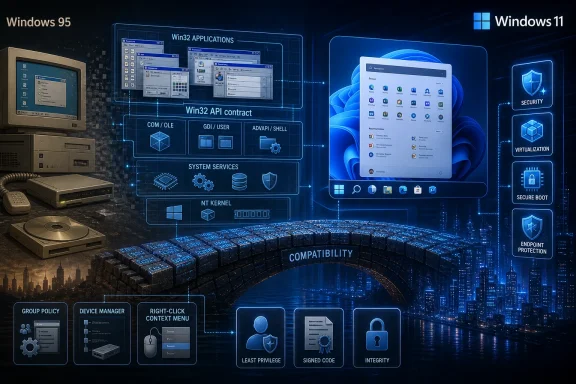 Microsoft’s Oldest Contract Is Still Its Most Powerful One
Every operating system has history. Windows has installed base as history, business model, and design constraint all at once. Russinovich’s point lands because Win32 is not a forgotten corner of the platform; it is the contract that millions of applications, tools, installers, shell extensions, device utilities, line-of-business programs, and enterprise workflows still expect Windows to honor.The phrase “Windows 95 code” makes for a sharper headline than “Windows still supports APIs that became mainstream during the Windows 95 and Windows NT transition.” But the latter is closer to the technical truth. Win32 was the 32-bit Windows programming model that helped carry Microsoft from the DOS-and-Windows 3.x era into the NT architecture that underpins modern Windows.
That distinction matters. Windows 11 is not literally Windows 95 with rounded corners and a Copilot button grafted onto the taskbar. It is an NT-descended operating system with modern kernel hardening, driver models, virtualization features, secure boot expectations, and a servicing pipeline unrecognizable to a 1995 developer. But its user-mode application ecosystem still leans heavily on interfaces born in the same period as dial-up modems, beige towers, and CD-ROM upgrade boxes.
This is why Russinovich’s remark is more revealing than embarrassing. Microsoft’s most durable promise has never been elegance. It has been that your weird old business application, your scanner utility, your accounting package, your macro-laden desktop workflow, and your vendor’s barely maintained configuration tool will probably still launch.
The Win32 Survival Story Was Written by Everyone Else’s Software
Microsoft has tried, repeatedly, to move Windows developers toward newer models. WinRT and the Universal Windows Platform were supposed to create a cleaner, safer, more modern application world. The Windows App SDK and WinUI now represent a more incremental attempt to modernize desktop development without demanding a mass rewrite.The trouble is that software ecosystems do not migrate because a vendor draws a better diagram. They migrate when the new platform is so compelling, so profitable, or so unavoidable that developers absorb the cost of change. Win32 survived because, for many developers, nothing Microsoft offered afterward justified abandoning decades of code, documentation, tooling, Stack Overflow answers, internal expertise, and customer expectations.
This is especially true outside the glossy consumer-app market. In enterprises, manufacturing, health care, finance, education, engineering, logistics, and government, Windows is less a lifestyle platform than a compatibility substrate. Applications are often built around device drivers, local databases, COM automation, file-system assumptions, registry keys, custom installers, plug-ins, shell behavior, and authentication quirks that accumulated over years.
That ecosystem does not see “legacy” as an insult. It sees legacy as working capital. A platform that can keep old code alive reduces retraining, migration risk, procurement churn, and operational surprises. For the CIO, the plant manager, or the small-business owner, Win32’s persistence can look less like technical debt than institutional memory.
Microsoft knows this. It also knows the darker side: every compatibility promise becomes a future constraint. The same API surface that keeps customers loyal also slows redesign, complicates security boundaries, and makes Windows feel internally inconsistent compared with platforms that were allowed to break more aggressively with the past.
Windows 11’s Modern Face Still Sits on a Very Old Desk
Windows 11 is a study in layered identity. Its marketing language emphasizes security, AI, cloud integration, refreshed design, and hardware-backed protections. Its daily reality still includes Control Panel remnants, old property sheets, legacy dialogs, desktop shell behaviors, and management surfaces that betray decades of accumulated design eras.That is not merely cosmetic nostalgia. The familiar old interfaces often expose functionality that newer Settings pages still do not fully replace, or they exist because the underlying configuration model was never cleanly rebuilt. Windows has been modernized in strata: a new shell over old panels, new deployment tools alongside old installers, new security defaults while legacy compatibility remains negotiable underneath.
Users notice this as inconsistency. Administrators notice it as a survival mechanism. Power users may grumble when they fall through a Windows 11 surface into a dialog that looks like it missed three product cycles, but they also know that the old dialog often contains the setting they actually need.
This is the bargain Microsoft has struggled to explain. Windows can look less coherent because it is more accommodating. macOS, iOS, ChromeOS, and mobile platforms have been freer to cut off old assumptions. Windows, by contrast, has had to remain hospitable to the forgotten app that still runs payroll.
The result is an operating system that frequently appears less modern than it is. Underneath, Windows has changed enormously since the 1990s. On the surface, it sometimes looks like a renovation project where the contractors discovered load-bearing walls everywhere.
WinRT Was the Future Until the Past Refused to Move
Russinovich’s mention of WinRT is important because it punctures one of Microsoft’s recurring fantasies: the clean platform reset. WinRT arrived with Windows 8 as part of a sweeping bet that touch-first, store-distributed, sandboxed, modern apps would redefine Windows. Instead, Windows 8 became a cautionary tale about trying to drag desktop users into a future they did not request.The failure was not that WinRT was technically worthless. It introduced important ideas around app packaging, permissions, language projections, asynchronous APIs, and a more controlled application model. But it was coupled to a user experience and distribution strategy that alienated traditional Windows customers, while developers saw limited upside in building apps for a store ecosystem that never matched the gravity of iOS or Android.
UWP later softened the pitch, but the central problem remained. Microsoft wanted a modern app model; Windows developers wanted access to the real desktop. The economic center of Windows software remained Win32, .NET desktop applications, WPF, Windows Forms, Electron apps, game launchers, creative tools, enterprise clients, and utilities that did not fit neatly into Microsoft’s preferred sandbox.
The Windows App SDK is a quieter, more realistic acknowledgment of that history. It does not demand that developers renounce Win32. It tries to let them adopt modern Windows capabilities incrementally. That is less dramatic than a platform revolution, but it is also more compatible with the way Windows actually evolves.
Microsoft’s lesson is blunt: Windows cannot be modernized by pretending the desktop is a rounding error. The desktop is the product. Everything else must negotiate with it.
Compatibility Is a Feature Until It Becomes an Attack Surface
The sysadmin’s view of this story is more complicated than the nostalgia angle suggests. Old APIs and old behaviors are not automatically insecure, and Win32 itself is not a vulnerability. But the design assumptions of older desktop software often clash with modern security expectations.Traditional Windows applications may expect broad file-system access, registry writes, local admin rights, DLL search behaviors, shell integration, COM components, services, scheduled tasks, kernel drivers, or plug-ins loaded from places security teams would rather treat as hostile. Many applications predate today’s threat model, where ransomware crews, infostealers, supply-chain attackers, and living-off-the-land techniques are routine.
This is why Microsoft has spent years adding mitigations around the old model rather than simply deleting it. Windows Defender Application Control, Smart App Control, virtualization-based security, code integrity policies, attack surface reduction rules, driver blocklists, sandboxing, MSIX packaging, and endpoint detection tooling all exist partly because the classic Windows software universe is too powerful to leave unmanaged.
The tension is visible in every enterprise rollout. Security teams want least privilege, controlled application execution, signed code, predictable update channels, and reduced local persistence. Business units want the expensive old application to keep running. Microsoft is left building guardrails around a road system laid down before the modern threat landscape existed.
That does not make Win32 a mistake. It makes it a platform designed for a world where the personal computer was the boundary. Today, the boundary is identity, telemetry, policy, cloud control planes, hardware roots of trust, and zero-trust assumptions. Windows has had to graft that world onto an application model built for another one.
The “Windows 95 Code” Line Is Too Simple, but the Unease Is Real
The viral version of the story is designed to make Windows 11 sound absurd: a 2026 operating system still dragging around code from the Clinton administration. That framing is emotionally satisfying, especially for users frustrated by Windows 11’s performance complaints, interface churn, advertising surfaces, forced account prompts, and uneven Settings migration. But it misses the deeper issue.The persistence of Win32 is not evidence that Microsoft forgot to clean the attic. It is evidence that backward compatibility is Windows’ central product feature. Remove it too aggressively, and Windows becomes just another modern operating system with a smaller app library and angrier customers.
Still, the unease is justified. Microsoft often markets Windows 11 as if it were a clean break: a secure, modern, AI-ready platform built for contemporary hardware. Then users encounter legacy dialogs, inconsistent context menus, awkward compatibility layers, and settings scattered across old and new control surfaces. The contrast makes Windows feel less like a unified product than a truce among internal eras.
Microsoft’s challenge is not that Win32 exists. It is that the company has struggled to give Windows a coherent modernization story that respects Win32 without being trapped by it. Too often, modernization has meant adding another layer rather than finishing the migration from the previous one.
That is why Russinovich’s candor is useful. It names what Windows users already sense. The platform’s power comes from continuity, and its frustrations come from the same place.
Developers Chose the Boring Platform Because Boring Wins
For developers, Win32’s endurance is not mysterious. It is documented, fast, flexible, native, widely understood, and deeply integrated with the operating system. It gives applications direct access to windows, messages, menus, files, processes, memory, devices, networking, graphics, and system services in ways that newer abstractions often wrap rather than replace.Many developers do not write raw Win32 code all day. They use frameworks layered above it: .NET, WPF, Windows Forms, Qt, Electron, game engines, Chromium-based shells, custom C++ frameworks, and hybrid stacks. But the base assumptions of the desktop are still there. A window is still a window. A process is still a process. A message pump, handle, hook, DLL, or registry key may still be part of the picture.
That makes Win32 less like an old application framework and more like urban infrastructure. Developers may not admire every pipe and cable, but they build around them because the city works. Replacing that infrastructure while keeping every building occupied is the sort of project that looks clean only in keynote slides.
Microsoft’s newer developer platforms have often suffered from uncertainty. Silverlight rose and fell. Metro became Modern, then UWP, then a more ambiguous piece of the Windows app story. WinUI and the Windows App SDK are promising, but developers have learned not to bet a product on every Microsoft client-platform rebrand.
Win32, by contrast, has had the virtue of stubborn predictability. It may be old, but it is not a fad. In software, that counts for more than elegance.
Enterprises Hear Reassurance and Warning in the Same Sentence
For enterprise IT, Russinovich’s comment is both comforting and ominous. Comforting, because Microsoft is effectively admitting that the old desktop ecosystem remains central rather than pretending everyone has moved to cloud-native, store-packaged, policy-perfect apps. Ominous, because it confirms that Windows modernization will remain a long negotiation, not a clean switchover.The most important enterprise Windows apps are often the least glamorous. They may have no public website, no modern installer, no mobile equivalent, and no developer team eager to rewrite them. They may control lab instruments, warehouse scanners, point-of-sale devices, claims systems, access-control hardware, CAD workflows, industrial controllers, or internal databases. They survive because replacing them is expensive and risky.
Windows’ backward compatibility gives those organizations time. It also allows technical debt to compound. Every year an old app continues to run is another year in which the migration business case can be deferred. Eventually the organization discovers that the person who understood the app retired, the vendor was acquired, the source code is gone, and the operating system dependency is now a strategic liability.
That is not Microsoft’s problem alone. It is the customer’s problem, the vendor’s problem, and the industry’s problem. But Microsoft’s compatibility posture shapes the incentives. If Windows keeps making the old thing work, many organizations will keep choosing the old thing.
This is the practical lesson for administrators: compatibility should be treated as a window, not a waiver. If Windows 11 still runs a critical legacy app, that is a chance to document it, isolate it, package it, test it, and plan its eventual replacement. It is not proof that the bill will never come due.
The AI PC Era Still Has to Right-Click a File
The timing of this admission is awkward because Microsoft is trying to sell Windows as the front end of the AI PC era. Copilot, neural processing units, Recall-style local indexing concepts, cloud-connected productivity assistance, and AI-driven development tools all depend on the idea that Windows is moving into a new phase. Yet the platform’s daily credibility still depends on whether ordinary desktop behavior works.This is the paradox of Windows in 2026. Microsoft wants to talk about agents, models, and ambient assistance. Users still judge the operating system by File Explorer responsiveness, context menu latency, driver stability, update reliability, battery life, app compatibility, and whether the setting they need is buried in an old dialog.
Win32 is part of that judgment. It is why the tools people rely on still work. It is also why Windows sometimes feels like an operating system where every new feature must pass through a compatibility customs office. Nothing arrives cleanly; everything has to coexist.
That coexistence is not always bad. The right-click menu in Windows 11 is a perfect microcosm. Microsoft tried to modernize and simplify it, but power users quickly noticed missing options, extra clicks, and extensions stranded behind the “show more options” escape hatch. The modern menu was cleaner; the old menu was more useful. Windows users usually choose useful.
If Microsoft’s AI ambitions ignore that lesson, they will repeat the WinRT mistake in a new vocabulary. The future of Windows cannot be imposed as an overlay that treats the desktop as an embarrassment. It has to make the existing desktop better, faster, safer, and less irritating.
The Right Lesson Is Stewardship, Not Shame
There is a lazy version of this debate that says old equals bad. That is not how serious software engineering works. Stable interfaces are valuable precisely because they endure. POSIX, TCP/IP, SQL, C, x86 conventions, and countless enterprise protocols persist not because the industry lacks imagination, but because shared foundations are expensive to replace.Win32 belongs in that category, with all the caveats that come from its size and age. It is not beautiful in every corner. It is not a model of modern API design. It carries historical assumptions and compatibility burdens that Microsoft would never design from scratch today. But it is also one of the most successful application platforms ever created.
The better critique is not that Microsoft failed to kill Win32. It is that Microsoft has too often failed to make the layers above it feel finished. Windows users are not angry because old APIs exist. They are angry when modernization produces duplication, sluggishness, nags, ads, broken defaults, or half-migrated control surfaces.
Stewardship would mean treating Win32 as bedrock while being disciplined about what sits on top. It would mean fewer abandoned app models, fewer UI rewrites that leave power workflows worse, and more investment in performance, consistency, documentation, packaging, and manageability. It would mean respecting the fact that Windows’ serious users can smell fashion-driven platform strategy from a mile away.
That is where Russinovich’s admission should push the conversation. The scandal is not that Windows has a past. The scandal would be if Microsoft used the past as an excuse for an incoherent present.
The Windows 95 Ghost Has Some Practical Advice
The useful takeaway from this episode is not panic; it is calibration. Windows 11 remains modern in important ways, but its oldest compatibility promises still shape its newest features. Anyone responsible for Windows machines should read Russinovich’s comment less as a confession than as a map of where the platform’s constraints really are.- Windows 11 is not literally Windows 95, but the Win32 application model that became central in the 1990s remains fundamental to how desktop Windows works.
- Microsoft’s failed and partial attempts to move beyond Win32 show that developer ecosystems migrate only when the replacement is both technically and economically irresistible.
- Legacy compatibility is a major reason Windows remains dominant in business environments, especially where specialized desktop software still matters.
- The same compatibility that protects old workflows can preserve security risk, operational debt, and management complexity.
- Windows modernization will be most credible when it improves existing desktop workflows instead of pretending they are obsolete.
- Administrators should treat working legacy applications as systems to inventory, contain, and eventually modernize, not as permanent exceptions to planning.
The uncomfortable truth behind the Win32 story is that Windows’ future will not arrive by deleting its past. It will arrive, if Microsoft gets it right, by turning compatibility from a defensive reflex into a disciplined engineering strategy: old applications still run, modern security still holds, new APIs earn adoption instead of demanding obedience, and Windows finally stops sounding apologetic about the very continuity that made it indispensable.
Source: Zamin.uz Microsoft Windows 11 операцион тизимида Windows 95 кодлари сақланиб қолганини тан олди
