

Windows 11 still includes Microsoft’s old Phone Dialer utility, launched in the Windows 95 era to place calls through a modem and telephone line, even though most modern PCs lack the hardware it expects and Microsoft now steers users toward Phone Link. That small executable is not important because many people use it. It is important because it shows how Windows ages: not by clean replacement, but by sediment. Microsoft’s flagship operating system still carries tools built for a world of beige towers, dial tones, and office PBX lines, because compatibility remains both Windows’ superpower and its tax.
Neowin’s latest Windows archaeology find is Phone Dialer, the little
That is the point. Phone Dialer belongs to an era when a PC could plausibly be attached to a voice-capable modem, when “calling from your computer” meant pushing tones through the public switched telephone network rather than handing a Bluetooth session to a smartphone or routing audio through Teams. Its interface is simple because its job was simple: type or click a number, keep a few speed-dial entries, and let Windows talk to telephony hardware.
The oddity is not that the app is old. Windows is full of old. The oddity is that Phone Dialer persists in Windows 11 at a time when Microsoft has spent years trying to make the operating system feel coherent, cloud-connected, AI-adjacent, and mobile-aware. The company has deprecated flashier pieces of its past, but this modest little dial pad remains, unadvertised and largely untouched.
That tension is the Windows story in miniature. Microsoft wants Windows to be modern enough to compete with macOS, ChromeOS, Android, iOS, and the browser itself. It also wants Windows to keep running whatever line-of-business workflow someone wired together in 2003 and never budgeted to replace.
Windows is not merely a consumer operating system. It is a platform contract stretching across decades of hardware, software, drivers, protocols, control panels, management scripts, and business processes. Every obscure component has a chance of being somebody’s dependency, even if that somebody is a hospital department with a scheduling terminal, a hotel back office, a manufacturing floor, or a public-sector desk that replaced the monitor twice but never replaced the workflow.
Phone Dialer’s continued existence may not mean there is a huge user base. It probably does not. It means Microsoft has to weigh the benefit of removing it against the possibility that removal breaks a customer whose setup is invisible until it fails. In Windows engineering, absence of evidence is not evidence of absence; it is often a reason to leave the file alone.
That is why old Windows utilities can seem immortal. They are not necessarily loved, developed, or even meaningfully supported in the way modern Store apps are supported. They remain because Windows has historically treated compatibility as an operating principle rather than a feature checkbox.
There is a difference between maintaining a component and preserving it. Phone Dialer appears to be preserved. It is still present, still launchable, still recognizable, and still capable in theory of doing the job it was built for if the right telephony stack exists underneath. But it is not where Microsoft’s design energy, security messaging, or user education lives.
The underlying concept was not foolish. Microsoft built telephony support into Windows because the PC was becoming the universal office machine. If it could store contacts, run databases, manage customer records, and connect to a modem, then dialing from the desktop was an obvious productivity feature. The line between computer and phone was already blurring, just not in the way the smartphone era later made familiar.
That old architecture also explains why the utility feels both quaint and strangely professional. The speed-dial buttons and keypad evoke a physical office phone. The assumption that a computer might have telephony hardware evokes the period when “multimedia PC” and “communications PC” were meaningful categories rather than marketing fossils.
What changed was not the desire to call from a computer. That desire exploded. What changed was the transport. The modern PC call is a VoIP session in Teams, Zoom, Slack, WhatsApp, Phone Link, a browser tab, or a carrier-integrated softphone. The call no longer requires the PC to pretend it is sitting beside a copper phone line.
That is why Phone Dialer’s survival feels uncanny. Microsoft did not abandon computer calling. It abandoned this route to it.
Phone Link is the clearest consumer-facing successor in spirit, though not in architecture. It connects Windows to Android devices and iPhones, bringing messages, notifications, photos, and in some cases calling features into the Windows experience. The premise is not that your PC has a modem. The premise is that your phone is already the modem, identity token, camera, message store, and cellular endpoint.
That shift is bigger than one app. It captures Microsoft’s post-Windows Phone reality. Having lost the smartphone operating-system war, Microsoft has spent years making Windows a better companion to phones it does not control. Phone Link is a concession and a strategy: if Windows cannot be the phone, it can be the place where the phone becomes manageable during work.
Phone Dialer, by contrast, comes from a world where Windows expected peripherals to attach directly and expose capabilities through local APIs. It is desktop Windows as a hardware orchestration layer. Phone Link is Windows as a cloud-and-device bridge. The former assumes cables and drivers; the latter assumes accounts, Bluetooth, Wi-Fi, mobile apps, permissions, and service updates.
This is why the relic matters. It lets us see how far Microsoft’s mental model has moved while the operating system’s filesystem keeps receipts.
Complexity matters in several ways. There is the security question: dormant code can still become relevant if it exposes attack surface, loads libraries, invokes older APIs, or interacts with privileged components. There is the management question: administrators have to distinguish between benign legacy components and suspicious processes. There is the user-trust question: when someone sees a mysterious “Phone Dialer” process or executable, they may wonder whether Windows has been compromised.
To be clear, the mere presence of
Enterprise IT often prefers clarity. If a component is supported, document it. If it is deprecated, say so. If it is retained only for compatibility, make that explicit. The awkward middle ground is where Phone Dialer appears to live: available enough to find, obscure enough to confuse, and old enough that most users cannot infer its purpose from the modern Windows experience.
That ambiguity is where nostalgia stops being cute. Windows does not need to delete every old tool, but it does need to explain which old tools still matter.
The company has become more explicit about some retirements. Internet Explorer, WordPad, older scripting behaviors, classic subsystems, and various control-panel-era experiences have all faced different forms of removal, redirection, or deprecation. But Windows still contains many features whose official status is less obvious to ordinary users.
Phone Dialer appears to be one of those components that has not been loudly killed because there is little upside in making noise about it. Announcing its deprecation would invite questions. Removing it would invite compatibility risk. Leaving it alone costs little in the short term.
That short-term logic is rational. It is also how platforms become cluttered. Each individual relic is defensible; collectively, they create the feeling that Windows is never quite rebuilt, only overlaid.
This is the paradox Microsoft lives with. The company markets Windows 11 with rounded corners, centered taskbar icons, Copilot branding, modern settings pages, and app-store polish. Beneath that, the operating system still contains pathways built for the office technology stack of the 1990s. Both are true Windows.
Modern communications apps do something more complicated while looking simpler. They resolve contacts through cloud directories, route calls through accounts, negotiate device permissions, sync state across endpoints, integrate with calendars, apply enterprise policy, record compliance logs, and traverse networks. A Teams dial pad may look like a dial pad, but behind it sits an enormous service architecture.
That makes Phone Dialer almost refreshingly literal. It does what its name says. There is no feed, no onboarding animation, no “try the new experience,” no AI summary, no identity picker, no telemetry banner visible to the user. It is a keypad from a time when software could be small because the problem was small.
But that simplicity is also why it feels unusable on a modern PC. The app is intuitive only if the hardware assumption is true. Without a voice-capable modem and telephony configuration, the interface becomes a prop. It is a working door in a building whose hallway has been demolished.
The lesson is not that old interfaces were better or worse. It is that software ages around assumptions. When the assumption disappears, even functional code becomes historical evidence.
Yet Windows 11 is still Windows. The new Settings app and the old administrative tools coexist. Modern packaging and Win32 installers coexist. Cloud account nudges coexist with local-machine management. Store apps coexist with executables whose lineage predates the Store by decades.
This is not automatically a failure. It is one reason Windows remains useful in places where tidier platforms struggle. If you need to run a weird USB instrument, an old accounting package, a custom driver, a serial-console workflow, a legacy VPN client, and a modern browser on the same machine, Windows is still the default answer in much of the world.
But the coexistence has a trust cost. Users see a new Windows surface and assume coherence. Then they find an ancient utility, a legacy dialog, or a management snap-in that seems to have fallen through time. The result is not just amusement; it is a reminder that Windows modernization is selective.
Phone Dialer is not the biggest example. It is just unusually charming because the telephone line is such a visible symbol of a vanished computing era.
That matters enormously in enterprise environments. A company may modernize collaboration tools, migrate email to the cloud, deploy endpoint management, and adopt zero-trust language, while still running a crucial workflow that depends on a decades-old executable. The budget, risk appetite, and institutional knowledge required to replace that workflow may not exist.
Windows accommodates that mess better than most platforms. It lets the shiny and the shabby share a desktop. It lets new procurement decisions coexist with old operational dependencies. It lets a machine be both a Microsoft 365 endpoint and a shrine to past purchasing decisions.
From that angle, Phone Dialer is not embarrassing. It is a tiny expression of the bargain that made Windows dominant: Microsoft will keep dragging old assumptions forward so customers can move at their own pace. The problem is that a bargain can become a burden when the past is never forced to declare itself.
Compatibility is valuable. Undocumented immortality is not.
Security teams already work from this principle. Remove unused roles. Disable unnecessary services. Restrict scripting where possible. Inventory executables. Reduce attack surface. The less a system can do, the less an attacker can potentially abuse.
Phone Dialer is probably not high on anyone’s emergency list. It is not the same category of concern as an exposed remote service, an unpatched driver, or a browser vulnerability. But it is part of the broader Windows reality that defenders must understand what is present, not merely what is advertised.
There is also the social-engineering angle. A mysterious legacy app name can be used as camouflage, and ordinary users may not know whether
The practical answer is not panic. It is inventory and policy. If an organization does not need legacy telephony support, it should know whether the component is present, whether it can be blocked by application control, and whether alerts involving it are meaningful. The point is not that Phone Dialer is dangerous. The point is that unknowns are operational debt.
The company already does this in some areas. Windows features, APIs, and applications sometimes receive formal deprecation notices or lifecycle guidance. But the map is inconsistent, especially for small utilities that are neither strategic nor prominent.
That inconsistency leaves the community to do archaeology. Enthusiasts discover an executable, test it, post screenshots, joke about the one customer who must still depend on UI automation, and speculate about why it remains. The jokes are funny because they are plausible. Windows really does have corners where one customer, one workflow, or one compatibility test can keep something alive.
Microsoft could reduce that uncertainty without making a dramatic product announcement. A maintained list of legacy inbox utilities and their status would help. So would clearer messaging in the app itself: not just “you lack hardware,” but “this legacy tool is provided for compatibility with modem-based telephony hardware.”
That kind of candor would not make Windows less compatible. It would make it more legible.
That generational shift matters because it changes what feels native. To a Windows 95 user, a PC that could dial a phone number through a modem was futuristic. To a Windows 11 user, the same utility feels prehistoric, while Phone Link feels normal and perhaps even a little conservative compared with the integration Apple offers between iPhone and Mac.
Microsoft is trying to make Windows feel native to this newer world. Phone Link, mobile-device settings, notification syncing, Android integration experiments, and cloud-connected identity all point in that direction. The PC is no longer the center of a user’s digital life by default; it is one node in a constellation.
But Windows cannot simply become a clean mobile-era operating system without betraying part of its installed base. That is why it often feels split-brained. It must satisfy the user who wants a sleek laptop that talks to an iPhone, and the administrator who needs a workstation that still tolerates equipment from a vendor whose software was last meaningfully updated during the Bush administration.
Phone Dialer’s presence is a reminder that Windows’ center of gravity is not only Redmond’s roadmap. It is the installed base.
That caution is not cowardice. It is a rational response to Windows’ role in the world. Windows PCs run point-of-sale systems, medical devices, industrial tools, public administration workflows, school labs, trading desks, and home gaming rigs. A clean cut in one place can become a crisis somewhere else.
Still, never choosing is also a choice. If Microsoft leaves old utilities in place indefinitely without explanation, it pushes the burden of interpretation onto users and administrators. Is this supported? Is it safe? Is it required? Is it abandoned? Should it be blocked? Will it disappear in the next feature update?
The answer cannot be the same for every component. Some old tools deserve retirement. Some deserve optional installation. Some should remain because they serve legitimate niches. Some should be documented as compatibility shims, not presented as ordinary apps.
Phone Dialer is a good candidate for that last category. It does not need a marketing campaign. It needs a label.
Copilot tells us where Microsoft wants Windows to go. Phone Dialer tells us why Windows moves slowly. The future can be announced in a product video, but the past ships in System32.
That tension explains much of the frustration and affection Windows inspires. Users complain that Windows is cluttered, inconsistent, and full of leftovers. The same users often rely on the fact that Windows will run almost anything, talk to almost anything, and preserve workflows that more opinionated platforms would have broken long ago.
The operating system is not a cathedral. It is a city. Some districts are newly renovated; others contain infrastructure nobody wants to touch because too many pipes run through it. Phone Dialer is not the power plant, but it is one of those odd old storefronts that proves the city was not built all at once.
Microsoft’s challenge is not to erase every old storefront. It is to stop pretending the map is obvious.
The next version of Windows will almost certainly carry more AI, more cloud integration, and more pressure to make the PC behave like part of a larger device mesh. It may also carry small, strange survivals from eras that now feel impossibly distant. Microsoft can keep that compatibility advantage, but it should be more honest about the artifacts it preserves, because the future of Windows will be judged not only by what new things it adds, but by how clearly it explains the old things it refuses to let die.
Source: Neowin This legacy app somehow still exists in Windows 11, despite zero use
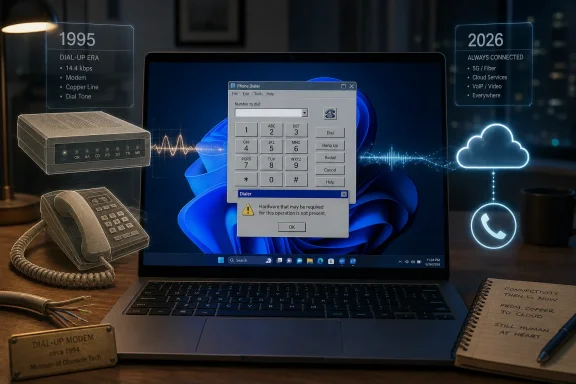 Windows Still Ships the Future With a Trapdoor to 1995
Neowin’s latest Windows archaeology find is Phone Dialer, the little dialer.exe utility that can still be summoned from Run or Search in Windows 11. Launch it on a typical 2026 laptop and the result is less a working communications tool than a museum label: Windows tells you the required telephony hardware is not present.That is the point. Phone Dialer belongs to an era when a PC could plausibly be attached to a voice-capable modem, when “calling from your computer” meant pushing tones through the public switched telephone network rather than handing a Bluetooth session to a smartphone or routing audio through Teams. Its interface is simple because its job was simple: type or click a number, keep a few speed-dial entries, and let Windows talk to telephony hardware.
The oddity is not that the app is old. Windows is full of old. The oddity is that Phone Dialer persists in Windows 11 at a time when Microsoft has spent years trying to make the operating system feel coherent, cloud-connected, AI-adjacent, and mobile-aware. The company has deprecated flashier pieces of its past, but this modest little dial pad remains, unadvertised and largely untouched.
That tension is the Windows story in miniature. Microsoft wants Windows to be modern enough to compete with macOS, ChromeOS, Android, iOS, and the browser itself. It also wants Windows to keep running whatever line-of-business workflow someone wired together in 2003 and never budgeted to replace.
Phone Dialer Is Not an App So Much as a Compatibility Promise
The easiest reaction is to laugh. Phone Dialer looks like the sort of relic that survives because nobody remembered to delete it. But on Windows, “nobody remembered” is rarely the whole answer.Windows is not merely a consumer operating system. It is a platform contract stretching across decades of hardware, software, drivers, protocols, control panels, management scripts, and business processes. Every obscure component has a chance of being somebody’s dependency, even if that somebody is a hospital department with a scheduling terminal, a hotel back office, a manufacturing floor, or a public-sector desk that replaced the monitor twice but never replaced the workflow.
Phone Dialer’s continued existence may not mean there is a huge user base. It probably does not. It means Microsoft has to weigh the benefit of removing it against the possibility that removal breaks a customer whose setup is invisible until it fails. In Windows engineering, absence of evidence is not evidence of absence; it is often a reason to leave the file alone.
That is why old Windows utilities can seem immortal. They are not necessarily loved, developed, or even meaningfully supported in the way modern Store apps are supported. They remain because Windows has historically treated compatibility as an operating principle rather than a feature checkbox.
There is a difference between maintaining a component and preserving it. Phone Dialer appears to be preserved. It is still present, still launchable, still recognizable, and still capable in theory of doing the job it was built for if the right telephony stack exists underneath. But it is not where Microsoft’s design energy, security messaging, or user education lives.
The Modem Era Did Not End Cleanly
Phone Dialer makes more sense if you remember that the PC was once expected to be part of the telephone system. In the Windows 95 and Windows 98 years, modems were not exotic add-ons. They were how millions of people reached the internet, faxed documents, connected to remote offices, and occasionally turned the computer into a crude telephone console.The underlying concept was not foolish. Microsoft built telephony support into Windows because the PC was becoming the universal office machine. If it could store contacts, run databases, manage customer records, and connect to a modem, then dialing from the desktop was an obvious productivity feature. The line between computer and phone was already blurring, just not in the way the smartphone era later made familiar.
That old architecture also explains why the utility feels both quaint and strangely professional. The speed-dial buttons and keypad evoke a physical office phone. The assumption that a computer might have telephony hardware evokes the period when “multimedia PC” and “communications PC” were meaningful categories rather than marketing fossils.
What changed was not the desire to call from a computer. That desire exploded. What changed was the transport. The modern PC call is a VoIP session in Teams, Zoom, Slack, WhatsApp, Phone Link, a browser tab, or a carrier-integrated softphone. The call no longer requires the PC to pretend it is sitting beside a copper phone line.
That is why Phone Dialer’s survival feels uncanny. Microsoft did not abandon computer calling. It abandoned this route to it.
Microsoft Replaced the Phone Line With the Phone Itself
The modern Microsoft answer to “make calls from Windows” is not Phone Dialer. It is Phone Link, Teams, and the broader Microsoft 365 communications stack. Those products represent an entirely different philosophy: the PC is no longer the telephone endpoint by itself, but a screen, keyboard, identity layer, and notification hub connected to services and devices.Phone Link is the clearest consumer-facing successor in spirit, though not in architecture. It connects Windows to Android devices and iPhones, bringing messages, notifications, photos, and in some cases calling features into the Windows experience. The premise is not that your PC has a modem. The premise is that your phone is already the modem, identity token, camera, message store, and cellular endpoint.
That shift is bigger than one app. It captures Microsoft’s post-Windows Phone reality. Having lost the smartphone operating-system war, Microsoft has spent years making Windows a better companion to phones it does not control. Phone Link is a concession and a strategy: if Windows cannot be the phone, it can be the place where the phone becomes manageable during work.
Phone Dialer, by contrast, comes from a world where Windows expected peripherals to attach directly and expose capabilities through local APIs. It is desktop Windows as a hardware orchestration layer. Phone Link is Windows as a cloud-and-device bridge. The former assumes cables and drivers; the latter assumes accounts, Bluetooth, Wi-Fi, mobile apps, permissions, and service updates.
This is why the relic matters. It lets us see how far Microsoft’s mental model has moved while the operating system’s filesystem keeps receipts.
The Real Cost of Backward Compatibility Is Not Disk Space
A tiny utility sitting in Windows is not going to meaningfully affect storage, memory, or performance for most users. The cost is not that Phone Dialer takes up room. The cost is that every preserved component is another piece of complexity in an already sprawling system.Complexity matters in several ways. There is the security question: dormant code can still become relevant if it exposes attack surface, loads libraries, invokes older APIs, or interacts with privileged components. There is the management question: administrators have to distinguish between benign legacy components and suspicious processes. There is the user-trust question: when someone sees a mysterious “Phone Dialer” process or executable, they may wonder whether Windows has been compromised.
To be clear, the mere presence of
dialer.exe does not mean Windows 11 is unsafe. Microsoft ships many legacy components without incident, and old does not automatically mean vulnerable. But the broader principle is familiar to anyone who has hardened Windows images: unused functionality is rarely beloved by security teams.Enterprise IT often prefers clarity. If a component is supported, document it. If it is deprecated, say so. If it is retained only for compatibility, make that explicit. The awkward middle ground is where Phone Dialer appears to live: available enough to find, obscure enough to confuse, and old enough that most users cannot infer its purpose from the modern Windows experience.
That ambiguity is where nostalgia stops being cute. Windows does not need to delete every old tool, but it does need to explain which old tools still matter.
Deprecation Is a Product Decision, Not a Cleanup Task
Microsoft’s handling of legacy Windows components has always been uneven because deprecation is politically and commercially harder than deletion looks from the outside. Removing a utility from a consumer laptop image may sound trivial. Removing it from a platform used by governments, factories, clinics, labs, call centers, and embedded deployments is something else.The company has become more explicit about some retirements. Internet Explorer, WordPad, older scripting behaviors, classic subsystems, and various control-panel-era experiences have all faced different forms of removal, redirection, or deprecation. But Windows still contains many features whose official status is less obvious to ordinary users.
Phone Dialer appears to be one of those components that has not been loudly killed because there is little upside in making noise about it. Announcing its deprecation would invite questions. Removing it would invite compatibility risk. Leaving it alone costs little in the short term.
That short-term logic is rational. It is also how platforms become cluttered. Each individual relic is defensible; collectively, they create the feeling that Windows is never quite rebuilt, only overlaid.
This is the paradox Microsoft lives with. The company markets Windows 11 with rounded corners, centered taskbar icons, Copilot branding, modern settings pages, and app-store polish. Beneath that, the operating system still contains pathways built for the office technology stack of the 1990s. Both are true Windows.
The UI Looks Ancient Because Its Assumptions Are Ancient
Phone Dialer’s interface is not merely visually old. It expresses an old theory of user interaction. The user sits at a desktop PC, enters a number, perhaps selects a saved speed dial, and expects the machine to initiate a call through attached hardware.Modern communications apps do something more complicated while looking simpler. They resolve contacts through cloud directories, route calls through accounts, negotiate device permissions, sync state across endpoints, integrate with calendars, apply enterprise policy, record compliance logs, and traverse networks. A Teams dial pad may look like a dial pad, but behind it sits an enormous service architecture.
That makes Phone Dialer almost refreshingly literal. It does what its name says. There is no feed, no onboarding animation, no “try the new experience,” no AI summary, no identity picker, no telemetry banner visible to the user. It is a keypad from a time when software could be small because the problem was small.
But that simplicity is also why it feels unusable on a modern PC. The app is intuitive only if the hardware assumption is true. Without a voice-capable modem and telephony configuration, the interface becomes a prop. It is a working door in a building whose hallway has been demolished.
The lesson is not that old interfaces were better or worse. It is that software ages around assumptions. When the assumption disappears, even functional code becomes historical evidence.
Windows 11 Is Cleaner on the Surface Than Under the Floorboards
Microsoft has put real effort into making Windows 11 feel less like a pile of eras. Settings continues to absorb old Control Panel territory. Inbox apps have been redesigned or replaced. Security baselines have moved toward TPMs, virtualization-based security, and more restrictive defaults. The supported hardware list itself was a statement that Microsoft wanted a more modern foundation.Yet Windows 11 is still Windows. The new Settings app and the old administrative tools coexist. Modern packaging and Win32 installers coexist. Cloud account nudges coexist with local-machine management. Store apps coexist with executables whose lineage predates the Store by decades.
This is not automatically a failure. It is one reason Windows remains useful in places where tidier platforms struggle. If you need to run a weird USB instrument, an old accounting package, a custom driver, a serial-console workflow, a legacy VPN client, and a modern browser on the same machine, Windows is still the default answer in much of the world.
But the coexistence has a trust cost. Users see a new Windows surface and assume coherence. Then they find an ancient utility, a legacy dialog, or a management snap-in that seems to have fallen through time. The result is not just amusement; it is a reminder that Windows modernization is selective.
Phone Dialer is not the biggest example. It is just unusually charming because the telephone line is such a visible symbol of a vanished computing era.
The Fossils Are Also a Competitive Advantage
It is fashionable to mock Windows for carrying old baggage, and often the mockery is deserved. But the same baggage is why Windows has survived so many platform transitions. Microsoft rarely wins by having the cleanest break. It wins by letting customers avoid clean breaks.That matters enormously in enterprise environments. A company may modernize collaboration tools, migrate email to the cloud, deploy endpoint management, and adopt zero-trust language, while still running a crucial workflow that depends on a decades-old executable. The budget, risk appetite, and institutional knowledge required to replace that workflow may not exist.
Windows accommodates that mess better than most platforms. It lets the shiny and the shabby share a desktop. It lets new procurement decisions coexist with old operational dependencies. It lets a machine be both a Microsoft 365 endpoint and a shrine to past purchasing decisions.
From that angle, Phone Dialer is not embarrassing. It is a tiny expression of the bargain that made Windows dominant: Microsoft will keep dragging old assumptions forward so customers can move at their own pace. The problem is that a bargain can become a burden when the past is never forced to declare itself.
Compatibility is valuable. Undocumented immortality is not.
The Security Story Is About Exposure, Not Nostalgia
Any time an obscure Windows component gets attention, the security conversation follows. That is healthy, but it needs precision. The issue is not that Phone Dialer is old and therefore bad. The issue is whether it creates unnecessary exposure in environments that do not use it.Security teams already work from this principle. Remove unused roles. Disable unnecessary services. Restrict scripting where possible. Inventory executables. Reduce attack surface. The less a system can do, the less an attacker can potentially abuse.
Phone Dialer is probably not high on anyone’s emergency list. It is not the same category of concern as an exposed remote service, an unpatched driver, or a browser vulnerability. But it is part of the broader Windows reality that defenders must understand what is present, not merely what is advertised.
There is also the social-engineering angle. A mysterious legacy app name can be used as camouflage, and ordinary users may not know whether
dialer.exe is expected. Microsoft-signed binaries are not inherently suspicious, but attackers have long benefited from the confusion created by crowded system directories and familiar-looking names.The practical answer is not panic. It is inventory and policy. If an organization does not need legacy telephony support, it should know whether the component is present, whether it can be blocked by application control, and whether alerts involving it are meaningful. The point is not that Phone Dialer is dangerous. The point is that unknowns are operational debt.
Microsoft’s Silence Creates the Vacuum
Neowin notes that there does not appear to be a clear official deprecation statement for Phone Dialer. That silence is arguably more interesting than the app itself. Microsoft could classify components like this more plainly for administrators and enthusiasts: supported, deprecated, retained for compatibility, or subject to future removal.The company already does this in some areas. Windows features, APIs, and applications sometimes receive formal deprecation notices or lifecycle guidance. But the map is inconsistent, especially for small utilities that are neither strategic nor prominent.
That inconsistency leaves the community to do archaeology. Enthusiasts discover an executable, test it, post screenshots, joke about the one customer who must still depend on UI automation, and speculate about why it remains. The jokes are funny because they are plausible. Windows really does have corners where one customer, one workflow, or one compatibility test can keep something alive.
Microsoft could reduce that uncertainty without making a dramatic product announcement. A maintained list of legacy inbox utilities and their status would help. So would clearer messaging in the app itself: not just “you lack hardware,” but “this legacy tool is provided for compatibility with modem-based telephony hardware.”
That kind of candor would not make Windows less compatible. It would make it more legible.
The Consumer PC Has Moved On, but Windows Cannot Entirely Follow
For ordinary Windows 11 users, Phone Dialer is irrelevant. Their phone calls happen through smartphones, earbuds, messaging apps, VoIP services, conferencing platforms, and carrier features. Many younger users have never owned a landline, much less used a PC modem to interact with one.That generational shift matters because it changes what feels native. To a Windows 95 user, a PC that could dial a phone number through a modem was futuristic. To a Windows 11 user, the same utility feels prehistoric, while Phone Link feels normal and perhaps even a little conservative compared with the integration Apple offers between iPhone and Mac.
Microsoft is trying to make Windows feel native to this newer world. Phone Link, mobile-device settings, notification syncing, Android integration experiments, and cloud-connected identity all point in that direction. The PC is no longer the center of a user’s digital life by default; it is one node in a constellation.
But Windows cannot simply become a clean mobile-era operating system without betraying part of its installed base. That is why it often feels split-brained. It must satisfy the user who wants a sleek laptop that talks to an iPhone, and the administrator who needs a workstation that still tolerates equipment from a vendor whose software was last meaningfully updated during the Bush administration.
Phone Dialer’s presence is a reminder that Windows’ center of gravity is not only Redmond’s roadmap. It is the installed base.
The Better Question Is Who Gets to Decide When the Past Is Over
Every platform eventually has to choose when compatibility stops being worth it. Apple makes those choices aggressively and absorbs the criticism. Google makes them through cloud service churn and API enforcement. Microsoft makes them slowly, selectively, and often only after years of overlap.That caution is not cowardice. It is a rational response to Windows’ role in the world. Windows PCs run point-of-sale systems, medical devices, industrial tools, public administration workflows, school labs, trading desks, and home gaming rigs. A clean cut in one place can become a crisis somewhere else.
Still, never choosing is also a choice. If Microsoft leaves old utilities in place indefinitely without explanation, it pushes the burden of interpretation onto users and administrators. Is this supported? Is it safe? Is it required? Is it abandoned? Should it be blocked? Will it disappear in the next feature update?
The answer cannot be the same for every component. Some old tools deserve retirement. Some deserve optional installation. Some should remain because they serve legitimate niches. Some should be documented as compatibility shims, not presented as ordinary apps.
Phone Dialer is a good candidate for that last category. It does not need a marketing campaign. It needs a label.
A Tiny Dial Pad Says More About Windows Than Copilot Does
The current Windows conversation is dominated by AI, cloud accounts, ads, telemetry, hardware requirements, and the slow migration from old control surfaces to new ones. Those are important stories. But sometimes a forgotten utility tells the deeper truth more clearly than the keynote feature does.Copilot tells us where Microsoft wants Windows to go. Phone Dialer tells us why Windows moves slowly. The future can be announced in a product video, but the past ships in System32.
That tension explains much of the frustration and affection Windows inspires. Users complain that Windows is cluttered, inconsistent, and full of leftovers. The same users often rely on the fact that Windows will run almost anything, talk to almost anything, and preserve workflows that more opinionated platforms would have broken long ago.
The operating system is not a cathedral. It is a city. Some districts are newly renovated; others contain infrastructure nobody wants to touch because too many pipes run through it. Phone Dialer is not the power plant, but it is one of those odd old storefronts that proves the city was not built all at once.
Microsoft’s challenge is not to erase every old storefront. It is to stop pretending the map is obvious.
The Practical Lessons Hidden in the Dial Tone
Phone Dialer’s survival is amusing, but it leaves behind concrete lessons for the people who actually manage Windows machines. The app itself may not matter much. The pattern around it does.- Windows 11 still contains legacy components whose original hardware assumptions no longer match the average PC.
- Phone Dialer appears to remain primarily for compatibility, not because Microsoft is actively promoting modem-based calling.
- Modern Windows calling and phone integration now lives in tools like Phone Link, Teams, and cloud-connected communications services.
- Administrators should treat obscure legacy executables as inventory questions rather than curiosities.
- Microsoft would help users and IT teams by labeling retained legacy utilities more clearly instead of leaving their status to community archaeology.
- The persistence of old tools is part of why Windows remains useful in messy real-world environments, even when it undermines the operating system’s modern image.
The next version of Windows will almost certainly carry more AI, more cloud integration, and more pressure to make the PC behave like part of a larger device mesh. It may also carry small, strange survivals from eras that now feel impossibly distant. Microsoft can keep that compatibility advantage, but it should be more honest about the artifacts it preserves, because the future of Windows will be judged not only by what new things it adds, but by how clearly it explains the old things it refuses to let die.
Source: Neowin This legacy app somehow still exists in Windows 11, despite zero use
