

Microsoft’s Character Map, the charmap.exe utility for browsing fonts and copying special characters, remains present in Windows 11 in May 2026 after originating as a Windows 3.1 accessory in 1992 and surviving largely unchanged through more than three decades of Windows releases. That makes it older than the Start menu, older than Plug and Play as most users remember it, and older than the web-era assumptions now baked into Windows design. Its survival is not nostalgia alone. It is a small reminder that Windows remains less a single modern product than a negotiated peace treaty between eras.
The tempting joke is that Microsoft forgot Character Map existed. The more interesting answer is that Microsoft probably remembers exactly what it is: a tiny Win32 utility with a narrow job, a near-zero support burden, and just enough users to make removal more annoying than preservation. In an operating system where WordPad can be cut, Steps Recorder can be marked for execution, and Copilot can be wedged into nearly every visible surface, charmap.exe persists because it belongs to a different category of Windows component: the tool that is too small to modernize, too useful to kill, and too old to offend anyone.
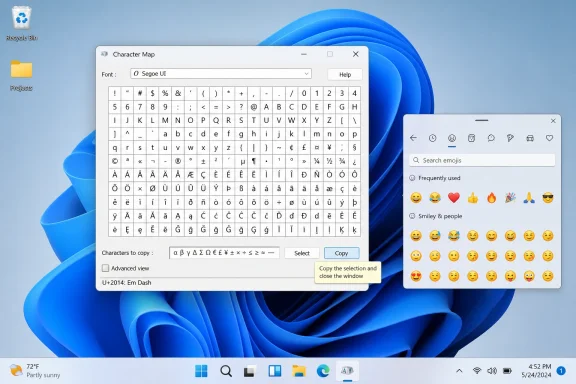
Character Map looks like software from another civilization because, in many ways, it is. It asks the user to choose a font, inspect the glyphs available in that font, select characters, and copy them elsewhere. It does not pretend to be a writing assistant, a design system, a cloud service, or a productivity hub.
That simplicity is precisely why it keeps surviving. If you need an em dash, a mathematical operator, a currency symbol, a Greek letter, a diacritic, or a symbol buried inside a specialist font, Character Map gives you a visible inventory instead of asking you to remember a code point or search the web. It is not elegant by 2026 standards, but it is legible in the oldest Windows sense: here is the thing, here is the grid, here is the Copy button.
The tool’s age is not incidental to its utility. Character Map belongs to a time when Windows was still trying to make the invisible parts of computing visible to ordinary people. Fonts were mysterious, keyboards were nationally specific, and the idea that every character in the world could live in one coherent encoding system was still working its way into mainstream desktop software.
That world has changed, but it has not disappeared. Unicode won. Emoji became a language layer. Office, browsers, design tools, IDEs, and chat apps all grew their own symbol pickers. Yet the underlying problem remains: users sometimes need to find a character that is not printed on the keyboard and may not be conveniently exposed by the application they are using.
Character Map is not the best answer to that problem anymore. It is merely the answer Windows has shipped for 34 years.
Those decisions reveal Microsoft’s current philosophy better than any design keynote. A legacy tool is not safe simply because it is old, but it is not doomed simply because it is old either. The company appears to be judging these utilities by a mix of maintenance cost, security exposure, support confusion, replacement quality, and visibility.
WordPad failed that test because it occupied an awkward middle ground. It was too limited to be a modern word processor, too capable to be treated as a plain text editor, and too associated with file formats and expectations Microsoft would rather route toward Word, Notepad, or web-based Office. Steps Recorder failed because screen recording, screenshots, and guided troubleshooting have moved elsewhere, and because recording user activity for support purposes is a more sensitive proposition in today’s privacy and security environment.
Character Map survives because it is quieter. It is not a file-format handler that users mistake for a supported document editor. It is not a recorder. It does not hook into cloud identity, sync settings, AI features, or collaboration services. It opens, copies characters, and closes.
That does not make it beautiful software. It makes it strategically uninteresting, which may be the safest status a Windows utility can have.
But the emoji panel and Character Map are not the same tool wearing different skins. The emoji panel is optimized for immediacy: faces, symbols, GIF-adjacent culture, kaomoji, and common punctuation. Character Map is optimized for completeness within a selected font. That distinction matters to anyone working with typography, legacy documents, symbols, code samples, localization, or unusual scripts.
The emoji panel answers the question, “What symbol do I want to insert right now?” Character Map answers a more technical question: “What characters does this font actually contain, and how do I copy one of them?” That is a narrower question, but it has not stopped mattering.
Designers still inspect fonts. Developers still check characters and encodings. Administrators still run into legacy applications where modern text input behaves unpredictably. Writers and editors still need odd punctuation often enough to keep a few ancient tricks alive. Even casual users occasionally need a degree symbol, a copyright mark, or an accented character and discover that the keyboard does not care about their deadline.
The problem with declaring old utilities obsolete is that “obsolete” often means “not needed by the person making the decision.” Windows is used in hospitals, factories, government offices, schools, print shops, courtrooms, call centers, engineering departments, and hobbyist basements. Somewhere in that mess, a grid of characters remains useful.
Character Map is a minor expression of that major reality. It is not just an app; it is a compatibility artifact. It reflects the old Windows bargain: if something shipped, and people built habits around it, and it does not create enough pain to justify removal, it may live for a very long time.
That bargain frustrates designers. It also explains why Windows remains Windows. Apple can make sharper breaks because it controls a narrower hardware and software culture. Linux distributions can let users assemble their own preferred toolchains because fragmentation is part of the bargain. Windows, by contrast, carries the burden of being the default desktop for everyone from gamers to accountants to industrial control vendors.
The result is an operating system that often feels inconsistent because consistency is not its highest historical value. Continuity is. Character Map looks wrong next to Windows 11’s centered taskbar, translucent surfaces, and rounded corners, but it behaves exactly as long-time users expect. For a certain kind of Windows utility, that is more important than visual harmony.
Microsoft’s public design language keeps changing. The institutional memory of Windows changes much more slowly.
WordPad faced that problem from two directions. Notepad has become more capable, with tabs, autosave-style behavior, and modern encoding handling, while Microsoft Word remains the company’s preferred answer for rich text. Steps Recorder faced it from Snipping Tool, Xbox Game Bar, Clipchamp, and support workflows that no longer need a 2009-era click recorder. Internet Explorer faced it from Edge. Windows Speech Recognition faced it from newer voice access features.
Character Map’s replacement story is weaker. The emoji panel is modern, but it does not fully cover the same ground. Office has Insert Symbol, but Windows cannot assume everyone is in Office. Developer tools and web apps have their own conveniences, but those are application-level answers. Third-party character map apps exist, including more modern ones, but Microsoft is unlikely to remove a built-in system utility by pointing users to the Store and calling the job done.
So Character Map remains in that oddly durable space where the old version is still the cleanest universal answer. It may not be the best symbol picker available. It is the best one Microsoft can count on being present on a Windows machine without asking what app, account, subscription, store policy, or network condition applies.
That matters more than the screenshots suggest.
Modern interfaces tend to hide those layers. That is usually good design. Most users should not need to know whether a glyph is present in Segoe UI Symbol, Arial Unicode MS, or a specialist barcode font. They should not need to think about code pages, Unicode blocks, combining characters, or input methods unless their work demands it.
But abstraction has a cost. When a modern app fails to display a character, substitutes a missing glyph box, mangles pasted text, or behaves differently across fonts, the older mental model suddenly becomes useful again. Character Map lets users see the font-level reality that polished software often conceals.
This is why old utilities can persist in professional workflows long after consumer UX has moved on. They expose something. They are not just shortcuts; they are diagnostic windows into how the system represents information.
For sysadmins and support technicians, that kind of visibility has practical value. If a user says a symbol will not appear in a document, the answer may involve font availability, application support, encoding, or copy-paste behavior. Character Map does not solve all of that, but it gives the investigation a concrete starting point.
A modern redesign could improve it. A careless redesign could also remove the very clarity that keeps it useful.
Those criticisms are fair, but they are not decisive. An operating system is not a showroom. It is infrastructure. Some infrastructure is allowed to be plain, boring, and rarely visited, especially when its presence does not meaningfully burden users who never open it.
The stronger case for removal would involve security, maintenance cost, accessibility failure, or conflicts with newer input systems. If Character Map became a recurring source of vulnerabilities, crashed in supported scenarios, mishandled modern fonts, or blocked modernization of text rendering, the calculation would change. But there is little public evidence that charmap.exe is causing that sort of systemic pain.
The memory footprint argument, often raised by defenders, is less important than the support-surface argument. Microsoft does not preserve Windows components merely because they are small. But small tools with stable behavior and narrow interaction models are easier to leave alone than broad tools that imply a promise of ongoing capability.
There is also a trust dimension. Removing a familiar utility teaches users that nothing is too small to be taken away. Sometimes that is necessary. But every removal carries a little cost for the people who used the tool and a little reputational cost for the platform that used to include it.
Character Map may be old, but it has not yet become expensive enough to justify that bill.
Character Map is easy to defend because it is small. The harder problem is that Windows contains many overlapping surfaces where Microsoft has not made clean decisions. Settings still does not fully replace Control Panel for every serious administrative path. Some new apps are prettier but less information-dense. Some legacy utilities are ugly but faster, clearer, and better understood by people who manage machines for a living.
This is where Microsoft’s modernization strategy often runs into suspicion. Users do not object to new tools because they love old pixels. They object when replacements feel slower, thinner, more account-bound, more ad-adjacent, or less respectful of local workflows. The fear is not change itself; it is losing control.
Character Map benefits from being outside that fight. It has no Microsoft account prompt. It does not upsell a subscription. It does not open a webview. It does not ask whether it can help you write better with AI. It does not need a privacy dashboard.
In the current Windows climate, that makes it almost radical. A utility that does one thing locally and leaves the user alone now feels less like cruft and more like a design philosophy Microsoft keeps rediscovering after forgetting it.
But that does not erase Character Map’s purpose. AI and search are good when the user can describe the desired character. Character Map is useful when the user cannot. Typography is visual. Symbols are often recognized by shape before name. A designer may not know the Unicode name of a glyph. A user may know that the character appears in a particular font but not how to call it.
AI also changes the trust equation. If a user needs a legal symbol, a mathematical operator, or a character in another script, “probably right” may not be good enough. A model can help identify a character, but the operating system still needs deterministic ways to inspect, select, and insert text. Character Map is deterministic to the point of boredom.
That boredom is a feature. The more Windows becomes layered with predictive systems, cloud-connected helpers, and context-aware surfaces, the more valuable a few dumb tools become. They provide a baseline. They remind users that not every task benefits from interpretation.
Copilot may be able to explain Unicode. Character Map lets you copy the character.
But modernization is not automatically preservation. A redesigned Character Map could easily become another overgrown Windows surface: slower to launch, dependent on new framework assumptions, visually consistent but functionally weaker. Windows history is full of replacements that looked better in screenshots and performed worse in edge cases.
The smarter path might be modest stewardship. Keep charmap.exe available. Fix obvious compatibility and accessibility issues. Improve discoverability from the emoji panel by linking to a fuller character browser. Make sure it understands contemporary font realities. Do not turn it into a cloud-connected symbol assistant.
That kind of restraint is unfashionable in platform strategy because it does not demo well. It will not headline Build. It will not excite investors. It will not make Windows 11 feel dramatically more modern. But it is exactly the kind of maintenance that keeps a mature operating system trustworthy.
A mature platform does not need every component to be new. It needs users to believe that the tools they rely on will either keep working or be replaced by something demonstrably better. Character Map survives because Microsoft has not yet cleared that bar for replacing it.
That is also why users react so strongly to these ancient tools. The debate is rarely just about one executable. It is about whether Windows still respects the local, practical, sometimes unglamorous jobs people bought PCs to do. When a utility like WordPad disappears, some users see cleanup; others see another piece of autonomy taken away.
Character Map has avoided that fate because it asks so little. It does not compete with Microsoft 365. It does not complicate the Start menu for most users. It does not represent an obvious security liability. It occupies a small corner of the OS and performs a task that remains awkward enough elsewhere to justify its continued presence.
For WindowsForum readers, the lesson is not that every legacy tool deserves immortality. Some should go. Some have gone. Some removals are overdue. The lesson is that age is a poor metric for judging system software. The better questions are whether a tool still solves a real problem, whether its replacement actually covers the same use cases, and whether removal creates more friction than preservation.
Source: Neowin This ancient Windows tool is still used by people after more than 30 years
The tempting joke is that Microsoft forgot Character Map existed. The more interesting answer is that Microsoft probably remembers exactly what it is: a tiny Win32 utility with a narrow job, a near-zero support burden, and just enough users to make removal more annoying than preservation. In an operating system where WordPad can be cut, Steps Recorder can be marked for execution, and Copilot can be wedged into nearly every visible surface, charmap.exe persists because it belongs to a different category of Windows component: the tool that is too small to modernize, too useful to kill, and too old to offend anyone.
 Character Map Is the Fossil That Still Has a Job
Character Map looks like software from another civilization because, in many ways, it is. It asks the user to choose a font, inspect the glyphs available in that font, select characters, and copy them elsewhere. It does not pretend to be a writing assistant, a design system, a cloud service, or a productivity hub.That simplicity is precisely why it keeps surviving. If you need an em dash, a mathematical operator, a currency symbol, a Greek letter, a diacritic, or a symbol buried inside a specialist font, Character Map gives you a visible inventory instead of asking you to remember a code point or search the web. It is not elegant by 2026 standards, but it is legible in the oldest Windows sense: here is the thing, here is the grid, here is the Copy button.
The tool’s age is not incidental to its utility. Character Map belongs to a time when Windows was still trying to make the invisible parts of computing visible to ordinary people. Fonts were mysterious, keyboards were nationally specific, and the idea that every character in the world could live in one coherent encoding system was still working its way into mainstream desktop software.
That world has changed, but it has not disappeared. Unicode won. Emoji became a language layer. Office, browsers, design tools, IDEs, and chat apps all grew their own symbol pickers. Yet the underlying problem remains: users sometimes need to find a character that is not printed on the keyboard and may not be conveniently exposed by the application they are using.
Character Map is not the best answer to that problem anymore. It is merely the answer Windows has shipped for 34 years.
The Modern Windows Cleanup Has Been Selective, Not Ruthless
Microsoft has not been shy about pruning parts of Windows when it decides the time has come. WordPad was deprecated and then removed from Windows 11 version 24H2 and Windows Server 2025, ending a long run for the lightweight rich-text editor. Steps Recorder, the old psr.exe troubleshooting tool, has been deprecated and is slated for removal in a future Windows release.Those decisions reveal Microsoft’s current philosophy better than any design keynote. A legacy tool is not safe simply because it is old, but it is not doomed simply because it is old either. The company appears to be judging these utilities by a mix of maintenance cost, security exposure, support confusion, replacement quality, and visibility.
WordPad failed that test because it occupied an awkward middle ground. It was too limited to be a modern word processor, too capable to be treated as a plain text editor, and too associated with file formats and expectations Microsoft would rather route toward Word, Notepad, or web-based Office. Steps Recorder failed because screen recording, screenshots, and guided troubleshooting have moved elsewhere, and because recording user activity for support purposes is a more sensitive proposition in today’s privacy and security environment.
Character Map survives because it is quieter. It is not a file-format handler that users mistake for a supported document editor. It is not a recorder. It does not hook into cloud identity, sync settings, AI features, or collaboration services. It opens, copies characters, and closes.
That does not make it beautiful software. It makes it strategically uninteresting, which may be the safest status a Windows utility can have.
The Emoji Panel Did Not Replace the Character Map
Windows does have a more modern surface for inserting special characters: the emoji and symbols panel opened with Win + period. For most people, most of the time, that is the better interface. It is quick, keyboard-friendly, and designed for insertion while typing rather than for browsing a typeface like a specimen book.But the emoji panel and Character Map are not the same tool wearing different skins. The emoji panel is optimized for immediacy: faces, symbols, GIF-adjacent culture, kaomoji, and common punctuation. Character Map is optimized for completeness within a selected font. That distinction matters to anyone working with typography, legacy documents, symbols, code samples, localization, or unusual scripts.
The emoji panel answers the question, “What symbol do I want to insert right now?” Character Map answers a more technical question: “What characters does this font actually contain, and how do I copy one of them?” That is a narrower question, but it has not stopped mattering.
Designers still inspect fonts. Developers still check characters and encodings. Administrators still run into legacy applications where modern text input behaves unpredictably. Writers and editors still need odd punctuation often enough to keep a few ancient tricks alive. Even casual users occasionally need a degree symbol, a copyright mark, or an accented character and discover that the keyboard does not care about their deadline.
The problem with declaring old utilities obsolete is that “obsolete” often means “not needed by the person making the decision.” Windows is used in hospitals, factories, government offices, schools, print shops, courtrooms, call centers, engineering departments, and hobbyist basements. Somewhere in that mess, a grid of characters remains useful.
Windows Is a Platform Before It Is an Experience
Microsoft has spent years trying to make Windows feel like a coherent modern product, but Windows’ deeper identity is still platform continuity. That continuity is why a decades-old business app can still matter more to an organization than whatever Microsoft happens to be promoting on the Start menu this quarter. It is why the Win32 API remains foundational even as Microsoft builds new frameworks, new app models, and new design languages around it.Character Map is a minor expression of that major reality. It is not just an app; it is a compatibility artifact. It reflects the old Windows bargain: if something shipped, and people built habits around it, and it does not create enough pain to justify removal, it may live for a very long time.
That bargain frustrates designers. It also explains why Windows remains Windows. Apple can make sharper breaks because it controls a narrower hardware and software culture. Linux distributions can let users assemble their own preferred toolchains because fragmentation is part of the bargain. Windows, by contrast, carries the burden of being the default desktop for everyone from gamers to accountants to industrial control vendors.
The result is an operating system that often feels inconsistent because consistency is not its highest historical value. Continuity is. Character Map looks wrong next to Windows 11’s centered taskbar, translucent surfaces, and rounded corners, but it behaves exactly as long-time users expect. For a certain kind of Windows utility, that is more important than visual harmony.
Microsoft’s public design language keeps changing. The institutional memory of Windows changes much more slowly.
Small Tools Avoid the Politics of Replacement
The most dangerous moment for any legacy feature is not when it becomes old. It is when Microsoft decides it has a replacement. Once a modern substitute exists, the old tool becomes evidence of duplication, maintenance debt, and product indecision.WordPad faced that problem from two directions. Notepad has become more capable, with tabs, autosave-style behavior, and modern encoding handling, while Microsoft Word remains the company’s preferred answer for rich text. Steps Recorder faced it from Snipping Tool, Xbox Game Bar, Clipchamp, and support workflows that no longer need a 2009-era click recorder. Internet Explorer faced it from Edge. Windows Speech Recognition faced it from newer voice access features.
Character Map’s replacement story is weaker. The emoji panel is modern, but it does not fully cover the same ground. Office has Insert Symbol, but Windows cannot assume everyone is in Office. Developer tools and web apps have their own conveniences, but those are application-level answers. Third-party character map apps exist, including more modern ones, but Microsoft is unlikely to remove a built-in system utility by pointing users to the Store and calling the job done.
So Character Map remains in that oddly durable space where the old version is still the cleanest universal answer. It may not be the best symbol picker available. It is the best one Microsoft can count on being present on a Windows machine without asking what app, account, subscription, store policy, or network condition applies.
That matters more than the screenshots suggest.
The Ugly Interface Is Also a Kind of Documentation
Character Map’s interface is not merely dated; it documents how Windows used to think about text. It exposes fonts as containers. It shows characters as entries in a table. It lets users browse rather than search, select rather than autocomplete, and copy rather than invoke some richer insertion pipeline.Modern interfaces tend to hide those layers. That is usually good design. Most users should not need to know whether a glyph is present in Segoe UI Symbol, Arial Unicode MS, or a specialist barcode font. They should not need to think about code pages, Unicode blocks, combining characters, or input methods unless their work demands it.
But abstraction has a cost. When a modern app fails to display a character, substitutes a missing glyph box, mangles pasted text, or behaves differently across fonts, the older mental model suddenly becomes useful again. Character Map lets users see the font-level reality that polished software often conceals.
This is why old utilities can persist in professional workflows long after consumer UX has moved on. They expose something. They are not just shortcuts; they are diagnostic windows into how the system represents information.
For sysadmins and support technicians, that kind of visibility has practical value. If a user says a symbol will not appear in a document, the answer may involve font availability, application support, encoding, or copy-paste behavior. Character Map does not solve all of that, but it gives the investigation a concrete starting point.
A modern redesign could improve it. A careless redesign could also remove the very clarity that keeps it useful.
The Case for Removal Is Weaker Than It Looks
The argument for killing Character Map usually begins with aesthetics. It looks old. It does not feel like Windows 11. It is discoverable mostly through search, Run, or muscle memory. It is not where a new user would naturally go.Those criticisms are fair, but they are not decisive. An operating system is not a showroom. It is infrastructure. Some infrastructure is allowed to be plain, boring, and rarely visited, especially when its presence does not meaningfully burden users who never open it.
The stronger case for removal would involve security, maintenance cost, accessibility failure, or conflicts with newer input systems. If Character Map became a recurring source of vulnerabilities, crashed in supported scenarios, mishandled modern fonts, or blocked modernization of text rendering, the calculation would change. But there is little public evidence that charmap.exe is causing that sort of systemic pain.
The memory footprint argument, often raised by defenders, is less important than the support-surface argument. Microsoft does not preserve Windows components merely because they are small. But small tools with stable behavior and narrow interaction models are easier to leave alone than broad tools that imply a promise of ongoing capability.
There is also a trust dimension. Removing a familiar utility teaches users that nothing is too small to be taken away. Sometimes that is necessary. But every removal carries a little cost for the people who used the tool and a little reputational cost for the platform that used to include it.
Character Map may be old, but it has not yet become expensive enough to justify that bill.
Microsoft’s Real Problem Is Not Character Map, But the Graveyard Around It
The conversation around Character Map is really a conversation about how Microsoft manages the sedimentary layers of Windows. The operating system contains modern Settings pages and Control Panel remnants, UWP-era leftovers and Win32 essentials, cloud-first onboarding and local administrative tools, AI prompts and 1990s dialogs. Users experience that mix as both strength and mess.Character Map is easy to defend because it is small. The harder problem is that Windows contains many overlapping surfaces where Microsoft has not made clean decisions. Settings still does not fully replace Control Panel for every serious administrative path. Some new apps are prettier but less information-dense. Some legacy utilities are ugly but faster, clearer, and better understood by people who manage machines for a living.
This is where Microsoft’s modernization strategy often runs into suspicion. Users do not object to new tools because they love old pixels. They object when replacements feel slower, thinner, more account-bound, more ad-adjacent, or less respectful of local workflows. The fear is not change itself; it is losing control.
Character Map benefits from being outside that fight. It has no Microsoft account prompt. It does not upsell a subscription. It does not open a webview. It does not ask whether it can help you write better with AI. It does not need a privacy dashboard.
In the current Windows climate, that makes it almost radical. A utility that does one thing locally and leaves the user alone now feels less like cruft and more like a design philosophy Microsoft keeps rediscovering after forgetting it.
AI Makes the Old Utility Look Stranger, Not Useless
The obvious 2026 punchline is Copilot. If Microsoft can put AI into Windows search, Office workflows, developer tools, and enterprise management narratives, why not ask Copilot for the symbol you need? In many cases, that will work. A user can type “degree symbol” or “Greek lowercase lambda” into a web search box, a chat assistant, or a document editor and probably get a copyable result.But that does not erase Character Map’s purpose. AI and search are good when the user can describe the desired character. Character Map is useful when the user cannot. Typography is visual. Symbols are often recognized by shape before name. A designer may not know the Unicode name of a glyph. A user may know that the character appears in a particular font but not how to call it.
AI also changes the trust equation. If a user needs a legal symbol, a mathematical operator, or a character in another script, “probably right” may not be good enough. A model can help identify a character, but the operating system still needs deterministic ways to inspect, select, and insert text. Character Map is deterministic to the point of boredom.
That boredom is a feature. The more Windows becomes layered with predictive systems, cloud-connected helpers, and context-aware surfaces, the more valuable a few dumb tools become. They provide a baseline. They remind users that not every task benefits from interpretation.
Copilot may be able to explain Unicode. Character Map lets you copy the character.
The Best Future for Character Map Is Not a Makeover
Microsoft could modernize Character Map. It could rebuild the app with WinUI, improve high-DPI behavior, add better search, expose Unicode names more clearly, support modern font features, and integrate more gracefully with the emoji panel. A thoughtful update could make it more accessible and more useful without betraying its purpose.But modernization is not automatically preservation. A redesigned Character Map could easily become another overgrown Windows surface: slower to launch, dependent on new framework assumptions, visually consistent but functionally weaker. Windows history is full of replacements that looked better in screenshots and performed worse in edge cases.
The smarter path might be modest stewardship. Keep charmap.exe available. Fix obvious compatibility and accessibility issues. Improve discoverability from the emoji panel by linking to a fuller character browser. Make sure it understands contemporary font realities. Do not turn it into a cloud-connected symbol assistant.
That kind of restraint is unfashionable in platform strategy because it does not demo well. It will not headline Build. It will not excite investors. It will not make Windows 11 feel dramatically more modern. But it is exactly the kind of maintenance that keeps a mature operating system trustworthy.
A mature platform does not need every component to be new. It needs users to believe that the tools they rely on will either keep working or be replaced by something demonstrably better. Character Map survives because Microsoft has not yet cleared that bar for replacing it.
The Tiny Grid That Explains a Very Large Operating System
Character Map’s continued existence says more about Windows than its tiny footprint suggests. It is a fossil, but not a dead one; it is a compatibility promise in miniature. It demonstrates that the platform’s value still comes from breadth, continuity, and accumulated workflows as much as from whatever Microsoft is currently marketing as the future.That is also why users react so strongly to these ancient tools. The debate is rarely just about one executable. It is about whether Windows still respects the local, practical, sometimes unglamorous jobs people bought PCs to do. When a utility like WordPad disappears, some users see cleanup; others see another piece of autonomy taken away.
Character Map has avoided that fate because it asks so little. It does not compete with Microsoft 365. It does not complicate the Start menu for most users. It does not represent an obvious security liability. It occupies a small corner of the OS and performs a task that remains awkward enough elsewhere to justify its continued presence.
For WindowsForum readers, the lesson is not that every legacy tool deserves immortality. Some should go. Some have gone. Some removals are overdue. The lesson is that age is a poor metric for judging system software. The better questions are whether a tool still solves a real problem, whether its replacement actually covers the same use cases, and whether removal creates more friction than preservation.
The Characters Microsoft Cannot Quite Delete
The practical verdict on Character Map is less romantic than the nostalgia suggests, and more favorable than the modernization absolutists would like.- Character Map is still present because it performs a narrow local task that Windows has not fully replaced at the operating-system level.
- The emoji panel is faster for common symbols, but it is not a complete substitute for inspecting characters inside installed fonts.
- Microsoft’s recent legacy removals show that old Windows tools are vulnerable when they overlap with newer supported workflows.
- Character Map’s small footprint, low visibility, and limited security exposure make it a weak candidate for removal.
- The utility remains useful for designers, developers, editors, support technicians, and anyone dealing with unusual characters or fonts.
- The best update would be careful maintenance and better discoverability, not a sweeping redesign that turns a stable tool into another modern Windows experiment.
Source: Neowin This ancient Windows tool is still used by people after more than 30 years
