

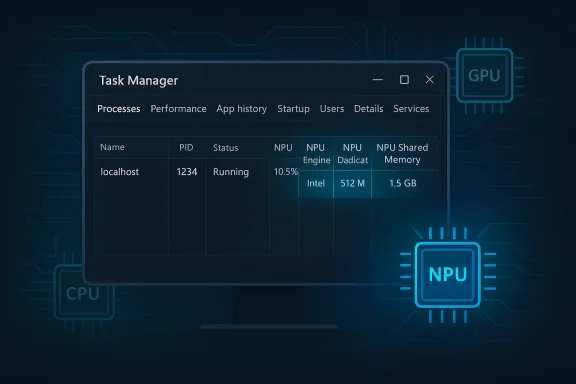
Windows 11’s Task Manager is finally learning how to speak the language of AI hardware, and that matters more than it may sound at first glance. In Dev build 26300.8142, Microsoft is adding optional NPU, NPU Engine, and NPU memory columns, along with an Isolation field that reveals AppContainer status. It is a small UI change on paper, but in practice it signals that Windows is treating the neural processing unit as a first-class citizen alongside the CPU and GPU. For Copilot+ PC owners, that is a meaningful step toward understanding where their system’s AI acceleration is actually going.
The modern Windows PC has become a far more heterogeneous machine than the one many users grew up with. The CPU still orchestrates the operating system, the GPU still dominates graphics and parallel compute, and now the NPU is increasingly responsible for low-power AI workloads that would otherwise drain battery or clog up more general-purpose silicon. Microsoft’s Copilot+ initiative made that shift visible to consumers, but the operating system’s built-in diagnostics lagged behind the hardware reality.
Task Manager has always been Windows’ most democratic performance tool. It is the place where enthusiasts, IT admins, and ordinary users go when they want a quick answer without opening specialized telemetry suites. Yet until now, it offered little meaningful visibility into NPU activity, leaving users to guess whether the AI engine was active, idle, saturated, or ignored by a given app.
That gap has become more important because NPUs are no longer novelty components. They are now part of Microsoft’s broader pitch for Copilot+ PCs, and they are starting to influence buying decisions, software optimization strategies, and even battery-life expectations. Once a component becomes a selling point, the absence of usage visibility becomes a product weakness.
The latest Dev-channel update suggests Microsoft understands that problem. By surfacing NPU metrics inside Task Manager, the company is not just adding a feature; it is teaching Windows users how to observe a class of hardware that many of them may not yet fully understand. That is a subtle but significant act of platform maturation.
This shift has implications for both consumers and enterprises. Consumers benefit from longer battery life and smoother AI features, while enterprises gain a path toward more private, offline-capable processing. But both groups need visibility if they are to trust and tune the system. Without a basic performance view, AI acceleration risks feeling like a black box rather than an advantage.
Microsoft has already been laying the groundwork for this transition. Earlier Insider builds introduced changes to Task Manager’s CPU reporting to align more closely with standard metrics and third-party tools, showing that Microsoft wants its native monitoring UI to be more consistent and less idiosyncratic. The new NPU columns extend that philosophy into AI hardware, which is where Windows is clearly heading next.
The result is a shift from marketing claims to visible behavior. If an app claims to use AI acceleration, users can now inspect whether the NPU is actually doing work. That matters for troubleshooting, battery analysis, and even app comparison shopping.
That is important because AI hardware is not uniform. Some chips include a discrete NPU block; others blend neural engines into a broader graphics or SoC design. A single “NPU usage” number would be too simplistic. By separating engines and memory categories, Microsoft is acknowledging that AI work can be distributed across different hardware pathways.
The new Isolation column is also worth attention. It shows whether an app is running in an AppContainer, which is a Windows security boundary used to limit what an application can access. That column is not AI-specific, but it sits beside the NPU additions in the same update, which tells you something about Microsoft’s priorities: visibility, control, and containment are being developed together.
For support professionals, this can become a diagnostic shortcut. If an app is supposed to use the NPU but no activity appears, the problem might be in driver support, app design, feature flags, or scheduling policy rather than the hardware itself. Conversely, if the NPU is pegged, it may explain sluggish behavior elsewhere.
That evolution is not accidental. Microsoft has spent years trying to reduce the distance between what the platform does internally and what users can understand at a glance. Task Manager is one of the few Windows utilities that almost everyone recognizes, so each new metric carries outsized educational value. If the feature lands well, many users may first learn what an NPU is by seeing it in Task Manager.
The addition of AI-related metrics also helps normalize the idea that the PC is now a multi-engine device. That may seem obvious to enthusiasts, but it is not obvious to everyday buyers who still think in terms of “processor speed” and “RAM.” The UI teaches the hardware story by making it visible.
This is also a competitive signal. If Windows wants to maintain its relevance in an AI PC era, it cannot leave system visibility to third-party tools alone. Built-in observability is part of platform credibility, especially when rivals are trying to reshape the personal-computer experience around their own hardware ecosystems.
That is especially true because Copilot+ branding has to mean something operational, not just promotional. If users cannot see when AI tasks are using the NPU, then the distinction between a Copilot+ PC and a regular Windows laptop becomes harder to appreciate. Visibility creates legitimacy, and legitimacy helps product category adoption.
The presence of NPU statistics also reinforces the idea that AI features should be judged like any other workload. Users already understand CPU load, memory pressure, and GPU utilization. NPU load is the next logical addition, especially as more apps attempt to offload model inference, image enhancement, transcription, and background effects to dedicated silicon.
For enterprises, the stakes are broader. IT departments need to know whether AI-enhanced workloads are local, whether they are security-isolated, and whether they consume enough system resources to affect performance or policy. Task Manager will not solve all of those questions, but it can give support teams a quick first look.
In modern Windows security architecture, isolation is not a niche concept. It is part of the broader push to compartmentalize apps, reduce attack surface, and constrain permissions. Putting that information into Task Manager helps bridge the gap between security policy and visible behavior.
The timing is interesting. Microsoft is adding AI telemetry and security isolation awareness in the same build, which suggests a wider platform message: Windows wants users to think about what hardware is doing, how software is contained, and where sensitive work is happening. That is a much more mature story than simple process killing.
This may also help troubleshoot AI features that appear limited or inconsistent. If an app is isolated and uses an NPU path, its access to local resources, background processing, or external hooks may differ from a traditional desktop app. In that sense, the Isolation column is part security feature and part diagnostic clue.
This is also why Microsoft tends to stage such changes gradually. Metrics that are technically correct can still be confusing if labels are unclear, defaults are awkward, or the values are not comparable to other tools. A Dev-channel rollout gives the company room to adjust wording, sorting, and performance cost before the feature reaches broader audiences.
The update’s placement in Dev also hints at a larger release cadence. Microsoft has been moving more platform changes through Insider channels in the build series associated with the next Windows branch, and Task Manager has been a recurring beneficiary. The company appears committed to shipping a more transparent system-monitoring experience as part of that wave.
That is especially important for technical features that might otherwise sound intimidating. “NPU Dedicated Memory” and “AppContainer Isolation” are not terms most consumers use in daily life, but they are the kind of terms Windows can normalize over time if it exposes them carefully and consistently.
If rivals want their silicon to stand out, they need software that shows the value of the hardware. Microsoft is making sure Windows does that for Copilot+ PCs. This could pressure OEMs and chip vendors to improve their own telemetry, driver integration, and user-facing monitoring tools so that buyers can compare products more intelligently.
It also strengthens Microsoft’s argument that Windows is the best place to run local AI. The OS is now not only supporting the workload but instrumenting it in a native, familiar interface. That creates a feedback loop: more visibility can lead to more confidence, which can lead to more app adoption, which then drives more NPU usage.
Developers may also need to think more carefully about resource partitioning. If AI workloads can be seen using dedicated versus shared memory, then efficiency becomes part of the product story. Apps that are smarter about offload behavior may earn a better reputation among power users and IT teams.
For everyday use, the most valuable scenario is simple confirmation. If a video-call enhancement, transcription feature, or image-processing app is consuming the NPU, the user can see it. If the NPU is idle when it should be active, the problem becomes easier to investigate.
This feature is also likely to reduce guesswork in support scenarios. Instead of assuming that an AI experience is failing because the app is broken, users can check whether the relevant hardware is active at all. That can save time and help separate software bugs from configuration issues.
The broader story is that Windows is becoming more explicit about what runs where. CPU, GPU, NPU, and security isolation are no longer hidden implementation details for enthusiasts alone. They are becoming part of the everyday language of the PC, and Microsoft is clearly trying to make sure its own operating system is the place where that language is learned.
Source: XDA Windows 11's Task Manager will finally tell you how much your NPU is working
 Overview
The modern Windows PC has become a far more heterogeneous machine than the one many users grew up with. The CPU still orchestrates the operating system, the GPU still dominates graphics and parallel compute, and now the NPU is increasingly responsible for low-power AI workloads that would otherwise drain battery or clog up more general-purpose silicon. Microsoft’s Copilot+ initiative made that shift visible to consumers, but the operating system’s built-in diagnostics lagged behind the hardware reality.Task Manager has always been Windows’ most democratic performance tool. It is the place where enthusiasts, IT admins, and ordinary users go when they want a quick answer without opening specialized telemetry suites. Yet until now, it offered little meaningful visibility into NPU activity, leaving users to guess whether the AI engine was active, idle, saturated, or ignored by a given app.
That gap has become more important because NPUs are no longer novelty components. They are now part of Microsoft’s broader pitch for Copilot+ PCs, and they are starting to influence buying decisions, software optimization strategies, and even battery-life expectations. Once a component becomes a selling point, the absence of usage visibility becomes a product weakness.
The latest Dev-channel update suggests Microsoft understands that problem. By surfacing NPU metrics inside Task Manager, the company is not just adding a feature; it is teaching Windows users how to observe a class of hardware that many of them may not yet fully understand. That is a subtle but significant act of platform maturation.
Why NPU visibility matters now
The core value of an NPU is efficiency. Unlike the CPU, which is designed for broad general-purpose work, or the GPU, which excels at high-throughput parallel computation, the NPU is tuned for AI inference tasks that can be handled with lower power and less heat. That makes it ideal for on-device features such as Windows Studio Effects, image processing, voice enhancement, and other AI-assisted experiences that Microsoft wants to keep local.This shift has implications for both consumers and enterprises. Consumers benefit from longer battery life and smoother AI features, while enterprises gain a path toward more private, offline-capable processing. But both groups need visibility if they are to trust and tune the system. Without a basic performance view, AI acceleration risks feeling like a black box rather than an advantage.
Microsoft has already been laying the groundwork for this transition. Earlier Insider builds introduced changes to Task Manager’s CPU reporting to align more closely with standard metrics and third-party tools, showing that Microsoft wants its native monitoring UI to be more consistent and less idiosyncratic. The new NPU columns extend that philosophy into AI hardware, which is where Windows is clearly heading next.
From hidden silicon to measurable workload
For years, new PC hardware categories were often launched before the operating system fully exposed them to users. That pattern repeated with TPMs, modern security processors, integrated graphics engines, and now NPUs. The difference this time is that Microsoft is not treating the NPU as an optional curiosity. It is becoming part of the Windows identity itself.The result is a shift from marketing claims to visible behavior. If an app claims to use AI acceleration, users can now inspect whether the NPU is actually doing work. That matters for troubleshooting, battery analysis, and even app comparison shopping.
- Consumers can identify which apps are benefiting from AI acceleration.
- IT teams can validate whether new productivity tools are using local AI paths.
- Developers get a clearer signal when their workloads are landing on the intended engine.
- Power users gain a new diagnostic layer for tuning performance and thermals.
What build 26300.8142 actually adds
Microsoft’s release note language is straightforward: Task Manager is gaining better insight into NPU usage on PCs that include an NPU. The new optional columns appear on the Processes, Users, and Details pages, with additional NPU Dedicated Memory and NPU Shared Memory columns on Details. The Performance page also gets broader visibility when a GPU contains neural engines of its own.That is important because AI hardware is not uniform. Some chips include a discrete NPU block; others blend neural engines into a broader graphics or SoC design. A single “NPU usage” number would be too simplistic. By separating engines and memory categories, Microsoft is acknowledging that AI work can be distributed across different hardware pathways.
The new Isolation column is also worth attention. It shows whether an app is running in an AppContainer, which is a Windows security boundary used to limit what an application can access. That column is not AI-specific, but it sits beside the NPU additions in the same update, which tells you something about Microsoft’s priorities: visibility, control, and containment are being developed together.
The new columns in plain English
The practical value of the new columns depends on who is looking. A casual user may only notice that an AI-powered feature appears to consume NPU resources. A more technical user can compare dedicated versus shared memory and infer whether the workload is spilling into broader system resources.For support professionals, this can become a diagnostic shortcut. If an app is supposed to use the NPU but no activity appears, the problem might be in driver support, app design, feature flags, or scheduling policy rather than the hardware itself. Conversely, if the NPU is pegged, it may explain sluggish behavior elsewhere.
- NPU column: shows whether an app is using the neural processor.
- NPU Engine: helps distinguish which engine is handling the work.
- Dedicated Memory: reflects NPU-specific memory usage.
- Shared Memory: shows when workloads tap broader system memory.
- Isolation: indicates AppContainer status on Processes and Details.
Task Manager’s evolution as a system telemetry hub
Task Manager used to be a simple emergency tool: end a frozen app, check CPU spikes, and move on. Over time it grew into a much more capable monitoring surface, adding disk, memory, GPU, network, startup, and efficiency-related views. With this latest update, it is becoming something closer to a built-in observability console for mainstream Windows.That evolution is not accidental. Microsoft has spent years trying to reduce the distance between what the platform does internally and what users can understand at a glance. Task Manager is one of the few Windows utilities that almost everyone recognizes, so each new metric carries outsized educational value. If the feature lands well, many users may first learn what an NPU is by seeing it in Task Manager.
The addition of AI-related metrics also helps normalize the idea that the PC is now a multi-engine device. That may seem obvious to enthusiasts, but it is not obvious to everyday buyers who still think in terms of “processor speed” and “RAM.” The UI teaches the hardware story by making it visible.
A utility that keeps absorbing the future
There is a pattern here. Whenever Windows introduces a new platform capability, Task Manager eventually becomes one of the first places where that capability is exposed. That was true for GPU tracking, and now it is becoming true for NPU telemetry as well. Microsoft is quietly turning Task Manager into a compatibility and trust layer for modern hardware.This is also a competitive signal. If Windows wants to maintain its relevance in an AI PC era, it cannot leave system visibility to third-party tools alone. Built-in observability is part of platform credibility, especially when rivals are trying to reshape the personal-computer experience around their own hardware ecosystems.
- Task Manager is becoming a cross-device diagnostics layer.
- Native telemetry reduces dependence on third-party utilities.
- UI exposure helps users trust new hardware categories.
- System transparency supports Microsoft’s AI PC narrative.
Copilot+ PCs and the hardware story
The new NPU metrics are not happening in a vacuum. They are part of Microsoft’s broader Copilot+ strategy, which has been built around the promise of on-device AI that is faster, more private, and more power-efficient than cloud-only alternatives. To support that pitch, Microsoft needs the operating system to surface the hardware behavior that underpins it.That is especially true because Copilot+ branding has to mean something operational, not just promotional. If users cannot see when AI tasks are using the NPU, then the distinction between a Copilot+ PC and a regular Windows laptop becomes harder to appreciate. Visibility creates legitimacy, and legitimacy helps product category adoption.
The presence of NPU statistics also reinforces the idea that AI features should be judged like any other workload. Users already understand CPU load, memory pressure, and GPU utilization. NPU load is the next logical addition, especially as more apps attempt to offload model inference, image enhancement, transcription, and background effects to dedicated silicon.
Enterprise and consumer perspectives diverge
For consumers, the primary benefit is practical confidence. If an app promises better battery life or smoother AI effects, users can now verify whether the NPU is actually engaged. That reduces the sense that AI features are just branding layered on top of the same old software stack.For enterprises, the stakes are broader. IT departments need to know whether AI-enhanced workloads are local, whether they are security-isolated, and whether they consume enough system resources to affect performance or policy. Task Manager will not solve all of those questions, but it can give support teams a quick first look.
- Consumers get reassurance that AI features are doing something measurable.
- Enterprises gain a lightweight way to audit AI workload behavior.
- Developers receive feedback on whether their app is using the intended path.
- Procurement teams can better justify premium hardware decisions.
The significance of the Isolation column
The Isolation column may look unrelated, but it is one of the more revealing additions in the update. By exposing whether an app is running in an AppContainer, Microsoft is giving users a security signal that is usually hidden from casual view. That matters because isolated apps are less likely to have broad access to the system, which can limit damage if something goes wrong.In modern Windows security architecture, isolation is not a niche concept. It is part of the broader push to compartmentalize apps, reduce attack surface, and constrain permissions. Putting that information into Task Manager helps bridge the gap between security policy and visible behavior.
The timing is interesting. Microsoft is adding AI telemetry and security isolation awareness in the same build, which suggests a wider platform message: Windows wants users to think about what hardware is doing, how software is contained, and where sensitive work is happening. That is a much more mature story than simple process killing.
Why AppContainer status matters to power users
Power users often assume an app’s packaging or store origin tells them enough about its security posture. It does not. AppContainer is a specific runtime boundary, and seeing it exposed in Task Manager can help explain why some apps behave differently, access fewer resources, or fail to integrate in certain ways.This may also help troubleshoot AI features that appear limited or inconsistent. If an app is isolated and uses an NPU path, its access to local resources, background processing, or external hooks may differ from a traditional desktop app. In that sense, the Isolation column is part security feature and part diagnostic clue.
- AppContainer status helps clarify security boundaries.
- It can explain feature limitations in some apps.
- It gives IT staff a faster triage signal.
- It pairs naturally with modern AI workload monitoring.
Why this update arrived in Dev first
Microsoft continues to use the Dev Channel as the proving ground for features that need real-world feedback before wider distribution. Build 26300.8142 is not a final consumer release; it is a working draft of the Windows 11 experience. That matters because telemetry presentation is fragile. If users misunderstand the numbers, the feature can create more confusion than clarity.This is also why Microsoft tends to stage such changes gradually. Metrics that are technically correct can still be confusing if labels are unclear, defaults are awkward, or the values are not comparable to other tools. A Dev-channel rollout gives the company room to adjust wording, sorting, and performance cost before the feature reaches broader audiences.
The update’s placement in Dev also hints at a larger release cadence. Microsoft has been moving more platform changes through Insider channels in the build series associated with the next Windows branch, and Task Manager has been a recurring beneficiary. The company appears committed to shipping a more transparent system-monitoring experience as part of that wave.
Insider builds as a design laboratory
Insider builds are not just bug-hunting programs. They are a design laboratory for the operating system’s future vocabulary. By the time a feature lands in mainstream Windows, Microsoft wants the language to feel familiar and the behavior to feel expected.That is especially important for technical features that might otherwise sound intimidating. “NPU Dedicated Memory” and “AppContainer Isolation” are not terms most consumers use in daily life, but they are the kind of terms Windows can normalize over time if it exposes them carefully and consistently.
- Dev builds let Microsoft test label clarity.
- They help evaluate performance overhead.
- They reveal whether users can interpret new telemetry fields.
- They provide feedback before broader rollout.
Competitive implications for the AI PC market
Microsoft is not the only company betting on AI hardware, but it is in a unique position because it controls the desktop operating system. By exposing NPU usage in Task Manager, Windows is making its own AI-first hardware story easier to see and explain. That may sound small, but in platform competition, visibility often becomes advantage.If rivals want their silicon to stand out, they need software that shows the value of the hardware. Microsoft is making sure Windows does that for Copilot+ PCs. This could pressure OEMs and chip vendors to improve their own telemetry, driver integration, and user-facing monitoring tools so that buyers can compare products more intelligently.
It also strengthens Microsoft’s argument that Windows is the best place to run local AI. The OS is now not only supporting the workload but instrumenting it in a native, familiar interface. That creates a feedback loop: more visibility can lead to more confidence, which can lead to more app adoption, which then drives more NPU usage.
What this could mean for app developers
For app makers, the pressure will increase to actually use the NPU when it makes sense. If Task Manager exposes whether their app is engaging the hardware, users will notice when an AI feature seems to run on the wrong engine or not at all. That creates accountability in a way that vague branding never could.Developers may also need to think more carefully about resource partitioning. If AI workloads can be seen using dedicated versus shared memory, then efficiency becomes part of the product story. Apps that are smarter about offload behavior may earn a better reputation among power users and IT teams.
- Developers may face greater pressure to prove NPU usage.
- Hardware vendors may need better driver and telemetry support.
- OEMs will want to highlight real AI acceleration, not just specs.
- Microsoft gains leverage as the OS-level arbiter of AI activity.
Practical impact for users today
The first thing most users will notice is that Task Manager has become a little more informative, not dramatically more complicated. That is a good sign. The best system diagnostics are the ones that add depth without making the interface feel like a research lab.For everyday use, the most valuable scenario is simple confirmation. If a video-call enhancement, transcription feature, or image-processing app is consuming the NPU, the user can see it. If the NPU is idle when it should be active, the problem becomes easier to investigate.
This feature is also likely to reduce guesswork in support scenarios. Instead of assuming that an AI experience is failing because the app is broken, users can check whether the relevant hardware is active at all. That can save time and help separate software bugs from configuration issues.
Quick ways users may benefit
The practical upside is less about raw numbers and more about decision-making. A visible NPU can change how users interpret battery drain, fan activity, or sluggishness in AI-assisted workflows. It also makes Windows feel more aligned with the hardware it is shipping on.- Faster troubleshooting of AI feature behavior.
- Better understanding of battery and thermal changes.
- Easier comparison between app behavior on Copilot+ hardware.
- More confidence that the NPU is not just marketing copy.
Strengths and Opportunities
Microsoft’s move has several obvious strengths. It improves transparency, strengthens the Copilot+ story, and gives users a built-in way to understand the new AI hardware category without relying on third-party tools. It also keeps Task Manager relevant in a period when Windows is absorbing more specialized compute blocks than ever before.- Better visibility into AI workloads on modern PCs.
- More trust in Copilot+ hardware claims.
- Cleaner troubleshooting for consumer and enterprise users.
- Richer diagnostics without installing extra tools.
- Improved security awareness through the Isolation column.
- Stronger platform cohesion between hardware and OS telemetry.
- Potential developer pressure to optimize NPU usage.
Risks and Concerns
The update also brings real risks, especially around interpretation. New telemetry can confuse users if they do not understand what the metrics mean, and AI hardware reporting is more complex than CPU or memory reporting. There is also a chance that the numbers vary enough across chip vendors to make comparisons messy.- Metric confusion if labels are not intuitive enough.
- Vendor inconsistency across different NPU implementations.
- False confidence if users assume visible activity equals good performance.
- Information overload for casual users.
- Potential support burden if the new columns raise questions.
- Feature fragmentation if support varies by device class.
- Privacy concerns if users misunderstand what is being monitored.
Looking Ahead
The most likely next step is refinement rather than reinvention. Microsoft will probably keep tuning Task Manager’s AI-related columns, especially if early Insider feedback reveals ambiguity in the way NPU engines, memory categories, or isolation status are displayed. The company may also expand the same monitoring philosophy to other tools in Windows, since once a metric becomes useful in one place, users tend to want it elsewhere too.The broader story is that Windows is becoming more explicit about what runs where. CPU, GPU, NPU, and security isolation are no longer hidden implementation details for enthusiasts alone. They are becoming part of the everyday language of the PC, and Microsoft is clearly trying to make sure its own operating system is the place where that language is learned.
- Watch for label tweaks in future Insider builds.
- Expect wider rollout if feedback is positive.
- Look for more AI telemetry in related Windows tools.
- Track whether third-party apps begin optimizing more aggressively for the NPU.
- Pay attention to whether enterprise admin tools adopt similar visibility.
Source: XDA Windows 11's Task Manager will finally tell you how much your NPU is working
