

Microsoft’s Task Scheduler is one of the most underappreciated automation engines in Windows 11, and the irony is hard to miss: the company is spending enormous energy selling a future built around Copilot, AI, and low-friction productivity while leaving a decades-old built-in automation platform looking like a relic. On paper, Task Scheduler can trigger programs by time or by system events, and Microsoft’s own documentation confirms it has long supported both time-based and event-based automation. In practice, though, its old interface, dated terminology, and IT-admin-first design make it feel invisible to ordinary users, which is exactly the gap Microsoft could be exploiting rather than ignoring.
Windows has always shipped with a deep automation layer, but Microsoft has never treated it as a consumer-facing flagship feature. Task Scheduler is automatically installed on supported Windows systems, and Microsoft’s own documentation places Task Scheduler 1.0 in the Windows 2000/XP/Server 2003 era and Task Scheduler 2.0 with Windows Vista and Windows Server 2008. That history matters because it explains both the power and the stagnation: the service is mature, stable, and deeply integrated, yet its UX and mental model still feel rooted in a pre-cloud, pre-AI world.
The core concept is straightforward enough. Task Scheduler monitors criteria you define, then runs an action when those criteria are met. Microsoft documents support for triggers such as specific times, logon events, startup events, idle-state events, and other system conditions, which makes the service more flexible than the average Windows user realizes. The problem is not capability; it is accessibility, discoverability, and the gulf between what the engine can do and what most users can comfortably configure.
That gulf becomes even more obvious when compared with Microsoft’s newer productivity narrative. In Windows 11, the company has invested heavily in Copilot branding, AI-assisted workflows, and Power Automate as a low-code automation platform. Microsoft’s documentation for Power Automate says users can create automated workflows between apps and services, and the Windows 11 experience includes preinstalled Power Automate for desktop workflows with hundreds of premade actions. In other words, Microsoft already has the pieces of a modern automation story; it just has them scattered across separate products and audiences.
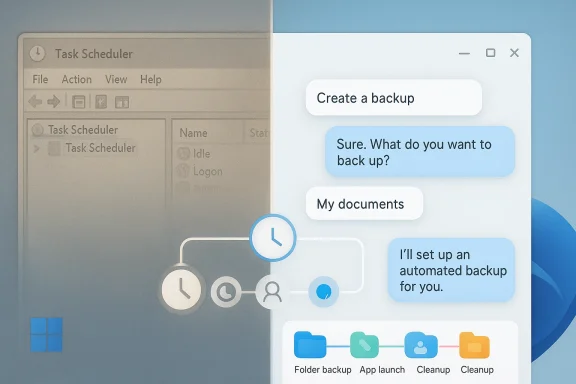
This mismatch is why the Neowin critique lands. The complaint is not simply that Task Scheduler is old. It is that Microsoft has spent years talking about productivity as a conversational, AI-assisted experience while one of the OS’s most useful automation subsystems remains hidden behind an admin tool that looks and feels like it was designed for a different era. That tension is not just aesthetic; it affects adoption, trust, and the likelihood that everyday users will ever automate anything on Windows without reaching for third-party tools.
For power users, the utility is obvious. A scheduled task can automate backups, cleanup jobs, folder maintenance, startup routines, diagnostic runs, or scripted maintenance operations without requiring any background service of your own. Microsoft’s command-line and API documentation also shows a broad surface area for control, including
That matters because Windows users rarely think in time-based terms alone. They think in outcome-based terms: clean this directory when I stop working, back this up when I plug in the laptop, or launch this app after sign-in. Task Scheduler already lives close to those use cases, but Microsoft has not given it the consumer-friendly framing that would make those jobs intuitive instead of intimidating.
The problem is compounded by age. Microsoft notes that Task Scheduler 2.0 dates back to Windows Vista and Server 2008. That versioning matters because the experience carries all the hallmarks of an era when enterprise administration was the primary audience and consumer self-service was secondary, if considered at all. Even when the backend remains robust, the frontend communicates legacy, and that perception is often enough to suppress usage.
This is where Microsoft’s own modernization effort around Windows 11 looks incomplete. The company has made major moves to simplify complex workflows through AI-driven interfaces and low-code tools, yet Task Scheduler remains essentially untouched as a consumer product concept. That creates an odd split: Windows can feel futuristic in one corner of the UI and decades old in another.
On Windows 11 specifically, Microsoft says users can create automations through the preinstalled Power Automate app, with a recorder and more than 400 premade actions. That makes the platform far more approachable than Task Scheduler for many use cases, especially when the task involves desktop UI interaction, browser actions, or multi-app workflows. The company has already solved a large part of the “ordinary people need automation too” problem; it just solved it in a separate product lane.
This is why the Neowin argument about convergence is compelling. If Microsoft can present one system as a curated, low-code automation layer and another as a hidden admin utility, it is reasonable to ask why those experiences are not more tightly linked. The user does not care which backend engine handles the job; the user cares that the outcome is easy, reliable, and understandable.
Imagine the value of a system that lets a user say, “Every Friday, archive my Downloads folder and move the ZIP to D:,” and then uses Task Scheduler under the hood to create the necessary job. That would not require a radical rewrite of Windows; it would require a thin, intelligent layer that translates human intent into task definitions. Microsoft has repeatedly demonstrated interest in that kind of prompt-driven productivity, especially in its newer Power Automate Copilot features.
Microsoft already has precedent for this kind of workflow in Power Automate, where Copilot can help analyze automation activity and surface insights from flow runs. The company is clearly comfortable using AI to reduce operational complexity, so extending that philosophy to local Windows task creation would be a logical next step. It is also a more credible consumer pitch than expecting average users to open an MMC snap-in and learn scheduling jargon.
Another reason is reliability. Microsoft is cautious about any system that can break workflows, create security concerns, or generate support tickets at scale. Task automation is deceptively simple on the surface but can become complex quickly when it interacts with permissions, login states, power management, or user profiles. A consumer-friendly interface might increase adoption, but it would also increase the chance that people blame Windows when an automation fails.
There is also a commercial calculation. Power Automate is not just a feature; it is part of a broader platform strategy tied to Microsoft 365 and the Power Platform. If Microsoft gave every Windows user a highly polished local automation environment for free, it could blur the value proposition of the paid ecosystem. That does not make the current state ideal for users, but it helps explain why the company may be moving cautiously.
A unified platform would also solve discoverability. Today, users can stumble across Task Scheduler, discover Power Automate through Microsoft 365, or use batch files and scripts if they already know what they are doing. That fragmentation is inefficient because it forces the user to choose a tool before they understand the problem space. A coherent automation experience would instead start with the task and route the user to the right engine.
The larger opportunity is habit formation. If Windows users begin automating small tasks — cleanup, file sorting, backups, app launches — they become more engaged with the platform and less likely to migrate those workflows elsewhere. That is not just a convenience story; it is a platform loyalty story. Microsoft benefits when Windows feels like a system that actively helps users save time.
Power Automate gives Microsoft an enterprise automation story with richer governance and cross-service connectivity, but Task Scheduler remains valuable for local device tasks, maintenance, and orchestration tied to the Windows session itself. That is why a unified story would matter: enterprise environments need both machine-local reliability and cross-platform workflow intelligence. Microsoft is already halfway there; it just has not wrapped the pieces in one coherent shell.
That would also improve the story for managed Windows 11 deployments. Automated maintenance, software tasks, remediation, and scheduled housekeeping are all stronger when the underlying orchestration is easier to inspect. In that sense, modernization would not just help consumers; it would reduce friction for IT departments that currently rely on tooling split across generations.
This is especially important because Windows 11 is no longer judged only against Windows itself. It is judged against macOS shortcuts, Linux scripting ecosystems, browser-based automation services, and the convenience of AI assistants that promise one-shot task creation. If Microsoft wants Windows to feel like the most powerful desktop platform, it cannot keep one of its biggest automation assets hidden in plain sight.
There is also a branding danger. Microsoft is trying to convince users that Windows 11 is the home of AI-enhanced productivity, yet an ignored core automation tool sends the opposite message: that the company is better at marketing new layers than modernizing foundational ones. That perception can linger even when the technical reality is more favorable.
The upside is substantial because the use cases are easy to understand and broadly appealing. Few features deliver a clearer “time saved” story than automation, and Windows is uniquely positioned to make that useful at both personal and organizational scale. If Microsoft wants to show that Windows 11 is more than an operating system with AI branding attached, this is one of the best places to prove it.
There is also a business-model tension. If Microsoft integrates too much of Power Automate’s friendliness into Windows without a thoughtful product boundary, it risks cannibalizing value across its own ecosystem or confusing users about where features live. The company has a history of separating capability across products, but that strategy can also make the user experience more fragmented than necessary.
If Microsoft is serious about making Windows 11 feel more intelligent and more helpful, the company should think less about whether Task Scheduler looks dated and more about whether the platform gives users a single, understandable path into automation. That path could be Copilot, Power Automate, a redesigned scheduler, or some combination of all three. The most important thing is that users stop needing to know which century their automation tool was born in.
Source: Neowin Microsoft is ignoring its most powerful automation tool in Windows 11
 Background
Windows has always shipped with a deep automation layer, but Microsoft has never treated it as a consumer-facing flagship feature. Task Scheduler is automatically installed on supported Windows systems, and Microsoft’s own documentation places Task Scheduler 1.0 in the Windows 2000/XP/Server 2003 era and Task Scheduler 2.0 with Windows Vista and Windows Server 2008. That history matters because it explains both the power and the stagnation: the service is mature, stable, and deeply integrated, yet its UX and mental model still feel rooted in a pre-cloud, pre-AI world.The core concept is straightforward enough. Task Scheduler monitors criteria you define, then runs an action when those criteria are met. Microsoft documents support for triggers such as specific times, logon events, startup events, idle-state events, and other system conditions, which makes the service more flexible than the average Windows user realizes. The problem is not capability; it is accessibility, discoverability, and the gulf between what the engine can do and what most users can comfortably configure.
That gulf becomes even more obvious when compared with Microsoft’s newer productivity narrative. In Windows 11, the company has invested heavily in Copilot branding, AI-assisted workflows, and Power Automate as a low-code automation platform. Microsoft’s documentation for Power Automate says users can create automated workflows between apps and services, and the Windows 11 experience includes preinstalled Power Automate for desktop workflows with hundreds of premade actions. In other words, Microsoft already has the pieces of a modern automation story; it just has them scattered across separate products and audiences.
This mismatch is why the Neowin critique lands. The complaint is not simply that Task Scheduler is old. It is that Microsoft has spent years talking about productivity as a conversational, AI-assisted experience while one of the OS’s most useful automation subsystems remains hidden behind an admin tool that looks and feels like it was designed for a different era. That tension is not just aesthetic; it affects adoption, trust, and the likelihood that everyday users will ever automate anything on Windows without reaching for third-party tools.
Why Task Scheduler Still Matters
Task Scheduler remains important because it is native, mature, and deeply wired into Windows itself. Microsoft’s documentation shows that the service can run tasks based on chosen criteria, and it has long been positioned as a general-purpose automation layer for the platform. That means it can do more than simply launch apps at a fixed hour; it can react to events in the operating system, which is often the difference between a basic reminder and a genuinely useful automation.For power users, the utility is obvious. A scheduled task can automate backups, cleanup jobs, folder maintenance, startup routines, diagnostic runs, or scripted maintenance operations without requiring any background service of your own. Microsoft’s command-line and API documentation also shows a broad surface area for control, including
schtasks.exe for administrative task management and the Task Scheduler API for developers. In other words, this is not a toy feature; it is one of the platform’s foundational automation systems.The overlooked value of event-driven automation
The real strength of Task Scheduler is not merely “run this at 3:00 p.m.” It is the fact that it can respond to system events, which allows automation to become contextual. Microsoft explicitly lists triggers for system startup, user logon, and idle conditions, and those hooks are what transform a scheduler into an automation engine. A task that runs only when the machine is idle, or only when a user logs on, is far more practical than a generic timed job for many everyday maintenance scenarios.That matters because Windows users rarely think in time-based terms alone. They think in outcome-based terms: clean this directory when I stop working, back this up when I plug in the laptop, or launch this app after sign-in. Task Scheduler already lives close to those use cases, but Microsoft has not given it the consumer-friendly framing that would make those jobs intuitive instead of intimidating.
- Native to Windows and available without extra installs
- Supports both time-based and event-based triggers
- Useful for backups, cleanup, maintenance, and startup routines
- Exposes both GUI and command-line control
- Can be a bridge between simple user needs and advanced scripting
Why the User Experience Feels Frozen
The biggest obstacle is not the feature set; it is the interface. Microsoft’s own Task Scheduler pages still read like administrator documentation, which is understandable for a system component but disastrous for mainstream adoption. The product is built around concepts like triggers, actions, conditions, and compatibility modes, but the language and navigation assume the user already knows what they mean. For an ordinary Windows 11 user, that creates immediate friction.The problem is compounded by age. Microsoft notes that Task Scheduler 2.0 dates back to Windows Vista and Server 2008. That versioning matters because the experience carries all the hallmarks of an era when enterprise administration was the primary audience and consumer self-service was secondary, if considered at all. Even when the backend remains robust, the frontend communicates legacy, and that perception is often enough to suppress usage.
Why legacy terminology hurts adoption
A modern user does not want to learn the difference between work items, triggers, conditions, and task compatibility options before accomplishing something simple. Microsoft’s documentation uses these terms precisely because the system is powerful, but precision can become a usability barrier when the audience is broad. If the average person must decode the product before they can use it, the product has already lost the battle for mainstream relevance.This is where Microsoft’s own modernization effort around Windows 11 looks incomplete. The company has made major moves to simplify complex workflows through AI-driven interfaces and low-code tools, yet Task Scheduler remains essentially untouched as a consumer product concept. That creates an odd split: Windows can feel futuristic in one corner of the UI and decades old in another.
- Terminology is still heavily admin-centric
- Visual design signals “legacy tool,” not “modern platform”
- Discovery is poor because Microsoft barely markets it
- Common tasks are not packaged as friendly presets
- Users are pushed toward PowerShell, batch files, or third-party tools
What Microsoft Already Has in Power Automate
Microsoft does not need to invent an automation story from scratch. Power Automate already gives the company a modern, GUI-based framework for flows, templates, connectors, and desktop automation. Microsoft’s documentation says it connects to more than 100 data sources, offers templates for common scenarios, and lets users build workflows without deep coding experience. That is the clearest proof that Microsoft understands the user appeal of approachable automation.On Windows 11 specifically, Microsoft says users can create automations through the preinstalled Power Automate app, with a recorder and more than 400 premade actions. That makes the platform far more approachable than Task Scheduler for many use cases, especially when the task involves desktop UI interaction, browser actions, or multi-app workflows. The company has already solved a large part of the “ordinary people need automation too” problem; it just solved it in a separate product lane.
Templates lower the learning curve
Templates are a big deal because they reduce the intimidation factor that hurts Task Scheduler. Microsoft describes templates as prebuilt flows for popular scenarios, and Power Automate’s documentation shows an ecosystem designed around guided starts rather than blank-slate complexity. That is the exact opposite of how Task Scheduler feels on first launch, where a user is handed a dense management console instead of a pathway.This is why the Neowin argument about convergence is compelling. If Microsoft can present one system as a curated, low-code automation layer and another as a hidden admin utility, it is reasonable to ask why those experiences are not more tightly linked. The user does not care which backend engine handles the job; the user cares that the outcome is easy, reliable, and understandable.
- Templates make common use cases approachable
- Recorder tools reduce the need for scripting
- Connectors expand beyond the local machine
- Desktop flows cover UI-heavy tasks
- Cloud flows provide orchestration beyond a single PC
Copilot Is the Missing Interface Layer
If Microsoft wants to turn automation into a mainstream Windows feature, Copilot is the obvious front end. The company has already positioned Copilot as a natural-language interface across Windows and Microsoft 365 experiences, and Microsoft’s Windows management documentation says the Copilot experience on Windows PCs has been updated and integrated with Microsoft 365 Copilot workflows. That makes natural-language task creation more than a thought experiment; it is already part of Microsoft’s product direction.Imagine the value of a system that lets a user say, “Every Friday, archive my Downloads folder and move the ZIP to D:,” and then uses Task Scheduler under the hood to create the necessary job. That would not require a radical rewrite of Windows; it would require a thin, intelligent layer that translates human intent into task definitions. Microsoft has repeatedly demonstrated interest in that kind of prompt-driven productivity, especially in its newer Power Automate Copilot features.
Natural language can hide complexity without removing power
The key point is not that users must never see advanced controls. It is that they should not need to start with them. A good Copilot-powered automation assistant could ask clarifying questions, propose schedules, and offer safe defaults before exposing the underlying task configuration. That would make Windows automation discoverable, which Task Scheduler currently is not.Microsoft already has precedent for this kind of workflow in Power Automate, where Copilot can help analyze automation activity and surface insights from flow runs. The company is clearly comfortable using AI to reduce operational complexity, so extending that philosophy to local Windows task creation would be a logical next step. It is also a more credible consumer pitch than expecting average users to open an MMC snap-in and learn scheduling jargon.
- Natural language lowers the barrier to entry
- Copilot can gather missing details interactively
- Advanced configuration can remain available underneath
- Users benefit from guided defaults and safety checks
- Automation becomes a conversation instead of a configuration exercise
Why Microsoft Has Not Already Done It
One reason is likely product segmentation. Task Scheduler belongs to Windows, Power Automate belongs to Microsoft’s broader productivity and low-code ecosystem, and Copilot sits across the company’s AI branding layer. Each of these products has a different audience, licensing model, and support burden. Bringing them closer together would create a cleaner user experience, but it would also force Microsoft to resolve overlap that may be useful internally precisely because it is messy externally.Another reason is reliability. Microsoft is cautious about any system that can break workflows, create security concerns, or generate support tickets at scale. Task automation is deceptively simple on the surface but can become complex quickly when it interacts with permissions, login states, power management, or user profiles. A consumer-friendly interface might increase adoption, but it would also increase the chance that people blame Windows when an automation fails.
Compatibility and support are not minor issues
Microsoft’s own documentation hints at the long tail of legacy support concerns. The company still documents differences between Task Scheduler 1.0 and 2.0, and it still maintains compatibility metadata and CLI tooling. That means any modernization effort must preserve old behaviors while layering in new ones, which is difficult to do without risking regressions. In a platform as central as Windows, stability often wins over elegance.There is also a commercial calculation. Power Automate is not just a feature; it is part of a broader platform strategy tied to Microsoft 365 and the Power Platform. If Microsoft gave every Windows user a highly polished local automation environment for free, it could blur the value proposition of the paid ecosystem. That does not make the current state ideal for users, but it helps explain why the company may be moving cautiously.
- Product overlap creates internal complexity
- Automation failures can generate support burden
- Legacy compatibility must be preserved
- Enterprise and consumer licensing incentives differ
- Windows changes carry higher regression risk than app changes
The Consumer Case for a Unified Automation Platform
For consumers, automation should feel like a productivity multiplier, not an IT certification exam. Windows 11 already exposes users to AI features, file management, search, and app suggestions, so a gentle automation layer would fit naturally into the broader OS experience. If Microsoft wants Windows to feel smarter and more proactive, the OS should help people handle routine tasks without demanding scripting knowledge.A unified platform would also solve discoverability. Today, users can stumble across Task Scheduler, discover Power Automate through Microsoft 365, or use batch files and scripts if they already know what they are doing. That fragmentation is inefficient because it forces the user to choose a tool before they understand the problem space. A coherent automation experience would instead start with the task and route the user to the right engine.
What a consumer-friendly workflow could look like
Microsoft does not need to expose the entire Task Scheduler console to ordinary users. It could instead provide simple automation recipes, natural-language creation, and a clean “advanced options” branch for more technical details. That would preserve power while removing the initial friction that prevents most users from trying automation at all. In practice, good defaults are often more valuable than unlimited configurability.The larger opportunity is habit formation. If Windows users begin automating small tasks — cleanup, file sorting, backups, app launches — they become more engaged with the platform and less likely to migrate those workflows elsewhere. That is not just a convenience story; it is a platform loyalty story. Microsoft benefits when Windows feels like a system that actively helps users save time.
- Users get immediate, practical wins
- Small automations build confidence
- Guided flows reduce frustration
- Advanced features remain available for power users
- Windows becomes more competitive against third-party automation tools
The Enterprise Case Is Stronger Than It Looks
Enterprises already understand the value of scheduled and event-driven automation, which is why Task Scheduler has survived for so long in admin circles. Microsoft’s documentation aroundschtasks.exe, Task Scheduler APIs, and task triggers reflects a system that is still very much relevant in managed environments. For IT teams, the issue is less about whether the tool works and more about whether Microsoft can make it safer, easier to govern, and better integrated with modern management practices.Power Automate gives Microsoft an enterprise automation story with richer governance and cross-service connectivity, but Task Scheduler remains valuable for local device tasks, maintenance, and orchestration tied to the Windows session itself. That is why a unified story would matter: enterprise environments need both machine-local reliability and cross-platform workflow intelligence. Microsoft is already halfway there; it just has not wrapped the pieces in one coherent shell.
Governance is the enterprise differentiator
Enterprises do not merely want automation. They want predictable automation, auditability, access control, and failure visibility. Microsoft’s newer Power Automate features around monitoring and AI-assisted analysis show that it understands this requirement, especially for desktop flow activity and operational insights. If similar observability were layered into Windows-native task automation, admins would gain a much cleaner view of what users and devices are doing.That would also improve the story for managed Windows 11 deployments. Automated maintenance, software tasks, remediation, and scheduled housekeeping are all stronger when the underlying orchestration is easier to inspect. In that sense, modernization would not just help consumers; it would reduce friction for IT departments that currently rely on tooling split across generations.
- Better observability would help support teams
- Governance features would reduce uncertainty
- Device-local and cloud automation could complement each other
- Admins would benefit from clearer task creation and reporting
- Managed Windows estates would become easier to standardize
Competitive Pressure and Third-Party Opportunity
If Microsoft leaves this space untouched, third parties will continue to define it. There is already a market for automation tools that feel more modern than Task Scheduler, and users who want straightforward productivity gains often move toward utilities that offer cleaner interfaces, better scripting integration, or richer workflow design. Microsoft has the advantage of owning the operating system, but that advantage only matters if the built-in experience is actually worth using.This is especially important because Windows 11 is no longer judged only against Windows itself. It is judged against macOS shortcuts, Linux scripting ecosystems, browser-based automation services, and the convenience of AI assistants that promise one-shot task creation. If Microsoft wants Windows to feel like the most powerful desktop platform, it cannot keep one of its biggest automation assets hidden in plain sight.
The risk of letting others own the narrative
Third-party developers often succeed because they solve the presentation layer Microsoft neglects. They take a capable subsystem and make it feel approachable, whether through better presets, friendlier language, or more visible success paths. If Microsoft waits too long, it may find that users associate automation on Windows with external tools rather than with the operating system itself. That is a subtle but important loss of platform identity.There is also a branding danger. Microsoft is trying to convince users that Windows 11 is the home of AI-enhanced productivity, yet an ignored core automation tool sends the opposite message: that the company is better at marketing new layers than modernizing foundational ones. That perception can linger even when the technical reality is more favorable.
- Third parties can own the user experience if Microsoft does not
- Better UX often wins over deeper technical capability
- Platform identity depends on visible, usable first-party tools
- Microsoft risks fragmenting its automation story
- AI marketing rings hollow if basic automation feels neglected
Strengths and Opportunities
There is a real opportunity here if Microsoft decides to treat automation as a first-class Windows feature instead of a hidden system utility. The company already has the raw ingredients: Task Scheduler for native event/time triggers, Power Automate for templates and low-code flows, and Copilot for natural-language interaction. The challenge is less technical than strategic, because the current stack is powerful but disjointed.The upside is substantial because the use cases are easy to understand and broadly appealing. Few features deliver a clearer “time saved” story than automation, and Windows is uniquely positioned to make that useful at both personal and organizational scale. If Microsoft wants to show that Windows 11 is more than an operating system with AI branding attached, this is one of the best places to prove it.
- Native automation can reduce dependency on third-party tools
- Natural-language creation would dramatically widen adoption
- Templates and presets can lower the learning curve
- Enterprise governance can improve if orchestration is unified
- Cross-app workflows can make Windows more compelling than legacy task tools
- AI assistance can hide complexity without eliminating power
- Better discoverability would help users understand what Windows can already do
Risks and Concerns
Modernization is not free of trade-offs. Microsoft would need to preserve compatibility with existing tasks, avoid breaking admin workflows, and ensure that AI-driven task creation does not produce unsafe or unreliable behavior. Task automation is one of those areas where a small error can cause endless annoyance, so any consumer-friendly redesign would need to be conservative beneath the surface even if it feels simple on top.There is also a business-model tension. If Microsoft integrates too much of Power Automate’s friendliness into Windows without a thoughtful product boundary, it risks cannibalizing value across its own ecosystem or confusing users about where features live. The company has a history of separating capability across products, but that strategy can also make the user experience more fragmented than necessary.
- Legacy compatibility must not be broken
- AI-created tasks could fail in surprising ways
- Support burden could rise if automation becomes mainstream
- Licensing boundaries may create confusion
- Feature overlap could weaken product clarity
- Security and permissions must be handled carefully
- Users may expect more reliability than automation can always deliver
Looking Ahead
The most likely near-term outcome is incrementalism rather than reinvention. Microsoft has already been evolving Copilot experiences in Windows and expanding Power Automate’s AI features, so the company may continue to modernize around the edges rather than reopen Task Scheduler itself. That would still be progress, but it would also leave the central critique intact: the underlying Windows automation story remains fragmented.If Microsoft is serious about making Windows 11 feel more intelligent and more helpful, the company should think less about whether Task Scheduler looks dated and more about whether the platform gives users a single, understandable path into automation. That path could be Copilot, Power Automate, a redesigned scheduler, or some combination of all three. The most important thing is that users stop needing to know which century their automation tool was born in.
- A Copilot front end for simple automation could be the fastest win
- A modern Task Scheduler UI would help power users and admins alike
- Power Automate integration could unify local and cloud workflows
- Better templates would make automation more approachable
- Richer observability would improve trust in scheduled tasks
Source: Neowin Microsoft is ignoring its most powerful automation tool in Windows 11
