

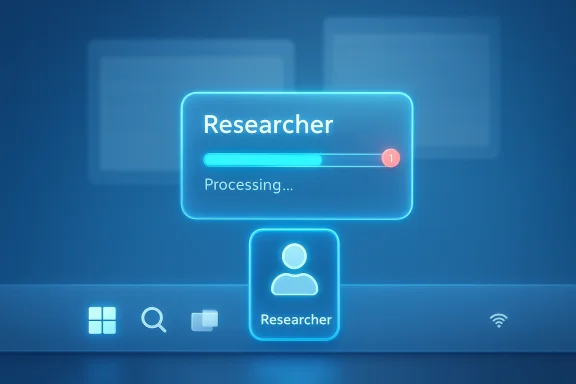
Microsoft is turning the Windows 11 taskbar into something more ambitious than a row of pinned apps and system icons: a live control surface for AI agents. In the latest Release Preview build, Windows now shows progress for agents directly on the taskbar, starting with Researcher in Microsoft 365 Copilot, and Microsoft says the same framework is intended to support third-party apps as well. That is a meaningful shift because it moves AI from a side feature into the operating system’s workflow layer, where users can launch, monitor, and return to long-running tasks without losing context. It also signals that Microsoft is trying to make AI feel more selective and useful, rather than scattered across every corner of Windows.
Microsoft’s Windows 11 AI strategy has been evolving for more than a year, but the current taskbar experiment is the clearest sign yet that the company wants agents to feel native to the desktop. Earlier Copilot efforts were mostly about quick access: a sidebar, a button, a prompt, or an app-specific shortcut. The new model is different. It treats an AI agent as a task that can persist, report progress, and then hand results back to the user when it is op operating system, subtle interface shifts often reveal major platform changes.
The timing matters too. Microsoft placed the feature in the Release Preview Channel on April 17, 2026, which is typically where Windows features move when they are close to broader deployment, even if they are still being rolled out gradually. The company’s own release notes say the taskbar experience supports both first-party and third-party apps, and that developers can hook into it through the Windows.UI.Shell.Tasks API. That makes this less like a one-off Copilot experiment and more like an operating-system framework intended for wider adoption.
The distinction between a sidebar and a taskbar monitor is important. A sidebar is something you open, use, and dismiss. A taskbar agent is something you can keep an eye on while the rest of your desktop keeps moving. That is a much better fit for research, document generation, data gathering, and rh in a single prompt-response cycle. Microsoft appears to be betting that users will accept AI more readily when it behaves like a job queue than when it behaves like a pop-up assistant.
At the same time, Microsoft is clearly sensitive to user fatigue. The company has already signaled that it wants to reduce unnecessary Copilot entry points in Windows and focus on experiences that feel genuinely useful and well-crafted. That caution is telling. It suggests Microsoft understands that sprinkling AI into every app and every pane is a fast way to make Windows feel noisy, while concentrating AI apstainable strategy. The taskbar, which already carries enormous visual and functional weight, is a logical place for that selective approach.
The earlier phase was more chaotic. Microsoft experimented with Copilot buttons, sidebars, inbox-app integrations, and other visible touchpoints that often felt redundant or overly eager. Some users saw the company’s AI features as useful enhancements; others saw them as large and persistent UI intrusions. Over time, Microsoft has responded by trimming some of the more obvious Copilot hooks and emphasizing that it will be more intentional about where AI appears. That reaognition that placement matters as much as capability.
Meanwhile, Microsoft has been investing in developer-facing infrastructure. The company’s Agent Launchers model is designed to let apps register AI agents once and make them available to supported Windows experiences. Microsoft’s own language describes those agents as interactive, task-oriented, contextually aware, and action-capable. That is a much bigger claim than “there is a chatbot here.” It implies a framework where the operating system can surface ongoing work, preserve context, and coooand services.
The taskbar is also one of Windows’ most politically sensitive surfaces. Users have strong muscle memory around it. They expect pinned apps, system status, search, and notifications; they do not expect the shell to become a showcase for experimental AI. Microsoft knows that too. That is why the company is presenting the taskbar agent story as optional, gradual, and tied to specific workflows rather than as a universal redesign of the desktop. In other words, this is a platform move wrapped s
The taskbar is not just a UI strip. It is where Windows signals what deserves immediate attention. By placing AI agents there, Microsoft is making a statement about priority: these tasks are not merely app-level curiosities, they are part of the operating rhythm of the system. That has technical implications, but it also changes perception. Once an AI task lives on the taskbar, it feels less like an add-on and more like a first-class workflow.
That matters because it creates a standardized way for apps to expose AI behavior without inventing a separate launcher or floating assistant for every developer. A more fragmented ecosystem would quickly become chaotic: one vendor would use a mini-window, another a browser tab, another a traydh surface mattered. Microsoft is trying to impose a common shell grammar on that mess. The result is more elegant, but also more powerful, because the OS gets to mediate discovery and control.
The most concrete official example so far is Researcher in Microsoft 365 Copilot. Microsoft says the taskbar will show progress while the agent works, users can hover over the icon to see real-time status, and a notification will bring them back when the report is ready. That is a very specific user promise. It frames the taskbar as a progress monitor for asynchronous work, not a substitute for the app itself.
There is also a competitive reason to move now. AI is increasingly becoming a platform-layer feature, which means the operating system itself can either become the broker for those experiences or be rslse’s assistant ecosystem. Microsoft clearly does not want Windows to be sidelined. By making the shell agent-aware, the company is trying to keep the OS at the center of AI work on the PC.
This is where the company’s shift in tone becomes important. Microsoft has recently talked about being more deliberate and reducing unnecessary Copilot entry points. That language sounds cautious, but it is also strategically savvy. It tells users and IT admins that the company is not trying to plaster Ayg to place AI where it can earn its keep, especially in workflows that are inherently multi-step and slow enough to justify background monitoring.
The downside is just as obvious. A lot of Windows users already believe the platform has become too noisy and too eager to advertise AI features they never asked for. If taskbar agents become anotoo try Copilot, the feature could backfire. Convenience is only valuable when it feels optional and restrained. Nobody wants a control plane that behaves like a sales pitch.
There is also the subscription question. Some of the most capable experiences, such as Microsoft 365 Researcher, are tied to Microsoft 365 and therefore to licensing and sign-in status. That means the taskbar may look universal whieunts and subscriptions. For consumers, that can create frustration if the UI suggests more than the entitlement actually provides.
That is important because enterprise trust is built on predictability. If an agent can surface in the taskbar but only for certain users, devices, languages, subscriptions, or policies, administrators need to understand those conditions clearly. A feature like this can be useful in managed environments, but only if the licensing and rollout rules are explicit. Otherwise, support und simple and turn out to be complicated.
The upside for business users is substantial if Microsoft gets the controls right. A research agent that can persist across Outlook, Teams, Excel, and browser windows can save time and reduce context switching. More broadly, a shell-level agent framework could make Windows a better home for enterprise AI than a collection of separate web apps and browser tabs. That is a real operational benefit, not just a UX flourish.
That matters because developers hate fragmented launch surfaces almost as much as users do. A standardized shell integration gives them a way to make AI tools visible without forcing users to remember separate entry points. It also creates a potential distribution advantagexkbar or search flow, developers that integrate properly will have a better shot at adoption.
But there is a catch. Standardization only works if the semantics are stable. If every vendor defines “agent” differently, the taskbar can become a mess of inconsistent experiences that share a label but not a behavior. That would be bad for users and embarrassing for Microsoft. The company’s challenge is to keep the framework flexible enough for developers while still making it legible for everyone else. Powerful platforms are often won or lost on naming discipline.
Microsoft also has to keep its rollout strategy disciplined. Gradual rollout is sensible, but the company will need to explain availability clearly across builds, device classes, languages, subscriptions, and policy states. A feature like this can survive limited availability. It cannot survive confusion. Clarity is part of the product.
Finally, Microsoft must preserve the basic Windows promise: the shell should help users work, not call attention to itself. The taskbar is one of the few places on the desktop where the company can make AI feel both visible and restrained. That is a hard balance to strike, but if Microsoft gets it right, it may end up defining how the next generation of Windows users interact with intelligent software. If it gets it wrong, the backlash will be immediate, because the taskbar is too central and too familiar to forgive easily.
Source: extremetech.com Windows 11 Will Let Third-Party AI Agents Sit on Your Taskbar
 Overview
Microsoft’s Windows 11 AI strategy has been evolving for more than a year, but the current taskbar experiment is the clearest sign yet that the company wants agents to feel native to the desktop. Earlier Copilot efforts were mostly about quick access: a sidebar, a button, a prompt, or an app-specific shortcut. The new model is different. It treats an AI agent as a task that can persist, report progress, and then hand results back to the user when it is op operating system, subtle interface shifts often reveal major platform changes.The timing matters too. Microsoft placed the feature in the Release Preview Channel on April 17, 2026, which is typically where Windows features move when they are close to broader deployment, even if they are still being rolled out gradually. The company’s own release notes say the taskbar experience supports both first-party and third-party apps, and that developers can hook into it through the Windows.UI.Shell.Tasks API. That makes this less like a one-off Copilot experiment and more like an operating-system framework intended for wider adoption.
The distinction between a sidebar and a taskbar monitor is important. A sidebar is something you open, use, and dismiss. A taskbar agent is something you can keep an eye on while the rest of your desktop keeps moving. That is a much better fit for research, document generation, data gathering, and rh in a single prompt-response cycle. Microsoft appears to be betting that users will accept AI more readily when it behaves like a job queue than when it behaves like a pop-up assistant.
At the same time, Microsoft is clearly sensitive to user fatigue. The company has already signaled that it wants to reduce unnecessary Copilot entry points in Windows and focus on experiences that feel genuinely useful and well-crafted. That caution is telling. It suggests Microsoft understands that sprinkling AI into every app and every pane is a fast way to make Windows feel noisy, while concentrating AI apstainable strategy. The taskbar, which already carries enormous visual and functional weight, is a logical place for that selective approach.
Background
Microsoft’s push toward taskbar-based agents did not appear out of nowhere. It sits on top of the company’s broader move from Copilot as a branded assistant to agents as platform capabilities. That shift has been visible in the way Microsoft talks about Windows AI: less as a single chatbot and more as a system of discovery, invocation, permissions, and task execution. In practical terms, the company has been building rlligent tools that Windows can expose across shell experiences like Search, Start, and the taskbar.The earlier phase was more chaotic. Microsoft experimented with Copilot buttons, sidebars, inbox-app integrations, and other visible touchpoints that often felt redundant or overly eager. Some users saw the company’s AI features as useful enhancements; others saw them as large and persistent UI intrusions. Over time, Microsoft has responded by trimming some of the more obvious Copilot hooks and emphasizing that it will be more intentional about where AI appears. That reaognition that placement matters as much as capability.
Meanwhile, Microsoft has been investing in developer-facing infrastructure. The company’s Agent Launchers model is designed to let apps register AI agents once and make them available to supported Windows experiences. Microsoft’s own language describes those agents as interactive, task-oriented, contextually aware, and action-capable. That is a much bigger claim than “there is a chatbot here.” It implies a framework where the operating system can surface ongoing work, preserve context, and coooand services.
The taskbar is also one of Windows’ most politically sensitive surfaces. Users have strong muscle memory around it. They expect pinned apps, system status, search, and notifications; they do not expect the shell to become a showcase for experimental AI. Microsoft knows that too. That is why the company is presenting the taskbar agent story as optional, gradual, and tied to specific workflows rather than as a universal redesign of the desktop. In other words, this is a platform move wrapped s
The taskbar is not just a UI strip. It is where Windows signals what deserves immediate attention. By placing AI agents there, Microsoft is making a statement about priority: these tasks are not merely app-level curiosities, they are part of the operating rhythm of the system. That has technical implications, but it also changes perception. Once an AI task lives on the taskbar, it feels less like an add-on and more like a first-class workflow.
Why the release previeeview is not final shipping code, but it is much closer to real-world deployment than a random lab build. When Microsoft moves a feature there, it is usually testing polish, compatibility, and rollout behavior, not simply proving that an idea can compile. That makes the current taskbar work especially significant for anyone watching how fast AI is being absorbed into Windows 11.
How the Agent Model Works
The architecture behind this feature is more interesting than the visual treatment. Microsoft is building a chain that begins with agent registration, moves through system discovery, and ends with taskbar presentation. In the company’s own documentation and preview materials, developers can register agents statically at install time or dynamically at runtime, then make those agentWindows surfaces. The taskbar becomes the front end, not the engine.That matters because it creates a standardized way for apps to expose AI behavior without inventing a separate launcher or floating assistant for every developer. A more fragmented ecosystem would quickly become chaotic: one vendor would use a mini-window, another a browser tab, another a traydh surface mattered. Microsoft is trying to impose a common shell grammar on that mess. The result is more elegant, but also more powerful, because the OS gets to mediate discovery and control.
The most concrete official example so far is Researcher in Microsoft 365 Copilot. Microsoft says the taskbar will show progress while the agent works, users can hover over the icon to see real-time status, and a notification will bring them back when the report is ready. That is a very specific user promise. It frames the taskbar as a progress monitor for asynchronous work, not a substitute for the app itself.
From chat to delegation
This is a big conceptual change. Classs built around prompt and answer. Agent design is built around delegation, status, and return. In a chat model, the user waits for a response. In an agent model, the user assigns a task, moves on, and checks back later. That is far closer to how professionals already work with email, downloads, builds, and batch jobs.The role of Model Context Protocol
Microsoft’s broader Windows AI stack also leans on Model Context Protocol ideas and connector discovery. The point is not just to givep a structured way to discover tools and data sources. That kind of plumbing is essential if Microsoft wants agents to be interoperable rather than isolated demos. It also helps explain why the company keeps talking about APIs and registries instead of only showing UI mockups.Why Microsoft Is Doing This Now
Microsoft is trying to solve two problems at once. First, it wants Windows to remain relevant as AI shifts from os. Second, it wants to avoid the backlash that comes from forcing too many AI surfaces into places where users do not want them. The taskbar-agent approach is a compromise that lets Microsoft promote AI without making it omnipresent.There is also a competitive reason to move now. AI is increasingly becoming a platform-layer feature, which means the operating system itself can either become the broker for those experiences or be rslse’s assistant ecosystem. Microsoft clearly does not want Windows to be sidelined. By making the shell agent-aware, the company is trying to keep the OS at the center of AI work on the PC.
This is where the company’s shift in tone becomes important. Microsoft has recently talked about being more deliberate and reducing unnecessary Copilot entry points. That language sounds cautious, but it is also strategically savvy. It tells users and IT admins that the company is not trying to plaster Ayg to place AI where it can earn its keep, especially in workflows that are inherently multi-step and slow enough to justify background monitoring.
Competitive pressure from other platforms
Apple’s momentum in on-device intelligence and integrated platform experiences has put extra pressure on Windows to define a modern AI story of its own. Microsoft’s answer is not to mimic a phone-style assistant, but to make Windows itself tharolled. That is a very Microsoft solution: win by owning the framework, not by winning one flashy demo.Why “less AI” can still mean more AI
The phrase “less AI” is misleading if taken literally. What Microsoft seems to mean is fewer random AI hooks, not less capability. In practice, the OS may become more AI-aware in the places that matter most, even as some low-value touchpoints disappear. That is a more disciplined strategy, and it is likely to be more durable if Microsoft can keep the experience coherent. Selective AI is still a lot of AI.What This Means for Consumers
For consumers, the best case is straightforward: a taskbar that helps you keep track of work without getting in the way. If you use Microsoft 365 Copilot or another agent-enabled app, you may eventually be able to kick off a long-running task, leave the app, and watch progress from the taskbar. That is genuinely useful when the job is research-heavy or needs background processing.The downside is just as obvious. A lot of Windows users already believe the platform has become too noisy and too eager to advertise AI features they never asked for. If taskbar agents become anotoo try Copilot, the feature could backfire. Convenience is only valuable when it feels optional and restrained. Nobody wants a control plane that behaves like a sales pitch.
There is also the subscription question. Some of the most capable experiences, such as Microsoft 365 Researcher, are tied to Microsoft 365 and therefore to licensing and sign-in status. That means the taskbar may look universal whieunts and subscriptions. For consumers, that can create frustration if the UI suggests more than the entitlement actually provides.
Consumer upside
A few consumer benefits stand out immediately:- Faster access to long-running AI tasks.
- Progress visibility without constant app switching.
- Less need for separate floating assistant windows.
- Better continuity when an AI task spans multiple minutes.
- A more coherent shell experience than scattered Copilot buttons.
Consumer friction
The risks are equally easy to imagine:- UI clutter if too many agents appear.
- Confusion over what is free versus licensed.
- Overlap between taskbar agents, search, and chat.
- Fatigue if AI appears in too many Windows surfaces.
- Suspicion that the OS is becoming a marketing channel.
What This Means for Enterprises
Enterprises are likely to see the feature through a very different lens. For IT teams, the key question is not whether the taskbar looks clever, but whether it can be governed, audited, and disabled when necessary. Microsoft has at least s n around agent features repeatedly emphasizes policy, control, and managed deployment.That is important because enterprise trust is built on predictability. If an agent can surface in the taskbar but only for certain users, devices, languages, subscriptions, or policies, administrators need to understand those conditions clearly. A feature like this can be useful in managed environments, but only if the licensing and rollout rules are explicit. Otherwise, support und simple and turn out to be complicated.
The upside for business users is substantial if Microsoft gets the controls right. A research agent that can persist across Outlook, Teams, Excel, and browser windows can save time and reduce context switching. More broadly, a shell-level agent framework could make Windows a better home for enterprise AI than a collection of separate web apps and browser tabs. That is a real operational benefit, not just a UX flourish.
Enterprise strengths
- Policy controls can make deployment safer.
- Managed rollout fits existing IT practices.
- Persistent progress indicators reduce workflow interruptions.
- Standardized agent discovery may reduce fragmentation.
- On-device components can improve responsiveness and privacy posture.
- Licensing can be aligned with existing Microsoft 365 governance.
Enterprise headaches
- Support teams may need to explain nuanced feature availability.
- Security teams will worry about third-party agent registration.
- Identity and entitlement checks could become more complex.
- Different builds and channels may expose different behaviors.
- Users may misunderstand what agents can do versus what they cannot do.
The Developer Opportunity
For developers, this is where the story becomes potentially transformative. Microsoft is not just adding a feature for its own apps. It is building a common registration and discovery layer that other apps can use, which is exactly the sort of plumbing that platform ecosystems need. If the framework gains traction, Windows could become a far more consistent environment for AI tools. ([blogs.wogs.windows.com/windows-insider/2025/12/19/announcing-windows-11-insider-preview-build-26220-7522-dev-beta-channels/)That matters because developers hate fragmented launch surfaces almost as much as users do. A standardized shell integration gives them a way to make AI tools visible without forcing users to remember separate entry points. It also creates a potential distribution advantagexkbar or search flow, developers that integrate properly will have a better shot at adoption.
But there is a catch. Standardization only works if the semantics are stable. If every vendor defines “agent” differently, the taskbar can become a mess of inconsistent experiences that share a label but not a behavior. That would be bad for users and embarrassing for Microsoft. The company’s challenge is to keep the framework flexible enough for developers while still making it legible for everyone else. Powerful platforms are often won or lost on naming discipline.
Why developers may care
- One registration can reach multiple Windows surfaces.
- Taskbar visibility can improve discoverability.
- Long-running tasks fit many AI workloads.
- Standard APIs reduce the need for custom launchers.
- Managed availability can align with licensing and auth.
- A shared shell pattern can make apps feel more native.
Where developers may hesitate
- Rules for agent registration may be too complex.
- Adoption depends on users trusting the shell integration.
- Microsoft could change the experience as it experiments.
- Third-party agents may be compared unfairly with Microsoft’s own tools.
- The value may be strongest only in certain productivity niches.
Strengths and Opportunities
Microsoft’s taskbar-agent strategy has several real strengths, and the most important one is that it is trying to solve a genuine product problem rather than simply adding another branding layer. The company is building a framework that could make AI more coherent inside Windows while giving users more visibility into what is happening. If it lands well, Windows 11 could become the most natural place for desktop AI on the PC. That is a significant strategic prize.- Unified discovery for agents across apps and shell surfaces.
- Visible progress tracking for long-running AI work.
- A more coherent alternative to scattered Copilot buttons.
- Better fit for research, reporting, and asynchronous tasks.
- Third-party extensibility that can broaden the ecosystem.
- Optional rollout that respects user choice.
- Potential enterprise value through policy and managed deployment.
Risks and Concerns
The risks are just as serious, and they center on trust. Windows users have already shown they do not want AI forced into every surface, especially when the value is unclear. If Microsoft pushes too hard, the taskbar could become a symbol of bloat rather than a useful workflow tool. That would be a shame, because the underlying idea is strong even if the execution will have to be very careful.- UI clutter if too many agents compete for attention.
- Confusion over licensing, availability, and entitlement.
- Security concerns around third-party agent registration.
- Trust issues if agents seem too powerful or opaque.
- Fragmentation across Microsoft’s own AI surfaces.
- User fatigue if Windows feels like an AI showcase.
- Support complexity for enterprise administrators.
Looking Ahead
The next few months will tell us whether this is a real platform shift or simply the latest Copilot repackage. The key signal to watch is third-party adoption. If developers begin registering meaningful agents and users actually find them useful, then the taskbar will become a serious AI control surface. If not, it will be remembered as another Microsoft experiment that looked better in a demo than it felt in daily use.Microsoft also has to keep its rollout strategy disciplined. Gradual rollout is sensible, but the company will need to explain availability clearly across builds, device classes, languages, subscriptions, and policy states. A feature like this can survive limited availability. It cannot survive confusion. Clarity is part of the product.
Finally, Microsoft must preserve the basic Windows promise: the shell should help users work, not call attention to itself. The taskbar is one of the few places on the desktop where the company can make AI feel both visible and restrained. That is a hard balance to strike, but if Microsoft gets it right, it may end up defining how the next generation of Windows users interact with intelligent software. If it gets it wrong, the backlash will be immediate, because the taskbar is too central and too familiar to forgive easily.
Source: extremetech.com Windows 11 Will Let Third-Party AI Agents Sit on Your Taskbar
