

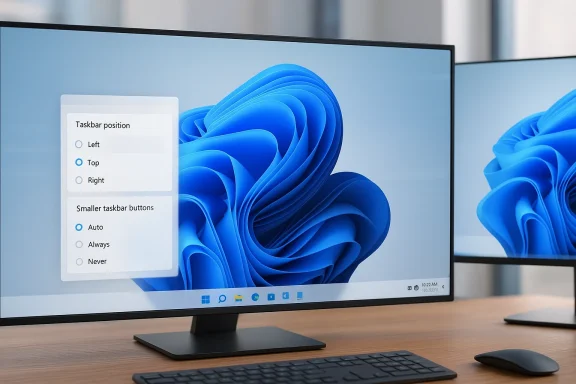
The move Microsoft is now making with the Windows 11 taskbar is bigger than a cosmetic tweak. After years of criticism, the company is preparing to restore taskbar repositioning so users can move it to the top or sides of the screen, while also testing smaller taskbar buttons and other interface refinements. If the rollout proceeds as described, it will be one of the clearest signs yet that Microsoft is willing to reverse one of Windows 11’s most unpopular design decisions. The change also arrives alongside broader work on performance, reliability, and everyday usability, suggesting a more pragmatic phase for the platform.
Windows 11 launched in 2021 with a cleaner, more touch-oriented shell, but it also removed several taskbar behaviors that long-time Windows users considered essential. Among the most visible losses was the ability to dock the taskbar on the left, right, or top edges of the screen. For many people, that was not a niche power-user preference but a core part of their desktop workflow, especially on ultrawide monitors and multi-display setups.
Microsoft’s decision was rooted in a broader rearchitecture of the taskbar. The new shell was simplified and rebuilt for a different design foundation, which made some legacy behaviors hard to preserve. That trade-off may have made sense inside the product team, but the reaction from users was immediate and sustained. In practice, the taskbar became a symbol of Windows 11’s tension between modern polish and the flexibility that made Windows feel like Windows.
The company has been slowly undoing some of those omissions. In 2025, Microsoft began rolling out smaller taskbar buttons as a configurable feature in Insider builds, giving users another way to reclaim space and density on the taskbar. By June 2025, Microsoft documented that taskbar icons would resize when space ran low, and that users could choose whether smaller buttons appeared only when needed, never, or always. That was a meaningful step toward restoring control, even if it stopped short of true repositioning. (blogs.windows.com)
More recently, Microsoft has also been expanding the Windows 11 taskbar’s supporting experiences. The company has continued to adjust taskbar indicators, fix taskbar-related bugs, and improve adjacent features such as the notification center and calendar behavior. Those updates matter because they show a pattern: Microsoft is not just patching the shell, it is actively rethinking the balance between old Windows habits and newer design constraints. (blogs.windows.com)
The criticism of Windows 11 was never only about whether the taskbar looked good. It was about control, and Windows has historically won loyalty by offering exactly that. When a platform known for configurability narrows user choice, the removal is felt as a regression, even if the interface looks cleaner at first glance.
When Microsoft removed the feature, it created a perception gap. The company was trying to modernize Windows, but many users interpreted the change as if the desktop had become less capable in exchange for a more restrained aesthetic. That perception matters, because operating systems are judged not only on technical quality but on whether they respect the user’s habits.
Microsoft later described the same capability as taskbar icon scaling, emphasizing that the feature would help keep more apps visible and accessible. The fact that the company gave users explicit control is notable, because it is a direct recognition that one size does not fit all. It is also a sign that Microsoft is trying to solve taskbar frustrations with settings rather than rigid defaults. (blogs.windows.com)
That pattern suggests Microsoft is treating the taskbar as a living subsystem again, not a finished artifact. The company seems to understand that trust in Windows is rebuilt through little corrections that users can feel immediately. It is incremental repair, and that may be more effective than a grand redesign.
Because the taskbar had been restructured, restoring side or top positioning was not simply a matter of flipping a switch. The Start menu, animations, hit targets, and placement logic all had to be considered together. In other words, the taskbar became tightly coupled to the rest of the shell, and that coupling imposed real engineering costs.
That is one reason many users never accepted the taskbar redesign as a net improvement. They could see that it was cleaner, but they could also see that it had been built by removing things they actually used. That is exactly the kind of change that makes a product feel more constrained even when it looks more modern.
Giving users control over the taskbar’s location restores an important form of spatial organization. Users who work from muscle memory can match the interface to their habits. Users with special setups can optimize for their hardware. Users who just want their desktop to feel less standard can finally make that choice without relying on hacks.
Microsoft’s move therefore has an accessibility dimension as well. Interface flexibility can help users with different visual preferences, motor habits, and workflow structures. In a broader sense, it makes Windows feel more adaptable rather than more prescriptive.
That means the return of movement will be welcomed, but it will not erase every complaint. The deeper question is whether Microsoft sees this as a one-off concession or as part of a broader commitment to restoring lost flexibility. That distinction will determine how users read the move.
This matters because organizations want fewer support tickets and fewer productivity complaints after an upgrade. If some employees can arrange the taskbar in a way that better matches their workflow, the transition may feel less disruptive. That is especially true for roles that depend on dense multitasking and fast app switching.
That means the taskbar return could have a second-life effect in managed environments. IT teams may use it to make Windows 11 more acceptable, or they may lock it down to preserve uniformity. Either way, the mere presence of the option gives administrators more room to tailor the experience.
In that sense, the taskbar story is really a story about trust. If Microsoft can restore a highly visible feature that users have asked for repeatedly, it may reassure enterprise buyers that Windows 11 is becoming more responsive to real-world demands.
That is why the feature’s return is likely to be celebrated disproportionately by enthusiasts. For them, this is not a trivial customization. It is the restoration of a basic capability that should never have disappeared in the first place.
The value here is cumulative. A taskbar that fits your habits reduces friction dozens or hundreds of times per day. That kind of improvement does not always show up in benchmark charts, but users notice it immediately.
The taskbar issue became a shorthand for that concern. Even users who like Windows 11’s overall direction often still felt that Microsoft had made the desktop less useful in exchange for a cleaner presentation. Reintroducing movement is a way to acknowledge that criticism without abandoning the broader modernization effort.
Microsoft’s challenge is to reclaim that functionality in a way that feels stable, official, and sustainable. If it succeeds, it reduces the incentive for unsupported hacks. If it fails, users will continue to look elsewhere for the flexibility they want.
That is why taskbar changes can be more strategically important than they appear. They influence whether users believe Windows is being built for them or merely around them.
Just as important, Microsoft will need to make sure the return of taskbar movement fits into a broader story about Windows quality. Small icon scaling, taskbar fixes, notification-center refinements, and calendar-related improvements all point in the same direction: a more mature Windows 11 that is willing to recover lost ground. If the company sustains that pattern, users may begin to see the operating system less as a compromise and more as a platform that is finally listening again. (blogs.windows.com)
Source: gnnhd.tv Windows 11 is finally getting a movable taskbar
 Overview
Windows 11 launched in 2021 with a cleaner, more touch-oriented shell, but it also removed several taskbar behaviors that long-time Windows users considered essential. Among the most visible losses was the ability to dock the taskbar on the left, right, or top edges of the screen. For many people, that was not a niche power-user preference but a core part of their desktop workflow, especially on ultrawide monitors and multi-display setups.Microsoft’s decision was rooted in a broader rearchitecture of the taskbar. The new shell was simplified and rebuilt for a different design foundation, which made some legacy behaviors hard to preserve. That trade-off may have made sense inside the product team, but the reaction from users was immediate and sustained. In practice, the taskbar became a symbol of Windows 11’s tension between modern polish and the flexibility that made Windows feel like Windows.
The company has been slowly undoing some of those omissions. In 2025, Microsoft began rolling out smaller taskbar buttons as a configurable feature in Insider builds, giving users another way to reclaim space and density on the taskbar. By June 2025, Microsoft documented that taskbar icons would resize when space ran low, and that users could choose whether smaller buttons appeared only when needed, never, or always. That was a meaningful step toward restoring control, even if it stopped short of true repositioning. (blogs.windows.com)
More recently, Microsoft has also been expanding the Windows 11 taskbar’s supporting experiences. The company has continued to adjust taskbar indicators, fix taskbar-related bugs, and improve adjacent features such as the notification center and calendar behavior. Those updates matter because they show a pattern: Microsoft is not just patching the shell, it is actively rethinking the balance between old Windows habits and newer design constraints. (blogs.windows.com)
Why the taskbar mattered so much
The taskbar is one of the most-used parts of Windows, which means even small design changes can have outsized consequences. It is where users launch apps, monitor running programs, check notifications, and manage system state. When Microsoft removed the ability to move it, it did not simply take away a preference setting; it altered how users organize their entire screen layout.A workflow feature, not just a visual preference
For some users, a vertical taskbar on the left or right edge can improve productivity by freeing horizontal space. That is especially valuable on widescreen monitors, where a bottom-docked taskbar can consume the same strip of space across the entire width. Users who work with many pinned apps, communication tools, and background utilities often prefer a side dock because it can feel more compact and more efficient.The criticism of Windows 11 was never only about whether the taskbar looked good. It was about control, and Windows has historically won loyalty by offering exactly that. When a platform known for configurability narrows user choice, the removal is felt as a regression, even if the interface looks cleaner at first glance.
- Ultrawide monitors benefit from vertical layouts.
- Multi-monitor setups often demand different taskbar behavior on each screen.
- Power users tend to prefer denser, information-rich UI.
- Accessibility needs can also vary widely across users.
- Muscle memory is a real productivity factor in desktop OS design.
The legacy Windows promise
Windows has always sold itself as a platform where the user, not the operating system, decides how the desktop behaves. That promise is part of why desktop Windows endured through so many shifts in consumer computing. The taskbar position feature, modest as it may sound, became a shorthand for whether Microsoft still believed in that legacy.When Microsoft removed the feature, it created a perception gap. The company was trying to modernize Windows, but many users interpreted the change as if the desktop had become less capable in exchange for a more restrained aesthetic. That perception matters, because operating systems are judged not only on technical quality but on whether they respect the user’s habits.
What Microsoft has already brought back
The good news for Windows fans is that the taskbar story is not one of permanent retreat. Microsoft has steadily been restoring some of the behaviors people missed, including taskbar density controls and calendar-related experiences. Those changes do not fully reverse the original design, but they do show that user feedback is being taken seriously. (blogs.windows.com)Smaller taskbar buttons return
In April 2025, Microsoft said Windows Insiders could choose when Windows should show smaller taskbar buttons: when the taskbar is full, never, or always. That was not a giant headline feature, but it was important because it addressed a longstanding complaint about wasted taskbar space. Users who keep many apps open can benefit from smaller icons, while those who prefer the original size can keep it.Microsoft later described the same capability as taskbar icon scaling, emphasizing that the feature would help keep more apps visible and accessible. The fact that the company gave users explicit control is notable, because it is a direct recognition that one size does not fit all. It is also a sign that Microsoft is trying to solve taskbar frustrations with settings rather than rigid defaults. (blogs.windows.com)
More attention to taskbar health
The June 2025 Release Preview build included a series of taskbar and system tray fixes, including improved indicator visibility and fixes for shortcut behavior and flickering preview controls. In February 2026, Microsoft also documented a built-in network speed test reachable from the taskbar and improvements for uncombined taskbar windows. These are the kinds of changes that do not dominate marketing copy, but they matter for day-to-day reliability. (blogs.windows.com)That pattern suggests Microsoft is treating the taskbar as a living subsystem again, not a finished artifact. The company seems to understand that trust in Windows is rebuilt through little corrections that users can feel immediately. It is incremental repair, and that may be more effective than a grand redesign.
- Smaller buttons help when the taskbar is crowded.
- Visual indicator tweaks improve usability.
- Bug fixes restore confidence in basic interactions.
- New taskbar utilities make the bar feel more useful.
- Gradual rollouts reduce the risk of broad breakage.
Why the taskbar was removed in the first place
To understand why this return matters, it helps to revisit why the feature disappeared. Windows 11’s shell was shaped by a different engineering and product philosophy, one that emphasized consistency, centered alignment, and a simpler surface area. That made the taskbar easier to present as a polished element of the new design language, but it also made it less flexible.A rebuilt shell with narrower assumptions
Microsoft effectively reworked the Windows 11 taskbar around assumptions that matched modern laptop-first use cases. The design is optimized for a fixed bottom position, centered icons, and a cleaner arrangement of controls. That choice may have improved visual coherence, but it also reduced the operating system’s tolerance for unusual layouts.Because the taskbar had been restructured, restoring side or top positioning was not simply a matter of flipping a switch. The Start menu, animations, hit targets, and placement logic all had to be considered together. In other words, the taskbar became tightly coupled to the rest of the shell, and that coupling imposed real engineering costs.
The Windows 10X influence
A lot of user frustration came from the feeling that Windows 11 had borrowed the wrong lessons from Windows 10X. Windows 10X was originally conceived for dual-screen and lightweight devices, and its shell was meant to be simpler and more touch-friendly. When parts of that work were repurposed into Windows 11, some long-time desktop behaviors were left behind.That is one reason many users never accepted the taskbar redesign as a net improvement. They could see that it was cleaner, but they could also see that it had been built by removing things they actually used. That is exactly the kind of change that makes a product feel more constrained even when it looks more modern.
The backlash was predictable
Microsoft has faced this pattern before. Each time Windows changes a familiar interaction model, the company gets a wave of backlash from people who rely on the old one. But the taskbar issue was especially sensitive because it affected both casual users and professionals.- Casual users noticed the loss of flexibility.
- Power users lost a workflow customization they depended on.
- Enterprise admins saw another feature that could complicate migrations.
- Forum communities amplified the criticism for years.
- Third-party tools filled the gap, but with risk.
What a movable taskbar means now
Restoring a movable taskbar is not just a nostalgic nod to older versions of Windows. It is a signal that Microsoft is willing to treat desktop users as adults who should decide how their interface behaves. That alone would make the change important, but there are broader product implications too.A win for desktop personalization
Personalization has become a major theme across modern operating systems, but in many cases it is superficial. Wallpapers, themes, accent colors, and icon shapes are nice, but they do not change how the machine feels in use. Taskbar position does, and it does so every single day.Giving users control over the taskbar’s location restores an important form of spatial organization. Users who work from muscle memory can match the interface to their habits. Users with special setups can optimize for their hardware. Users who just want their desktop to feel less standard can finally make that choice without relying on hacks.
Better fit for different screen types
The return of taskbar repositioning is especially relevant in a world of ultrawide monitors, portrait displays, and multi-screen setups. Different screens invite different interface layouts, and a fixed bottom taskbar is not the best answer in every case. A vertical taskbar can reduce eye travel, while a top-docked one can feel more natural for users coming from macOS or other environments.Microsoft’s move therefore has an accessibility dimension as well. Interface flexibility can help users with different visual preferences, motor habits, and workflow structures. In a broader sense, it makes Windows feel more adaptable rather than more prescriptive.
Still not the same as full legacy freedom
Even if Microsoft reintroduces top and side docking, the Windows 11 taskbar may still not behave exactly like the Windows 10 version. Repositioning is only one element of a much larger interaction model. Other behaviors, such as notification handling, drag-and-drop nuances, and monitor-specific taskbar behavior, still shape the overall experience.That means the return of movement will be welcomed, but it will not erase every complaint. The deeper question is whether Microsoft sees this as a one-off concession or as part of a broader commitment to restoring lost flexibility. That distinction will determine how users read the move.
- Restoring position control is a real usability win.
- It improves support for diverse monitor setups.
- It helps users recover familiar workflows.
- It signals that Microsoft is listening.
- It does not solve every remaining taskbar complaint.
The enterprise angle
For enterprises, the taskbar debate may sound superficial, but that would be a mistake. Large organizations care deeply about consistency, supportability, training costs, and user satisfaction. A feature as visible as taskbar positioning can affect all four.Reduced friction in migrations
When companies move users from Windows 10 to Windows 11, interface changes become training issues. The more familiar the desktop feels, the less resistance employees tend to show. A movable taskbar will not eliminate migration pain, but it can soften the perception that Windows 11 is forcing users into an unfamiliar mold.This matters because organizations want fewer support tickets and fewer productivity complaints after an upgrade. If some employees can arrange the taskbar in a way that better matches their workflow, the transition may feel less disruptive. That is especially true for roles that depend on dense multitasking and fast app switching.
Configuration, policy, and support
Enterprises will also want clarity about how taskbar repositioning is managed. In corporate environments, customization options can be useful, but they can also create support overhead if users are allowed to experiment freely. Microsoft will likely need to document how the feature interacts with device management, policies, and standardized images.That means the taskbar return could have a second-life effect in managed environments. IT teams may use it to make Windows 11 more acceptable, or they may lock it down to preserve uniformity. Either way, the mere presence of the option gives administrators more room to tailor the experience.
A subtle sign of maturity
A platform becomes enterprise-friendly not when it looks simple, but when it absorbs complexity without collapsing. Returning taskbar placement options suggests Microsoft is more willing to let Windows be configurable again. That is a good sign for organizations that have been wary of change for change’s sake.In that sense, the taskbar story is really a story about trust. If Microsoft can restore a highly visible feature that users have asked for repeatedly, it may reassure enterprise buyers that Windows 11 is becoming more responsive to real-world demands.
The consumer angle
For consumers, the change is more immediate and emotional. People spend hours each day interacting with the taskbar, even if they never think about it consciously. A small shift in placement can change how a whole desktop feels.More control for power users
Power users have long relied on taskbar positioning to manage screen space. A movable bar can help create a cleaner workspace, especially when combined with smaller taskbar buttons or auto-hiding behavior. It can also reduce the sense that Windows is enforcing a one-size-fits-all desktop model.That is why the feature’s return is likely to be celebrated disproportionately by enthusiasts. For them, this is not a trivial customization. It is the restoration of a basic capability that should never have disappeared in the first place.
A meaningful quality-of-life improvement
For everyday users, the gain is less ideological and more practical. Some people simply want the taskbar out of the way. Others may prefer it at the top because that layout feels closer to the way they use apps and window controls. Small decisions like this can make a machine feel more comfortable over time.The value here is cumulative. A taskbar that fits your habits reduces friction dozens or hundreds of times per day. That kind of improvement does not always show up in benchmark charts, but users notice it immediately.
Why it matters more than a cosmetic refresh
Microsoft often gets attention for visual updates, but interface ergonomics tend to matter more in the long run. A refined font or new icon set does not help if the operating system still blocks familiar workflows. Taskbar positioning is one of those rare features that is both simple to explain and deeply consequential in use.- It affects app switching.
- It changes how the desktop is organized.
- It can improve monitor utilization.
- It helps users preserve muscle memory.
- It makes the OS feel more personal.
Competition and market pressure
Microsoft’s taskbar reversal should also be read in competitive context. Desktop operating systems are judged against alternatives not only on features, but on philosophy. Windows has long differentiated itself through flexibility, while Apple’s macOS and various Linux desktops often emphasize different kinds of control or simplicity.Windows can’t afford to feel less flexible
If Windows becomes too rigid, it loses one of its strongest brand advantages. People put up with complexity because they get control in return. When Microsoft strips out familiar customization and then takes years to restore it, it risks undermining that bargain.The taskbar issue became a shorthand for that concern. Even users who like Windows 11’s overall direction often still felt that Microsoft had made the desktop less useful in exchange for a cleaner presentation. Reintroducing movement is a way to acknowledge that criticism without abandoning the broader modernization effort.
A response to third-party workarounds
The existence of third-party tools such as ExplorerPatcher and Start11 showed that demand never went away. When users rely on external utilities to recreate a native behavior, it is a signal that the platform is not meeting a real need. It is also a hint that competitors do not have to do much to look more accommodating.Microsoft’s challenge is to reclaim that functionality in a way that feels stable, official, and sustainable. If it succeeds, it reduces the incentive for unsupported hacks. If it fails, users will continue to look elsewhere for the flexibility they want.
Windows as a product, not just an ecosystem
The return of the movable taskbar also reminds us that Windows still lives or dies by its desktop experience. AI integrations, cloud features, and account services matter, but they do not replace the basic feel of the OS. Microsoft knows that if the core shell frustrates users, the rest of the stack becomes harder to value.That is why taskbar changes can be more strategically important than they appear. They influence whether users believe Windows is being built for them or merely around them.
Strengths and Opportunities
Microsoft’s taskbar reversal has several strengths, and they go beyond nostalgia. The opportunity here is to reframe Windows 11 as a platform that can evolve without ignoring the users who depend on it most.- Restores trust by acknowledging a widely criticized omission.
- Improves usability on ultrawide and multi-monitor setups.
- Supports personalization in a way that actually affects daily work.
- Reduces reliance on hacks and unsupported third-party tools.
- Helps enterprise adoption by softening the Windows 11 learning curve.
- Signals responsiveness to feedback from power users and enthusiasts.
- Pairs well with smaller taskbar buttons for better space management.
Risks and Concerns
The same change also carries risks, especially if Microsoft treats it as a narrow fix rather than a broader philosophy shift. Users will judge the move not only by whether it works, but by whether it arrives with the stability and completeness they expect.- Incomplete restoration could frustrate users if edge cases remain broken.
- UI inconsistencies may persist across monitors and screen sizes.
- Enterprise admins may face new policy and support questions.
- Regression risk is real whenever core shell behavior changes.
- Expectation inflation could grow if Microsoft overpromises.
- Too much gradual rollout may leave users unsure when the feature is coming.
- Legacy behavior gaps may remain even after repositioning returns.
Looking Ahead
The next phase will be about execution. Microsoft says the movable taskbar will arrive first for Windows Insiders in the coming weeks before reaching all Windows 11 users later in the year, and that timeline will matter. The company will need to prove not only that the feature exists, but that it behaves reliably across different display configurations, input methods, and shell states.Just as important, Microsoft will need to make sure the return of taskbar movement fits into a broader story about Windows quality. Small icon scaling, taskbar fixes, notification-center refinements, and calendar-related improvements all point in the same direction: a more mature Windows 11 that is willing to recover lost ground. If the company sustains that pattern, users may begin to see the operating system less as a compromise and more as a platform that is finally listening again. (blogs.windows.com)
- Watch for the Insider build that first exposes taskbar repositioning.
- Check whether the feature supports top, left, and right placement equally well.
- See how it behaves on multi-monitor and ultrawide setups.
- Monitor whether Microsoft ties it to other taskbar controls such as icon scaling.
- Look for clues about enterprise policy support and admin management.
- Pay attention to whether Microsoft expands or limits the feature after feedback.
Source: gnnhd.tv Windows 11 is finally getting a movable taskbar
