

Microsoft’s move to restore a movable taskbar in Windows 11 is more than a nostalgic nod to Windows 10-era flexibility. It is a signal that the company is listening to one of the most persistent user complaints about Windows 11: that it looked modern, but often felt less adaptable than the version it replaced. The early look Microsoft briefly surfaced, then deleted, suggests the feature is real, in progress, and likely part of a broader effort to make Windows 11 feel less rigid and more personal.
The taskbar has always been one of Windows’ defining surfaces. It is where users launch apps, check system status, switch between tasks, and orient themselves visually across a busy desktop. When Windows 11 arrived, Microsoft made the bar cleaner and more centered, but it also took away some long-standing freedoms that many power users had come to regard as basic. That tension has shaped a large part of the criticism around the OS ever since.
Microsoft has now publicly acknowledged that taskbar repositioning is one of the top asks from users, and in its March 20, 2026 Windows Insider update it confirmed that it is introducing the ability to move the taskbar to the top or sides of the screen. The company also framed this change as part of a larger quality push focused on performance, reliability, and more carefully crafted experiences. That matters because it shows the taskbar change is not a one-off tweak; it is part of a broader reset in how Microsoft is approaching Windows 11. (blogs.windows.com)
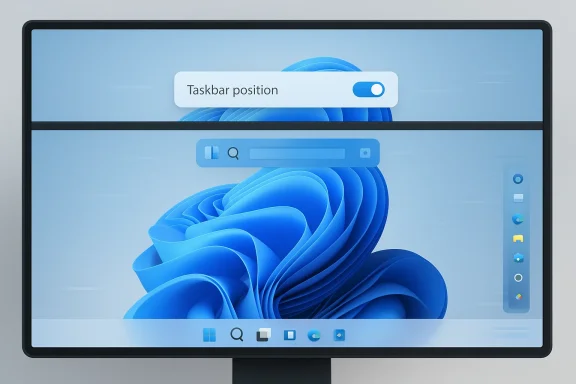
The early look Microsoft revealed also helps clarify how the final feature will work. The right-click menu shown in the deleted video was described by Microsoft engineers as a debug tool, not the shipping interface. Instead, the final version is expected to use the Settings app, more like the way Windows 10 handled taskbar configuration. That distinction is important because it suggests Microsoft wants the feature to be deliberate, stable, and integrated into the broader Windows personalization model rather than exposed as a quick experimental shortcut.
Windows 11’s removal of that freedom was felt especially sharply by users who had grown accustomed to customizing the desktop as a workflow tool. Microsoft did preserve some taskbar options, but the overall direction was stricter and more opinionated. That has been a recurring source of frustration, and it explains why something as seemingly mundane as taskbar placement has stayed near the top of user feedback for years.
That official statement matters because it removes a large amount of ambiguity. Until now, taskbar rumors often lived in the space between hidden builds, code references, and community speculation. Microsoft has now made the feature part of its quality narrative for Windows 11, which makes a public rollout much more plausible.
This is important because it changes the story from “Microsoft may finally cave” to “Microsoft is recalibrating what Windows 11 should be.” That is a meaningful shift in tone.
A debug menu can be a fast way to test a feature internally, but it is not a polished end-user solution. Microsoft likely used it because it allows engineers to move quickly while still validating the behavior of the shell. The shipping version will need clearer labels, better discoverability, and compatibility with the rest of the personalization stack.
There is also a symbolic dimension here. By placing the option in Settings rather than a context menu, Microsoft reinforces that this is an officially supported personalization choice, not a hidden tweak or a shell hack. That distinction matters to enterprise administrators and to users who want consistency across devices.
This is also where interface design becomes a technical problem. A bottom taskbar has room for richer affordances, labels, and longer controls. A left or right taskbar has to prioritize vertical density and efficient use of space. Microsoft’s decision to collapse Search rather than force a cramped bar suggests the company is trying to make the feature functional instead of merely faithful to the old behavior.
Microsoft has reportedly acknowledged that the early animations were a bit janky, and that they should be smoothed out before release. That caveat is reassuring. It suggests the company is not rushing out a half-finished shell change simply to satisfy headlines. It is trying to make sure the experience is visually consistent, which is especially important for a feature users will interact with all day.
That matters because a movable taskbar and a slimmer taskbar are often paired in user requests. People who prefer a vertical layout often also want less wasted screen real estate. On large monitors, every line of vertical space counts. On laptops, a tall taskbar can feel intrusive. So the smaller-taskbar work is not a separate nice-to-have; it is part of the same design philosophy.
At the same time, shrinking the taskbar is not risk-free. Smaller targets can hurt touch usability, accessibility, and glanceability if done poorly. Microsoft will need to balance density with clarity. That is why the company’s willingness to tie the feature to the broader taskbar redesign is a good sign.
The enterprise angle is especially interesting because Microsoft has been emphasizing quality, reliability, and better update control in the same breath as this taskbar work. That implies a broader pitch: Windows 11 should be both more stable and more customizable, not one or the other. In a business setting, that can help Microsoft defend the platform against perceptions that Windows 11 is less flexible than Windows 10.
That said, enterprises may want this to remain optional and centrally manageable. In larger deployments, consistency matters. Microsoft will need to ensure that customization does not become fragmentation. The best possible outcome is a setting that users can enjoy without giving administrators new headaches.
This is also a reminder that operating-system loyalty is built in layers. If Microsoft removes enough familiar controls, users look for workarounds. Some move to custom shell tools. Some cling to older Windows versions longer than they otherwise would. Some simply become more skeptical of future redesigns. Restoring the taskbar is therefore a reputational repair as much as a feature addition.
That is a win for Microsoft, but it is also a tacit admission that the original choice was too restrictive. Good product strategy is often about knowing when to reverse course. In this case, the reversal is likely overdue.
This matters because Windows 11 has spent years accumulating feature fragments that felt disconnected from one another. Some changes were welcome, others were divisive, and many arrived in ways that made the shell feel inconsistent. Microsoft now appears to be saying that the next phase of Windows 11 is about coherency.
By tying the taskbar work to broader quality goals, Microsoft is giving itself permission to refine the implementation before it reaches stable releases. That is probably the right choice. Users have waited a long time; they will tolerate a few more weeks if the result is genuinely better.
What matters now is not whether the feature exists in principle. It does. What matters is how well Microsoft executes the final version, how many edge cases it solves before release, and whether the broader shell improvements arrive with the same seriousness. If Microsoft gets this right, the taskbar may become a symbol of a more responsive Windows 11 rather than a reminder of what was taken away.
Source: Neowin Windows 11 is getting movable taskbar, and Microsoft revealed an early look at it
 Overview
The taskbar has always been one of Windows’ defining surfaces. It is where users launch apps, check system status, switch between tasks, and orient themselves visually across a busy desktop. When Windows 11 arrived, Microsoft made the bar cleaner and more centered, but it also took away some long-standing freedoms that many power users had come to regard as basic. That tension has shaped a large part of the criticism around the OS ever since.Microsoft has now publicly acknowledged that taskbar repositioning is one of the top asks from users, and in its March 20, 2026 Windows Insider update it confirmed that it is introducing the ability to move the taskbar to the top or sides of the screen. The company also framed this change as part of a larger quality push focused on performance, reliability, and more carefully crafted experiences. That matters because it shows the taskbar change is not a one-off tweak; it is part of a broader reset in how Microsoft is approaching Windows 11. (blogs.windows.com)
The early look Microsoft revealed also helps clarify how the final feature will work. The right-click menu shown in the deleted video was described by Microsoft engineers as a debug tool, not the shipping interface. Instead, the final version is expected to use the Settings app, more like the way Windows 10 handled taskbar configuration. That distinction is important because it suggests Microsoft wants the feature to be deliberate, stable, and integrated into the broader Windows personalization model rather than exposed as a quick experimental shortcut.
Why This Taskbar Change Matters
For many users, the taskbar position is not cosmetic. It affects muscle memory, screen layout, ergonomics, and how efficiently people move between windows. A vertical taskbar on a wide monitor can feel natural in a way a bottom-docked bar does not. A top taskbar can better match workflows on ultrawide displays, dual monitors, or systems where the lower edge is already crowded with docks, chat heads, or app chrome.Windows 11’s removal of that freedom was felt especially sharply by users who had grown accustomed to customizing the desktop as a workflow tool. Microsoft did preserve some taskbar options, but the overall direction was stricter and more opinionated. That has been a recurring source of frustration, and it explains why something as seemingly mundane as taskbar placement has stayed near the top of user feedback for years.
A Familiar Complaint Returns
The request to move the taskbar is not new. It became a common theme in Feedback Hub submissions, support forum posts, and third-party workarounds shortly after Windows 11 launched. In practical terms, this means the feature’s return is less a fresh invention than a correction to a change many users never wanted in the first place. Microsoft’s own acknowledgment validates that the complaint was never niche; it was simply delayed.- The taskbar is a high-visibility, high-frequency interface element.
- Position changes affect productivity more than appearance.
- Power users often use vertical layouts on large displays.
- Returning the option helps reduce the need for third-party tools.
- The change is especially meaningful for multi-monitor and ultrawide setups.
The Official Confirmation
The most important development is that Microsoft itself has now confirmed the direction. In its March 20, 2026 Windows Insider post, the company stated that it is introducing the ability to reposition the taskbar to the top or sides of the screen, and it explicitly connected that work to feedback from users. The same post also showed Windows 11 desktops with the taskbar at the bottom, top, left, and right, reinforcing that this is not hypothetical concept art but a preview of what is being tested. (blogs.windows.com)That official statement matters because it removes a large amount of ambiguity. Until now, taskbar rumors often lived in the space between hidden builds, code references, and community speculation. Microsoft has now made the feature part of its quality narrative for Windows 11, which makes a public rollout much more plausible.
What Microsoft Said
Microsoft’s language is revealing. It described taskbar repositioning as a “top ask,” which is corporate shorthand for something that has remained visible across feedback channels and internal prioritization. The company also placed it alongside changes to updates, File Explorer, widgets, and Feedback Hub, implying a broader campaign to make Windows feel more controllable and less disruptive. (blogs.windows.com)This is important because it changes the story from “Microsoft may finally cave” to “Microsoft is recalibrating what Windows 11 should be.” That is a meaningful shift in tone.
- Microsoft has officially acknowledged the feature.
- The feature is being previewed in Insider builds.
- The taskbar can move to top or side positions.
- The change is tied to a broader Windows quality effort.
- User feedback is clearly driving the decision.
The Early Look and the Debug Menu
The deleted Microsoft video that circulated briefly showed a taskbar position chooser reached through the taskbar’s right-click menu. According to the reporting around it, Microsoft engineers later clarified that this menu was only a debug tool, not what users will ultimately see. The final experience is expected to be handled in Settings, likely under the taskbar personalization controls. That is a more conservative approach, but it also makes sense from a UX standpoint.A debug menu can be a fast way to test a feature internally, but it is not a polished end-user solution. Microsoft likely used it because it allows engineers to move quickly while still validating the behavior of the shell. The shipping version will need clearer labels, better discoverability, and compatibility with the rest of the personalization stack.
Why the Final UI Matters
If Microsoft wants this feature to feel native, the implementation needs to be predictable. Users should not have to guess whether a move is temporary, whether the bar will reposition properly across monitors, or whether pinned apps will behave differently depending on orientation. The final UI must make those choices obvious. Otherwise, the company risks turning a beloved customization into another confusing Windows setting.There is also a symbolic dimension here. By placing the option in Settings rather than a context menu, Microsoft reinforces that this is an officially supported personalization choice, not a hidden tweak or a shell hack. That distinction matters to enterprise administrators and to users who want consistency across devices.
- The leaked menu was a debug-only implementation.
- Shipping controls are expected in Settings.
- The final UI should be more discoverable and stable.
- Microsoft is likely trying to avoid confusing experimental surfaces.
- A settings-based approach aligns with Windows 11’s design language.
What Changes for Side-Mounted Taskbars
The taskbar cannot just move sideways and pretend nothing else changed. Microsoft has already indicated that the taskbar and its elements will adapt to each position. One of the notable limitations, according to the early reporting, is that there will be no search bars for side-mounted taskbars. Instead, Search is expected to collapse into a compact icon that better fits the narrower width. That sounds like a small detail, but it is exactly the sort of compromise that determines whether the feature feels refined or awkward.This is also where interface design becomes a technical problem. A bottom taskbar has room for richer affordances, labels, and longer controls. A left or right taskbar has to prioritize vertical density and efficient use of space. Microsoft’s decision to collapse Search rather than force a cramped bar suggests the company is trying to make the feature functional instead of merely faithful to the old behavior.
Layout Adaptation and Visual Balance
A vertical taskbar changes the balance of the entire desktop. Pinned icons, jump lists, Start, Search, system tray elements, and notifications all have to reflow in ways that preserve readability. If the system animates those transitions well, the experience can feel elegant. If it does not, the taskbar will feel like a visual patch rather than a deliberate layout.Microsoft has reportedly acknowledged that the early animations were a bit janky, and that they should be smoothed out before release. That caveat is reassuring. It suggests the company is not rushing out a half-finished shell change simply to satisfy headlines. It is trying to make sure the experience is visually consistent, which is especially important for a feature users will interact with all day.
- Search will likely shrink to an icon on vertical taskbars.
- Icons and controls must adapt to limited horizontal space.
- Smooth animations will be essential to perceived quality.
- The feature must work cleanly across different monitor shapes.
- A polished transition will matter more than raw functionality.
The Small-Taskbar Request Is Also Coming
Taskbar position is only one part of the complaint set. Another long-requested feature is the ability to make the taskbar physically smaller. Right now, Windows 11 supports smaller icons in some contexts, but the taskbar’s overall thickness remains relatively fixed. Microsoft has said a future Windows 11 update will address that as well, which suggests the company is willing to rethink not just where the taskbar sits, but how much space it occupies.That matters because a movable taskbar and a slimmer taskbar are often paired in user requests. People who prefer a vertical layout often also want less wasted screen real estate. On large monitors, every line of vertical space counts. On laptops, a tall taskbar can feel intrusive. So the smaller-taskbar work is not a separate nice-to-have; it is part of the same design philosophy.
Why Size Is About More Than Aesthetics
A smaller taskbar can improve usability in subtle ways. It gives users more room for documents, browser windows, spreadsheets, and creative tools. It can also make the desktop feel less crowded, especially for people who pin many apps or work with multiple windows side by side. That makes the feature relevant to both casual users and professionals.At the same time, shrinking the taskbar is not risk-free. Smaller targets can hurt touch usability, accessibility, and glanceability if done poorly. Microsoft will need to balance density with clarity. That is why the company’s willingness to tie the feature to the broader taskbar redesign is a good sign.
- Smaller taskbar height can improve available workspace.
- It may benefit productivity users on large displays.
- Touch and accessibility concerns need careful handling.
- Taskbar size and icon size are related but distinct issues.
- Microsoft is now treating both as first-class customization requests.
Enterprise and Consumer Impact
For consumers, the benefit is obvious: more control, less frustration, and fewer reasons to install third-party shell tools. For enterprises, the value is more nuanced. IT departments care about predictability, supportability, and user satisfaction. A movable taskbar will not transform fleet management, but it can reduce one more category of complaint from employees who feel boxed in by a desktop they use all day.The enterprise angle is especially interesting because Microsoft has been emphasizing quality, reliability, and better update control in the same breath as this taskbar work. That implies a broader pitch: Windows 11 should be both more stable and more customizable, not one or the other. In a business setting, that can help Microsoft defend the platform against perceptions that Windows 11 is less flexible than Windows 10.
Consumer Expectations vs Corporate Reality
Consumers tend to judge Windows by what they can see and touch. Enterprises judge it by manageability, compatibility, and the support burden it creates. A movable taskbar satisfies both groups in different ways. Consumers get a feature they remember from older versions of Windows, while IT gets a less hostile change management story because the feature is likely controlled through normal settings and policy channels.That said, enterprises may want this to remain optional and centrally manageable. In larger deployments, consistency matters. Microsoft will need to ensure that customization does not become fragmentation. The best possible outcome is a setting that users can enjoy without giving administrators new headaches.
- Consumers gain a long-requested productivity option.
- Enterprises may see lower user frustration and fewer workarounds.
- Centralized management will matter for large deployments.
- The feature supports Microsoft’s broader quality narrative.
- Customization must not undermine standardization.
Competitive Implications
Microsoft’s decision also has competitive implications, even if they are subtle. Desktop operating systems are not usually judged on one feature alone, but the overall direction matters. By restoring configurability, Microsoft is implicitly acknowledging that Windows 11 lost something valuable in the transition from Windows 10. That leaves room for rivals and third-party shells to claim they are more flexible, more user-friendly, or simply more respectful of user preference.This is also a reminder that operating-system loyalty is built in layers. If Microsoft removes enough familiar controls, users look for workarounds. Some move to custom shell tools. Some cling to older Windows versions longer than they otherwise would. Some simply become more skeptical of future redesigns. Restoring the taskbar is therefore a reputational repair as much as a feature addition.
Third-Party Tools Filled the Gap
For years, users seeking a movable or highly customized taskbar have relied on third-party utilities and shell modifications. That ecosystem exists because Microsoft left an unmet demand in the product. By bringing the feature back natively, Microsoft reduces the need for unsupported tweaks and lowers the risk of users depending on tools that can break after updates.That is a win for Microsoft, but it is also a tacit admission that the original choice was too restrictive. Good product strategy is often about knowing when to reverse course. In this case, the reversal is likely overdue.
- Native support reduces reliance on third-party tools.
- Microsoft can reclaim control over the user experience.
- The move may improve goodwill among power users.
- It reduces support issues caused by unsupported shell hacks.
- It helps Windows 11 feel less alien to long-time users.
The Broader Windows 11 Quality Push
Taskbar repositioning is arriving alongside a notable shift in Microsoft’s messaging. In its March 2026 Windows Insider post, the company said it is focusing on performance, reliability, and craft, and it placed taskbar customization directly inside that larger effort. It also highlighted changes to Windows updates, File Explorer, widgets, search, and the Feedback Hub. That is not the language of a company shipping isolated experiments. It is the language of a platform-wide correction. (blogs.windows.com)This matters because Windows 11 has spent years accumulating feature fragments that felt disconnected from one another. Some changes were welcome, others were divisive, and many arrived in ways that made the shell feel inconsistent. Microsoft now appears to be saying that the next phase of Windows 11 is about coherency.
Why “Craft” Is the Key Word
When Microsoft talks about craft, it is not just talking about polish. It is talking about how features feel when they are integrated into the operating system as a whole. A movable taskbar is a perfect example. It is not technically difficult in the abstract, but it touches layout, animation, search, notifications, accessibility, and settings architecture. If any part of that chain feels off, the whole feature suffers.By tying the taskbar work to broader quality goals, Microsoft is giving itself permission to refine the implementation before it reaches stable releases. That is probably the right choice. Users have waited a long time; they will tolerate a few more weeks if the result is genuinely better.
- The taskbar work is part of a wider quality initiative.
- Microsoft is emphasizing reliability over flashy novelty.
- Search, updates, and File Explorer are being improved too.
- “Craft” implies attention to the whole user journey.
- The feature can benefit from deliberate, staged rollout.
Strengths and Opportunities
Microsoft has a real chance to convert years of frustration into goodwill if it delivers this feature cleanly. The opportunity is not just to restore an old option, but to show that Windows 11 can still evolve in response to user demand without losing its modern identity.- Restores a high-demand customization option.
- Improves productivity for vertical and ultrawide workflows.
- Reduces dependence on third-party shell tools.
- Strengthens Microsoft’s credibility with power users.
- Fits the company’s new emphasis on quality and craft.
- Could improve satisfaction in enterprise and consumer settings.
- Creates a more flexible foundation for future shell changes.
Risks and Concerns
The biggest risk is that Microsoft ships the feature in a technically correct but visually awkward form. A movable taskbar sounds simple, but it can easily become a source of friction if animations stutter, controls compress badly, or the rest of the shell fails to adapt elegantly. A feature this visible cannot afford to look like a compromise.- Poor animations could undermine confidence in the rollout.
- Vertical layouts may expose spacing or truncation bugs.
- Accessibility and touch handling need careful testing.
- A half-finished UI would invite criticism from power users.
- The feature could complicate support and documentation.
- Any inconsistency across monitors would stand out immediately.
Looking Ahead
The most likely next step is that the taskbar repositioning feature begins appearing in Windows Insider preview builds with a more polished Settings-based control path. If Microsoft’s earlier promise holds, the first promised Windows 11 improvements should start arriving in the coming weeks, which means enthusiasts will be watching build changelogs closely. The timing suggests that this is one of the centerpieces of Microsoft’s April 2026 quality push. (blogs.windows.com)What matters now is not whether the feature exists in principle. It does. What matters is how well Microsoft executes the final version, how many edge cases it solves before release, and whether the broader shell improvements arrive with the same seriousness. If Microsoft gets this right, the taskbar may become a symbol of a more responsive Windows 11 rather than a reminder of what was taken away.
- Watch Insider builds for the first public rollout.
- Look for Settings-based taskbar controls, not debug menus.
- Monitor whether side-mounted search becomes icon-only.
- Track whether a smaller taskbar ships alongside positioning.
- Pay attention to animation quality and layout consistency.
- See whether Microsoft extends more customization to other shell elements.
Source: Neowin Windows 11 is getting movable taskbar, and Microsoft revealed an early look at it
