

Background
Windows 11 launched with a taskbar that looked modern but behaved in a more constrained way than many longtime Windows users expected. The bar was centered, simplified, and locked to the bottom edge of the display, with several legacy customization options removed along the way . That decision may have made sense insideh but it immediately created friction for users who had spent years shaping the desktop around their own workflows.
The backlash was never just about nostalgia. For many people, the taskbar is the nerve center of Windows: it governs app switching, window management, system status, and quick access to core tools . When Microsoft restricted taskbar placement, it did not merely remove a conveniencehow people interacted with the operating system every minute of the workday. That is why the complaint persisted long after launch and why the reversal now feels larger than a single UI tweak.
Historical context matters here because Windows had long treated the taskbar as a customizable surface. Earlier versions let users move it around the screen, adapt it to different monitor shapes, and even use its position as part of a broader productivity strategy . Windows 11 broke that continuity, and for power users, that break read as a philosophical shift: Microsoiformity more than flexibility. That tradeoff is especially visible on ultrawide monitors, vertical displays, and multi-monitor workstations, where a fixed bottom taskbar is often less efficient than a side-mounted one.
Microsoft’s taskbar decisions are also tied to the shell’s architectural history. The Windows 11 taskbar was influenced by the company’s Windows 10X work, which had a more constrained, touch-oriented design goal. That heritage helps explain why Windows 11 shipped with a polished appearance but a thinner feature set. The current effort to restore taskbar mobility suggests Microsoft is now willing to revisit those decisions instead of simply defending them.
A broader pattern has emerged over the past year. Microsoft has already reintroduced or refined several taskbar-adjacent features, including smaller icon behavior and other refinements that make the shell feel more configurable again . In that light, the movable taskbar is not an isolated surprise. It looks more like part of a wider reset in how Microsoft th:etic statement, more as a desktop platform that should adapt to the user.
What Microsoft Is Reportedly Changing
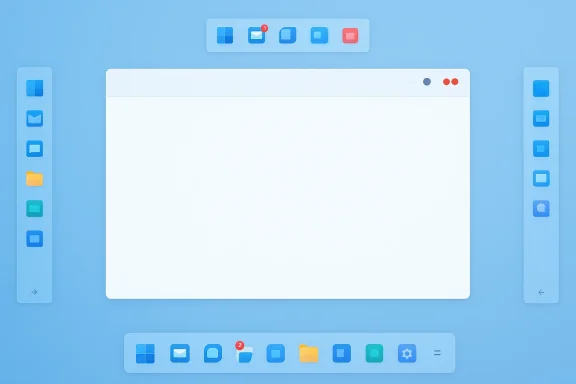
The headline change is straightforward: Microsoft is reportedly prototyping support for taskbar placement on the top, left, or right side of the screen, in addition to the current bottom placement . That restores a classic Windows behavior that many users assumed would never return. It also reopens a design space that can matter a lot for productivity, accessibilit placement freedom
Placement freedom is the most visible part of the story, but not the only part. Microsoft is also said to be working on taskbar sizing controls so users can shrink the bar itself rather than merely changing icon appearance . That distinction matters because icon scaling alone does not fully solve density problems. A thinner taskbar can free up screen real estate, especially on smaller laptops or displays where every vertical pixel cimpact will depend on how complete the implementation is. If the taskbar can move, resize, and still preserve core behaviors like notifications, flyouts, and app previews, then the feature will feel like a true restoration rather than a partial compromise. If Microsoft delivers only limited placement support, users will likely treat it as another half-step.
- Top placement could help users who prefer a traditional desktop layout.
- Left or right placement may suit tall, narrow, or portrait-oriented screens.
- Smaller taskbar thickness can preserve more space for content.
- Multi-monitor users may gain better symmetry across displays.
- Accessibility-minded users may benefit from a layout that better matches their habits.
Why this is more than a cosmetic tweak
Taskbar placement affects mouse travel, eye movement, and how much uninterrupted room remains for applications. On a coding setup, a side-docked taskbar can preserve more horizontal space for editor panes and terminal windows. On an ultrawide monitor, a top-aligned or left-aligned setup can better match how the user scans the screen.
That is why the feature is so emotionally loaded. For casual users, taskbar placement may sound like a preference. For serious desktop users, it is part of the workstation’s operating logic. Microsoft is not just changing a setting; it is changing how the shell fits around the user’s physical workflow.
What to watch in Insider builds
Microsoft is likely to test the feature in stages, and that makes the Insider channel strategically important. The company needs to validate edge cases such as DPI scaling, auto-hide behavior, touch input, and multi-monitor switching before a broad rollout. Those interactions are exactly where shell features tend to fail when they are rushed.
A badly executed return would hurt Microsoft more than a delayed one. The company knows this feature is symbolic, which is why it will probably move cautiously. If the rollout happens, users should expect Microsoft to frame it as a response to feedback and a sign that Windows 11 is becoming more adaptable.
Why the Taskbar Became a Symbol
The taskbar is one of those interface elements that disappears into the background until it changes. When it works well, people barely think about it. When it changes in a way users do not like, it becomes a daily reminder that the OS is making decisions for them.
That is exactly what happened with Windows 11. By locking the taskbar to the bottom, Microsoft created the impression that it knew better than users about how a desktop should be organized. The resulting frustration was not about a single missing toggle; it was about trust. The company had removed a long-standing choice without offering an obviously better replacement.
The psychology of lost control
A desktop OS is, in a sense, a habit machine. Users build muscle memory around where buttons live, how far the cursor travels, and which edges of the screen anchor their attention. When the shell changes abruptly, those habits break. Even if the new design is cleaner, the user still feels a loss.
That is why the reaction was so intense in Windows 11’s case. The taskbar had always been part of that muscle memory, and Microsoft’s decision to flatten its configurability made the platform feel less personal. The company may have intended simplification, but many users experienced it as reduction.
- Habits matter more than design theory.
- Familiarity can be a productivity feature.
- Users notice losses more than theoretical gains.
- Workflow disruption often outlasts the initial complaint.
- Small interface changes can have large emotional weight.
Vertical workflows and screen geometry
The practical case for a movable taskbar is strongest in specialized setups. Developers, analysts, and creators often use wide monitors, vertical monitors, or multiple displays, and those layouts change what “efficient” means. A side taskbar can free up precious horizontal space for dense apps like spreadsheets, code editors, and video timelines.
That is why the feature has endured as a complaint. It is not an abstract demand for customization. It is a concrete request to let the OS fit the way users already work. For people who live in those environments, the missing option was never trivial.
Why Microsoft may finally be listening
Microsoft’s current behavior suggests a shift in priorities. The company has been under pressure to make Windows 11 feel less rigid, less intrusive, and less opinionated. Returning taskbar mobility is an easy way to show that it is willing to reverse course when a design choice proves too restrictive.
That is especially important now that Windows 10 support has ended. Users who preferred older workflows no longer have the same fallback option, which means Windows 11 must absorb more of that dissatisfaction. Microsoft’s incentive to close feature gaps has never been stronger.
The Enterprise Angle
For enterprise users, taskbar placement may sound like a niche preference, but in large environments, “niche” can still mean expensive. Every interface mismatch generates friction for help desks, training teams, and power users who depend on standardized workflows. A more flexible taskbar reduces one more point of complaint that IT departments have had to explain away.
The enterprise angle is also about consistency. Organizations often have mixed hardware: laptops, ultrawide monitors, docking stations, remote desktops, and thin clients. A single fixed taskbar position does not always map cleanly onto that variety. Giving users control can make Windows feel more adaptable across roles and device classes.
Workflow and support implications
This change could reduce friction in environments where users work across multiple displays or switch between office and remote setups. It may also help organizations that use specialized layouts for dashboards, monitoring tools, or productivity suites. In those contexts, the taskbar is part of the workstation design, not just a shell ornament.
The support benefit is subtler but real. When users are unhappy with basic UI behavior, they often open tickets for what are effectively preference problems. A configurable taskbar can absorb some of that frustration before it becomes a service desk issue.
- Better fit for multi-monitor setups.
- Reduced complaints about fixed UI layouts.
- More flexibility for high-density workflows.
- Potentially fewer help desk tickets.
- Easier accommodation for legacy Windows habits.
Accessibility and ergonomic considerations
Accessibility is another reason the change matters. Some users prefer taskbar placement that reduces reach, aligns with their gaze, or works better with assistive tools. A side or top taskbar can also help users with motor, visual, or spatial preferences that do not align with the default bottom placement.
This is one of those cases where choice itself is the accessibility feature. Microsoft does not need to declare a grand accessibility initiative for the benefit to be real. Simply restoring a familiar option may make the desktop more usable for people who have long depended on it.
The enterprise risk of half-finished features
There is one caution: enterprises tend to dislike UI features that are only partially supported. If taskbar placement behaves inconsistently across devices or build versions, IT administrators may avoid recommending it broadly. That is why Microsoft’s testing matters so much. A stable feature can be adopted; a flaky one becomes another reason to wait.
Consumer Impact and Everyday Use
For consumers, this is one of those changes that sounds small until it lands on a personal machine. Then it becomes immediately obvious whether the OS feels more natural or more restrictive. The average user may never move the taskbar, but the option itself signals that Windows 11 is becoming less rigid.
There is a psychological effect here too. People notice when Microsoft gives them back something they used to have. Even if they never change the setting, the fact that it exists can make the OS feel more respectful. That matters in a desktop environment where users spend hours every day.
Why casual users may still care
Most users will probably leave the taskbar at the bottom. But many will appreciate the ability to adjust size or icon density, especially on smaller laptops or 2-in-1 devices. A more compact taskbar can make the screen feel less crowded without demanding a full redesign.
The feature may also benefit users who prefer a cleaner desktop. Windows 11 has always leaned into a more minimal visual style, and this update would let people keep that appearance while gaining more control over where the shell sits.
How this compares to Windows 10
Windows 10 and earlier versions let users treat the taskbar as a flexible object. Windows 11 took that flexibility away, which made the newer system feel like a step backward in one of the few areas that matters every single day. Restoring the option will not make Windows 11 identical to Windows 10, but it will soften the break.
That matters because many users still evaluate Windows 11 through the lens of Windows 10. When Microsoft removes a familiar behavior, users compare it to the old version immediately. Giving that behavior back is a practical way to reduce resentment.
Small feature, big emotional payoff
The emotional payoff here may be larger than the technical one. That is often how desktop UI changes work: users reward restored agency more than flashy novelty. A taskbar that can move feels like Microsoft is acknowledging a long-running complaint and respecting different kinds of work.
- It restores a familiar Windows habit.
- It reduces the sense of enforced design.
- It lets users adapt the shell to their monitor.
- It may make Windows 11 feel less “locked down.”
- It provides a visible win for frustrated users.
Microsoft’s Design Philosophy Is Changing
The taskbar story fits a broader pattern in Microsoft’s current Windows strategy. The company seems to be shifting away from a “simplify everything” mindset and toward a more pragmatic approach that values flexibility, feedback, and incremental correction. That is a significant change in tone.
For years, Windows 11 often felt like a product that wanted to clean up the desktop by narrowing user choices. The current wave of improvements suggests the company has learned that less clutter is not the same as less control. Those are different goals, and they do not always overlap.
From opinionated design to adaptive design
Microsoft appears to be moving toward an adaptive philosophy: keep the modern look, but give users back the controls that matter most. The taskbar is the clearest example, but the pattern could extend to other shell surfaces if the company sees positive results. Once you restore one classic capability, the question becomes which others deserve a second look.
This matters because Windows still thrives on its ability to accommodate many kinds of users. A modern desktop should be cleaner, yes, but it should also remain flexible enough to serve power users, accessibility needs, and specialized workflows. That balancing act is hard, but it is also what has always made Windows distinct.
The role of feedback
Microsoft has been emphasizing user feedback more openly, and the taskbar change fits that narrative neatly. It gives the company a simple, understandable example of listening to complaints and acting on them. That is valuable because trust in product direction is often rebuilt through visible reversals, not abstract promises.
The company can point to the taskbar and say: we heard you. That message is much more powerful than a generic statement about innovation. It is also easier for users to believe.
Why this matters beyond the taskbar
The real story is bigger than the bar itself. If Microsoft can restore a long-lost desktop behavior without damaging the rest of the shell, it proves that Windows 11 can evolve without becoming rigid. That would make future feature requests easier to imagine, because users would know the company is willing to revisit unpopular choices.
- A modern interface does not have to be inflexible.
- Feedback can reshape product direction.
- Restored features can rebuild goodwill quickly.
- User control is part of desktop quality.
- Design consistency should not override workflow reality.
Competitive Implications
Although this is a Windows story, the implications reach beyond Microsoft. Desktop operating systems compete on trust, habit, and how well they fit into daily work. When one vendor removes flexibility, competitors gain an argument. When that vendor restores it, the argument gets weaker.
The movable taskbar may not decide market share by itself, but it does influence perception. In the PC ecosystem, perception matters because switching costs are high. A user who feels heard is less likely to go looking for alternatives.
Windows versus the broader desktop market
The desktop market has always rewarded platforms that support diverse hardware and workflows. If Microsoft makes Windows 11 more adaptable, it strengthens the case that Windows remains the default choice for serious desktop work. That is especially important in a world where productivity habits are increasingly shaped by mixed-device ecosystems.
The taskbar update also undercuts a common criticism that Windows has become too prescriptive. That criticism has fuelled a lot of commentary around alternative platforms, customization tools, and shell tweaks. By restoring a native option, Microsoft reduces the need for third-party workarounds.
The third-party customization ecosystem
There is another competitive layer here: user-modification tools. When official features are missing, the community often fills the gap with shell customizers and taskbar mods. Those tools solve a real need, but they also highlight the gap between Microsoft’s defaults and what users actually want.
If Microsoft ships a native movable taskbar, it will reduce reliance on those tools. That can be good for stability, supportability, and trust. It also means Microsoft is reclaiming a part of the UX stack that had effectively been ceded to enthusiasts.
Market signal and brand perception
The brand signal may be the most important competitive effect. A company that listens and reverses course looks more mature than one that digs in. In Windows’ case, that matters because many users have memories of abrupt design changes that felt imposed rather than earned.
Restoring the taskbar is therefore a marketing win as much as a product win. It says Microsoft is willing to adapt under pressure, which is exactly the kind of message that makes enterprise buyers and enthusiasts more comfortable with the platform’s direction.
Strengths and Opportunities
The biggest strength of this change is that it addresses a real, long-running complaint without forcing users to relearn the entire desktop. Microsoft can win goodwill quickly if the implementation is smooth and the feature reaches broad availability. It also gives the company a concrete example of responsive product management.
The opportunity is even larger because this feature can serve multiple audiences at once. Power users get flexibility, casual users get a cleaner optional layout, and enterprises get fewer friction points.
- Restores a long-requested Windows behavior.
- Improves ergonomics on ultrawide and vertical displays.
- Reduces dependence on third-party shell tools.
- Strengthens Microsoft’s “we’re listening” message.
- Helps Windows 11 feel less restrictive.
- Supports both consumer and enterprise use cases.
- Creates a positive precedent for future UI corrections.
Risks and Concerns
The main risk is that Microsoft could ship a partial or unstable version of the feature. Taskbar placement touches a lot of other shell behaviors, and a weak implementation would create fresh frustration instead of solving old frustration. The company also has to avoid making the taskbar feel fragmented across devices or builds.
There is also a broader risk that restoring one feature raises expectations for many more. Once users see Microsoft reversing course, they may start asking why other long-lost controls are still missing.
- Inconsistent behavior across monitors or scaling modes.
- Breakage in auto-hide, notifications, or flyouts.
- Feature delay if testing uncovers edge cases.
- User disappointment if sizing is limited.
- Too much emphasis on symbolism over polish.
- Pressure to restore other removed Windows features.
- Enterprise hesitation if rollout is uneven.
What to Watch Next
The next few months will tell us whether this is a real product reversal or just another promising prototype. The key questions are not hard to define: does the feature survive Insider testing, does it work reliably across different setups, and does Microsoft pair it with meaningful taskbar sizing controls? Those details will determine whether users see this as a genuine win.
Just as important, Microsoft will need to show that this is part of a broader shell strategy rather than a one-off concession. If the company continues to soften the most restrictive parts of Windows 11 while preserving the cleaner visual language, it may finally be striking the balance users wanted from the start.
- Insider build confirmation of top/left/right positioning.
- Evidence that taskbar sizing is more than icon scaling.
- Compatibility across multi-monitor and touch setups.
- Clear rollout timing for broader Windows 11 users.
- Any related changes to Start, notifications, or auto-hide behavior.
The company’s longer-term challenge is cultural as much as technical. Microsoft has to prove that listening to users is not a sign of weakness or indecision, but a strength in platform design. If the taskbar return lands well, it could become one of the clearest examples yet that Windows 11 is finally learning how to modernize without becoming rigid.
In the end, this is not just about moving icons around the screen. It is about restoring a small piece of user agency that many people never should have lost in the first place. If Microsoft gets that right, Windows 11 will feel less like a compromise and more like a desktop that can actually grow with the people who use it.