

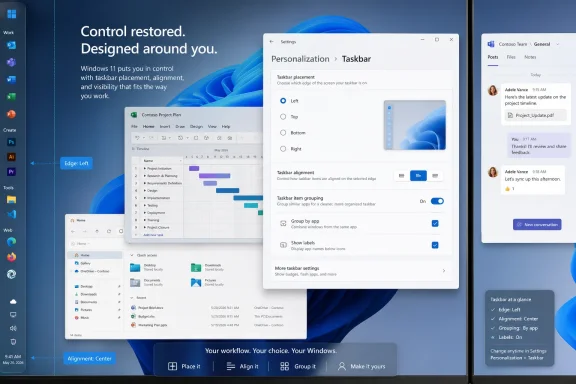
Microsoft began testing long-requested Windows 11 taskbar customization on May 15, 2026, in Insider Experimental Preview Build 26300.8493, letting eligible testers move the taskbar to the top, bottom, left, or right edge and pair each position with alignment controls and smaller buttons. That sounds like a small UI checkbox until you remember that Windows 11 launched in 2021 by removing behaviors Windows users had treated as basic furniture for decades. The fix is welcome, but the delay is the story. Microsoft is not merely restoring a feature; it is tacitly admitting that Windows modernization went too far when it confused visual cleanliness with user control.
The Windows taskbar has always been more than a strip of icons. It is the operating system’s front desk, traffic controller, and memory aid, the place where users discover what is open, what needs attention, and what can be reached without thinking. When Windows 11 locked that surface to the bottom of the screen, Microsoft did not just change a preference; it broke muscle memory.
The new Insider build begins to undo that decision. Users in the Experimental channel can choose any screen edge through Settings, rather than relying on registry hacks, shell replacements, or the familiar Windows power-user ritual of waiting for some unsupported workaround to break after Patch Tuesday. Flyouts and animations are supposed to follow the taskbar’s position, and Microsoft says most customization settings, including small taskbar buttons and never-combine behavior, should work across locations.
That last detail matters. A vertical taskbar without ungrouped, labeled windows is not really a vertical taskbar for many heavy multitaskers. It is just a column of mystery icons. Microsoft’s decision to support labels and separation in alternate positions suggests the company understands that the feature’s audience is not primarily chasing novelty; it is chasing visibility.
Still, this is preview software, and Microsoft is being careful about the fine print. Touch gestures, the Search box, and Ask Copilot support in alternate locations are still works in progress, while auto-hidden and touch-optimized taskbars are not yet supported in those positions. In other words, the taskbar can move again, but it has not yet fully become the old flexible taskbar in modern clothing.
That was especially galling because the taskbar is not decorative. Developers use vertical layouts to preserve code height. Spreadsheet users, video editors, traders, and anyone with ultrawide or multi-monitor setups may prefer a side-mounted taskbar because horizontal space is cheaper than vertical space. Accessibility and ergonomics also matter: for some users, a top or side edge is simply easier to reach or easier to track.
Microsoft’s early Windows 11 taskbar felt like an object lesson in design by subtraction. It centered icons, simplified interactions, removed long-standing options, and left users to discover that “modern” often meant “less adjustable.” The company did eventually bring back some missing behaviors, including never-combine taskbar buttons, but the movable taskbar remained a conspicuous absence.
The engineering explanation was never ridiculous. Windows 11 did not merely skin the Windows 10 taskbar; it rebuilt major shell components, and supporting every orientation touches flyouts, animations, input modes, localization, accessibility, and multiple display arrangements. But users rarely experience architecture diagrams. They experience the thing they could do yesterday and cannot do today.
That distinction matters for administrators and cautious enthusiasts. The Experimental channel is where Microsoft can gather telemetry, test feature flags, and find the strange edge cases that only emerge when real people attach docks, rotate monitors, change scaling settings, switch languages, and run a decade’s worth of tray utilities. It is not where a production fleet should go to regain one missing UI control.
The build number also matters because it places the change in the Windows 11 version 25H2 development stream. Microsoft is using controlled rollouts and feature flags, meaning even eligible Insiders may not see everything at once. The era when a build number meant a uniform feature set for every tester is largely gone; Windows is now a platform of staged experiments.
That makes the feature both more real and less final than the headlines imply. It is real because it is in Microsoft’s release notes and visible to testers. It is not final because Microsoft has not committed to a stable-channel date, an enterprise policy model, or a complete support story for every taskbar mode.
The Recommended section has been especially divisive. For some users it is useful, surfacing recent files and activity. For others it is wasted space, clutter, or yet another place where Windows feels too interested in steering attention. The best answer was never to declare one camp correct; it was to make the section less compulsory.
A resizable Start menu follows the same logic. Windows runs on tiny laptops, giant desktops, tablets, handheld gaming PCs, virtual machines, and enterprise workstations with unusual display arrangements. A fixed Start experience may photograph well in a product demo, but it ages badly in the wild.
This is where Microsoft’s design language meets the reality of Windows as infrastructure. Apple can impose taste more aggressively because it owns a tighter hardware and software stack. Windows, by contrast, is expected to fit everything from a classroom laptop to a six-monitor trading desk. Personalization is not a hobbyist indulgence in that world; it is part of the operating system’s compatibility contract.
Windows 11 arrived in an era when screens were simultaneously getting stranger and more constrained. Laptops adopted taller aspect ratios in some segments, but many inexpensive machines still shipped with limited vertical resolution. Handheld and convertible devices complicated assumptions about input. External monitors became wider, denser, and more likely to sit beside other displays.
A one-size taskbar is a poor fit for that hardware landscape. The bottom taskbar consumes the same kind of space that browsers, code editors, document windows, and spreadsheets all want most. Moving it to the side, shrinking it, or combining those choices lets the user decide which pixels are precious.
Microsoft’s own examples lean toward developers, but the audience is larger. Anyone who lives in full-height content can benefit: writers, accountants, researchers, engineers, support technicians, and remote workers trapped inside nested desktops. The taskbar may be a small strip of glass, but it taxes every app on the screen.
That is why the restoration is not as simple as flipping an old Windows 10 switch. A top taskbar changes where Start opens. A left taskbar changes how tooltips avoid covering content. A right taskbar must behave correctly in right-to-left languages, unusual scaling combinations, and multi-monitor setups where “right” may mean the boundary between displays rather than the edge of the workspace.
The modern Windows shell also carries more baggage than the old one. Widgets, search suggestions, Copilot affordances, notification surfaces, and cloud-linked recommendations all compete for taskbar-adjacent territory. The more Microsoft turns the taskbar into a launchpad for services, the harder it becomes to treat it as a simple movable control.
That does not excuse the five-year wait, but it explains part of it. Microsoft chose to modernize the shell by narrowing the supported interaction model first and rebuilding flexibility later. Users are entitled to argue that the order should have been reversed.
Those questions matter because UI changes become support tickets. A taskbar that jumps position unexpectedly, renders incorrectly on a docked laptop, or breaks auto-hide in a shared environment is not a personalization victory. It is Monday morning noise for the help desk.
There is also a training dimension. Many organizations standardize the Windows desktop not because they dislike user choice, but because predictable screens reduce support friction. If Microsoft brings the feature to stable Windows, administrators will need a way to allow flexibility without losing control over managed environments.
The right answer is not to bury the feature out of fear. It is to ship it with mature policy support, clear documentation, and predictable upgrade behavior. Windows customization is most valuable when it is both user-friendly and administratively boring.
Users are not opposed to new experiences by default. They are opposed to new experiences that arrive while old controls vanish. When an operating system adds an AI button but cannot place the taskbar where the user wants it, the priorities feel backwards.
The healthiest version of Windows is not nostalgic. It can have Copilot, better search, smarter dictation, cleaner design, and modern security defaults. But it also has to respect the arrangements people build over years of work. Personal computing still includes the word personal.
Microsoft’s recent changes suggest a company trying to rebalance that equation. Quieter Widgets, more adjustable Start sections, improved taskbar sizing, and movable taskbar positions all point toward a Windows team that has heard the same complaint enough times: stop mistaking defaults for destiny.
 Microsoft’s Most Visible Regression Finally Starts to Move
The Windows taskbar has always been more than a strip of icons. It is the operating system’s front desk, traffic controller, and memory aid, the place where users discover what is open, what needs attention, and what can be reached without thinking. When Windows 11 locked that surface to the bottom of the screen, Microsoft did not just change a preference; it broke muscle memory.The new Insider build begins to undo that decision. Users in the Experimental channel can choose any screen edge through Settings, rather than relying on registry hacks, shell replacements, or the familiar Windows power-user ritual of waiting for some unsupported workaround to break after Patch Tuesday. Flyouts and animations are supposed to follow the taskbar’s position, and Microsoft says most customization settings, including small taskbar buttons and never-combine behavior, should work across locations.
That last detail matters. A vertical taskbar without ungrouped, labeled windows is not really a vertical taskbar for many heavy multitaskers. It is just a column of mystery icons. Microsoft’s decision to support labels and separation in alternate positions suggests the company understands that the feature’s audience is not primarily chasing novelty; it is chasing visibility.
Still, this is preview software, and Microsoft is being careful about the fine print. Touch gestures, the Search box, and Ask Copilot support in alternate locations are still works in progress, while auto-hidden and touch-optimized taskbars are not yet supported in those positions. In other words, the taskbar can move again, but it has not yet fully become the old flexible taskbar in modern clothing.
Windows 11’s Clean Slate Came With a User Tax
The original sin of Windows 11 was not that it looked different. Windows has survived plenty of visual resets, from Luna to Aero to Metro to Fluent. The problem was that Windows 11 often behaved as if a calmer design language justified taking away controls from people who had spent years arranging their PCs around their work.That was especially galling because the taskbar is not decorative. Developers use vertical layouts to preserve code height. Spreadsheet users, video editors, traders, and anyone with ultrawide or multi-monitor setups may prefer a side-mounted taskbar because horizontal space is cheaper than vertical space. Accessibility and ergonomics also matter: for some users, a top or side edge is simply easier to reach or easier to track.
Microsoft’s early Windows 11 taskbar felt like an object lesson in design by subtraction. It centered icons, simplified interactions, removed long-standing options, and left users to discover that “modern” often meant “less adjustable.” The company did eventually bring back some missing behaviors, including never-combine taskbar buttons, but the movable taskbar remained a conspicuous absence.
The engineering explanation was never ridiculous. Windows 11 did not merely skin the Windows 10 taskbar; it rebuilt major shell components, and supporting every orientation touches flyouts, animations, input modes, localization, accessibility, and multiple display arrangements. But users rarely experience architecture diagrams. They experience the thing they could do yesterday and cannot do today.
The Insider Channel Is a Promise, Not a Delivery Date
The Daily Express framing is broadly right that Microsoft is finally addressing a long-term Windows 11 complaint, but “finally fixes” needs an asterisk big enough to live on the taskbar itself. This is not a general availability release for every Windows 11 PC. It is an Insider Experimental feature, and Microsoft’s own release notes make clear that Experimental features may change, disappear, or arrive later in a different form.That distinction matters for administrators and cautious enthusiasts. The Experimental channel is where Microsoft can gather telemetry, test feature flags, and find the strange edge cases that only emerge when real people attach docks, rotate monitors, change scaling settings, switch languages, and run a decade’s worth of tray utilities. It is not where a production fleet should go to regain one missing UI control.
The build number also matters because it places the change in the Windows 11 version 25H2 development stream. Microsoft is using controlled rollouts and feature flags, meaning even eligible Insiders may not see everything at once. The era when a build number meant a uniform feature set for every tester is largely gone; Windows is now a platform of staged experiments.
That makes the feature both more real and less final than the headlines imply. It is real because it is in Microsoft’s release notes and visible to testers. It is not final because Microsoft has not committed to a stable-channel date, an enterprise policy model, or a complete support story for every taskbar mode.
Start Menu Changes Show the Same Course Correction
The taskbar is the headline, but Microsoft’s broader message is about Start and taskbar personalization. The company is also working on Start menu sizing and section controls, including the ability to adjust the presence of areas such as pinned apps, recommendations, and app lists. That is another retreat from the original Windows 11 posture, where Microsoft seemed determined to make Start simpler by making it less negotiable.The Recommended section has been especially divisive. For some users it is useful, surfacing recent files and activity. For others it is wasted space, clutter, or yet another place where Windows feels too interested in steering attention. The best answer was never to declare one camp correct; it was to make the section less compulsory.
A resizable Start menu follows the same logic. Windows runs on tiny laptops, giant desktops, tablets, handheld gaming PCs, virtual machines, and enterprise workstations with unusual display arrangements. A fixed Start experience may photograph well in a product demo, but it ages badly in the wild.
This is where Microsoft’s design language meets the reality of Windows as infrastructure. Apple can impose taste more aggressively because it owns a tighter hardware and software stack. Windows, by contrast, is expected to fit everything from a classroom laptop to a six-monitor trading desk. Personalization is not a hobbyist indulgence in that world; it is part of the operating system’s compatibility contract.
The Small Taskbar Is Really About Screen Economics
The smaller taskbar option may prove just as consequential as moving the taskbar. Microsoft says users will be able to select smaller taskbar buttons, reducing icon size and taskbar height while keeping core elements aligned. On compact displays, that is not aesthetic fussiness; it is recovered workspace.Windows 11 arrived in an era when screens were simultaneously getting stranger and more constrained. Laptops adopted taller aspect ratios in some segments, but many inexpensive machines still shipped with limited vertical resolution. Handheld and convertible devices complicated assumptions about input. External monitors became wider, denser, and more likely to sit beside other displays.
A one-size taskbar is a poor fit for that hardware landscape. The bottom taskbar consumes the same kind of space that browsers, code editors, document windows, and spreadsheets all want most. Moving it to the side, shrinking it, or combining those choices lets the user decide which pixels are precious.
Microsoft’s own examples lean toward developers, but the audience is larger. Anyone who lives in full-height content can benefit: writers, accountants, researchers, engineers, support technicians, and remote workers trapped inside nested desktops. The taskbar may be a small strip of glass, but it taxes every app on the screen.
The Limits Expose Why This Took So Long
The preview limitations are not footnotes; they reveal the complexity Microsoft invited when it rebuilt the shell. Search, Copilot entry points, touch gestures, auto-hide behavior, and flyout positioning are all tied to assumptions about where the taskbar lives. Once the taskbar can sit on any edge, every one of those assumptions has to be audited.That is why the restoration is not as simple as flipping an old Windows 10 switch. A top taskbar changes where Start opens. A left taskbar changes how tooltips avoid covering content. A right taskbar must behave correctly in right-to-left languages, unusual scaling combinations, and multi-monitor setups where “right” may mean the boundary between displays rather than the edge of the workspace.
The modern Windows shell also carries more baggage than the old one. Widgets, search suggestions, Copilot affordances, notification surfaces, and cloud-linked recommendations all compete for taskbar-adjacent territory. The more Microsoft turns the taskbar into a launchpad for services, the harder it becomes to treat it as a simple movable control.
That does not excuse the five-year wait, but it explains part of it. Microsoft chose to modernize the shell by narrowing the supported interaction model first and rebuilding flexibility later. Users are entitled to argue that the order should have been reversed.
Enterprise IT Will Ask the Boring Questions First
For IT departments, the emotional satisfaction of a movable taskbar is secondary to manageability. The questions will be predictable: Can it be controlled by policy? Does it roam with user settings? Does it behave consistently across virtual desktops, remote sessions, multi-monitor docks, and non-persistent VDI images? What happens when a cumulative update changes the behavior?Those questions matter because UI changes become support tickets. A taskbar that jumps position unexpectedly, renders incorrectly on a docked laptop, or breaks auto-hide in a shared environment is not a personalization victory. It is Monday morning noise for the help desk.
There is also a training dimension. Many organizations standardize the Windows desktop not because they dislike user choice, but because predictable screens reduce support friction. If Microsoft brings the feature to stable Windows, administrators will need a way to allow flexibility without losing control over managed environments.
The right answer is not to bury the feature out of fear. It is to ship it with mature policy support, clear documentation, and predictable upgrade behavior. Windows customization is most valuable when it is both user-friendly and administratively boring.
The Copilot Era Makes Old-School Customization More Important
There is an irony in this timing. Microsoft is investing heavily in AI surfaces, Copilot hooks, cloud-connected recommendations, and adaptive experiences, yet one of the most welcomed Windows changes of 2026 is the return of an old taskbar option. That should tell Redmond something important about trust.Users are not opposed to new experiences by default. They are opposed to new experiences that arrive while old controls vanish. When an operating system adds an AI button but cannot place the taskbar where the user wants it, the priorities feel backwards.
The healthiest version of Windows is not nostalgic. It can have Copilot, better search, smarter dictation, cleaner design, and modern security defaults. But it also has to respect the arrangements people build over years of work. Personal computing still includes the word personal.
Microsoft’s recent changes suggest a company trying to rebalance that equation. Quieter Widgets, more adjustable Start sections, improved taskbar sizing, and movable taskbar positions all point toward a Windows team that has heard the same complaint enough times: stop mistaking defaults for destiny.
The Fix Arrives With Receipts Attached
This preview build is a meaningful course correction, but it should be judged by what ships broadly, not by what appears in an Insider screenshot. The concrete picture is encouraging, with caveats that matter for anyone outside the enthusiast bubble.- Microsoft is testing movable Windows 11 taskbar positions in the Experimental channel, not rolling them out to all stable Windows 11 users yet.
- The new setting lets testers choose bottom, top, left, or right placement through the Settings app rather than unsupported hacks.
- Icon alignment and smaller taskbar buttons are part of the same broader push to make the taskbar more adaptable.
- Some important behaviors, including auto-hide in alternate positions and full touch support, are still unfinished.
- Start menu personalization is moving in the same direction, with Microsoft working on sizing and section-level controls.
- The real test will be stable-channel reliability, enterprise policy support, accessibility polish, and consistent behavior across multi-monitor and touch scenarios.
References
- Primary source: Daily Express
Published: Wed, 20 May 2026 06:00:00 GMT

Microsoft finally fixes long-term Windows 11 issues
Here's how to get long-awaited PC updates for free.www.express.co.uk
- Related coverage: techradar.com
- Official source: blogs.windows.com

Improving Windows quality: Making Taskbar and Start more personal
In our commitment to Windows quality, we outlined our plans to deliver improvements in performance, reliability, and craft. We are also committed to blogs.windows.com
- Related coverage: windowscentral.com
- Related coverage: bleepingcomputer.com
Microsoft testing adjustable taskbar, Start menu in Windows 11
Microsoft has finally brought back the resizable taskbar and Start menu to Windows 11 in the latest preview version rolling out to Insiders in the Experimental channel.www.bleepingcomputer.com
- Related coverage: arstechnica.com
Five years later, Windows 11 brings back much-missed taskbar options (and more)
Microsoft is also testing a smaller taskbar and more customizable Start menu. arstechnica.com
- Related coverage: windowslatest.com

Explained: Why you can't move Windows 11 taskbar like Windows 10, according to Microsoft
Windows 11 can't move the taskbar, and four years later, Microsoft still has no plans to bring it back. Here's why, according to Microsoft. www.windowslatest.com
- Related coverage: windowsforum.com

Windows 11 Taskbar Returns: Move It Top or Sides Again (Insider Preview)
Microsoft is quietly preparing one of the most welcome reversals in Windows 11’s shell story: the return of a movable taskbar that can sit at the top or sides of the display, not just the bottom. That sounds small on paper, but it addresses one of the most persistent complaints about Windows... windowsforum.com
- Related coverage: thurrott.com

Windows Insiders on the Experimental Channel Can Try Alternative Taskbar Positions
Microsoft is bringing back alternative taskbar positions on Windows 11. The new feature is rolling out to Insiders on the Experimental Channel, along with a new smaller taskbar option. www.thurrott.com
- Related coverage: beebom.com

How to Move the Taskbar to the Top or Side on Windows 11
Learn the three ways to move the Windows 11 Taskbar to the top or sides. With Registry or a third-party app, change the Taskbar's position. beebom.com
- Related coverage: thefpsreview.com

Microsoft Finally Lets You Move the Windows 11 Taskbar After Nearly Five Years
It only took about five years, but Microsoft has finally relented. Windows Insiders in the Experimental channel can now move the Windows 11 taskbar to the top, bottom, left, or right of the screen, restoring a feature that Windows users had for decades before Windows 11 launched in October 2021... www.thefpsreview.com
- Related coverage: notebookcheck.net

Microsoft brings back Windows 10 taskbar customizations to Windows 11
Microsoft is finally giving Windows 11 users more control over the taskbar again, including full screen-edge placement and a smaller, more compact mode. The update also improves how menus and window labels behave depending on the taskbar position. www.notebookcheck.net
- Related coverage: ineasysteps.com
